Calibre-Web on GKE Autopilot
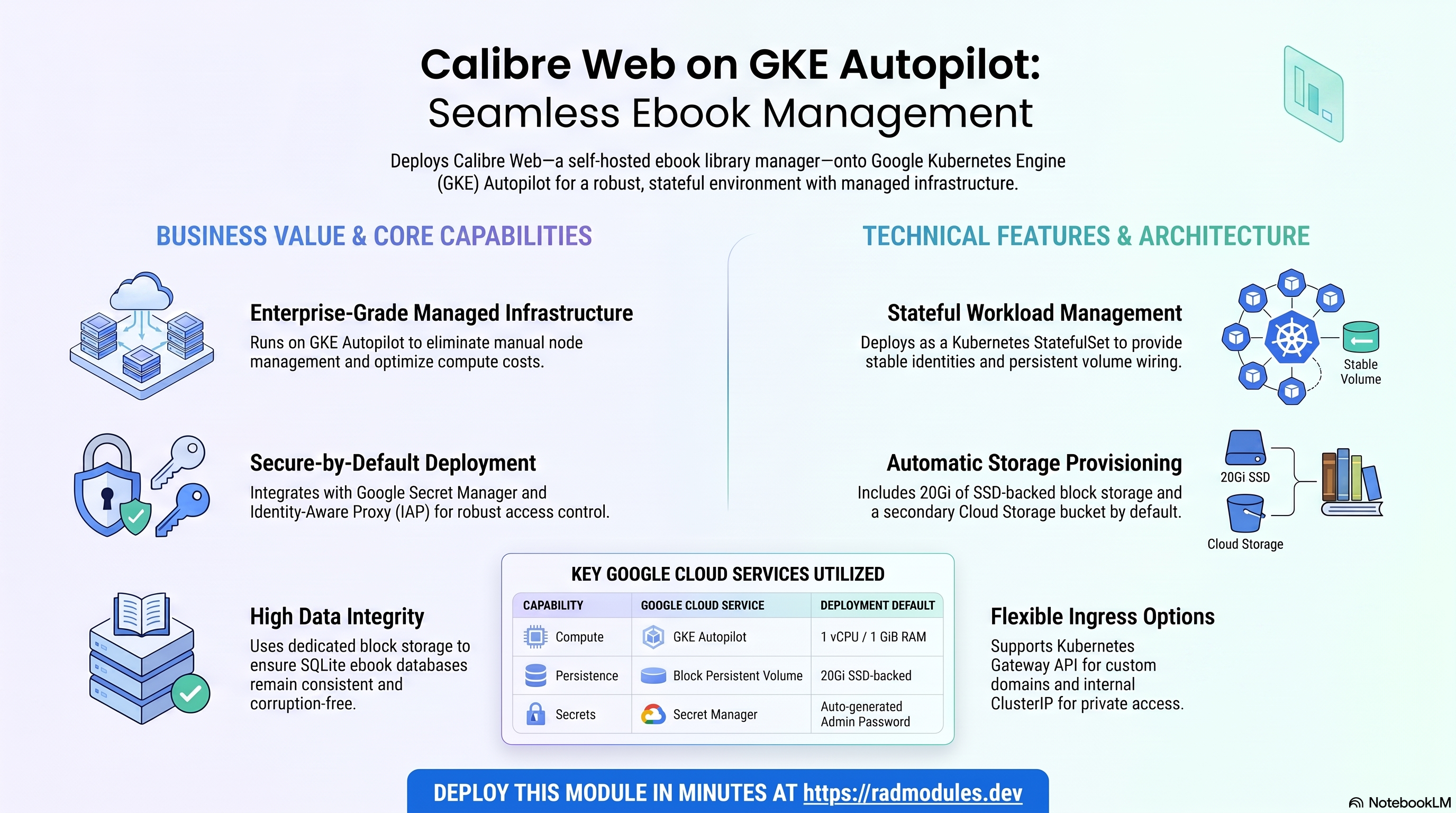
Calibre-Web is a clean, self-hosted web app for browsing, reading and downloading
ebooks from an existing Calibre library — it serves an in-browser reader, an OPDS
feed, user management and Kobo sync on top of the upstream LinuxServer.io
calibre-web image. This module deploys Calibre-Web on GKE Autopilot on top of
the App_GKE foundation, which provisions and manages the shared
Google Cloud and Kubernetes infrastructure; CalibreWeb_GKE is a thin wrapper that
supplies Calibre-Web's own configuration (image, ports, probes, storage wiring) and
forwards everything else straight through.
This guide focuses on the cloud services Calibre-Web uses and how to explore and operate them from the Google Cloud Console and the command line. For the mechanics that are common to every GKE application — Workload Identity, ingress, autoscaling, CI/CD, Cloud Armor, IAP, Binary Authorization, VPC Service Controls, backups, and the deployment lifecycle — refer to the App_GKE foundation guide rather than repeating them here.
What Calibre-Web costs on RAD, and how that compares
Calibre-Web on RAD's GKE Autopilot module costs about US$42 a month in your own Google Cloud project, with no extra licence fee — Calibre-Web is open source. In a project RAD manages for you, the same deployment is metered at 67 credits a day (about 2,010 a month, about US$201 at the top-up price). Or see the Cloud Run guide for the lower-cost option. If you only need Calibre-Web occasionally — studying, a demo, a short-lived project — a RAD-managed project can be deleted and restored within 30 days for a few credits, so that monthly figure becomes a few dollars instead. See Pause it for free, below.
What you pay on RAD
Calibre-Web is open source, so there is no licence fee. You pay for three things:
| In a Google Cloud project you own | In a project RAD manages for you | |
|---|---|---|
| Module fee, once per deployment | 75 credits (US$7.50 at the top-up price) | 67.5 credits (10% lower) |
| Build time | A few credits per build (roughly 3–6 credits) | The same |
| Google Cloud running cost | Billed by Google to your own billing account, about US$42 a month for the default configuration (table below) | Metered hourly in credits; RAD publishes 67 credits a day, about 2,010 a month (about US$201 at the top-up price) |
| Who owns what | You own the project and its billing; RAD deploys and updates it | RAD owns the project, with guardrails, quotas and budget alerts; you get console access, and a minimum purchased balance is held in reserve |
10 credits cost US$1 on a one-off top-up, and less on a monthly plan. In a project RAD manages, the database, file server and network are shared by every application in the project, so a second application does not add a second database.
Default running cost in your own project (us-central1, Google list prices):
| Resource (module default) | Per month |
|---|---|
| GKE Autopilot pod, 1x vCPU / 1 GiB | US$36.08 |
| Cloud NAT and networking | US$5 |
| Cloud Storage (add-ons, backups) | US$1 |
| GKE cluster management fee | shared across every GKE app in the project; $0 if this is your only cluster, else ~73 |
| Total (excluding the shared GKE cluster fee) | about US$42 |
These prices are the same in africa-south1 (Johannesburg).
- GKE Autopilot does not scale to zero. At least one pod always runs, so the cost above applies whether or not anyone is using the app; extra pods are added only under load.
How it compares, for a personal or small-library ebook server
Calibre-Web has no official hosted offering — it is built to run against your own existing Calibre library, so the realistic comparison is a bare server:
- A Hetzner CPX22 or DigitalOcean droplet (2 vCPU/4 GB, about US$24/month) or a GCP e2-standard-2 (2 vCPU/8 GB, about US$49/month) would run it comfortably — oversized for Calibre-Web's own 1 vCPU/1 GiB footprint here, so a smaller, cheaper instance class would do just as well.
- On a bare VPS you own the operating system, security patches and your own backup discipline. RAD's module gives you the compute, Secret Manager and Cloud Monitoring already wired up, for the module fee plus the Google Cloud usage above.
Pause it for free: delete a RAD-managed project, restore it when you need it
If Calibre-Web runs in a project RAD manages for you, deleting the whole project — rather than deleting just this module — unlinks its billing first, then asks Google to delete the project outright. Google keeps it, recoverable, for 30 days, and because billing is already unlinked, nothing is charged while it waits. Unlike deleting one module, this does not tear down Cloud SQL, any VM or the compute resource one by one: the whole project simply stops.
- Restoring is a check, not a rebuild. Within 30 days, the project's owner can ask Google to undelete the project and reattach its billing account, then run Update on each deployment to confirm everything came back. Because nothing was individually destroyed, that Update finds the same resources already there, and an Update never charges the module fee again. For a typical 2–3-deployment chain this costs only a handful of credits in total (roughly 5–10 credits, under US$1).
- What this needs. You must own the project (not one RAD only manages billing for), restore it yourself within 30 days — after that Google deletes it for good — and clear the tier's admission floor again (100 credits for the sandbox tier most study/demo use fits). Google says most services are fully working again within 36 hours of a restore.
- One real gap: nightly backups do not survive. Backups are written to a bucket inside the project, and that bucket has Cloud Storage's soft-delete turned off, so it is very likely gone as soon as the project is deleted — even though the project itself is recoverable for 30 days. Copy a backup out (to Google Drive, or a bucket outside the project) before deleting if there is anything in it worth keeping; for a default install with nothing irreplaceable, this does not matter.
Source: Delete and restore projects.
Pay only while you use it, the other way: delete and redeploy
In your own project, or once the 30-day restore window above has passed, the way to stop paying is to delete the deployment and deploy it again when you need it.
- What a redeploy costs. The module fee again, plus the builds: about 79 credits (about US$7.90) at the top-up price, and roughly 15–20 minutes of build time (RAD's own platform average). Deleting saves money only once Calibre-Web would otherwise sit unused for about 3 days or more — in your own project that is about US$1.40 a day, and in a RAD-managed one it is 67 credits a day.
- Most of the running cost here is usually the database and/or the shared file/cache VM or cluster. They stop only when nothing else in the project uses them, so deleting Calibre-Web while another application shares the project saves only Calibre-Web's own compute part.
- Keep data first. Nightly backups go to a bucket inside the deployment and are deleted with it, so copy the latest backup out before deleting if you want to keep it.
Lab sessions and Managed Environments
- Lab sessions, for training. A trainer runs a session for a class. Each participant gets the app in their own Google Cloud project for 15 minutes to 24 hours, within an allowance the trainer sets. Either the trainer funds every place, or each participant pays for their own. Everything is deleted when the session ends and unused credits go back to the trainer.
- Managed Environments, for consultancies. A partner runs the app for a client from a ring-fenced wallet it funds, and settles with the client directly. If the wallet runs low, billing pauses and the data is kept, so nobody receives an unexpected charge. At the end the partner hands the project over and the deployments become the client's own.
Credits can be bought in more than 20 currencies, including XAF, XOF, NGN, GHS, KES and ZAR, by card, bank transfer or mobile money.
Sources (8 October 2026): Google Cloud list prices from the Cloud Billing Catalog API; RAD fees and the daily-credit estimate from radmodules.dev/pricing; Delete and restore projects for the pause/restore window and backup-bucket caveat; prices change, check each source before relying on a figure.
1. Overview
Calibre-Web runs as a single, stateful workload. It has no external database —
all of its state (the application database, the Calibre library metadata database,
configuration, cache, and logs) lives in internal SQLite files under /config. The
deployment wires together a focused set of Google Cloud services:
| Capability | Google Cloud service | Notes |
|---|---|---|
| Compute | GKE Autopilot | Calibre-Web pods on port 8083, 1 vCPU / 1 GiB by default |
| Workload type | Kubernetes StatefulSet | Auto-selected because stateful_pvc_enabled = true by default |
| Config/library persistence | GKE block Persistent Volume (standard-rwo, SSD-backed) | Mounted at /config; holds app.db, Calibre's metadata.db, config, cache, logs |
| Object storage | Cloud Storage | A storage-suffixed bucket is always provisioned, but is not mounted while the StatefulSet PVC is in use (see §2.C) |
| Secrets | Secret Manager | Auto-generated CALIBRE_ADMIN_PASSWORD — provisioned but not the credential Calibre-Web actually authenticates with on first login (see §3) |
| Database | None | database_type = "NONE"; no Cloud SQL instance, user, or db-init job |
| Ingress | Kubernetes Gateway API (when custom domain configured) or in-cluster ClusterIP | service_type defaults to ClusterIP, not LoadBalancer (see §2.E) |
Sensible defaults worth knowing up front:
- Stateful, PVC-backed by default.
stateful_pvc_enabled = trueandworkload_typeis leftnull, which auto-resolves toStatefulSet(per the App_GKE "StatefulSet auto-select" behaviour). A real block PVC is used instead of gcsfuse specifically because Calibre-Web's SQLite files (app.db,metadata.db) would be corrupted by GCS FUSE's relaxed consistency model. - The PVC storage class defaults to SSD (
standard-rwo). This draws from the regionalSSD_TOTAL_GBquota, which is small on quota-constrained projects. Calibre-Web doesn't need SSD IOPS for its SQLite workload — consider overridingstateful_pvc_storage_class = "standard"(HDDpd-standard) to preserve SSD quota for other apps while keeping the block-device write-locking integrity SQLite needs. - Single replica by default.
min_instance_count = 1,max_instance_count = 1. Because the StatefulSet usesvolumeClaimTemplates, each replica gets its own, independent PVC — scaling beyond 1 does not share/configacross pods; it silently forks the library and config into separate, unsynchronised copies per pod. Do not raisemax_instance_countwithout an external synchronisation strategy. - No database.
database_type = "NONE"; there is nodb-initjob and none of the database-related variables in this module are referenced. - No Redis.
enable_redisis declared for foundation-variable mirroring but is not forwarded —main.tfhardcodesenable_redis = falseto the Foundation call regardless of the variable's value. service_typedefaults toClusterIP, notLoadBalancer. Combined with the defaultapplication_domains = [], the deployment has no external access configured out of the box even thoughenable_custom_domain = trueby default — the Gateway is provisioned but has no hostname to route until you supplyapplication_domainsor switchservice_typetoLoadBalancer.- The generated admin password is not the working login. The upstream
LinuxServer image ships a built-in default login (
admin/admin123); theCALIBRE_ADMIN_PASSWORDSecret Manager secret is provisioned for a stronger credential but is not wired into the container automatically. Change the password in the Calibre-Web UI on first sign-in. - A Cloud Storage bucket is created but unused by default.
create_cloud_storage = truealways provisions thestorage-suffixed bucket, but it is only mounted at/configwhenstateful_pvc_enabled = false(Deployment mode). With the default StatefulSet/PVC path, the bucket exists but is not attached to the workload. - Image version is pinned via an app-specific build ARG. The Dockerfile reads
CALIBREWEB_VERSION(not the genericAPP_VERSIONthe Foundation injects); whenapplication_version = "latest"the build is pinned to a known-good0.6.24.
2. Google Cloud Services & How to Explore Them
All commands assume you have run
gcloud container clusters get-credentials <cluster> --region <region> --project <project>
and that PROJECT, REGION, and NAMESPACE are set. The namespace and other
identifiers are reported in the deployment Outputs.
A. GKE Autopilot — the Calibre-Web StatefulSet
Calibre-Web pods are scheduled on Autopilot, which bills for the CPU/memory the
pods actually request. The workload runs as a StatefulSet (not a Deployment)
so it gets a stable pod identity and an ordered restart sequence
(stateful_pod_management_policy defaults to OrderedReady when left null).
- Console: Kubernetes Engine → Workloads → select the Calibre-Web workload for pods, revisions, and events.
- CLI:
kubectl get statefulset,pods,svc -n "$NAMESPACE"
kubectl logs -n "$NAMESPACE" statefulset/<service-name> --tail=100
kubectl describe pod -n "$NAMESPACE" -l app=<service-name>
See App_GKE for how Autopilot, scaling, and workload type selection are managed.
B. Block storage — the /config Persistent Volume Claim
Calibre-Web's SQLite files (app.db, Calibre's metadata.db), configuration,
cache, and logs live on a per-pod block PVC mounted at /config
(stateful_pvc_mount_path), sized 20Gi by default
(stateful_pvc_size) on the standard-rwo (SSD pd-balanced) StorageClass
(stateful_pvc_storage_class).
- Console: Kubernetes Engine → Storage → Persistent Volume Claims; Compute Engine → Storage → Disks.
- CLI:
kubectl get pvc -n "$NAMESPACE"
kubectl describe pvc -n "$NAMESPACE" -l app=<service-name>
gcloud compute disks list --project "$PROJECT" --filter="name~<service-name>"
Because SSD PVCs draw the tight SSD_TOTAL_GB quota and scaling a stateful app to
zero keeps its PVC (only deleting the PVC/namespace reclaims the quota), verify
current usage before a wide campaign of stateful GKE apps. See App_GKE
for the StatefulSet and PVC lifecycle in general.
C. Cloud Storage
A Cloud Storage bucket (suffix storage) is always provisioned when
create_cloud_storage = true (the default) and the workload service account is
granted access — but it is only mounted into the pod at /config via GCS FUSE
when stateful_pvc_enabled = false (i.e. when running as a Deployment instead of
the default StatefulSet). With the default configuration the bucket exists but is
not attached to the running workload.
- Console: Cloud Storage → Buckets.
- CLI:
gcloud storage buckets list --project "$PROJECT" --filter="name~storage"
See App_GKE for GCS FUSE mounts and CMEK options.
D. Secret Manager
One Calibre-Web secret is generated automatically and stored in Secret Manager:
CALIBRE_ADMIN_PASSWORD (a 24-character random value, secret-<prefix>-<app>-admin-password),
injected into the container as a secret environment variable. On GKE, secrets are
projected via the Secret Store CSI driver / SecretSync; the key has no __, so it
is a valid targetKey.
- Console: Security → Secret Manager.
- CLI:
gcloud secrets list --project "$PROJECT" --filter="name~admin-password"
gcloud secrets versions access latest --secret=<admin-password-secret-name> --project "$PROJECT"
Note: the injected secret is not automatically applied as the Calibre-Web login — see §3 for the actual first-login credentials. See App_GKE for the Secret Store CSI integration and rotation.
E. Networking & ingress
service_type defaults to ClusterIP (internal-only), and
enable_custom_domain = true by default provisions a Kubernetes Gateway API
resource — but with the default empty application_domains = [] there is no
hostname for the Gateway to route, so the deployment has no external access
configured out of the box. To expose Calibre-Web externally, either set
application_domains to a real hostname, or switch service_type to
LoadBalancer (which additionally picks up the App_GKE default <reserved-ip>.nip.io
hostname when reserve_static_ip = true).
- Console: Network services → Load balancing / Gateways; VPC network → IP addresses.
- CLI:
kubectl get svc,gateway,httproute -n "$NAMESPACE"
gcloud compute addresses list --project "$PROJECT"
See App_GKE for custom domains, Cloud CDN, and static IP details.
F. Cloud Logging & Monitoring
Pod stdout/stderr flow to Cloud Logging; GKE metrics flow to Cloud Monitoring.
Uptime checks are disabled by default (uptime_check_config.enabled = false).
- Console: Logging → Logs Explorer; Monitoring → Dashboards / Alerting.
- CLI:
gcloud logging read 'resource.type="k8s_container" AND resource.labels.namespace_name="'"$NAMESPACE"'"' \
  --project "$PROJECT" --limit 50
3. Calibre-Web Application Behaviour
- No initialization job by default.
initialization_jobsdefaults to[]; Calibre-Web manages its own SQLite storage and needs no database bootstrap (there is nodb-initjob becausedatabase_type = "NONE"). Only user-supplied jobs run. - Thin-wrapper image, no custom entrypoint. The Dockerfile is
FROM lscr.io/linuxserver/calibre-web:${CALIBREWEB_VERSION}with no added entrypoint script — the upstream LinuxServer s6-based init runs unchanged.image_source = "custom"is set purely so the Foundation builds/mirrors the image into Artifact Registry. - First-boot storage layout. The LinuxServer image drops privileges to
PUID=1000/PGID=1000and keeps all state under/config(app.db, Calibre'smetadata.db, config, cache, logs); the ebook library itself lives under/books(empty on first run — the in-app setup wizard points Calibre-Web at it).stateful_fs_groupdefaults to3000(the CalibreWeb Helm chart convention) so the PVC is group-writable. - Login credentials. The upstream image's built-in first-login credentials are
admin/admin123. The Secret-Manager-generatedCALIBRE_ADMIN_PASSWORDis not applied automatically — it exists so a strong password is available in Secret Manager and so a future image/entrypoint can consume it. Change the admin password in the Calibre-Web UI immediately after first sign-in. - Health probes. Both the startup and liveness probes issue an HTTP GET
/(Calibre-Web's login page), which returns200with no authentication required — so probes pass as soon as the server is serving, independent of any login state. Startup:initial_delay=15s,timeout=5s,period=10s,failure_threshold=10. Liveness:initial_delay=30s,timeout=5s,period=30s,failure_threshold=3. - Scaling constraint.
min_instance_count = 1/max_instance_count = 1by default. Because the StatefulSet provisions a distinct PVC per replica (volumeClaimTemplates), raisingmax_instance_countdoes not give pods a shared library — each pod gets its own independent, unsynchronised/config. - Verify the deployment:
kubectl get statefulset,pods,pvc -n "$NAMESPACE"
kubectl logs -n "$NAMESPACE" statefulset/<service-name> --tail=100
kubectl exec -n "$NAMESPACE" <pod-name> -- ls -la /config
4. Configuration Variables
Variables are grouped exactly as they appear on the deployment platform. Only settings specific to or notable for Calibre-Web are listed; every other input is inherited from App_GKE with its standard behaviour and defaults.
Group 3 — Application Identity
| Variable | Default | Description |
|---|---|---|
application_name | calibreweb | Base name for resources. Do not change after first deploy. |
application_version | latest | lscr.io/linuxserver/calibre-web tag used as the custom-build base; latest is pinned to a known-good tag (0.6.24) at build time via the app-specific CALIBREWEB_VERSION build ARG. |
application_display_name | Calibre-Web | Human-readable name for display purposes. |
description | Calibre-Web — a web app for browsing, reading and downloading ebooks from a Calibre library. | Populates the GKE workload description. |
Group 4 — Runtime & Scaling
| Variable | Default | Description |
|---|---|---|
cpu_limit | 1000m | 1 vCPU. |
memory_limit | 1Gi | Memory limit for the Calibre-Web container. |
min_instance_count / max_instance_count | 1 / 1 | Keep at 1 — see §3 scaling constraint (per-replica PVC forking). |
container_port | 8083 | Fixed by CalibreWeb_Common; the module variable is not forwarded to App_GKE and has no effect. |
enable_cloudsql_volume | false | Correctly left off — Calibre-Web does not use Cloud SQL. |
enable_image_mirroring | true | Mirrors the image into Artifact Registry to avoid Docker Hub rate limits. |
Group 6 — GKE Backend & Cluster
| Variable | Default | Description |
|---|---|---|
service_type | LoadBalancer | Externally reachable by default. Set ClusterIP for internal-only — see §2.E for the ingress gotcha that creates in combination with application_domains = []. |
workload_type | null → StatefulSet | Auto-resolved because stateful_pvc_enabled = true. |
session_affinity | None | No sticky routing by default (single replica makes this moot at default scale). |
Group 7 — StatefulSet Configuration
| Variable | Default | Description |
|---|---|---|
stateful_pvc_enabled | true | Provisions a block PVC per pod — required because gcsfuse would corrupt Calibre-Web's SQLite files. |
stateful_pvc_size | 20Gi | Size for /config plus the Calibre library. |
stateful_pvc_mount_path | /config | Where Calibre-Web stores its SQLite databases, config, cache, and logs. |
stateful_pvc_storage_class | standard-rwo (SSD) | Draws the regional SSD_TOTAL_GB quota. Calibre-Web's SQLite workload does not need SSD IOPS — consider standard (HDD pd-standard) to conserve SSD quota. |
stateful_fs_group | 3000 | Matches the CalibreWeb Helm chart convention so the PVC is group-writable by PUID:PGID=1000:1000. |
Group 9 — PodDisruptionBudget
| Variable | Default | Description |
|---|---|---|
enable_pod_disruption_budget | true | On by default (unlike most modules). |
pdb_min_available | 1 | With max_instance_count = 1, a PDB of 1 effectively blocks voluntary eviction of the sole pod until it can be rescheduled. |
Group 10 — Observability & Health
| Variable | Default | Description |
|---|---|---|
startup_probe / liveness_probe (from CalibreWeb_Common) | HTTP / | Login page, 200, no auth required — passes as soon as the server is serving. |
uptime_check_config.enabled | false | Uptime checks are off by default. |
Group 13 — Filesystem (NFS)
| Variable | Default | Description |
|---|---|---|
enable_nfs | false | NFS is not used by Calibre-Web — persistence is via the StatefulSet PVC (or GCS FUSE in Deployment mode) instead. |
network_tags | ["nfsserver"] | Defaults to including the nfsserver tag even though NFS is disabled by default; harmless but only relevant if you separately enable NFS. |
Group 14 — Cloud Storage
| Variable | Default | Description |
|---|---|---|
create_cloud_storage | true | Always provisions the storage-suffixed bucket, but see §2.C — it is unmounted while stateful_pvc_enabled = true (the default). |
Group 15 — Redis
| Variable | Default | Description |
|---|---|---|
enable_redis | true (declared) | Inert — main.tf hardcodes enable_redis = false on the Foundation call regardless of this variable's value. Calibre-Web does not use Redis. |
redis_host / redis_port | "" / 6379 | Declared for foundation-variable mirroring but not forwarded to App_GKE at all. |
Group 16 — Database
| Variable | Default | Description |
|---|---|---|
database_type | NONE | Fixed by CalibreWeb_Common; no Cloud SQL instance, database, or user is created. All other database_*/sql_* variables in this group are explicitly "Not referenced." |
Group 19 — Custom Domain, Static IP & Networking
| Variable | Default | Description |
|---|---|---|
enable_custom_domain | true | Provisions the Gateway API resource, but does nothing externally useful without application_domains set (see §2.E). |
application_domains | [] | Empty by default — set this to get a working external hostname while service_type = ClusterIP. |
reserve_static_ip | true | Ties into the App_GKE default <reserved-ip>.nip.io hostname only when service_type = LoadBalancer; behaviour when combined with the default ClusterIP is not explicitly documented by the Foundation. |
All other inputs follow standard App_GKE behaviour.
5. Outputs
These values are returned on a successful deployment and are the quickest way to locate and explore the running resources.
| Output | Description |
|---|---|
service_name | Kubernetes Service name. |
namespace | Namespace the workload runs in. |
service_cluster_ip | In-cluster ClusterIP. |
stage_service_cluster_ips | Map of ClusterIPs for stage-specific services. |
service_external_ip | External LoadBalancer IP (when a static IP is reserved and service_type = LoadBalancer). |
service_url | URL to reach Calibre-Web. |
calibreweb_admin_password_secret_id | Secret Manager secret ID holding the generated CALIBRE_ADMIN_PASSWORD (see §3 for why this is not the initial login). |
storage_buckets | Created Cloud Storage buckets. |
network_name / network_exists / regions | VPC network, presence, available regions. |
container_image / container_registry | Deployed image and Artifact Registry repo. |
monitoring_enabled / monitoring_notification_channels | Monitoring status and channels. |
deployment_id / tenant_id / resource_prefix | Naming identifiers. |
project_id / project_number | Project identifiers. |
initialization_jobs | Names of any user-supplied initialization jobs (none by default). |
statefulset_name | Name of the StatefulSet. |
cicd_enabled / cicd_configuration | CI/CD status and details (repo, trigger, registry). |
github_repository_url / github_repository_owner / github_repository_name | CI/CD GitHub details. |
artifact_registry_repository / cloudbuild_trigger_name / cloudbuild_trigger_id | Registry and build trigger. |
kubernetes_ready | Whether the cluster/workload is ready. |
vpc_sc_enabled / vpc_sc_perimeter_name / vpc_sc_dry_run_mode | VPC-SC status. |
audit_logging_enabled / artifact_registry_cmek_enabled | Audit logging and CMEK status. |
6. Configuration Pitfalls & Sensible Defaults
Risk: Critical (data loss / outage / security) — High (service degraded) — Medium (cost or partial degradation) — Low (minor).
Inherited plan-time validation. This module passes its configuration through the App_GKE foundation engine, which validates values and combinations at plan time — a
StatefulSetforced alongside a stateless setting, IAP with no authorized identities,quota_memory_*given as bare integers, an out-of-rangecontainer_port/backup_retention_days. Invalid configuration fails the plan with a clear, named error before any resource is created, so most mistakes below are caught up front rather than at apply or runtime.
| Setting | Sensible value | Risk | Consequence if wrong |
|---|---|---|---|
max_instance_count | 1 | Critical | Each StatefulSet replica gets its own PVC (volumeClaimTemplates) — scaling up forks /config into independent, unsynchronised copies per pod, not a shared library. |
stateful_pvc_enabled | true (keep) | Critical | Switching to false/Deployment mode moves /config onto GCS FUSE, which can corrupt Calibre-Web's SQLite files (app.db, metadata.db) under its access patterns. |
service_type + application_domains | Set application_domains, or use LoadBalancer | High | With the defaults (ClusterIP + empty application_domains), the deployment has no external access configured despite enable_custom_domain = true. |
stateful_pvc_storage_class | standard (HDD) for quota-constrained projects | Medium | The default standard-rwo (SSD) draws the tight SSD_TOTAL_GB quota; a campaign of stateful GKE apps can exhaust it around app #8. Scaling to zero does not free the PVC — only deleting it does. |
CALIBRE_ADMIN_PASSWORD (auto-generated) | Change the login in the UI on first sign-in | High | The generated secret is not applied automatically; the working first-login credential is the upstream default admin/admin123 until changed manually. |
enable_resource_quota | Understand before enabling | Medium | This module's quota_cpu_*/quota_memory_*/quota_max_* variables are declared but not forwarded to App_GKE — enabling the quota uses the Foundation's own defaults (4 CPU / 4Gi–8Gi memory / 20 pods), not any value set on this module. |
enable_redis | Ignore — inert | Low | main.tf hardcodes enable_redis = false regardless of this variable; Calibre-Web has no Redis dependency. |
create_cloud_storage | false if you don't need the fallback bucket | Low | With the default StatefulSet path the storage bucket is provisioned but never mounted — a small, avoidable cost if you don't plan to switch to Deployment mode. |
memory_limit | 1Gi (raise for large libraries) | Medium | Calibre-Web loads library/collection indexes into memory; undersizing risks OOM under a large Calibre library. |
quota_memory_requests / _limits (foundation-level, if enabling quotas directly on App_GKE) | binary units (4Gi, 8192Mi) | Critical | Bare integers are treated as bytes and block all pod scheduling in the namespace. |
For the foundation behaviour referenced throughout — IAM and Workload Identity, autoscaling, ingress and certificates, CI/CD, Cloud Armor, IAP, Binary Authorization, VPC-SC, backups, and image mirroring — see App_GKE. Calibre-Web-specific application configuration shared across platform variants is described in CalibreWeb_Common.
Related guides
- Hands-on lab: Calibre-Web on GKE Autopilot — deploy it step by step, with the console screens and commands at each stage.
- Calibre-Web on Google Cloud Run — the same application on Cloud Run, for when you need the other deployment target.
- Calibre-Web Common — Shared Application Configuration — the configuration shared by both deployment targets.
- Deployed alongside Komga on GKE Autopilot, Kavita on GKE Autopilot, Audiobookshelf on GKE Autopilot, Navidrome on GKE Autopilot in the Digital Library solution.
Need RAD to do something it does not do yet? Request it on the roadmap, or vote on what is already there.