Platform Capabilities
Overview
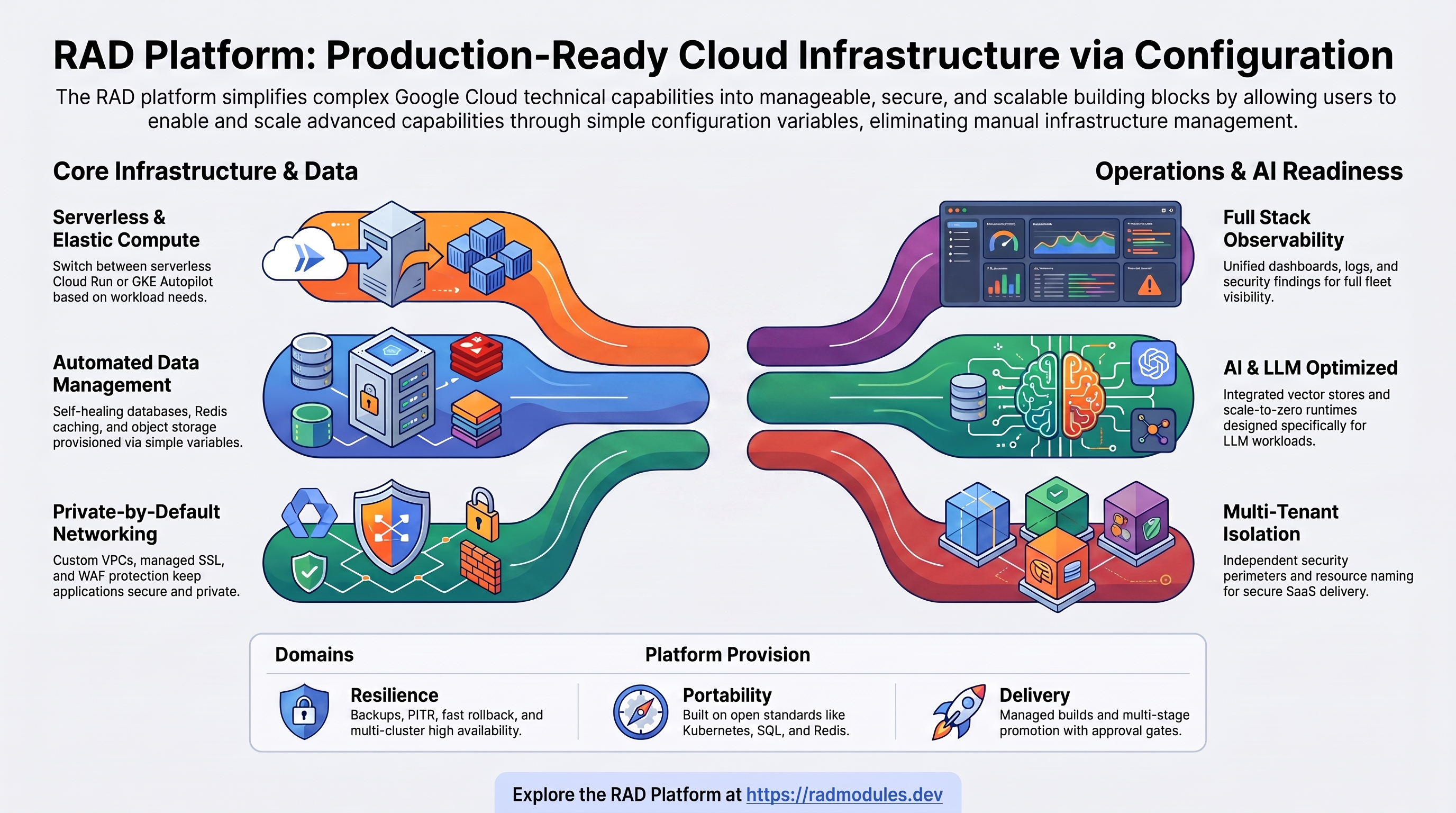
This document summarises the technical capabilities the RAD platform provides for running industry solutions on Google Cloud — elastic compute, managed data, secure networking, full observability, resilience, multi-tenancy, AI workloads, and portability.
Every capability is delivered through managed Google Cloud services and exposed through simple configuration variables — there is no infrastructure to design, write, or maintain. For the business value these capabilities deliver, see Engineering Excellence.
1. Serverless & elastic compute
- Cloud Run (default runtime). Stateless web applications run serverless and
scale to zero when idle (
min_instance_count = 0), billed per request and per second. Concurrency, instance ceilings, and resources are tunable (cpu_limit,memory_limit,max_instance_count). Services reach private data over the VPC directly — low latency, no connector fees — and can be fronted by identity-aware access with no load balancer required. - GKE Autopilot (for stateful and specialised workloads). Workloads that need persistent volumes, stable identities, or custom controllers run on Autopilot, billed per pod for the resources actually requested. Vertical Pod Autoscaling continuously right-sizes requests; StatefulSets, CronJobs, and Jobs are supported.
- Runtime choice per deployment. Every solution ships in both a Cloud Run and a GKE variant from a shared core, so the runtime is a deployment-time decision — stateless apps default to Cloud Run, stateful apps to Autopilot.
- One-shot jobs. Database initialisation, migrations, plugin and extension
installs, custom SQL (
enable_custom_sql_scripts), and backup/restore run as jobs billed only while executing, triggered automatically with each deployment. - Flexible image sourcing. Deploy a pre-built image, build from source, or mirror
an upstream image into the project's registry (
container_image_source,enable_image_mirroring) to keep traffic inside the project and satisfy image-attestation policy.
2. Data, databases & storage
- Managed relational databases. Cloud SQL for MySQL 8.0 and PostgreSQL, with
private networking, configurable machine tiers, and optional high availability and
point-in-time recovery. AlloyDB (PostgreSQL-compatible, optimised for analytics and
vector search) is available, with an optional read pool for horizontal read scaling
(
enable_alloydb_read_pool). Applications connect via a secure proxy, socket, or private IP (enable_cloudsql_volume), with optional IAM database authentication. - Caching. Managed in-memory cache (Memorystore Redis), in standard or
high-availability tiers (
enable_redis). - Shared and object storage. Managed network file storage for high-throughput
shared access across replicas (
enable_nfs); object storage buckets with lifecycle policies and customer-managed encryption; and object-storage mounts for large, read-heavy data such as media and model weights. - Search and vector stores. Elasticsearch for full-text and vector search, and
pgvectoron Cloud SQL / AlloyDB for similarity search (postgres_extensions). - Automated data lifecycle. Per-application database and least-privilege user creation, plugin and extension installation, and schema initialisation/migration all run automatically on deployment — no manual database setup.
- Automated credential rotation. Database passwords can rotate on a schedule
(
enable_auto_password_rotation), with the platform ensuring the new secret has propagated before instances restart.
3. Networking & connectivity
- Private-by-default network. A custom VPC with regional subnets, managed egress (Cloud NAT), and private service connectivity keeps databases and caches off the public internet.
- Modern ingress and domains. Custom domains with automatically provisioned,
managed SSL certificates (
application_domains); a zero-configuration address is used when no domain is declared. Cacheable content can be served from the global edge (enable_cdn). - Web application firewall and DDoS protection. A global WAF with managed DDoS
protection (
enable_cloud_armor) applies OWASP Top 10 rules and adaptive rate limiting, restricts administrative paths to known networks (admin_ip_ranges), and routes all traffic through the firewall. - Micro-segmentation. Network policies restrict pod-to-pod traffic to only what
is required (
enable_network_segmentation), on a deny-by-default basis. - Service mesh. An Istio-compatible mesh provides automatic mutual TLS between services, traffic policy (retries, timeouts, circuit breakers), and Layer-7 telemetry — all without changing application code. It can run either a per-workload proxy model or a lower-overhead shared-node model, trading full Layer-7 feature coverage against reduced per-pod resource cost.
- Multi-cluster topology. Two to ten clusters in a shared network, with a multi-primary mesh and fleet-based service discovery, underpin high availability and cross-region scale.
- Hybrid connectivity. Peering to an existing VMware estate and a VPN/Interconnect-friendly topology support hybrid operation during migration.
4. Observability & operations
- Per-application dashboards covering request rate, latency (p50/p95/p99), error rate, instance count, and CPU/memory utilisation.
- Alerting on error rate, latency objectives, resource saturation, and failed deployments, with configurable notification channels.
- Centralised logging. Every application, job, and build streams logs to Cloud Logging.
- Audit logging. Project-wide Admin Activity, Data Access, and System Event audit logs, with optional long-term export.
- Security findings. Security Command Center aggregates vulnerabilities, misconfigurations, and threats in a single view.
- Distributed tracing and mesh telemetry are produced automatically for
mesh-enrolled services — no manual instrumentation. Traces use the standard W3C
Trace Context (
traceparent) header, so they stitch together across services and across mesh options without proprietary instrumentation. - Fleet-wide visibility. A single-pane view across clusters, with continuous configuration reconciliation that surfaces drift.
5. Resilience, backup & disaster recovery
- Automated backup and restore of database and file state to object storage, with import paths for onboarding data from outside the project.
- Managed-service durability. Cloud SQL point-in-time recovery and daily backups, file-store snapshots, object versioning, and versioned secrets.
- Workload backup for Kubernetes applications.
- Availability protection. Pod disruption budgets (
enable_pod_disruption_budget,pdb_min_available) prevent too many instances being taken down at once during maintenance. - Fast rollback. Shift traffic back to a previous revision (Cloud Run) or roll back the workload (GKE) for sub-minute application recovery.
- Reproducible recovery. Because each solution is fully described by its configuration, it can be re-provisioned in another region and restored from backup.
- Multi-cluster HA supports active/active and cross-region disaster recovery.
- Failure isolation across locations. For clusters spanning more than one location or cloud, in-cluster traffic and the local Kubernetes control plane keep running even if connectivity to the central control plane is lost; only centrally-dependent features (cross-cluster health checks, central API access, managed mesh updates) degrade until it is restored.
6. Multi-tenancy & SaaS enablement
- Tenant-aware resource naming makes every resource self-identifying in the console, billing, and audit logs — enabling per-tenant chargeback and eliminating cross-tenant conflicts.
- Per-deployment isolation. Each tenant deployment is independent, with its own lifecycle and upgrade cadence — no shared state between tenants.
- Per-tenant security perimeters (
enable_vpc_sc,vpc_sc_dry_run) keep each tenant's databases, storage, and secrets isolated, backed by per-tenant identities, secrets, and buckets. Network ranges are derived automatically to avoid collisions. - Tenant lifecycle. Provision infrastructure with or without the application
(
deploy_application), tear a tenant down cleanly, and move tenant data between deployments, projects, or regions. - A catalogue as a marketplace. The library of ready-to-run solutions can be offered to tenants as turnkey deployments.
7. AI & LLM workloads
- Pre-built AI solutions. Self-hosted model inference (Ollama), visual LLM workflow building (Flowise), retrieval-augmented generation (RAGFlow), and AI-enabled automation (N8N AI, Activepieces) deploy with the same experience as any other solution.
- Vector stores. Elasticsearch and
pgvectoron Cloud SQL / AlloyDB provide similarity search for embeddings. - AI-aware runtime. Scale-to-zero suits spiky inference traffic; Autopilot suits
sustained workloads; model weights are stored once on shared storage and mounted
read-only across replicas to avoid re-downloads; deployment timeouts and registry
lifecycle policies are tuned for multi-gigabyte images (
deployment_timeout). - Inherited posture. AI workloads automatically gain the platform's security and cost controls — managed secrets for provider API keys, identity-aware access, service perimeters, image attestation, and scale-to-zero economics.
8. Portability & multicloud readiness
- Built on open standards. Standard containers, standard Kubernetes APIs (Deployment, StatefulSet, Gateway API, network policy), and standard SQL and Redis protocols — not proprietary, cloud-only constructs.
- Open-source applications and a parameterised image source
(
container_image_source,container_image) avoid vendor lock-in. - Kubernetes as the portability layer. The GKE variants use portable primitives that run on any conformant cluster; the multi-cluster mesh and fleet model extend to hybrid and on-premises Kubernetes.
- Federated identity bridges external identity providers (e.g. AWS, Azure AD, Okta) into Google Cloud.
- Attached non-GCP clusters. Existing Kubernetes clusters on other clouds (such as Azure AKS and AWS EKS) can be registered as first-class fleet members and managed from a single Google Cloud control plane, with cluster access brokered through a managed connect gateway rather than exposing the foreign cluster's public endpoint.
- An honest framing. Today the platform targets Google Cloud. "Multicloud" here means architectural readiness — portable workloads, open standards, a vendor-neutral automation model, and the ability to manage attached non-GCP clusters — not a turnkey path for deploying new application stacks onto AWS or Azure, which would require additional platform support.
9. Delivery & progressive promotion
- Managed, on-demand build and delivery — no build servers to provision or maintain.
- Multi-stage promotion (
enable_cloud_deploy,cloud_deploy_stages) moves a release through environments such as development → staging → production, with optional automatic promotion and human approval gates between stages. - Consistent validation runs on every change before anything is provisioned.
Capabilities at a glance
| Domain | What the platform provides |
|---|---|
| Compute | Serverless Cloud Run (scale-to-zero) and GKE Autopilot, chosen per deployment |
| Data & storage | Managed SQL, AlloyDB, Redis, file and object storage, vector search — set up automatically |
| Networking | Private VPC, managed domains + SSL, CDN, WAF/DDoS, micro-segmentation, service mesh, multi-cluster |
| Observability | Dashboards, alerting, centralised + audit logging, security findings, tracing, fleet visibility |
| Resilience | Backups + PITR, workload backup, disruption budgets, fast rollback, re-provision-anywhere, multi-cluster HA |
| Multi-tenancy | Tenant-aware naming, per-tenant isolation and perimeters, full tenant lifecycle |
| AI | Pre-built AI solutions, vector stores, AI-aware runtime, inherited security/cost posture |
| Portability | Open standards, portable Kubernetes, attached non-GCP clusters, federated identity, architectural multicloud readiness |
| Delivery | Managed build, multi-stage promotion with approval gates |
You configure it
These capabilities are delivered and tuned entirely through configuration variables —
there is no infrastructure code to write. Representative controls include
min_instance_count / max_instance_count, cpu_limit / memory_limit,
enable_redis, enable_nfs, enable_cloudsql_volume,
enable_auto_password_rotation, enable_cdn, enable_cloud_armor,
enable_network_segmentation, enable_vpc_sc, enable_pod_disruption_budget,
enable_cloud_deploy, and application_domains.
In summary
The platform packages the full technical stack a production solution needs — elastic compute, managed and resilient data, secure networking, deep observability, multi-tenant isolation, AI-ready runtimes, and portable foundations — as managed Google Cloud services you switch on and size through configuration. The capability is there from the first deployment; you choose how much of it to use.
Need RAD to do something it does not do yet? Request it on the roadmap, or vote on what is already there.