Sample Application on Google Cloud Run
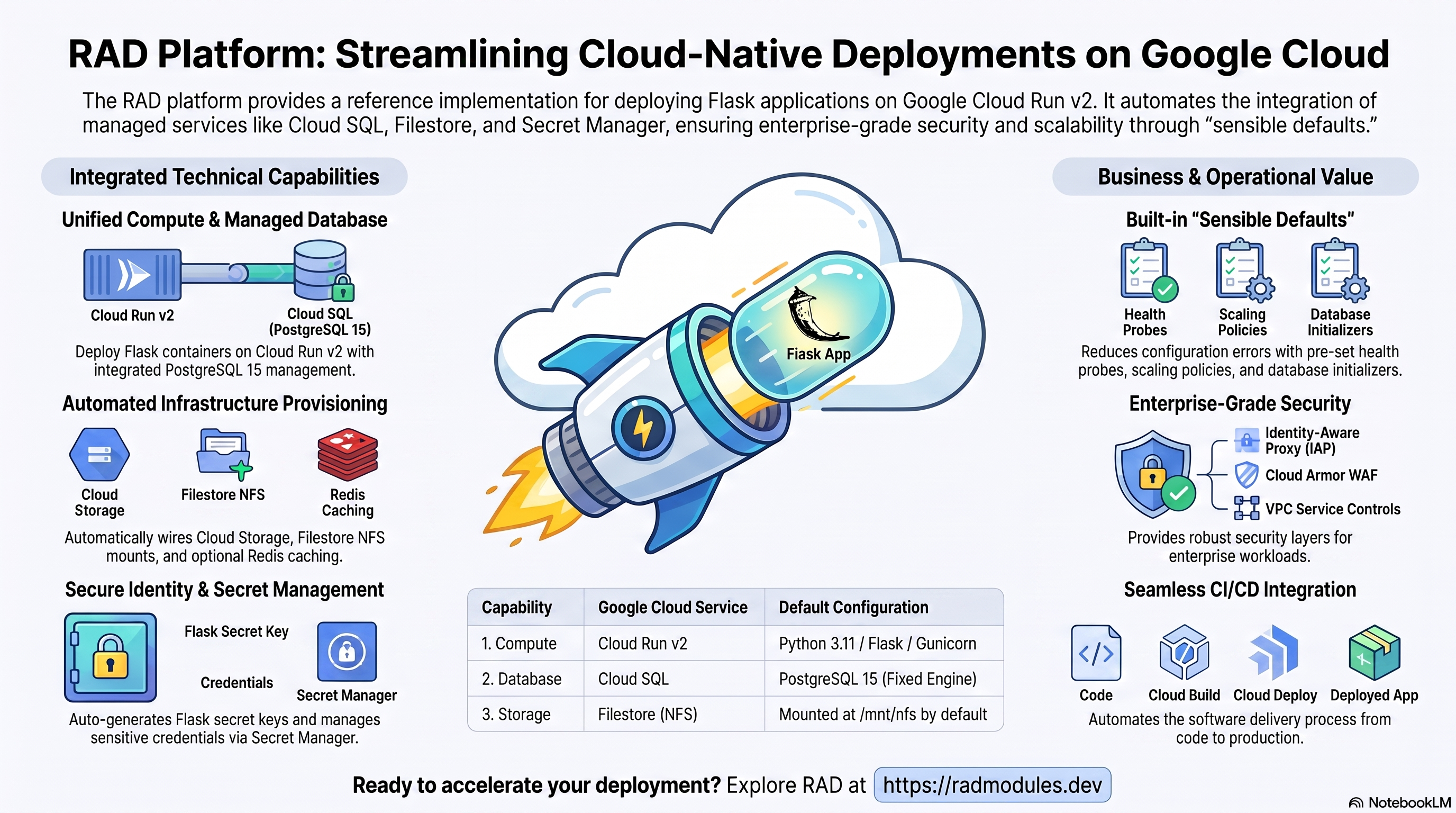
The Sample module is a reference implementation that demonstrates how application modules are built on this platform. It deploys a minimal Flask web application (Python 3.11, PostgreSQL 15, optional Redis, optional NFS) on Cloud Run v2 on top of the App_CloudRun foundation, which provisions and manages the shared Google Cloud infrastructure.
This guide focuses on the cloud services the Sample application uses and how to explore and operate them from the Google Cloud Console and the command line. For the mechanics common to every Cloud Run application — service identity, ingress and load balancing, scaling and concurrency, CI/CD, Cloud Armor, IAP, Binary Authorization, VPC Service Controls, backups, and the deployment lifecycle — refer to the App_CloudRun foundation guide rather than repeating them here.
1. Overview
The Sample application runs as a Python/Gunicorn container on Cloud Run v2. The deployment wires together a focused set of Google Cloud services:
| Capability | Google Cloud service | Notes |
|---|---|---|
| Compute | Cloud Run v2 | Flask/Gunicorn service, 1 vCPU / 512 MiB by default, request-based autoscaling |
| Database | Cloud SQL for PostgreSQL 15 | Required; the db-init job creates the schema on first deploy |
| Shared files | Filestore (NFS) | Enabled by default; shared volume mounted at /mnt/nfs (requires gen2 execution environment) |
| Object storage | Cloud Storage | A single data bucket provisioned by default |
| Cache & sessions | Redis | Optional (enable_redis = false by default); when enabled, an internal redis:alpine service is deployed |
| Secrets | Secret Manager | Auto-generated Flask SECRET_KEY stored at deploy time |
| Ingress | Cloud Run URL / Cloud Load Balancing | Default run.app URL; optional external HTTPS load balancer + custom domain |
Sensible defaults worth knowing up front:
- PostgreSQL 15 is fixed. The database engine is set to
POSTGRES_15bySample_Commonand cannot be changed to MySQL orNONEin this module. - A
db-initjob runs on first deploy to create the PostgreSQL database, user, and schema. It is idempotent and safe to re-run. - Redis is disabled by default. When
enable_redis = true, an internalredis:alpineCloud Run service is deployed. Unlike the GKE variant, there is no automatic fallback to127.0.0.1— you must setredis_hostexplicitly to the service's internal URL or a Cloud Memorystore private IP. - The Flask
SECRET_KEYis auto-generated and stored in Secret Manager; it is never set in plain text. min_instance_countdefaults to0(scale-to-zero). The module does not override this; set it to1if you want to eliminate cold starts.- Health probes target
/healthz— a Cloud Run TCP startup probe and HTTP liveness probe against the/healthzendpoint (returns{"status": "healthy"}).
2. Google Cloud Services & How to Explore Them
All commands assume PROJECT and REGION are set. Service and resource names are
reported in the deployment Outputs.
A. Cloud Run — the Sample service
The Flask application runs as a Cloud Run v2 service that autoscales by request load between the minimum and maximum instance counts. Each deployment creates an immutable revision; traffic can be split across revisions for safe rollouts.
- Console: Cloud Run → select the service for revisions, traffic, logs, and metrics.
- CLI:
gcloud run services list --project "$PROJECT" --region "$REGION"
gcloud run services describe <service-name> --project "$PROJECT" --region "$REGION"
gcloud run revisions list --service <service-name> --project "$PROJECT" --region "$REGION"
See App_CloudRun for scaling, concurrency, execution environment, and traffic splitting.
B. Cloud SQL for PostgreSQL 15
The Sample application stores its visitor counter in a managed Cloud SQL for PostgreSQL 15 instance. The service connects privately through the Cloud SQL Auth Proxy over a Unix socket (no public IP). On first deploy an initialization Job creates the application database, user, and grants privileges.
- Console: SQL → select the instance for connections, backups, flags, metrics.
- CLI:
gcloud sql instances list --project "$PROJECT"
gcloud sql instances describe <instance-name> --project "$PROJECT"
gcloud sql connect <instance-name> --user=<db-user> --database=<db-name> --project "$PROJECT"
The instance name, database, user, and password secret are in the Outputs. See App_CloudRun for the connection model, backups, and password rotation.
C. Filestore (NFS) and Cloud Storage
When enable_nfs = true (the default), a Filestore (NFS) share is mounted into the
Cloud Run service so all instances share the same files. This requires the gen2
execution environment. A dedicated Cloud Storage bucket is also provisioned.
- Console: Filestore → Instances; Cloud Storage → Buckets.
- CLI:
gcloud filestore instances list --project "$PROJECT"
gcloud storage buckets list --project "$PROJECT"
gcloud storage ls gs://<data-bucket>/        # bucket name is in the Outputs
See App_CloudRun for the NFS mount, GCS Fuse, and CMEK.
D. Redis cache (optional)
When enable_redis = true, an internal redis:alpine Cloud Run service is deployed
alongside the application. The Flask app uses it for server-side session storage. The
environment variables ENABLE_REDIS, REDIS_HOST, and REDIS_PORT are injected
automatically. You must set redis_host explicitly — Cloud Run instances cannot reach a
co-located service via 127.0.0.1.
- Console: Cloud Run — the Redis service appears as a separate Cloud Run service in the same project and region.
- CLI:
gcloud run services list --project "$PROJECT" --region "$REGION"
gcloud run services describe <redis-service-name> --project "$PROJECT" --region "$REGION"
E. Secret Manager
The Flask SECRET_KEY is auto-generated on first deploy and stored as a Secret Manager
secret. The database password is also managed in Secret Manager by the foundation.
- Console: Security → Secret Manager.
- CLI:
gcloud secrets list --project "$PROJECT"
gcloud secrets versions access latest --secret=<secret-name> --project "$PROJECT"
See App_CloudRun for injection and rotation details.
F. Networking & ingress
The service is reachable at its run.app URL by default. An external HTTPS load
balancer with a custom domain, Cloud CDN, and Cloud Armor can be layered on; ingress
settings and VPC egress control connectivity.
- Console: Cloud Run (service URL); Network services → Load balancing.
- CLI:
gcloud run services describe <service-name> --region "$REGION" --format='value(status.url)'
gcloud compute addresses list --project "$PROJECT"
See App_CloudRun.
G. Cloud Logging & Monitoring
Container logs flow to Cloud Logging; Cloud Run and Cloud SQL metrics flow to Cloud Monitoring, with optional uptime checks and alert policies.
- Console: Logging → Logs Explorer; Monitoring → Dashboards / Alerting.
- CLI:
gcloud run services logs read <service-name> --project "$PROJECT" --region "$REGION" --limit 50
3. Sample Application Behaviour
- First-deploy database setup. An initialization Job runs
db-init.sh(using thepostgres:15-alpineimage) which idempotently creates the PostgreSQL database user, database, and grants privileges. It is safe to re-run. - Health probes. The startup probe is TCP (checks port 8080 is open). The liveness
probe targets
GET /healthz, which returns{"status": "healthy"}immediately without a database query. - Visitor counter. The root route (
GET /) increments a persistent counter in the PostgreSQLvisitorstable, demonstrating both database connectivity and (when Redis is enabled) per-session tracking. - Database diagnostics.
GET /dbexecutesSELECT version()and returns the PostgreSQL version string — useful for quickly verifying database connectivity. - Redis session handling. When
enable_redis = trueandredis_hostis set to a reachable endpoint, the Flask app usesFlask-Sessionwith a Redis backend. WhenREDIS_HOSTis empty, a warning is logged and sessions fall back to signed cookies. - Flask
SECRET_KEY. The auto-generated key is retrieved from Secret Manager and injected as theSECRET_KEYenvironment variable at instance startup. It is used for session signing. - Inspect running instances:
gcloud run services describe <service-name> --region "$REGION" --project "$PROJECT"
gcloud run revisions list --service <service-name> --region "$REGION" --project "$PROJECT"
4. Configuration Variables
Variables are grouped exactly as they appear on the deployment platform. Only settings specific to or notable for Sample_CloudRun are listed; every other input is inherited from App_CloudRun with its standard behaviour.
Group 1 — Project & Identity
| Variable | Default | Description |
|---|---|---|
project_id | (required) | Target Google Cloud project. |
region | us-central1 | Region for the service and regional resources. |
Group 2 — Deployment Environment
| Variable | Default | Description |
|---|---|---|
tenant_id | demo | Short suffix that makes resource names unique per environment. |
support_users | [] | Emails granted project access and monitoring alerts. |
resource_labels | {} | Labels applied to all resources. |
Group 3 — Application Identity
| Variable | Default | Description |
|---|---|---|
application_name | cloudrunapp | Base name for resources. Do not change after first deploy. |
application_display_name | Cloudrun Application | Friendly name shown in the Console. |
application_description | (set) | Service description. |
application_version | latest | Container image version tag. |
application_database_name | sampleapp | PostgreSQL database name. Immutable after first deploy. |
application_database_user | cloudrunapp | Application user. Immutable after first deploy. |
Group 4 — Runtime & Scaling
| Variable | Default | Description |
|---|---|---|
deploy_application | true | Set false to provision infrastructure only. |
container_image_source | custom | "prebuilt" deploys an existing image; "custom" builds via Cloud Build. |
container_image | us-docker.pkg.dev/cloudrun/container/hello | Image URI when container_image_source = "prebuilt". |
cpu_limit | 1000m | CPU per instance. |
memory_limit | 512Mi | Memory per instance. |
min_instance_count | 0 | Minimum instances (0 = scale-to-zero). |
max_instance_count | 1 | Maximum instances. |
container_port | 8080 | Flask/Gunicorn listens on port 8080. |
execution_environment | gen2 | Required for NFS mounts. |
enable_cloudsql_volume | true | Cloud SQL Auth Proxy for socket connections. |
traffic_split | [] | Split traffic across revisions for staged rollouts. |
max_revisions_to_retain | 7 | How many old revisions to keep. |
Group 5 — Access & Ingress Control
| Variable | Default | Description |
|---|---|---|
ingress_settings | all | Which networks may reach the service (all / internal / internal-and-cloud-load-balancing). |
vpc_egress_setting | PRIVATE_RANGES_ONLY | How outbound traffic is routed through the VPC connector. |
enable_iap | false | Require Google sign-in via Identity-Aware Proxy. |
iap_authorized_users / iap_authorized_groups | [] | Who may access through IAP. |
Group 6 — Environment Variables & Secrets
| Variable | Default | Description |
|---|---|---|
environment_variables | {} | Extra non-secret settings. |
secret_environment_variables | {} | Map of env var → Secret Manager secret name. |
secret_propagation_delay | 30 | Seconds to wait after secret creation before proceeding. |
secret_rotation_period | 2592000s | Rotation notification frequency. |
Group 7 — Backup & Restore
| Variable | Default | Description |
|---|---|---|
backup_schedule | 0 2 * * * | Automated backup cron (UTC). |
backup_retention_days | 7 | Retention; raise for production/compliance. |
enable_backup_import / backup_source / backup_uri / backup_format | restore options | Restore from a backup on deploy. |
Group 8 — CI/CD & Binary Authorization
Standard App_CloudRun Cloud Build / Cloud Deploy integration — see
App_CloudRun. Key inputs: enable_cicd_trigger,
github_repository_url, github_token, enable_cloud_deploy,
enable_binary_authorization.
Group 9 — Custom SQL Scripts
enable_custom_sql_scripts, custom_sql_scripts_bucket, custom_sql_scripts_path,
custom_sql_scripts_use_root — run SQL from a GCS bucket after provisioning. See
App_CloudRun.
Group 10 — Domain, CDN, Cloud Armor & Image Retention
| Variable | Default | Description |
|---|---|---|
application_domains | [] | Custom hostnames for the external load balancer. |
enable_cdn | false | Enable Cloud CDN on the load balancer backend. |
enable_cloud_armor / admin_ip_ranges | off | Attach a WAF policy / restrict privileged access. |
max_images_to_retain / delete_untagged_images / image_retention_days | (set) | Artifact Registry cleanup policy. |
Group 11 — Storage & Filesystem
| Variable | Default | Description |
|---|---|---|
enable_nfs | true | Shared Filestore volume. Requires gen2 execution environment. |
nfs_mount_path | /mnt/nfs | Mount path inside the container. |
nfs_instance_name | "" | Name of an existing NFS VM; leave empty for auto-discovery. |
nfs_instance_base_name | app-nfs | Base name for an inline NFS VM when none exists. |
create_cloud_storage / storage_buckets / gcs_volumes | (set) | Data bucket / additional buckets / GCS Fuse mounts. |
manage_storage_kms_iam / enable_artifact_registry_cmek | false | CMEK options. |
Group 12 — Database Backend
| Variable | Default | Description |
|---|---|---|
database_password_length | 32 | Generated password length (16–64). |
enable_auto_password_rotation / rotation_propagation_delay_sec | off | DB password rotation. |
Group 13 — Jobs & Scheduled Tasks
| Variable | Default | Description |
|---|---|---|
initialization_jobs | [] | Leave empty to use the built-in db-init job from Sample_Common. |
cron_jobs | [] | Recurring Cloud Run Jobs triggered by Cloud Scheduler. |
Group 14 — Observability & Health
| Variable | Default | Description |
|---|---|---|
startup_probe_config | TCP, port 8080 | TCP startup probe (waits for port to open). |
health_check_config | HTTP GET / | Liveness probe. |
startup_probe / liveness_probe | HTTP GET /healthz | Application-level probe settings passed to Sample_Common. |
uptime_check_config | { enabled = false, path = "/" } | Cloud Monitoring uptime check; disabled by default. |
alert_policies | [] | Metric alert policies. |
Group 21 — Redis Cache
| Variable | Default | Description |
|---|---|---|
enable_redis | false | Deploy an internal Redis service and enable session storage. |
redis_host | "" | Must be set explicitly. No automatic fallback — leaving empty results in an empty REDIS_HOST and connection failure. |
redis_port | 6379 | Redis port. |
redis_auth | "" | Optional Redis auth password (sensitive). |
Group 22 — VPC Service Controls & Audit Logging
| Variable | Default | Description |
|---|---|---|
enable_vpc_sc | false | Enforce a VPC-SC perimeter (requires organization_id). |
vpc_cidr_ranges / vpc_sc_dry_run | (set) | Access level CIDRs / dry-run mode. |
enable_audit_logging | false | Detailed Cloud Audit Logs. |
5. Outputs
Returned on a successful deployment — the quickest way to locate and explore the running resources.
| Output | Description |
|---|---|
service_name | Cloud Run service name. |
service_url | Default run.app URL of the service. |
service_location | Region the service runs in. |
stage_services | Stage-specific service URLs (Cloud Deploy). |
load_balancer_ip / load_balancer_url | External HTTPS load balancer IP / URL (when enabled). |
database_instance_name | Cloud SQL instance name. |
database_name / database_user | Application database name / user. |
database_password_secret | Secret Manager secret holding the DB password. |
database_host / database_port | DB endpoint / port. |
storage_buckets | Created Cloud Storage buckets. |
network_name / network_exists / regions | VPC network, presence, regions. |
container_image / container_registry | Deployed image and Artifact Registry repo. |
monitoring_enabled / monitoring_notification_channels / uptime_check_names | Monitoring status, channels, uptime checks. |
initialization_jobs | Names of the setup jobs. |
deployment_id / tenant_id / resource_prefix | Naming identifiers. |
project_id / project_number | Project identifiers. |
cicd_enabled / github_repository_url / github_repository_owner / github_repository_name / cicd_configuration | CI/CD status and details. |
artifact_registry_repository / cloudbuild_trigger_name / cloudbuild_trigger_id | Registry and build trigger. |
vpc_sc_enabled / vpc_sc_perimeter_name / vpc_sc_dry_run_mode | VPC-SC status. |
audit_logging_enabled / artifact_registry_cmek_enabled | Audit logging and CMEK status. |
6. Configuration Pitfalls & Sensible Defaults
Risk: Critical (data loss / outage / security) — High (service degraded) — Medium (cost or partial degradation) — Low (minor).
| Setting | Sensible value | Risk | Consequence if wrong |
|---|---|---|---|
database_type (via Sample_Common) | PostgreSQL 15 (fixed) | Critical | The db-init script uses PostgreSQL-specific commands; a different engine breaks database setup. |
application_database_name / _user | set once | Critical | Immutable after first deploy; renaming recreates the DB/user and destroys data. |
application_name | set once | Critical | Embedded in Cloud Run service name, Artifact Registry repo, and Secret Manager secret IDs. Changing orphans existing secrets. |
enable_backup_import | false unless restoring | Critical | Enabling without a valid backup_uri fails the import job. |
container_port | 8080 | Critical | Mismatch causes the TCP startup probe to fail — revision never becomes healthy. |
enable_cloudsql_volume | true | Critical | false with PostgreSQL: all DB connections fail at startup. The db-init job also fails. |
execution_environment | gen2 | High | gen1 with enable_nfs = true: NFS mount fails at container startup. |
enable_redis | false (default) | High | true without redis_host set: REDIS_HOST is empty and the Flask app cannot connect to Redis. |
memory_limit | 512Mi or more | High | Too little memory causes the Flask app to be OOM-killed on startup. |
ingress_settings | all for testing; internal-and-cloud-load-balancing with Cloud Armor | Medium | Using all with Cloud Armor lets requests bypass the WAF via the *.run.app URL. |
enable_iap / enable_cloud_armor | enable for production | Medium | The application is otherwise publicly reachable. |
min_instance_count | 1 for latency-sensitive workloads | Medium | 0 means cold starts (5–10 s) under load. |
enable_vpc_sc with vpc_sc_dry_run = false | test in dry-run first | Critical | If any SA or IP is missing from the access level, Cloud Run, Cloud SQL, and Secret Manager access all fail simultaneously. |
backup_retention_days | 7 (raise for prod) | Medium | Too short for compliance retention. |
For the foundation behaviour referenced throughout — service identity, scaling and concurrency, ingress and load balancing, CI/CD, Cloud Armor, IAP, Binary Authorization, VPC-SC, backups, and image mirroring — see App_CloudRun. The shared application configuration (Flask secret, database bootstrap, probe behaviour, and Redis sidecar) is described in Sample_Common.
Related guides
- Hands-on lab: Sample on Cloud Run — deploy it step by step, with the console screens and commands at each stage.
- Sample Application on GKE Autopilot — the same application on Kubernetes, for when you need the other deployment target.
- Sample Common — Shared Application Configuration — the configuration shared by both deployment targets.
Need RAD to do something it does not do yet? Request it on the roadmap, or vote on what is already there.