Immich on GKE Autopilot
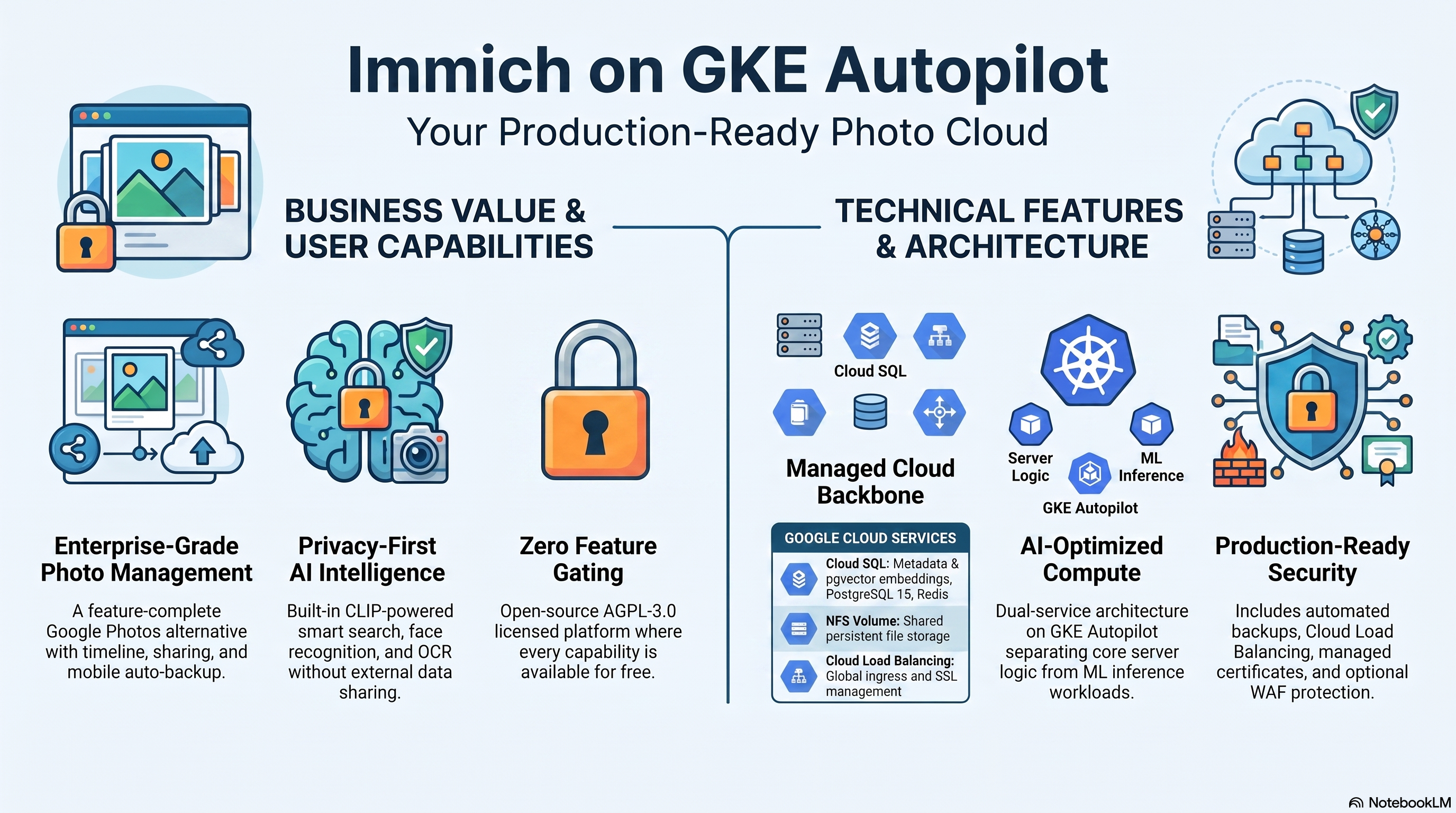
Immich is an open-source, AGPL-3.0-licensed self-hosted photo and video management platform — a Google Photos alternative with mobile auto-backup, a timeline, albums, sharing, CLIP-powered smart search, and face recognition. Every feature is free: the optional $99 product key is a supporter badge only, with zero feature gating. This module deploys Immich on GKE Autopilot on top of the App_GKE foundation, which provisions and manages the shared Google Cloud and Kubernetes infrastructure.
There is deliberately no CloudRun variant of this module. Immich's media library is a local filesystem — it has no S3/GCS storage backend — and photo/video uploads are routinely multi-GB, neither of which fits Cloud Run's request model.
This guide focuses on the cloud services Immich uses and how to explore and operate them from the Google Cloud Console and the command line. For the mechanics common to every GKE application — Workload Identity, ingress, autoscaling, CI/CD, Cloud Armor, IAP, Binary Authorization, VPC Service Controls, backups, and the deployment lifecycle — refer to the App_GKE foundation guide.
What Immich costs on RAD, and how that compares
Immich on RAD's GKE module costs about US$150 a month in your own project, plus a 300-credit (US$30) module fee once per deployment — with every feature unlocked, including face recognition and CLIP search (the optional $99 Immich product key is a supporter badge only). If you only need it occasionally, see "Pause it for free" below to stop paying without losing your photo library. Immich ships only as a GKE module on RAD; there is no Cloud Run variant.
What you pay on RAD
| In a Google Cloud project you own | In a project RAD manages for you | |
|---|---|---|
| Module fee, once per deployment | 300 credits (US$30.00) | 270 credits (10% lower) |
| Build time | A few credits per build | The same |
| Google Cloud running cost | Billed by Google to your own billing account, about US$149.81 a month for the default configuration (table below) | Metered hourly in credits; RAD publishes 116 credits a day |
| Who owns what | You own the project and its billing; RAD deploys and updates it | RAD owns the project, with guardrails, quotas and budget alerts; you get console access, and a minimum purchased balance is held in reserve |
10 credits cost US$1 on a one-off top-up, less on a plan. In a project RAD manages, the database, file server and network are shared by every application in the project, so a second application does not add a second database.
Default running cost in your own project (us-central1, Google list prices):
| Resource (module default) | Per month |
|---|---|
| GKE Autopilot pod, 2x vCPU / 4 GiB | US$79.35 |
| Cloud SQL for PostgreSQL, 1 vCPU / 3.75 GB, zonal, 10 GB SSD | US$51.02 |
| NFS/cache file server (small VM) | US$13.43 |
| Cloud NAT and networking | US$5.00 |
| Cloud Storage (add-ons, backups) | US$1.00 |
| GKE cluster management fee | shared across every GKE app in the project; $0 if this is your only cluster, else ~73 |
| Total | about US$149.81 |
How it compares
- Immich itself runs no official hosted SaaS — its maintainers are explicit that self-hosting is the point — so the honest comparison is against the services it replaces. Google Photos' own paid storage (Google One) starts at $1.99/month for 100 GB and $2.99/month for 200 GB, but a shared family photo library with video quickly outgrows that, and you give up auto-tagging control and ownership of the originals in exchange.
- Immich's own footprint (2 vCPU, 4 GiB, plus a database and an NFS VM) is close to a Hetzner CPX22 or DigitalOcean 2 vCPU/4 GB droplet (about $24/month) or a GCP Compute Engine e2-standard-2 (about $49/month) — cheaper in cash, but then you run PostgreSQL, the NFS share, backups, security patches and the machine-learning container's upgrades yourself.
- What RAD adds over a bare VPS: managed Cloud SQL with automated backups and point-in-time recovery, Secret Manager for credentials, and monitoring — the things that turn a weekend self-host project into something you can leave running unattended.
Pause it for free: delete a RAD-managed project, restore it when you need it
If Immich runs in a project RAD manages for you and you expect to come back to it — a break between courses, a seasonal lull, or simply not knowing yet whether you'll need it next month — this is the better option, and it costs almost nothing.
Deleting a RAD-managed project unlinks its billing first, then asks Google to delete the project outright: Google's own 30-day recoverable soft delete. Unlike deleting Immich as a single module, this does not tear down the GKE pod, Cloud SQL database, NFS file server and networking one by one — the whole project simply stops, and nothing is charged while it waits, because billing is already unlinked.
Restoring, within 30 days and only by the project's owner, asks Google to undelete the project and reattaches its billing account, then asks you to run Update on each deployment to confirm everything came back. Because nothing was individually destroyed, that Update finds the same resources already there — it is a check, not a rebuild, and an Update never charges the module fee again. This costs only a handful of credits (under US$1) in build time for a typical chain of deployments.
What this needs: you must own the project (not one RAD only manages billing for), you must restore it yourself within 30 days — after that Google deletes it for good — and restoring is admitted like creating a new project, so your purchased credit balance must still clear the tier's floor (100 credits for the sandbox tier most use fits). Google says most services are fully working again within 36 hours of a restore.
One real gap: nightly backups are written to a bucket inside the project, and that bucket has Cloud Storage's soft-delete explicitly turned off, so it is very likely gone as soon as you delete the project, even though the project itself is recoverable for 30 days. Immich's own nightly export of the database and library metadata is kept in that bucket; the original photos and videos live in the GKE pod's attached storage and the NFS share, which are not individually destroyed by this path, so your library itself survives the 30 days intact — it is specifically the metadata/database backup copy that is not recoverable from a deleted project's bucket.
Pay only while you use it, the other way: delete and redeploy
In your own project, or once the 30-day window above has passed, the fallback is to delete Immich outright and redeploy it later.
- What a redeploy costs: the module fee again, plus the builds — roughly the module fee shown above plus 3–6 credits of build time.
- When it's worth it: deleting saves money only once Immich would otherwise sit unused for about 6 days or more in your own project (about 2 days or more in a RAD-managed one). Immich's database and NFS file server are the bulk of the running cost here, so if nothing else in the project shares them, deleting Immich removes the whole bill above.
- Keep data first. Nightly backups are written to a bucket inside the deployment, and that bucket is deleted with it — copy the latest backup out (to Google Drive, or a bucket you keep) before deleting if you want to keep it.
Lab sessions and Managed Environments
- Lab sessions, for training. A trainer runs a session for a class. Each participant gets the app in their own Google Cloud project for 15 minutes to 24 hours, within an allowance the trainer sets. Either the trainer funds every place, or each participant pays for their own. Everything is deleted when the session ends and unused credits go back to the trainer.
- Managed Environments, for consultancies. A partner runs the app for a client from a ring-fenced wallet it funds, and settles with the client directly. If the wallet runs low, billing pauses and the data is kept, so nobody receives an unexpected charge. At the end the partner hands the project over and the deployments become the client's own.
- Credits can be bought in more than 20 currencies, including XAF, XOF, NGN, GHS, KES and ZAR, by card, bank transfer or mobile money.
Sources (8 October 2026): Google Cloud list prices from the Cloud Billing Catalog API; RAD fees and the daily-credit estimate from radmodules.dev/pricing; Google Cloud: delete and restore projects for the pause/restore mechanism. Prices change; check each source before relying on a figure.
1. Overview
Immich runs as two services: the Immich server (API + in-process background workers, custom-built image) and a separate prebuilt machine-learning container.
| Capability | Google Cloud service | Notes |
|---|---|---|
| Compute (server) | GKE Autopilot | Custom image over ghcr.io/immich-app/immich-server, port 2283, 2 vCPU / 4 GiB, exactly one replica |
| Compute (ML) | GKE Autopilot | Prebuilt ghcr.io/immich-app/immich-machine-learning, port 3003, internal-only, CPU inference (no GPU), 2 vCPU / 4 GiB |
| Database | Cloud SQL for PostgreSQL 15 | Required — with the pgvector extension (DB_VECTOR_EXTENSION=pgvector; Cloud SQL has no VectorChord) |
| Media library | NFS (shared platform volume) | Mounted at /usr/src/app/upload (IMMICH_MEDIA_LOCATION) — Immich has no object-storage backend |
| Cache & queue | Redis | Required — Immich's job queue and pub/sub; the NFS-server co-hosted Redis is injected by default |
| Image build | Cloud Build + Artifact Registry | Thin custom build adding the cloud entrypoint |
| Ingress | Cloud Load Balancing | External LoadBalancer, optional custom domain + managed certificate |
Sensible defaults worth knowing up front:
enable_nfs = trueis validated, not just defaulted. The entire photo/video library lives atIMMICH_MEDIA_LOCATION; without NFS that path is the pod's ephemeral disk and every restart wipes the library. The plan fails if you turn it off.enable_redis = trueis validated. Immich refuses to start without Redis. With no explicitredis_host, the platform injects the NFS-server co-hosted Redis IP.max_instance_count = 1is validated. One NFS media library, one writer; Immich's in-process job workers assume a single instance.- The Deployment uses the
Recreatestrategy, notRollingUpdate— App_GKE switches automatically for NFS-backed apps, so version updates incur a short outage instead of deadlocking two pods on the same library. application_version = "latest"resolves to Immich's rollingreleasetag. Immich publishesreleaseandvX.Y.Ztags but nolatest; the shared layer mapslatest→releasevia the app-specificIMMICH_VERSIONbuild ARG, and the machine-learning image uses the same resolved tag (lock-step).- pgvector is the vector backend. Cloud SQL has no VectorChord (Immich's
preferred extension); Immich runs on its documented pgvector fallback. The
db-initjob pre-createsvectorandearthdistanceextensions. - Probes hit
GET /api/server/ping— Immich's unauthenticated liveness endpoint ({"res":"pong"}). - No app-level secrets. Immich's JWT signing keys live in the database;
DB_PASSWORDis injected by the foundation under the exact name Immich reads. - First run is interactive. Visit the web UI and create the admin account on the sign-up screen; the Immich mobile apps (iOS/Android) then connect to the same server URL.
2. Google Cloud Services & How to Explore Them
All commands assume you have run
gcloud container clusters get-credentials <cluster> --region <region> --project <project>
and that PROJECT, REGION, and NAMESPACE are set. The namespace and other
identifiers are reported in the deployment Outputs.
A. GKE Autopilot — the Immich server and ML workloads
The server Deployment runs a single replica; the machine-learning service runs as a second Deployment in the same namespace, reachable only inside the cluster.
- Console: Kubernetes Engine → Workloads → filter by the namespace to see both Deployments, pods, and events. Kubernetes Engine → Services & Ingress shows the external IP.
- CLI:
kubectl get pods -A | grep immich                       # find the namespace fast
kubectl get pods,svc,deploy -n "$NAMESPACE"
kubectl logs -n "$NAMESPACE" deploy/"$(kubectl get deploy -n "$NAMESPACE" -o name | grep -v ml | head -1 | cut -d/ -f2)" --tail=100
# The cloud entrypoint logs the resolved DB/Redis/media config on the first lines:
kubectl logs -n "$NAMESPACE" <server-pod> | head -15
# Confirm the ML URL wiring:
kubectl exec -n "$NAMESPACE" deploy/<server-deploy> -- env | grep IMMICH_MACHINE_LEARNING_URL
B. Cloud SQL for PostgreSQL 15 + pgvector
Immich stores all metadata (users, albums, assets, EXIF, smart-search embeddings,
face-recognition data) in Cloud SQL PostgreSQL 15, reached through the Cloud SQL
Auth Proxy sidecar. The first-deploy db-init job creates the database and user
and pre-creates the pgvector and earthdistance extensions; Immich runs with
DB_VECTOR_EXTENSION = pgvector because Cloud SQL does not offer VectorChord.
- Console: SQL → select the instance.
- CLI:
gcloud sql instances list --project "$PROJECT"
gcloud sql connect <instance-name> --user=<db-user> --database=<db-name> --project "$PROJECT"
# Inside psql — confirm the vector extension:
#   SELECT extname, extversion FROM pg_extension WHERE extname IN ('vector','earthdistance');
The instance name, database name, user, and password secret are in the Outputs.
C. NFS — the media library
The shared platform NFS volume is mounted at /usr/src/app/upload
(IMMICH_MEDIA_LOCATION). Every original, thumbnail, and encoded video lives
there; the pod itself is disposable.
- CLI:
# The NFS server is a Compute Engine VM managed by Services_GCP:
gcloud compute instances list --project "$PROJECT" --filter="name~nfs"
# Verify the mount and library content from inside the pod:
kubectl exec -n "$NAMESPACE" deploy/<server-deploy> -- df -h /usr/src/app/upload
kubectl exec -n "$NAMESPACE" deploy/<server-deploy> -- ls /usr/src/app/upload
D. Redis (job queue and pub/sub)
Immich queues every background job (thumbnail generation, metadata extraction,
smart-search embedding, face detection) through Redis. By default the NFS-server
VM co-hosts Redis and the platform injects its IP as REDIS_HOST; the cloud
entrypoint maps it to Immich's REDIS_HOSTNAME and fails fast if it resolves
empty.
- CLI:
kubectl exec -n "$NAMESPACE" deploy/<server-deploy> -- env | grep -E 'REDIS_HOST'
E. Machine learning — CLIP smart search and face recognition
The prebuilt ghcr.io/immich-app/immich-machine-learning container serves CLIP
embeddings, face recognition, and OCR over HTTP on port 3003 (internal-only). It
is CPU inference — no GPU. Its env sets IMMICH_PORT = "3003" explicitly: the
foundation propagates the server's env into additional services and the ML image
reads the same IMMICH_PORT variable — without the override it inherits 2283,
binds the wrong port, and its :3003 startup probe never passes. The server
finds it via the injected IMMICH_MACHINE_LEARNING_URL, set via module_env_vars
to the real Kubernetes Service DNS name (http://<service>-ml:3003 — the
Service is named <service>-ml); the foundation's output_env_var_name
mechanism composes an unresolvable bare-name URL (http://ml:3003), so its
output is parked in the unused IMMICH_ML_URL_FOUNDATION_UNUSED env var. Model
files download lazily on first use into
/cache on the pod's ephemeral disk (re-downloaded after rescheduling — accepted).
- CLI:
kubectl get pods -n "$NAMESPACE" | grep ml
kubectl logs -n "$NAMESPACE" deploy/<ml-deploy> --tail=50    # model downloads + inference requests
F. Cloud Build & Artifact Registry
The server image is a thin custom build (FROM ghcr.io/immich-app/immich-server
plus the cloud entrypoint) produced by Cloud Build and stored in Artifact Registry.
The IMMICH_VERSION build ARG carries the resolved tag — app-specific on purpose,
because the foundation injects APP_VERSION and wins the merge, and Immich has no
latest tag.
- CLI:
gcloud builds list --project "$PROJECT" --limit 5
gcloud artifacts docker images list <region>-docker.pkg.dev/"$PROJECT"/<repo> 2>/dev/null | grep immich
G. Networking, Logging & Monitoring
External access is via a Cloud Load Balancing IP (service_type = LoadBalancer);
a custom domain with a managed certificate and a reserved static IP are on by
default (enable_custom_domain = true, reserve_static_ip = true).
- CLI:
kubectl get svc -n "$NAMESPACE"
gcloud compute addresses list --project "$PROJECT"
gcloud logging read 'resource.type="k8s_container" AND resource.labels.namespace_name="'"$NAMESPACE"'"' \
  --project "$PROJECT" --limit 50
3. Immich Application Behaviour
- The cloud entrypoint maps env names at runtime. The custom image's
cloud-entrypoint.shmaps the foundation-injectedDB_HOST/DB_IP→DB_HOSTNAME(rewriting an Auth Proxy socket-directory path to127.0.0.1TCP),DB_USER→DB_USERNAME,DB_NAME→DB_DATABASE_NAME, andREDIS_HOST→REDIS_HOSTNAME/REDIS_PORT— the foundation may injectREDIS_HOSTashostorhost:port, so the entrypoint splits it into a bare hostname plus a port (default6379when none is present). Kubernetes$(VAR)references could not do this: K8s resolves$(VAR)only against env entries defined earlier in the alphabetically rendered list, andDB_DATABASE_NAMEsorts beforeDB_NAME, so$(DB_NAME)would stay a literal string.DB_PASSWORDneeds no mapping. The entrypoint also resolves the upstream start script across image layouts — Immich v3 moved the app to/usr/src/app/server(start script atserver/bin/start.sh) while older images keep/usr/src/app/start.sh; both are probed and the working directory adjusted beforeexec. The entrypoint prints the resolved configuration at the top of the pod log — always the first place to look. - First-deploy database setup. The
db-initjob (postgres:15-alpine) runsdb-init.shidempotently: user, database, grants,pgvector+earthdistanceextensions, and acloudsqlsuperusergrant so upstream migrations can manage extensions themselves. Immich applies its own schema migrations on every startup. - Single writer, Recreate deploys. Because the media library is one NFS
filesystem and job workers run in-process, only one replica is allowed
(plan-time validated), and version updates replace the pod with
Recreate(brief downtime) rather than a rolling surge. - Smart search and face recognition are asynchronous. After an upload, the server queues jobs that call the ML service; the first smart-search query also triggers the CLIP model download, so it is noticeably slow once per ML pod lifetime. Job progress is visible in the web UI under Administration → Jobs.
- First-run admin. On first visit the web UI shows the sign-up screen; the first registered account becomes the admin. Immich's iOS/Android apps connect to the same server URL for mobile auto-backup.
- Telemetry is off (
IMMICH_TELEMETRY_INCLUDE = "") andIMMICH_ENV = production; the API and background workers run in one container (upstream merged the microservices container in v1.106).
4. Configuration Variables
Variables are grouped exactly as they appear on the deployment platform. Only settings specific to or notable for Immich are listed; every other input is inherited from App_GKE with its standard behaviour and defaults.
Group 1 — Project & Identity
| Variable | Default | Description |
|---|---|---|
project_id | (required) | Target Google Cloud project. |
region | us-central1 | Region fallback when network discovery cannot determine it. |
Group 2 — Deployment Environment
| Variable | Default | Description |
|---|---|---|
tenant_id | demo | Short suffix that makes resource names unique per environment. |
support_users | [] | Emails granted project access and monitoring alerts. |
resource_labels | {} | Labels applied to all resources. |
Group 3 — Application Identity
| Variable | Default | Description |
|---|---|---|
application_name | immich | Base name for resources. Do not change after first deploy. |
application_version | latest | Server + ML image tag, kept in lock-step. latest resolves to Immich's rolling release tag (no latest tag exists upstream); pin vX.Y.Z in production. |
Group 4 — Runtime & Scaling
| Variable | Default | Description |
|---|---|---|
deploy_application | true | Set false to provision infrastructure only. |
cpu_limit / memory_limit | 2000m / 4Gi | Server container resources. |
container_port | 2283 | Immich's native port (IMMICH_PORT). |
min_instance_count | 1 | Keep at 1 so Immich is always available. |
max_instance_count | 1 | Must be 1 — plan-time validated (single NFS writer, in-process workers). |
ml_cpu_limit / ml_memory_limit | 2000m / 4Gi | Machine-learning container resources. CLIP + face models need ~2–3Gi resident; 4Gi is the safe default. |
enable_cloudsql_volume | true | Cloud SQL Auth Proxy sidecar. |
enable_image_mirroring | true | Mirror images into Artifact Registry. |
Group 5 — Environment Variables & Secrets
| Variable | Default | Description |
|---|---|---|
environment_variables | {} | Extra settings merged over the Immich defaults (IMMICH_PORT, IMMICH_MEDIA_LOCATION, DB_VECTOR_EXTENSION, IMMICH_ENV, telemetry). Do not set DB_*/REDIS_* here — the entrypoint owns the mapping. |
secret_environment_variables | {} | Map of env var → Secret Manager secret name. |
Group 6 — GKE Backend & Cluster
| Variable | Default | Description |
|---|---|---|
service_type | LoadBalancer | External IP for the web UI and mobile apps. |
session_affinity | ClientIP | Sticky routing (single replica, so mostly moot). |
network_tags | ["nfsserver"] | Required for NFS connectivity. |
termination_grace_period_seconds | 60 | Grace before force-kill. |
deployment_timeout | 1800 | Seconds Terraform waits for the rollout. |
Group 10 — Observability & Health
| Variable | Default | Description |
|---|---|---|
startup_probe | HTTP /api/server/ping, 30s delay, 30×10s | Application startup probe (Group 14 on the platform). |
liveness_probe | HTTP /api/server/ping, 30s delay | Application liveness probe. |
uptime_check_config | disabled, path /api/server/ping | Optional Cloud Monitoring uptime check. |
Group 11 — Jobs & Additional Services
| Variable | Default | Description |
|---|---|---|
initialization_jobs | [] | Leave empty for the built-in db-init job. Immich migrates its own schema on startup. |
additional_services | [] | Appended after the built-in machine-learning service. |
Group 13 — Filesystem (NFS)
| Variable | Default | Description |
|---|---|---|
enable_nfs | true | Must stay true — plan-time validated. The entire media library lives on NFS; Immich has no S3/GCS backend. |
nfs_mount_path | /usr/src/app/upload | Mounted exactly at IMMICH_MEDIA_LOCATION. |
Group 16 — Database Backend
| Variable | Default | Description |
|---|---|---|
db_name | immich_db | PostgreSQL database name. Immutable after first deploy. |
db_user | immich_user | Application database user. Immutable after first deploy. |
database_password_length | 32 | Generated password length (16–64). |
Group 17 — Backup & Maintenance
| Variable | Default | Description |
|---|---|---|
backup_schedule | 0 2 * * * | Automated database and NFS backup cron (UTC). |
backup_retention_days | 7 | Raise for production — the NFS library is the only copy of your photos. |
Group 19 — Custom Domain, Static IP & Networking
| Variable | Default | Description |
|---|---|---|
enable_custom_domain | true | Gateway API + managed certificate. |
application_domains | [] | Hostnames to serve. |
reserve_static_ip | true | Stable external IP across redeploys. |
Group 20 — Identity-Aware Proxy (IAP)
Warning: the Immich mobile apps authenticate against the Immich server, not Google — IAP in front of the API breaks mobile auto-backup unless every device can complete the Google sign-in flow.
| Variable | Default | Description |
|---|---|---|
enable_iap | false | Requires custom domain and both OAuth credentials (validated). |
Group 21 — Redis & Cloud Armor
| Variable | Default | Description |
|---|---|---|
enable_redis | true | Must stay true — plan-time validated; Immich refuses to start without Redis. |
redis_host | "" | Empty = the NFS-server co-hosted Redis IP is injected. |
enable_cloud_armor | false | Attach a WAF policy to the Ingress backend. |
Group 22 — VPC Service Controls & Audit Logging
Standard App_GKE inputs: enable_vpc_sc, vpc_cidr_ranges, vpc_sc_dry_run,
organization_id, enable_audit_logging. See App_GKE.
5. Outputs
| Output | Description |
|---|---|
service_name | Kubernetes Service name. |
namespace | Namespace the workloads run in. |
service_cluster_ip / stage_service_cluster_ips | In-cluster ClusterIPs. |
service_external_ip | External LoadBalancer IP (when a static IP is reserved). |
web_url | URL for the Immich web UI — external LoadBalancer IP if available, otherwise internal cluster URL. |
database_instance_name / database_name / database_user | Cloud SQL identifiers. |
database_password_secret | Secret Manager secret holding the DB password. |
database_host / database_port | DB endpoint (127.0.0.1 via the Auth Proxy) / port. |
storage_buckets | Created Cloud Storage buckets. |
network_name / network_exists / regions | VPC network details. |
container_image / container_registry | Deployed image and Artifact Registry repo. |
monitoring_enabled / monitoring_notification_channels | Monitoring status and channels. |
initialization_jobs / db_import_job | Setup and (optional) import job names. |
deployment_id / tenant_id / resource_prefix | Naming identifiers. |
project_id / project_number | Project identifiers. |
cicd_enabled / cicd_configuration and GitHub/trigger outputs | CI/CD status and details. |
kubernetes_ready | Whether all Kubernetes resources were deployed (false on the first apply of a new inline cluster). |
vpc_sc_enabled / vpc_sc_perimeter_name / vpc_sc_dry_run_mode | VPC-SC status. |
audit_logging_enabled / artifact_registry_cmek_enabled | Audit logging and CMEK status. |
6. Configuration Pitfalls & Sensible Defaults
Risk: Critical (data loss / outage / security) — High (service degraded) — Medium (cost or partial degradation) — Low (minor).
Plan-time validation.
Immich_GKEcarries its own validation guards on top of the App_GKE foundation checks:enable_nfs = false,enable_redis = false,max_instance_count > 1, Redis with no host source, and IAP without OAuth credentials all fail the plan with a named error before any resource is created.
| Setting | Sensible value | Risk | Consequence if wrong |
|---|---|---|---|
enable_nfs | true (validated) | Critical | With NFS off, the entire media library sits on the pod's ephemeral disk — every pod rescheduling wipes all photos and videos. Immich has no S3/GCS backend to fall back to. Blocked at plan time. |
max_instance_count | 1 (validated) | Critical | More than one replica means multiple writers on one NFS library and duplicated in-process job workers — library corruption and racing jobs. Blocked at plan time. |
db_name / db_user | Set once | Critical | Immutable after first deploy; renaming recreates the DB/user and orphans all asset metadata, albums, and users. |
backup_retention_days | Raise for production | High | The NFS library is the only copy of the media; 7 days of backups is thin for a photo archive. |
enable_redis / redis_host | true / "" (validated) | High | Without Redis the server exits at startup (the entrypoint fails fast with a clear error). With Redis on but no NFS and no explicit host, REDIS_HOST is empty — also blocked at plan time. |
ML IMMICH_PORT override | Keep the built-in IMMICH_PORT = "3003" on the ML service | High | The foundation propagates the server's env into additional services, and the ML image reads the same IMMICH_PORT variable as the server — without the override the ML container inherits 2283, binds the wrong port, and its :3003 startup probe never passes (the ML Deployment never becomes Ready). |
IMMICH_MACHINE_LEARNING_URL | Leave the injected real-DNS URL alone | High | The foundation's output_env_var_name mechanism composes the URL from the bare additional-service name (http://ml:3003), but the Service it creates is named <service>-ml — the bare name does not resolve and smart search/face recognition fail. The module injects the real Service DNS URL via module_env_vars and parks the foundation-composed value in the unused IMMICH_ML_URL_FOUNDATION_UNUSED. |
ml_memory_limit | 4Gi (default; treat as the floor) | Medium | Below the ~2–3Gi the CLIP + face models need resident, model load OOM-kills the ML pod — smart search and face recognition silently fail while the main app looks perfectly healthy (uploads and browsing still work). Watch for OOMKilled restarts on the ML pod. |
enable_iap | false unless mobile access is managed | Medium | IAP intercepts the API the mobile apps call; auto-backup breaks for devices that cannot complete Google sign-in. |
application_version | latest (→ release) or a pinned vX.Y.Z | Medium | Setting a tag that doesn't exist upstream fails the build/pull; the server and ML tags are kept in lock-step automatically — do not point them at different versions manually. |
| Version updates | Expect brief downtime | Low | NFS-backed apps deploy with the Recreate strategy — the old pod stops before the new one starts. This is intentional (rolling updates deadlock on the shared library). |
| pgvector vs VectorChord | Accept pgvector on Cloud SQL | Low | Smart-search index builds and queries are slower than Immich's preferred VectorChord — expected on Cloud SQL, which does not offer VectorChord. Functionally complete, just slower on large libraries. |
| First ML query latency | Expect a slow first search | Low | CLIP/face models download on first use (cache on ephemeral disk, re-downloaded after ML pod rescheduling) — the first smart-search query after a deploy is slow. |
| Startup probe path | /api/server/ping | Low | Any authenticated endpoint returns 401/403 to the unauthenticated kubelet probe and wedges the rollout; keep the default. |
For the foundation behaviour referenced throughout — IAM and Workload Identity, autoscaling, ingress and certificates, CI/CD, Cloud Armor, IAP, Binary Authorization, VPC-SC, backups, and image mirroring — see App_GKE. The Immich-specific shared application layer (image, entrypoint, database bootstrap, probes) is described in Immich_Common.
Related guides
- Hands-on lab: Immich on GKE Autopilot — deploy it step by step, with the console screens and commands at each stage.
- Immich Common — Shared Application Configuration — the configuration shared by both deployment targets.
- Deployed alongside Nextcloud on Google Cloud Run, Filebrowser on GKE Autopilot, Vaultwarden on Google Cloud Run, Kopia on GKE Autopilot in the Personal Cloud solution.
Need RAD to do something it does not do yet? Request it on the roadmap, or vote on what is already there.