Certification track: Associate Cloud Engineer (ACE)
Penpot GKE Module — Configuration Guide
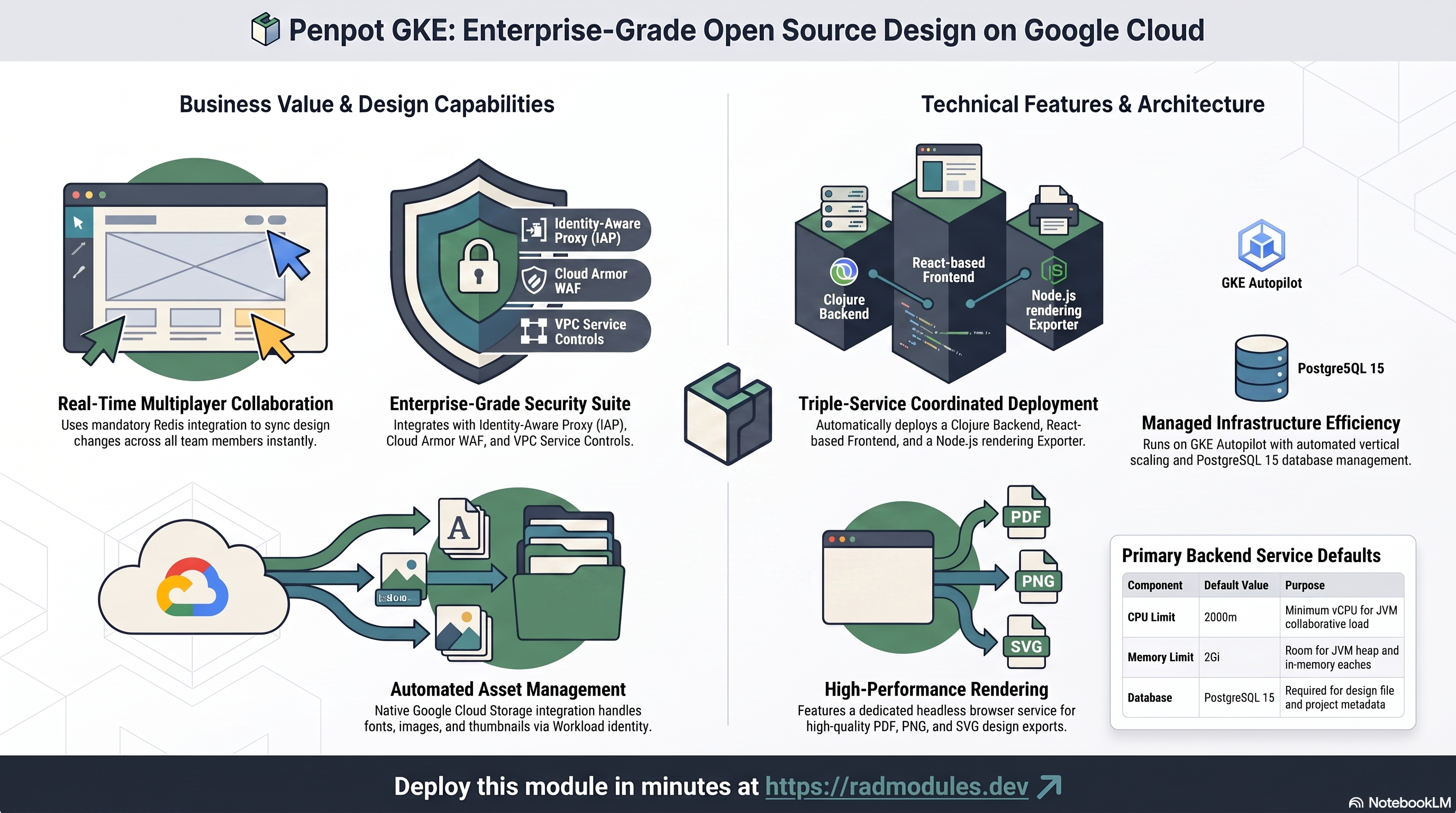
This guide describes every configuration variable available in the Penpot_GKE module. Penpot_GKE is a wrapper module that combines the generic App_GKE infrastructure module with the Penpot_Common shared application configuration to deploy Penpot — an open-source design and prototyping tool — on Google Kubernetes Engine (GKE) Autopilot.
Most configuration options in Penpot GKE map directly to the same options in App GKE. Where a variable is identical in behaviour, this guide references the App GKE guide rather than repeating the same documentation. Only the variables and defaults that are specific to Penpot are described in full here.
Note: Variables marked as platform-managed are set and maintained by the platform. You do not normally need to change them.
What Penpot costs on RAD, and how that compares
For a design team of ten, Penpot on RAD's GKE Autopilot module costs about US$143 a month with no per-user licence. GKE suits a Penpot that must stay up, scale across pods, or run beside other Kubernetes workloads. For the lowest cost, the Cloud Run module runs the same Penpot for about US$99 a month. Figures are as at 8 October 2026; sources are listed at the end of this section.
If you only need it occasionally — studying for a certification, a demo, a seasonal business — a RAD-managed project can be deleted and restored within 30 days for a few credits, so that US$143 becomes a few dollars a month instead. See Pause it for free, below.
What you pay on RAD
| In a Google Cloud project you own | In a project RAD manages for you | |
|---|---|---|
| Module fee, once per deployment | 175 credits (US$17.50 at the top-up price) | 157.5 credits (10% lower) |
| Build time | About 19 credits per build (RAD's average build takes about 19 minutes) | The same |
| Google Cloud running cost | Billed by Google to your own billing account (table below) | Metered hourly in credits; RAD publishes 113 credits a day, about 3,390 credits a month (about US$339 at the top-up price, US$271 at the Scale plan's rate) |
| Who owns what | You own the project and its billing; RAD deploys and updates it | RAD owns the project, with guardrails, quotas and budget alerts; you get console access, and a minimum purchased balance is held in reserve |
10 credits cost US$1 on a one-off top-up, and less on a monthly plan. In a project RAD manages, the database, file server and network are shared by every application in the project, so a second application does not add a second database.
Default running cost in your own project (us-central1, Google list prices):
| Resource (module default) | Per month |
|---|---|
| GKE Autopilot pod, 2x vCPU / 2 GiB | US$72.16 |
| Cloud SQL for PostgreSQL, 1 vCPU / 3.75 GB, zonal, 10 GB SSD | US$51.02 |
| NFS/cache file server (small VM) | US$13.43 |
| Cloud NAT and networking | US$5 |
| Cloud Storage (add-ons, backups) | US$1 |
| GKE cluster management fee | shared across every GKE app in the project; $0 if this is your only cluster, else ~73 |
| Total | about US$143, or about US$216 without the free tier |
- GKE's free tier covers the management fee of one Autopilot or zonal cluster per billing account, so it applies only if this is your only such cluster. Cloud SQL costs the same in africa-south1 (Johannesburg); the pod and VM cost about 10% more there.
- GKE Autopilot does not scale to zero. At least one Penpot pod always runs, so the cost above is the same whether or not anyone is using it; extra pods are added only under load.
- Avoid Filestore for a small deployment. The module uses a small NFS/cache VM by default. Filestore's smallest instance is 1 TiB, which costs about US$164 a month on its own.
How it compares
- Penpot sells its own hosted Unlimited plan: US$7 per editor per month, capped at US$175/month regardless of team size (penpot.app/pricing, 8 October 2026) — about US$70/month for ten editors. A free Professional plan also exists, capped at 8 team members for real-time collaboration.
- RAD's own-project figure above is higher in cash terms because it is dedicated infrastructure — a dedicated Cloud SQL instance and Cloud Run services, plus the mandatory Redis event bus for real-time collaboration — rather than a slice of Penpot's own multi-tenant cloud.
- A bare VPS — Hetzner CPX22 or a DigitalOcean 2 vCPU/4 GB Droplet, both about US$24/month — undercuts both RAD figures, at the cost of running PostgreSQL, Redis, backups and patches yourself.
Pause it for free: delete a RAD-managed project, restore it when you need it
If Penpot runs in a project RAD manages for you, you have a second option that goes well beyond scaling to zero: delete the whole project, and restore it within 30 days for close to nothing. This suits occasional use — studying for a certification, a demo environment, a seasonal business — far better than running Penpot continuously.
- How it works. Deleting a RAD-managed project unlinks its billing first, then asks Google to delete the project. Google does not remove the project immediately: it keeps it, recoverable, for 30 days. Because billing is already unlinked, nothing is charged while it waits. Unlike deleting one module, this does not tear down Cloud SQL, any VM or the GKE cluster one by one — the whole project, and everything in it, simply stops.
- Restoring costs a handful of credits, not a rebuild. Within 30 days, the project's owner can restore it. RAD asks Google to undelete the project and reattaches its billing account, then asks you to run Update on each deployment to confirm everything came back. Because nothing was individually destroyed, that Update finds the same resources already there — it is a check, not a rebuild, and an Update never charges the module fee again. That costs a handful of credits (under US$1) for a typical 2–3-deployment chain, against the 180 credits (US$18) a full redeploy costs below.
- So a month of occasional use can cost a few dollars, not US$143. Deploy Penpot, use it for a while, delete the project. Restore it next time you want it, confirm with Update, and delete it again when you're done. You pay only for the module fee once, the builds, and whatever time Penpot was actually live.
- What this needs. You must own the project (not a bring-your-own one RAD only manages billing for), and you restore it yourself within the 30 days — after that, Google deletes it for good. Restoring is admitted like creating a new project: your purchased credit balance must still clear the tier's floor (100 credits for the sandbox tier most study and demo use fits). Google says most services are fully working again within 36 hours of a restore.
- One real gap: the backup bucket does not survive. Penpot's backups are written to a bucket inside the project, and that bucket is not protected by Cloud Storage's soft-delete, so it is very likely gone as soon as you delete the project — even though the project itself is recoverable for 30 days. If you have made changes to Penpot you want to keep, copy a backup out (to Google Drive, or a bucket outside the project) before you delete, the same as the redeploy workflow below. For a default installation with nothing irreplaceable in it, this does not matter.
Pay only while you use it, the other way: delete and redeploy
GKE Autopilot does not scale to zero between requests. The option above only applies to a RAD-managed project; in your own project, or once the 30-day window has passed, the way to stop paying is to delete the deployment and deploy it again when you need it.
- What a redeploy costs. The module fee again plus the builds: about 180 credits (US$18), because RAD recreates the project and shared services before Penpot. Deleting saves money only once Penpot would otherwise sit unused for about 4 days or more, both in your own project (about US$4.75 a day) and in a RAD-managed one (113 credits a day).
- Most of the running cost is usually the database and the shared file/cache VM. They stop only when nothing else in the project uses them, so deleting Penpot while something else shares the project saves only Penpot's own compute part.
- Keep data first. Backups are written to a bucket inside the deployment and are deleted with it, so copy the latest backup out before deleting if you want to keep it.
- RAD does not recreate a deleted deployment for you; you enter the settings again when you deploy.
Lab sessions and Managed Environments
- Lab sessions, for training. A trainer runs a session for a class. Each participant gets the app in their own Google Cloud project for 15 minutes to 24 hours, within an allowance the trainer sets. Either the trainer funds every place, or each participant pays for their own. Everything is deleted when the session ends and unused credits go back to the trainer.
- Managed Environments, for consultancies. A partner runs the app for a client from a ring-fenced wallet it funds, and settles with the client directly. If the wallet runs low, billing pauses and the data is kept, so nobody receives an unexpected charge. At the end the partner hands the project over and the deployments become the client's own.
Credits can be bought in more than 20 currencies, including XAF, XOF, NGN, GHS, KES and ZAR, by card, bank transfer or mobile money.
Sources (8 October 2026): Google Cloud list prices from the Cloud Billing Catalog API; radmodules.dev/pricing for RAD's own fees and daily-credit estimates; Delete and restore projects for the pause/restore window and what it says about Cloud Storage objects without soft delete; Penpot pricing.
Standard Configuration Reference
The following configuration areas are provided by the underlying App_GKE module. Consult the linked sections of the App_GKE Configuration Guide for full documentation.
| Configuration Area | App GKE.md Section | Penpot-Specific Notes |
|---|---|---|
| Project & Identity | §2 IAM & Access Control | Identical. |
| Application Identity | §3.A Compute (GKE Autopilot) | Penpot-specific defaults; see Group 2: Application Identity. |
| Runtime & Scaling | §3.A Compute (GKE Autopilot) | Penpot-specific defaults for container_port, cpu_limit, memory_limit, and timeout_seconds; see Group 3: Runtime & Scaling. |
| Penpot Application Config | (Penpot-specific) | penpot_flags, jvm_max_heap, jvm_min_heap, public_uri; see Group 5: Penpot Application Configuration. |
| SMTP Configuration | (Penpot-specific) | First-class SMTP variables for invitation emails; see Group 8: SMTP Configuration. |
| Environment Variables & Secrets | §3 Core Service Configuration | One auto-generated secret (PENPOT_SECRET_KEY); see Group 7: Environment Variables & Secrets. |
| Networking & Network Policies | §3.D Networking & Network Policies | Identical. |
| Initialization Jobs & CronJobs | §3.E Initialization Jobs & CronJobs | A default db-init job (from Penpot Common) creates the database and user; Penpot then runs its own schema migrations on startup; see Group 9: Jobs & Scheduled Tasks. |
| Additional Services | §3.F Additional Services | Frontend and exporter are provisioned automatically as additional services; see How Penpot GKE Relates to App GKE. |
| Storage — NFS | §3.C Storage (NFS / GCS / GCS Fuse) | enable_nfs defaults to true; required when no explicit redis_host is provided; see Group 10: Storage & Filesystem — NFS. |
| Storage — GCS | §3.C Storage (NFS / GCS / GCS Fuse) | assets GCS bucket (gcs-<service-name>-assets) provisioned automatically; accessed via Workload Identity ADC; see Group 11: Storage & Filesystem — GCS. |
| Database Configuration | §3.B Database (Cloud SQL) | PostgreSQL 15 required; see Group 12: Database Configuration. |
| Backup Schedule & Retention | §3.B Database (Cloud SQL) | Identical. |
| Custom SQL Scripts | §3.E Initialization Jobs & CronJobs | Identical. |
| Observability & Health Checks | §3.A Compute (GKE Autopilot) | Health checks target /api/health; see Group 14: Observability & Health. |
| Cloud Armor WAF | §4.A Cloud Armor WAF | Identical. |
| Identity-Aware Proxy | §4.B Identity-Aware Proxy (IAP) | Identical. |
| Binary Authorization | §4.C Binary Authorization | Identical. |
| VPC Service Controls | §4.D VPC Service Controls | Identical. |
| Secrets Store CSI Driver | §4.E Secrets Store CSI Driver | Always enabled — no configuration required. |
| Traffic & Ingress | §5 Traffic & Ingress | Identical. |
| CDN | §5.B CDN | Identical. |
| Custom Domain & Static IP | §5.C Static IP Reservation | public_uri must be updated to match the custom domain; see Group 15: Custom Domain & Static IP. |
| Cloud Build Triggers | §6.A Cloud Build Triggers | Identical. |
| Cloud Deploy Pipeline | §6.B Cloud Deploy Pipeline | Identical. |
| Image Mirroring | §6.C Image Mirroring | enable_image_mirroring defaults to true; Penpot images are hosted on Docker Hub. |
| Pod Disruption Budgets | §7.A Pod Disruption Budgets | enable_pod_disruption_budget defaults to false; see Group 15: Reliability Policies. |
| Topology Spread Constraints | §7.B Topology Spread Constraints | Identical. |
| Resource Quotas | §7.C Resource Quotas | Identical. |
| Auto Password Rotation | §7.D Auto Password Rotation | See Group 12: Database Configuration. |
| Redis Cache | §8.A Redis / Memorystore | enable_redis defaults to true — Redis is mandatory for WebSocket pub/sub; see Group 16: Redis (WebSocket Pub/Sub). |
| Backup Import | §8.B Backup Import | See Group 6: Backup & Maintenance. |
| Service Mesh (ASM) | §8.C Service Mesh (ASM via Fleet) | Identical. |
| Multi-Cluster Services | §8.D Multi-Cluster Services (MCS) | enable_multi_cluster_service exists on App_GKE but is not mirrored onto Penpot_GKE — MCS is not configurable for this module. |
How Penpot GKE Relates to App GKE
Penpot GKE passes all variables through to App GKE and adds a Penpot Common sub-module that supplies Penpot-specific defaults and application configuration. The main effects are:
- PostgreSQL 15 is required. Penpot's Clojure backend only supports PostgreSQL.
Penpot Commonhardcodesdatabase_type = "POSTGRES_15"in theconfigit assembles — this is not driven by a variable.Penpot GKEdoes declare its owndatabase_typevariable (default"POSTGRES", mirroringApp_GKE's convention), but it is never forwarded toPenpot CommonorApp_GKE's applied config, so setting it has no effect. - Three coordinated services are deployed. Penpot GKE deploys three separate Kubernetes services working in concert:
- Backend (main workload, port 6060): The Clojure HTTP API, WebSocket server, and job scheduler. Managed by App GKE as the primary deployment.
- Frontend (additional service, Service port
80→ container port8080, Penpot's frontend nginx doesn't listen on 80): An nginx container serving the ClojureScript/React SPA. Proxies/apiand/wsrequests to the backend via its cluster-internal service address. - Exporter (additional service, port 6061): A Node.js + Puppeteer/Chromium headless browser that renders design pages for export to PDF, PNG, and SVG. Chromium navigates to the frontend service to render pages before capture.
- The exporter URI is injected automatically.
PENPOT_EXPORTER_URIis set to the exporter service's cluster-internal URL (http://<service-name>-exporter.<namespace>.svc.cluster.local:6061) at deploy time. You do not need to configure this manually. - Redis is mandatory. All Penpot backend replicas share WebSocket event state via Redis pub/sub (database 0). Without Redis, real-time multiplayer design collaboration breaks immediately when more than one backend replica is running — users on different replicas cannot see each other's changes.
- An
assetsGCS bucket is provisioned automatically.Penpot Commonprovides a bucket (name_suffix = "assets", full namegcs-<service-name>-assets) for design assets (fonts, images, thumbnails, file uploads). The backend reads and writes this bucket using Workload Identity ADC — no explicit credentials are required. public_uriis automatically set to the predicted service URL. The predicted URL is passed toPenpot Commonaspublic_uri. For custom domain deployments, you must overridepublic_uriviaenvironment_variablesto match the URL users access, so that the frontend SPA, backend links, and exporter navigation all use the correct base URL.- One application-level secret is auto-generated.
Penpot CommoncreatesPENPOT_SECRET_KEY— a 64-character random value stored in Secret Manager assecret-<prefix>-penpot-key— the shared JWT signing key used by both the backend and the exporter. It is injected as a secret environment variable viamodule_secret_env_vars = module.penpot_app.secret_ids, and the exporter additionally references it directly (secret_env_vars = { PENPOT_SECRET_KEY = "PENPOT_SECRET_KEY" }) since its config schema requires:secret-keyor the container exits on startup. TheDB_PASSWORDsecret is provisioned automatically byApp GKE. - JVM heap sizing. The Clojure backend runs on the JVM.
jvm_max_heapandjvm_min_heapcontrol the JVM heap allocation and should be sized relative tomemory_limit. timeout_secondsdefaults to 3600 seconds. Large export operations (PDF/PNG of complex designs) can take several minutes. The maximum 3600-second timeout accommodates even very large export jobs.
Group 1: Project & Identity
Identical to App_GKE. See App_GKE.
| Variable | Default | Description |
|---|---|---|
project_id | (required) | GCP project ID. |
region | "us-central1" | GCP region for resource deployment. Used as fallback when network discovery cannot determine the region from existing VPC subnets. Also used as the location for the assets GCS bucket. |
Group 2: Application Identity
These variables behave identically to App_GKE. See App_GKE for descriptions.
Penpot-specific defaults:
| Variable | Penpot GKE Default | App GKE Default | Notes |
|---|---|---|---|
application_name | "penpot" | "gkeapp" | Used as the base name for all GCP and Kubernetes resources. The frontend service is named <application_name>-frontend and the exporter <application_name>-exporter. Do not change after deployment. |
display_name | "Penpot - Open Source Design Tool" | "App GKE Application" | Shown in the platform UI and dashboards. Can be changed freely. |
description | "Penpot - Open-source design and prototyping tool for teams" | "App GKE Custom Application…" | Descriptive label. Can be changed freely. |
application_version | "latest" | "1.0.0" | Version tag applied to all three Penpot container images (backend, frontend, exporter). All three images must use the same version tag to ensure API compatibility — do not mix versions between services. Pin to a specific version (e.g., "2.3.0") for production. |
Group 3: Runtime & Scaling
Most variables behave identically to App_GKE. See App_GKE Group 4.
Penpot-specific defaults and behaviour:
Note: The scaling variables (
min_instance_count,max_instance_count) and resource variables (cpu_limit,memory_limit) apply to the backend service. The frontend and exporter services have their own resource limits defined internally:
- Frontend:
1000mCPU,512Mimemory, scales withmin_instance_count/max_instance_count- Exporter:
2000mCPU,2Gimemory, minimum 1 replica, scales tomax_instance_count
| Variable | Penpot GKE Default | App GKE Default | Notes |
|---|---|---|---|
container_port | 6060 | 8080 | Penpot backend Clojure HTTP + WebSocket port. Do not change — the frontend nginx proxy config is hardcoded to connect to the backend on this port via the cluster-internal service address. |
cpu_limit | "2000m" | "1000m" | 2 vCPU is the minimum for the JVM backend under collaborative load. The JVM itself requires roughly 500m at idle; concurrent WebSocket connections and design file operations require additional headroom. |
memory_limit | "2Gi" | "512Mi" | The JVM requires more memory headroom than typical Node.js or Python applications. With jvm_max_heap = "1g", the container needs at least 1.5 Gi to accommodate JVM overhead, OS, and Penpot's in-memory file caches. 2 Gi is the recommended minimum; increase to 4 Gi for large teams or complex design files. |
min_instance_count | 1 | 1 | Always at least one pod running. Scale-to-zero causes WebSocket disconnections for active collaborators and a JVM cold-start delay of 60–120 seconds. |
max_instance_count | 3 | 3 | Maximum backend replicas. All replicas share design state via Redis — horizontal scaling is safe. |
timeout_seconds | 3600 | 300 | Maximum timeout to accommodate large export operations (PDF/PNG of complex multi-page designs). The maximum allowed value is 3600 seconds. |
enable_cloudsql_volume | true | true | Cloud SQL Auth Proxy sidecar is required. The Penpot backend connects to PostgreSQL via the Auth Proxy Unix socket. |
enable_image_mirroring | true | true | Penpot images are hosted on Docker Hub. Mirroring to Artifact Registry avoids rate limits and satisfies Binary Authorization requirements. Applied to the backend image; the frontend and exporter images are also mirrored automatically. |
The remaining runtime variables (deploy_application, container_image, container_build_config, enable_vertical_pod_autoscaling, container_protocol, container_resources, cloudsql_volume_mount_path, service_annotations, service_labels) behave as described in App_GKE Group 4.
Group 4: Access & Networking
These variables behave identically to App_GKE. See App_GKE, App_GKE, and App_GKE.
| Variable | Default | Description |
|---|---|---|
enable_iap | false | Enables Identity-Aware Proxy authentication on the load balancer. |
iap_authorized_users | [] | Individual users or service accounts granted IAP access. |
iap_authorized_groups | [] | Google Groups granted IAP access. |
iap_oauth_client_id | "" | OAuth client ID for IAP configuration. |
iap_oauth_client_secret | "" | OAuth client secret for IAP configuration. |
enable_custom_domain | true | Configures Ingress/Gateway for custom domain routing with managed SSL certificates. Enabled by default — a Gateway with a static IP is provisioned automatically. When using a custom domain, update PENPOT_PUBLIC_URI in environment_variables to match the domain. |
application_domains | [] | Custom domain names (e.g. ["penpot.example.com"]). |
reserve_static_ip | true | Reserves a Global Static IP for the load balancer. Recommended when using a custom domain. |
static_ip_name | "" | Name for the reserved IP; auto-generated if blank. |
network_tags | ["nfsserver"] | Firewall tags applied to GKE cluster nodes. The nfsserver tag is required for NFS connectivity. |
enable_cloud_armor | false | Enables a Cloud Armor WAF security policy. |
admin_ip_ranges | [] | Admin CIDR ranges permitted through Cloud Armor. |
cloud_armor_policy_name | "default-waf-policy" | Name of the Cloud Armor security policy to attach. |
enable_vpc_sc | false | Enables VPC Service Controls perimeter enforcement. |
enable_cdn | false | Enables Cloud CDN on the load balancer. |
Group 5: Penpot Application Configuration
These variables are specific to Penpot and are passed directly to Penpot Common. They control the Clojure backend's runtime behaviour and JVM resource allocation.
| Variable | Default | Options / Format | Description & Implications |
|---|---|---|---|
penpot_flags | "enable-registration enable-login disable-demo-users" | Space-separated flag strings | Space-separated Penpot feature flags that control which features and authentication methods are active. The same flags string is passed to both the backend and the frontend nginx container so that the SPA's feature rendering matches the backend's capabilities. Key flags: enable-registration (allow self-registration), disable-registration (require admin-created invitations), enable-login-with-password (standard username/password login), disable-demo-users (disable the demo account accessible without sign-up), enable-oidc (enable generic OIDC provider), enable-google-login, enable-github-login. Flags are applied at startup — changing them requires a pod restart. |
jvm_max_heap | "1g" | JVM heap size string (e.g. "1g", "2g", "512m") | JVM maximum heap size for the Penpot backend. Should be set to roughly half of memory_limit to leave headroom for JVM overhead, Netty/HttpKit off-heap buffers, and OS. For a 2 Gi container, "1g" is appropriate. For a 4 Gi container, use "2g". Setting jvm_max_heap close to memory_limit risks OOM kills from off-heap memory growth. |
jvm_min_heap | "512m" | JVM heap size string | JVM initial heap size. Controls how much heap the JVM reserves at startup. A higher jvm_min_heap reduces the frequency of JVM heap expansion pauses but increases the pod's baseline memory footprint. For production deployments, setting jvm_min_heap equal to jvm_max_heap eliminates all heap resizing pauses at the cost of a higher constant memory reservation. |
Validating Group 5 Settings
Google Cloud Console:
- GKE Workloads: Navigate to Kubernetes Engine → Workloads, select the Penpot backend deployment, and verify environment variables include
PENPOT_FLAGS,JVM_MAX_HEAP, andJVM_MIN_HEAP.
gcloud CLI / kubectl:
# Confirm Penpot feature flags are set in the backend pod
kubectl exec -n NAMESPACE POD_NAME -- env | grep PENPOT_FLAGS

# Check JVM heap settings
kubectl exec -n NAMESPACE POD_NAME -- env | grep JVM

# View backend startup logs to confirm JVM initialisation and flag parsing
kubectl logs -n NAMESPACE POD_NAME --since=5m | grep -i "flags\|heap\|migration\|started"
Group 6: Backup & Maintenance
These variables behave identically to App_GKE. See App_GKE.
Penpot-specific defaults:
| Variable | Default | Notes |
|---|---|---|
backup_schedule | "0 2 * * *" | Daily at 02:00 UTC. Adjust to match your Recovery Point Objective. |
backup_retention_days | 7 | 7-day retention. Increase for production deployments; design files and project history are irreplaceable. |
Backup Import — Penpot GKE supports importing an existing database backup on first deployment:
| Variable | Default | Description |
|---|---|---|
enable_backup_import | false | When true, runs a one-time import job during deployment to restore the backup specified by backup_uri. |
backup_source | "gcs" | Source system for the backup file. "gcs" imports from a Cloud Storage URI; "gdrive" imports from a Google Drive file ID. |
backup_uri | "" | Full GCS URI (e.g. "gs://my-bucket/backups/penpot.sql") or Google Drive file ID. |
backup_file | "backup.sql" | Filename of a backup already placed in the module-managed backups bucket. Only used when enable_backup_import = true. |
backup_format | "sql" | Format of the backup file. Supported values: sql, tar, gz, tgz, tar.gz, zip, auto. |
Note: A backup import restores the PostgreSQL database only. Design asset files stored in the GCS
assetsbucket (gcs-<service-name>-assets) must be migrated separately — copy them into the assets bucket after the database restore completes.
Group 7: Environment Variables & Secrets
These variables behave identically to App_GKE. See App_GKE.
One application-level secret is auto-generated. Penpot Common creates PENPOT_SECRET_KEY (a 64-character random value stored in Secret Manager as secret-<prefix>-penpot-key) — the shared JWT signing key used by the backend and the exporter. It is exposed via the secret_ids output and wired in as module_secret_env_vars; the exporter additionally references it directly since its config schema requires :secret-key. Penpot does not otherwise create admin passwords or other application secrets. The database password (DB_PASSWORD) is provisioned automatically by App GKE.
PENPOT_PUBLIC_URI is injected automatically by the module using the predicted service URL. To override it (for example, when using a custom domain), set it explicitly in environment_variables:
environment_variables = {
  PENPOT_PUBLIC_URI = "https://penpot.example.com"
}
PENPOT_EXPORTER_URI is injected automatically by the penpot.tf local block. It is set to the exporter service's cluster-internal URL. Do not override this unless you are deploying a custom exporter at a different address.
The standard variables (environment_variables, secret_environment_variables, secret_rotation_period, secret_propagation_delay, manage_storage_kms_iam) behave as described in App_GKE.
Group 8: SMTP Configuration
Penpot uses SMTP for invitation emails (inviting team members to a Penpot organisation) and password reset notifications. SMTP is optional — without it, Penpot still functions fully for invited users and login, but invitation emails and password reset emails cannot be sent.
| Variable | Default | Description |
|---|---|---|
smtp_enabled | false | Enable SMTP email sending. When false, all invitation and notification emails are silently discarded. |
smtp_from | "" | Sender email address shown in outbound emails (e.g. "noreply@example.com"). |
smtp_reply_to | "" | Reply-to email address for outbound emails. Leave empty to use smtp_from. |
smtp_host | "" | SMTP server hostname (e.g. "smtp.mailgun.org", "smtp.sendgrid.net"). Required when smtp_enabled = true. |
smtp_port | 587 | SMTP server port. 587 is the standard STARTTLS port. Use 465 for SSL/TLS, 25 for unencrypted (not recommended). |
smtp_username | "" | SMTP authentication username. |
smtp_use_tls | true | Enable STARTTLS negotiation. Recommended for port 587. |
smtp_use_ssl | false | Enable direct SSL/TLS. Use for port 465. Mutually exclusive with smtp_use_tls. |
SMTP password: The SMTP password is not a top-level variable. Add it via
secret_environment_variablesto keep it out of Terraform state:secret_environment_variables = {
PENPOT_SMTP_PASSWORD = "your-smtp-password-secret-name"
}
Validating SMTP Settings
gcloud CLI / kubectl:
# Confirm SMTP environment variables are set in the backend pod
kubectl exec -n NAMESPACE POD_NAME -- env | grep -i smtp

# Check backend logs for SMTP configuration confirmation
kubectl logs -n NAMESPACE POD_NAME | grep -i "smtp\|email\|mail"
Group 9: Jobs & Scheduled Tasks
These variables behave as described in App_GKE.
Default db-init job: When initialization_jobs is empty (the default), Penpot Common supplies a db-init Kubernetes Job (image postgres:15-alpine, script scripts/db-init.sh, execute_on_apply = true) that creates the PostgreSQL database and application user. Penpot's Clojure application then handles schema creation and migration internally on backend startup, before accepting HTTP or WebSocket connections. Supplying a non-empty initialization_jobs list replaces the default job.
CronJobs:
The cron_jobs variable is available for custom scheduled tasks such as batch export jobs or analytics processing. See App_GKE for full schema documentation.
Note: GKE CronJobs use
restart_policy,concurrency_policy,failed_jobs_history_limit,successful_jobs_history_limit,starting_deadline_seconds, andsuspendfields. The Cloud Run–style fields (parallelism,paused,max_retries,task_count) are not available.
Additional services: The frontend and exporter are provisioned automatically — you do not need to add them via additional_services. The additional_services variable is available for any extra services beyond the standard three (for example, a custom webhook processor or a metrics exporter sidecar service).
Group 10: Storage & Filesystem — NFS
These variables behave identically to App_GKE. See App_GKE.
Penpot-specific defaults:
| Variable | Default | Notes |
|---|---|---|
enable_nfs | true | NFS storage is enabled by default. When enable_redis = true and no external redis_host is provided, the module uses the NFS server IP as the Redis host. If you disable NFS, you must provide an explicit redis_host — without Redis, real-time collaboration is unavailable. |
nfs_mount_path | "/mnt/nfs" | The path where the NFS volume is mounted inside the container. Penpot does not use NFS for application storage directly — NFS in this module primarily co-hosts the Redis process used for WebSocket pub/sub. |
Group 11: Storage & Filesystem — GCS
These variables behave identically to App_GKE. See App_GKE Group 14.
Penpot-specific auto-provisioned bucket:
Penpot Common automatically provisions a GCS bucket (name_suffix = "assets", full name gcs-<service-name>-assets) for design asset storage. Unlike Paperless-ngx (which uses GCS FUSE for document storage), Penpot's Clojure backend accesses this bucket natively via Workload Identity ADC — no GCS FUSE volume mount is required. The backend uses the GCS Java SDK to read and write design assets directly.
| Bucket | name_suffix | Access Method | Purpose |
|---|---|---|---|
| Auto-provisioned | assets | Workload Identity ADC (GCS SDK) | Design assets: fonts, images, thumbnails, file uploads |
The following environment variables are injected automatically by Penpot Common:
PENPOT_STORAGE_BACKEND=gcs— directs Penpot to use GCS as the asset storage backendPENPOT_STORAGE_GCS_BUCKET_NAME— set to the provisioned bucket name
You do not need to configure GCS credentials manually. The backend's Kubernetes Service Account is bound to a GCP Service Account with Storage Object Admin permissions on the assets bucket via Workload Identity.
The create_cloud_storage, storage_buckets, gcs_volumes, manage_storage_kms_iam, enable_artifact_registry_cmek, max_images_to_retain, delete_untagged_images, and image_retention_days variables behave as described in App_GKE Group 14.
Group 12: Database Configuration
These variables behave identically to App_GKE. See App_GKE.
Penpot-specific defaults and restrictions:
| Variable | Penpot GKE Default | App GKE Default | Notes |
|---|---|---|---|
db_name | "penpot" | "gkeappdb" | Name of the PostgreSQL database created for Penpot. Immutable after deployment — changing this value recreates the database and destroys all Penpot projects, design files, and team data. |
db_user | "penpot" | "gkeappuser" | PostgreSQL user for Penpot. Immutable after deployment. |
database_password_length | 32 | 32 | Length of the auto-generated database password. Valid range: 16–64 characters. |
Important: Penpot requires PostgreSQL. The
database_typevariable declared onPenpot_GKEis present only for Foundation-variable-mirroring convention (default"POSTGRES") — it is never forwarded toPenpot CommonorApp_GKE, so setting it has no effect. The database engine actually provisioned is alwaysPOSTGRES_15, hardcoded insidePenpot Common.
Cloud SQL instance discovery:
| Variable | Default | Description |
|---|---|---|
sql_instance_name | "" | Name of an existing Cloud SQL instance to use. Leave empty to auto-discover a Services GCP-managed instance or create an inline instance. |
sql_instance_base_name | "app-sql" | Base name for the inline Cloud SQL instance when no existing instance is found. Deployment ID is appended. |
Automatic password rotation:
| Variable | Default | Description |
|---|---|---|
enable_auto_password_rotation | false | Deploys an automated database password rotation job. When true, the database password is rotated on the schedule defined by secret_rotation_period and GKE pods are restarted to pick up the new credential. |
rotation_propagation_delay_sec | 90 | Seconds to wait after rotation before restarting pods. |
Group 13: Custom SQL Scripts
Identical to App_GKE. See App_GKE.
Available variables: enable_custom_sql_scripts, custom_sql_scripts_bucket, custom_sql_scripts_path, custom_sql_scripts_use_root.
Group 14: Observability & Health
These variables behave identically to App_GKE. See App_GKE.
Penpot-specific defaults:
Penpot's Clojure backend runs JVM initialisation and PostgreSQL migrations during startup. The first boot after a fresh deployment can take 60–120 seconds before the backend accepts HTTP connections.
Health probe routing
Penpot GKE exposes two parallel sets of probe variables that configure Kubernetes probes via different routing paths:
| Variable set | Passed to | Configures |
|---|---|---|
startup_probe, liveness_probe | Penpot Common sub-module | The application container's Kubernetes probe spec (initialDelaySeconds, path, failureThreshold, etc.) |
startup_probe_config, health_check_config | App GKE directly | The App GKE-standard probe configuration used for load balancer health checks and GKE infrastructure probes |
These are parallel paths, not aliases. Changing startup_probe does not affect startup_probe_config, and vice versa.
Startup probe (startup_probe → Penpot Common):
| Field | Penpot Default | Notes |
|---|---|---|
type | "TCP" | TCP probe on the backend port (6060). Deliberately not HTTP /api/health — the Penpot backend has no /api/health endpoint (that path 404s; the real one is /readyz), so an HTTP probe would restart-loop a healthy backend. |
path | "/api/health" | Present in the object but ignored for a TCP probe. |
initial_delay_seconds | 30 | Allows 30 seconds before the first probe attempt. The JVM starts quickly; the initial delay accommodates schema migration time. |
timeout_seconds | 10 | Probe timeout per attempt. |
period_seconds | 10 | Probe interval. |
failure_threshold | 30 | Up to 300 seconds (30 × 10s) of startup allowance before the pod is restarted. |
Liveness probe (liveness_probe → Penpot Common):
| Field | Penpot Default | Notes |
|---|---|---|
type | "TCP" | TCP probe on port 6060. Deliberately not HTTP /api/health (that path 404s on the Penpot backend, which would restart-loop a healthy pod). |
path | "/api/health" | Present in the object but ignored for a TCP probe. |
initial_delay_seconds | 60 | Gives the backend additional time to stabilise before liveness checks begin. |
period_seconds | 30 | Less frequent than startup probe — appropriate for a stable running service. |
failure_threshold | 3 | Three consecutive failures trigger a pod restart. |
App GKE-standard probes (startup_probe_config, health_check_config → App GKE):
| Variable | Penpot Default | Notes |
|---|---|---|
startup_probe_config | { enabled = true, type = "TCP", timeout_seconds = 240, period_seconds = 240, failure_threshold = 1 } | TCP probe on container_port (6060). Allows up to 240 seconds for startup. |
health_check_config | { enabled = true, type = "HTTP", path = "/api/health" } | HTTP GET against /api/health. Penpot's dedicated health endpoint. |
uptime_check_config: Defaults to { enabled = false, path = "/api/health" } — uptime checks are disabled by default. Enable explicitly for production monitoring. If the Penpot backend is not publicly accessible (e.g. behind IAP), uptime checks must use a Google-reachable endpoint or be configured via VPC-internal monitoring.
Validating Health Probes
gcloud CLI / kubectl:
# Check startup probe status from pod events
kubectl describe pod -n NAMESPACE POD_NAME | grep -A5 "Startup Probe"

# Manually test the health endpoint from inside the pod
kubectl exec -n NAMESPACE POD_NAME -- \
  wget -qO- http://localhost:6060/api/health

# Check the frontend service health
kubectl exec -n NAMESPACE FRONTEND_POD_NAME -- \
  wget -qO- http://localhost:80/
Group 15: Reliability Policies
These variables behave identically to App_GKE. See App_GKE.
Penpot-specific defaults:
| Variable | Penpot GKE Default | Notes |
|---|---|---|
enable_pod_disruption_budget | false | PDB is disabled by default. Enable for production deployments — without a PDB, node maintenance can terminate all backend replicas simultaneously, disconnecting all active collaborators and potentially corrupting in-flight design edits. |
pdb_min_available | 1 | At least one backend pod must remain available during voluntary disruptions. Requires at least 2 replicas (min_instance_count >= 2) to be effective. |
Available variables: enable_pod_disruption_budget, pdb_min_available, enable_topology_spread, topology_spread_strict.
Group 15: Custom Domain & Static IP
Identical to App_GKE. See App_GKE.
public_uriand custom domains: Penpot must know its public URL at startup.PENPOT_PUBLIC_URIis injected automatically using the predicted service URL. When using a custom domain, setPENPOT_PUBLIC_URIexplicitly viaenvironment_variablesto match the domain inapplication_domains. Penpot usespublic_urito:
- Generate invitation links sent in email notifications
- Configure the frontend SPA's backend API base URL
- Provide the correct URL to the exporter's headless Chromium for page rendering
An incorrect
public_uribreaks invitation emails, export rendering, and any absolute URLs embedded in design files.
Group 16: Redis (WebSocket Pub/Sub)
These variables configure Penpot's Redis integration. The underlying Redis infrastructure support is provided by App_GKE (see App_GKE). Redis is mandatory for Penpot — it is the WebSocket pub/sub event bus that synchronises real-time design changes between all connected users across all backend replicas.
Note: In
Penpot GKE, the Redis variables are in group 21.
| Variable | Default | Options / Format | Description & Implications |
|---|---|---|---|
enable_redis | true | true / false | Enables Redis as Penpot's WebSocket pub/sub event bus. Must remain true for real-time collaboration to function. When true and redis_host is blank, the module defaults to using the NFS server IP as the Redis host. Without Redis, any deployment with more than one backend replica will exhibit split-brain behaviour — users on different replicas cannot see each other's design changes. With a single replica, Penpot's in-process event bus is used, but this breaks on any pod restart or rolling update. |
redis_host | "" (defaults to NFS server IP) | Hostname or IP address | The hostname or IP address of the Redis server. Leave blank to use the automatically discovered NFS server IP. Override with an explicit IP or hostname when using a dedicated Redis instance — such as Google Cloud Memorystore for Redis — for higher availability and throughput. Example: "10.128.0.10". |
redis_port | "6379" | Port number string | The TCP port on which the Redis server is listening. The default 6379 is the standard Redis port. |
redis_auth | "" | String (sensitive) | Authentication password for the Redis server. Leave empty if the Redis instance does not require authentication. For Google Cloud Memorystore with AUTH enabled, set this to the instance's AUTH string. This value is treated as sensitive. |
Validating Redis Settings
Google Cloud Console:
- Memorystore instance (if used): Navigate to Memorystore → Redis to confirm the instance exists, its IP address, port, and AUTH status.
- GKE pod environment: Navigate to Kubernetes Engine → Workloads, select the Penpot backend deployment, and check the pod's environment variables for
PENPOT_REDIS_URI.
gcloud CLI / kubectl:
# List Memorystore Redis instances in the project (if using Memorystore)
gcloud redis instances list \
  --region=REGION \
  --project=PROJECT_ID \
  --format="table(name,host,port,state,memorySizeGb,authEnabled)"

# Confirm the Redis URI is set in the Penpot backend pod
kubectl exec -n NAMESPACE POD_NAME -- env | grep PENPOT_REDIS

# Test Redis connectivity from inside the Penpot backend pod
kubectl exec -n NAMESPACE POD_NAME -- \
  nc -zv REDIS_HOST 6379

# Check Penpot backend logs for Redis connection confirmation
kubectl logs -n NAMESPACE POD_NAME | grep -i "redis\|connected\|pub/sub"
Group 17: GKE Backend Configuration
Identical to App_GKE. See App_GKE.
Penpot-specific defaults:
| Variable | Penpot GKE Default | Notes |
|---|---|---|
session_affinity | "ClientIP" | Recommended for WebSocket stability. With "None", WebSocket upgrade requests and subsequent WebSocket frames may be routed to different backend replicas — this can interrupt active collaboration sessions. "ClientIP" ensures a user's WebSocket connection always reaches the same backend pod. |
service_type | "LoadBalancer" | Exposes the Penpot backend via a Google Cloud Load Balancer. The frontend service (ingress = "INGRESS_TRAFFIC_ALL") is also exposed externally and receives user browser traffic directly. The exporter service (ingress = "INGRESS_TRAFFIC_INTERNAL_ONLY") is cluster-internal only. |
termination_grace_period_seconds | 60 | Allows in-flight WebSocket sessions and export operations to drain before the pod is terminated. Consider increasing to 120+ seconds for teams that frequently use the PDF/PNG export feature. |
Available variables: gke_cluster_name, namespace_name, workload_type, service_type, session_affinity, configure_service_mesh, enable_network_segmentation, termination_grace_period_seconds, deployment_timeout, network_name, prereq_subnet_cidr_override. (enable_multi_cluster_service and gke_cluster_selection_mode exist on App_GKE but are not mirrored onto Penpot_GKE.)
Group 18: Stateful Workloads
Identical to App_GKE. See the StatefulSet configuration described in App_GKE.
Setting stateful_pvc_enabled = true automatically selects workload_type = "StatefulSet". Penpot's design asset storage is backed by GCS, so a per-pod PVC is not required for design data durability. A StatefulSet with PVC may be useful for storing local JVM heap dumps or persistent Penpot internal caches between restarts.
| Variable | Default | Notes |
|---|---|---|
stateful_pvc_enabled | null | Set to true to enable StatefulSet with per-pod PVC. |
stateful_pvc_size | "10Gi" | Initial PVC size. |
stateful_pvc_mount_path | "/data" | Container path where the per-pod PVC is mounted. |
stateful_pvc_storage_class | "standard-rwo" | StorageClass for the PVC. |
stateful_headless_service | null | Create a headless service for stable pod DNS identities. |
stateful_pod_management_policy | null | "OrderedReady" or "Parallel". |
stateful_update_strategy | null | "RollingUpdate" or "OnDelete". |
stateful_fs_group | null | GID for the pod-level fsGroup in the security context. |
Module Outputs
Penpot GKE exposes the following Terraform outputs:
| Output | Description |
|---|---|
service_name | Name of the primary Kubernetes service (backend) |
service_cluster_ip | In-cluster ClusterIP of the primary Kubernetes service |
frontend_url | External URL of the Penpot frontend |
backend_cluster_url | In-cluster URL of the Penpot backend service |
exporter_cluster_url | In-cluster URL of the Penpot exporter service |
service_external_ip | External IP address of the load balancer |
project_id | GCP project ID |
deployment_id | Deployment ID suffix |
namespace | Kubernetes namespace |
database_instance_name | Name of the Cloud SQL instance |
database_name | Name of the application database |
database_user | Name of the application database user |
database_password_secret | Secret Manager secret name for the database password |
storage_buckets | Created GCS storage buckets (includes the auto-provisioned assets bucket) |
container_image | Backend container image used for the deployment |
cicd_enabled | Whether the CI/CD pipeline is enabled |
github_repository_url | GitHub repository URL connected for CI/CD |
kubernetes_ready | true when the GKE cluster endpoint is reachable and all Kubernetes workload resources are deployed. false on the first apply of a new inline cluster — re-run apply to complete the deployment. |
Configuration Pitfalls & Sensible Defaults
Risk levels: Critical (data loss, full outage, security breach) — High (service unavailable or significant degradation) — Medium (degraded function or increased cost) — Low (minor impact).
| Variable | Sensible Default | Risk | Consequence of Incorrect Value |
|---|---|---|---|
project_id | (required) | Critical | No default — deployment fails immediately. |
enable_redis | true | Critical | Redis is the WebSocket pub/sub bus. Disabling it causes real-time collaboration to break immediately with more than one backend replica. Split-brain: users on different replicas cannot see each other's design changes. |
redis_host | "" | High | Auto-resolves to NFS IP. If NFS is disabled and no explicit host is given, Penpot's Redis connection fails at startup and the backend refuses to start. |
enable_nfs | true | High | Required when redis_host is blank. Disabling NFS without providing an explicit Redis host causes backend startup failure. |
container_port | 6060 | Critical | Penpot backend listens on 6060. Changing this without matching the container's bound port causes all health probes and the frontend nginx proxy to fail immediately. |
memory_limit | "2Gi" | High | JVM requires headroom beyond jvm_max_heap. Setting memory_limit equal to jvm_max_heap leaves no room for off-heap memory (Netty buffers, GC overhead) and causes OOM kills. Always set memory_limit to at least 1.5× jvm_max_heap. |
jvm_max_heap | "1g" | High | Setting jvm_max_heap above memory_limit causes immediate OOM kill at JVM startup. Setting it too low causes excessive garbage collection under load, reducing WebSocket responsiveness and throughput. |
timeout_seconds | 3600 | Medium | Large PDF/PNG exports of complex multi-page designs can take several minutes. Reducing this below 120 seconds causes export jobs to time out and return an error to the user. |
session_affinity | "ClientIP" | High | Without session affinity, WebSocket upgrade requests and their subsequent frames may be routed to different backend replicas. Active collaboration sessions experience disconnections and event loss. |
penpot_flags | "enable-registration enable-login disable-demo-users" | Medium | Incorrect flags can disable login entirely (e.g. removing enable-login-with-password without configuring OIDC) or open registration to the public unexpectedly (removing disable-registration on an internet-facing deployment). |
public_uri (via environment_variables) | (auto-predicted) | High | Must match the actual URL users use to access Penpot. Incorrect public_uri breaks invitation email links, OIDC redirects, and the exporter's headless Chromium navigation — exported PDFs and PNGs will be blank or fail. |
db_name | "penpot" | Critical | Immutable after deployment — changing this recreates the database and destroys all Penpot projects, design files, components, and team data. |
db_user | "penpot" | Critical | Immutable after deployment — changing this recreates the user, invalidates credentials, and breaks Penpot's database connection. |
application_version | "latest" | High | All three service images (backend, frontend, exporter) must use the same version tag. Mismatched versions between backend and frontend can cause API incompatibilities that break the web UI. Pin to a specific version for production. |
backup_retention_days | 7 | Medium | Insufficient for design teams with strict data recovery requirements. Increase to 30+ days for production deployments with active design work that cannot be recreated. |
quota_memory_requests / quota_memory_limits | "" | Critical (GKE-specific) | Must use binary suffixes (Gi, Mi) when set. Bare integers are treated as bytes and prevent all pods from being scheduled — this affects all three Penpot services simultaneously. |
enable_pod_disruption_budget | false | High | Without a PDB, node maintenance can terminate all backend replicas simultaneously, disconnecting all active collaborators and potentially causing unsaved design changes to be lost. Enable for any production deployment with active users. |
smtp_enabled | false | Medium | Without SMTP, invitation emails cannot be sent. Team onboarding requires sharing login credentials manually or using an OIDC provider. Password reset is also unavailable without SMTP. |
Related guides
- Hands-on lab: Penpot on GKE Autopilot — deploy it step by step, with the console screens and commands at each stage.
- Penpot on Google Cloud Run — the same application on Cloud Run, for when you need the other deployment target.
- Penpot Common Shared Configuration Module — the configuration shared by both deployment targets.
Need RAD to do something it does not do yet? Request it on the roadmap, or vote on what is already there.