Certification track: Associate Cloud Engineer (ACE)
Formbricks on Google Cloud Run
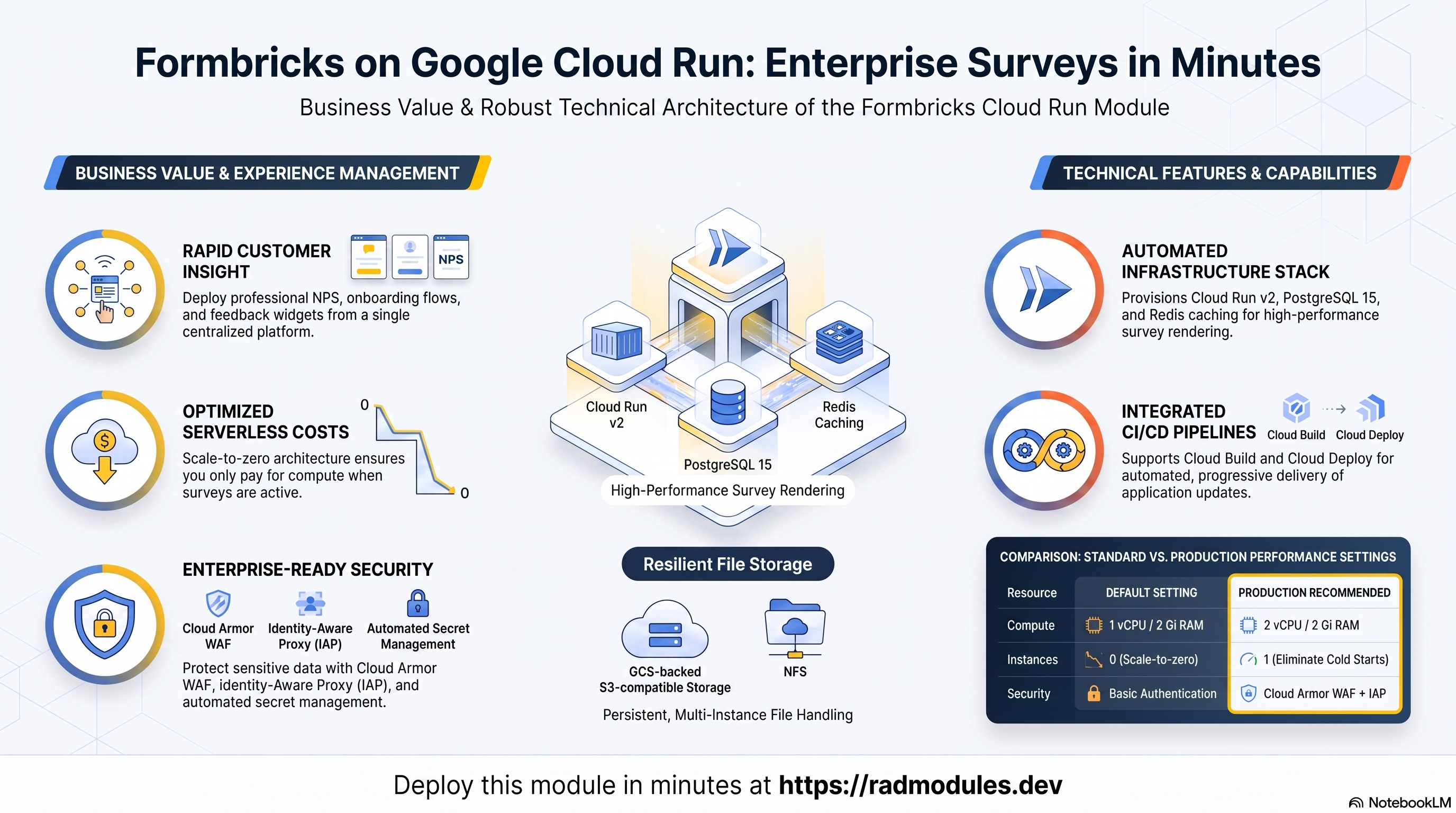
This document provides a comprehensive reference for the modules/Formbricks_CloudRun module. It covers architecture, IAM, configuration variables, Formbricks-specific behaviours, and operational patterns for deploying Formbricks on Google Cloud Run (v2).
What Formbricks costs on RAD, and how that compares
Running Formbricks in your own Google Cloud project costs about US$83.61/month in Google Cloud charges, on top of a one-time 110-credit RAD module fee (99 credits — 10% lower — in a RAD-managed project). Formbricks is an open-source survey and experience management platform. If you deploy into a RAD-managed project, you can pause the whole thing for free and pick it back up later — see "Pause it for free" below.
Formbricks is also available on GKE — see the GKE guide if you need Kubernetes-based orchestration; this guide covers the lower-cost Cloud Run option.
What you pay on RAD
| Own project | RAD-managed project | |
|---|---|---|
| Module fee | 110 credits (one-time) | 99 credits (one-time, 10% lower) |
| Build time | ~3–6 credits (one-time, per build) | ~3–6 credits (one-time, per build) |
| Google Cloud running cost | ~US$83.61/month, billed to your own Google billing account at list price | ~32 credits/day (~US$3.20/day), metered hourly at list price plus RAD's margin |
Default running cost in your own project
| Resource | US$/month (Google list price, us-central1) |
|---|---|
| Cloud Run, 1x vCPU / 2 GiB (scaleToZero) | US$13.16 |
| Cloud SQL for PostgreSQL, 1 vCPU / 3.75 GB, zonal, 10 GB SSD | US$51.02 |
| NFS/cache file server (small VM) | US$13.43 |
| Cloud NAT and networking | US$5 |
| Cloud Storage (add-ons, backups) | US$1 |
| Total | US$83.61 |
How it compares
- Formbricks Cloud's cheapest paid plan, Pro, is US$74/month (3 workspaces, 2,000 monthly responses, unlimited seats) — verified at https://formbricks.com/pricing. That undercuts RAD's ~US$83.61/month Google Cloud bill for the Cloud Run variant on sticker price alone, but it caps usage; RAD's instance is uncapped, self-hosted, and the data never leaves your own project.
- The honest trade here is cap vs. control, not price: a managed SaaS plan is cheaper at this scale, and RAD's running cost is what real Cloud SQL, compute and networking actually cost at Google's list price with nothing hidden in a bundled seat price.
- RAD is not claiming to be cheaper than a bare VPS in cash terms — it usually is not. The case for RAD is what's managed for you.
Pause it for free: delete a RAD-managed project, restore it when you need it
If Formbricks is running in a RAD-managed project, you can stop paying for it entirely without destroying it. Deleting that project first unlinks its billing, then asks Google to delete the project outright — Google's own 30-day recoverable soft delete. Unlike deleting the Formbricks module on its own, this does not tear down Cloud SQL, any VM or the compute resource one by one: the whole project simply stops, and nothing is charged while it waits, because billing is already unlinked.
Restoring, within 30 days and only by the project's owner, asks Google to undelete the project and reattaches its billing account, then asks you to run Update on each deployment to confirm everything came back. Because nothing was individually destroyed, that Update finds the same resources already there — it is a check, not a rebuild, and an Update never charges the module fee again. This costs only a handful of build-time credits in total — roughly 5–10 credits, under US$1, for a typical 2–3-deployment chain. The 99-credit module fee is not charged again.
What this needs: you must own the project (not one RAD only manages billing for), you must restore it yourself within 30 days — after that Google deletes it for good — and restoring is admitted like creating a new project, so your purchased credit balance must still clear the tier's floor (100 credits for the sandbox tier most study/demo use fits). Google says most services are fully working again within 36 hours of a restore.
One real gap: nightly backups are written to a bucket inside the project, and that bucket has Cloud Storage's soft-delete explicitly turned off, so it is very likely gone as soon as you delete the project — even though the project itself is recoverable for 30 days. If you have customised Formbricks and want to keep that work, copy a backup out (to Google Drive, or a bucket outside the project) before deleting. For a default install with nothing irreplaceable in it, this does not matter.
Pay only while you use it, the other way: delete and redeploy
If Formbricks is in your own project (or more than 30 days have passed on a RAD-managed one), the way to stop paying is to delete the deployment and redeploy later when you need it again.
A redeploy costs the module fee again, plus the builds: roughly 110 + ~3–6 credits (~US$11.45) in your own project, or 99 + ~3–6 credits on a RAD-managed one.
Deleting only saves money once Formbricks would otherwise sit unused long enough to clear that redeploy cost against its own running cost: roughly about 5 days or more idle in your own project (against its ~US$83.61/month Google Cloud bill), or about 4 days or more idle in a RAD-managed project (against its ~32 credits/day).
Most of Formbricks's running cost is the database and the shared file/cache VM. They stop only when nothing else in the project uses them, so deleting this app while something else shares the project saves only this app's own compute share of the total above.
Keep data first: nightly backups go to a bucket inside the deployment and are deleted with it, so copy the latest backup out before deleting if you want to keep it.
Lab sessions and Managed Environments
- Lab sessions, for training: a trainer runs a session for a class. Each participant gets the app in their own Google Cloud project for 15 minutes to 24 hours, within an allowance the trainer sets. Either the trainer funds every place, or each participant pays for their own. Everything is deleted when the session ends and unused credits go back to the trainer.
- Managed Environments, for consultancies: a partner runs the app for a client from a ring-fenced wallet it funds, and settles with the client directly. If the wallet runs low, billing pauses and the data is kept, so nobody receives an unexpected charge. At the end the partner hands the project over and the deployments become the client's own.
- Credits can be bought in more than 20 currencies, including XAF, XOF, NGN, GHS, KES and ZAR, by card, bank transfer or mobile money.
Sources (8 October 2026): Google Cloud Billing Catalog API list prices; radmodules.dev/pricing for RAD's own fees and daily-credit estimates; Google's project delete/restore docs for the pause/restore mechanics; Formbricks Cloud pricing for the Formbricks Cloud figures.
1. Module Overview
Formbricks is an open-source survey and experience management platform. It allows teams to build product surveys, NPS surveys, onboarding flows, and in-app feedback widgets from a single platform. Built on Next.js with Prisma ORM, it requires PostgreSQL, optional Redis, and S3-compatible object storage. Formbricks CloudRun is a wrapper module built on top of App CloudRun. It uses App CloudRun for all GCP infrastructure provisioning and injects Formbricks-specific application configuration, secrets, database initialisation, and GCS-backed S3-compatible storage via Formbricks Common.
Key Capabilities:
- Compute: Cloud Run v2 (Gen2), Next.js container on port 3000, 1 vCPU / 2 Gi by default (2 vCPU / 2 Gi recommended for production). Scale-to-zero (
min_instance_count = 0) withmax_instance_count = 1. - Data Persistence: Cloud SQL PostgreSQL 15. NFS (GCE VM or Filestore) enabled by default. An
uploadsGCS bucket is auto-provisioned byFormbricks Commonfor S3-compatible file storage via GCS HMAC credentials. - Security: Inherits Cloud Armor WAF, IAP, Binary Authorization, and VPC Service Controls from
App CloudRun. Multiple auto-generated application secrets (NextAuth key, encryption key, cron token, HMAC keys) are provisioned in Secret Manager byFormbricks Common. - Caching: Redis enabled by default (
enable_redis = true) — Formbricks uses Redis for caching and background job queues. - CI/CD: Cloud Build custom image pipeline by default; Cloud Deploy progressive delivery optional.
- Health Probes: The startup probe is TCP on the container port by design, not HTTP
/api/v2/health— that endpoint only returns 2xx once Formbricks reports FULL readiness (DB + Redis + dependencies), so an HTTP startup probe never passes even though Next.js is already listening ("Ready" in logs, but the service is never created). The liveness probe is disabled by default for the same reason: Cloud Run liveness can't use a TCP socket, and the HTTP/api/v2/healthendpoint would restart-loop a healthy container before it reaches full readiness. The TCP startup probe alone gates routing.
Project & Application Identity
| Variable | Group | Type | Default | Description |
|---|---|---|---|---|
project_id | 1 | string | — | GCP project ID. Required. |
tenant_id | 2 | string | 'demo' | Short suffix appended to all resource names. |
support_users | 2 | list(string) | [] | Email recipients for monitoring alerts. |
resource_labels | 2 | map(string) | {} | Labels applied to all provisioned resources. |
application_name | 3 | string | 'formbricks' | Base resource name. Do not change after initial deployment. |
display_name | 3 | string | 'Formbricks Surveys' | Human-readable name shown in the GCP Console. |
description | 3 | string | 'Formbricks - Open Source Survey and Experience Management' | Cloud Run service description. |
application_version | 3 | string | 'latest' | Formbricks image version tag. Increment to deploy a new release. |
webapp_url | 3 | string | "" | Public URL of the Formbricks instance. Set after first deploy. |
Wrapper architecture: Formbricks CloudRun calls Formbricks Common to build an application_config object containing Formbricks-specific environment variables, auto-generated secrets, S3/GCS storage wiring, probe configuration, and the db-init job definition. module_storage_buckets carries the uploads bucket provisioned by Formbricks Common. scripts_dir is resolved to the Formbricks_Common/scripts directory at apply time.
Webapp URL note: When webapp_url is left empty, main.tf computes a deterministic Cloud Run service URL (https://<service>-<project-number>.<region>.run.app) and passes it to Formbricks Common as WEBAPP_URL/NEXTAUTH_URL — Formbricks never actually falls back to the image's localhost:3000 default on Cloud Run (Cloud Run does not interpolate $(VAR) references, so the URL is computed as a plain string). Set webapp_url explicitly only to point OAuth callbacks and email links at a custom domain instead of the predicted run.app URL.
2. IAM & Access Control
Formbricks_CloudRun delegates all IAM provisioning to App_CloudRun. The Cloud Run SA, Cloud Build SA, IAP service agent, and password rotation role sets are identical to those in the App_CloudRun module.
Auto-generated application secrets: Unlike Ghost, Formbricks Common auto-generates multiple application-level secrets and stores them in Secret Manager. These are created once and remain stable across deployments:
| Secret | Environment Variable | Notes |
|---|---|---|
NEXTAUTH_SECRET | NEXTAUTH_SECRET | NextAuth.js session encryption key (32-char random). |
ENCRYPTION_KEY | ENCRYPTION_KEY | Formbricks data encryption key. |
CRON_SECRET | CRON_SECRET | Cron job authentication token. |
HUB_API_KEY | HUB_API_KEY | Formbricks Hub API key. |
CUBEJS_API_SECRET | CUBEJS_API_SECRET | Cube.js analytics secret. |
S3_ACCESS_KEY | S3_ACCESS_KEY | GCS HMAC access key for S3-compatible uploads. |
S3_SECRET_KEY | S3_SECRET_KEY | GCS HMAC secret key for S3-compatible uploads. |
SMTP_PASSWORD | SMTP_PASSWORD | Created only when smtp_host is configured. |
REDIS_URL | REDIS_URL | Created only when Redis is enabled with auth. |
The DB_PASSWORD and ROOT_PASSWORD secrets are provisioned automatically by App CloudRun and consumed by the db-init job.
Secret Manager access: The Cloud Run service account is granted roles/secretmanager.secretAccessor on all provisioned secrets. Plaintext values are never written to deployment state.
3. Core Service Configuration
A. Compute (Cloud Run)
Formbricks is a Next.js application that performs Prisma database migrations on startup. Formbricks CloudRun exposes cpu_limit and memory_limit as top-level variables with sensible defaults.
Scale-to-zero is enabled (min_instance_count = 0 by default). Formbricks cold starts typically take 15–20 seconds as Next.js compiles and Prisma validates its database connection. For production surveys with SLA requirements, set min_instance_count = 1 to eliminate cold starts.
Startup CPU Boost is always enabled (hardcoded in App CloudRun).
Container image: container_image_source defaults to 'custom', meaning Cloud Build constructs a custom image using Formbricks_Common's Dockerfile (wrapping ghcr.io/formbricks/formbricks). Set container_image_source = 'prebuilt' and container_image = 'ghcr.io/formbricks/formbricks:latest' to skip the build and deploy upstream directly.
| Variable | Group | Default | Description |
|---|---|---|---|
deploy_application | 4 | true | Set false for infrastructure-only deployment (SQL, storage, secrets). |
container_image_source | 4 | 'custom' | 'custom' builds via Cloud Build. 'prebuilt' deploys an existing image URI. |
container_image | 4 | "" | Override image URI. Leave empty for Cloud Build to manage the image. |
cpu_limit | 4 | '1000m' | CPU per instance. 1 vCPU minimum; '2000m' recommended for production. |
memory_limit | 4 | '2Gi' | Memory per instance. 2 Gi default; do not set below 512 Mi. |
container_port | 4 | 3000 | Formbricks's native HTTP port. Do not change. |
execution_environment | 4 | 'gen2' | Gen2 required for NFS mounts and GCS Fuse. |
timeout_seconds | 4 | 300 | Max request duration. Increase for large file uploads. |
enable_cloudsql_volume | 4 | true | Mounts the Cloud SQL Auth Proxy Unix-socket volume. Defaults to true: a direct-IP TCP connection forces sslmode=require, and Formbricks/Prisma's pg client verifies the private-IP Cloud SQL cert, which fails against its untrusted CA (every query 500s). The socket avoids this — the proxy does the mTLS and the app connects with sslmode=disable. |
traffic_split | 4 | [] | Percentage-based canary/blue-green traffic allocation. |
service_annotations | 4 | {} | Advanced Cloud Run annotations. |
service_labels | 4 | {} | Labels applied to the Cloud Run service. |
min_instance_count | 4 | 0 | Minimum running instances. Set to 1 to eliminate cold starts. |
max_instance_count | 4 | 1 | Maximum concurrent instances. Increase for higher-traffic deployments. |
cpu_always_allocated | 4 | false | Request-based billing by default: Formbricks serves surveys/dashboard on request, and its response pipeline (notification emails, webhooks, integrations) only runs after a survey response. Set true if you run live surveys that need real-time notifications/webhooks delivered without waiting for the next request to wake the instance. |
Differences from App CloudRun defaults:
| Variable | App CloudRun | Formbricks CloudRun | Reason |
|---|---|---|---|
container_port | 8080 | 3000 | Formbricks Next.js server binds to port 3000. |
cpu_limit | '1000m' | '1000m' | Same default — upgrade to '2000m' for production. |
memory_limit | '512Mi' | '2Gi' | Next.js + Prisma + survey rendering requires significantly more RAM. |
enable_image_mirroring | false | true | Formbricks mirrors to Artifact Registry to avoid ghcr.io rate limits. |
B. Database (Cloud SQL — PostgreSQL 15)
Formbricks requires PostgreSQL. Formbricks Common fixes database_type = "POSTGRES_15". The module uses db_name and db_user as Formbricks-specific shorthand variables.
Unix-socket connection: enable_cloudsql_volume defaults to true. Formbricks connects to Cloud SQL PostgreSQL via the Cloud SQL Auth Proxy Unix socket (mounted at cloudsql_volume_mount_path, default /cloudsql), injected as DB_HOST. This avoids a certificate-verification failure that occurs when Formbricks/Prisma's pg client connects directly over private-IP TCP with sslmode=require against Cloud SQL's untrusted CA. Set enable_cloudsql_volume = false only for a direct-IP TCP connection you know presents a verifiable certificate.
| Variable | Group | Default | Description |
|---|---|---|---|
db_name | 12 | 'formbricks' | PostgreSQL database name. Do not change after initial deployment. |
db_user | 12 | 'formbricks' | PostgreSQL application user. Password auto-generated in Secret Manager. |
database_password_length | 12 | 32 | Auto-generated password length. Range: 16–64. |
enable_auto_password_rotation | 12 | false | Automated zero-downtime password rotation. |
rotation_propagation_delay_sec | 12 | 90 | Seconds to wait after rotation before restarting the service. |
sql_instance_name | 12 | "" | Name of an existing Cloud SQL instance. Leave empty to auto-discover. |
sql_instance_base_name | 12 | 'app-sql' | Base name for an inline Cloud SQL instance. Deployment ID is appended. |
database_typeis fixed to"POSTGRES_15"byFormbricks Commonand is not user-overridable via the standarddatabase_typevariable. Formbricks requires PostgreSQL and will fail to start against MySQL or SQL Server.
C. Storage (NFS & GCS)
NFS is enabled by default (enable_nfs = true). Formbricks stores shared files on the NFS volume when multiple instances are active. Requires execution_environment = 'gen2'.
GCS uploads bucket: Formbricks Common automatically provisions a dedicated uploads GCS bucket and configures Formbricks to use GCS's S3-compatible XML API via HMAC credentials. The bucket name is injected as S3_BUCKET_NAME, and S3_ENDPOINT_URL=https://storage.googleapis.com routes Formbricks's S3 client to GCS. This bucket is separate from any buckets listed in storage_buckets.
HMAC key injection: S3_ACCESS_KEY and S3_SECRET_KEY are auto-generated GCS HMAC credentials stored in Secret Manager and injected as secret environment variables at runtime.
| Variable | Group | Default | Description |
|---|---|---|---|
enable_nfs | 11 | true | Provisions an NFS volume for shared file storage. Requires gen2. |
nfs_mount_path | 11 | '/mnt/nfs' | Container path where the NFS share is mounted. |
create_cloud_storage | 11 | true | Set false to skip additional bucket creation. The uploads bucket is always provisioned. |
storage_buckets | 11 | [{ name_suffix = "data" }] | Additional GCS buckets beyond the auto-provisioned uploads bucket. |
gcs_volumes | 11 | [] | GCS buckets to mount via GCS Fuse (requires gen2). |
nfs_instance_name | 9 | "" | Name of an existing NFS GCE VM. Leave empty to auto-discover. |
nfs_instance_base_name | 9 | 'app-nfs' | Base name for an inline NFS GCE VM. Deployment ID is appended. |
manage_storage_kms_iam | 11 | false | Creates a CMEK KMS keyring and enables CMEK on all storage buckets. |
enable_artifact_registry_cmek | 11 | false | Creates an Artifact Registry KMS key for at-rest image encryption. |
D. Networking
Cloud Run uses Direct VPC Egress to reach Cloud SQL. Because enable_cloudsql_volume = true is the default, Formbricks connects to PostgreSQL via the Cloud SQL Auth Proxy Unix socket rather than a direct TCP connection to the private IP.
| Variable | Group | Default | Description |
|---|---|---|---|
ingress_settings | 5 | 'all' | 'all' — public internet; 'internal' — VPC only; 'internal-and-cloud-load-balancing' — forces traffic through the HTTPS LB. |
vpc_egress_setting | 5 | 'PRIVATE_RANGES_ONLY' | 'PRIVATE_RANGES_ONLY' routes only RFC 1918 traffic via VPC. |
E. Initialization & Bootstrap
A db-init Cloud Run Job is automatically provisioned by Formbricks Common when initialization_jobs is left as the default empty list. It uses a PostgreSQL-compatible image and executes Formbricks_Common/scripts/db-init.sh, which performs idempotent database and user creation before the Formbricks service starts.
Prisma migrations are managed by Formbricks itself at container startup (PRISMA_MIGRATE=false is set to disable forced migration, as Formbricks runs its own Prisma migration logic on boot).
| Variable | Group | Default | Description |
|---|---|---|---|
initialization_jobs | 13 | [] | One-shot Cloud Run Jobs. Leave empty for Formbricks Common to supply the default db-init job. |
cron_jobs | 13 | [] | Recurring jobs triggered by Cloud Scheduler. |
4. Advanced Security
A. Cloud Armor WAF
When enable_cloud_armor = true, a Global HTTPS Load Balancer with a Cloud Armor WAF policy (OWASP Top 10, adaptive DDoS, rate limiting) is provisioned in front of Cloud Run.
| Variable | Group | Default | Description |
|---|---|---|---|
enable_cloud_armor | 10 | false | Provisions Global HTTPS LB + Cloud Armor WAF. Required for custom domains, CDN, and DDoS protection. |
admin_ip_ranges | 10 | [] | CIDR ranges exempted from WAF rules (e.g., office VPN, CI/CD egress IPs). |
B. Identity-Aware Proxy (IAP)
When enable_iap = true, Cloud Run's native IAP integration is enabled directly on the service. Google identity authentication is required before requests reach Formbricks. Useful for internal deployments or staging survey environments.
| Variable | Group | Default | Description |
|---|---|---|---|
enable_iap | 5 | false | Enables IAP natively on the Cloud Run service. |
iap_authorized_users | 5 | [] | Users/service accounts granted access. Format: 'user:email' or 'serviceAccount:sa@...'. |
iap_authorized_groups | 5 | [] | Google Groups granted access. Format: 'group:name@example.com'. |
C. Binary Authorization
When enable_binary_authorization = true, Cloud Run enforces that deployed images carry a valid cryptographic attestation.
| Variable | Group | Default | Description |
|---|---|---|---|
enable_binary_authorization | 8 | false | Enforces image attestation. Requires a Binary Authorization policy pre-configured in the project. |
D. VPC Service Controls
When enable_vpc_sc = true, all GCP API calls from this module are bound within an existing VPC-SC perimeter.
| Variable | Group | Default | Description |
|---|---|---|---|
enable_vpc_sc | 22 | false | Registers module API calls within the project's VPC-SC perimeter. A perimeter must already exist before enabling. |
E. Secret Manager Integration
Formbricks application secrets are stored in Secret Manager and injected natively by Cloud Run at revision start — plaintext is never written to state.
Formbricks Common auto-generates all required application secrets. User-defined secrets can be added via secret_environment_variables for SMTP passwords and other custom sensitive values.
| Variable | Group | Default | Description |
|---|---|---|---|
secret_environment_variables | 6 | {} | Map of env var name → Secret Manager secret ID. Resolved at runtime. |
secret_rotation_period | 6 | '2592000s' | Frequency at which Secret Manager emits rotation notifications. Default: 30 days. |
secret_propagation_delay | 6 | 30 | Seconds to wait after secret creation before dependent resources proceed. |
5. Traffic & Ingress
A. HTTPS Load Balancer
When enable_cloud_armor = true, a Global HTTPS Load Balancer backed by a Serverless NEG is provisioned. Traffic flows: Internet → Cloud Armor → Global HTTPS LB → Serverless NEG → Cloud Run.
Setting ingress_settings = 'internal-and-cloud-load-balancing' forces all Formbricks traffic through the LB, preventing direct *.run.app URL access.
B. Cloud CDN
When enable_cdn = true (requires enable_cloud_armor = true), Cloud CDN is attached to the HTTPS Load Balancer backend. Formbricks serves a mix of Next.js server-side rendered pages and static assets. CDN is well-suited for static assets (JS bundles, CSS, uploaded survey images) but survey submissions and API endpoints must not be cached.
| Variable | Group | Default | Description |
|---|---|---|---|
enable_cdn | 10 | false | Enables Cloud CDN on the HTTPS LB backend. Only effective when enable_cloud_armor = true. |
max_images_to_retain | 10 | 7 | Maximum number of recent container images to keep in Artifact Registry. |
delete_untagged_images | 10 | true | Automatically deletes untagged (dangling) images from Artifact Registry. |
image_retention_days | 10 | 30 | Days after which images are eligible for deletion. |
C. Custom Domains
Custom domains are attached to the Global HTTPS Load Balancer via application_domains. Google-managed SSL certificates are provisioned automatically. DNS must point to the load balancer IP after apply.
After setting a custom domain, update webapp_url to match — NextAuth.js uses this value for OAuth redirect URIs and email links.
| Variable | Group | Default | Description |
|---|---|---|---|
application_domains | 10 | [] | Custom domain names for the HTTPS LB. Google-managed SSL certificates provisioned per domain. |
6. CI/CD & Delivery
A. Cloud Build Triggers
When enable_cicd_trigger = true, a Cloud Build GitHub connection and push trigger are provisioned. The trigger builds and deploys a custom Formbricks image when code is pushed to the configured branch.
| Variable | Group | Default | Description |
|---|---|---|---|
enable_cicd_trigger | 8 | false | Provisions a Cloud Build GitHub trigger. Requires github_repository_url and credentials. |
github_repository_url | 8 | "" | Full HTTPS URL of the GitHub repository. |
github_token | 8 | "" | GitHub PAT (repo, admin:repo_hook scopes). Sensitive. |
github_app_installation_id | 8 | "" | GitHub App installation ID (preferred for organisation repos). |
cicd_trigger_config | 8 | { branch_pattern = "^main$" } | Advanced trigger config: branch_pattern, included_files, ignored_files, trigger_name, substitutions. |
B. Cloud Deploy Pipeline
When enable_cloud_deploy = true (requires enable_cicd_trigger = true), the CI/CD pipeline is upgraded to a managed Cloud Deploy delivery pipeline with sequential promotion stages.
| Variable | Group | Default | Description |
|---|---|---|---|
enable_cloud_deploy | 8 | false | Provisions a Cloud Deploy pipeline. Requires enable_cicd_trigger = true. |
cloud_deploy_stages | 8 | [dev, staging, prod(approval)] | Ordered promotion stages. Each: name, require_approval, auto_promote. |
7. Reliability & Scheduling
A. Scaling & Concurrency
min_instance_count = 0 and max_instance_count = 1 are the defaults. Formbricks cold starts take 15–20 seconds due to Next.js initialisation and Prisma connection setup. For production deployments, set min_instance_count = 1.
When Redis is enabled (enable_redis = true), multiple Formbricks instances can share cache state, making horizontal scaling safe. Increase max_instance_count for high-traffic survey periods.
B. Traffic Splitting
Traffic splitting is supported. Because Formbricks externalises session state to PostgreSQL and cache state to Redis, canary deployments are safe — requests route consistently regardless of which instance handles them.
| Variable | Group | Default | Description |
|---|---|---|---|
traffic_split | 4 | [] | Percentage-based traffic allocation across named revisions. All entries must sum to 100. |
C. Health Probes & Uptime Monitoring
Formbricks exposes /api/v2/health — a dedicated health endpoint that returns HTTP 200 only once the application AND its database/Redis dependencies report full readiness. Because of that "full readiness" semantics, the probes deliberately do not both target it as an HTTP check:
startup_probedefaults to TCP, not HTTP/api/v2/health: an HTTP probe against that path never passes until full readiness, so Cloud Run's startup probe would never succeed even though Next.js is already listening on the container port ("Ready" in logs, but the service never becomes routable). A TCP probe succeeds as soon as the app binds the port — the correct gate for "route traffic here."liveness_probeis disabled by default (enabled = false): Cloud Run liveness probes can't use a TCP socket, and the HTTP/api/v2/healthpath would restart-loop an otherwise-healthy container before it reaches full readiness. The TCP startup probe already gates traffic, so liveness is left off.
| Variable | Group | Default | Description |
|---|---|---|---|
startup_probe | 14 | { enabled=true, type="TCP", path="/api/v2/health", initial_delay_seconds=30, timeout_seconds=5, period_seconds=20, failure_threshold=10 } | Startup readiness probe. TCP by design — see explanation above. Container receives no traffic until this succeeds. |
liveness_probe | 14 | { enabled=false, type="HTTP", path="/api/v2/health", initial_delay_seconds=15, timeout_seconds=5, period_seconds=30, failure_threshold=3 } | Liveness probe. Disabled by default — see explanation above. Enable only if you understand the restart-loop risk against /api/v2/health before full readiness. |
startup_probe_config | 14 | { enabled=true, type="TCP" } | App_CloudRun-level service startup probe, independent of the Formbricks-specific startup_probe above. |
health_check_config | 14 | { enabled=true, type="HTTP", path="/" } | App_CloudRun-level service liveness probe, independent of the Formbricks-specific liveness_probe above. |
uptime_check_config | 14 | { enabled=false, path="/" } | Cloud Monitoring uptime check. Disabled by default; enable for production monitoring — alerts notify support_users if unreachable. |
alert_policies | 14 | [] | Cloud Monitoring metric alert policies. |
D. Auto Password Rotation
When enable_auto_password_rotation = true, a zero-downtime password rotation pipeline is provisioned:
- Secret Manager emits a rotation notification at every
secret_rotation_periodinterval. - Eventarc fires a Cloud Run rotation Job.
- The job generates a new password, updates the Cloud SQL PostgreSQL user, writes a new secret version.
- After
rotation_propagation_delay_secseconds, the job restarts the Formbricks service.
| Variable | Group | Default | Description |
|---|---|---|---|
enable_auto_password_rotation | 12 | false | Enables automated password rotation. |
rotation_propagation_delay_sec | 12 | 90 | Seconds to wait after writing the new secret before restarting the service. |
8. Integrations
A. Redis Cache
Redis is enabled by default (enable_redis = true). Formbricks uses Redis for caching API responses, rate limiting, and background job queues. When Redis is enabled and redis_host is not provided, the module defaults to using the NFS server IP as the Redis host (a lightweight Redis instance co-located on the NFS GCE VM). For production deployments, point redis_host at a dedicated Google Cloud Memorystore for Redis instance.
| Variable | Group | Default | Description |
|---|---|---|---|
enable_redis | 21 | true | Enables Redis for Formbricks caching and rate limiting. Recommended for all deployments. |
redis_host | 21 | "" | Redis server hostname or IP. Leave blank to use the NFS server IP. |
redis_port | 21 | '6379' | Redis server TCP port (string). |
redis_auth | 21 | "" | Redis AUTH password. Sensitive — never stored in state. |
B. Email (SMTP)
Formbricks uses SMTP for transactional email: user invitations, survey response notifications, and onboarding emails. The dedicated SMTP variables provide a cleaner interface than environment_variables:
| Variable | Group | Default | Description |
|---|---|---|---|
smtp_host | 5 | 'smtp.gmail.com' | SMTP server hostname. Set to "" to disable email. |
smtp_port | 5 | 587 | SMTP port. Use 587 for STARTTLS (recommended) or 465 for implicit TLS. |
smtp_user | 5 | "" | SMTP authentication username. |
smtp_password | 5 | "" | SMTP password. Auto-generated and stored in Secret Manager if left empty. Sensitive. |
smtp_secure_enabled | 5 | false | Enable implicit TLS. Set true when smtp_port = 465. |
mail_from | 5 | "" | Sender address shown in Formbricks emails (e.g., 'noreply@surveys.example.com'). |
C. Formbricks Hub & Cube.js
From Formbricks v5 onwards, the platform connects to a Formbricks Hub service for licensing and analytics and to a Cube.js sidecar for analytics queries.
| Variable | Group | Default | Description |
|---|---|---|---|
hub_api_url | 21 | 'http://localhost:8080' | Formbricks Hub API URL. Override when running Hub as a separate Cloud Run service. |
cubejs_api_url | 21 | 'http://localhost:4000' | Cube.js analytics API URL. Override for a separate Cube.js deployment. |
D. Backup Import & Recovery
When enable_backup_import = true, a dedicated Cloud Run Job restores an existing database backup into the provisioned Cloud SQL PostgreSQL instance during the apply.
| Variable | Group | Default | Description |
|---|---|---|---|
backup_schedule | 7 | '0 2 * * *' | Cron expression (UTC) for automated daily backups. |
backup_retention_days | 7 | 7 | Days to retain backup files in GCS. |
enable_backup_import | 7 | false | Triggers a one-time restore on apply. Set false after a successful import. |
backup_source | 7 | 'gcs' | 'gcs' (full GCS URI) or 'gdrive' (Drive file ID). |
backup_uri | 7 | "" | Full GCS URI (e.g., 'gs://my-bucket/formbricks-2024.sql') or Google Drive file ID. |
backup_format | 7 | 'sql' | Backup file format. Options: sql, tar, gz, tgz, tar.gz, zip. |
9. Platform-Managed Behaviours
The following behaviours are applied automatically by Formbricks CloudRun regardless of variable values.
| Behaviour | Implementation | Detail |
|---|---|---|
| PostgreSQL 15 required | database_type = "POSTGRES_15" fixed by Formbricks Common | Formbricks requires PostgreSQL. MySQL and SQL Server are not supported. |
| S3-compatible storage via GCS | STORAGE_PROVIDER=s3, S3_ENDPOINT_URL=https://storage.googleapis.com injected automatically | Formbricks's S3 file upload client is pointed at GCS via the XML API. HMAC credentials in Secret Manager authenticate the connection. |
| GCS uploads bucket | uploads bucket provisioned by Formbricks Common via module_storage_buckets | A dedicated GCS bucket for Formbricks file uploads is provisioned separately from storage_buckets. |
| Auto-generated secrets | NEXTAUTH_SECRET, ENCRYPTION_KEY, CRON_SECRET, HUB_API_KEY, CUBEJS_API_SECRET, S3_ACCESS_KEY, S3_SECRET_KEY | All application-level secrets are created once by Formbricks Common and remain stable. |
| NFS enabled by default | enable_nfs = true default | Shared NFS storage is provisioned. Requires execution_environment = 'gen2'. |
| Redis enabled by default | enable_redis = true default | Redis caching is on by default. When redis_host is blank, the NFS server IP is used. |
| Image mirroring | enable_image_mirroring = true default | Formbricks images are mirrored from ghcr.io to Artifact Registry to avoid rate limits. |
| Unix-socket database connection | enable_cloudsql_volume = true default | Formbricks connects to PostgreSQL over the Cloud SQL Auth Proxy Unix socket rather than direct-IP TCP, avoiding a Prisma cert-verification failure against Cloud SQL's untrusted CA. |
| TCP startup probe | startup_probe.type = "TCP" default | Formbricks's own /api/v2/health endpoint only returns 2xx at full readiness (DB + Redis + deps), so an HTTP probe against it never passes; TCP succeeds as soon as the app binds the port. |
| Liveness probe disabled | liveness_probe.enabled = false default | Cloud Run liveness can't use TCP, and HTTP /api/v2/health would restart-loop a healthy-but-not-fully-ready container. The TCP startup probe already gates routing. |
| Scripts directory | scripts_dir = abspath("${module.formbricks_app.path}/scripts") | Initialization scripts are sourced from Formbricks Common. |
10. Exploring with the GCP Console
After deployment, use the GCP Console to observe and operate the Formbricks deployment.
Cloud Run service:
- Navigate to Cloud Run in the Console and select your Formbricks service (named
appformbricks<tenant><id>). - The Revisions tab shows every deployed revision with its traffic allocation, instance count, and creation timestamp.
- The Metrics tab displays request count, request latencies, container instance count, and startup latency — useful for evaluating
min_instance_countsettings. - The Logs tab streams container logs directly. Look for Prisma migration output and NextAuth.js startup messages on first boot.
- The YAML tab reveals the full Cloud Run service spec including all injected environment variables (secret references appear as secret names, not values).
Secret Manager:
- Navigate to Security → Secret Manager and filter by the deployment prefix (e.g.,
formbricks-demo). - The auto-generated secrets —
NEXTAUTH_SECRET,ENCRYPTION_KEY,CRON_SECRET,HUB_API_KEY,CUBEJS_API_SECRET,S3_ACCESS_KEY,S3_SECRET_KEY— will all be present. - Each secret's Versions tab shows when it was created. A secret with only one version and no rotation activity is in its initial state.
- Click a secret name to see which Cloud Run services reference it (under Usage).
Cloud SQL:
- Navigate to SQL and select the PostgreSQL instance used by Formbricks.
- The Connections tab shows active database connections from the Cloud Run SA.
- The Databases tab confirms the
formbricksdatabase exists. - The Users tab confirms the
formbricksuser has been created by thedb-initjob. - The Operations tab logs all administrative actions including user creation and password changes.
Cloud Storage:
- Navigate to Cloud Storage → Buckets and look for the
uploadsbucket (named with the app and deployment prefix). - Survey response file attachments uploaded by users appear as objects under the bucket.
- The Permissions tab confirms the HMAC service account has
roles/storage.objectAdminon the bucket. - The Configuration tab shows the CMEK status if
manage_storage_kms_iam = true.
Cloud Build:
- Navigate to Cloud Build → History to see the Formbricks image build history.
- Each build corresponds to a deployment or version increment.
- Click any build to see the Dockerfile steps, build arguments, and push target in Artifact Registry.
Artifact Registry:
- Navigate to Artifact Registry and find the repository for the Formbricks deployment.
- Images are tagged with the
application_versionvalue. - The Vulnerabilities tab (if scanning is enabled) shows CVEs detected in the Formbricks image.
Cloud Monitoring:
- Navigate to Monitoring → Uptime checks to see the uptime check created by the module (when
uptime_check_config.enabled = true). - Navigate to Monitoring → Alerting to see any configured
alert_policies. - In Metrics Explorer, query
run.googleapis.com/request_latenciesfiltered to your service name to track p50/p95/p99 response times.
11. Exploring with gcloud
The following commands are useful for day-to-day operations of a Formbricks Cloud Run deployment. Replace PROJECT_ID, REGION, and DEPLOYMENT_ID with your values.
Describe the Cloud Run service and retrieve the URL:
gcloud run services describe appformbricks<DEPLOYMENT_ID> \
  --region=REGION \
  --project=PROJECT_ID \
  --format="yaml(status.url, spec.template.spec.containers[0].resources)"
List all Cloud Run revisions and their traffic splits:
gcloud run revisions list \
  --service=appformbricks<DEPLOYMENT_ID> \
  --region=REGION \
  --project=PROJECT_ID \
  --format="table(metadata.name, status.conditions[0].status, spec.containerConcurrency, metadata.creationTimestamp)"
Tail live Cloud Run container logs:
gcloud logging read \
  'resource.type="cloud_run_revision" AND resource.labels.service_name="appformbricks<DEPLOYMENT_ID>"' \
  --project=PROJECT_ID \
  --freshness=10m \
  --format="table(timestamp, textPayload)" \
  --order=asc
List all Formbricks secrets in Secret Manager:
gcloud secrets list \
  --project=PROJECT_ID \
  --filter="name~formbricks" \
  --format="table(name, replication.automatic, createTime)"
View the latest version of a specific secret (metadata only — not the value):
gcloud secrets versions describe latest \
  --secret=formbricks-nextauth-secret \
  --project=PROJECT_ID
List Cloud Run Jobs (includes db-init):
gcloud run jobs list \
  --region=REGION \
  --project=PROJECT_ID \
  --filter="metadata.name~formbricks"
Execute the db-init job manually (e.g., after a schema change):
gcloud run jobs execute formbricks-db-init-<DEPLOYMENT_ID> \
  --region=REGION \
  --project=PROJECT_ID \
  --wait
Check the Cloud SQL instance and database:
gcloud sql instances describe <SQL_INSTANCE_NAME> \
  --project=PROJECT_ID \
  --format="table(name, state, databaseVersion, settings.tier, ipAddresses)"

gcloud sql databases list \
  --instance=<SQL_INSTANCE_NAME> \
  --project=PROJECT_ID
List GCS buckets for the Formbricks deployment:
gcloud storage buckets list \
  --project=PROJECT_ID \
  --filter="name~formbricks" \
  --format="table(name, location, storageClass)"
View Cloud Build history for image builds:
gcloud builds list \
  --project=PROJECT_ID \
  --filter="substitutions.REPO_NAME~formbricks" \
  --limit=10 \
  --format="table(id, status, createTime, duration)"
List Artifact Registry images:
gcloud artifacts docker images list \
  REGION-docker.pkg.dev/PROJECT_ID/REPO_NAME \
  --filter="package~formbricks" \
  --format="table(package, tags, updateTime)"
Check the uptime check status:
gcloud monitoring uptime list-configs \
  --project=PROJECT_ID \
  --filter="displayName~formbricks"
12. Variable Reference
All user-configurable variables exposed by Formbricks CloudRun, sorted by UI group then order.
| Variable | Group | Default | Description |
|---|---|---|---|
project_id | 1 | — | GCP project ID. Required. |
region | 1 | 'us-central1' | GCP region for resource deployment. |
tenant_id | 2 | 'demo' | Short suffix appended to all resource names. |
support_users | 2 | [] | Email addresses for monitoring alerts. |
resource_labels | 2 | {} | Labels applied to all provisioned resources. |
application_name | 3 | 'formbricks' | Base resource name. Do not change after initial deployment. |
display_name | 3 | 'Formbricks Surveys' | Human-readable name shown in the GCP Console. |
description | 3 | 'Formbricks - Open Source Survey and Experience Management' | Service description. |
application_version | 3 | 'latest' | Container image tag. Increment to deploy a new release. |
webapp_url | 3 | "" | Public URL of the Formbricks instance. Set after first deploy. |
deploy_application | 4 | true | Set false for infrastructure-only deployment. |
container_image_source | 4 | 'custom' | 'custom' (Cloud Build) or 'prebuilt' (existing image). |
container_image | 4 | "" | Container image URI. Leave empty for Cloud Build to manage. |
container_build_config | 4 | { enabled = true } | Cloud Build configuration: Dockerfile path, context, build args. |
cpu_limit | 4 | '1000m' | CPU per instance. Upgrade to '2000m' for production. |
memory_limit | 4 | '2Gi' | Memory per instance. Formbricks (Next.js 16) requires a minimum of 2Gi — 512Mi causes OOM crashes at startup. |
container_port | 4 | 3000 | Formbricks native port. Do not change. |
execution_environment | 4 | 'gen2' | Gen2 required for NFS mounts. |
timeout_seconds | 4 | 300 | Max request duration. |
enable_cloudsql_volume | 4 | true | Mount Cloud SQL Auth Proxy socket. Default true — avoids a cert-verification failure on direct-IP TCP. |
cloudsql_volume_mount_path | 4 | '/cloudsql' | Container path for Auth Proxy socket when enable_cloudsql_volume = true. |
container_protocol | 4 | 'http1' | 'http1' or 'h2c'. |
enable_image_mirroring | 4 | true | Mirrors the Formbricks image into Artifact Registry. |
traffic_split | 4 | [] | Canary/blue-green traffic allocation. |
min_instance_count | 4 | 0 | Minimum running instances. Set to 1 for production. |
max_instance_count | 4 | 1 | Maximum concurrent instances. Increase for higher traffic. |
cpu_always_allocated | 4 | false | Request-based billing by default (Formbricks serves surveys/dashboard on request; the response pipeline — notification emails, webhooks, integrations — only runs after a survey response). Set true for live surveys needing real-time notifications/webhooks without waiting for the next request. |
max_revisions_to_retain | 4 | 7 | Maximum Cloud Run revisions to keep. |
service_annotations | 4 | {} | Advanced Cloud Run annotations. |
service_labels | 4 | {} | Labels applied to the Cloud Run service. |
ingress_settings | 5 | 'all' | 'all', 'internal', or 'internal-and-cloud-load-balancing'. |
vpc_egress_setting | 5 | 'PRIVATE_RANGES_ONLY' | 'PRIVATE_RANGES_ONLY' or 'ALL_TRAFFIC'. |
enable_iap | 5 | false | Enables IAP natively on the Cloud Run service. |
iap_authorized_users | 5 | [] | Users/SAs granted IAP access. |
iap_authorized_groups | 5 | [] | Google Groups granted IAP access. |
smtp_host | 5 | 'smtp.gmail.com' | SMTP server hostname. Set to "" to disable email. |
smtp_port | 5 | 587 | SMTP port (587 for STARTTLS, 465 for implicit TLS). |
smtp_user | 5 | "" | SMTP authentication username. |
smtp_password | 5 | "" | SMTP password. Auto-generated in Secret Manager if empty. Sensitive. |
smtp_secure_enabled | 5 | false | Enable implicit TLS (true for port 465). |
mail_from | 5 | "" | Sender address in Formbricks emails. |
environment_variables | 6 | SMTP defaults | Plain-text env vars. SMTP defaults pre-populated. |
secret_environment_variables | 6 | {} | Secret Manager references for additional sensitive values. |
secret_propagation_delay | 6 | 30 | Seconds to wait after secret creation. |
secret_rotation_period | 6 | '2592000s' | Secret Manager rotation notification frequency. |
backup_schedule | 7 | '0 2 * * *' | Cron expression (UTC) for automated backups. |
backup_retention_days | 7 | 7 | Days to retain backup files in GCS. |
enable_backup_import | 7 | false | Triggers a one-time restore on apply. |
backup_source | 7 | 'gcs' | 'gcs' (full URI) or 'gdrive' (file ID). |
backup_uri | 7 | "" | Full GCS URI or Google Drive file ID. |
backup_format | 7 | 'sql' | Backup format. Options: sql, tar, gz, tgz, tar.gz, zip. |
enable_cicd_trigger | 8 | false | Provisions a Cloud Build GitHub trigger. |
github_repository_url | 8 | "" | Full HTTPS URL of the GitHub repository. |
github_token | 8 | "" | GitHub PAT. Required on first apply. Sensitive. |
github_app_installation_id | 8 | "" | GitHub App installation ID. |
cicd_trigger_config | 8 | { branch_pattern = "^main$" } | Advanced Cloud Build trigger config. |
enable_cloud_deploy | 8 | false | Provisions a Cloud Deploy progressive delivery pipeline. |
cloud_deploy_stages | 8 | [dev, staging, prod(approval)] | Ordered Cloud Deploy promotion stages. |
enable_binary_authorization | 8 | false | Enforces image attestation on deployment. |
enable_custom_sql_scripts | 9 | false | Runs SQL scripts from GCS after provisioning. |
custom_sql_scripts_bucket | 9 | "" | GCS bucket containing SQL scripts. |
custom_sql_scripts_path | 9 | "" | Path prefix within the bucket. |
custom_sql_scripts_use_root | 9 | false | Run scripts as the root DB user. |
nfs_instance_name | 9 | "" | Name of an existing NFS GCE VM. Leave empty to auto-discover. |
nfs_instance_base_name | 9 | 'app-nfs' | Base name for inline NFS VM. |
enable_cloud_armor | 10 | false | Provisions Global HTTPS LB + Cloud Armor WAF. |
admin_ip_ranges | 10 | [] | CIDR ranges exempted from WAF rules. |
application_domains | 10 | [] | Custom domains with Google-managed SSL certificates. |
enable_cdn | 10 | false | Enables Cloud CDN on the HTTPS LB backend. |
max_images_to_retain | 10 | 7 | Maximum container images to keep in Artifact Registry. |
delete_untagged_images | 10 | true | Automatically deletes untagged images. |
image_retention_days | 10 | 30 | Days after which images are eligible for deletion. |
create_cloud_storage | 11 | true | Set false to skip GCS bucket creation. |
storage_buckets | 11 | [{ name_suffix = "data" }] | Additional GCS buckets to provision. |
enable_nfs | 11 | true | Provisions NFS shared storage. Requires gen2. |
nfs_mount_path | 11 | '/mnt/nfs' | Container path where NFS is mounted. |
gcs_volumes | 11 | [] | GCS buckets to mount via GCS Fuse. |
manage_storage_kms_iam | 11 | false | Creates CMEK KMS key and enables CMEK on storage buckets. |
enable_artifact_registry_cmek | 11 | false | Creates Artifact Registry KMS key for at-rest image encryption. |
db_name | 12 | 'formbricks' | PostgreSQL database name. Do not change after initial deployment. |
db_user | 12 | 'formbricks' | PostgreSQL application user. |
database_type | 12 | 'POSTGRES_15' | Database engine. Do not change — Formbricks requires PostgreSQL. |
database_password_length | 12 | 32 | Auto-generated password length. Range: 16–64. |
enable_auto_password_rotation | 12 | false | Automated zero-downtime password rotation. |
rotation_propagation_delay_sec | 12 | 90 | Seconds to wait after rotation before restarting the service. |
initialization_jobs | 13 | [] | One-shot Cloud Run Jobs. Leave empty for Formbricks Common to supply the default db-init job. |
cron_jobs | 13 | [] | Recurring scheduled Cloud Run Jobs. |
startup_probe | 14 | { path="/api/v2/health", initial_delay_seconds=30, failure_threshold=10 } | Startup probe targeting Formbricks health endpoint. |
liveness_probe | 14 | { path="/api/v2/health", initial_delay_seconds=15, failure_threshold=3 } | Liveness probe. |
startup_probe_config | 14 | { enabled=true, type="TCP" } | App_CloudRun-level service startup probe. |
health_check_config | 14 | { enabled=true, type="HTTP", path="/" } | App_CloudRun-level service liveness probe. |
uptime_check_config | 14 | { enabled=true, path="/" } | Cloud Monitoring uptime check. |
alert_policies | 14 | [] | Cloud Monitoring metric alert policies. |
enable_redis | 21 | true | Redis for Formbricks caching and rate limiting. |
redis_host | 21 | "" | Redis hostname/IP. Defaults to NFS server IP when empty. |
redis_port | 21 | '6379' | Redis TCP port (string). |
redis_auth | 21 | "" | Redis AUTH password. Sensitive. |
hub_api_url | 21 | 'http://localhost:8080' | Formbricks Hub API URL (v5+). |
cubejs_api_url | 21 | 'http://localhost:4000' | Cube.js analytics API URL (v5+). |
enable_vpc_sc | 22 | false | Registers API calls within the project's VPC-SC perimeter. |
vpc_cidr_ranges | 22 | [] | VPC subnet CIDR ranges for VPC-SC network access level. |
vpc_sc_dry_run | 22 | true | Logs VPC-SC violations without blocking. Set false to enforce. |
organization_id | 22 | "" | GCP Organization ID for VPC-SC. Auto-discovered when empty. |
enable_audit_logging | 22 | false | Enables detailed Cloud Audit Logs. |
13. Outputs
| Output | Description |
|---|---|
service_name | Name of the Cloud Run service. |
service_url | Public URL of the Cloud Run service. |
service_location | GCP region where the Cloud Run service is deployed. |
project_id | GCP project ID. |
deployment_id | Deployment ID suffix used in resource names. |
database_instance_name | Name of the Cloud SQL PostgreSQL instance. |
database_name | Name of the application database. |
database_user | Name of the application database user. |
database_password_secret | Secret Manager secret name for the database password. |
storage_buckets | Created GCS storage buckets (includes the uploads bucket). |
container_image | Container image used for the deployment. |
cicd_enabled | Whether the CI/CD pipeline is enabled. |
github_repository_url | GitHub repository URL connected for CI/CD. |
Configuration Pitfalls & Sensible Defaults
Risk levels: Critical (data loss, full outage, security breach) — High (service unavailable or significant degradation) — Medium (degraded function or increased cost) — Low (minor impact).
| Variable | Sensible Default | Risk | Consequence of Incorrect Value |
|---|---|---|---|
project_id | (required) | Critical | No default — deployment fails immediately. |
webapp_url | "" (auto-computed) | Medium | When left empty, main.tf computes a deterministic Cloud Run service URL and injects it as WEBAPP_URL/NEXTAUTH_URL — Formbricks does not actually fall back to localhost:3000 on this platform. Set webapp_url explicitly to point OAuth redirect URIs and email links at a custom domain instead of the predicted run.app URL. |
db_name | "formbricks" | Critical | Immutable after first deployment — changing this causes the database to be recreated, destroying all survey definitions, responses, and user data. |
db_user | "formbricks" | Critical | Immutable after first deployment — changing this recreates the PostgreSQL user and invalidates all stored credentials. |
enable_redis | true | High | Redis is enabled by default. When redis_host = "" the module falls back to the NFS server IP. If enable_nfs = false and redis_host is also empty, Formbricks cannot initialise its caching layer and will fail at startup. |
redis_host | "" (auto-resolves to NFS IP) | High | Relies on NFS server IP when blank. If NFS is also disabled, Redis connectivity fails at boot. |
enable_nfs | true | High | Without NFS, uploaded survey assets and file attachments are stored on the ephemeral container filesystem. All uploads are lost on every new Cloud Run revision. Multiple instances will serve inconsistent file content. |
memory_limit | "2Gi" | High | Formbricks's Next.js runtime and Prisma ORM require significant heap. Reducing below 512Mi causes OOM crashes under normal survey traffic. 2Gi is the recommended minimum for production. |
min_instance_count | 0 | Medium | Scale-to-zero causes cold starts of 15–20 seconds. Users visiting a survey immediately after an idle period will experience this delay. Set to 1 for any production survey with SLA requirements. |
cpu_always_allocated | false | Medium | Request-based billing by default — the response pipeline (notification emails, webhooks, integrations) only runs while an instance is serving a request. If you run live surveys that need real-time notifications/webhooks delivered without waiting for the next request to wake the instance, set true (instance-based billing, higher cost). |
smtp_host | 'smtp.gmail.com' (placeholder) | High | Defaults to a placeholder hostname so Formbricks's env validation has a complete SMTP block; without real smtp_user/smtp_password credentials, email delivery still fails. Configure a real SMTP provider before inviting team members. |
enable_cloud_armor | false | Medium | Without Cloud Armor, the Formbricks admin panel is accessible from the public internet protected only by Formbricks's own authentication. Enable for any production deployment. |
backup_retention_days | 7 | Medium | Seven days is insufficient for active survey deployments. Increase to 30+ days for any production Formbricks instance collecting valuable survey responses. |
container_port | 3000 | Critical | Formbricks binds to port 3000. Changing this without matching the application server configuration causes all Cloud Run health probes to fail and the service to be marked unhealthy. |
enable_backup_import | false | Critical | Requires backup_uri to be a valid, accessible GCS or Drive path. Enabling with an empty backup_uri causes the restore job to fail during apply. |
secret_propagation_delay | 30 | Low | Occasionally insufficient in multi-region setups. Increase to 60–90s if Formbricks secrets are not found during apply. |
Destroying Resources
Known Deletion Issue: Serverless IPv4 Address Release
When destroying a Cloud Run deployment, you may encounter an error similar to:
Error: Error waiting for Subnetwork to be deleted: The following serverless IPv4 address(es) on subnet ... are still in use.
Cause: GCP holds serverless IPv4 addresses on the VPC subnet asynchronously after a Cloud Run service is deleted. These addresses are released approximately 20–30 minutes after the Cloud Run service is removed.
Resolution: Wait 20–30 minutes after the initial destroy attempt, then re-run the destroy command:
tofu destroy
The second run will succeed once GCP has released the reserved addresses.
Related guides
- Hands-on lab: Formbricks on Cloud Run — deploy it step by step, with the console screens and commands at each stage.
- Formbricks GKE Module — Configuration Guide — the same application on Kubernetes, for when you need the other deployment target.
- Formbricks Common Shared Configuration Module — the configuration shared by both deployment targets.
- Deployed alongside Flarum on Google Cloud Run, Fider on Google Cloud Run, LimeSurvey on Google Cloud Run, Rallly on Google Cloud Run in the Community & Voice of Customer solution.
Need RAD to do something it does not do yet? Request it on the roadmap, or vote on what is already there.