Certification track: Associate Cloud Engineer (ACE)
Penpot on Google Cloud Run
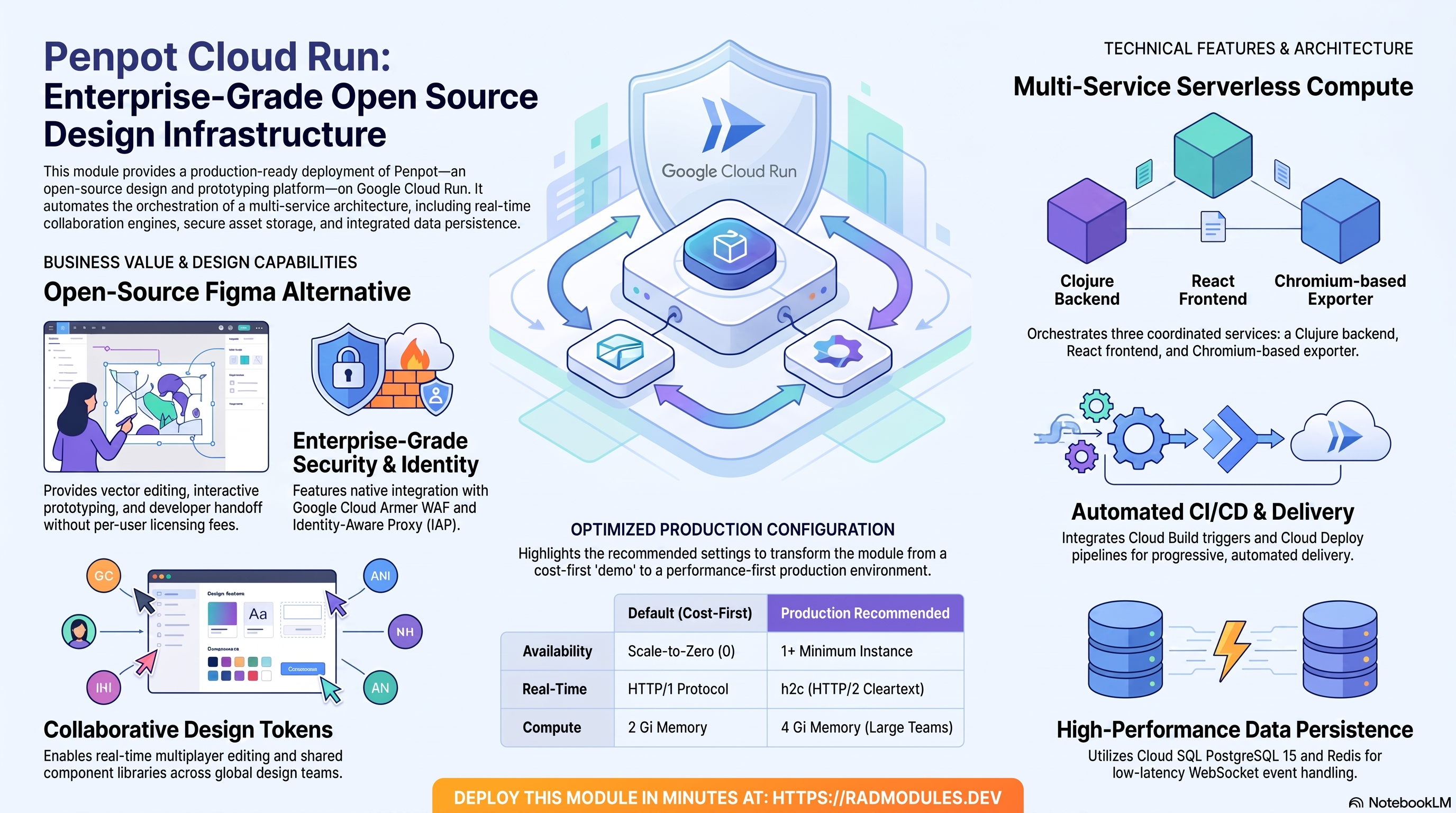
This document provides a comprehensive reference for the modules/Penpot_CloudRun module. It covers architecture, IAM, configuration variables, Penpot-specific behaviours, and operational patterns for deploying Penpot on Google Cloud Run (v2).
What Penpot costs on RAD, and how that compares
For a design team of ten, Penpot on RAD's Cloud Run module costs about US$99 a month with no per-user licence. Penpot's own hosted Unlimited plan costs about US$70 a month for ten editors (capped at US$175 regardless of team size); see How it compares for what RAD trades for that. Figures are as at 8 October 2026; sources are listed at the end of this section.
If you only need it occasionally — studying for a certification, a demo, a seasonal business — a RAD-managed project can be deleted and restored within 30 days for a few credits, so that US$99 becomes a few dollars a month instead. See Pause it for free, below.
What you pay on RAD
| In a Google Cloud project you own | In a project RAD manages for you | |
|---|---|---|
| Module fee, once per deployment | 110 credits (US$11 at the top-up price) | 99 credits (10% lower) |
| Build time | About 19 credits per build (RAD's average build takes about 19 minutes) | The same |
| Google Cloud running cost | Billed by Google to your own billing account (table below) | Metered hourly in credits; RAD publishes 32 credits a day, about 960 credits a month (about US$96 at the top-up price, US$77 at the Scale plan's rate) |
| Who owns what | You own the project and its billing; RAD deploys and updates it | RAD owns the project, with guardrails, quotas and budget alerts; you get console access, and a minimum purchased balance is held in reserve |
10 credits cost US$1 on a one-off top-up, and less on a monthly plan. In a project RAD manages, the database, file server and network are shared by every application in the project, so a second application does not add a second database.
Default running cost in your own project (us-central1, Google list prices):
| Resource (module default) | Per month |
|---|---|
| Cloud Run, 2x vCPU / 2 GiB (scaleToZero) | US$28.37 |
| Cloud SQL for PostgreSQL, 1 vCPU / 3.75 GB, zonal, 10 GB SSD | US$51.02 |
| NFS/cache file server (small VM) | US$13.43 |
| Cloud NAT and networking | US$5 |
| Cloud Storage (add-ons, backups) | US$1 |
| Total | about US$99 |
- Cloud SQL and Cloud Run cost the same in africa-south1 (Johannesburg); the VM costs about 10% more.
- Scale-to-zero is the default. The Cloud Run line above already reflects that cost; setting
min_instance_count = 1keeps an instance warm and raises this line, in exchange for no cold starts. - Avoid Filestore for a small deployment. The module uses a small NFS/cache VM by default. Filestore's smallest instance is 1 TiB, which costs about US$164 a month on its own.
How it compares
- Penpot sells its own hosted Unlimited plan: US$7 per editor per month, capped at US$175/month regardless of team size (penpot.app/pricing, 8 October 2026) — about US$70/month for ten editors. A free Professional plan also exists, capped at 8 team members for real-time collaboration.
- RAD's own-project figure above is higher in cash terms because it is dedicated infrastructure — a dedicated Cloud SQL instance and Cloud Run services, plus the mandatory Redis event bus for real-time collaboration — rather than a slice of Penpot's own multi-tenant cloud.
- A bare VPS — Hetzner CPX22 or a DigitalOcean 2 vCPU/4 GB Droplet, both about US$24/month — undercuts both RAD figures, at the cost of running PostgreSQL, Redis, backups and patches yourself.
- If Penpot needs to stay up without scaling to zero, or run beside other Kubernetes workloads, see the GKE guide instead — about US$143 a month in your own project, or 3,390 credits (about US$271–339) a month in one RAD manages.
Pause it for free: delete a RAD-managed project, restore it when you need it
If Penpot runs in a project RAD manages for you, you have a second option that goes well beyond scaling to zero: delete the whole project, and restore it within 30 days for close to nothing. This suits occasional use — studying for a certification, a demo environment, a seasonal business — far better than running Penpot continuously.
- How it works. Deleting a RAD-managed project unlinks its billing first, then asks Google to delete the project. Google does not remove the project immediately: it keeps it, recoverable, for 30 days. Because billing is already unlinked, nothing is charged while it waits. Unlike deleting one module, this does not tear down Cloud SQL, any VM or Cloud Run one by one — the whole project, and everything in it, simply stops.
- Restoring costs a handful of credits, not a rebuild. Within 30 days, the project's owner can restore it. RAD asks Google to undelete the project and reattaches its billing account, then asks you to run Update on each deployment to confirm everything came back. Because nothing was individually destroyed, that Update finds the same resources already there — it is a check, not a rebuild, and an Update never charges the module fee again. That costs a handful of credits (under US$1) for a typical 2–3-deployment chain, against the 115 credits (US$11.50) a full redeploy costs below.
- So a month of occasional use can cost a few dollars, not US$99. Deploy Penpot, use it for a while, delete the project. Restore it next time you want it, confirm with Update, and delete it again when you're done. You pay only for the module fee once, the builds, and whatever time Penpot was actually live.
- What this needs. You must own the project (not a bring-your-own one RAD only manages billing for), and you restore it yourself within the 30 days — after that, Google deletes it for good. Restoring is admitted like creating a new project: your purchased credit balance must still clear the tier's floor (100 credits for the sandbox tier most study and demo use fits). Google says most services are fully working again within 36 hours of a restore.
- One real gap: the backup bucket does not survive. Penpot's backups are written to a bucket inside the project, and that bucket is not protected by Cloud Storage's soft-delete, so it is very likely gone as soon as you delete the project — even though the project itself is recoverable for 30 days. If you have made changes to Penpot you want to keep, copy a backup out (to Google Drive, or a bucket outside the project) before you delete, the same as the redeploy workflow below. For a default installation with nothing irreplaceable in it, this does not matter.
Pay only while you use it, the other way: delete and redeploy
Cloud Run already scales to zero between requests. The option above only applies to a RAD-managed project; in your own project, or once the 30-day window has passed, the way to stop paying is to delete the deployment and deploy it again when you need it.
- What a redeploy costs. The module fee again plus the builds: about 115 credits (US$11.50), because RAD recreates the project and shared services before Penpot. Deleting saves money only once Penpot would otherwise sit unused for about 4 days or more, both in your own project (about US$3.29 a day) and in a RAD-managed one (32 credits a day).
- Most of the running cost is usually the database and the shared file/cache VM. They stop only when nothing else in the project uses them, so deleting Penpot while something else shares the project saves only Penpot's own compute part.
- Keep data first. Backups are written to a bucket inside the deployment and are deleted with it, so copy the latest backup out before deleting if you want to keep it.
- RAD does not recreate a deleted deployment for you; you enter the settings again when you deploy.
Lab sessions and Managed Environments
- Lab sessions, for training. A trainer runs a session for a class. Each participant gets the app in their own Google Cloud project for 15 minutes to 24 hours, within an allowance the trainer sets. Either the trainer funds every place, or each participant pays for their own. Everything is deleted when the session ends and unused credits go back to the trainer.
- Managed Environments, for consultancies. A partner runs the app for a client from a ring-fenced wallet it funds, and settles with the client directly. If the wallet runs low, billing pauses and the data is kept, so nobody receives an unexpected charge. At the end the partner hands the project over and the deployments become the client's own.
Credits can be bought in more than 20 currencies, including XAF, XOF, NGN, GHS, KES and ZAR, by card, bank transfer or mobile money.
Sources (8 October 2026): Google Cloud list prices from the Cloud Billing Catalog API; radmodules.dev/pricing for RAD's own fees and daily-credit estimates; Delete and restore projects for the pause/restore window and what it says about Cloud Storage objects without soft delete; Penpot pricing.
1. Module Overview
Penpot is an open-source design and prototyping platform — a self-hosted alternative to Figma. It provides vector design editing, interactive prototyping, component libraries, design tokens, developer handoff with code inspection, and real-time multiplayer collaboration via WebSockets. Penpot CloudRun is a wrapper module built on top of App CloudRun. It uses App CloudRun for all GCP infrastructure provisioning and injects Penpot-specific application configuration, multi-service architecture, and asset storage configuration via Penpot Common.
Key Capabilities:
- Compute: Cloud Run v2 (Gen2), three coordinated services — backend (Clojure HTTP API + WebSocket server), frontend (nginx serving React SPA), and exporter (headless Chromium for PDF/PNG/SVG export). Backend defaults to 2 vCPU / 2 Gi.
- Data Persistence: Cloud SQL PostgreSQL 15. GCS assets bucket for design assets (fonts, images, thumbnails), accessed natively via Workload Identity / ADC.
- Real-Time Collaboration: Redis is mandatory as the WebSocket pub/sub event bus. All backend replicas share event state via Redis DB 0. Without Redis, real-time multiplayer editing breaks when more than one backend instance is running.
- Security: Inherits Cloud Armor WAF, IAP, Binary Authorization, and VPC Service Controls from
App CloudRun. No application-level secrets are auto-generated byPenpot Common. - Protocol:
container_protocoldefaults to'http1'; set'h2c'(HTTP/2 cleartext) for end-to-end WebSocket multiplexing. - CI/CD: Cloud Build custom image pipeline by default; Cloud Deploy progressive delivery optional.
- Health Checks: Startup probe uses TCP on port 6060 (Penpot 2.x does not expose an unauthenticated HTTP health endpoint). The module also exposes
startup_probe_configandhealth_check_configtargeting/api/healthfor load balancer health checks.
Project & Application Identity
| Variable | Group | Type | Default | Description |
|---|---|---|---|---|
project_id | 1 | string | — | GCP project ID. Required. |
tenant_id | 2 | string | 'demo' | Short suffix appended to all resource names. |
support_users | 2 | list(string) | [] | Email recipients for monitoring alerts. |
resource_labels | 2 | map(string) | {} | Labels applied to all provisioned resources. |
region | 1 | string | 'us-central1' | GCP region for all resources. |
application_name | 3 | string | 'penpot' | Base resource name. Do not change after initial deployment. |
display_name | 3 | string | 'Penpot - Open Source Design Tool' | Human-readable name shown in the GCP Console. |
description | 3 | string | 'Penpot - Open-source design and prototyping tool for teams' | Cloud Run service description. |
application_version | 3 | string | 'latest' | Penpot image version tag applied to all three services. |
Wrapper architecture: Penpot CloudRun calls Penpot Common to build the application configuration object containing Penpot-specific environment variables, probe configuration, and multi-service definitions for the backend, frontend, and exporter. module_storage_buckets carries the penpot-assets bucket provisioned by Penpot Common. scripts_dir resolves to abspath("${module.penpot_app.path}/scripts") at apply time.
PostgreSQL note: Penpot requires PostgreSQL 15. database_type = "POSTGRES_15" is the default and must not be changed to MySQL or SQL Server — Penpot's Clojure backend only supports PostgreSQL.
2. IAM & Access Control
Penpot_CloudRun delegates all IAM provisioning to App_CloudRun. The Cloud Run SA, Cloud Build SA, IAP service agent, and password rotation role sets are identical to those in App_CloudRun.
No application-level secrets: Penpot Common does not auto-generate application secrets (no equivalent of SECRET_KEY or DIRECTUS_KEY). Penpot manages its own internal signing keys at runtime. The DB_PASSWORD secret is provisioned automatically by App CloudRun. User-defined secrets — including an SMTP password — can be added via secret_environment_variables.
GCS asset access: The Penpot backend reads and writes design assets (images, fonts, thumbnails) to the penpot-assets GCS bucket. Access is granted via the Cloud Run SA's Workload Identity binding — no explicit credentials are required. PENPOT_STORAGE_BACKEND=gcs and PENPOT_STORAGE_GCS_BUCKET_NAME are injected automatically.
120-second IAM propagation delay: Inherited from App CloudRun — the Penpot services are not deployed until the delay completes, preventing secret-read failures on the first revision start.
For the complete role tables and IAP, password rotation, and public access details, see the App_CloudRun documentation.
3. Core Service Configuration
A. Compute (Cloud Run)
Penpot's backend is a Clojure JVM application. Cold starts require the JVM to initialise and the application to run PostgreSQL migrations, which can take 60–120 seconds on first boot. min_instance_count defaults to 0 (scale-to-zero, cost-first); set it to 1 to keep the backend warm for real-time collaboration where users expect instant connectivity.
Container protocol: container_protocol defaults to 'http1'. Set 'h2c' (HTTP/2 cleartext) to enable WebSocket multiplexing over the same connection for real-time multiplayer editing.
Multi-service deployment: The frontend (nginx, port 80) and exporter (headless Chromium) are deployed as additional Cloud Run services alongside the main backend. The PENPOT_PUBLIC_URI variable is automatically set to the predicted frontend service URL. For custom domains, update PENPOT_PUBLIC_URI via environment_variables to match the actual URL users access.
| Variable | Group | Default | Description |
|---|---|---|---|
deploy_application | 4 | true | Set false for infrastructure-only deployment (PostgreSQL, GCS, secrets). |
cpu_limit | 4 | '2000m' | CPU per backend instance. 2 vCPU minimum for JVM + WebSocket handling. |
memory_limit | 4 | '2Gi' | Memory per backend instance. Increase to 4 Gi for large teams or complex designs. |
min_instance_count | 4 | 0 | Minimum backend instances. Raise to 1 or higher for real-time collaboration. |
max_instance_count | 4 | 1 | Maximum backend instances. |
container_port | 4 | 6060 | Penpot backend HTTP + WebSocket port. Do not change. |
execution_environment | 4 | 'gen2' | Gen2 required for NFS mounts and GCS Fuse. |
timeout_seconds | 4 | 3600 | Max request duration. Long timeout accommodates large export operations. |
enable_cloudsql_volume | 4 | true | Connects to Cloud SQL via Unix socket via Auth Proxy sidecar. |
container_protocol | 4 | 'http1' | Set 'h2c' for end-to-end HTTP/2 WebSocket multiplexing. |
enable_image_mirroring | 4 | true | Mirrors Penpot images into Artifact Registry to avoid Docker Hub rate limits. |
traffic_split | 4 | [] | Percentage-based canary/blue-green traffic allocation. |
service_annotations | 4 | {} | Advanced Cloud Run annotations. |
service_labels | 4 | {} | Labels applied to the Cloud Run service. |
Differences from App CloudRun defaults:
| Variable | App CloudRun | Penpot CloudRun | Reason |
|---|---|---|---|
container_port | 8080 | 6060 | Penpot backend's native port. |
memory_limit | '512Mi' | '2Gi' | JVM requires more memory headroom than typical Node.js/Python apps. |
enable_image_mirroring | false | true | Penpot images are pulled from Docker Hub; mirroring avoids rate limits. |
timeout_seconds | 300 | 3600 | Large export operations (PDF/PNG of complex designs) can take several minutes. |
B. Penpot Feature Flags & JVM Tuning
| Variable | Group | Default | Description |
|---|---|---|---|
penpot_flags | 5 | 'enable-registration enable-login disable-demo-users' | Space-separated Penpot feature flags. Key flags: enable-registration (allow self-registration), disable-registration (invite-only), enable-login-with-password, enable-oidc-<provider>. |
jvm_max_heap | 5 | '1g' | JVM maximum heap. Set to roughly half of memory_limit. For a 2 Gi container, '1g' is appropriate; for 4 Gi, use '2g'. |
jvm_min_heap | 5 | '512m' | JVM initial heap. Controls how much memory the JVM reserves at startup. |
C. Database (Cloud SQL — PostgreSQL 15)
Penpot requires PostgreSQL 15. database_type = "POSTGRES_15" is the default. Unlike Ghost (MySQL), all standard PostgreSQL features are available. Penpot runs its own database migrations at startup — no separate db-init job is needed or provided by Penpot Common.
| Variable | Group | Default | Description |
|---|---|---|---|
db_name | 13 | 'penpot' | PostgreSQL database name. Do not change after initial deployment. |
db_user | 13 | 'penpot' | PostgreSQL application user. Password auto-generated and stored in Secret Manager. |
database_type | 13 | 'POSTGRES_15' | Cloud SQL database engine. Do not change — Penpot requires PostgreSQL. |
database_password_length | 13 | 32 | Auto-generated password length. Range: 16–64. |
enable_auto_password_rotation | 6 | false | Automated zero-downtime password rotation. |
rotation_propagation_delay_sec | 6 | 90 | Seconds to wait after rotation before restarting services. |
D. Storage (GCS Assets Bucket)
Penpot Common automatically provisions a penpot-assets GCS bucket for design assets (fonts, user-uploaded images, thumbnails). The backend accesses this bucket via PENPOT_STORAGE_BACKEND=gcs and ADC/Workload Identity — no explicit credentials are required.
NFS is also available (enable_nfs = true) for shared file storage. When redis_host is not provided, the module falls back to using the NFS server IP as the Redis host.
| Variable | Group | Default | Description |
|---|---|---|---|
create_cloud_storage | 12 | true | Set false to skip additional bucket creation. The penpot-assets bucket from Penpot Common is always provisioned. |
storage_buckets | 12 | [] | Additional GCS buckets beyond the auto-provisioned assets bucket. |
enable_nfs | 12 | true | Provisions an NFS volume for shared storage. Also used as the fallback Redis host. |
nfs_mount_path | 12 | '/mnt/nfs' | Container path where the NFS share is mounted. |
gcs_volumes | 12 | [] | GCS buckets to mount via GCS Fuse (requires gen2). |
manage_storage_kms_iam | 12 | false | Creates a CMEK KMS keyring and enables CMEK on storage buckets. |
enable_artifact_registry_cmek | 12 | false | Creates an Artifact Registry KMS key for at-rest image encryption. |
E. Networking
| Variable | Group | Default | Description |
|---|---|---|---|
ingress_settings | 8 | 'all' | 'all' — public internet; 'internal' — VPC only; 'internal-and-cloud-load-balancing' — forces traffic through the HTTPS LB. |
vpc_egress_setting | 8 | 'PRIVATE_RANGES_ONLY' | 'PRIVATE_RANGES_ONLY' routes only RFC 1918 traffic via VPC. |
F. Initialization
Penpot runs its own PostgreSQL migrations at backend startup. No separate db-init Cloud Run Job is injected by Penpot Common — the backend's Clojure process applies migrations automatically before the application accepts traffic. Allow 60–120 seconds for first boot.
Custom initialization jobs and cron jobs are still supported via the initialization_jobs and cron_jobs variables.
| Variable | Group | Default | Description |
|---|---|---|---|
initialization_jobs | 15 | [] | One-shot Cloud Run Jobs run during deployment. Leave empty — Penpot handles its own migrations. |
cron_jobs | 15 | [] | Recurring scheduled Cloud Run Jobs. Each entry: name, schedule, image, command, args, env_vars, secret_env_vars, cpu_limit, memory_limit, timeout_seconds, max_retries, task_count, parallelism, mount_nfs, mount_gcs_volumes, script_path, paused. |
4. Advanced Security
A. Cloud Armor WAF
When enable_cloud_armor = true, a Global HTTPS Load Balancer with a Cloud Armor WAF policy (OWASP Top 10, adaptive DDoS, 500 req/min rate limiting) is provisioned in front of Cloud Run.
| Variable | Group | Default | Description |
|---|---|---|---|
enable_cloud_armor | 14 | false | Provisions Global HTTPS LB + Cloud Armor WAF. Required for custom domains and DDoS protection. |
admin_ip_ranges | 14 | [] | CIDR ranges exempted from WAF rules (e.g., design team VPN, CI/CD egress IPs). |
B. Identity-Aware Proxy (IAP)
When enable_iap = true, Google identity authentication is required before requests reach Penpot. Useful for restricting access to internal design teams without managing Penpot user accounts for every visitor.
| Variable | Group | Default | Description |
|---|---|---|---|
enable_iap | 8 | false | Enables IAP natively on the Cloud Run service. |
iap_authorized_users | 8 | [] | Users/service accounts granted access. Format: 'user:email' or 'serviceAccount:sa@...'. |
iap_authorized_groups | 8 | [] | Google Groups granted access. Format: 'group:name@example.com'. |
C. Binary Authorization
When enable_binary_authorization = true, Cloud Run enforces that deployed Penpot images carry a valid cryptographic attestation.
| Variable | Group | Default | Description |
|---|---|---|---|
enable_binary_authorization | 10 | false | Enforces image attestation. Requires a Binary Authorization policy pre-configured in the project. |
D. VPC Service Controls
When enable_vpc_sc = true, all GCP API calls from this module are bound within an existing VPC-SC perimeter.
| Variable | Group | Default | Description |
|---|---|---|---|
enable_vpc_sc | 18 | false | Registers module API calls within the project's VPC-SC perimeter. A perimeter must already exist. |
vpc_cidr_ranges | 18 | [] | VPC subnet CIDR ranges for the VPC-SC network access level. Auto-discovered when empty. |
vpc_sc_dry_run | 18 | true | Logs VPC-SC violations without blocking. Set false to enforce. |
organization_id | 18 | "" | GCP Organization ID override for VPC-SC. Auto-discovered from project when empty. |
enable_audit_logging | 18 | false | Enables detailed Cloud Audit Logs (DATA_READ, DATA_WRITE, ADMIN_READ). |
E. Secret Manager Integration
Penpot secrets are stored in Secret Manager and injected natively by Cloud Run at revision start.
| Variable | Group | Default | Description |
|---|---|---|---|
secret_environment_variables | 6 | {} | Map of env var name → Secret Manager secret ID. Use for SMTP passwords, OIDC client secrets, etc. |
secret_rotation_period | 6 | '2592000s' | Secret Manager rotation notification frequency. Default: 30 days. |
secret_propagation_delay | 6 | 30 | Seconds to wait after secret creation before dependent resources proceed. |
5. Traffic & Ingress
A. HTTPS Load Balancer
When enable_cloud_armor = true, a Global HTTPS Load Balancer backed by a Serverless NEG is provisioned. Traffic flows: Internet → Cloud Armor → Global HTTPS LB → Serverless NEG → Cloud Run.
Setting ingress_settings = 'internal-and-cloud-load-balancing' forces all Penpot traffic through the LB, preventing direct *.run.app URL access. This is recommended for production deployments where the load balancer IP is the canonical entry point.
B. Cloud CDN
When enable_cdn = true (requires enable_cloud_armor = true), Cloud CDN is attached to the HTTPS Load Balancer backend.
Penpot consideration: Penpot serves a mix of authenticated design API calls and static frontend assets (React SPA, CSS, fonts). CDN is well-suited for the frontend static assets but should not cache API responses or WebSocket connections. The nginx frontend serves assets with appropriate cache headers; the backend API should not be CDN-cached.
| Variable | Group | Default | Description |
|---|---|---|---|
enable_cdn | 14 | false | Enables Cloud CDN on the HTTPS LB backend. |
max_images_to_retain | 14 | 7 | Maximum number of recent container images to keep in Artifact Registry. |
delete_untagged_images | 14 | true | Automatically deletes untagged images from Artifact Registry. |
image_retention_days | 14 | 30 | Days after which images are eligible for deletion. |
C. Custom Domains
Custom domains are attached to the Global HTTPS Load Balancer via application_domains. Google-managed SSL certificates are provisioned automatically.
Important for Penpot: After adding a custom domain, set PENPOT_PUBLIC_URI via environment_variables to match the custom domain URL. Penpot uses PENPOT_PUBLIC_URI to generate links in email invitations and to route WebSocket connections. A mismatch causes broken invitation links and WebSocket connection failures.
| Variable | Group | Default | Description |
|---|---|---|---|
application_domains | 14 | [] | Custom domain names for the HTTPS LB. (e.g., ['design.example.com']) |
6. CI/CD & Delivery
A. Cloud Build Triggers
When enable_cicd_trigger = true, a Cloud Build GitHub connection and push trigger are provisioned.
| Variable | Group | Default | Description |
|---|---|---|---|
enable_cicd_trigger | 10 | false | Provisions a Cloud Build GitHub trigger. |
github_repository_url | 10 | "" | Full HTTPS URL of the GitHub repository. |
github_token | 10 | "" | GitHub PAT (repo, admin:repo_hook scopes). Sensitive. |
github_app_installation_id | 10 | "" | GitHub App installation ID (preferred for organisation repos). |
cicd_trigger_config | 10 | { branch_pattern = "^main$" } | Advanced trigger config: branch_pattern, included_files, ignored_files, trigger_name, substitutions. |
B. Cloud Deploy Pipeline
When enable_cloud_deploy = true (requires enable_cicd_trigger = true), the CI/CD pipeline is upgraded to a managed Cloud Deploy delivery pipeline with sequential promotion stages.
| Variable | Group | Default | Description |
|---|---|---|---|
enable_cloud_deploy | 10 | false | Provisions a Cloud Deploy pipeline. |
cloud_deploy_stages | 10 | [dev, staging, prod(approval)] | Ordered promotion stages. Each: name, target_name, service_name, require_approval, auto_promote. |
7. Reliability & Scheduling
A. Scaling & Concurrency
min_instance_count defaults to 0 (scale-to-zero). Setting it to 1 keeps at least one backend instance running at all times, which matters for Penpot because:
- WebSocket connections from active collaborators are terminated on scale-to-zero events.
- JVM cold starts take 30–60 seconds, during which new connection attempts fail.
- Real-time collaboration requires a persistent event bus connection through Redis.
Redis handles WebSocket fan-out between backend replicas, so horizontal scaling is safe. All backend instances publish and subscribe to the same Redis channel, and design change events are broadcast to all connected clients regardless of which instance they are connected to.
B. Traffic Splitting
Traffic splitting is supported for canary deployments.
| Variable | Group | Default | Description |
|---|---|---|---|
traffic_split | 4 | [] | Percentage-based traffic allocation across named revisions. All entries must sum to 100. Empty sends 100% to the latest revision. |
Penpot consideration: Canary deployments require careful handling of WebSocket connections. Active sessions connected to the old revision will remain there until reconnection. Design to accept both revisions being active simultaneously during the canary window.
C. Health Probes
Penpot 2.x does not expose an unauthenticated HTTP health endpoint on the root path. The module uses a TCP startup probe on port 6060 (checks that the backend process is listening), combined with startup_probe_config and health_check_config targeting /api/health for load balancer health checks.
| Variable | Group | Default | Description |
|---|---|---|---|
startup_probe | 16 | { type="TCP", port=6060, initial_delay_seconds=5, period_seconds=5, failure_threshold=40 } | TCP startup probe. Allows up to 200 seconds total startup time (5s × 40). |
liveness_probe | 16 | { enabled=false } | Disabled by default — Cloud Run does not support TCP liveness probes. |
startup_probe_config | 16 | { enabled=true, type="TCP", path="/api/health", timeout_seconds=240 } | Alternative startup probe for load balancer health checks. |
health_check_config | 16 | { enabled=true, type="HTTP", path="/api/health", period_seconds=10 } | HTTP liveness probe targeting /api/health. |
uptime_check_config | 16 | { enabled=false, path="/api/health" } | Optional Cloud Monitoring uptime check. Alerts notify support_users. |
alert_policies | 16 | [] | Cloud Monitoring metric alert policies. |
D. Auto Password Rotation
When enable_auto_password_rotation = true, a zero-downtime password rotation pipeline is provisioned:
- Secret Manager emits a rotation notification at every
secret_rotation_periodinterval. - Eventarc fires a Cloud Run rotation Job.
- The job generates a new password, updates the Cloud SQL PostgreSQL user, and writes a new secret version.
- After
rotation_propagation_delay_secseconds, the job restarts the Penpot backend.
| Variable | Group | Default | Description |
|---|---|---|---|
enable_auto_password_rotation | 6 | false | Enables automated password rotation. |
rotation_propagation_delay_sec | 6 | 90 | Seconds to wait after rotation before restarting services. |
8. Integrations
A. Redis (Mandatory for Multi-Instance Deployments)
Redis is enabled by default (enable_redis = true). Penpot uses Redis as its WebSocket pub/sub event bus. When a designer makes a change, the backend publishes the event to Redis, and all other backend instances receive it and push it to their connected WebSocket clients. Without Redis, real-time collaboration only works when all clients are connected to the same backend instance — which is not guaranteed under Cloud Run's load balancing.
When enable_redis = true and redis_host is not provided, the module defaults to using the NFS server IP as the Redis host. For production deployments with multiple backend instances, point redis_host at a dedicated Google Cloud Memorystore for Redis instance.
| Variable | Group | Default | Description |
|---|---|---|---|
enable_redis | 17 | true | Enables Redis for WebSocket pub/sub. Mandatory for multi-instance collaboration. |
redis_host | 17 | "" | Redis server hostname or IP. Leave blank to use the NFS server IP. Use Memorystore for production. |
redis_port | 17 | '6379' | Redis server TCP port (string). |
redis_auth | 17 | "" | Redis AUTH password. Sensitive — never stored in state. |
B. Email (SMTP)
Penpot uses SMTP for team invitations and password resets. smtp_enabled must be set to true to activate email sending. Unlike other modules, SMTP is disabled by default in Penpot CloudRun — it must be explicitly enabled.
| Variable | Group | Default | Description |
|---|---|---|---|
smtp_enabled | 7 | false | Enables SMTP email sending. Must be true for invitations and password resets to work. |
smtp_from | 7 | "" | Default sender address. (e.g., 'noreply@example.com') |
smtp_reply_to | 7 | "" | Default reply-to address. |
smtp_host | 7 | "" | SMTP server hostname. |
smtp_port | 7 | 587 | SMTP port. 587 for STARTTLS, 465 for SSL. |
smtp_username | 7 | "" | SMTP authentication username. |
smtp_use_tls | 7 | true | Enable STARTTLS. |
smtp_use_ssl | 7 | false | Enable SSL/TLS. |
For the SMTP password, use secret_environment_variables:
secret_environment_variables = {
  PENPOT_SMTP_PASSWORD = "penpot-smtp-password"
}
C. Backup Import & Recovery
When enable_backup_import = true, a dedicated Cloud Run Job restores an existing PostgreSQL backup into the provisioned Cloud SQL instance during the apply.
| Variable | Group | Default | Description |
|---|---|---|---|
backup_schedule | 9 | '0 2 * * *' | Cron expression (UTC) for automated daily backups. |
backup_retention_days | 9 | 7 | Days to retain backup files in GCS. |
enable_backup_import | 9 | false | Triggers a one-time restore on apply. Set false after a successful import. |
backup_source | 9 | 'gcs' | 'gcs' (full GCS URI) or 'gdrive' (Drive file ID). |
backup_uri | 9 | "" | Full GCS URI (e.g., 'gs://my-bucket/penpot-2024-01.sql') or Google Drive file ID. |
backup_format | 9 | 'sql' | Backup file format. Options: sql, tar, gz, tgz, tar.gz, zip. |
D. Custom SQL Scripts
| Variable | Group | Default | Description |
|---|---|---|---|
enable_custom_sql_scripts | 11 | false | Runs SQL scripts from GCS after provisioning. |
custom_sql_scripts_bucket | 11 | "" | GCS bucket containing SQL scripts. |
custom_sql_scripts_path | 11 | "" | Path prefix within the bucket. |
custom_sql_scripts_use_root | 11 | false | Run scripts as the root DB user. |
E. Observability & Alerting
| Variable | Group | Default | Description |
|---|---|---|---|
uptime_check_config | 16 | { enabled=false, path="/api/health" } | Optional Cloud Monitoring uptime check on /api/health. |
alert_policies | 16 | [] | Custom alert policies. Each: name, metric_type, comparison, threshold_value, duration_seconds. |
support_users | 2 | [] | Email addresses notified by uptime and alert policy triggers. |
9. Exploring with the GCP Console
After a successful deployment, the following GCP Console paths are most useful for understanding and validating the Penpot deployment.
Cloud Run Services
Navigate to Cloud Run in the GCP Console. You will see multiple services:
- The main Penpot backend service (port 6060) with its
*.run.appURL. - The frontend service (nginx, port 80) whose URL is the user-facing entry point.
- The exporter service (headless Chromium) for PDF/PNG/SVG export.
Click the backend service to view:
- Revisions tab: active revision, traffic allocation, instance counts.
- Logs tab: JVM startup messages, migration output, WebSocket connection events.
- Metrics tab: request count, latency percentiles, instance count over time, container CPU/memory utilisation.
Cloud SQL
Navigate to SQL in the GCP Console. The Penpot PostgreSQL 15 instance shows:
- Connection name (needed for
gcloud sql connect). - Current connections and query insights.
- Automated backup schedule and latest backup timestamp.
Click the instance name, then Databases to confirm the penpot database exists and Users to confirm the penpot user is present.
Cloud Storage
Navigate to Cloud Storage → Buckets. The penpot-assets bucket stores:
thumbnails/— design file thumbnail images.objects/— uploaded design assets (images, fonts).
Verify the bucket exists and the Cloud Run SA has roles/storage.objectAdmin on it.
Secret Manager
Navigate to Security → Secret Manager. Secrets provisioned for this deployment include:
DB_PASSWORD(Penpot PostgreSQL application user password).
If SMTP is enabled, your SMTP secret will also appear here if added via secret_environment_variables.
Monitoring Uptime Checks
Navigate to Monitoring → Uptime checks. The Penpot uptime check polls /api/health from multiple global GCP regions. A failed check triggers an alert email to support_users.
Artifact Registry
Navigate to Artifact Registry. The Penpot backend, frontend, and exporter images are stored here after mirroring from Docker Hub. Check that all three images are present and tagged correctly.
10. Exploring with gcloud
The following gcloud commands are useful for inspecting and troubleshooting the Penpot Cloud Run deployment. Replace PROJECT_ID, REGION, and SERVICE_NAME with your actual values.
List all Penpot Cloud Run services in the project:
gcloud run services list \
  --project=PROJECT_ID \
  --region=REGION \
  --filter="metadata.name:penpot" \
  --format="table(metadata.name,status.url,status.conditions[0].status)"
Describe the Penpot backend service (shows env vars, scaling, traffic split):
gcloud run services describe penpot-backend \
  --project=PROJECT_ID \
  --region=REGION \
  --format=yaml
Check the current revision and instance count:
gcloud run revisions list \
  --project=PROJECT_ID \
  --region=REGION \
  --service=penpot-backend \
  --format="table(metadata.name,status.observedGeneration,spec.containerConcurrency,status.conditions[0].status)"
Tail live logs from the Penpot backend:
gcloud run services logs tail penpot-backend \
  --project=PROJECT_ID \
  --region=REGION
Fetch recent logs filtered to errors only:
gcloud logging read \
  'resource.type="cloud_run_revision" AND resource.labels.service_name="penpot-backend" AND severity>=ERROR' \
  --project=PROJECT_ID \
  --limit=50 \
  --format="table(timestamp,jsonPayload.message)"
Check the Cloud SQL instance status:
gcloud sql instances describe INSTANCE_NAME \
  --project=PROJECT_ID \
  --format="table(name,state,databaseVersion,settings.dataDiskSizeGb,ipAddresses[0].ipAddress)"
List Cloud SQL databases on the Penpot instance:
gcloud sql databases list \
  --instance=INSTANCE_NAME \
  --project=PROJECT_ID
Connect to the Penpot PostgreSQL database (requires Cloud SQL Auth Proxy or Cloud Shell):
gcloud sql connect INSTANCE_NAME \
  --user=penpot \
  --database=penpot \
  --project=PROJECT_ID
List the penpot-assets GCS bucket contents by prefix:
gcloud storage ls gs://penpot-assets-PROJECT_ID/thumbnails/ --recursive
Check Secret Manager secrets for this deployment:
gcloud secrets list \
  --project=PROJECT_ID \
  --filter="name:penpot" \
  --format="table(name,createTime,replication.automatic)"
Fetch the current database password (for diagnostic purposes only):
gcloud secrets versions access latest \
  --secret=penpot-db-password \
  --project=PROJECT_ID
Check Memorystore Redis instances (if using dedicated Redis):
gcloud redis instances list \
  --region=REGION \
  --project=PROJECT_ID \
  --format="table(name,host,port,state,memorySizeGb,authEnabled)"
List Cloud Run Jobs (initialization or cron jobs):
gcloud run jobs list \
  --project=PROJECT_ID \
  --region=REGION \
  --filter="metadata.name:penpot" \
  --format="table(metadata.name,status.latestCreatedExecution.completionTimestamp,status.latestCreatedExecution.succeededCount)"
Check Artifact Registry for mirrored Penpot images:
gcloud artifacts docker images list \
  REGION-docker.pkg.dev/PROJECT_ID/REPOSITORY \
  --filter="package:penpot" \
  --format="table(package,tags,createTime,updateTime)"
Verify the Cloud Run SA has storage access to the assets bucket:
gcloud storage buckets get-iam-policy gs://penpot-assets-PROJECT_ID \
  --format="table(bindings.role,bindings.members)"
11. Platform-Managed Behaviours
The following behaviours are applied automatically by Penpot CloudRun regardless of variable values.
| Behaviour | Implementation | Detail |
|---|---|---|
| PostgreSQL 15 required | database_type = "POSTGRES_15" default | Penpot only supports PostgreSQL. Do not change to MySQL or SQL Server. |
| No db-init job | Penpot runs its own migrations at startup | Unlike Django or Ghost, no db-init Cloud Run Job is injected. Penpot's Clojure process applies migrations automatically on first boot. |
| http1 protocol by default | container_protocol = "http1" | Set "h2c" (HTTP/2 cleartext) to enable WebSocket multiplexing for real-time collaboration. |
| Scale-to-zero by default | Default min_instance_count = 0 | Cost-first default. Set 1 for active collaboration — WebSocket sessions are terminated on scale-down. |
| GCS assets bucket | penpot-assets bucket provisioned by Penpot Common | Used for design asset storage. Accessed via PENPOT_STORAGE_BACKEND=gcs. |
| Image mirroring on by default | enable_image_mirroring = true default | All three Penpot images are mirrored to Artifact Registry to avoid Docker Hub rate limits. |
| Redis for WebSocket fan-out | enable_redis = true default | Without Redis, real-time collaboration breaks under load balancing across multiple instances. |
| Long request timeout | timeout_seconds = 3600 default | PDF and PNG exports of complex multi-page designs can take minutes. |
| No auto-generated app secrets | module_secret_env_vars = {} | Penpot manages its own internal signing keys. No SECRET_KEY equivalent is created. |
12. Variable Reference
All user-configurable variables, sorted by UI group then order.
| Variable | Group | Default | Description |
|---|---|---|---|
project_id | 1 | — | GCP project ID. Required. |
region | 1 | 'us-central1' | GCP deployment region. |
tenant_id | 2 | 'demo' | Short suffix appended to all resource names. |
support_users | 2 | [] | Email addresses for monitoring alerts. |
resource_labels | 2 | {} | Labels applied to all provisioned resources. |
application_name | 3 | 'penpot' | Base resource name. Do not change after initial deployment. |
display_name | 3 | 'Penpot - Open Source Design Tool' | Human-readable name. |
description | 3 | 'Penpot - Open-source design and prototyping tool for teams' | Service description. |
application_version | 3 | 'latest' | Penpot container image tag. |
deploy_application | 4 | true | Set false for infrastructure-only deployment. |
cpu_limit | 4 | '2000m' | CPU per backend instance. |
memory_limit | 4 | '2Gi' | Memory per backend instance. |
min_instance_count | 4 | 0 | Minimum backend instances. Raise to 1 for real-time collaboration. |
max_instance_count | 4 | 1 | Maximum backend instances. |
container_port | 4 | 6060 | Penpot backend port. Do not change. |
execution_environment | 4 | 'gen2' | Gen2 required for NFS mounts. |
timeout_seconds | 4 | 3600 | Max request duration. |
enable_cloudsql_volume | 4 | true | Connects via Cloud SQL Auth Proxy Unix socket. |
container_protocol | 4 | 'http1' | Set 'h2c' for HTTP/2 WebSocket multiplexing. |
enable_image_mirroring | 4 | true | Mirrors images into Artifact Registry. |
traffic_split | 4 | [] | Canary/blue-green traffic allocation. |
service_annotations | 4 | {} | Advanced Cloud Run annotations. |
service_labels | 4 | {} | Labels applied to the Cloud Run service. |
penpot_flags | 5 | 'enable-registration enable-login disable-demo-users' | Penpot feature flags. |
jvm_max_heap | 5 | '1g' | JVM maximum heap. ~50% of memory_limit. |
jvm_min_heap | 5 | '512m' | JVM initial heap. |
environment_variables | 6 | {} | Plain-text env vars. |
secret_environment_variables | 6 | {} | Secret Manager references. |
secret_propagation_delay | 6 | 30 | Seconds to wait after secret creation. |
secret_rotation_period | 6 | '2592000s' | Secret Manager rotation notification frequency. |
enable_auto_password_rotation | 6 | false | Automated zero-downtime password rotation. |
rotation_propagation_delay_sec | 6 | 90 | Seconds after rotation before restarting services. |
smtp_enabled | 7 | false | Enables SMTP email. Required for invitations and password resets. |
smtp_from | 7 | "" | Sender email address. |
smtp_reply_to | 7 | "" | Reply-to email address. |
smtp_host | 7 | "" | SMTP server hostname. |
smtp_port | 7 | 587 | SMTP port. |
smtp_username | 7 | "" | SMTP authentication username. |
smtp_use_tls | 7 | true | Enable STARTTLS. |
smtp_use_ssl | 7 | false | Enable SSL/TLS. |
ingress_settings | 8 | 'all' | 'all', 'internal', or 'internal-and-cloud-load-balancing'. |
vpc_egress_setting | 8 | 'PRIVATE_RANGES_ONLY' | VPC egress routing. |
enable_iap | 8 | false | Enables IAP on the Cloud Run service. |
iap_authorized_users | 8 | [] | Users/SAs granted IAP access. |
iap_authorized_groups | 8 | [] | Google Groups granted IAP access. |
backup_schedule | 9 | '0 2 * * *' | Cron expression for automated backups. |
backup_retention_days | 9 | 7 | Days to retain backup files. |
enable_backup_import | 9 | false | Triggers a one-time restore on apply. |
backup_source | 9 | 'gcs' | 'gcs' or 'gdrive'. |
backup_uri | 9 | "" | Full GCS URI or Google Drive file ID. |
backup_format | 9 | 'sql' | Backup format. |
enable_cicd_trigger | 10 | false | Provisions a Cloud Build GitHub trigger. |
github_repository_url | 10 | "" | Full HTTPS GitHub URL. |
github_token | 10 | "" | GitHub PAT. Sensitive. |
github_app_installation_id | 10 | "" | GitHub App installation ID. |
cicd_trigger_config | 10 | { branch_pattern = "^main$" } | Advanced Cloud Build trigger config. |
enable_cloud_deploy | 10 | false | Provisions a Cloud Deploy progressive delivery pipeline. |
cloud_deploy_stages | 10 | [dev, staging, prod(approval)] | Cloud Deploy promotion stages. |
enable_binary_authorization | 10 | false | Enforces image attestation. |
enable_custom_sql_scripts | 11 | false | Runs SQL scripts from GCS. |
custom_sql_scripts_bucket | 11 | "" | GCS bucket for SQL scripts. |
custom_sql_scripts_path | 11 | "" | Path prefix within the bucket. |
custom_sql_scripts_use_root | 11 | false | Run scripts as root DB user. |
create_cloud_storage | 12 | true | Set false to skip additional bucket creation. |
storage_buckets | 12 | [] | Additional GCS buckets to provision. |
enable_nfs | 12 | true | Provisions NFS shared storage. |
nfs_mount_path | 12 | '/mnt/nfs' | Container NFS mount path. |
nfs_instance_name | 12 | "" | Existing NFS VM name. |
nfs_instance_base_name | 12 | 'app-nfs' | Base name for inline NFS VM. |
gcs_volumes | 12 | [] | GCS Fuse volume mounts. |
manage_storage_kms_iam | 12 | false | CMEK KMS key for storage buckets. |
enable_artifact_registry_cmek | 12 | false | CMEK for Artifact Registry images. |
database_type | 13 | 'POSTGRES_15' | Cloud SQL engine. Do not change. |
db_name | 13 | 'penpot' | PostgreSQL database name. Immutable. |
db_user | 13 | 'penpot' | PostgreSQL application user. Immutable. |
database_password_length | 13 | 32 | Auto-generated password length. |
enable_cloud_armor | 14 | false | Provisions Global HTTPS LB + Cloud Armor WAF. |
admin_ip_ranges | 14 | [] | CIDR ranges exempted from WAF rules. |
application_domains | 14 | [] | Custom domains with Google-managed SSL. |
enable_cdn | 14 | false | Enables Cloud CDN on the HTTPS LB. |
max_images_to_retain | 14 | 7 | Maximum Artifact Registry images to keep. |
delete_untagged_images | 14 | true | Delete dangling images from Artifact Registry. |
image_retention_days | 14 | 30 | Days before images are eligible for deletion. |
initialization_jobs | 15 | [] | One-shot Cloud Run Jobs. Leave empty — Penpot handles its own migrations. |
cron_jobs | 15 | [] | Recurring scheduled Cloud Run Jobs. |
startup_probe | 16 | TCP probe, port 6060, 40 retries | TCP startup probe. |
liveness_probe | 16 | { enabled=false } | Disabled — Cloud Run does not support TCP liveness. |
startup_probe_config | 16 | { enabled=true, type="TCP", timeout_seconds=240 } | LB startup probe. |
health_check_config | 16 | { enabled=true, type="HTTP", path="/api/health" } | HTTP liveness probe. |
uptime_check_config | 16 | { enabled=false, path="/api/health" } | Optional Cloud Monitoring uptime check. |
alert_policies | 16 | [] | Cloud Monitoring metric alert policies. |
enable_redis | 17 | true | Redis for WebSocket pub/sub. Mandatory for multi-instance. |
redis_host | 17 | "" | Redis hostname/IP. Defaults to NFS server IP. |
redis_port | 17 | '6379' | Redis TCP port. |
redis_auth | 17 | "" | Redis AUTH password. Sensitive. |
enable_vpc_sc | 18 | false | VPC-SC perimeter enforcement. |
vpc_cidr_ranges | 18 | [] | VPC-SC CIDR ranges. |
vpc_sc_dry_run | 18 | true | Log violations without blocking. |
organization_id | 18 | "" | GCP Organization ID for VPC-SC. |
enable_audit_logging | 18 | false | Detailed Cloud Audit Logs. |
13. Outputs
| Output | Description |
|---|---|
service_name | Name of the Penpot backend Cloud Run service. |
backend_url | Public URL of the backend Cloud Run service. |
frontend_url | Public URL of the frontend (nginx) Cloud Run service — the URL users open. |
exporter_url | Public URL of the exporter Cloud Run service. |
service_location | GCP region of the deployment. |
project_id | GCP project ID. |
deployment_id | Deployment ID suffix used in resource names. |
database_instance_name | Name of the Cloud SQL PostgreSQL 15 instance. |
database_name | Name of the Penpot application database. |
database_user | Name of the Penpot application database user. |
database_password_secret | Secret Manager secret name for the database password. |
storage_buckets | Created GCS storage buckets (including penpot-assets). |
container_image | Container image used for the backend deployment. |
cicd_enabled | Whether the CI/CD pipeline is enabled. |
github_repository_url | GitHub repository URL connected for CI/CD. |
Configuration Pitfalls & Sensible Defaults
Risk levels: Critical (data loss, full outage, security breach) — High (service unavailable or significant degradation) — Medium (degraded function or increased cost) — Low (minor impact).
| Variable | Sensible Default | Risk | Consequence of Incorrect Value |
|---|---|---|---|
project_id | (required) | Critical | No default — deployment fails immediately. |
database_type | "POSTGRES_15" | Critical | Penpot only supports PostgreSQL. Any other value breaks the backend at startup. |
container_protocol | "h2c" for multiplayer (module default "http1") | Critical | Under "http1", WebSocket multiplexing is unavailable and real-time collaboration degrades. Designs can still be saved but multiplayer editing may be non-functional. |
min_instance_count | 1 for active collaboration (module default 0) | High | Under scale-to-zero, active WebSocket sessions are terminated and all collaborators are disconnected. JVM cold starts cause 30–60 second reconnection delays. |
redis_host | "" (auto-resolves to NFS IP) | High | If enable_nfs = false and redis_host is also empty, the backend cannot connect to Redis and will fail to start multi-instance collaboration. |
enable_redis | true | High | Disabling Redis breaks real-time collaboration under any load balancing. Single-instance deployments survive without Redis but scaling becomes impossible. |
jvm_max_heap | "1g" | High | Must be set below memory_limit. Setting jvm_max_heap = "2g" on a memory_limit = "2Gi" container leaves no headroom for the JVM's off-heap memory, causing OOMKill. A safe ratio is 50% of memory_limit. |
memory_limit | "2Gi" | High | Penpot's JVM requires headroom for off-heap memory, NIO buffers, and metaspace. Reducing below 1Gi causes frequent OOMKill under real workloads. |
db_name | "penpot" | Critical | Immutable after deployment. Changing causes Terraform to recreate the database, destroying all Penpot designs, files, and team data. |
db_user | "penpot" | Critical | Immutable after deployment. Changing recreates the Cloud SQL user and breaks all database connections. |
penpot_flags | "enable-registration enable-login disable-demo-users" | Medium | Leaving enable-registration active on a public deployment allows anyone to create an account. Use disable-registration for closed-team deployments and invite users via email. |
smtp_enabled | false | High | With SMTP disabled, Penpot cannot send team invitations or password reset emails. New team members can only be added by an admin through direct account creation. |
application_domains | [] | Medium | Without a custom domain, the PENPOT_PUBLIC_URI is set to the predicted *.run.app URL. If users access Penpot via a custom domain without updating PENPOT_PUBLIC_URI, invitation email links point to the wrong URL. |
backup_retention_days | 7 | Medium | Insufficient for active design teams. Increase to 30+ days. A week of designs and files can represent significant creative work. |
enable_cloud_armor | false | Medium | Without Cloud Armor, the Penpot frontend and API are exposed directly to the internet. WAF rules protect against common web attacks on the design API. |
timeout_seconds | 3600 | Low | Reducing below 300 seconds may cause large PDF/PNG export operations to time out mid-export, returning an error to the designer. |
Destroying Resources
Known Deletion Issue: Serverless IPv4 Address Release
When destroying a Cloud Run deployment, you may encounter an error similar to:
Error: Error waiting for Subnetwork to be deleted: The following serverless IPv4 address(es) on subnet ... are still in use.
Cause: GCP holds serverless IPv4 addresses on the VPC subnet asynchronously after a Cloud Run service is deleted. These addresses are released approximately 20–30 minutes after the Cloud Run service is removed.
Resolution: Wait 20–30 minutes after the initial destroy attempt, then re-run the destroy command:
tofu destroy
The second run will succeed once GCP has released the reserved addresses.
Related guides
- Hands-on lab: Penpot on Cloud Run — deploy it step by step, with the console screens and commands at each stage.
- Penpot GKE Module — Configuration Guide — the same application on Kubernetes, for when you need the other deployment target.
- Penpot Common Shared Configuration Module — the configuration shared by both deployment targets.
- Deployed alongside Excalidraw on Google Cloud Run, AFFiNE on Google Cloud Run in the Design & Visual Collaboration solution.
Need RAD to do something it does not do yet? Request it on the roadmap, or vote on what is already there.