PeerTube on GKE Autopilot
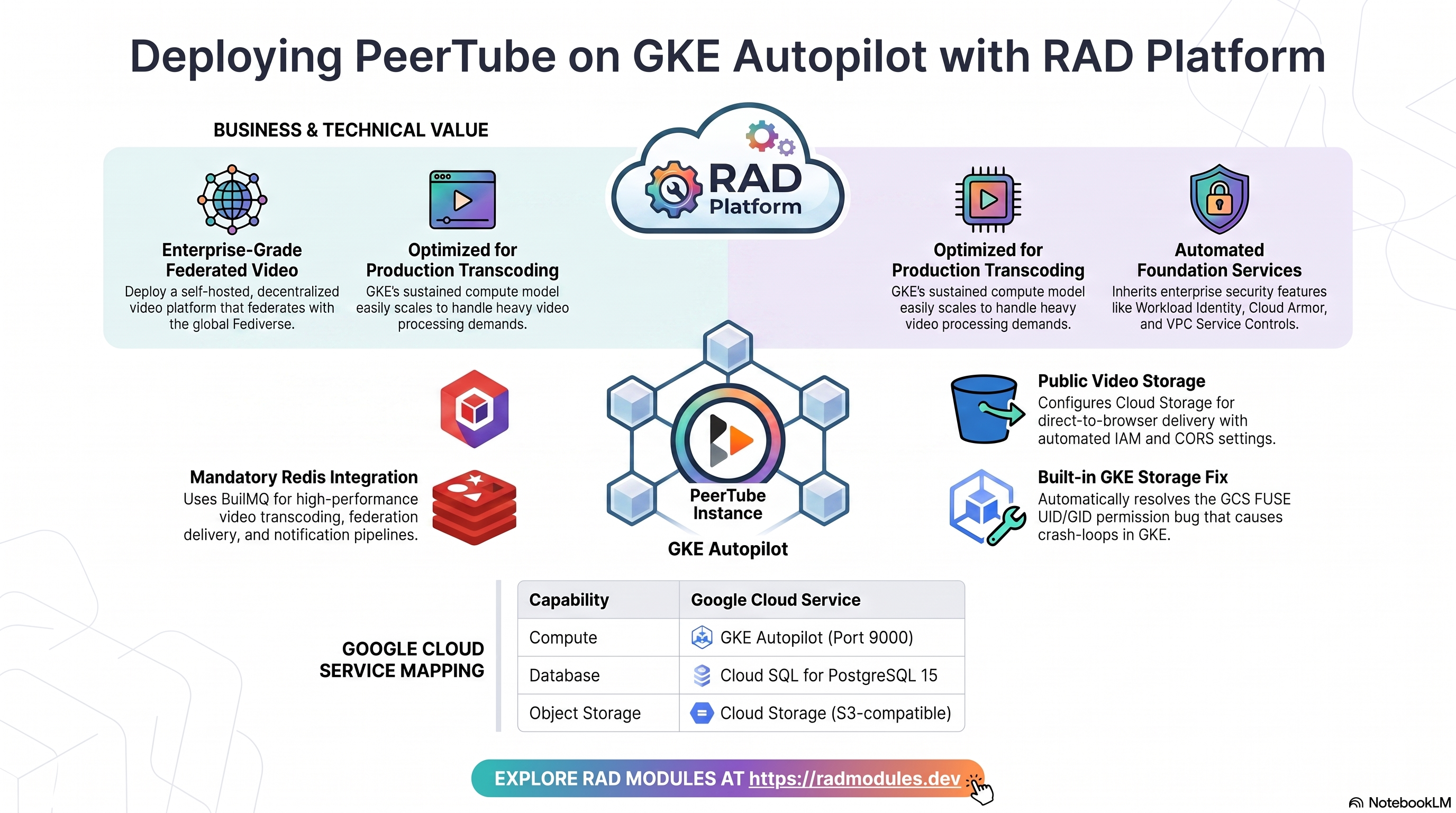
PeerTube is an open-source, ActivityPub-federated video hosting platform — a self-hosted YouTube alternative where independently-operated instances follow and federate videos, comments, and channels with each other (and the rest of the Fediverse) the same way Mastodon federates posts. This module deploys PeerTube on GKE Autopilot on top of the App_GKE foundation, which provisions and manages the shared Google Cloud and Kubernetes infrastructure.
This guide focuses on the cloud services PeerTube uses and how to explore and operate them from the Google Cloud Console and the command line. For the mechanics common to every GKE application — Workload Identity, ingress, autoscaling, CI/CD, Cloud Armor, IAP, Binary Authorization, VPC Service Controls, backups, and the deployment lifecycle — refer to the App_GKE foundation guide rather than repeating them here.
What PeerTube costs on RAD, and how that compares
For a single instance, PeerTube on RAD's GKE Autopilot module costs about US$143 a month with no per-user licence. GKE suits a PeerTube instance that must stay up, scale across pods, or run beside other Kubernetes workloads. For the lowest cost, the Cloud Run module runs the same PeerTube for about US$99 a month. Figures are as at 8 October 2026; sources are listed at the end of this section.
If you only need it occasionally — studying for a certification, a demo, a seasonal business — a RAD-managed project can be deleted and restored within 30 days for a few credits, so that US$143 becomes a few dollars a month instead. See Pause it for free, below.
What you pay on RAD
| In a Google Cloud project you own | In a project RAD manages for you | |
|---|---|---|
| Module fee, once per deployment | 110 credits (US$11 at the top-up price) | 99 credits (10% lower) |
| Build time | About 19 credits per build (RAD's average build takes about 19 minutes) | The same |
| Google Cloud running cost | Billed by Google to your own billing account (table below) | Metered hourly in credits; RAD publishes 108 credits a day, about 3,240 credits a month (about US$324 at the top-up price, US$259 at the Scale plan's rate) |
| Who owns what | You own the project and its billing; RAD deploys and updates it | RAD owns the project, with guardrails, quotas and budget alerts; you get console access, and a minimum purchased balance is held in reserve |
10 credits cost US$1 on a one-off top-up, and less on a monthly plan. In a project RAD manages, the database, file server and network are shared by every application in the project, so a second application does not add a second database.
Default running cost in your own project (us-central1, Google list prices):
| Resource (module default) | Per month |
|---|---|
| GKE Autopilot pod, 2x vCPU / 2 GiB | US$72.16 |
| Cloud SQL for PostgreSQL, 1 vCPU / 3.75 GB, zonal, 10 GB SSD | US$51.02 |
| NFS/cache file server (small VM) | US$13.43 |
| Cloud NAT and networking | US$5 |
| Cloud Storage (add-ons, backups) | US$1 |
| GKE cluster management fee | shared across every GKE app in the project; $0 if this is your only cluster, else ~73 |
| Total | about US$143, or about US$216 without the free tier |
- GKE's free tier covers the management fee of one Autopilot or zonal cluster per billing account, so it applies only if this is your only such cluster. Cloud SQL costs the same in africa-south1 (Johannesburg); the pod and VM cost about 10% more there.
- GKE Autopilot does not scale to zero. At least one PeerTube pod always runs, so the cost above is the same whether or not anyone is using it; extra pods are added only under load.
- Avoid Filestore for a small deployment. The module uses a small NFS/cache VM by default. Filestore's smallest instance is 1 TiB, which costs about US$164 a month on its own.
How it compares
- PeerTube is run by independent operators rather than sold as a single commercial SaaS, so there is no one vendor price to cite here; this compares against a bare server instead.
- A bare VPS sized close to PeerTube's own footprint — Hetzner CPX22 or a DigitalOcean 2 vCPU/4 GB Droplet, both about US$24/month, or a GCP Compute Engine e2-standard-2 (2 vCPU/8 GB) at about US$49/month — is cheaper in cash than either RAD figure above, and video storage/egress is billed separately either way.
- RAD's Cloud Storage-backed object storage, Cloud SQL backups and Redis job queue are managed for you; on a bare VPS, storage growth, backups and the transcoding queue are your own job.
Pause it for free: delete a RAD-managed project, restore it when you need it
If PeerTube runs in a project RAD manages for you, you have a second option that goes well beyond scaling to zero: delete the whole project, and restore it within 30 days for close to nothing. This suits occasional use — studying for a certification, a demo environment, a seasonal business — far better than running PeerTube continuously.
- How it works. Deleting a RAD-managed project unlinks its billing first, then asks Google to delete the project. Google does not remove the project immediately: it keeps it, recoverable, for 30 days. Because billing is already unlinked, nothing is charged while it waits. Unlike deleting one module, this does not tear down Cloud SQL, any VM or the GKE cluster one by one — the whole project, and everything in it, simply stops.
- Restoring costs a handful of credits, not a rebuild. Within 30 days, the project's owner can restore it. RAD asks Google to undelete the project and reattaches its billing account, then asks you to run Update on each deployment to confirm everything came back. Because nothing was individually destroyed, that Update finds the same resources already there — it is a check, not a rebuild, and an Update never charges the module fee again. That costs a handful of credits (under US$1) for a typical 2–3-deployment chain, against the 115 credits (US$11.50) a full redeploy costs below.
- So a month of occasional use can cost a few dollars, not US$143. Deploy PeerTube, use it for a while, delete the project. Restore it next time you want it, confirm with Update, and delete it again when you're done. You pay only for the module fee once, the builds, and whatever time PeerTube was actually live.
- What this needs. You must own the project (not a bring-your-own one RAD only manages billing for), and you restore it yourself within the 30 days — after that, Google deletes it for good. Restoring is admitted like creating a new project: your purchased credit balance must still clear the tier's floor (100 credits for the sandbox tier most study and demo use fits). Google says most services are fully working again within 36 hours of a restore.
- One real gap: the backup bucket does not survive. PeerTube's backups are written to a bucket inside the project, and that bucket is not protected by Cloud Storage's soft-delete, so it is very likely gone as soon as you delete the project — even though the project itself is recoverable for 30 days. If you have made changes to PeerTube you want to keep, copy a backup out (to Google Drive, or a bucket outside the project) before you delete, the same as the redeploy workflow below. For a default installation with nothing irreplaceable in it, this does not matter.
Pay only while you use it, the other way: delete and redeploy
GKE Autopilot does not scale to zero between requests. The option above only applies to a RAD-managed project; in your own project, or once the 30-day window has passed, the way to stop paying is to delete the deployment and deploy it again when you need it.
- What a redeploy costs. The module fee again plus the builds: about 115 credits (US$11.50), because RAD recreates the project and shared services before PeerTube. Deleting saves money only once PeerTube would otherwise sit unused for about 3 days or more, both in your own project (about US$4.75 a day) and in a RAD-managed one (108 credits a day).
- Most of the running cost is usually the database and the shared file/cache VM. They stop only when nothing else in the project uses them, so deleting PeerTube while something else shares the project saves only PeerTube's own compute part.
- Keep data first. Backups are written to a bucket inside the deployment and are deleted with it, so copy the latest backup out before deleting if you want to keep it.
- RAD does not recreate a deleted deployment for you; you enter the settings again when you deploy.
Lab sessions and Managed Environments
- Lab sessions, for training. A trainer runs a session for a class. Each participant gets the app in their own Google Cloud project for 15 minutes to 24 hours, within an allowance the trainer sets. Either the trainer funds every place, or each participant pays for their own. Everything is deleted when the session ends and unused credits go back to the trainer.
- Managed Environments, for consultancies. A partner runs the app for a client from a ring-fenced wallet it funds, and settles with the client directly. If the wallet runs low, billing pauses and the data is kept, so nobody receives an unexpected charge. At the end the partner hands the project over and the deployments become the client's own.
Credits can be bought in more than 20 currencies, including XAF, XOF, NGN, GHS, KES and ZAR, by card, bank transfer or mobile money.
Sources (8 October 2026): Google Cloud list prices from the Cloud Billing Catalog API; radmodules.dev/pricing for RAD's own fees and daily-credit estimates; Delete and restore projects for the pause/restore window and what it says about Cloud Storage objects without soft delete.
1. Overview
PeerTube runs as a custom-built Node.js pod on GKE Autopilot, built from a
Dockerfile layered on the official chocobozzz/peertube base image so a
dedicated PEERTUBE_VERSION build ARG can pin a real release. The deployment
wires together a focused set of Google Cloud services:
| Capability | Google Cloud service | Notes |
|---|---|---|
| Compute | GKE Autopilot | Node.js pod on port 9000; 2 vCPU / 2 GiB by default (conservative — raise for real transcoding) |
| Database | Cloud SQL for PostgreSQL 15 | Required — pg_trgm/unaccent extensions pre-created; PeerTube migrates its own schema; Cloud SQL Auth Proxy sidecar |
| Cache & queue | Redis | Mandatory, not optional — PeerTube's BullMQ job queue (transcoding, federation delivery, notifications) has no in-memory fallback |
| Object storage | Cloud Storage | A public videos bucket (S3-compatible, HMAC credentials) for video/streaming-playlist files; a private data bucket (GCS FUSE, with an explicit UID/GID fix) for local state |
| Secrets | Secret Manager | Auto-generated PEERTUBE_SECRET, PT_INITIAL_ROOT_PASSWORD, S3 HMAC access/secret key pair; database password |
| Ingress | Kubernetes Service / Gateway | Default LoadBalancer Service — required public for federation; optional custom domain via Kubernetes Gateway |
Sensible defaults worth knowing up front:
- Redis is mandatory. PeerTube's transcoding, federation delivery, and
notification pipeline all run through an in-process BullMQ job queue with
no in-memory fallback — unlike most modules in this catalogue where Redis
is an optional performance/scaling knob.
enable_redis = trueis the default and should never be disabled; a plan-time precondition blocksenable_redis = truewith neitherredis_hostset norenable_nfs = true. - This module fixed a real, GKE-specific storage-permission bug.
PeerTube's vendor entrypoint runs as root and
chowns/datato thepeertubeuser (uid/gid 999) before dropping privileges — that in-containerchownworks fine on Cloud Run's own gcsfuse integration, but GKE's GCS FUSE CSI driver does not honor it, leaving the mount root-owned. See §3 for the full story and the fix. - GKE is the right target for real transcoding load. Unlike the Cloud Run
variant (deliberately scoped to VOD/light-transcoding), GKE's sustained
compute model and this module's ability to raise
cpu_limit/memory_limitwell beyond scale-to-zero economics make it the better home for production transcoding — PeerTube's own FAQ recommends up to 8 vCPU / 8Gi. - RTMP live streaming is not wired in this pass — but it's not architecturally
blocked here the way it is on Cloud Run.
enable_live_streamingdefaultsfalseand currently has no effect: Cloud Run Services can never route raw TCP (an absolute architectural ceiling), but GKE's networking model can expose additional TCP ports via extra LoadBalancer Service ports — that wiring is simply not implemented yet. - The
videosbucket is deliberately public. PeerTube's own architecture requires browsers to fetch video/streaming-playlist files directly from object storage, not proxied through the app — the bucket overrides the Foundation's secure-by-defaultpublic_access_prevention = "enforced"to"inherited"so the requiredallUsers:objectViewergrant can apply (the same fix already proven on the Cloud Run variant — see PeerTube_CloudRun §3). - On a RAD-managed self-serve project, a project-level org-policy override
is applied first, then waited on. RAD-managed projects inherit a folder
org policy enforcing
constraints/storage.publicAccessPrevention, which overrides the bucket-level setting above and reintroduces the same412. Whenis_self_serve_project = true(server-injected — never set it by hand; it isfalsefor an ordinary bring-your-own project, where this whole mechanism is a no-op), the module overrides that constraint at the project level via the guardrails-admin provider. The override is tied to this module's own state, so destroying the deployment reverts the project to the folder's enforced-by-default posture. The override needs ~90s to propagate before the bucket grant will succeed. Terraform reports the org-policy write as complete in 0s, but GCP's enforcement lags: the very next apply step still hit the same412, even after the provider's own built-in IAM retry/backoff (~30s,Too many conflicts) was exhausted. Atime_sleep.wait_for_org_policy_propagationof 90s sits between the two, and the bucket grant depends on the wait rather than on the override directly — so an apply on a self-serve project is ~90s slower by design. Confirmed live 2026-08-06 on the Cloud Run variant, which provisions its buckets through the same Foundation path. - Sharp edge: the override is project-scoped, so two PeerTube variants in
one project collide.
storage.publicAccessPreventionhas no bucket-scoped variant once enforced at a higher level. If the same project ever runs bothPeerTube_GKEandPeerTube_CloudRun, each module's state independently manages the same project-level policy object, and destroying either removes it out from under the other.solutions.yamlonly ever selects one PeerTube variant per solution, so this is rare in practice and is not solved in the module. host(the ActivityPub federation domain) is immutable after first real use. Left empty by default so the entrypoint derives it from App_GKE's own predicted service URL — works out of the box on a fresh deploy. Set a real custom domain before production use.- No admin-bootstrap init job is needed.
PT_INITIAL_ROOT_PASSWORDis read directly fromprocess.envby PeerTube's owninstaller.tson first boot when no users exist yet — therootaccount is created automatically. - Database connection uses the Cloud SQL Auth Proxy loopback, unencrypted.
Unlike the Cloud Run variant (which must override
PEERTUBE_DB_SSLtotruewith cert verification off, since Cloud Run aliases the raw Cloud SQL private IP), App_GKE'sdb_host_env_var_namemechanism prefers the cloud-sql-proxy sidecar's127.0.0.1loopback when present — soPeerTube_Common's sharedPEERTUBE_DB_SSL="false"default is already correct here, unmodified.
2. Google Cloud Services & How to Explore Them
All commands assume you have run
gcloud container clusters get-credentials <cluster> --region <region> --project <project>
and that PROJECT, REGION, and NAMESPACE are set. Resource names are
reported in the deployment Outputs.
A. GKE Autopilot — the PeerTube workload
- Console: Kubernetes Engine → Workloads → select the Deployment.
- CLI:
kubectl get pods,svc -n "$NAMESPACE"
kubectl logs -n "$NAMESPACE" deploy/<service-name> --tail=100
kubectl describe pod -n "$NAMESPACE" -l app=<service-name>
See App_GKE for Workload Identity, autoscaling, and rollout mechanics.
B. Cloud SQL for PostgreSQL 15
PeerTube stores all application data (accounts, videos metadata, comments,
follows, playlists) in a managed Cloud SQL for PostgreSQL 15 instance,
reached via a Cloud SQL Auth Proxy sidecar on 127.0.0.1.
- Console: SQL → select the instance for connections, backups, flags, metrics.
- CLI:
gcloud sql instances list --project "$PROJECT" --filter="name~peertube"
gcloud sql instances describe <instance-name> --project "$PROJECT"
gcloud sql connect <instance-name> --user=<db-user> --database=<db-name> --project "$PROJECT"
The instance name, database, user, and password secret are in the Outputs. See App_GKE for the connection model, backups, and password rotation.
C. Redis — the BullMQ job queue
Redis backs PeerTube's transcoding, federation delivery, and notification job
queue. When redis_host is left empty, the shared NFS server VM's IP is used
as the default Redis host.
- CLI:
POD=$(kubectl get pods -n "$NAMESPACE" -l app=<service-name> -o jsonpath='{.items[0].metadata.name}')
kubectl exec -n "$NAMESPACE" "$POD" -- env | grep -i PEERTUBE_REDIS
D. Cloud Storage — videos (public) and data (private, GCS FUSE)
Two GCS buckets are provisioned:
-
videos— public (public_access_prevention = "inherited",allUsers:objectViewer), CORS-enabled, accessed via PeerTube's native S3-compatible client (AWS SDK) against GCS's S3-interop XML endpoint using HMAC credentials from a dedicated service account. Holds all five PeerTube object-storage classes (web-videos, streaming-playlists, original-video-files, user-exports, captions) under distinct prefixes. -
data— private, mounted via the GCS FUSE CSI driver at/datawith explicituid=999,gid=999,file-mode=664,dir-mode=775mount options (see §3 for why this is load-bearing on GKE). Holds PeerTube's local (non-object-storage) state: avatars, thumbnails, previews, storyboards, torrents, plugins, logs, and tmp/cache. -
Console: Cloud Storage → Buckets.
-
CLI:
gcloud storage buckets list --project "$PROJECT" --filter="name~peertube"
gcloud storage ls gs://<videos-bucket>/
gcloud storage buckets describe gs://<videos-bucket> --format='value(iamConfiguration.publicAccessPrevention)'
See App_GKE for GCS Fuse and CMEK options.
E. Secret Manager
PeerTube's pod reads PEERTUBE_SECRET, PT_INITIAL_ROOT_PASSWORD
(consulted only on first boot when no users exist), the S3 HMAC access/secret
key pair, and — when SMTP is configured — an SMTP password, all as
secret-backed environment variables. The database password is managed
separately by the foundation.
- Console: Security → Secret Manager.
- CLI:
gcloud secrets list --project "$PROJECT" --filter="name~peertube"
gcloud secrets versions access latest --secret=<secret-name> --project "$PROJECT"
See App_GKE for injection and rotation details, and PeerTube_Common for the full secret list.
F. Networking & ingress
The Kubernetes Service defaults to service_type = "LoadBalancer" (required
for public ActivityPub federation and video delivery). A quota-constrained
project can set service_type = "ClusterIP" and verify via
kubectl port-forward instead of consuming external/static-IP quota. A
Kubernetes Gateway with a custom domain, Cloud CDN (useful for video
delivery), and Cloud Armor can be layered on.
- Console: Kubernetes Engine → Gateways, Services & Ingress.
- CLI:
kubectl get svc -n "$NAMESPACE" -o wide
gcloud compute addresses list --project "$PROJECT"
See App_GKE.
G. Cloud Logging & Monitoring
Container logs flow to Cloud Logging; GKE and Cloud SQL metrics flow to Cloud Monitoring, with optional uptime checks and alert policies.
- Console: Logging → Logs Explorer; Monitoring → Dashboards / Alerting.
- CLI:
kubectl logs -n "$NAMESPACE" deploy/<service-name> --tail=100 -f
3. PeerTube Application Behaviour
- First-deploy database setup. The
db-initjob runsscripts/peertube/db-init.shusingpostgres:15-alpine. It waits for Cloud SQL to accept connections, then idempotently creates the application role and database, grants privileges, and creates thepg_trgmandunaccentextensions as the postgres superuser — PeerTube's install guide requires both but does not create them itself. Safe to re-run (execute_on_apply = true,max_retries = 3). - No separate migrate job. PeerTube creates and migrates its own Sequelize schema automatically on every server start.
- Admin account bootstraps automatically — no manual trigger needed.
Unlike some ActivityPub apps in this catalogue (GoToSocial requires a
manual CLI job), PeerTube's
installer.tsreadsPT_INITIAL_ROOT_PASSWORDdirectly fromprocess.env(not node-config, so noPEERTUBE_prefix) on first boot when no users exist yet, and creates therootadmin account with that password automatically. Retrieve it:Log in atSECRET=$(gcloud secrets list --project "$PROJECT" --filter="name~root-password" --format="value(name)")
gcloud secrets versions access latest --secret="$SECRET" --project "$PROJECT"$SERVICE_URL/loginwith usernameroot. - The federation domain (
host) is immutable after real use.PEERTUBE_WEBSERVER_HOSTNAMEis baked into every locally-created ActivityPub actor/object URI the first time the server boots with real data. Whenhostis left empty,docker-entrypoint.shderives it from App_GKE's ownGKE_SERVICE_URLat container start — a working federated default requiring no pre-deploy domain decision. Set a real custom domain viahostbefore production use; changing it after real accounts/videos exist requires PeerTube's ownupdate-hostmaintenance script and does not retroactively fix already-federated URIs. - Health path. The startup probe is TCP on port 9000 — PeerTube's own
DB/Redis migrations and first-boot admin bootstrap can take longer than a
typical HTTP readiness window allows, and an HTTP probe against a
not-yet-ready API would prevent the pod from ever becoming Ready. The
liveness probe uses the public, unauthenticated
GET /api/v1/configendpoint.
⚠ The GCS-FUSE UID/GID bug — the GKE-specific gotcha this module fixes
PeerTube's vendor image entrypoint (support/docker/production/entrypoint.sh)
runs as root and chowns /data to the peertube user — confirmed
uid/gid 999 via docker run --entrypoint sh chocobozzz/peertube:production -c "id peertube" — before dropping privileges to run the server as that
user.
- On Cloud Run, this in-container
chownis sufficient — Cloud Run's own built-in gcsfuse integration tolerates it, and the mount ends up correctly owned with no extra configuration. - On GKE, the GCS FUSE CSI driver does not honor an in-container
chown. Without an explicituid=/gid=mount option, the volume mounts root-owned and stays that way regardless of what the entrypoint does afterward — so PeerTube's own attempt to write into its now root-owned/datafails immediately:This crash-loops the pod on every restart, before the server ever binds its port.Error: EACCES: permission denied, mkdir '/data/logs'
PeerTube_Common's shared _peertube_data_volume local (in
modules/PeerTube_Common/main.tf, used by both the Cloud Run and GKE
variants) fixes this by pinning explicit mount options:
mount_options = [
  "implicit-dirs",
  "stat-cache-ttl=60s",
  "type-cache-ttl=60s",
  "uid=999",
  "gid=999",
  "file-mode=664",
  "dir-mode=775",
]
This is a no-op on Cloud Run (root already chowns to the same IDs there) and
load-bearing on GKE. It is the same bug class already found and fixed on
this catalogue's Paperless, CodeServer, CloudBeaver, and Seerr GKE variants
(see the repository CLAUDE.md's "GKE gcsfuse UID/GID permission denied"
finding) — PeerTube is the latest confirmed instance, and the first where
the mismatched UID (999, not the more common 1000) came from the vendor
entrypoint's own chown rather than the image's declared USER.
Verified live, 2026-07-22:
kubectl get pods -n "$NAMESPACE" -l app=<service-name>
# 3/3 Running, 0 restarts (down from 5 before the fix)

kubectl logs -n "$NAMESPACE" <pod> | head -20
# HTTP server listening on 0.0.0.0:9000
# Creating the administrator ... Username: root

POD=$(kubectl get pods -n "$NAMESPACE" -l app=<service-name> -o jsonpath='{.items[0].metadata.name}')
kubectl exec -n "$NAMESPACE" "$POD" -- ls -la /data
# every entry (logs/, avatars/, torrents/, plugins/, ...) owned peertube:peertube

kubectl port-forward -n "$NAMESPACE" "$POD" 19000:9000 &
curl -s http://localhost:19000/api/v1/config | head -c 200      # 200, real JSON
curl -s http://localhost:19000/api/v1/config/about | head -c 200 # 200, real JSON
Diagnostic tell, if you ever see this symptom on a fork of this module:
kubectl describe pod -n "$NAMESPACE" <peertube-pod>
# Look for: Error: EACCES: permission denied, mkdir '/data/logs'
4. Configuration Variables
Variables are grouped exactly as they appear on the deployment platform
(matching each variable's {{UIMeta group=N}} tag in variables.tf). Only
settings specific to or notable for PeerTube are listed; every other input is
inherited from App_GKE with its standard behaviour.
Group 3 — Application Identity
| Variable | Default | Description |
|---|---|---|
application_name | peertube | Base name for resources. Do not change after first deploy. |
application_display_name | PeerTube | Human-readable name shown in the platform UI. |
application_version | latest | Resolves to the maintained production Docker Hub tag via the dedicated PEERTUBE_VERSION build ARG — not the generic Foundation APP_VERSION (which would otherwise win the merge and produce an unresolvable latest tag). |
host | "" | PEERTUBE_WEBSERVER_HOSTNAME — the public federation domain. Immutable after first real use. Left empty derives it from the predicted GKE service URL. |
admin_email | admin@example.com | Email assigned to the auto-created root administrator account. |
enable_open_registration | false | Allow new users to sign themselves up. |
enable_live_streaming | false | Present for schema symmetry; not wired in this pass — see §1/§3. |
Group 4 — Runtime & Scaling
| Variable | Default | Description |
|---|---|---|
container_image_source | custom | Builds a Dockerfile-based image (chocobozzz/peertube:${PEERTUBE_VERSION} base) via Cloud Build. |
cpu_limit | 2000m | Conservative default for demo/VOD use. PeerTube's FAQ recommends up to 8 vCPU for real transcoding load — raise it here for production use, this is the right variant for that. |
memory_limit | 2Gi | Conservative default. PeerTube's FAQ recommends up to 8Gi for real transcoding load. |
container_port | 9000 | PeerTube's native PEERTUBE_LISTEN_PORT default. |
min_instance_count / max_instance_count | 0 / 3 | 0 enables scale-to-zero on the minimum; 3 is the HPA cost ceiling. |
enable_cloudsql_volume | true | Runs the Cloud SQL Auth Proxy sidecar; App_GKE prefers its 127.0.0.1 loopback for PEERTUBE_DB_HOSTNAME, so PeerTube's PEERTUBE_DB_SSL="false" default is correct unmodified (see §1). |
enable_image_mirroring | true | Mirror the base image into Artifact Registry. |
Group 6 — GKE Backend Configuration
| Variable | Default | Description |
|---|---|---|
service_type | LoadBalancer | Required for public federation by default; set ClusterIP under a static-IP quota constraint and verify via kubectl port-forward (used for this module's own live verification). |
session_affinity | ClientIP | Sticky sessions. |
workload_type | Deployment | StatefulSet is available via stateful_pvc_enabled. |
Group 5 — Environment Variables, Secrets & SMTP
| Variable | Default | Description |
|---|---|---|
environment_variables | {} | Plain-text env vars merged into PeerTube_Common's defaults. |
secret_environment_variables | {} | Operator-facing Secret Manager references. |
smtp_host | "" | SMTP hostname. Empty disables email; a non-empty value provisions the SMTP password secret. |
smtp_port / smtp_user / smtp_password / smtp_secure_enabled / mail_from | 587 / "" / "" / false / "" | Standard SMTP configuration, only used when smtp_host is set. mail_from defaults to noreply@<host> when empty. |
Group 13 — NFS
| Variable | Default | Description |
|---|---|---|
enable_nfs | true | Provisions the shared NFS VM, whose IP is used as the default Redis host when redis_host is empty. |
Group 14 — Cloud Storage
| Variable | Default | Description |
|---|---|---|
create_cloud_storage | true | PeerTube_Common supplies the real data/videos bucket declarations, overriding this variable's generic data-only default. |
gcs_volumes | [] | Additional GCS FUSE volume mounts beyond data (which already ships the uid=999/gid=999 fix — see §3). |
Group 16 — Database
| Variable | Default | Description |
|---|---|---|
database_type | POSTGRES_15 | PeerTube requires PostgreSQL. |
db_name | peertube | The database actually created and injected as PEERTUBE_DB_NAME. Immutable after first deploy. |
db_user | peertube | The role actually created and injected as PEERTUBE_DB_USERNAME; password auto-generated in Secret Manager. |
enable_postgres_extensions | true | Installs postgres_extensions after provisioning. |
postgres_extensions | ["pg_trgm", "unaccent"] | Required by PeerTube's install guide; not created by PeerTube itself. |
Group 15 — Redis
| Variable | Default | Description |
|---|---|---|
enable_redis | true | Mandatory — never disable. PeerTube has no in-memory fallback for BullMQ. A plan-time precondition blocks enable_redis=true with no redis_host and no enable_nfs. |
redis_host | "" | Leave blank to default to the NFS server IP. |
Group 11 — Workload Automation
| Variable | Default | Description |
|---|---|---|
initialization_jobs | [] | Leave empty to use the built-in db-init job supplied by PeerTube_Common. |
Group 7 — StatefulSet
| Variable | Default | Description |
|---|---|---|
stateful_pvc_enabled | false | When true, App_GKE mounts a real block PVC at /data instead of GCS FUSE, and PeerTube_GKE's own wiring (peertube.tf) auto-disables the GCS FUSE volume to avoid a double-mount. |
Group 10 — Observability & Health
| Variable | Default | Description |
|---|---|---|
startup_probe | TCP, port 9000 | Confirms the port is bound; PeerTube's own DB/Redis migrations and admin bootstrap complete before the HTTP API is meaningfully ready. |
liveness_probe | HTTP /api/v1/config, 60s initial delay | The public, unauthenticated config endpoint. |
uptime_check_config | { enabled=true, path="/" } | Cloud Monitoring uptime check — only meaningful when service_type = "LoadBalancer" or a custom domain is configured. |
Group 22 — VPC Service Controls & Audit Logging
| Variable | Default | Description |
|---|---|---|
enable_vpc_sc | false | Enforce a VPC-SC perimeter (requires organization_id). |
enable_audit_logging | false | Detailed Cloud Audit Logs. |
5. Outputs
Returned on a successful deployment — the quickest way to locate and explore the running resources.
| Output | Description |
|---|---|
service_name / namespace | Kubernetes Service name and namespace. |
service_cluster_ip / service_external_ip | Internal ClusterIP; external LoadBalancer IP (when reserved). |
service_url | URL to reach PeerTube. |
database_instance_name | Cloud SQL instance name. |
database_name / database_user | Application database name / user. |
database_password_secret | Secret Manager secret holding the DB password. |
database_host / database_port | 127.0.0.1 via the Cloud SQL Auth Proxy sidecar / port. |
storage_buckets | Created Cloud Storage buckets (data, videos). |
network_name | VPC network name. |
container_image / container_registry | Deployed image and Artifact Registry repo. |
monitoring_enabled | Monitoring status. |
initialization_jobs | Names of the setup jobs (db-init). |
deployment_id / tenant_id / resource_prefix | Naming identifiers. |
project_id | Project identifier. |
cicd_enabled / artifact_registry_repository | CI/CD status and Artifact Registry repo. |
kubernetes_ready | Whether the workload reached Ready state. |
vpc_sc_enabled / audit_logging_enabled | VPC-SC and audit logging status. |
6. Configuration Pitfalls & Sensible Defaults
Risk: Critical (data loss / outage / security) — High (service degraded) — Medium (cost or partial degradation) — Low (minor).
| Setting | Sensible value | Risk | Consequence if wrong |
|---|---|---|---|
/data GCS FUSE mount_options | Leave PeerTube_Common's uid=999/gid=999 fix in place | Critical | Without it, the pod crash-loops with Error: EACCES: permission denied, mkdir '/data/logs' on every restart — a GKE-only failure mode not seen on Cloud Run (see §3). |
host (PEERTUBE_WEBSERVER_HOSTNAME) | Set your real domain before first real use | Critical | Baked into every ActivityPub actor/object URI at creation time; changing it after real accounts/videos exist breaks federation for everything created under the old value. |
enable_redis | true (never disable) | Critical | PeerTube has no in-memory fallback for BullMQ — transcoding, federation delivery, and notifications all stop working without Redis. |
videos bucket public_access_prevention | "inherited" (set by PeerTube_Common, do not override to "enforced") | Critical | PeerTube's architecture requires browsers to fetch video files directly from object storage; "enforced" blocks the required allUsers:objectViewer grant with a 412 error at apply time. |
database_type | POSTGRES_15 | Critical | PeerTube requires PostgreSQL; the pg_trgm/unaccent extensions and Sequelize schema are Postgres-specific. |
startup_probe | Leave type = "TCP" | High | PeerTube's DB/Redis migrations and admin bootstrap take longer than a typical HTTP readiness window allows; an HTTP probe against a not-yet-ready API can prevent the pod from ever becoming Ready. |
cpu_limit / memory_limit | Raise substantially for real transcoding load | High | The 2000m/2Gi defaults are deliberately conservative for demo/VOD use; PeerTube's own FAQ recommends up to 8 vCPU/8Gi for real production transcoding — undersized resources stall or fail transcode jobs. |
stateful_pvc_enabled | Leave false unless you need block-storage write-locking guarantees for /data | Medium | Enabling it switches /data to a real PVC and auto-disables the GCS FUSE volume — mixing the two would double-mount the path. |
service_type | LoadBalancer for public federation; ClusterIP only under a real IP-quota constraint | Medium | ClusterIP makes the instance unreachable from outside the cluster — fine for kubectl port-forward verification, wrong for a production federated instance. |
enable_open_registration | false for most deployments | Medium | Leaving registration open on a public instance allows anyone with the URL to create an account and upload video content. |
enable_iap | false for a public instance | Medium | IAP blocks unauthenticated ActivityPub federation traffic and public video viewing — only appropriate for a fully private/testing instance. |
PT_INITIAL_ROOT_PASSWORD secret | Retrieve and store securely after first deploy | Medium | This is the only credential for the root admin account; it is not re-generated or re-applied after the account already exists. |
For the foundation behaviour referenced throughout — Workload Identity,
ingress, autoscaling, CI/CD, Cloud Armor, IAP, Binary Authorization, VPC-SC,
backups, and image mirroring — see App_GKE. PeerTube-specific
application configuration shared with the Cloud Run variant is defined in
PeerTube_Common (module source:
modules/PeerTube_Common). See also the Cloud Run variant's guide,
PeerTube_CloudRun, for the storage-bucket public-access
story shared by both platforms.
Related guides
- Hands-on lab: PeerTube on GKE Autopilot — deploy it step by step, with the console screens and commands at each stage.
- PeerTube on Google Cloud Run — the same application on Cloud Run, for when you need the other deployment target.
- PeerTube Common — Shared Application Configuration — the configuration shared by both deployment targets.
Need RAD to do something it does not do yet? Request it on the roadmap, or vote on what is already there.