Gokapi on GKE Autopilot
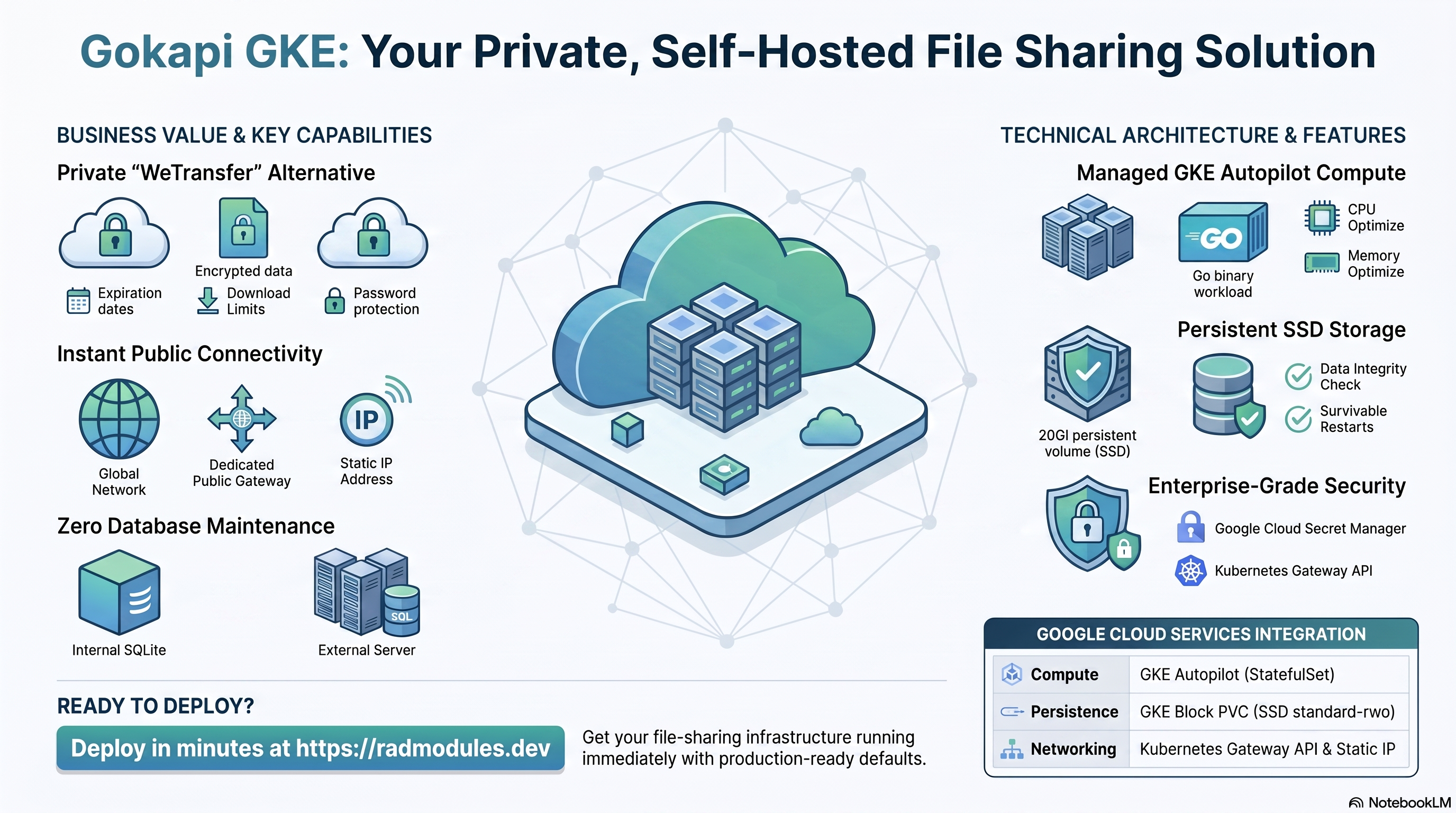
Gokapi is a lightweight, self-hosted file-sharing server written in Go — a self-hosted alternative to WeTransfer. Users upload files and generate shareable download links with optional expiry dates, download-count limits, and password protection, all backed by an internal SQLite database (no external database required). This module deploys Gokapi on GKE Autopilot on top of the App_GKE foundation, which provisions and manages the shared Google Cloud and Kubernetes infrastructure.
This guide focuses on the cloud services Gokapi uses and how to explore and operate them from the Google Cloud Console and the command line. For the mechanics that are common to every GKE application — Workload Identity, ingress, autoscaling, CI/CD, Cloud Armor, IAP, Binary Authorization, VPC Service Controls, backups, and the deployment lifecycle — refer to the App_GKE foundation guide rather than repeating them here.
What Gokapi costs on RAD, and how that compares
Running Gokapi in your own Google Cloud project costs about US$42.08/month in Google Cloud charges, on top of a one-time 75-credit RAD module fee (67.5 credits — 10% lower — in a RAD-managed project). Gokapi is a lightweight, self-hosted file-sharing server written in Go. If you deploy into a RAD-managed project, you can pause the whole thing for free and pick it back up later — see "Pause it for free" below.
Gokapi is also available on Cloud Run — see the Cloud Run guide for the lower-cost option; this guide covers the GKE variant.
What you pay on RAD
| Own project | RAD-managed project | |
|---|---|---|
| Module fee | 75 credits (one-time) | 67.5 credits (one-time, 10% lower) |
| Build time | ~3–6 credits (one-time, per build) | ~3–6 credits (one-time, per build) |
| Google Cloud running cost | ~US$42.08/month, billed to your own Google billing account at list price | ~67 credits/day (~US$6.70/day), metered hourly at list price plus RAD's margin |
Default running cost in your own project
| Resource | US$/month (Google list price, us-central1) |
|---|---|
| GKE Autopilot pod, 1x vCPU / 1 GiB | US$36.08 |
| Cloud NAT and networking | US$5 |
| Cloud Storage (add-ons, backups) | US$1 |
| GKE cluster management fee | shared across every GKE app in the project; $0 if this is your only cluster, else ~73 |
| Total | US$42.08 |
How it compares
- There is no officially hosted/cloud version of Gokapi to compare against, so the honest comparison is against self-managed infrastructure, not a competing SaaS.
- A bare VPS sized to roughly 1 vCPU / 1 GiB — a Hetzner CPX22 (2 vCPU/4GB, ~US$24/mo), a DigitalOcean 2 vCPU/4GB Droplet (US$24/mo), or GCP's own Compute Engine e2-standard-2 (2 vCPU/8GB, ~US$49/mo) — usually undercuts RAD's sticker price; a VPS a size or two smaller would undercut it further.
- What that lower price does not include is the admin's own time: patching the OS, rotating database backups, renewing TLS certificates and watching for downtime. RAD's managed Cloud SQL, Secret Manager and monitoring do that for you, which is the actual trade being made, not the sticker price.
- RAD is not claiming to be cheaper than a bare VPS in cash terms — it usually is not. The case for RAD is what's managed for you.
Pause it for free: delete a RAD-managed project, restore it when you need it
If Gokapi is running in a RAD-managed project, you can stop paying for it entirely without destroying it. Deleting that project first unlinks its billing, then asks Google to delete the project outright — Google's own 30-day recoverable soft delete. Unlike deleting the Gokapi module on its own, this does not tear down Cloud SQL, any VM or the compute resource one by one: the whole project simply stops, and nothing is charged while it waits, because billing is already unlinked.
Restoring, within 30 days and only by the project's owner, asks Google to undelete the project and reattaches its billing account, then asks you to run Update on each deployment to confirm everything came back. Because nothing was individually destroyed, that Update finds the same resources already there — it is a check, not a rebuild, and an Update never charges the module fee again. This costs only a handful of build-time credits in total — roughly 5–10 credits, under US$1, for a typical 2–3-deployment chain. The 67.5-credit module fee is not charged again.
What this needs: you must own the project (not one RAD only manages billing for), you must restore it yourself within 30 days — after that Google deletes it for good — and restoring is admitted like creating a new project, so your purchased credit balance must still clear the tier's floor (100 credits for the sandbox tier most study/demo use fits). Google says most services are fully working again within 36 hours of a restore.
One real gap: nightly backups are written to a bucket inside the project, and that bucket has Cloud Storage's soft-delete explicitly turned off, so it is very likely gone as soon as you delete the project — even though the project itself is recoverable for 30 days. If you have customised Gokapi and want to keep that work, copy a backup out (to Google Drive, or a bucket outside the project) before deleting. For a default install with nothing irreplaceable in it, this does not matter.
Pay only while you use it, the other way: delete and redeploy
If Gokapi is in your own project (or more than 30 days have passed on a RAD-managed one), the way to stop paying is to delete the deployment and redeploy later when you need it again.
A redeploy costs the module fee again, plus the builds: roughly 75 + ~3–6 credits (~US$7.95) in your own project, or 67.5 + ~3–6 credits on a RAD-managed one.
Deleting only saves money once Gokapi would otherwise sit unused long enough to clear that redeploy cost against its own running cost: roughly about 6 days or more idle in your own project (against its ~US$42.08/month Google Cloud bill), or about 2 days or more idle in a RAD-managed project (against its ~67 credits/day).
Keep data first: nightly backups go to a bucket inside the deployment and are deleted with it, so copy the latest backup out before deleting if you want to keep it.
Lab sessions and Managed Environments
- Lab sessions, for training: a trainer runs a session for a class. Each participant gets the app in their own Google Cloud project for 15 minutes to 24 hours, within an allowance the trainer sets. Either the trainer funds every place, or each participant pays for their own. Everything is deleted when the session ends and unused credits go back to the trainer.
- Managed Environments, for consultancies: a partner runs the app for a client from a ring-fenced wallet it funds, and settles with the client directly. If the wallet runs low, billing pauses and the data is kept, so nobody receives an unexpected charge. At the end the partner hands the project over and the deployments become the client's own.
- Credits can be bought in more than 20 currencies, including XAF, XOF, NGN, GHS, KES and ZAR, by card, bank transfer or mobile money.
Sources (8 October 2026): Google Cloud Billing Catalog API list prices; radmodules.dev/pricing for RAD's own fees and daily-credit estimates; Google's project delete/restore docs for the pause/restore mechanics.
1. Overview
Gokapi runs as a single Go binary workload with no external database. The deployment wires together a small, focused set of Google Cloud services:
| Capability | Google Cloud service | Notes |
|---|---|---|
| Compute | GKE Autopilot | A single-container StatefulSet pod on port 53842, 1000m CPU / 1Gi memory by default |
| Database / metadata | None (internal SQLite) | No Cloud SQL — Gokapi writes its own SQLite DB under GOKAPI_CONFIG_DIR; database_type is fixed to NONE |
| File persistence | GKE block PVC (StatefulSet) | The SQLite DB and uploaded files both live under /data, on a per-pod Persistent Volume Claim by default |
| Object storage | Cloud Storage (conditional) | A storage bucket is always declared, but only mounted (via GCS FUSE) when the StatefulSet PVC is disabled |
| Secrets | Secret Manager | Only an optional operator API key (GOKAPI_API_KEY); no mandatory generated secret |
| Ingress | Kubernetes Gateway API | enable_custom_domain = true by default, so a public Gateway endpoint (and reserved static IP) is provisioned out of the box |
Sensible defaults worth knowing up front:
- No Cloud SQL, ever.
database_typeis hard-fixed toNONEbyGokapi_Common— all the generic database variables (db_name,db_user,application_database_name, etc.) are forwarded to the foundation only for variable-mirroring compatibility and have no effect. - SQLite + uploaded files live on a real block PVC by default, not GCS FUSE.
stateful_pvc_enabled = trueby default, which also auto-resolvesworkload_typetoStatefulSet(no need to set both). A 20Gistandard-rwo(SSD) PVC is mounted at/data;GOKAPI_CONFIG_DIR=/data/config(config + the SQLite database) andGOKAPI_DATA_DIR=/data/data(uploaded files) both live under that mount, so both survive pod restarts/redeploys. This matters because SQLite is not safe on gcsfuse — the module explicitly avoids that combination by disabling the GCS volume whenever the PVC is enabled (see below). - The
storageGCS bucket is still created by default even though it isn't mounted.Gokapi_Commonalways declares astorage-suffixed bucket, andcreate_cloud_storage = trueby default provisions it — but with the default StatefulSet PVC in place,enable_gcs_storage_volumeis automatically set tofalseto avoid a double-mount at/data, so the bucket sits unused unless you disablestateful_pvc_enabled. - Single replica by design.
min_instance_count = 1,max_instance_count = 1. Gokapi's SQLite database is single-writer; there is no distributed/clustered mode, so do not scale beyond 1 pod. - No admin password is auto-generated. Gokapi has no mandatory secret — the
administrator account is created interactively through Gokapi's own first-run
setup wizard at
/setup(thesetup_urloutput). Until it is completed, every other page —/included — answers "Server is in maintenance mode, please try again in a few minutes". - Optional operator API key.
enable_api_key(defaultfalse) generates a 32-character random token, stores it in Secret Manager, and injects it asGOKAPI_API_KEYvia a native Kubernetes Secret (explicit_secret_values) rather than the Secret Manager → SecretSync path. This is a convenience token only — Gokapi's own upload/download API keys are normally minted from the admin UI after setup. - Redis is force-disabled. The variant hardcodes
enable_redis = falseto the foundation regardless of theenable_redisvariable's value — Gokapi has no use for Redis. - A public endpoint is provisioned out of the box. Unlike many app modules,
enable_custom_domaindefaults totrueandreserve_static_ipdefaults totrue, even thoughservice_typedefaults toClusterIP. This gives Gokapi a working public Gateway endpoint by default — appropriate for an app whose whole purpose is generating shareable download links. See App_GKE for the default<reserved-ip>.nip.iohostname mechanic.
2. Google Cloud Services & How to Explore Them
All commands assume you have run
gcloud container clusters get-credentials <cluster> --region <region> --project <project>
and that PROJECT, REGION, and NAMESPACE are set. The namespace and other
identifiers are reported in the deployment Outputs.
A. GKE Autopilot — the Gokapi workload
Gokapi runs as a single-pod StatefulSet by default (stable pod identity, an
OrderedReady restart policy, and a per-pod PVC). Autopilot bills for the CPU and
memory the pod actually requests.
- Console: Kubernetes Engine → Workloads → select the Gokapi workload for pods, revisions, and events.
- CLI:
kubectl get pods,svc,statefulset -n "$NAMESPACE"
kubectl logs -n "$NAMESPACE" statefulset/<service-name> --tail=100
kubectl describe pod -n "$NAMESPACE" -l app=<service-name>
See App_GKE for how Autopilot, scaling, and the StatefulSet vs Deployment workload type are managed.
B. Persistent storage — the block PVC (and the unused GCS bucket)
The SQLite metadata database and every uploaded file live under /data on a
per-pod block PVC (stateful_pvc_enabled = true, 20Gi, standard-rwo/SSD by
default). A storage Cloud Storage bucket is also declared and — unless you turn
the PVC off — provisioned but never mounted.
- Console: Kubernetes Engine → Storage for the PVC; Cloud Storage → Buckets for the (likely unused) bucket.
- CLI:
kubectl get pvc -n "$NAMESPACE"
gcloud storage buckets list --project "$PROJECT" --filter="name~storage"
See App_GKE for the StatefulSet/PVC mechanics (Group 7) and the SSD
SSD_TOTAL_GB quota consideration on quota-constrained projects.
C. Secret Manager
Gokapi creates no mandatory secret. The only secret this module can create is
the optional GOKAPI_API_KEY operator convenience token, gated by enable_api_key
(default false).
- Console: Security → Secret Manager.
- CLI:
gcloud secrets list --project "$PROJECT" --filter="name~api-key"
gcloud secrets versions access latest --secret=<api-key-secret-name> --project "$PROJECT"
See App_GKE for the Secret Store CSI / native-secret injection model and rotation.
D. Networking & ingress
enable_custom_domain = true and reserve_static_ip = true are both defaults, so
a Kubernetes Gateway API resource with a reserved static external IP is
provisioned automatically, even though the underlying Kubernetes Service itself
defaults to ClusterIP.
- Console: Network services → Load balancing; VPC network → IP addresses.
- CLI:
kubectl get svc,gateway,httproute -n "$NAMESPACE"
gcloud compute addresses list --project "$PROJECT"
See App_GKE for the default <reserved-ip>.nip.io hostname, custom
domains, Cloud CDN, and static IP details.
E. Cloud Logging & Monitoring
Pod stdout/stderr flow to Cloud Logging; GKE metrics flow to Cloud Monitoring.
Optional uptime checks and alert policies are available (uptime_check_config is
disabled by default).
- Console: Logging → Logs Explorer; Monitoring → Dashboards / Alerting.
- CLI:
gcloud logging read 'resource.type="k8s_container" AND resource.labels.namespace_name="'"$NAMESPACE"'"' \
  --project "$PROJECT" --limit 50
3. Gokapi Application Behaviour
- No initialization job runs by default.
Gokapi_Commonsupplies no defaultinitialization_jobsentry — Gokapi manages its own storage and needs no database to bootstrap. Only user-supplied jobs (for custom data loading or migration) will appear under Kubernetes Jobs. - First-boot setup is entirely interactive. There is no auto-install flag and
no generated admin password. Open
/setupon the service URL (thesetup_urloutput) and Gokapi's own wizard creates the administrator account;/shows only "Server is in maintenance mode" until then. - Where data physically persists. With the default
stateful_pvc_enabled = true, bothGOKAPI_CONFIG_DIR=/data/config(the SQLite metadata DB and app config) andGOKAPI_DATA_DIR=/data/data(uploaded files) sit on the same per-pod block PVC mounted at/data. If you instead setstateful_pvc_enabled = false, the module automatically re-enables the GCS FUSE mount of thestoragebucket at the same path — acceptable for light use, but higher latency for SQLite-heavy workloads than the block PVC. - Single-writer, single-pod.
min_instance_count = 1/max_instance_count = 1by default. Gokapi's SQLite database has no clustering/replication story, so do not raisemax_instance_countabove 1. - Health probes hit the public root, no auth required. Both the startup probe
and the liveness probe are HTTP GET
/(Gokapi's public root, 200, unauthenticated — before setup it is the maintenance notice, still 200) — startup:initial_delay=15s, timeout=5s, period=10s, failure_threshold=10; liveness:initial_delay=30s, timeout=5s, period=30s, failure_threshold=3. - Container port is fixed at
53842. This is Gokapi's native port, wired viaGOKAPI_PORT=53842and the module'scontainer_port; it is not configurable through the genericcontainer_portvariable (which is documented as having no effect on this module). - Verify the deployed pod and its persistent state:
kubectl get pods,pvc -n "$NAMESPACE"
kubectl exec -n "$NAMESPACE" statefulset/<service-name> -- ls -la /data/config /data/data
kubectl logs -n "$NAMESPACE" statefulset/<service-name> --tail=50
4. Configuration Variables
Variables are grouped exactly as they appear on the deployment platform. Only settings specific to or notable for Gokapi are listed; every other input is inherited from App_GKE with its standard behaviour and defaults.
Group 3 — Application Identity
| Variable | Default | Description |
|---|---|---|
application_name | gokapi | Base name for resources. Do not change after first deploy. |
application_version | latest | f0rc3/gokapi image tag used as the custom-build base; latest is pinned to a known-good tag (v1.9.6) at build time via the app-specific GOKAPI_VERSION build arg. |
enable_api_key | false | Generates a random API key in Secret Manager and injects it as GOKAPI_API_KEY, an operator convenience token only. |
Group 4 — Runtime & Scaling
| Variable | Default | Description |
|---|---|---|
cpu_limit | 1000m | CPU limit for the Gokapi container. |
memory_limit | 1Gi | Memory limit; Gokapi is a lightweight Go binary and needs little memory. |
min_instance_count | 1 | Kept at 1 to avoid cold starts. |
max_instance_count | 1 | Keep at 1 — Gokapi's SQLite DB is single-writer with no distributed mode. |
container_port | 53842 | Not forwarded to the foundation; Gokapi's port is fixed at 53842 via Gokapi_Common. |
enable_cloudsql_volume | false | Must remain false — Gokapi has no Cloud SQL database. |
Group 6 — GKE Backend & Cluster
| Variable | Default | Description |
|---|---|---|
service_type | LoadBalancer | Externally reachable by default. Set ClusterIP to make the Service internal-only and route the public entry point through the Group 19 Gateway instead (enable_custom_domain, below). |
workload_type | null → StatefulSet | Auto-resolves to StatefulSet because stateful_pvc_enabled = true by default. |
session_affinity | None | Stickiness is largely moot with a single replica. |
Group 7 — StatefulSet / PVC
| Variable | Default | Description |
|---|---|---|
stateful_pvc_enabled | true | Provisions a per-pod block PVC for the SQLite DB + uploads; strongly recommended over GCS FUSE for Gokapi. |
stateful_pvc_size | 20Gi | Size to hold the SQLite DB plus all uploaded files. |
stateful_pvc_mount_path | /data | Both GOKAPI_CONFIG_DIR (/data/config) and GOKAPI_DATA_DIR (/data/data) live under this mount. |
stateful_pvc_storage_class | standard-rwo | Balanced PD (SSD) by default on GKE Autopilot; draws the SSD_TOTAL_GB quota. |
stateful_fs_group | 3000 | Matches Gokapi's UID 1000 / GID 2000 so the PVC is group-writable. |
Group 13 — Filesystem (NFS)
| Variable | Default | Description |
|---|---|---|
enable_nfs | false | Off by default — Gokapi persists via the StatefulSet PVC, not shared NFS. |
Group 16 — Database Backend
| Variable | Default | Description |
|---|---|---|
database_type | NONE | Fixed — Gokapi has no SQL database; all other database variables in this group are forwarded only for variable-mirroring compatibility and have no effect. |
Group 19 — Custom Domain, Static IP & Networking
| Variable | Default | Description |
|---|---|---|
enable_custom_domain | true | On by default (unusual among app modules) so a public Gateway endpoint exists out of the box, matching Gokapi's purpose of generating shareable links. |
reserve_static_ip | true | Stable external IP across redeploys, feeding the default <ip>.nip.io hostname. |
application_domains | [] | Custom hostnames + managed certificate; layer onto the default Gateway endpoint. |
All other inputs follow standard App_GKE behaviour.
5. Outputs
These values are returned on a successful deployment and are the quickest way to locate and explore the running resources.
| Output | Description |
|---|---|
service_name | Kubernetes Service name. |
namespace | Namespace the workload runs in. |
service_cluster_ip | In-cluster ClusterIP. |
stage_service_cluster_ips | Map of ClusterIPs for stage-specific services. |
service_external_ip | External LoadBalancer IP (when a static IP is reserved). |
service_url | URL to reach Gokapi. |
gokapi_api_key_secret_id | Secret Manager secret ID for the optional operator API key; empty when enable_api_key is false. |
storage_buckets | Created Cloud Storage buckets (the storage bucket, mounted only if the StatefulSet PVC is disabled). |
network_name / network_exists / regions | VPC network, presence, available regions. |
container_image / container_registry | Deployed image and Artifact Registry repo. |
monitoring_enabled / monitoring_notification_channels | Monitoring status and channels. |
initialization_jobs | Names of any user-supplied initialization jobs (none by default). |
statefulset_name | Name of the StatefulSet. |
deployment_id / tenant_id / resource_prefix | Naming identifiers. |
project_id / project_number | Project identifiers. |
cicd_enabled / cicd_configuration | CI/CD status and details (repo, trigger, registry). |
github_repository_url / github_repository_owner / github_repository_name | CI/CD GitHub details. |
artifact_registry_repository / cloudbuild_trigger_name / cloudbuild_trigger_id | Registry and build trigger. |
kubernetes_ready | Whether the cluster/workload is ready. |
vpc_sc_enabled / vpc_sc_perimeter_name / vpc_sc_dry_run_mode | VPC-SC status. |
audit_logging_enabled / artifact_registry_cmek_enabled | Audit logging and CMEK status. |
6. Configuration Pitfalls & Sensible Defaults
Risk: Critical (data loss / outage / security) — High (service degraded) — Medium (cost or partial degradation) — Low (minor).
Inherited plan-time validation. This module passes its configuration through the App_GKE foundation engine, which validates values and combinations at plan time — a
StatefulSetforced alongside a stateless setting, IAP with no authorized identities,quota_memory_*given as bare integers, an out-of-rangecontainer_port/backup_retention_days. Invalid configuration fails the plan with a clear, named error before any resource is created, so most mistakes below are caught up front rather than at apply or runtime.
| Setting | Sensible value | Risk | Consequence if wrong |
|---|---|---|---|
stateful_pvc_enabled | true | Critical | Turning it off falls back to a GCS FUSE mount for the SQLite DB — gcsfuse's write semantics are unsafe for SQLite and risk metadata corruption under real usage. |
stateful_pvc_mount_path | /data (leave default) | Critical | Both GOKAPI_CONFIG_DIR and GOKAPI_DATA_DIR are computed relative to this path; changing it without matching environment_variables overrides orphans the existing SQLite DB and uploads. |
max_instance_count | 1 | Critical | Gokapi's SQLite database is single-writer with no clustering; running >1 replica risks database corruption and inconsistent uploads. |
stateful_pvc_storage_class | standard-rwo (SSD) | Medium | Fine for typical use; on a quota-constrained project (e.g. tight SSD_TOTAL_GB), override to HDD standard per App_GKE if quota is scarce — Gokapi's I/O pattern does not require SSD-level IOPS. |
create_cloud_storage | true (default) with stateful_pvc_enabled = true | Medium | Creates an unused storage GCS bucket that is never mounted while the PVC is active — set create_cloud_storage = false to avoid the unnecessary bucket, or leave it if you might disable the PVC later. |
enable_api_key (auto-generated secret) | Leave false unless you need a pre-provisioned key | Low | The token is a convenience only; Gokapi's real upload/download API keys are minted from the admin UI regardless of this setting. |
quota_memory_requests / _limits | binary units (4Gi, 8192Mi) | Critical | Bare integers are treated as bytes and block all pod scheduling in the namespace. |
enable_custom_domain / reserve_static_ip | true / true (defaults) | Medium | Disabling both leaves Gokapi reachable only via internal ClusterIP, with no public URL for the download links it generates — defeats the purpose of the app for external sharing. |
enable_cloudsql_volume | false | Low | Setting it true injects a pointless Cloud SQL Auth Proxy sidecar; Gokapi never uses it. |
enable_nfs | false | Low | Gokapi persists via the StatefulSet PVC by default; enabling NFS adds an unused Filestore instance unless you deliberately switch off the PVC and want shared storage instead. |
For the foundation behaviour referenced throughout — IAM and Workload Identity, autoscaling, ingress and certificates, CI/CD, Cloud Armor, IAP, Binary Authorization, VPC-SC, backups, and image mirroring — see App_GKE. Gokapi-specific application configuration shared with the Cloud Run variant is described in Gokapi_Common.
Related guides
- Hands-on lab: Gokapi on GKE Autopilot — deploy it step by step, with the console screens and commands at each stage.
- Gokapi on Google Cloud Run — the same application on Cloud Run, for when you need the other deployment target.
- Gokapi Common — Shared Application Configuration — the configuration shared by both deployment targets.
Need RAD to do something it does not do yet? Request it on the roadmap, or vote on what is already there.