Certification track: Associate Cloud Engineer (ACE)
Formbricks GKE Module — Configuration Guide
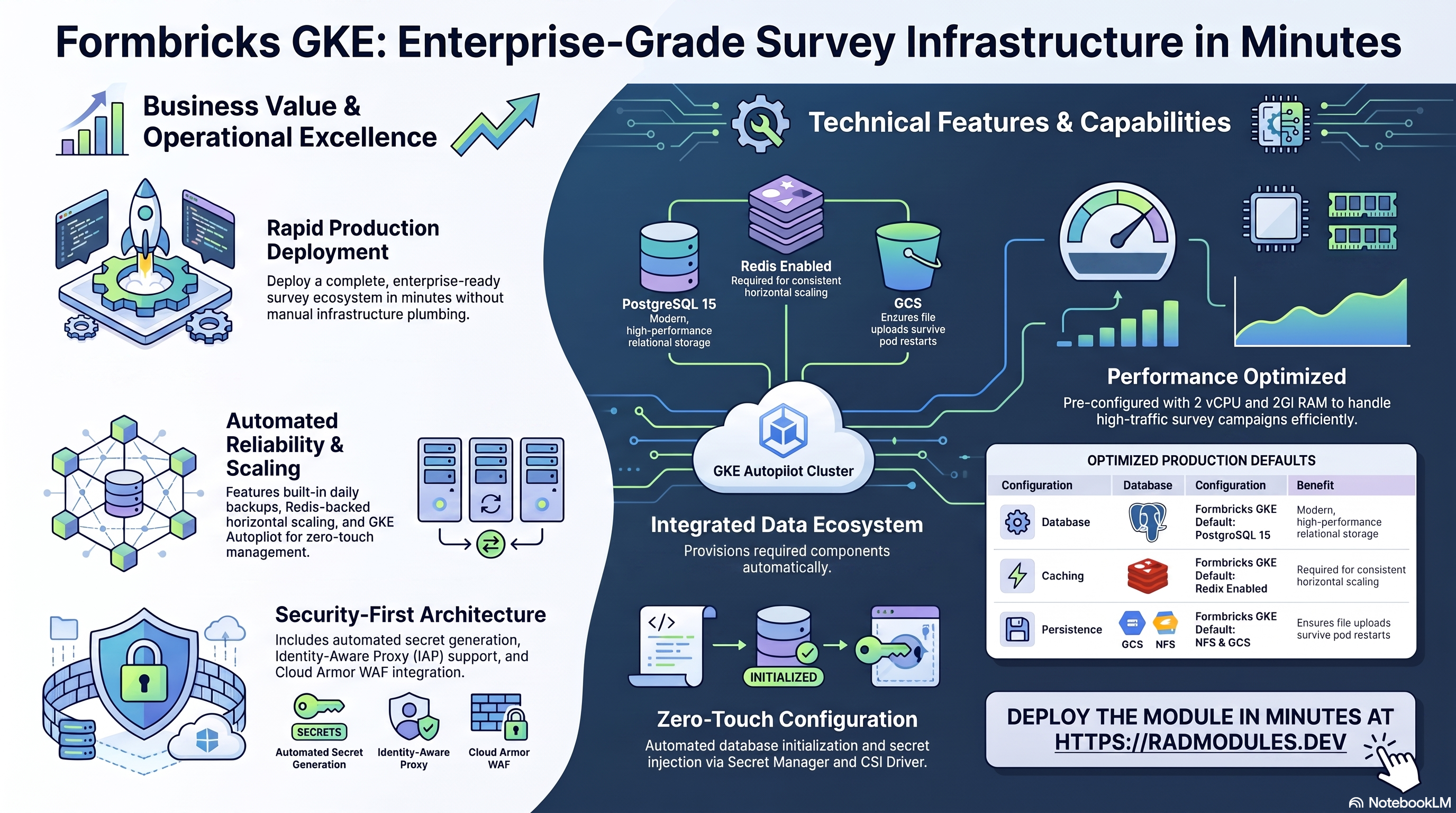
This guide describes every configuration variable available in the Formbricks_GKE module. Formbricks_GKE is a wrapper module that combines the generic App_GKE infrastructure module with the Formbricks_Common shared application configuration to deploy the Formbricks open-source survey and experience management platform on Google Kubernetes Engine (GKE) Autopilot.
Most configuration options in Formbricks GKE map directly to the same options in App GKE. Where a variable is identical in behaviour, this guide references the App GKE guide rather than repeating the same documentation. Only the variables and defaults that are specific to Formbricks are described in full here.
Note: Variables marked as platform-managed are set and maintained by the platform. You do not normally need to change them.
What Formbricks costs on RAD, and how that compares
Running Formbricks in your own Google Cloud project costs about US$142.62/month in Google Cloud charges, on top of a one-time 110-credit RAD module fee (99 credits — 10% lower — in a RAD-managed project). Formbricks is an open-source survey and experience management platform. If you deploy into a RAD-managed project, you can pause the whole thing for free and pick it back up later — see "Pause it for free" below.
Formbricks is also available on Cloud Run — see the Cloud Run guide for the lower-cost option; this guide covers the GKE variant.
What you pay on RAD
| Own project | RAD-managed project | |
|---|---|---|
| Module fee | 110 credits (one-time) | 99 credits (one-time, 10% lower) |
| Build time | ~3–6 credits (one-time, per build) | ~3–6 credits (one-time, per build) |
| Google Cloud running cost | ~US$142.62/month, billed to your own Google billing account at list price | ~108 credits/day (~US$10.80/day), metered hourly at list price plus RAD's margin |
Default running cost in your own project
| Resource | US$/month (Google list price, us-central1) |
|---|---|
| GKE Autopilot pod, 2x vCPU / 2 GiB | US$72.16 |
| Cloud SQL for PostgreSQL, 1 vCPU / 3.75 GB, zonal, 10 GB SSD | US$51.02 |
| NFS/cache file server (small VM) | US$13.43 |
| Cloud NAT and networking | US$5 |
| Cloud Storage (add-ons, backups) | US$1 |
| GKE cluster management fee | shared across every GKE app in the project; $0 if this is your only cluster, else ~73 |
| Total | US$142.62 |
How it compares
- Formbricks Cloud's cheapest paid plan, Pro, is US$74/month (3 workspaces, 2,000 monthly responses, unlimited seats) — verified at https://formbricks.com/pricing. That undercuts RAD's ~US$142.62/month Google Cloud bill for the GKE variant on sticker price alone, but it caps usage; RAD's instance is uncapped, self-hosted, and the data never leaves your own project.
- The honest trade here is cap vs. control, not price: a managed SaaS plan is cheaper at this scale, and RAD's running cost is what real Cloud SQL, compute and networking actually cost at Google's list price with nothing hidden in a bundled seat price.
- RAD is not claiming to be cheaper than a bare VPS in cash terms — it usually is not. The case for RAD is what's managed for you.
Pause it for free: delete a RAD-managed project, restore it when you need it
If Formbricks is running in a RAD-managed project, you can stop paying for it entirely without destroying it. Deleting that project first unlinks its billing, then asks Google to delete the project outright — Google's own 30-day recoverable soft delete. Unlike deleting the Formbricks module on its own, this does not tear down Cloud SQL, any VM or the compute resource one by one: the whole project simply stops, and nothing is charged while it waits, because billing is already unlinked.
Restoring, within 30 days and only by the project's owner, asks Google to undelete the project and reattaches its billing account, then asks you to run Update on each deployment to confirm everything came back. Because nothing was individually destroyed, that Update finds the same resources already there — it is a check, not a rebuild, and an Update never charges the module fee again. This costs only a handful of build-time credits in total — roughly 5–10 credits, under US$1, for a typical 2–3-deployment chain. The 99-credit module fee is not charged again.
What this needs: you must own the project (not one RAD only manages billing for), you must restore it yourself within 30 days — after that Google deletes it for good — and restoring is admitted like creating a new project, so your purchased credit balance must still clear the tier's floor (100 credits for the sandbox tier most study/demo use fits). Google says most services are fully working again within 36 hours of a restore.
One real gap: nightly backups are written to a bucket inside the project, and that bucket has Cloud Storage's soft-delete explicitly turned off, so it is very likely gone as soon as you delete the project — even though the project itself is recoverable for 30 days. If you have customised Formbricks and want to keep that work, copy a backup out (to Google Drive, or a bucket outside the project) before deleting. For a default install with nothing irreplaceable in it, this does not matter.
Pay only while you use it, the other way: delete and redeploy
If Formbricks is in your own project (or more than 30 days have passed on a RAD-managed one), the way to stop paying is to delete the deployment and redeploy later when you need it again.
A redeploy costs the module fee again, plus the builds: roughly 110 + ~3–6 credits (~US$11.45) in your own project, or 99 + ~3–6 credits on a RAD-managed one.
Deleting only saves money once Formbricks would otherwise sit unused long enough to clear that redeploy cost against its own running cost: roughly about 3 days or more idle in your own project (against its ~US$142.62/month Google Cloud bill), or about 1 days or more idle in a RAD-managed project (against its ~108 credits/day).
Most of Formbricks's running cost is the database and the shared file/cache VM. They stop only when nothing else in the project uses them, so deleting this app while something else shares the project saves only this app's own compute share of the total above.
Keep data first: nightly backups go to a bucket inside the deployment and are deleted with it, so copy the latest backup out before deleting if you want to keep it.
Lab sessions and Managed Environments
- Lab sessions, for training: a trainer runs a session for a class. Each participant gets the app in their own Google Cloud project for 15 minutes to 24 hours, within an allowance the trainer sets. Either the trainer funds every place, or each participant pays for their own. Everything is deleted when the session ends and unused credits go back to the trainer.
- Managed Environments, for consultancies: a partner runs the app for a client from a ring-fenced wallet it funds, and settles with the client directly. If the wallet runs low, billing pauses and the data is kept, so nobody receives an unexpected charge. At the end the partner hands the project over and the deployments become the client's own.
- Credits can be bought in more than 20 currencies, including XAF, XOF, NGN, GHS, KES and ZAR, by card, bank transfer or mobile money.
Sources (8 October 2026): Google Cloud Billing Catalog API list prices; radmodules.dev/pricing for RAD's own fees and daily-credit estimates; Google's project delete/restore docs for the pause/restore mechanics; Formbricks Cloud pricing for the Formbricks Cloud figures.
Standard Configuration Reference
The following configuration areas are provided by the underlying App_GKE module.
| Configuration Area | Formbricks-Specific Notes |
|---|---|
| Module Metadata | Platform-only, not forwarded to App_GKE; see Group 0: Module Metadata. |
| Project & Identity | Identical to App_GKE. |
| Application Identity | Formbricks-specific defaults; see Group 2: Application Identity. |
| Runtime & Scaling | Formbricks-specific defaults for container_port, cpu_limit, memory_limit; see Group 3: Runtime & Scaling. |
| GKE Cluster & Workload | Identical to App_GKE; see Group 3b: GKE Cluster & Workload. |
| Environment Variables & Secrets | Formbricks secrets injected automatically; see Group 5: Environment Variables & Secrets. |
| Networking | Identical to App_GKE. |
| Custom SQL Scripts | Identical to App_GKE; see Group 4b: Custom SQL Scripts. |
| Resource Quotas | Identical to App_GKE; see Group 4c: Resource Quotas. |
| VPC Service Controls | Identical to App_GKE; see Group 4d: VPC Service Controls. |
| Initialization Jobs | db-init PostgreSQL job supplied automatically by Formbricks Common; see Group 8: Jobs & Scheduled Tasks. |
| Storage — NFS | enable_nfs defaults to true; see Group 9: Storage & Filesystem — NFS. |
| Storage — GCS | uploads GCS bucket provisioned automatically; see Group 10: Storage & Filesystem — GCS. |
| Database Configuration | PostgreSQL 15 required; see Group 11: Database Configuration. |
| Backup Schedule & Retention | Identical to App_GKE. |
| Observability & Health Checks | /api/v2/health endpoint; see Group 13: Observability & Health. |
| Cloud Armor WAF | Identical to App_GKE. |
| Identity-Aware Proxy | Identical to App_GKE. |
| Binary Authorization | Identical to App_GKE. |
| Traffic & Ingress | Identical to App_GKE. |
| Custom Domain & Static IP | Formbricks webapp_url must be set to match; see Group 11: Custom Domain & Static IP. |
| Cloud Build Triggers | Identical to App_GKE. |
| Cloud Deploy Pipeline | Identical to App_GKE. |
| Image Mirroring | enable_image_mirroring defaults to true. |
| Pod Disruption Budgets | Identical to App_GKE. |
| Topology Spread Constraints | Identical to App_GKE. |
| Auto Password Rotation | See Group 11: Database Configuration. |
| Redis Cache | enable_redis defaults to true; see Group 12: Redis Cache. |
| Backup Import | Exposes backup_uri and backup_file. |
| StatefulSet Configuration | See Group 15: Stateful Workloads. |
How Formbricks GKE Relates to App GKE
Formbricks GKE passes all variables through to App GKE and adds a Formbricks Common sub-module that supplies Formbricks-specific defaults, secrets, and application configuration. The main effects are:
- PostgreSQL 15 is required. Formbricks is built on Prisma ORM targeting PostgreSQL. The
database_typedefault is"POSTGRES_15". - Application secrets are auto-generated.
Formbricks CommoncreatesNEXTAUTH_SECRET,ENCRYPTION_KEY,CRON_SECRET,HUB_API_KEY,CUBEJS_API_SECRET,S3_ACCESS_KEY, andS3_SECRET_KEYin Secret Manager on first deployment. These are injected into the pod as secret environment variables via the Secrets Store CSI Driver. - An
uploadsGCS bucket is provisioned automatically.Formbricks Commonprovides anuploadsbucket that Formbricks uses via GCS's S3-compatible XML API. HMAC credentials in Secret Manager authenticate the connection. You do not need to define it instorage_buckets. - A
db-initjob runs on first deployment.Formbricks Commonsupplies a defaultdb-initKubernetes Job that initialises the PostgreSQL schema and creates the application user. Prisma migrations then run automatically when the Formbricks container starts. - Resource defaults are sized for Formbricks. The default
cpu_limit(2 vCPU) andmemory_limit(2 Gi) reflect Formbricks's Next.js runtime and Prisma connection pool requirements. - Redis caching is enabled by default. Formbricks uses Redis for API response caching and rate limiting. Mandatory for safe horizontal scaling.
webapp_urlmust be set after first deploy. NextAuth.js requires the public URL of the Formbricks instance for OAuth redirect URIs and email links. Leave empty on first deploy; update to the external IP, nip.io domain, or custom domain after the load balancer IP is known.- Session affinity defaults to
ClientIP. Formbricks's Next.js session handling benefits from routing repeated requests from the same browser to the same pod. Required to maintain consistent authentication state across the admin panel.
Group 0: Module Metadata
Platform/UI metadata read by the RAD platform for the catalogue listing, dependency ordering, credit billing, and access control. None of these are forwarded to App_GKE — they have no effect on the deployed infrastructure.
| Variable | Default | Description |
|---|---|---|
module_description | Formbricks description text | Shown in the platform catalogue. |
module_documentation | "https://docs.radmodules.dev/docs/modules/Formbricks_GKE" | Link to this guide. |
module_dependency | ["Services_GCP"] | Modules the platform deploys first. |
requires_services | { create_postgres=true, create_network_filesystem=true, create_google_kubernetes_engine=true, ... } | Tells the platform which Services_GCP create_* toggles must be enabled when auto-provisioning Services_GCP for this deployment. |
module_services | ["GKE Autopilot", "Cloud SQL (PostgreSQL 15)", ...] | GCP services shown in the platform UI. |
credit_cost | 110 | Platform credits consumed per deployment. |
require_credit_purchases | false | When true, the module fee can be paid only from purchased credits (subscription or top-up), not from free awarded or event credits. |
enable_purge | true | Permit full resource deletion on destroy. |
public_access | true | List this module in the public catalogue. |
require_services_gcp_module | true | Fail at plan time if no Services_GCP-managed VPC is detected. Set false for standalone deployment with inline prerequisites. |
shared_users | [] | Users granted access regardless of public_access. |
technical_support_users | [] | Users the platform routes support requests to. |
resource_creator_identity | "rad-module-creator@YOUR_PLATFORM_PROJECT.iam.gserviceaccount.com" | Service account Terraform uses to create resources. |
application_module | "" | Not referenced — has no effect in this application module. |
impersonation_service_account | "" | Not referenced — has no effect in this application module. |
job_execution_wait_timeout | 900 | Max seconds a deployment waits for the db-init job before aborting the apply. |
explicit_secret_values | {} | Not referenced — has no effect in this application module (Formbricks_Common's own secret values are wired internally instead). |
scripts_dir | "" | Not referenced — has no effect in this application module (the module always points at Formbricks_Common's own scripts/ directory). |
Group 1: Project & Identity
Identical to App_GKE.
| Variable | Default | Description |
|---|---|---|
project_id | — | GCP project ID. Required. |
region | "us-central1" | GCP region for resource deployment. Used as fallback for VPC discovery and as the storage bucket location for the uploads bucket. |
tenant_id | "demo" | Short suffix appended to all resource names. |
support_users | [] | Email addresses for monitoring alerts. |
resource_labels | {} | Labels applied to all provisioned resources. |
Group 2: Application Identity
Formbricks-specific defaults:
| Variable | Formbricks GKE Default | App GKE Default | Notes |
|---|---|---|---|
application_name | "formbricks" | "gkeapp" | Used as the base name for all GCP and Kubernetes resources. Do not change after deployment. |
application_display_name | "Formbricks Surveys" | "App GKE Application" | Shown in dashboards and the platform UI. Can be changed freely. |
application_description | "Formbricks Surveys on GKE Autopilot" | "App GKE Custom Application" | Descriptive label. Not forwarded to App_GKE — the description variable controls this. |
application_version | "latest" | "1.0.0" | The Formbricks release tag to build and deploy. Set to a specific version for production (e.g., "v2.3.0"). |
description | "Formbricks - Open Source Survey and Experience Management" | — | Passed to Formbricks Common as the db-init job description. |
webapp_url | "" | — | Public URL of the Formbricks instance. Leave empty on first deploy; update after the external IP is known. |
Group 3: Runtime & Scaling
Formbricks-specific defaults and behaviour:
| Variable | Formbricks GKE Default | App GKE Default | Notes |
|---|---|---|---|
container_port | 3000 | 8080 | Formbricks's native HTTP port. Do not change. |
cpu_limit | "2000m" | "1000m" | Formbricks Next.js server benefits from 2 vCPU; "1000m" causes noticeable response latency under moderate survey traffic. |
memory_limit | "2Gi" | "512Mi" | Formbricks with Prisma connection pool and response caching requires at least 1 Gi; 2 Gi is recommended for production with file upload support. |
min_instance_count | 0 | — | Defaults to 0 (scale-to-zero). Set to 1 for production to eliminate cold starts. |
max_instance_count | 3 | 3 | HPA maxReplicas. Increase for higher-traffic survey campaigns. |
container_image_source | "custom" | "custom" | Formbricks Common supplies a Dockerfile-based build. Set to "prebuilt" to deploy the upstream ghcr.io/formbricks/formbricks image directly. |
enable_cloudsql_volume | true | true | The Cloud SQL Auth Proxy sidecar provides the PostgreSQL endpoint in GKE (Cloud Run uses the native Cloud SQL volume — a Unix socket under /cloudsql). |
enable_image_mirroring | true | varies | Mirrors the Formbricks image from ghcr.io to Artifact Registry to avoid rate limits and ensure pull reliability. |
session_affinity | "ClientIP" | varies | Required for consistent authentication state across Formbricks admin sessions. See note below. |
session_affinity note: Formbricks's Next.js server handles session state in-process (with Redis as external backing store). Without ClientIP session affinity, admin panel requests can route to different pods that have not yet synchronised their in-memory session cache, causing intermittent authentication failures. Keep "ClientIP" for all Formbricks GKE deployments.
container_resources: The container_resources variable default ({ cpu_limit = "1000m", memory_limit = "512Mi" }) is overridden by the Formbricks Common-provided cpu_limit and memory_limit values ("2000m" and "2Gi" respectively) in the main.tf locals merge. To set custom resource limits, set cpu_limit and memory_limit directly rather than container_resources.
The remaining runtime variables (deploy_application, container_image, container_build_config, enable_vertical_pod_autoscaling, container_protocol, timeout_seconds, cloudsql_volume_mount_path, service_annotations, service_labels) behave as described in the App_GKE guide.
Group 3b: GKE Cluster & Workload
Identical to App_GKE — no Formbricks-specific defaults.
| Variable | Default | Description |
|---|---|---|
gke_cluster_name | "" | Target GKE cluster name. Leave empty for auto-discovery. |
namespace_name | "" | Kubernetes namespace. Leave empty to auto-generate from application_name + tenant_id. |
workload_type | "Deployment" | "Deployment" or "StatefulSet". |
service_type | "LoadBalancer" | "LoadBalancer", "ClusterIP", or "NodePort". |
configure_service_mesh | false | Enables Istio/Anthos Service Mesh sidecar injection for the namespace. |
enable_network_segmentation | false | Creates Kubernetes NetworkPolicies restricting pod-to-pod traffic to the same namespace. |
termination_grace_period_seconds | 30 | Seconds Kubernetes waits after SIGTERM before SIGKILL. |
deployment_timeout | 1800 | Seconds Terraform waits for the rollout to complete during apply. |
network_name | "" | VPC network to use. Not referenced — has no effect in this application module. |
gke_cluster_selection_mode | "primary" | Not referenced — has no effect in this application module. |
enable_multi_cluster_service | false | Not referenced — has no effect in this application module. |
prereq_gke_subnet_cidr | "10.201.0.0/24" | Not referenced — has no effect in this application module. |
prereq_subnet_cidr_override | "" | Declared for convention parity; not forwarded, so setting it has no effect here. |
extra_service_ports | [] | Declared for convention parity; not forwarded, so setting it has no effect here. |
Group 4: Access & Networking
The following networking variables are available in Formbricks GKE:
| Variable | Default | Description |
|---|---|---|
enable_iap | false | Enables Identity-Aware Proxy authentication on the load balancer. Recommended for internal or staging Formbricks deployments. |
iap_authorized_users | [] | Individual users or service accounts granted IAP access. |
iap_authorized_groups | [] | Google Groups granted IAP access. |
iap_oauth_client_id | "" | OAuth client ID for IAP. Required when enable_iap = true. |
iap_oauth_client_secret | "" | OAuth client secret for IAP. Required when enable_iap = true. |
iap_support_email | "" | Support email shown on the Google OAuth consent screen. |
enable_custom_domain | true | Configures Kubernetes Gateway API for custom domain routing with managed SSL certificates. |
application_domains | [] | Custom domain names (e.g., ["surveys.example.com"]). When enable_custom_domain = true and this is empty, a nip.io domain is used for testing. |
reserve_static_ip | true | Reserves a Global Static IP for the load balancer. Recommended for production. |
static_ip_name | "" | Name for the reserved IP. Auto-generated if blank. |
network_tags | ["nfsserver"] | Firewall tags applied to GKE cluster nodes. The nfsserver tag is required for NFS connectivity. |
enable_cloud_armor | false | Enables a Cloud Armor WAF security policy. |
admin_ip_ranges | [] | Admin CIDR ranges permitted through Cloud Armor. |
cloud_armor_policy_name | "default-waf-policy" | Name of the Cloud Armor security policy to attach. |
enable_cdn | false | Enables Cloud CDN via GCPBackendPolicy for the Gateway. |
Formbricks URL configuration: When using a custom domain, set
webapp_urlto match the domain. Formbricks uses this value to generate NextAuth.js redirect URIs, email confirmation links, and survey share URLs. A mismatch between the actual service URL andwebapp_urlbreaks authentication and causes broken links in survey emails.
Group 4b: Custom SQL Scripts
Identical to App_GKE. Runs arbitrary SQL scripts from a GCS bucket during initialization, in addition to (not instead of) the db-init job Formbricks_Common supplies.
| Variable | Default | Description |
|---|---|---|
enable_custom_sql_scripts | false | Execute custom SQL scripts from GCS during initialization. |
custom_sql_scripts_bucket | "" | GCS bucket containing the scripts. |
custom_sql_scripts_path | "" | Path prefix in the bucket; scripts run in alphabetical order. |
custom_sql_scripts_use_root | false | Run scripts as the database root user instead of the application user. |
Group 4c: Resource Quotas
Identical to App_GKE. Creates a Kubernetes ResourceQuota limiting total CPU, memory, and object counts in the Formbricks namespace — useful in shared clusters. Memory values require binary suffixes (Gi/Mi); bare integers are treated as bytes and block all pod scheduling.
| Variable | Default | Description |
|---|---|---|
enable_resource_quota | false | Create a Kubernetes ResourceQuota in the namespace. |
quota_cpu_requests | "" | Total CPU requests allowed. Empty = no quota. |
quota_cpu_limits | "" | Total CPU limits allowed. Empty = no quota. |
quota_memory_requests | "" | Total memory requests allowed (e.g. "4Gi"). Empty = no quota. |
quota_memory_limits | "" | Total memory limits allowed (e.g. "8Gi"). Empty = no quota. |
quota_max_pods | "" | Maximum pods in the namespace. Empty = no quota. |
quota_max_services | "" | Maximum Kubernetes Services in the namespace. Empty = no quota. |
quota_max_pvcs | "" | Maximum PVCs in the namespace. Only relevant when workload_type = "StatefulSet". Empty = no quota. |
Group 4d: VPC Service Controls
Identical to App_GKE.
| Variable | Default | Description |
|---|---|---|
enable_vpc_sc | false | Enforce a VPC Service Controls perimeter around the GCP APIs this module uses. |
vpc_cidr_ranges | [] | Subnet CIDRs for the VPC-SC access level. Auto-discovered from the VPC when empty. |
vpc_sc_dry_run | true | Log violations without blocking, recommended for initial rollout. |
organization_id | "" | GCP Organization ID for Access Context Manager. Auto-discovered when empty. |
enable_audit_logging | false | Enable detailed Cloud Audit Logs (DATA_READ/DATA_WRITE/ADMIN_READ) for the project. |
Group 5: Environment Variables & Secrets
Formbricks Common injects the following environment variables automatically. You do not need to define them in environment_variables:
| Environment Variable | Value / Source | Notes |
|---|---|---|
STORAGE_PROVIDER | "s3" | Instructs Formbricks to use the S3 storage driver. |
S3_ENDPOINT_URL | "https://storage.googleapis.com" | Points Formbricks's S3 client at GCS. |
S3_BUCKET_NAME | <uploads-bucket-name> | Auto-provisioned uploads GCS bucket. |
NEXTAUTH_URL | var.webapp_url | NextAuth.js base URL. Empty until webapp_url is set. |
WEBAPP_URL | var.webapp_url | Formbricks public URL for email links. |
HUB_API_URL | var.hub_api_url | Formbricks Hub API endpoint (v5+). |
CUBEJS_API_URL | var.cubejs_api_url | Cube.js analytics API endpoint (v5+). |
SMTP_HOST | var.smtp_host | SMTP server. Empty disables email. |
SMTP_PORT | var.smtp_port | SMTP port (587 default). |
SMTP_USER | var.smtp_user | SMTP username. |
SMTP_SECURE_ENABLED | var.smtp_secure_enabled ("1" / "0") | Implicit TLS flag. true for port 465, false for STARTTLS on 587. |
MAIL_FROM | var.mail_from | Sender address. |
smtp_password (default "", sensitive) is injected as the SMTP_PASSWORD Kubernetes Secret — see the secrets table below. When left empty, Formbricks_Common auto-generates a random value in Secret Manager.
The following sensitive values are injected as Kubernetes Secrets via the Secrets Store CSI Driver (from Secret Manager):
| Kubernetes Secret | Environment Variable | Notes |
|---|---|---|
NEXTAUTH_SECRET | NEXTAUTH_SECRET | JWT signing key — do not change after users exist. |
ENCRYPTION_KEY | ENCRYPTION_KEY | Data encryption key. |
CRON_SECRET | CRON_SECRET | Cron authentication token. |
HUB_API_KEY | HUB_API_KEY | Hub connectivity key. |
CUBEJS_API_SECRET | CUBEJS_API_SECRET | Cube.js JWT secret. |
S3_ACCESS_KEY | S3_ACCESS_KEY | GCS HMAC access key. |
S3_SECRET_KEY | S3_SECRET_KEY | GCS HMAC secret key. |
SMTP_PASSWORD | SMTP_PASSWORD | When smtp_host is configured. |
REDIS_URL | REDIS_URL | When Redis auth is enabled. |
Use secret_environment_variables to inject additional Secret Manager secrets beyond those provided by Formbricks Common.
The remaining secrets variables (secret_rotation_period, secret_propagation_delay, manage_storage_kms_iam) behave identically to App_GKE.
Group 6: Backup & Maintenance
Formbricks-specific defaults:
| Variable | Default | Notes |
|---|---|---|
backup_schedule | "0 2 * * *" | Daily at 02:00 UTC. Adjust to match your survey data recovery objectives. |
backup_retention_days | 7 | Increase to 30+ days for active survey deployments with valuable response data. |
Backup Import:
| Variable | Default | Description |
|---|---|---|
enable_backup_import | false | When true, runs a one-time import job during deployment. |
backup_source | "gcs" | "gcs" imports from a Cloud Storage URI; "gdrive" imports from a Google Drive file ID. |
backup_uri | "" | Full GCS URI (e.g., "gs://my-bucket/formbricks.sql") or Google Drive file ID. |
backup_file | "backup.sql" | Filename of a backup already placed in the module-managed backups bucket. |
backup_format | "sql" | Format: sql, tar, gz, tgz, tar.gz, zip, auto. |
Group 7: CI/CD & GitHub Integration
Identical to App_GKE. Available variables: enable_cicd_trigger, github_repository_url, github_token, github_app_installation_id, cicd_trigger_config, enable_cloud_deploy, cloud_deploy_stages, enable_binary_authorization, binauthz_evaluation_mode.
Group 8: Jobs & Scheduled Tasks
Formbricks default db-init job:
When initialization_jobs is left as the default empty list, Formbricks Common automatically supplies a db-init job:
| Field | Value |
|---|---|
| Job name | db-init |
| Image | PostgreSQL-compatible client image |
| Purpose | Creates the formbricks PostgreSQL database and user, then grants privileges |
| Execute on every apply | true |
| CPU / Memory | 1000m / 512Mi |
Prisma migrations then run automatically when the Formbricks container starts — the db-init job only ensures the database and user exist beforehand.
Override initialization_jobs with a non-empty list to replace this default with custom jobs. Each custom job must specify at least one of command, args, or script_path.
additional_services (default []) deploys extra companion GKE services alongside Formbricks — not used by the default configuration, available for advanced customization.
Note: GKE cron jobs (
cron_jobs) use Kubernetes CronJob fields (restart_policy,concurrency_policy,failed_jobs_history_limit,successful_jobs_history_limit,starting_deadline_seconds,suspend) rather than the Cloud Run-style fields (parallelism,paused,max_retries,task_count) used inFormbricks CloudRun.
Group 9: Storage & Filesystem — NFS
Formbricks-specific defaults:
| Variable | Default | Notes |
|---|---|---|
enable_nfs | true | NFS storage is enabled by default. Formbricks stores shared file uploads, cached assets, and session data on the NFS volume so all pod replicas access the same filesystem. |
nfs_mount_path | "/mnt/nfs" | The path where the NFS volume is mounted inside the Formbricks container. |
nfs_instance_name | "" | Name of an existing NFS GCE VM. Leave empty to auto-discover. |
nfs_instance_base_name | "app-nfs" | Base name for an inline NFS GCE VM when none exists. |
nfs_volume_name | "nfs-data-volume" | Kubernetes volume name for the NFS mount. Declared for convention parity; not forwarded, so setting it has no effect here. |
Group 10: Storage & Filesystem — GCS
Formbricks Common automatically provisions an uploads GCS bucket in addition to any buckets defined in storage_buckets. This bucket is used by Formbricks for S3-compatible file storage — survey response attachments, uploaded images, and custom assets are stored here via GCS's XML API with HMAC credentials.
| Bucket | name_suffix | Purpose |
|---|---|---|
| Auto-provisioned | uploads | Formbricks file uploads via S3-compatible GCS XML API |
The create_cloud_storage, storage_buckets, gcs_volumes, manage_storage_kms_iam, enable_artifact_registry_cmek, max_images_to_retain (default 7), delete_untagged_images (default true), and image_retention_days (default 30) variables behave identically to App_GKE — the last three govern Artifact Registry image cleanup for the inline-created repository.
Group 11: Database Configuration
Formbricks-specific defaults and restrictions:
| Variable | Formbricks GKE Default | App GKE Default | Notes |
|---|---|---|---|
database_type | "POSTGRES_15" | "POSTGRES" | Formbricks requires PostgreSQL. Do not change to MySQL or SQL Server — Prisma ORM in this module targets PostgreSQL. |
db_name | "formbricks" | — | Shorthand for the Formbricks database name. Do not change after first deployment. |
db_user | "formbricks" | — | Shorthand for the Formbricks database user. Do not change after first deployment. |
application_database_name | "formbricksdb" | "gkeappdb" | The App_GKE level variable for the database name. This is effectively overridden by db_name in Formbricks Common — use db_name for Formbricks. |
application_database_user | "formbricksuser" | "gkeappuser" | The App_GKE level variable for the database user. Use db_user for Formbricks. |
enable_postgres_extensions | true | false | PostgreSQL extensions are enabled by default for Formbricks. |
postgres_extensions | ["vector", "uuid-ossp"] | [] | vector (pgvector) is required by Formbricks's Prisma schema (embeddings/AI features) — without it, prisma db push fails with a permission error since the app DB user can't CREATE EXTENSION. uuid-ossp supports UUID generation. |
enable_mysql_plugins | false | false | N/A — Formbricks requires PostgreSQL. Forwarded to App_GKE but has no effect while database_type stays POSTGRES_15. |
mysql_plugins | [] | [] | N/A — Formbricks requires PostgreSQL. |
Cloud SQL instance discovery:
| Variable | Default | Description |
|---|---|---|
sql_instance_name | "" | Name of an existing Cloud SQL instance to use. Leave empty to auto-discover. |
sql_instance_base_name | "app-sql" | Base name for an inline Cloud SQL instance. Deployment ID is appended. |
Automatic password rotation:
| Variable | Default | Description |
|---|---|---|
enable_auto_password_rotation | false | Deploys an automated database password rotation job. When true, the database password is rotated on the schedule defined by secret_rotation_period and GKE pods are restarted. |
rotation_propagation_delay_sec | 90 | Seconds to wait after rotation before restarting pods. |
database_password_length | 32 | Length of the auto-generated database password (16–64 characters). |
Inert convention-parity variables: application_database_name ("formbricksdb") and application_database_user ("formbricksuser") are the App_GKE-level database identity variables — Formbricks uses db_name/db_user instead (see above), so these are not referenced. db_host_env_var_name, db_name_env_var_name, db_password_env_var_name, db_port_env_var_name, and db_user_env_var_name (all default "") let a wrapper module expose the DB connection details under additional, non-standard environment variable names; Formbricks_GKE declares them for convention parity but does not forward them, so setting them has no effect here.
Group 12: Redis Cache
Formbricks uses Redis for API response caching, rate limiting, and background job coordination. Redis is mandatory for horizontal scaling — without Redis, multiple Formbricks pods cannot share cache state, leading to duplicate rate limit buckets and inconsistent API responses.
Note: In
Formbricks GKE, the Redis variables are in group 15 in the variables file, but are documented here as group 12 for clarity.
| Variable | Default | Description |
|---|---|---|
enable_redis | true | Enables Redis as the Formbricks cache and rate-limiting backend. Required for max_instance_count > 1. When redis_host is blank, the module defaults to the NFS server IP. |
redis_host | "" | Redis server hostname or IP. Leave blank to use the NFS server IP. Override with a Cloud Memorystore instance for production. |
redis_port | "6379" | Redis TCP port. |
redis_auth | "" | Redis AUTH password. Leave empty if Redis does not require authentication. Sensitive. |
hub_api_url | "http://localhost:8080" | Formbricks Hub API URL (group 15). |
cubejs_api_url | "http://localhost:4000" | Cube.js analytics API URL (group 15). |
Validating Redis in GKE:
# Confirm the Redis environment variable is set in the Formbricks pod
kubectl exec -n NAMESPACE POD_NAME -- env | grep REDIS

# Test Redis connectivity from inside the Formbricks pod
kubectl exec -n NAMESPACE POD_NAME -- \
  nc -zv REDIS_HOST 6379

# List Memorystore Redis instances (if using Memorystore)
gcloud redis instances list \
  --region=REGION \
  --project=PROJECT_ID \
  --format="table(name,host,port,state,authEnabled)"
Group 13: Observability & Health
Formbricks exposes /api/v2/health — a dedicated health endpoint that returns HTTP 200 only when the application and its PostgreSQL connection are operational.
Formbricks GKE exposes two parallel sets of probe variables:
| Variable set | Configures |
|---|---|
startup_probe, liveness_probe | Passed to Formbricks Common; configure the application container's Kubernetes probe spec |
startup_probe_config, health_check_config | Passed to App GKE directly; configure the infrastructure-level and load balancer health checks |
Startup probe (startup_probe → Formbricks Common):
| Field | Formbricks Default | Notes |
|---|---|---|
path | "/api/v2/health" | Formbricks-native health endpoint — reflects DB connectivity. |
initial_delay_seconds | 0 | Kubernetes startup probe uses failureThreshold × periodSeconds as the total allowance. |
period_seconds | 30 | Check every 30 seconds. |
failure_threshold | 10 | Up to 300 seconds total (10 × 30s) for Formbricks to start. |
timeout_seconds | 10 |
Liveness probe (liveness_probe → Formbricks Common):
| Field | Formbricks Default | Notes |
|---|---|---|
path | "/api/v2/health" | Same endpoint as startup probe. |
initial_delay_seconds | 60 | Gives Formbricks time to stabilise before liveness checks begin. |
period_seconds | 30 | |
failure_threshold | 3 | Container restarted after 3 consecutive failures (90 seconds). |
App GKE-standard probes (startup_probe_config, health_check_config → App GKE):
Both default to path = "/". For accurate load balancer health checks, override both to use path = "/api/v2/health" to match Formbricks's actual health endpoint.
| Variable | Group | Default |
|---|---|---|
startup_probe_config | 10 | { enabled = true, type = "TCP", path = "/" } |
health_check_config | 10 | { enabled = true, type = "HTTP", path = "/" } |
uptime_check_config | 10 | { enabled = false, path = "/" } |
alert_policies | 10 | [] |
Group 14: Reliability Policies
Identical to App_GKE. Available variables: enable_pod_disruption_budget (default true), pdb_min_available (default "1"), enable_topology_spread (default false), topology_spread_strict (default false).
For production Formbricks deployments with max_instance_count > 1, set enable_topology_spread = true to distribute pods across GKE Autopilot node zones and improve availability.
Group 15: Stateful Workloads
When stateful_pvc_enabled = true, the module automatically uses a StatefulSet workload type. This provisions a per-pod PVC for Formbricks local storage.
| Variable | Default | Description |
|---|---|---|
stateful_pvc_enabled | false | Enable per-pod PVC for StatefulSet. Set true if NFS is disabled and local persistent storage is needed. |
stateful_pvc_size | "10Gi" | PVC size per pod. Survey file uploads can grow quickly — provision 50+ Gi for active deployments. |
stateful_pvc_mount_path | "/data" | Mount path for the per-pod PVC. |
stateful_pvc_storage_class | "standard-rwo" | GKE Autopilot default (Balanced PD, ReadWriteOnce). |
stateful_headless_service | true | Creates a headless Service for stable pod DNS identities. |
stateful_pod_management_policy | "OrderedReady" | Sequential pod startup. Use "Parallel" to start all pods simultaneously. |
stateful_update_strategy | "RollingUpdate" | Rolling pod replacements on template changes. |
Note:
stateful_pvc_enabled = trueandworkload_type = "Deployment"cannot be used together — this fails at plan time.
Module Outputs
Formbricks GKE exposes the following outputs:
| Output | Description |
|---|---|
service_name | Name of the Kubernetes service. |
service_url | Service URL. |
service_external_ip | External IP address of the load balancer. |
project_id | GCP project ID. |
deployment_id | Deployment ID suffix. |
namespace | Kubernetes namespace. |
database_instance_name | Name of the Cloud SQL PostgreSQL instance. |
database_name | Name of the application database. |
database_user | Name of the application database user. |
database_password_secret | Secret Manager secret name for the database password. |
storage_buckets | Created GCS storage buckets (includes the uploads bucket). |
container_image | Container image used for the deployment. |
cicd_enabled | Whether the CI/CD pipeline is enabled. |
github_repository_url | GitHub repository URL connected for CI/CD. |
kubernetes_ready | true when the GKE cluster endpoint is reachable and all Kubernetes resources are deployed. false on the first apply of a new inline cluster — re-run apply to complete the deployment. |
Exploring with the GCP Console
After deployment, use the GCP Console to observe and operate the Formbricks GKE deployment.
GKE Workloads:
- Navigate to Kubernetes Engine → Workloads and select your project and cluster.
- Filter by the Formbricks namespace (e.g.,
formbricks-demo). You will see the FormbricksDeploymentorStatefulSetalong with anydb-initJobs. - Click the workload to see pod count, rolling update status, and resource requests/limits.
- The Events tab shows Kubernetes scheduler decisions, image pull status, and probe failures. This is the first place to look when pods fail to start.
- The YAML tab shows the full Kubernetes manifest including all injected environment variables and secret volume mounts.
GKE Services & Ingress:
- Navigate to Kubernetes Engine → Services & Ingress and select the Formbricks namespace.
- The Formbricks Service (type
LoadBalancer) shows its external IP. This is the IP to set as thewebapp_urlbase on first deploy. - If
enable_custom_domain = true, a Gateway resource appears here with the attached SSL certificate status. - The Backend health tab on the Ingress/Gateway shows whether the load balancer considers the Formbricks pods healthy.
HPA (Horizontal Pod Autoscaler):
- Navigate to Kubernetes Engine → Workloads, select the Formbricks deployment, then look at the Horizontal Pod Autoscaler section.
- Current replica count, target CPU utilisation, and scaling events are visible here.
- Alternatively, navigate to the cluster in Kubernetes Engine → Clusters and use the built-in Cloud Shell:
kubectl get hpa -n formbricks-demo.
Secret Manager:
- Navigate to Security → Secret Manager and filter by
formbricks. - All auto-generated secrets appear here:
NEXTAUTH_SECRET,ENCRYPTION_KEY,CRON_SECRET,HUB_API_KEY,CUBEJS_API_SECRET,S3_ACCESS_KEY,S3_SECRET_KEY, and conditionallySMTP_PASSWORDandREDIS_URL. - Click any secret to see its version history, creation timestamp, and which Kubernetes workloads reference it (under Usage).
Cloud SQL:
- Navigate to SQL and select the PostgreSQL instance.
- The Connections tab shows active connections from GKE pods. Under heavy load, connection count is a key health indicator — Prisma's connection pool limits typically keep this low.
- The Operations tab logs the
db-initjob's database and user creation.
Cloud Storage:
- Navigate to Cloud Storage → Buckets and find the
uploadsbucket. - Survey file attachments uploaded by respondents are stored as objects here.
- The Permissions tab confirms the HMAC service account has
roles/storage.objectAdmin.
Cloud Build:
- Navigate to Cloud Build → History to see the Formbricks image build history.
- Each build log shows the Dockerfile steps, build arguments referencing
application_version, and the push step to Artifact Registry.
Exploring with gcloud
The following commands are useful for day-to-day operations. Replace PROJECT_ID, REGION, CLUSTER_NAME, and NAMESPACE with your values.
Get cluster credentials and set the namespace context:
gcloud container clusters get-credentials CLUSTER_NAME \
  --region=REGION \
  --project=PROJECT_ID

kubectl config set-context --current --namespace=NAMESPACE
List all pods and their status:
kubectl get pods -n NAMESPACE -o wide
Describe a Formbricks pod (shows events, probe status, resource usage):
kubectl describe pod POD_NAME -n NAMESPACE
Tail live Formbricks container logs:
kubectl logs -n NAMESPACE -l app=formbricks --follow --tail=100
Check the HPA status and scaling history:
kubectl get hpa -n NAMESPACE
kubectl describe hpa formbricks -n NAMESPACE
Confirm all Formbricks secrets are mounted in the pod:
kubectl exec -n NAMESPACE POD_NAME -- env | grep -E 'NEXTAUTH|ENCRYPTION|CRON|S3|REDIS|SMTP'
List Secret Manager secrets for the Formbricks deployment:
gcloud secrets list \
  --project=PROJECT_ID \
  --filter="name~formbricks" \
  --format="table(name, replication.automatic, createTime)"
View the latest version of a secret (metadata only):
gcloud secrets versions describe latest \
  --secret=formbricks-nextauth-secret \
  --project=PROJECT_ID
Check the Cloud SQL PostgreSQL instance:
gcloud sql instances describe SQL_INSTANCE_NAME \
  --project=PROJECT_ID \
  --format="table(name, state, databaseVersion, settings.tier)"

gcloud sql databases list \
  --instance=SQL_INSTANCE_NAME \
  --project=PROJECT_ID
Check the GKE Ingress / Gateway external IP:
kubectl get gateway -n NAMESPACE
kubectl get svc -n NAMESPACE formbricks
Check the Formbricks uploads GCS bucket:
gcloud storage buckets list \
  --project=PROJECT_ID \
  --filter="name~formbricks" \
  --format="table(name, location, storageClass)"

gcloud storage ls gs://UPLOADS_BUCKET_NAME/ --long
View GKE cluster-level events (useful for scheduling failures):
kubectl get events -n NAMESPACE --sort-by='.lastTimestamp' | tail -30
Check Memorystore Redis (if using Memorystore for Redis):
gcloud redis instances list \
  --region=REGION \
  --project=PROJECT_ID \
  --format="table(name,host,port,state,memorySizeGb,authEnabled)"
Manually trigger the db-init job:
kubectl create job formbricks-db-init-manual \
  --from=cronjob/formbricks-db-init \
  -n NAMESPACE
kubectl logs -n NAMESPACE job/formbricks-db-init-manual --follow
View Cloud Build image build history:
gcloud builds list \
  --project=PROJECT_ID \
  --limit=10 \
  --format="table(id, status, createTime, duration)"
Configuration Pitfalls & Sensible Defaults
Risk levels: Critical (data loss, full outage, security breach) — High (service unavailable or significant degradation) — Medium (degraded function or increased cost) — Low (minor impact).
| Variable | Sensible Default | Risk | Consequence of Incorrect Value |
|---|---|---|---|
project_id | (required) | Critical | No default — deployment fails immediately. |
webapp_url | Set after first deploy | High | NextAuth.js generates OAuth redirect URIs and email links referencing the value of webapp_url. If left empty after first deploy, authentication fails for any OAuth provider and email links resolve to localhost. Retrieve the external IP from kubectl get svc, set webapp_url, and redeploy. |
db_name | "formbricks" | Critical | Immutable after first deployment — changing this recreates the database, destroying all survey definitions, responses, and team data. |
db_user | "formbricks" | Critical | Immutable after first deployment — changing this recreates the database user and breaks all existing credential references. |
database_type | "POSTGRES_15" | Critical | Formbricks's Prisma schema targets PostgreSQL. Setting to MYSQL_8_0 or NONE causes Formbricks to fail at startup with a Prisma client error. |
enable_redis | true | High | Redis is on by default. When redis_host = "" the module falls back to the NFS server IP. If enable_nfs = false and redis_host is also empty, Formbricks fails at startup. With max_instance_count > 1, Redis is mandatory — without it, each pod maintains an isolated cache, causing inconsistent rate limiting and response behaviour. |
session_affinity | "ClientIP" | High | Without session affinity, Formbricks admin panel requests route to different pods. In-memory session caches diverge, causing intermittent authentication failures and unexpected logouts. Keep "ClientIP" for all multi-replica Formbricks deployments. |
enable_nfs | true | High | Without NFS, uploaded survey assets are stored on the ephemeral pod filesystem. All uploads are lost on pod restart or rolling update. Multiple replicas serve inconsistent file content. |
memory_limit | "2Gi" | High | The GKE container_resources base default is only "512Mi". Formbricks's Next.js runtime requires at least 1 Gi; the Prisma connection pool and response caching under active survey traffic require 2 Gi. Under-provisioning causes Node.js OOM crashes. |
smtp_host | "" | High | Without SMTP, Formbricks cannot send user invitations, survey response notifications, or magic-link sign-in emails. Configure a valid SMTP provider before inviting team members. |
min_instance_count | 0 | Medium | Scale-to-zero causes cold starts of 15–20 seconds. Survey respondents visiting immediately after an idle period experience this delay. Set to 1 for production surveys with SLA requirements. |
backup_retention_days | 7 | Medium | Seven days is insufficient for active survey deployments. Increase to 30+ days for any production Formbricks deployment collecting valuable survey response data. |
quota_memory_requests / quota_memory_limits | "" | Critical (GKE-specific) | Must use binary suffixes (Gi, Mi) when set. Bare integers are treated as bytes by Kubernetes and block all pod scheduling entirely. |
enable_pod_disruption_budget | true | Medium | Already enabled. Disabling allows all pods to be terminated simultaneously during GKE Autopilot node upgrades, causing a full service outage. |
pdb_min_available | "1" | Medium | With a single replica, PDB prevents all voluntary disruptions until the pod is rescheduled. Use at least 2 replicas in production to allow rolling maintenance. |
stateful_pvc_size | "10Gi" | Medium | Survey file uploads grow quickly. 10Gi is a minimum for development. Provision 50–100Gi for active production deployments accepting file attachments. PVC size can be expanded but not reduced without data migration. |
enable_cloud_armor | false | Medium | Without Cloud Armor, the Formbricks admin panel is protected only by Formbricks's own authentication. Enable for any publicly accessible production deployment. |
Related guides
- Hands-on lab: Formbricks on GKE Autopilot — deploy it step by step, with the console screens and commands at each stage.
- Formbricks on Google Cloud Run — the same application on Cloud Run, for when you need the other deployment target.
- Formbricks Common Shared Configuration Module — the configuration shared by both deployment targets.
Need RAD to do something it does not do yet? Request it on the roadmap, or vote on what is already there.