Hermes Agent on Google Cloud Run
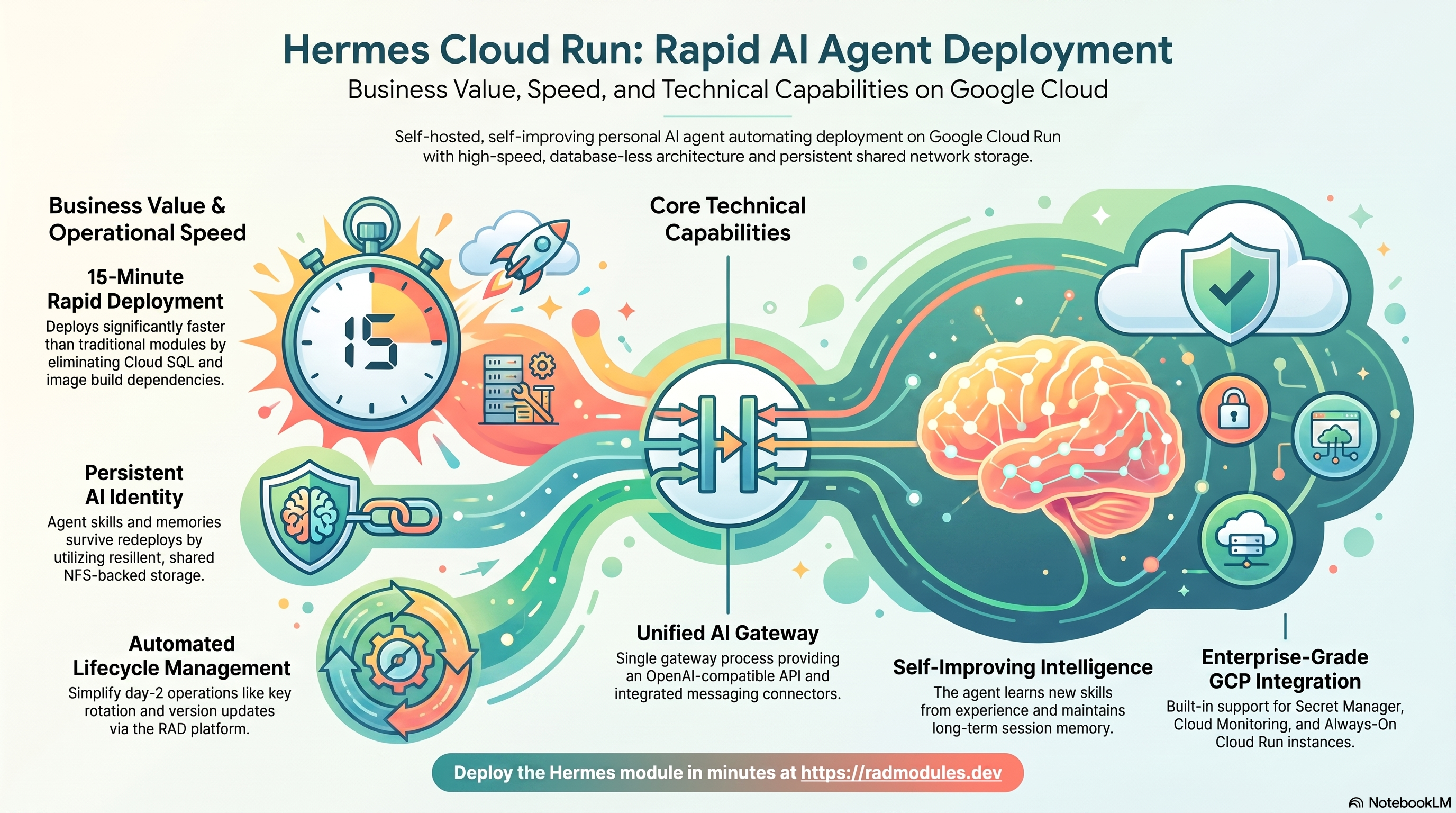
Hermes Agent is Nous Research's open-source (MIT-licensed), self-hosted,
self-improving personal AI agent: it learns skills from experience, persists
memory across sessions, and connects to messaging platforms plus an
OpenAI-compatible API from a single gateway process
(documentation). This module
deploys the official nousresearch/hermes-agent image on Cloud Run v2 on top
of the App_CloudRun foundation, which provisions and manages
the shared Google Cloud infrastructure.
This guide focuses on the cloud services Hermes uses and how to explore and operate them from the Google Cloud Console and the command line. For the mechanics common to every Cloud Run application — service identity, ingress and load balancing, scaling and concurrency, CI/CD, Cloud Armor, IAP, Binary Authorization, VPC Service Controls, backups, and the deployment lifecycle — refer to the App_CloudRun foundation guide rather than repeating them here.
What Hermes costs on RAD, and how that compares
Running Hermes on Cloud Run in your own Google Cloud project costs about $123.06/month in Google Cloud charges, on top of a one-off 110-credit RAD module fee charged once at deploy time. Hermes Agent is a self-hosted personal AI agent with persistent memory, so this deployment carries both a database for that memory and a small file server for its working state — there is no commercial hosted version of this exact project to compare against. In a RAD-managed project the module fee drops to 99 credits (10% lower) and the running cost is metered hourly in credits instead of billed directly by Google — see Pause it for free below for the one RAD-managed advantage a self-hosted VPS cannot match — or see the GKE guide if you'd rather run it on Kubernetes.
What you pay on RAD
| Own project | RAD-managed project | |
|---|---|---|
| Module fee (one-off) | 110 credits | 99 credits (10% lower) |
| Build time | ~3-6 credits per build, either way | ~3-6 credits per build, either way |
| Google Cloud running cost | $123.06/month, billed by Google at list price | ~57 credits/day, metered at list price plus RAD's margin |
Default running cost in your own project
| Resource | US$/month (Google list price, us-central1) |
|---|---|
| Cloud Run, 1x vCPU / 2 GiB (alwaysOn) | $52.60 |
| Cloud SQL for PostgreSQL, 1 vCPU / 3.75 GB, zonal, 10 GB SSD | $51.02 |
| NFS/cache file server (small VM) | $13.43 |
| Cloud NAT and networking | $5.00 |
| Cloud Storage (add-ons, backups) | $1.00 |
| Total | $123.06 |
How it compares
- A self-managed comparison: Hetzner CPX22 (2 vCPU/4GB) runs about $24/mo, a DigitalOcean 2 vCPU/4GB Droplet is the same $24/mo, and a GCP Compute Engine e2-standard-2 (2 vCPU/8GB) is about $49/mo — on the Cloud Run variant's 1 vCPU/2 GiB footprint a smaller class would also do; the GKE variant's 2 vCPU matches the quoted boxes more closely.
- What a bare VPS doesn't give you here matters more than usual for an agent that persists memory across sessions: automatic Postgres backups, secret rotation for its API keys, and monitoring if the process stalls — all covered by RAD's managed stack.
- Running your own LLM API costs are unaffected either way — this comparison is only the hosting infrastructure Hermes runs on, not the model calls it makes.
Pause it for free: delete a RAD-managed project, restore it when you need it
This is the headline advantage of a RAD-managed project, and it costs nothing while paused. Deleting a RAD-managed project unlinks its billing first, then asks Google to delete the project outright — Google's own 30-day recoverable soft delete. Unlike deleting one module, this does not tear down Cloud SQL, any VM, or the compute resource one by one: the whole project simply stops, and nothing is charged while it waits, because billing is already unlinked.
Restoring, within 30 days and only by the project's owner, asks Google to undelete the project and reattaches its billing account, then asks you to run Update on each deployment to confirm everything came back. Because nothing was individually destroyed, that Update finds the same resources already there — it is a check, not a rebuild, and an Update never charges the module fee again. This costs only a handful of credits (under US$1) in total for a typical 2-3-deployment chain.
What this needs: you must own the project (not one RAD only manages billing for), you must restore it yourself within 30 days — after that Google deletes it for good — and restoring is admitted like creating a new project, so your purchased credit balance must still clear the tier's floor (100 credits for the sandbox tier most study/demo use fits). Google says most services are fully working again within 36 hours of a restore.
One real gap: nightly backups are written to a bucket inside the project, and that bucket has Cloud Storage's soft-delete explicitly turned off, so it is very likely gone as soon as you delete the project — even though the project itself is recoverable for 30 days. If you've customised Hermes and want to keep that work, copy a backup out (to Google Drive, or a bucket outside the project) before deleting. For a default install with nothing irreplaceable in it, this does not matter.
Pay only while you use it, the other way: delete and redeploy
In your own project, or once 30 days have passed on a RAD-managed one, there is no free pause — deleting removes the resources for good, and bringing Hermes back means redeploying from scratch. That costs about 113-116 credits (the 110-credit module fee plus a build).
Deleting only saves money once Hermes would otherwise sit unused long enough to clear that redeploy cost against its own running cost — for Hermes, that's about 3 days or more. Most of that running cost is usually the database (and, where this module uses one, the shared file-server VM or GKE cluster) — those stop only once nothing else in the project uses them, so deleting this app while something else shares the project saves only its own compute share.
Keep data first: nightly backups go to a bucket inside the deployment and are deleted with it, so copy the latest backup out before deleting if you want to keep it.
Lab sessions and Managed Environments
Lab sessions, for training: a trainer runs a session for a class. Each participant gets the app in their own Google Cloud project for 15 minutes to 24 hours, within an allowance the trainer sets. Either the trainer funds every place, or each participant pays for their own. Everything is deleted when the session ends and unused credits go back to the trainer.
Managed Environments, for consultancies: a partner runs the app for a client from a ring-fenced wallet it funds, and settles with the client directly. If the wallet runs low, billing pauses and the data is kept, so nobody receives an unexpected charge. At the end the partner hands the project over and the deployments become the client's own.
Credits can be bought in more than 20 currencies, including XAF, XOF, NGN, GHS, KES and ZAR, by card, bank transfer or mobile money.
Sources (8 October 2026): Google Cloud Billing Catalog API list prices; radmodules.dev/pricing for RAD's own fees and daily-credit estimates; Google's project delete/restore documentation for the pause/restore claims.
1. Overview
Hermes runs as a single always-on gateway container on Cloud Run v2. The deployment wires together a deliberately small set of Google Cloud services:
| Capability | Google Cloud service | Notes |
|---|---|---|
| Compute | Cloud Run v2 | Gateway container, 1 vCPU / 2 GiB by default, min=1 / max=1, always-allocated CPU |
| Agent state | Self-managed NFS (Services_GCP) | Mounted at /opt/data — SQLite config, sessions, skills, memories. No Cloud SQL |
| Secrets | Secret Manager | ANTHROPIC_API_KEY, auto-generated API_SERVER_KEY and dashboard password, optional OPENAI_API_KEY / TELEGRAM_BOT_TOKEN |
| Container image | Artifact Registry (mirror) | Official prebuilt image mirrored in; no custom build, no Cloud Build step |
| Networking | VPC + run.app URL | Serverless VPC egress for the NFS mount; public URL for the API server |
| Database / cache | — | No Cloud SQL, no Redis — Hermes is entirely SQLite-on-NFS |
Sensible defaults worth knowing up front:
- All agent state lives at
/opt/data, and that path is fixed inside the image. The shared platform NFS is mounted directly over it (enable_nfs = true,nfs_mount_path = "/opt/data", both defaulted and enforced by a plan-time validation). Without the mount, every cold start or redeploy silently wipes the agent's accumulated identity. max_instance_countis validated to 1. Hermes' state is SQLite, which has a single-writer model — a second concurrent instance corrupts the database.cpu_always_allocated = trueandmin_instance_count = 1. The messaging connectors (Telegram/Discord/Slack) long-poll outbound; with scale-to-zero the agent is asleep and misses messages, and request-based CPU throttling stalls the polling loops and async agent turns. Expect one always-warm instance.- The OpenAI-compatible API server listens on port 8642 and requires the
auto-generated
API_SERVER_KEYas a bearer token. - The startup probe is TCP port-listening by default; the liveness probe is disabled. The API server requires auth, so an HTTP probe against it would 401 and wedge the rollout — and Cloud Run does not support TCP liveness probes (TCP is startup-only). The TCP startup probe plus Cloud Run's own instance management cover health; enable a liveness probe with an HTTP path only after verifying the endpoint is unauthenticated.
- The web dashboard (port 9119) is not routed on Cloud Run — Cloud Run exposes
a single ingress port. Use the GKE variant with
kubectl port-forwardif you need the dashboard UI. - At least one model-provider key is required on the initial deployment
(
anthropic_api_key, orenable_openai+openai_api_key); a plan-time check warns when none is supplied. - No init jobs, no database bootstrap — first boot only initialises
/opt/dataon the NFS share.
2. Google Cloud Services & How to Explore Them
All commands assume PROJECT and REGION are set. Service and resource names are
reported in the deployment Outputs.
A. Cloud Run — the Hermes gateway service
Hermes runs as a single-instance Cloud Run v2 service. Each deployment creates an immutable revision; because the app is NFS/SQLite-backed and capped at one instance, there is no autoscaling to observe — the interesting signals are revision health and instance uptime.
- Console: Cloud Run → select the service for revisions, traffic, logs, and metrics.
- CLI:
gcloud run services list --project "$PROJECT" --region "$REGION"
gcloud run services describe <service-name> --project "$PROJECT" --region "$REGION"
gcloud run revisions list --service <service-name> --project "$PROJECT" --region "$REGION"
See App_CloudRun for scaling, billing modes, execution environment, and traffic splitting.
B. NFS shared storage — the agent's identity
The entire agent state (SQLite config database, API keys, sessions, learned
skills, memories) lives on the shared self-managed NFS server provisioned by
Services_GCP (create_network_filesystem = true), mounted at /opt/data in the
container via the gen2 execution environment. The NFS VM must be RUNNING before
this module deploys — discovery finds it by label.
- Console: Compute Engine → VM instances (the NFS server VM); Cloud Run → service → Volumes tab.
- CLI:
gcloud compute instances list --project "$PROJECT" \
  --filter="name~nfs" --format="table(name,zone,status)"
# Confirm the NFS volume mount on the running revision:
gcloud run services describe <service-name> --region "$REGION" \
  --format="yaml(spec.template.spec.volumes)"
The share and its data are owned by Services_GCP — destroying the Hermes deployment does not delete the agent's state on the NFS export.
C. Secret Manager
Five secrets can exist per deployment, all injected as environment variables:
ANTHROPIC_API_KEY (operator-supplied), API_SERVER_KEY (auto-generated 64-char
hex — the gateway API bearer token), HERMES_DASHBOARD_BASIC_AUTH_PASSWORD
(auto-generated), and optionally OPENAI_API_KEY and TELEGRAM_BOT_TOKEN.
- Console: Security → Secret Manager.
- CLI:
gcloud secrets list --project "$PROJECT" --filter="name~hermes"
gcloud secrets versions access latest --secret=<secret-name> --project "$PROJECT"
Blank credential variables on an update deployment preserve the stored latest
version — keys never need re-entering. See App_CloudRun for
injection and rotation details.
D. Artifact Registry — the mirrored image
The official nousresearch/hermes-agent:<version> image is mirrored into
Artifact Registry before deployment (enable_image_mirroring = true) so the
service never pulls from Docker Hub at runtime. There is no Cloud Build step
— this is a prebuilt module.
- Console: Artifact Registry → Repositories.
- CLI:
gcloud artifacts repositories list --project "$PROJECT" --location "$REGION"
gcloud artifacts docker images list \
  "$REGION-docker.pkg.dev/$PROJECT/<repo>" --filter="package~hermes"
E. Networking & ingress
The API server is reachable at the service's run.app URL by default
(ingress_settings = "all"), protected by the API_SERVER_KEY bearer token
rather than network controls. VPC egress (PRIVATE_RANGES_ONLY) carries the NFS
traffic; connector long-polling egresses to the public internet directly.
- Console: Cloud Run (service URL); VPC network → VPC networks.
- CLI:
gcloud run services describe <service-name> --region "$REGION" --format='value(status.url)'
gcloud compute networks list --project "$PROJECT"
See App_CloudRun for Cloud Armor, custom domains, and IAP.
F. Cloud Logging & Monitoring
Container logs flow to Cloud Logging; Cloud Run metrics to Cloud Monitoring. The uptime check is disabled by default — the API server requires auth, so an unauthenticated uptime check would always fail.
- Console: Logging → Logs Explorer; Monitoring → Dashboards / Alerting.
- CLI:
gcloud run services logs read <service-name> --project "$PROJECT" --region "$REGION" --limit 50
3. Hermes Application Behaviour
- First-boot data-directory initialisation. The image's ENTRYPOINT is
s6-overlay's
/init, which starts as root,chowns the/opt/datavolume (the fresh NFS directory) to the non-roothermesuser, then drops privileges and starts the gateway (container_args = ["gateway", "run"]— the image's default CMD is the interactive CLI, so the gateway must be started explicitly). - No database init job. Hermes creates its own SQLite config database under
/opt/dataon first boot; there is nothing to bootstrap andinitialization_jobsis empty. - API access requires the
API_SERVER_KEY. The OpenAI-compatible endpoint on port 8642 authenticates with a bearer token:KEY=$(gcloud secrets versions access latest --secret=<api-server-key-secret> --project "$PROJECT")
curl -s -H "Authorization: Bearer $KEY" "$(gcloud run services describe <service-name> \
--region "$REGION" --format='value(status.url)')/v1/models" - Dashboard first-run. The in-process web dashboard (API-key management,
profile configuration) runs on port 9119 behind basic auth
(
dashboard_username/ the auto-generated password in Secret Manager). Cloud Run routes only the container port (8642), so the dashboard is unreachable on this variant — use the GKE variant'skubectl port-forward, or configure the agent through its own chat/API surface. - Connector setup (Telegram). Set
enable_telegram = trueand supplytelegram_bot_token(from @BotFather). Hermes' Telegram connector long-polls outbound — no webhook, router, or public callback URL is needed. A plan-time validation rejectsenable_telegram = truewith an empty token. Other connectors (Discord, Slack, WhatsApp, Signal) are configured through the operatorenvironment_variablesmap. - Version updates. Change
application_versionand redeploy — the mirror re-copies the tag if the digest changed and a new revision rolls out. Agent state is untouched (it lives on NFS, not in the image).
4. Configuration Variables
Variables are grouped exactly as they appear on the deployment platform. Only settings specific to or notable for Hermes are listed; every other input is inherited from App_CloudRun with its standard behaviour.
Group 1 — Project, Identity & Credentials
| Variable | Default | Description |
|---|---|---|
project_id | (required) | Target Google Cloud project. |
region | us-central1 | Region for the service and regional resources. |
anthropic_api_key | "" | Primary model-provider key, injected as ANTHROPIC_API_KEY. Required on the initial deployment (or use OpenAI); omit on updates to keep the stored version. |
api_server_key | "" (auto) | Bearer token for the OpenAI-compatible API server. Auto-generated 64-char hex when blank. |
enable_openai / openai_api_key | false / "" | Optional secondary provider, injected as OPENAI_API_KEY. |
enable_dashboard | true | Run the port-9119 dashboard in-process (not routed on Cloud Run). |
dashboard_username / dashboard_password | admin / "" (auto) | Dashboard basic auth; password auto-generated into Secret Manager. |
Group 3 — Application Identity
| Variable | Default | Description |
|---|---|---|
application_name | hermes | Base name for resources. Do not change after first deploy. |
application_version | latest | nousresearch/hermes-agent image tag; pin to a release tag in production. |
Group 4 — Runtime & Scaling
| Variable | Default | Description |
|---|---|---|
cpu_limit / memory_limit | 1000m / 2Gi | Per-instance resources; the agent runs model calls remotely so memory stays moderate. |
min_instance_count | 1 | Keep at 1 — connectors long-poll outbound; scale-to-zero misses messages. |
max_instance_count | 1 | Validated to 1 — SQLite single-writer on the shared NFS. |
container_port | 8642 | The gateway's OpenAI-compatible API server port. |
cpu_always_allocated | true | Required — CPU throttling breaks connector long-polling and async agent turns. Do not set false. |
execution_environment | gen2 | Required for the NFS volume mount. |
timeout_seconds | 3600 | Agent sessions can be long-running. |
enable_cloudsql_volume | false | Hermes has no database. |
container_image_source | prebuilt | Deploys the official image with no build step. |
enable_image_mirroring | true | Mirror into Artifact Registry to avoid Docker Hub rate limits. |
Group 5 — Access & Networking
| Variable | Default | Description |
|---|---|---|
ingress_settings | all | Public run.app URL; the API server enforces its own bearer-token auth. |
vpc_egress_setting | PRIVATE_RANGES_ONLY | Routes NFS traffic via the VPC; connector polling egresses directly. |
enable_iap | false | IAP would also block programmatic API clients that only carry the bearer token. |
Group 6 — Environment Variables & Secrets
| Variable | Default | Description |
|---|---|---|
environment_variables | {} | Extra config; module-managed vars (API_SERVER_*, HERMES_DASHBOARD*) take precedence. Use for Discord/Slack/WhatsApp/Signal connector credentials or provider endpoints (e.g. OpenRouter). |
secret_environment_variables | {} | Map of env var → existing Secret Manager secret name. |
Group 11 — Storage & NFS
| Variable | Default | Description |
|---|---|---|
enable_nfs | true | Required — validated. The agent's entire identity lives under /opt/data. |
nfs_mount_path | /opt/data | The image's fixed data directory; the NFS share is mounted directly over it. |
gcs_volumes | [] | Auxiliary GCSFuse mounts only — never point one at /opt/data (SQLite is unsafe on GCSFuse). |
Group 14 — Observability & Health
| Variable | Default | Description |
|---|---|---|
startup_probe | TCP, 20s delay, 24 retries | TCP port-listening — safe regardless of API-server auth; headroom for the NFS mount and first-boot init. |
liveness_probe | disabled | Cloud Run does not support TCP liveness probes (TCP is startup-only), and Hermes' /health behaviour behind API-server auth is unverified. Enable with an HTTP path only after verifying the endpoint is unauthenticated. |
uptime_check_config | disabled | An unauthenticated uptime check would always fail against the authed API server. |
Group 15 — Hermes Connectors
| Variable | Default | Description |
|---|---|---|
enable_telegram | false | Provision the Telegram bot token secret and inject TELEGRAM_BOT_TOKEN. |
telegram_bot_token | "" | Bot token from @BotFather; required (validated) when enable_telegram = true. |
Inert convention mirrors: the database (group 12), Redis, custom-SQL, and
additional_services/additional_containers variables are declared for
convention parity but not forwarded — Hermes has no database and no Redis.
5. Outputs
Returned on a successful deployment — the quickest way to locate and explore the running resources.
| Output | Description |
|---|---|
service_name | Cloud Run service name. |
api_url | Default run.app URL of the gateway API server. |
service_location | Region the service runs in. |
stage_services | Stage-specific service details (Cloud Deploy). |
storage_buckets | Created Cloud Storage buckets (none by default). |
network_name / network_exists / regions | VPC network, presence, regions. |
container_image / container_registry | Deployed image and Artifact Registry repo. |
monitoring_enabled / monitoring_notification_channels / uptime_check_names | Monitoring status, channels, uptime checks. |
initialization_jobs | Setup job names (empty — no DB to bootstrap). |
deployment_id / tenant_id / resource_prefix | Naming identifiers. |
project_id / project_number | Project identifiers. |
cicd_enabled / github_repository_url / github_repository_owner / github_repository_name / cicd_configuration | CI/CD status and details. |
artifact_registry_repository / cloudbuild_trigger_name / cloudbuild_trigger_id | Registry and build trigger. |
6. Configuration Pitfalls & Sensible Defaults
Risk: Critical (data loss / outage / security) — High (service degraded) — Medium (cost or partial degradation) — Low (minor).
Plan-time validation. This module's
validation.tfand the App_CloudRun foundation engine validate values and combinations at plan time —max_instance_count > 1,enable_nfs = false, a Telegram connector without its token, or OpenAI enabled without a key all fail the plan with a clear, named error before any resource is created.
| Setting | Sensible value | Risk | Consequence if wrong |
|---|---|---|---|
max_instance_count | 1 (validated) | Critical | A second concurrent instance writes the same SQLite database on NFS — single-writer violation corrupts the agent's entire state. |
enable_nfs | true (validated) | Critical | Without the NFS mount, /opt/data is ephemeral disk — every cold start / redeploy silently wipes the agent's identity (config, sessions, skills, memories). |
gcs_volumes at /opt/data | never | Critical | GCSFuse lacks POSIX locking and atomic renames; SQLite on GCSFuse corrupts. Keep state on NFS. |
min_instance_count | 1 | High | With 0, connectors are asleep between requests — Telegram/Discord messages are missed until an inbound HTTP call happens to wake the instance. |
anthropic_api_key (or OpenAI pair) | set on first deploy | High | Without any provider key the agent cannot run a single turn, and the empty Anthropic secret fails the Cloud Run deploy ("Secret was not found"). |
cpu_always_allocated | true | High | Request-based billing throttles CPU to ~0 between requests, stalling connector long-polling and async agent turns. |
startup_probe | TCP (default) | Medium | An HTTP startup probe against the authed API server returns 401/403 forever — the revision never becomes Ready and the rollout wedges. |
liveness_probe | disabled (default) | Medium | Probes run unauthenticated; enabling an HTTP liveness probe requires verifying the endpoint is unauthenticated first — a 401/403 endpoint would kill healthy instances. Cloud Run has no TCP liveness option. |
application_version | pin a release tag | Medium | latest re-resolves per mirror run; behaviour can change under you on redeploy. |
enable_telegram without token | blocked | Low | Plan-time validation rejects it; the connector cannot start without the bot token. |
For the foundation behaviour referenced throughout — service identity, scaling and billing modes, ingress and load balancing, CI/CD, Cloud Armor, IAP, Binary Authorization, VPC-SC, backups, and image mirroring — see App_CloudRun. Hermes-specific application configuration shared with the GKE variant is described in Hermes_Common.
Related guides
- Hands-on lab: Hermes Agent on Cloud Run — deploy it step by step, with the console screens and commands at each stage.
- Hermes Agent on GKE Autopilot — the same application on Kubernetes, for when you need the other deployment target.
- Hermes Common — Shared Application Configuration — the configuration shared by both deployment targets.
- Deployed alongside LiteLLM on Google Cloud Run, OpenClaw on Google Cloud Run, n8n on Google Cloud Run in the AI Agent Workspace solution.
Need RAD to do something it does not do yet? Request it on the roadmap, or vote on what is already there.