Certification track: Professional Cloud Database Engineer (PCDE) · AI Tooling
Qdrant on Google Cloud Run
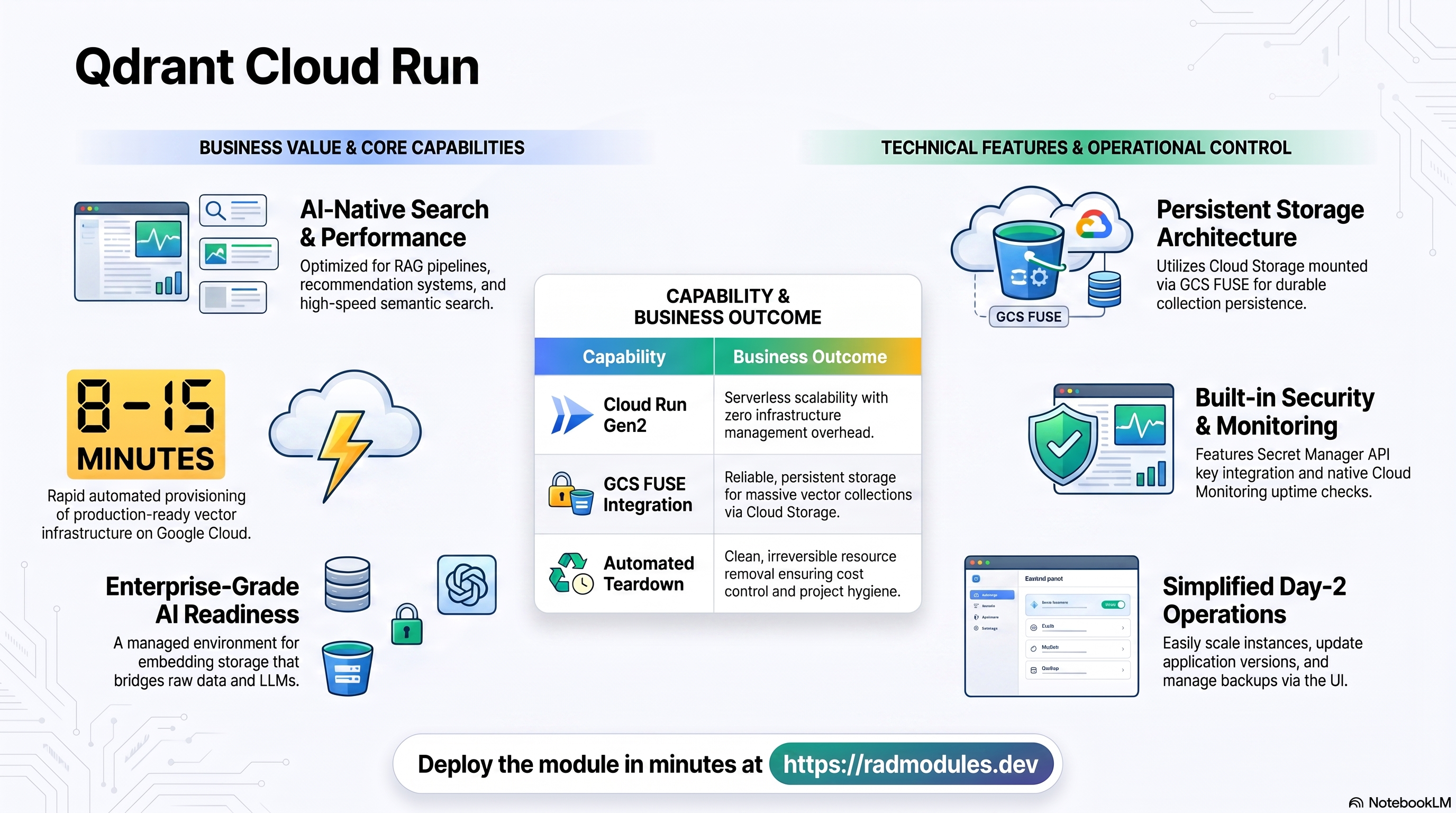
Qdrant is a high-performance vector database and similarity search engine built for AI workloads — RAG pipelines, recommendation systems, semantic search, and embeddings storage. This module deploys Qdrant on Cloud Run v2 on top of the App_CloudRun foundation, which provisions and manages the shared Google Cloud infrastructure.
This guide focuses on the cloud services Qdrant uses and how to explore and operate them from the Google Cloud Console and the command line. For the mechanics common to every Cloud Run application — service identity, ingress and load balancing, scaling and concurrency, CI/CD, Cloud Armor, IAP, Binary Authorization, VPC Service Controls, backups, and the deployment lifecycle — refer to the App_CloudRun foundation guide rather than repeating them here.
What Qdrant costs on RAD, and how that compares
Running Qdrant in your own Google Cloud project costs about US$19.14/month in infrastructure, plus a one-time module fee of 40 RAD credits (sized at 1 vCPU / 1 GiB on an always-on warm Cloud Run instance). RAD charges the module fee once, at deploy time — never again on Update — plus build time metered in credits; Google Cloud usage itself is billed to your own billing account at Google's list price. On a RAD-managed project the same resources are metered hourly in credits at list price plus RAD's margin — about 9 credits/day — and the module fee is 10% lower, at 36 credits. See "Pause it for free" below for how a RAD-managed Qdrant deployment can be stopped, at no running cost, until you need it again. (or see the GKE guide if you need Kubernetes)
What you pay on RAD
| Item | Own project | RAD-managed project |
|---|---|---|
| Module fee | 40 credits (once) | 36 credits (once) |
| Build time | ~3-6 credits, metered per build minute | same, metered in credits at list price + RAD's margin |
| Google Cloud running cost | ~$19.14/month, billed to your own billing account at Google's list price | ~9 credits/day, metered hourly at list price + RAD's margin |
Default running cost in your own project
| Resource | US$/month (Google list price, us-central1) |
|---|---|
| Cloud Run, 1x vCPU / 1 GiB (warm) | 13.14 |
| Cloud NAT and networking | 5 |
| Cloud Storage (add-ons, backups) | 1 |
| Total | $19.14 |
How it compares
- We could not verify a current, directly-comparable commercial SaaS price for this exact open-source project, so the honest comparison is a bare self-managed server: Hetzner CPX22 (2 vCPU/4GB,
$24/mo), a DigitalOcean 2 vCPU/4GB Droplet ($24/mo), or a GCP Compute Engine e2-standard-2 (2 vCPU/8GB, ~$49/mo). This app's own footprint (1 vCPU or less, 1 GiB or less) is smaller than any of those classes, so a bare self-managed box sized to match would cost less than the figures above — but you would still own every patch, backup and security update yourself. - RAD is not claiming to beat a bare VPS on sticker price — it usually does not. What RAD adds for the same or a similar dollar figure is a managed database, Secret Manager-held credentials, monitoring, and one-click Update, none of which a bare VPS gives you for free.
- On a bare VPS you are the one applying OS/database security patches, taking and testing backups, and renewing certificates; RAD's managed Cloud SQL, Secret Manager and monitoring handle all three for you.
Pause it for free: delete a RAD-managed project, restore it when you need it
This is the headline option on a RAD-managed project, and it is free while paused. Deleting a RAD-managed project first unlinks its billing, then asks Google to delete the project itself — Google's own 30-day recoverable soft delete. Unlike deleting a single module, this does not tear down the database, any VM, or the compute resource one at a time: the whole project simply stops, and because billing is already unlinked, nothing is charged while it waits.
Restoring — within 30 days, and only by the project's owner — asks Google to undelete the project and reattaches its billing account, then asks you to run Update on each deployment to confirm everything came back. Because nothing was individually destroyed, that Update finds the same resources already there: it is a check, not a rebuild, and an Update never charges the module fee again. The whole restore costs only a handful of credits (under US$1) in build time for a typical chain of deployments. What this needs: you must own the project (not merely have RAD manage its billing), you must restore it yourself within the 30 days — after that Google deletes it for good — and restoring is admitted like creating a new project, so your purchased credit balance must still clear the tier's floor (100 credits for the sandbox tier most study and demo use fits). Google says most services are fully working again within 36 hours of a restore.
One real gap: nightly backups are written to a bucket inside the project, and that bucket has Cloud Storage's soft-delete explicitly turned off, so the backup bucket is very likely gone as soon as you delete the project — even though the project itself is recoverable for 30 days. If you have customised this deployment and want to keep that work, copy a backup out (to Google Drive, or a bucket outside the project) before deleting. For a default install with nothing irreplaceable in it, this does not matter.
Pay only while you use it, the other way: delete and redeploy
The other lever, for an own project (or a RAD-managed one past its 30-day restore window), is to delete Qdrant outright and redeploy it later. A redeploy costs the module fee again plus the builds — roughly 43-46 credits in total for this module.
Deleting only saves money once Qdrant would otherwise sit unused long enough to clear that redeploy cost against its own running cost — for this module, that is about 7 days or more of being idle, based on its own US$19.14/month running cost above. Most of that running cost is usually the database and any shared file/cache VM, and they stop only once nothing else in the project uses them, so deleting this app alone saves only its own compute share if something else shares the project.
Keep data first: nightly backups go to a bucket inside the deployment and are deleted with it, so copy the latest backup out before deleting if you want to keep it.
Lab sessions and Managed Environments
- Lab sessions, for training: a trainer runs a session for a class. Each participant gets the app in their own Google Cloud project for 15 minutes to 24 hours, within an allowance the trainer sets. Either the trainer funds every place, or each participant pays for their own. Everything is deleted when the session ends and unused credits go back to the trainer.
- Managed Environments, for consultancies: a partner runs the app for a client from a ring-fenced wallet it funds, and settles with the client directly. If the wallet runs low, billing pauses and the data is kept, so nobody receives an unexpected charge. At the end the partner hands the project over and the deployments become the client's own.
- Credits can be bought in more than 20 currencies, including XAF, XOF, NGN, GHS, KES and ZAR, by card, bank transfer or mobile money.
Sources (8 October 2026): Google Cloud Billing Catalog API list prices; radmodules.dev/pricing for RAD's own fees and daily-credit estimates; Resource Manager: delete and restore projects for the pause/restore mechanics.
1. Overview
Qdrant runs as a Cloud Run v2 (Gen2) service with a GCS FUSE-mounted Cloud Storage bucket for persistent collection storage. The deployment wires together a focused set of Google Cloud services:
| Capability | Google Cloud service | Notes |
|---|---|---|
| Compute | Cloud Run v2 | Qdrant service, 1 vCPU / 1 GiB by default, min_instance_count = 1 |
| Persistent storage | Cloud Storage via GCS FUSE | <prefix>-storage bucket mounted at /qdrant/storage via Gen2 GCS FUSE CSI |
| Secrets | Secret Manager | Optional API key (QDRANT__SERVICE__API_KEY) |
| Ingress | Cloud Run URL / Cloud Load Balancing | Default internal (VPC-only); optional HTTPS load balancer with Cloud Armor |
Sensible defaults worth knowing up front:
- No SQL database, no Redis. Qdrant manages its own embedded storage. No Cloud SQL instance or Redis dependency is created.
- Single-instance by default.
max_instance_count = 1is strongly recommended. Qdrant is a single-writer store — multiple instances writing to the same GCS FUSE mount corrupt collections. - Internal ingress by default.
ingress_settings = "internal"restricts access to the VPC. Changing to"all"(public internet) requiresenable_api_key = true— a plan-time validation blocks the combination of public ingress without an API key. - Gen2 execution environment is required for GCS FUSE mounts. The module
defaults to
execution_environment = "gen2". - Two distinct health endpoints. Startup uses
/readyz; liveness uses/livez. Never point the liveness probe at/readyz— Qdrant temporarily marks itself not-ready while loading large collections, causing spurious container restarts. - gRPC requires
h2cprotocol. Cloud Run does not expose port 6334. Usecontainer_protocol = "h2c"and a gRPC client over the main port if gRPC is needed. - Redis is declared but inert.
enable_redisdefaults totrueat the variable level (theApp_CloudRunfoundation default), butQdrant_CloudRun'smain.tfhardcodesenable_redis = falseon the call intoApp_CloudRunregardless of the variable's value —redis_host,redis_port, andredis_authhave no effect. Qdrant has no caching dependency. - The container build is fixed by
Qdrant_Common.container_image,container_image_source,container_build_config, andcontainer_resourcesare declared only for Foundation convention-mirroring —Qdrant_Commonsets the real image (qdrant/qdrant), build source (custom, via a thin wrapper Dockerfile), and resource shape internally and ignores these four variables.
2. Google Cloud Services & How to Explore Them
All commands assume PROJECT and REGION are set. Service and resource names
are reported in the deployment Outputs.
A. Cloud Run — the Qdrant service
Qdrant runs as a Cloud Run v2 service. Each deployment creates an immutable revision. The service scales between the minimum and maximum instance counts based on request concurrency.
- Console: Cloud Run → select the service for revisions, traffic, logs, and metrics.
- CLI:
gcloud run services list --project "$PROJECT" --region "$REGION"
gcloud run services describe <service-name> --project "$PROJECT" --region "$REGION"
gcloud run revisions list --service <service-name> --project "$PROJECT" --region "$REGION"
See App_CloudRun for scaling, concurrency, execution environment, and traffic splitting.
B. Cloud Storage — Qdrant persistent storage
Qdrant persists its WAL, collection data, HNSW index files, and metadata at
/qdrant/storage inside the container. This path is backed by a Cloud Storage
bucket (<prefix>-storage) mounted via GCS FUSE. The bucket is provisioned
automatically by the module.
- Console: Cloud Storage → Buckets — find the
*-storagebucket. - CLI:
gcloud storage buckets list --project "$PROJECT"
gcloud storage ls gs://<storage-bucket>/
gcloud storage ls gs://<storage-bucket>/collections/
See App_CloudRun for GCS Fuse details and CMEK options.
C. Secret Manager — Qdrant API key
When enable_api_key = true, a 32-character alphanumeric API key is generated
and stored in Secret Manager. It is injected as QDRANT__SERVICE__API_KEY at
runtime, requiring all REST and gRPC callers to pass api-key: <key> in request
headers.
- Console: Security → Secret Manager — look for a secret named
<resource-prefix>-api-key. - CLI:
gcloud secrets list --project "$PROJECT"
gcloud secrets versions access latest --secret=<api-key-secret> --project "$PROJECT"
See App_CloudRun for injection and rotation details.
D. Networking & ingress
By default the service is reachable only from within the VPC (ingress_settings = "internal"). An external HTTPS load balancer with a custom domain, Cloud CDN,
and Cloud Armor can be layered on when the service needs to be reachable from
outside the VPC.
- Console: Cloud Run (service URL); Network services → Load balancing.
- CLI:
gcloud run services describe <service-name> --region "$REGION" \
  --format='value(status.url)'
gcloud compute addresses list --project "$PROJECT"
See App_CloudRun.
E. Cloud Logging & Monitoring
Container logs flow to Cloud Logging; Cloud Run metrics flow to Cloud
Monitoring. Optional uptime checks (against /readyz) and alert policies are
available.
- Console: Logging → Logs Explorer; Monitoring → Dashboards / Alerting.
- CLI:
gcloud run services logs read <service-name> --project "$PROJECT" \
  --region "$REGION" --limit 50
3. Qdrant Application Behaviour
- No database bootstrap. Qdrant manages its own embedded storage engine. No initialization job is injected by default. The service starts immediately after the container is ready.
- Collection loading on start. Qdrant loads all collections from GCS FUSE
into memory during startup. For instances with large collections, startup can
take tens of seconds. The startup probe (
/readyz) waits for this to complete before traffic is sent to the instance. - Separate liveness and readiness endpoints.
/readyzreturns 503 while collections are loading;/livezalways returns 200 while the process is alive. The liveness probe uses/livezto prevent spurious container restarts during collection load. Do not change the liveness probe to/readyz. - Single-writer constraint. Multiple Cloud Run instances cannot safely share
the same GCS FUSE storage path. Keep
max_instance_count = 1. Scale vertically (increase CPU and memory) for higher throughput. - gRPC over HTTP/2. Cloud Run does not expose a second port for gRPC.
Use
container_protocol = "h2c"together with a gRPC client that connects over HTTP/2 on port 6333 if gRPC is needed. - Scheduled tasks. Use
cron_jobsto schedule periodic Qdrant collection snapshots via the REST API or for custom maintenance routines, run as Cloud Run Jobs.
4. Configuration Variables
Variables are grouped exactly as they appear on the deployment platform. Only settings specific to or notable for Qdrant are listed; every other input is inherited from App_CloudRun with its standard behaviour.
Group 1 — Project & Identity
| Variable | Default | Description |
|---|---|---|
project_id | (required) | Target Google Cloud project. |
region | us-central1 | Region for the service and regional resources. |
Group 2 — Deployment Environment
| Variable | Default | Description |
|---|---|---|
tenant_id | demo | Short suffix that makes resource names unique per environment. |
support_users | [] | Emails granted project access and monitoring alerts. |
resource_labels | {} | Labels applied to all resources. |
Group 3 — Application Identity
| Variable | Default | Description |
|---|---|---|
application_name | qdrant | Base name for resources. Do not change after first deploy. |
application_display_name | Qdrant Vector Database | Friendly name shown in the Console. |
description | (set) | Cloud Run service description shown in the platform UI. |
application_description | (set) | Foundation-mirrored alternate description field; populates the same Cloud Run service description. |
application_version | latest | Qdrant image version tag; pin to a semver tag for production (e.g. v1.9.0). |
enable_api_key | false | Generate a random API key in Secret Manager; required before setting ingress_settings = "all". |
Group 4 — Runtime & Scaling
| Variable | Default | Description |
|---|---|---|
deploy_application | true | Set false to provision infrastructure only. |
cpu_limit | 1000m | CPU per instance. Increase to 2000m–4000m for production index builds and concurrent queries. |
memory_limit | 1Gi | Memory per instance. Qdrant loads HNSW indexes into RAM — size based on collection dimensions and vector count. |
min_instance_count | 1 | Minimum instances. Keep ≥ 1 to avoid cold starts during HNSW index loading. |
max_instance_count | 1 | Maximum instances. Keep at 1 — Qdrant is a single-writer store. |
container_port | 6333 | Qdrant REST API port. |
execution_environment | gen2 | Gen2 required for GCS FUSE mounts. |
timeout_seconds | 300 | Max request duration (0–3600 s). Increase for large batch upserts or snapshot operations. |
enable_image_mirroring | true | Mirror the Qdrant image into Artifact Registry to avoid Docker Hub rate limits. |
container_protocol | http1 | Use h2c to enable HTTP/2 for gRPC clients connecting over port 6333. |
traffic_split | [] | Traffic allocation across revisions for canary or blue-green deployments. |
max_revisions_to_retain | 7 | Maximum Cloud Run revisions to keep. Not referenced — no effect on deployment in this application module. |
enable_cloudsql_volume | false | Injects a Cloud SQL Auth Proxy sidecar. Not applicable — Qdrant has no SQL database; leave false. |
cloudsql_volume_mount_path | /cloudsql | Not applicable — Qdrant has no Cloud SQL database. |
service_annotations / service_labels | {} | Custom Cloud Run service annotations / labels. |
container_image_source / container_image / container_build_config / container_resources | custom / "" / (set) / (set) | Declared for Foundation convention-mirroring only. Qdrant_Common fixes the real image, build source, and resource shape; these four have no effect. |
Group 5 — Access & Ingress Control
| Variable | Default | Description |
|---|---|---|
ingress_settings | internal | internal (VPC-only, recommended), all (requires enable_api_key = true), or internal-and-cloud-load-balancing. |
vpc_egress_setting | PRIVATE_RANGES_ONLY | How outbound traffic is routed through the VPC connector. |
enable_iap | false | Require Google sign-in via Identity-Aware Proxy. |
iap_authorized_users / iap_authorized_groups | [] | Who may access through IAP. |
Group 6 — Environment Variables & Secrets
| Variable | Default | Description |
|---|---|---|
environment_variables | {} | Extra non-secret settings. Use QDRANT__… keys to override Qdrant configuration. |
secret_environment_variables | {} | Map of env var → Secret Manager secret name. |
secret_propagation_delay | 30 | Seconds to wait after secret creation before proceeding. |
secret_rotation_period | 2592000s | Secret Manager rotation reminder period (30 days default). |
prereq_subnet_cidr_override | "" | Override for the inline VPC primary subnet CIDR. Set only when re-applying an existing deployment to avoid resource replacement. |
Group 7 — Backup & Restore
| Variable | Default | Description |
|---|---|---|
backup_schedule | 0 2 * * * | Automated backup cron (UTC). |
backup_retention_days | 7 | Retention; raise for production/compliance. |
enable_backup_import / backup_source / backup_uri / backup_format | restore options | Restore from a backup on deploy. |
backup_file | backup.sql | Filename of the backup to import; only used when enable_backup_import = true. Listed in the platform under Group 13 (Jobs). |
additional_services | [] | Supplementary Cloud Run services deployed alongside Qdrant (e.g. a sidecar worker or proxy). Not used by default. |
additional_containers | [] | In-pod sidecar containers sharing the same Cloud Run service and localhost. Not used by default — Qdrant has no companion process. |
Group 8 — CI/CD & Binary Authorization
Standard App_CloudRun Cloud Build / Cloud Deploy integration — see
App_CloudRun. Key inputs: enable_cicd_trigger,
github_repository_url, github_token, github_app_installation_id,
cicd_trigger_config, enable_cloud_deploy, cloud_deploy_stages,
enable_binary_authorization, binauthz_evaluation_mode (not referenced —
setting it has no effect on this application module).
Group 9 — NFS & Custom SQL
| Variable | Default | Description |
|---|---|---|
enable_nfs | false | Qdrant uses GCS for storage — enable NFS only for custom init jobs that need a shared filesystem. Requires Gen2. |
nfs_mount_path | /mnt/nfs | Mount path inside the container. |
nfs_instance_name | "" | Name of an existing NFS GCE VM to use. Leave empty for auto-discovery. |
nfs_instance_base_name | app-nfs | Base name for an inline NFS GCE VM. |
nfs_volume_name | nfs-data-volume | Cloud Run volume name for the NFS mount. Override for a second NFS share. |
enable_custom_sql_scripts | false | Not applicable — Qdrant has no SQL database. |
custom_sql_scripts_bucket / custom_sql_scripts_path / custom_sql_scripts_use_root | "" / "" / false | Not applicable — accepted for Foundation compatibility only. |
Group 10 — Load Balancer, CDN & Image Retention
| Variable | Default | Description |
|---|---|---|
enable_cloud_armor | false | Provision Global HTTPS LB + Cloud Armor WAF. |
admin_ip_ranges | [] | CIDRs exempted from WAF rules. |
application_domains | [] | Custom domain names for the HTTPS LB (Google-managed SSL). |
enable_cdn | false | Enable Cloud CDN on the HTTPS LB backend. |
max_images_to_retain | 7 | Maximum recent container images to keep in Artifact Registry. |
delete_untagged_images | true | Automatically delete untagged images from Artifact Registry. |
image_retention_days | 30 | Days after which images are eligible for deletion. Set to 0 to disable. |
Group 11 — Storage & Filesystem
| Variable | Default | Description |
|---|---|---|
create_cloud_storage | true | Provision the GCS storage bucket. |
storage_buckets / gcs_volumes | [] | Additional buckets / GCS FUSE mounts. |
manage_storage_kms_iam / enable_artifact_registry_cmek | false | CMEK options. |
enable_redis | true (variable default) | Inert. main.tf hardcodes enable_redis = false on the App_CloudRun call regardless of this value — Qdrant has no caching dependency. |
redis_host / redis_port / redis_auth | "" / 6379 / "" | Inert — never forwarded, since Redis is hardcoded off. |
Group 12 — Database Backend
Not applicable — Qdrant has no SQL database. database_type is forwarded to
App_CloudRun but its default (NONE) is the only supported value; changing
it would not give Qdrant a working database connection because Qdrant_Common
never wires database credentials into the container. The following are
accepted for Foundation compatibility only and have no effect: sql_instance_name,
sql_instance_base_name, database_password_length, application_database_name,
application_database_user, db_password_env_var_name,
enable_postgres_extensions, postgres_extensions, enable_mysql_plugins,
mysql_plugins, enable_auto_password_rotation, rotation_propagation_delay_sec,
db_host_env_var_name, db_user_env_var_name, db_name_env_var_name,
db_port_env_var_name, service_url_env_var_name.
Group 13 — Jobs & Scheduled Tasks
| Variable | Default | Description |
|---|---|---|
initialization_jobs | [] | Qdrant requires no default init job; provide only custom data loading or migration tasks. |
cron_jobs | [] | Recurring Cloud Run Jobs for periodic collection snapshots or maintenance. |
Group 14 — Observability & Health
| Variable | Default | Description |
|---|---|---|
startup_probe | /readyz, 15s delay | HTTP probe — Qdrant reports ready once all collections are loaded. |
liveness_probe | /livez, 30s delay | HTTP probe — dedicated liveness endpoint unaffected by collection load state. |
startup_probe_config | enabled=true, path=/readyz | Alternative Foundation-level startup probe interface. |
health_check_config | enabled=true, path=/livez | Alternative Foundation-level liveness probe interface. |
uptime_check_config | disabled, /readyz | Cloud Monitoring uptime check. |
alert_policies | [] | Metric alert policies. |
Group 15 — Advanced Networking
| Variable | Default | Description |
|---|---|---|
network_name | "" | Name of the VPC network to use. Leave empty to auto-discover a single Services_GCP-managed network; required only when more than one exists in the project. |
Group 23 — VPC Service Controls & Audit Logging
| Variable | Default | Description |
|---|---|---|
enable_vpc_sc | false | Enforce a VPC-SC perimeter (requires organization_id). |
vpc_cidr_ranges / vpc_sc_dry_run | (set) | Access level CIDRs / dry-run mode. |
enable_audit_logging | false | Detailed Cloud Audit Logs. |
Group 0 — Module Metadata (advanced/internal)
Beyond the platform-facing metadata (module_description, module_documentation,
module_dependency, module_services, credit_cost, require_credit_purchases,
enable_purge, public_access, shared_users, technical_support_users,
resource_creator_identity, impersonation_service_account,
require_services_gcp_module), three variables control platform-internal
provisioning and are not normally set by hand: requires_services (tells the
platform which Services_GCP resources to auto-provision for this module —
defaults to the free NFS/Redis Compute VM path, not managed Memorystore/Filestore),
job_execution_wait_timeout (900s — how long the deployment waits for an
initialization job before aborting), and module_writable_secret_ids ({} —
Secret Manager write grants for post-install hooks; unused by Qdrant).
5. Outputs
Returned on a successful deployment — the quickest way to locate and explore the running resources.
| Output | Description |
|---|---|
service_name | Cloud Run service name. |
qdrant_url | Internal VPC URL for the Qdrant REST API (port 6333). Only reachable from within the same VPC when ingress_settings = "internal". |
service_location | Region the service runs in. |
stage_services | Stage-specific service URLs (Cloud Deploy). |
load_balancer_ip / load_balancer_url | External HTTPS load balancer IP / URL (when enabled). |
storage_buckets | Created Cloud Storage buckets. |
network_name / network_exists / regions | VPC network, presence, regions. |
container_image / container_registry | Deployed image and Artifact Registry repo. |
monitoring_enabled / monitoring_notification_channels / uptime_check_names | Monitoring status, channels, uptime checks. |
initialization_jobs | Names of any custom setup jobs. |
deployment_id / tenant_id / resource_prefix | Naming identifiers. |
project_id / project_number | Project identifiers. |
cicd_enabled / github_repository_url / github_repository_owner / github_repository_name / cicd_configuration | CI/CD status and details. |
artifact_registry_repository / cloudbuild_trigger_name / cloudbuild_trigger_id | Registry and build trigger. |
vpc_sc_enabled / vpc_sc_perimeter_name / vpc_sc_dry_run_mode | VPC-SC status. |
audit_logging_enabled / artifact_registry_cmek_enabled | Audit logging and CMEK status. |
6. Configuration Pitfalls & Sensible Defaults
Risk: Critical (data loss / outage / security) — High (service degraded) — Medium (cost or partial degradation) — Low (minor).
| Setting | Sensible value | Risk | Consequence if wrong |
|---|---|---|---|
enable_api_key | true (any external deployment) | Critical | Without an API key, any caller who can reach the service can read, modify, or delete all collections. |
ingress_settings | internal (default) | Critical | Setting to "all" without enable_api_key = true is blocked at plan time; doing so exposes Qdrant to the public internet. |
application_name | set once | Critical | Immutable after first deploy; changing recreates storage and loses all collections. |
max_instance_count | 1 | High | Multiple instances writing to the same GCS FUSE path corrupt collections — Qdrant is a single-writer store. |
liveness_probe path | /livez (default) | High | Pointing liveness at /readyz causes spurious container restarts every time a large collection is loaded from GCS. |
memory_limit | ≥ 4Gi for production | High | Default 1Gi only supports small test collections; OOM kills terminate all in-flight queries and trigger a full index reload from GCS. |
execution_environment | gen2 (default) | High | GCS FUSE requires Gen2; Gen1 deployments with enable_nfs = true fail at plan time. |
application_version | pin to semver for production | Medium | Using latest can cause an unintended storage-format upgrade that makes existing collections unreadable. |
min_instance_count | 1 | Medium | Scale-to-zero causes a cold reload of all collections from GCS on the next request; avoid for latency-sensitive workloads. |
timeout_seconds | 300 | Medium | Large ANN searches, batch upserts, or snapshot operations can exceed the default — increase to 600 or more for heavy workloads. |
enable_iap / enable_cloud_armor | enable for exposed deployments | High | Without access controls, the Qdrant REST API is reachable by any caller on the allowed network. |
secret_propagation_delay | 30 | Medium | In large projects, Secret Manager replication may exceed 30 s; increase to 60 to prevent reading an empty API key secret. |
backup_retention_days | 7 (raise for prod) | Medium | Too short for compliance retention. |
enable_backup_import | false unless restoring | Critical | Enabling without a valid backup_uri fails the import job. |
enable_redis / redis_host / redis_port / redis_auth | leave at defaults | Low | Inert — main.tf hardcodes Redis off regardless of these values. Setting them has no effect and does not indicate misconfiguration. |
database_type / sql_instance_name and the other Group 12 database variables | leave at defaults | Low | Inert for Qdrant — Qdrant_Common never wires database credentials into the container, so changing these does not create a usable database connection. |
container_image / container_image_source / container_build_config / container_resources | leave at defaults | Low | Inert — Qdrant_Common fixes the real image, build source, and resource shape. |
For the foundation behaviour referenced throughout — service identity, scaling and concurrency, ingress and load balancing, CI/CD, Cloud Armor, IAP, Binary Authorization, VPC-SC, backups, and image mirroring — see App_CloudRun. Qdrant-specific application configuration shared with the GKE variant is described in Qdrant_Common.
Related guides
- Hands-on lab: Qdrant on Cloud Run — deploy it step by step, with the console screens and commands at each stage.
- Qdrant on GKE Autopilot — the same application on Kubernetes, for when you need the other deployment target.
- Qdrant Common — Shared Application Configuration — the configuration shared by both deployment targets.
- Deployed alongside Elasticsearch on GKE Autopilot, MongoDB on GKE Autopilot, Meilisearch on GKE Autopilot in the Shared Data Services solution.
Need RAD to do something it does not do yet? Request it on the roadmap, or vote on what is already there.