Certification track: Professional Cloud Database Engineer (PCDE) · AI Tooling
Chroma on Google Cloud Run
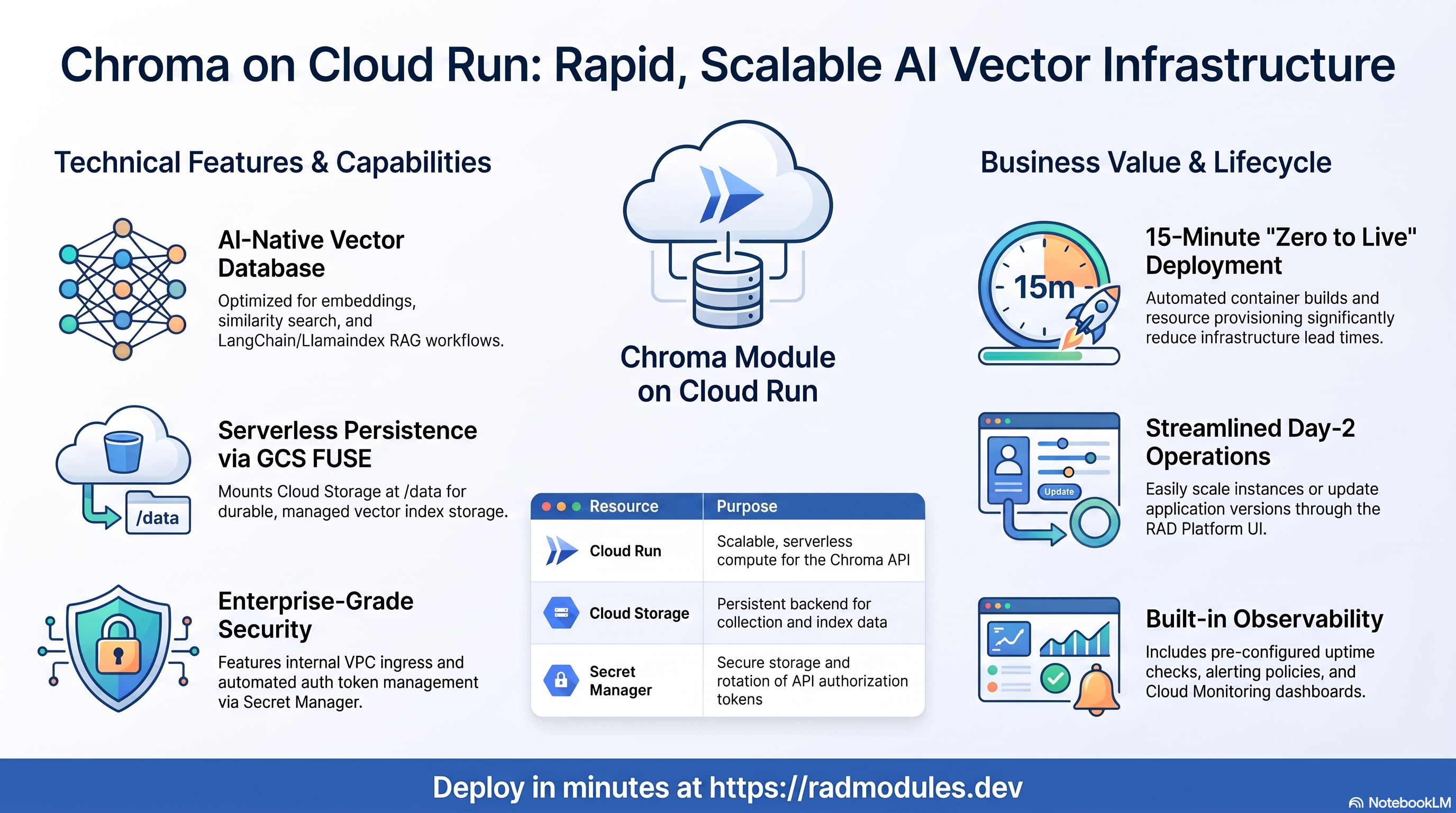
Chroma is an AI-native open-source vector database purpose-built for embeddings and similarity search. It powers RAG pipelines, semantic search, and LangChain/LlamaIndex workflows. This module deploys Chroma on Cloud Run v2 on top of the App_CloudRun foundation, which provisions and manages the shared Google Cloud infrastructure.
This guide focuses on the cloud services Chroma uses and how to explore and operate them from the Google Cloud Console and the command line. For the mechanics common to every Cloud Run application — service identity, ingress and load balancing, scaling and concurrency, CI/CD, Cloud Armor, IAP, Binary Authorization, VPC Service Controls, backups, and the deployment lifecycle — refer to the App_CloudRun foundation guide rather than repeating them here.
What Chroma costs on RAD, and how that compares
Chroma on RAD's Cloud Run module costs about US$19.14 a month in a Google Cloud project you own, plus a one-time 40-credit module fee (US$4). Chroma is an AI-native vector database for embeddings and similarity search, used to back RAG pipelines and semantic search. GKE Autopilot suits Chroma that must stay up, scale across pods, or run beside other Kubernetes workloads; for the lowest cost, this Cloud Run module is usually the right pick — see the GKE guide if you need the other.
If Chroma is only needed occasionally — a demo, a trial, a seasonal or study workload — a RAD-managed project can be deleted and restored within 30 days for a handful of credits, so that US$19.14 becomes a few dollars a month instead. See Pause it for free, below.
What you pay on RAD
| In a Google Cloud project you own | In a project RAD manages for you | |
|---|---|---|
| Module fee, once per deployment | 40 credits (US$4 at the top-up price) | 36 credits (10% lower) |
| Build time | A few credits per build (roughly 3–6) | The same |
| Google Cloud running cost | Billed by Google to your own billing account, about US$19.14 a month for the default configuration (table below) | Metered hourly in credits; RAD publishes 9 credits a day, about 270 a month (about US$27 at the top-up price) |
| Who owns what | You own the project and its billing; RAD deploys and updates it | RAD owns the project, with guardrails, quotas and budget alerts; you get console access, and a minimum purchased balance is held in reserve |
10 credits cost US$1 on a one-off top-up, less on a plan. In a project RAD manages, the database, file server and network are shared by every application in the project, so a second application does not add a second database.
Default running cost in your own project (us-central1, Google list prices):
| Resource (module default) | Per month |
|---|---|
| Cloud Run, 1x vCPU / 1 GiB (warm) | US$13.14 |
| Cloud NAT and networking | US$5 |
| Cloud Storage (add-ons, backups) | US$1 |
| Total | about US$19.14 |
How it compares
- The project's own managed offering, Chroma Cloud, starts at $0 a month plus usage (10 databases, $5 of credits included — about $2.50/GiB written, $0.33/GiB stored a month, and a small per-query and per-GiB-returned charge), stepping up to $250 a month plus usage on the Team plan.
- Run it yourself and a small VPS running Chroma's own server process costs less in cash: a Hetzner CPX22 or DigitalOcean 2 vCPU/4 GB box is about $24 a month, or a GCP
e2-standard-2about $49 a month — plus your own time for backups, security patches and upgrades, which RAD's managed Cloud SQL, Secret Manager and monitoring cover for you. - RAD never claims to be cheaper than bare infrastructure in cash terms — it usually is not. The difference is what RAD manages for you: patching, backups, secrets and monitoring, plus the ability to pause Chroma for free rather than paying for idle capacity (see below).
Pause it for free: delete a RAD-managed project, restore it when you need it
If Chroma runs in a project RAD manages for you, you have a second option that goes well beyond scaling to zero: delete the whole project, and restore it within 30 days for close to nothing. This suits Chroma that you only need occasionally far better than running it continuously.
- How it works. Deleting a RAD-managed project unlinks its billing first, then asks Google to delete the project. Google does not remove the project immediately: it keeps it, recoverable, for 30 days. Because billing is already unlinked, nothing is charged while it waits. Unlike deleting one module, this does not tear down Cloud Run resources one by one — the whole project, and everything in it, simply stops.
- Restoring costs a handful of credits, not a rebuild. Within 30 days, the project's owner can restore it. RAD asks Google to undelete the project and reattaches its billing account, then asks you to run Update on each deployment to confirm everything came back. Because nothing was individually destroyed, that Update finds the same resources already there — it is a check, not a rebuild, and an Update never charges the module fee again. That is a handful of credits (under US$1) in total for a typical Chroma chain, against the 45 credits a full redeploy costs.
- So a month of occasional use can cost a few dollars, not US$19.14. Deploy Chroma, use it, delete the project. Restore it next time you want it, confirm with Update, and delete it again when you're done. You pay only for the module fee once, the builds, and whatever hours it was actually live.
- What this needs. You must own the project (not a bring-your-own one RAD only manages billing for), and you restore it yourself within the 30 days — after that, Google deletes it for good. Restoring is admitted like creating a new project: your purchased credit balance must still clear the tier's floor (100 credits for the sandbox tier most study and demo use fits). Google says most services are fully working again within 36 hours of a restore.
- One real gap: the backup bucket does not survive. Nightly backups are written to a bucket inside the project, and that bucket is not protected by Cloud Storage's soft-delete, so it is very likely gone as soon as you delete the project — even though the project itself is recoverable for 30 days. If you have customised Chroma and want to keep that work, copy a backup out (to Google Drive, or a bucket outside the project) before you delete. For a default installation with nothing irreplaceable in it, this does not matter.
Pay only while you use it, the other way: delete and redeploy
Cloud Run keeps a warm instance, so it does not scale fully to zero on its own. The option above only applies to a RAD-managed project; in your own project, or once the 30-day window has passed, the way to stop paying is to delete the deployment and deploy it again when you need it.
- What a redeploy costs. The module fee again plus the builds: about 45 credits (US$4.50) in your own project. Deleting saves money only once Chroma would otherwise sit unused for about 8 days or more in your own project (US$0.64 a day), or about 5 days or more in a RAD-managed one (9 credits a day).
- Keep your data first. Nightly backups are written to a bucket inside the deployment and are deleted with it, so copy the latest backup out before deleting if you want to keep it.
- Note your settings. RAD does not recreate a deleted deployment for you; you enter the settings again when you deploy.
Lab sessions and Managed Environments
- Lab sessions, for training. A trainer runs a session for a class. Each participant gets the app in their own Google Cloud project for 15 minutes to 24 hours, within an allowance the trainer sets. Either the trainer funds every place, or each participant pays for their own. Everything is deleted when the session ends and unused credits go back to the trainer.
- Managed Environments, for consultancies. A partner runs the app for a client from a ring-fenced wallet it funds, and settles with the client directly. If the wallet runs low, billing pauses and the data is kept, so nobody receives an unexpected charge. At the end the partner hands the project over and the deployments become the client's own.
Credits can be bought in more than 20 currencies, including XAF, XOF, NGN, GHS, KES and ZAR, by card, bank transfer or mobile money.
Sources (8 October 2026): Google Cloud list prices from the Cloud Billing Catalog API; RAD's own fees and daily-credit estimates from radmodules.dev/pricing; Delete and restore projects for the 30-day recovery window and what it says about Cloud Storage objects without soft delete; Chroma Cloud. Prices change; check each source before relying on a figure.
1. Overview
Chroma runs as a containerised vector-database service on Cloud Run v2. The deployment wires together a focused set of Google Cloud services:
| Capability | Google Cloud service | Notes |
|---|---|---|
| Compute | Cloud Run v2 (Gen2) | 1 vCPU / 1 GiB by default; min_instance_count = 1 to avoid index-reload cold starts |
| Data persistence | Cloud Storage (GCS FUSE) | Auto-provisioned <prefix>-data bucket mounted at /data; primary storage backend |
| Auth token | Secret Manager | Optional API token — CHROMA_SERVER_AUTHN_CREDENTIALS injected at runtime |
| Ingress | Cloud Run internal URL | ingress_settings = "internal" by default; optional HTTPS load balancer + custom domain |
Sensible defaults worth knowing up front:
- No SQL database and no Redis. Chroma manages its own embedded storage. No Cloud SQL instance is created and no Redis connection is configured.
ingress_settings = "internal"by default. Thechroma_api_urloutput is not reachable from the public internet with this setting. Changing to"all"requiresenable_auth_token = true(enforced at plan time).- Single-instance required.
max_instance_count = 1is the default. Multiple Cloud Run instances against the same GCS FUSE mount cannot coordinate writes and will corrupt collections. - GCS FUSE is the persistence backend. A
<prefix>-databucket is automatically provisioned and mounted at/data. Gen2 execution environment is required. - Auth token is optional but recommended for any deployment reachable outside the VPC.
When enabled, the token is stored in Secret Manager and must be passed as
Authorization: Bearer <token>in every API call. - Health probes are fixed to
/api/v2/heartbeat. This is the only health endpoint Chroma exposes; the probe path cannot be changed. - Anonymised telemetry is always disabled.
ANONYMIZED_TELEMETRY=falseis injected automatically.
2. Google Cloud Services & How to Explore Them
All commands assume PROJECT and REGION are set. Service and resource names are
reported in the deployment Outputs.
A. Cloud Run — the Chroma service
Chroma runs as a Cloud Run v2 service. Each deployment creates an immutable revision;
traffic can be split across revisions for safe rollouts. cpu_always_allocated
defaults to false (request-based billing); set it true (with `min_instance_count
= 1`) to keep CPU allocated between requests so background index operations and health checks are never throttled.
- Console: Cloud Run → select the service for revisions, traffic, logs, and metrics.
- CLI:
gcloud run services list --project "$PROJECT" --region "$REGION"
gcloud run services describe <service-name> --project "$PROJECT" --region "$REGION"
gcloud run revisions list --service <service-name> --project "$PROJECT" --region "$REGION"
See App_CloudRun for scaling, concurrency, execution environment, and traffic splitting.
B. Cloud Storage (GCS FUSE) — Chroma data persistence
Chroma stores its embedded SQLite database, HNSW index files, and collection metadata
at the /data path. A dedicated Cloud Storage bucket (<prefix>-data) is
automatically provisioned and mounted at /data via the GCS FUSE CSI driver. The
Cloud Run service account is granted read/write access automatically.
- Console: Cloud Storage → Buckets — look for the bucket whose name ends in
-data. - CLI:
gcloud storage buckets list --project "$PROJECT"
gcloud storage ls gs://<data-bucket>/chroma/    # inspect Chroma's on-disk layout
# Confirm the GCS FUSE mount inside a running instance:
gcloud run services describe <service-name> --region "$REGION" \
  --format='value(spec.template.spec.volumes)'
See App_CloudRun for GCS Fuse, CMEK options, and bucket management.
C. Secret Manager
When enable_auth_token = true, Chroma's API authentication token is generated and
stored as a Secret Manager secret. It is injected into the service at runtime as
CHROMA_SERVER_AUTHN_CREDENTIALS; plaintext never appears in configuration.
- Console: Security → Secret Manager.
- CLI:
gcloud secrets list --project "$PROJECT"
# Retrieve the token to configure API clients:
gcloud secrets versions access latest --secret=<prefix>-auth-token --project "$PROJECT"
See App_CloudRun for injection and rotation details.
D. Networking & ingress
By default the service is reachable only within the VPC (ingress_settings = "internal").
An external HTTPS load balancer with a custom domain, Cloud CDN, and Cloud Armor can
be layered on; egress settings control connectivity.
- Console: Cloud Run (service URL); Network services → Load balancing.
- CLI:
gcloud run services describe <service-name> --region "$REGION" --format='value(status.url)'
gcloud compute addresses list --project "$PROJECT"
# Test the Chroma heartbeat from inside the VPC:
curl <internal-service-url>/api/v2/heartbeat
See App_CloudRun.
E. Cloud Logging & Monitoring
Container logs flow to Cloud Logging; Cloud Run metrics flow to Cloud Monitoring, with
an optional uptime check against /api/v2/heartbeat and alert policies.
- Console: Logging → Logs Explorer; Monitoring → Dashboards / Alerting.
- CLI:
gcloud run services logs read <service-name> --project "$PROJECT" --region "$REGION" --limit 50
3. Chroma Application Behaviour
- No database bootstrap. Chroma manages its own embedded storage and requires no
database initialisation job. No
db-initjob is injected. If you provide custominitialization_jobs, they run as Cloud Run Jobs before the service is updated. - Index loading on cold start. When a new instance starts (after scale-to-zero or a
new revision), it loads HNSW indexes from the GCS bucket. For large collections this
can take tens of seconds; the startup probe at
/api/v2/heartbeatwaits until Chroma signals readiness. Keepmin_instance_count = 1to avoid this on every request. - Single-instance constraint. Chroma is a single-writer store. Multiple Cloud Run
instances against the same GCS FUSE mount will corrupt collections because there is
no distributed write lock. Always keep
max_instance_count = 1. Scale vertically (increase CPU and memory) rather than horizontally. - Auth token usage. When
enable_auth_token = true, all API calls must includeAuthorization: Bearer <token>. Retrieve the token from Secret Manager, then use it:Python client:TOKEN=$(gcloud secrets versions access latest \
--secret=<prefix>-auth-token --project "$PROJECT")
curl -H "Authorization: Bearer $TOKEN" <service-url>/api/v2/collectionsimport chromadb
client = chromadb.HttpClient(
host="<service-hostname>", port=443, ssl=True,
headers={"Authorization": f"Bearer {TOKEN}"}
) - Health probe. Both the startup and liveness probes target
/api/v2/heartbeatvia HTTP. The probe path is fixed by Chroma_Common and cannot be changed. The startup probe allows 15 seconds initial delay to accommodate GCS FUSE mount and index loading. - Scheduled tasks. Chroma has no built-in scheduled commands. Use
cron_jobsif you need periodic collection snapshots or maintenance tasks, triggered by Cloud Scheduler.
4. Configuration Variables
Variables are grouped exactly as they appear on the deployment platform. Only settings specific to or notable for Chroma are listed; every other input is inherited from App_CloudRun with its standard behaviour.
Group 1 — Project & Identity
| Variable | Default | Description |
|---|---|---|
project_id | (required) | Target Google Cloud project. |
region | us-central1 | Region for the service and regional resources. |
enable_auth_token | false | Generate a random API token and store it in Secret Manager. Recommended for any deployment reachable outside the VPC. |
Group 2 — Deployment Environment
| Variable | Default | Description |
|---|---|---|
tenant_id | demo | Short suffix that makes resource names unique per environment. |
support_users | [] | Emails granted project access and monitoring alerts. |
resource_labels | {} | Labels applied to all resources. |
Group 3 — Application Identity
| Variable | Default | Description |
|---|---|---|
application_name | chroma | Base name for resources. Do not change after first deploy. |
application_display_name | Chroma Vector Database | Friendly name shown in the Console. |
description | (set) | Cloud Run service description. |
application_version | latest | Chroma image version tag. Pin to a specific version for reproducible deployments. |
Group 4 — Runtime & Scaling
| Variable | Default | Description |
|---|---|---|
deploy_application | true | Set false to provision infrastructure only. |
cpu_limit | 1000m | CPU per instance; increase to 2000m+ for production query workloads. |
memory_limit | 1Gi | Memory per instance. Chroma loads HNSW indexes into memory — size based on collection count and vector dimensions. |
min_instance_count | 1 | Minimum instances. Keep ≥ 1 to avoid index-reload cold starts. |
max_instance_count | 1 | Maximum instances. Keep at 1 — multiple instances on the same GCS FUSE path will corrupt collections. |
container_port | 8000 | Chroma REST API port. |
execution_environment | gen2 | Gen2 required for GCS FUSE mounts. |
cpu_always_allocated | false | Request-based billing by default; set true to keep CPU allocated between requests and avoid background index operation timeouts. |
timeout_seconds | 300 | Max request duration. Increase for large batch similarity searches. |
enable_cloudsql_volume | false | Not applicable — Chroma has no SQL database. |
enable_image_mirroring | true | Mirror the Chroma image into Artifact Registry to avoid Docker Hub rate limits. |
traffic_split | [] | Canary/blue-green traffic allocation across revisions. |
max_revisions_to_retain | 7 | Maximum Cloud Run revisions to keep. |
Group 5 — Access & Networking
| Variable | Default | Description |
|---|---|---|
ingress_settings | internal | Keep internal so Chroma is only reachable within the VPC. Setting all requires enable_auth_token = true (enforced at plan time). |
vpc_egress_setting | PRIVATE_RANGES_ONLY | VPC egress mode. |
enable_iap | false | Require Google identity authentication via IAP. |
iap_authorized_users / iap_authorized_groups | [] | Who may access through IAP. |
Group 6 — Environment Variables & Secrets
| Variable | Default | Description |
|---|---|---|
environment_variables | {} | Extra non-secret settings. ANONYMIZED_TELEMETRY=false and CHROMA_SERVER_HTTP_PORT=8000 are always injected. |
secret_environment_variables | {} | Map of env var → Secret Manager secret name. |
secret_propagation_delay | 30 | Seconds to wait after secret creation before proceeding. |
secret_rotation_period | 2592000s | Secret rotation reminder period (30 days). |
Group 7 — Backup & Restore
| Variable | Default | Description |
|---|---|---|
backup_schedule | 0 2 * * * | Automated backup cron (UTC). Leave empty to disable. |
backup_retention_days | 7 | Retention in days. Raise for production/compliance. |
enable_backup_import / backup_source / backup_uri / backup_format | restore options | Restore from a backup on deploy. |
Group 8 — CI/CD & Binary Authorization
Standard App_CloudRun Cloud Build / Cloud Deploy integration — see
App_CloudRun. Key inputs: enable_cicd_trigger,
github_repository_url, github_token, enable_cloud_deploy,
enable_binary_authorization, binauthz_evaluation_mode,
additional_cloudrun_sa_roles.
Group 9 — Custom SQL Scripts
enable_custom_sql_scripts, custom_sql_scripts_bucket, custom_sql_scripts_path,
custom_sql_scripts_use_root — not applicable to Chroma (no SQL database). These
variables are accepted for foundation compatibility but have no effect. See
App_CloudRun.
Group 10 — Load Balancer, CDN & Artifact Registry
| Variable | Default | Description |
|---|---|---|
enable_cloud_armor | false | Provision a Global HTTPS Load Balancer with Cloud Armor WAF. |
admin_ip_ranges | [] | CIDRs exempted from WAF rules. |
application_domains | [] | Custom domain names for the HTTPS load balancer. |
enable_cdn | false | Enable Cloud CDN on the HTTPS load balancer. Requires enable_cloud_armor = true. |
max_images_to_retain / delete_untagged_images / image_retention_days | (set) | Artifact Registry cleanup policy. |
Group 11 — Storage & Filesystem
| Variable | Default | Description |
|---|---|---|
create_cloud_storage | true | Provision GCS buckets. The <prefix>-data bucket is provisioned automatically by Chroma_Common. |
storage_buckets / gcs_volumes | (set) | Additional buckets / GCS FUSE mounts. |
enable_nfs | false | Mount Cloud Filestore NFS (requires gen2). Chroma uses GCS for primary storage; enable only for custom init jobs. |
nfs_mount_path | /mnt/nfs | NFS container mount path. |
manage_storage_kms_iam / enable_artifact_registry_cmek | false | CMEK options. |
Group 12 — Database Backend
Not applicable — Chroma has no SQL database. The following variables are accepted for
foundation compatibility only and are fixed or ignored: database_type (fixed to
NONE), database_password_length, enable_auto_password_rotation,
rotation_propagation_delay_sec, db_host_env_var_name, db_user_env_var_name,
db_name_env_var_name, db_port_env_var_name, service_url_env_var_name.
Group 13 — Jobs & Scheduled Tasks
| Variable | Default | Description |
|---|---|---|
initialization_jobs | [] | Chroma requires no default init job. Provide jobs for custom data loading only. |
cron_jobs | [] | Recurring Cloud Scheduler-triggered jobs (e.g., collection snapshots). |
Group 14 — Observability & Health
| Variable | Default | Description |
|---|---|---|
startup_probe / startup_probe_config | /api/v2/heartbeat | HTTP startup probe — Chroma returns 200 once fully initialised. Probe path is fixed. |
liveness_probe / health_check_config | /api/v2/heartbeat | Liveness probe. |
uptime_check_config | enabled=false, path=/api/v2/heartbeat | Cloud Monitoring uptime check; disabled by default. |
alert_policies | [] | Metric alert policies. |
Group 23 — VPC Service Controls & Audit Logging
| Variable | Default | Description |
|---|---|---|
enable_vpc_sc | false | Enforce a VPC-SC perimeter (requires organization_id). |
vpc_cidr_ranges / vpc_sc_dry_run | (set) | Access level CIDRs / dry-run mode. |
enable_audit_logging | false | Detailed Cloud Audit Logs. |
5. Outputs
Returned on a successful deployment — the quickest way to locate and explore the running resources.
| Output | Description |
|---|---|
service_name | Cloud Run service name. |
chroma_api_url | Internal VPC URL for the Chroma v2 API (append /collections, /heartbeat, etc.). Only reachable within the VPC when ingress_settings is internal. |
service_location | Region the service runs in. |
stage_services | Stage-specific service details (Cloud Deploy). |
storage_buckets | Created Cloud Storage buckets. |
network_name / network_exists / regions | VPC network, presence, regions. |
container_image / container_registry | Deployed image and Artifact Registry repo. |
monitoring_enabled / monitoring_notification_channels / uptime_check_names | Monitoring status, channels, uptime checks. |
initialization_jobs | Names of any custom setup jobs. |
deployment_id / tenant_id / resource_prefix | Naming identifiers. |
project_id / project_number | Project identifiers. |
cicd_enabled / github_repository_url / github_repository_owner / github_repository_name / cicd_configuration | CI/CD status and details. |
artifact_registry_repository / cloudbuild_trigger_name / cloudbuild_trigger_id | Registry and build trigger. |
vpc_sc_enabled / vpc_sc_perimeter_name / vpc_sc_dry_run_mode | VPC-SC status. |
audit_logging_enabled / artifact_registry_cmek_enabled | Audit logging and CMEK status. |
6. Configuration Pitfalls & Sensible Defaults
Risk: Critical (data loss / outage / security) — High (service degraded) — Medium (cost or partial degradation) — Low (minor).
| Setting | Sensible value | Risk | Consequence if wrong |
|---|---|---|---|
enable_auth_token | true for any externally reachable deployment | Critical | Without a token any caller who can reach the Chroma API can read, write, or delete every collection. |
ingress_settings | internal (default) | High | Changing to "all" without enable_auth_token = true exposes an unauthenticated vector database to the public internet (blocked at plan time). |
max_instance_count | 1 | High | Multiple instances against the same GCS FUSE path will corrupt collections — Chroma has no distributed write lock. |
execution_environment | gen2 | High | GCS FUSE requires Gen2. Deploying with gen1 while GCS volumes are configured fails the deployment. |
memory_limit | 4Gi+ for production | High | Chroma loads HNSW indexes into memory. The default 1Gi supports only very small collections; OOM kills drop in-flight queries. |
cpu_always_allocated | true | Medium | Setting false causes CPU throttling between requests, slowing index operations and potentially causing health check timeouts. |
application_version | pin to a specific tag | Medium | Using latest makes deployments non-reproducible. Chroma data formats can change across major versions. |
timeout_seconds | increase for large collections | Medium | Large similarity searches over millions of vectors can take several seconds; 504s return to clients if the timeout is too low. |
min_instance_count | 1 | Medium | Scale-to-zero causes cold starts during which HNSW indexes must be reloaded from GCS, adding latency for the first request after idle. |
enable_iap / enable_cloud_armor | enable for externally reachable services | High | Without authentication, an externally exposed Chroma endpoint is fully open. |
backup_retention_days | raise for production | Medium | Regular GCS bucket snapshots are the primary recovery path; too-short retention limits recovery options. |
enable_cloudsql_volume | false | Low | Chroma has no SQL database; enabling this injects a Cloud SQL Auth Proxy sidecar that consumes resources unnecessarily. |
For the foundation behaviour referenced throughout — service identity, scaling and concurrency, ingress and load balancing, CI/CD, Cloud Armor, IAP, Binary Authorization, VPC-SC, backups, and image mirroring — see App_CloudRun. Chroma-specific application configuration shared with the GKE variant is described in Chroma_Common.
Related guides
- Hands-on lab: Chroma on Cloud Run — deploy it step by step, with the console screens and commands at each stage.
- Chroma on GKE Autopilot — the same application on Kubernetes, for when you need the other deployment target.
- Chroma Common — Shared Application Configuration — the configuration shared by both deployment targets.
Need RAD to do something it does not do yet? Request it on the roadmap, or vote on what is already there.