Certification track: Professional Cloud Database Engineer (PCDE) · AI Tooling
Chroma on GKE Autopilot
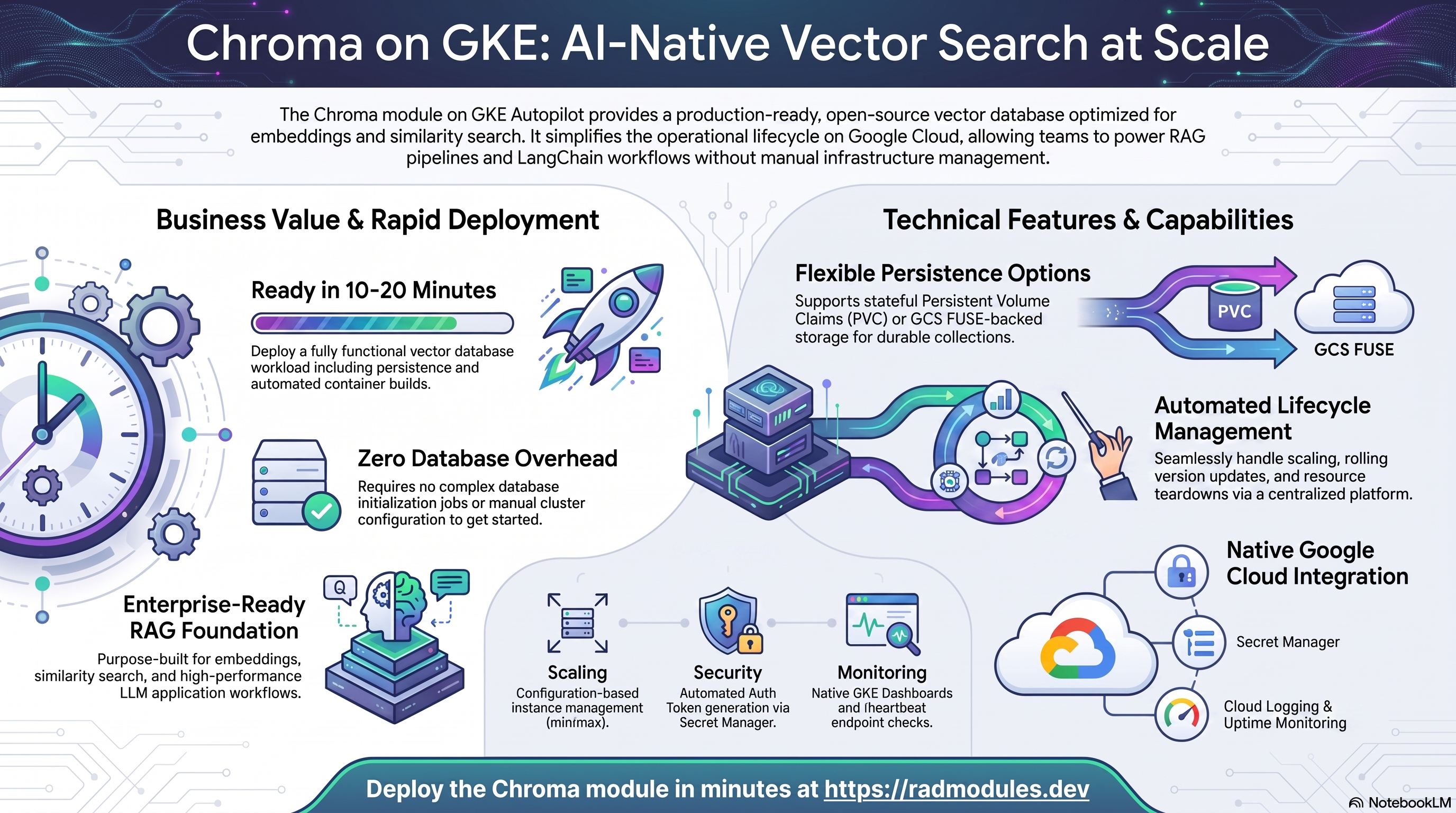
Chroma is an AI-native open-source vector database purpose-built for embeddings and similarity search. It powers RAG pipelines, semantic search, and LangChain/LlamaIndex workflows. This module deploys Chroma on GKE Autopilot on top of the App_GKE foundation, which provisions and manages the shared Google Cloud and Kubernetes infrastructure.
This guide focuses on the cloud services Chroma uses and how to explore and operate them from the Google Cloud Console and the command line. For the mechanics that are common to every GKE application — Workload Identity, ingress, autoscaling, CI/CD, Cloud Armor, IAP, Binary Authorization, VPC Service Controls, backups, and the deployment lifecycle — refer to the App_GKE foundation guide rather than repeating them here.
What Chroma costs on RAD, and how that compares
Chroma on RAD's GKE Autopilot module costs about US$42.08 a month in a Google Cloud project you own, plus a one-time 75-credit module fee (US$7.50). Chroma is an AI-native vector database for embeddings and similarity search, used to back RAG pipelines and semantic search. For the lowest cost, the Cloud Run guide runs the same Chroma for about US$19.14 a month; pick GKE here only if Chroma must stay up continuously, scale across pods, or run beside other Kubernetes workloads.
If Chroma is only needed occasionally — a demo, a trial, a seasonal or study workload — a RAD-managed project can be deleted and restored within 30 days for a handful of credits, so that US$42.08 becomes a few dollars a month instead. See Pause it for free, below.
What you pay on RAD
| In a Google Cloud project you own | In a project RAD manages for you | |
|---|---|---|
| Module fee, once per deployment | 75 credits (US$7.50 at the top-up price) | 67.5 credits (10% lower) |
| Build time | A few credits per build (roughly 3–6) | The same |
| Google Cloud running cost | Billed by Google to your own billing account, about US$42.08 a month for the default configuration (table below) | Metered hourly in credits; RAD publishes 56 credits a day, about 1680 a month (about US$168 at the top-up price) |
| Who owns what | You own the project and its billing; RAD deploys and updates it | RAD owns the project, with guardrails, quotas and budget alerts; you get console access, and a minimum purchased balance is held in reserve |
10 credits cost US$1 on a one-off top-up, less on a plan. In a project RAD manages, the database, file server and network are shared by every application in the project, so a second application does not add a second database.
Default running cost in your own project (us-central1, Google list prices):
| Resource (module default) | Per month |
|---|---|
| GKE Autopilot pod, 1x vCPU / 1 GiB | US$36.08 |
| Cloud NAT and networking | US$5 |
| Cloud Storage (add-ons, backups) | US$1 |
| GKE cluster management fee | shared across every GKE app in the project; $0 if this is your only cluster, else ~73 |
| Total | about US$42.08 |
How it compares
- The project's own managed offering, Chroma Cloud, starts at $0 a month plus usage (10 databases, $5 of credits included — about $2.50/GiB written, $0.33/GiB stored a month, and a small per-query and per-GiB-returned charge), stepping up to $250 a month plus usage on the Team plan.
- Run it yourself and a small VPS running Chroma's own server process costs less in cash: a Hetzner CPX22 or DigitalOcean 2 vCPU/4 GB box is about $24 a month, or a GCP
e2-standard-2about $49 a month — plus your own time for backups, security patches and upgrades, which RAD's managed Cloud SQL, Secret Manager and monitoring cover for you. - RAD never claims to be cheaper than bare infrastructure in cash terms — it usually is not. The difference is what RAD manages for you: patching, backups, secrets and monitoring, plus the ability to pause Chroma for free rather than paying for idle capacity (see below).
Pause it for free: delete a RAD-managed project, restore it when you need it
If Chroma runs in a project RAD manages for you, you have a second option that goes well beyond scaling to zero: delete the whole project, and restore it within 30 days for close to nothing. This suits Chroma that you only need occasionally far better than running it continuously.
- How it works. Deleting a RAD-managed project unlinks its billing first, then asks Google to delete the project. Google does not remove the project immediately: it keeps it, recoverable, for 30 days. Because billing is already unlinked, nothing is charged while it waits. Unlike deleting one module, this does not tear down GKE Autopilot resources one by one — the whole project, and everything in it, simply stops.
- Restoring costs a handful of credits, not a rebuild. Within 30 days, the project's owner can restore it. RAD asks Google to undelete the project and reattaches its billing account, then asks you to run Update on each deployment to confirm everything came back. Because nothing was individually destroyed, that Update finds the same resources already there — it is a check, not a rebuild, and an Update never charges the module fee again. That is a handful of credits (under US$1) in total for a typical Chroma chain, against the 80 credits a full redeploy costs.
- So a month of occasional use can cost a few dollars, not US$42.08. Deploy Chroma, use it, delete the project. Restore it next time you want it, confirm with Update, and delete it again when you're done. You pay only for the module fee once, the builds, and whatever hours it was actually live.
- What this needs. You must own the project (not a bring-your-own one RAD only manages billing for), and you restore it yourself within the 30 days — after that, Google deletes it for good. Restoring is admitted like creating a new project: your purchased credit balance must still clear the tier's floor (100 credits for the sandbox tier most study and demo use fits). Google says most services are fully working again within 36 hours of a restore.
- One real gap: the backup bucket does not survive. Nightly backups are written to a bucket inside the project, and that bucket is not protected by Cloud Storage's soft-delete, so it is very likely gone as soon as you delete the project — even though the project itself is recoverable for 30 days. If you have customised Chroma and want to keep that work, copy a backup out (to Google Drive, or a bucket outside the project) before you delete. For a default installation with nothing irreplaceable in it, this does not matter.
Pay only while you use it, the other way: delete and redeploy
GKE Autopilot keeps at least one pod running, so it never scales to zero on its own. The option above only applies to a RAD-managed project; in your own project, or once the 30-day window has passed, the way to stop paying is to delete the deployment and deploy it again when you need it.
- What a redeploy costs. The module fee again plus the builds: about 80 credits (US$8) in your own project. Deleting saves money only once Chroma would otherwise sit unused for about 6 days or more in your own project (US$1.40 a day), or about 2 days or more in a RAD-managed one (56 credits a day).
- Keep your data first. Nightly backups are written to a bucket inside the deployment and are deleted with it, so copy the latest backup out before deleting if you want to keep it.
- Note your settings. RAD does not recreate a deleted deployment for you; you enter the settings again when you deploy.
Lab sessions and Managed Environments
- Lab sessions, for training. A trainer runs a session for a class. Each participant gets the app in their own Google Cloud project for 15 minutes to 24 hours, within an allowance the trainer sets. Either the trainer funds every place, or each participant pays for their own. Everything is deleted when the session ends and unused credits go back to the trainer.
- Managed Environments, for consultancies. A partner runs the app for a client from a ring-fenced wallet it funds, and settles with the client directly. If the wallet runs low, billing pauses and the data is kept, so nobody receives an unexpected charge. At the end the partner hands the project over and the deployments become the client's own.
Credits can be bought in more than 20 currencies, including XAF, XOF, NGN, GHS, KES and ZAR, by card, bank transfer or mobile money.
Sources (8 October 2026): Google Cloud list prices from the Cloud Billing Catalog API; RAD's own fees and daily-credit estimates from radmodules.dev/pricing; Delete and restore projects for the 30-day recovery window and what it says about Cloud Storage objects without soft delete; Chroma Cloud. Prices change; check each source before relying on a figure.
1. Overview
Chroma runs as a containerised vector-database workload. The deployment wires together a focused set of Google Cloud services:
| Capability | Google Cloud service | Notes |
|---|---|---|
| Compute | GKE Autopilot | StatefulSet or Deployment pods, 1 vCPU / 1 GiB by default |
| Data persistence | StatefulSet PVC (default) or GCS FUSE | PVC-backed by default; GCS FUSE only when stateful_pvc_enabled = false |
| Object storage | Cloud Storage | Auto-provisioned <prefix>-data bucket; used as primary store when PVC is not enabled |
| Auth token | Secret Manager | Optional API token — CHROMA_SERVER_AUTHN_CREDENTIALS injected at runtime |
| Ingress | Cloud Load Balancing | ClusterIP by default (internal cluster access); optional LoadBalancer with IAP or auth token |
Sensible defaults worth knowing up front:
- No SQL database and no Redis. Chroma manages its own embedded storage. No Cloud SQL instance is created and no Redis connection is configured.
ClusterIPby default. The service is reachable only within the cluster; theendpoint_urloutput is not accessible from outside the cluster with this default. Setservice_type = "LoadBalancer"only if external access is needed, and enableenable_auth_tokenor IAP alongside it.- Single-instance recommended.
max_instance_count = 1is the default. Multiple Chroma pods sharing a single PVC are not supported — concurrent writes would corrupt collections. - StatefulSet PVC by default.
stateful_pvc_enabled = true(the default) automatically resolves the workload type toStatefulSetand disables the GCS FUSE volume at/datato prevent a double-mount conflict. - Auth token is optional but recommended for any deployment reachable outside the pod
namespace. When enabled, the token is stored in Secret Manager and must be passed as
Authorization: Bearer <token>in every API call. - Health probes are fixed to
/api/v2/heartbeat. This is the only health endpoint Chroma exposes. - Anonymised telemetry is always disabled.
ANONYMIZED_TELEMETRY=falseis injected automatically. - Many database/Redis/build-config inputs are inert.
Chroma_GKEdeclares the full App_GKE variable surface (database, Redis, container build, quota, and other Foundation-mirror inputs) forcheck_conventions.pyparity, but most of them are hardcoded or ignored byChroma_Common/main.tf— see Section 4 for the full, per-group list.
2. Google Cloud Services & How to Explore Them
All commands assume you have run
gcloud container clusters get-credentials <cluster> --region <region> --project <project>
and that PROJECT, REGION, and NAMESPACE are set. The namespace and other
identifiers are reported in the deployment Outputs.
A. GKE Autopilot — the Chroma workload
Chroma pods are scheduled on Autopilot, which bills for the CPU and memory the pods actually request. The deployment runs as a StatefulSet (when PVC-backed) or a Deployment (when GCS FUSE-backed), with Horizontal Pod Autoscaling managing replica count.
- Console: Kubernetes Engine → Workloads → select the Chroma workload to see pods, revisions, and events. Kubernetes Engine → Services & Ingress shows the service IP.
- CLI:
kubectl get pods,svc,hpa -n "$NAMESPACE"
kubectl logs -n "$NAMESPACE" deploy/<service-name> --tail=100
kubectl describe statefulset -n "$NAMESPACE"    # when using StatefulSet
See App_GKE for how Autopilot, scaling, and the workload type (Deployment vs StatefulSet) are managed.
B. Data Persistence — StatefulSet PVC or GCS FUSE
Chroma stores its embedded SQLite database, HNSW index files, and collection metadata
in a persistent volume at /data. Two storage backends are available:
StatefulSet PVC (default): A Kubernetes PersistentVolumeClaim
backed by a Balanced PD (standard-rwo) or SSD (premium-rwo) is provisioned per pod,
providing low-latency local-disk access for index reads and writes.
- Console: Kubernetes Engine → Storage → PersistentVolumeClaims.
- CLI:
kubectl get pvc -n "$NAMESPACE"
kubectl describe pvc -n "$NAMESPACE" <pvc-name>
GCS FUSE (only when stateful_pvc_enabled = false): A Cloud Storage bucket (<prefix>-data)
is provisioned and mounted at /data via the GCS FUSE CSI driver.
- Console: Cloud Storage → Buckets — look for the bucket whose name ends in
-data. - CLI:
gcloud storage buckets list --project "$PROJECT"
gcloud storage ls gs://<data-bucket>/chroma/    # inspect Chroma's on-disk layout
# Confirm the GCS FUSE mount inside a pod:
kubectl exec -n "$NAMESPACE" <pod-name> -- df -h | grep /data
See App_GKE for GCS Fuse, CMEK options, and PVC provisioning.
C. Secret Manager
When enable_auth_token = true, Chroma's API authentication token is generated and
stored as a Secret Manager secret. It is injected into pods at runtime as
CHROMA_SERVER_AUTHN_CREDENTIALS; plaintext never appears in configuration.
- Console: Security → Secret Manager.
- CLI:
gcloud secrets list --project "$PROJECT"
# Retrieve the token to configure API clients:
gcloud secrets versions access latest --secret=<prefix>-auth-token --project "$PROJECT"
See App_GKE for the Secret Store CSI integration and rotation.
D. Networking & ingress
By default the Chroma service is exposed as a ClusterIP, accessible only within the
cluster. When service_type = "LoadBalancer" is set, an external Cloud Load Balancing
IP is provisioned. A custom domain, static IP, and Cloud Armor can be layered on.
- Console: Kubernetes Engine → Services & Ingress; Network services → Load balancing; VPC network → IP addresses.
- CLI:
kubectl get ingress,svc -n "$NAMESPACE"
gcloud compute addresses list --project "$PROJECT"
# Test the Chroma heartbeat from inside the cluster:
kubectl run -n "$NAMESPACE" --rm -it curl --image=curlimages/curl -- \
  curl http://<cluster-ip>:8000/api/v2/heartbeat
See App_GKE for custom domains, Cloud CDN, and static IP details.
E. Cloud Logging & Monitoring
Pod stdout/stderr flow to Cloud Logging; GKE metrics flow to Cloud Monitoring. Optional
uptime checks against /api/v2/heartbeat and alert policies are available.
- Console: Logging → Logs Explorer; Monitoring → Dashboards / Alerting.
- CLI:
gcloud logging read 'resource.type="k8s_container" AND resource.labels.namespace_name="'"$NAMESPACE"'"' \
  --project "$PROJECT" --limit 50
3. Chroma Application Behaviour
- No database bootstrap. Chroma manages its own embedded storage and requires no
database initialisation job. No
db-initjob is injected. If you provide custominitialization_jobs, they run before the application starts. - Index loading on start. When Chroma restarts (after a pod eviction or rolling
update), it loads its HNSW indexes from the PVC or GCS bucket. For large collections
this can take tens of seconds; the startup probe at
/api/v2/heartbeatwaits until Chroma signals readiness. - Single-writer constraint. Chroma does not have distributed locking over its
storage. Running more than one pod writing to the same PVC or GCS path will corrupt
collections. Keep
max_instance_count = 1unless you are running a Chroma cluster deployment with separate storage per pod. - Auth token usage. When
enable_auth_token = true, all API calls must includeAuthorization: Bearer <token>. Retrieve the token from Secret Manager, then use it with the Python client:# Retrieve token
TOKEN=$(gcloud secrets versions access latest \
--secret=<prefix>-auth-token --project "$PROJECT")import chromadb
client = chromadb.HttpClient(
host="<cluster-ip>", port=8000,
headers={"Authorization": f"Bearer {TOKEN}"}
) - Health probe. Both the startup and liveness probes target
/api/v2/heartbeatwith a 15-second initial delay. The probe path is fixed by Chroma_Common and cannot be changed. - Scheduled tasks. Chroma has no built-in scheduled commands. Use
cron_jobsif you need periodic collection snapshots or maintenance tasks.
4. Configuration Variables
Variables are grouped exactly as they appear on the deployment platform. Only settings specific to or notable for Chroma are listed; every other input is inherited from App_GKE with its standard behaviour and defaults.
Group 0 — Module Metadata
| Variable | Default | Description |
|---|---|---|
module_description | Chroma is the AI-native open-source vector database with 18,000+ GitHub stars, purpose-built for embeddings and similarity search. Accelerates AI application development with a production-grade store for RAG pipelines, semantic search, and LangChain/LlamaIndex workflows. Deploy on GKE Autopilot with StatefulSet persistence, GCS Fuse storage, optional token authentication, Workload Identity, Secret Manager, and horizontal auto-scaling. | The description of the module. (e.g., "Chroma GKE: Deploy Chroma vector database on GKE Autopilot.") |
module_documentation | https://docs.radmodules.dev/docs/modules/Chroma_GKE | The URL to the module documentation. |
module_dependency | (set) | Specify the names of the modules this module depends on in the order in which they should be deployed. (e.g., ["Services_GCP"]) |
module_services | (set) | Specify the module services. |
credit_cost | 75 | Specify the module cost. (e.g., 50) |
require_credit_purchases | false | When true, the module fee can be paid only from purchased credits (subscription or top-up), not from free awarded or event credits. |
enable_purge | true | Set to true to enable the ability to purge this module. |
public_access | true | Set to true to enable the module to be available to all platform users. |
require_services_gcp_module | true | Enforces that the Services_GCP module is deployed before this module. When true, the deployment fails at plan time with a clear error if no Services_GCP-managed VPC network is detected in the project. Set to false to allow standalone deployment with inline prerequisite resources. |
resource_creator_identity | rad-module-creator@YOUR_PLATFORM_PROJECT.iam.gserviceaccount.com | The Service Account used by terraform to create resources in the destination project. (e.g., "rad-module-creator@YOUR_PLATFORM_PROJECT.iam.gserviceaccount.com") |
shared_users | (set) | List of users who can view and deploy this module regardless of the public_access setting. Enter one or more user email addresses. Metadata only. |
technical_support_users | (set) | List of users responsible for providing technical support for this module. Enter one or more user email addresses. The deployment portal routes support requests for this module to these users. Metadata only. |
impersonation_service_account | `` | Service account email to impersonate when calling GCP APIs from shell scripts. Leave empty to use the runner's own credentials. (e.g., 'deployer@my-project.iam.gserviceaccount.com') |
job_execution_wait_timeout | 900 | Maximum seconds a deployment waits for the database setup (db-create) job to complete before it aborts, so a stuck job fails the apply quickly instead of hanging until the build's outer timeout. Set it to at least the job's own runtime plus a margin. |
explicit_secret_values | (set) | Raw sensitive values to inject directly into Kubernetes Secrets, bypassing Secret Manager data source reads. Not referenced — setting this variable has no effect on deployment in this application module. |
scripts_dir | `` | Path to initialisation scripts directory. Not referenced — setting this variable has no effect on deployment in this application module. |
requires_services | (set) | Explicit map of the Services_GCP-provisioned resources this module needs, independent of whatever Services_GCP's own variable defaults currently are. The platform reads this map (not module_services, which is a human-readable list for the deployment-confirmation UI) to decide which Services_GCP create_* toggles must be enabled when auto-provisioning or updating the shared Services_GCP deployment for the destination project. Keys mirror Services_GCP's own boolean variable names 1:1. create_redis and create_filestore_nfs should stay false for the automated deployment path: the free Compute Engine NFS+Redis VM (create_network_filesystem) is what every automated deployment gets; switching to managed Cloud Memorystore/Filestore is a manual post-deployment optimisation, never something an automated dependency chain should request on its own. |
All other inputs in this group follow standard App_GKE behaviour.
Group 1 — Project & Identity
| Variable | Default | Description |
|---|---|---|
project_id | (required) | Select an existing project on the RAD platform or enter the project ID of an external GCP project. You must grant Owner role to the RAD GCP Project agent service account when deploying into an external project. (e.g., 'my-project-123') |
tenant_id | demo | Specify a unique tenant or deployment identifier. This uniquely identifies your application deployment and is used in resource naming (1-7 lowercase alphanumeric characters, no hyphens — the 7-character cap comes from GCP's 30-character service-account ID limit). |
region | us-central1 | GCP region for resource deployment (e.g., 'us-central1'). Used as fallback when network discovery cannot determine the region from existing VPC subnets. |
All other inputs in this group follow standard App_GKE behaviour.
Group 2 — Deployment Environment
| Variable | Default | Description |
|---|---|---|
support_users | (set) | Email addresses of users to be granted access the Google Cloud project, monitoring alerts and notifications (e.g., ['admin@example.com', 'ops@example.com']). |
resource_labels | (set) | Key-value labels applied to all resources created by this module. Use to enforce organisational tagging policies such as cost centre, environment, or team ownership. (e.g., { env = "prod", team = "engineering" }) |
All other inputs in this group follow standard App_GKE behaviour.
Group 3 — Application Identity
| Variable | Default | Description |
|---|---|---|
application_name | chroma | Application name used in resource naming. Must start with a letter and contain only lowercase letters, numbers, and hyphens (1-20 characters). (e.g., "chroma") |
application_display_name | Chroma Vector Database | Human-readable application name for display purposes. (e.g., "Chroma Vector Database") |
application_description | Chroma Vector Database on GKE Autopilot | Brief description of the application's purpose. Not referenced — setting this variable has no effect on deployment in this application module. |
description | Chroma — the AI-native open-source vector database for embeddings and similarity search | Brief description of the Chroma deployment's purpose. Populates the GKE workload description and platform documentation. (e.g., 'Chroma Vector Database for AI applications') |
application_version | latest | Chroma Docker image version tag. Use 'latest' for the most recent stable release, or pin to a specific version for reproducible deployments. (e.g., 'latest', '0.5.0') |
All other inputs in this group follow standard App_GKE behaviour.
Group 4 — Runtime & Scaling
| Variable | Default | Description |
|---|---|---|
deploy_application | true | Set to true to deploy the application infrastructure. When false, only shared resources (secrets, storage, IAM) are created without deploying the actual GKE workload. |
container_image_source | custom | Determines how the container image is sourced. Use 'prebuilt' to deploy an existing image URI directly, or 'custom' to build the image from source. Not referenced — setting this variable has no effect on deployment in this application module. |
container_image | `` | Image URI. Not referenced — setting this variable has no effect on deployment in this application module. |
container_build_config | (set) | Build Config. Not referenced — setting this variable has no effect on deployment in this application module. |
enable_image_mirroring | true | Mirrors the Chroma container image into Artifact Registry before deployment. Recommended to avoid Docker Hub rate limits and improve pull reliability in production environments. |
min_instance_count | 1 | Minimum number of pod replicas to keep running at all times. For Chroma, set to at least 1 to avoid cold starts. Must be less than or equal to max_instance_count. (e.g., 1) |
max_instance_count | 1 | Maximum number of pod replicas allowed to run concurrently. For Chroma without distributed mode, 1 is typical. Must be greater than or equal to min_instance_count. (e.g., 1) |
enable_vertical_pod_autoscaling | false | Enable Vertical Pod Autoscaling (VPA). When enabled, HPA based on CPU/Memory is disabled to avoid conflicts. VPA automatically optimizes resource requests. (e.g., false) |
container_port | 8000 | TCP port that the Chroma container listens on. For Chroma this is always 8000 (set via Chroma_Common); this variable is not forwarded to App_GKE and has no effect. |
container_protocol | http1 | HTTP protocol version used by the Kubernetes Service backend. Not referenced — setting this variable has no effect on deployment in this application module. |
container_resources | (set) | CPU/Memory limits for the Chroma container. Note: use the cpu_limit and memory_limit variables to set container resources — this structured object is accepted for UI compatibility but does not override cpu_limit/memory_limit. |
timeout_seconds | 300 | Request timeout in seconds (0-3600). Maximum time a request can take. (e.g., 300) |
enable_cloudsql_volume | false | Injects a Cloud SQL Auth Proxy sidecar container into the GKE pod. Chroma does not use Cloud SQL — this should remain false unless you are running a custom sidecar alongside Chroma. |
cloudsql_volume_mount_path | /cloudsql | Cloud SQL Auth Proxy socket mount path. Not referenced — Chroma has no Cloud SQL database. |
service_annotations | (set) | Custom annotations applied to the Kubernetes Service resource. (e.g., { "cloud.google.com/neg" = "{\\"ingress\\": true}" }) |
service_labels | (set) | Custom labels applied specifically to the Kubernetes Service resource. (e.g., { category = "production", tier = "database" }) |
cloud_sql_proxy_version | 2-alpine | Cloud SQL Auth Proxy image tag. Not applicable — Chroma has no Cloud SQL database. |
cpu_limit | 1000m | CPU limit allocated to the Chroma container. (e.g., '1000m', '2000m') |
memory_limit | 1Gi | Memory limit allocated to the Chroma container. Chroma loads embedding indexes into memory; size this based on your collections. (e.g., '1Gi', '4Gi') |
enable_auth_token | false | Generate a random auth token and store it in Secret Manager. When true, Chroma is started with CHROMA_SERVER_AUTHN_CREDENTIALS and CHROMA_SERVER_AUTHN_PROVIDER set so that all API calls require the token. Recommended for any deployment accessible outside the pod/namespace. |
All other inputs in this group follow standard App_GKE behaviour.
Group 5 — Environment Variables & Secrets
| Variable | Default | Description |
|---|---|---|
environment_variables | (set) | Static environment variables for the Chroma container as key-value pairs. (e.g., { CHROMA_LOG_CONFIG_FILE = "/chroma/log_config.yml" }) |
secret_environment_variables | (set) | Environment variables from Secret Manager. Map environment variable name to Secret Manager secret name. |
secret_rotation_period | 2592000s | Secret rotation schedule. (e.g., '2592000s' for 30 days) |
secret_propagation_delay | 30 | Time in seconds to wait after a secret is created or updated before proceeding with dependent operations. (e.g., 30) |
All other inputs in this group follow standard App_GKE behaviour.
Group 6 — GKE Backend & Cluster
| Variable | Default | Description |
|---|---|---|
gke_cluster_name | `` | Name of the GKE cluster to deploy into. Leave empty to auto-discover. (e.g., 'gke-cluster-1') |
prereq_gke_subnet_cidr | 10.201.0.0/24 | CIDR range for the inline GKE subnet. Not referenced — setting this variable has no effect on deployment in this application module. |
gke_cluster_selection_mode | primary | Strategy for choosing target GKE cluster. (e.g., 'primary') |
prereq_subnet_cidr_override | `` | Override for the inline VPC primary subnet CIDR. |
namespace_name | `` | Kubernetes namespace for deployment. Leave empty to auto-generate from application_name and tenant_id. (e.g., 'chroma-prod') |
prereq_gke_pod_cidr_override | `` | Override for the inline GKE pod secondary range CIDR. |
prereq_gke_service_cidr_override | `` | Override for the inline GKE service secondary range CIDR. |
workload_type | null | Kubernetes workload type. Use 'StatefulSet' (recommended for Chroma) for stable pod identity and orderly restarts, or 'Deployment' for stateless operation with GCS-backed storage. (e.g., 'Deployment' or 'StatefulSet') |
service_type | ClusterIP | Kubernetes Service type. Keep 'ClusterIP' (default) so Chroma is reachable only within the cluster — the api_url output is not accessible from outside the cluster with this setting. Set 'LoadBalancer' only if external access is needed, and enable IAP or enable_auth_token alongside it. |
session_affinity | None | Session affinity mode for the Kubernetes Service. (e.g., 'None' or 'ClientIP') |
enable_multi_cluster_service | false | Enables Multi-Cluster Services (MCS) for the application. Not referenced — setting this variable has no effect. |
extra_service_ports | (set) | Additional ports to expose on the Kubernetes Service, for a workload that speaks more than one protocol on the same pod. Mirrors the App_GKE variable to satisfy convention checks; declared but NOT forwarded by this module, so setting it has no effect here. Defaults to an empty list, which renders exactly the Service this module rendered before. |
configure_service_mesh | false | Enables Istio service mesh injection for the application namespace. Requires Cloud Service Mesh or Anthos Service Mesh to be installed on the cluster. |
enable_network_segmentation | false | Enable Kubernetes NetworkPolicies for micro-segmentation. (e.g., false) |
termination_grace_period_seconds | 60 | Seconds Kubernetes waits after SIGTERM before forcibly terminating. Increase to allow Chroma to flush in-flight writes. Valid range: 0–3600. (e.g., 60) |
deployment_timeout | 1800 | Maximum seconds Terraform waits for the Kubernetes rollout to complete. (e.g., 1800) |
All other inputs in this group follow standard App_GKE behaviour.
Group 7 — StatefulSet Configuration
| Variable | Default | Description |
|---|---|---|
stateful_pvc_enabled | true | Enable Persistent Volume Claim for StatefulSet. Recommended for Chroma to avoid GCS FUSE I/O overhead for large collections. When true without explicit workload_type, automatically resolves to 'StatefulSet'. (e.g., false) |
stateful_pvc_size | 20Gi | Storage size for each PVC provisioned by the StatefulSet. Size the PVC to hold all Chroma collections plus overhead. (e.g., '20Gi', '50Gi') |
stateful_pvc_mount_path | /data | Filesystem path inside the Chroma container where the per-pod PVC is mounted. (e.g., '/data') |
stateful_pvc_storage_class | standard-rwo | Kubernetes StorageClass for the StatefulSet PVCs. 'standard-rwo' (Balanced PD) is the default for GKE Autopilot. Use 'premium-rwo' for higher IOPS. (e.g., 'standard-rwo', 'premium-rwo') |
stateful_headless_service | null | Create a headless service for the StatefulSet to enable stable network identities. (e.g., true) |
stateful_pod_management_policy | null | Controls the order in which pods are created and deleted. 'OrderedReady' is required for safe Chroma restarts. (e.g., 'OrderedReady' or 'Parallel') |
stateful_update_strategy | null | Update strategy for the StatefulSet. Use 'RollingUpdate' for zero-downtime updates. (e.g., 'RollingUpdate' or 'OnDelete') |
stateful_fs_group | 1000 | GID set as the pod-level fsGroup in the StatefulSet security context. Ensures the PVC is group-writable. Set to 0 to leave fsGroup unset. (e.g., 1000) |
All other inputs in this group follow standard App_GKE behaviour.
Group 8 — Resource Quota
| Variable | Default | Description |
|---|---|---|
enable_resource_quota | false | Creates a Kubernetes ResourceQuota in the application namespace. |
quota_cpu_requests | `` | Total CPU requests quota for the namespace. Not referenced — setting this variable has no effect. |
quota_cpu_limits | `` | Total CPU limits quota for the namespace. Not referenced — setting this variable has no effect. |
quota_memory_requests | `` | Total memory requests quota for the namespace (e.g., '4Gi'). Must use binary unit suffixes such as 'Gi' or 'Mi' — bare integers are treated as bytes by Kubernetes and will block all pod scheduling. |
quota_memory_limits | `` | Total memory limits quota for the namespace (e.g., '8Gi'). Must use binary unit suffixes such as 'Gi' or 'Mi' — bare integers are treated as bytes by Kubernetes and will block all pod scheduling. |
quota_max_pods | `` | Maximum pods in the namespace. Not referenced — setting this variable has no effect. |
quota_max_services | `` | Maximum Services in the namespace. Not referenced — setting this variable has no effect. |
quota_max_pvcs | `` | Maximum PVCs in the namespace. Not referenced — setting this variable has no effect. |
All other inputs in this group follow standard App_GKE behaviour.
Group 9 — Reliability Policies
| Variable | Default | Description |
|---|---|---|
enable_pod_disruption_budget | true | Creates a Kubernetes PodDisruptionBudget to limit pod unavailability during voluntary disruptions. |
pdb_min_available | 1 | Minimum pods available during voluntary disruptions. (e.g., '1') |
enable_topology_spread | false | Adds Kubernetes TopologySpreadConstraints. Not referenced — setting this variable has no effect. |
topology_spread_strict | false | Controls the whenUnsatisfiable behaviour of the topology spread constraint. Not referenced — setting this variable has no effect. |
All other inputs in this group follow standard App_GKE behaviour.
Group 10 — Observability & Health
| Variable | Default | Description |
|---|---|---|
startup_probe_config | (set) | Configuration for the Kubernetes startup probe. Chroma exposes /api/v2/heartbeat. Example: { enabled = true, type = "HTTP", path = "/api/v2/heartbeat", initial_delay_seconds = 15, timeout_seconds = 5, period_seconds = 10, failure_threshold = 10 }. |
health_check_config | (set) | Configuration for the Kubernetes liveness probe. Uses /api/v2/heartbeat (Chroma's health endpoint). Example: { enabled = true, type = "HTTP", path = "/api/v2/heartbeat", initial_delay_seconds = 30, timeout_seconds = 5, period_seconds = 30, failure_threshold = 3 }. |
uptime_check_config | (set) | Uptime check configuration. Monitors service availability. Example: { enabled = true, path = "/api/v2/heartbeat", check_interval = "60s", timeout = "10s" }. |
alert_policies | (set) | Custom alert policies for Cloud Monitoring. |
startup_probe | (set) | Startup probe configuration. Chroma exposes /api/v2/heartbeat once fully ready to serve requests. Example: { enabled = true, type = "HTTP", path = "/api/v2/heartbeat", initial_delay_seconds = 15, timeout_seconds = 5, period_seconds = 10, failure_threshold = 10 }. |
liveness_probe | (set) | Liveness probe configuration. Uses /api/v2/heartbeat (Chroma's health endpoint). Example: { enabled = true, type = "HTTP", path = "/api/v2/heartbeat", initial_delay_seconds = 30, timeout_seconds = 5, period_seconds = 30, failure_threshold = 3 }. |
All other inputs in this group follow standard App_GKE behaviour.
Group 11 — Jobs & Scheduled Tasks
| Variable | Default | Description |
|---|---|---|
initialization_jobs | (set) | Kubernetes jobs for initialization tasks. Chroma requires no default initialization; only provide jobs for custom data loading or migration tasks. |
cron_jobs | (set) | List of CronJobs to deploy alongside Chroma (e.g., for collection snapshots or maintenance tasks). |
additional_services | (set) | List of additional Kubernetes services to deploy alongside Chroma (e.g., sidecars, helper services). |
All other inputs in this group follow standard App_GKE behaviour.
Group 12 — CI/CD, Binary Authorization & Cloud Deploy
| Variable | Default | Description |
|---|---|---|
enable_cicd_trigger | false | Enable automated Cloud Build trigger for CI/CD. (e.g., false) |
github_repository_url | `` | GitHub repository URL for automated CI/CD (e.g., 'https://github.com/username/repo'). |
github_token | `` | GitHub Personal Access Token (PAT). Required when enable_cicd_trigger is true. |
github_app_installation_id | `` | GitHub App installation ID. |
cicd_trigger_config | (set) | Cloud Build trigger configuration for automated CI/CD pipeline. Example: { branch_pattern = "^main$", included_files = [], ignored_files = [], trigger_name = null, description = "Automated build and deployment trigger", substitutions = { } }. |
enable_cloud_deploy | false | Enable Google Cloud Deploy for a managed Dev → Staging → Prod promotion pipeline. Requires enable_cicd_trigger = true. |
cloud_deploy_stages | (set) | Ordered list of Cloud Deploy pipeline stages. |
enable_binary_authorization | false | Enable Binary Authorization for this deployment. (e.g., false) |
binauthz_evaluation_mode | ALWAYS_ALLOW | Binary Authorization enforcement mode. Not referenced — setting this variable has no effect on deployment in this application module. |
All other inputs in this group follow standard App_GKE behaviour.
Group 13 — NFS
| Variable | Default | Description |
|---|---|---|
enable_nfs | false | Provisions a Cloud Filestore (NFS) instance and mounts it into the GKE pod as a shared persistent volume. |
nfs_mount_path | /mnt/nfs | Filesystem path inside the container where the NFS volume is mounted. (e.g., '/mnt/nfs') |
nfs_volume_name | nfs-data-volume | Volume name for the NFS mount. (e.g., 'nfs-data-volume') |
nfs_instance_name | `` | Name of an existing NFS GCE VM to use. Leave empty to auto-discover. |
nfs_instance_base_name | app-nfs | Base name for the inline NFS GCE VM. (e.g., 'app-nfs') |
All other inputs in this group follow standard App_GKE behaviour.
Group 14 — Cloud Storage & Artifact Registry
| Variable | Default | Description |
|---|---|---|
create_cloud_storage | true | Controls whether the module provisions GCS buckets defined in storage_buckets. |
storage_buckets | (set) | Cloud Storage buckets to create in addition to the Chroma data bucket. |
gcs_volumes | (set) | GCS FUSE volume mounts via CSI driver. The Chroma data bucket is automatically added; use this for additional volumes. |
manage_storage_kms_iam | false | When true, creates a CMEK KMS keyring and storage encryption key. |
enable_artifact_registry_cmek | false | When true, enables CMEK encryption of container images in Artifact Registry. |
max_images_to_retain | 7 | Maximum number of recent container images to keep in Artifact Registry. Set to 0 to disable. (e.g., 7) |
delete_untagged_images | true | Automatically delete untagged container images from Artifact Registry. (e.g., true) |
image_retention_days | 30 | Days after which container images are eligible for deletion. Set to 0 to disable. (e.g., 30) |
All other inputs in this group follow standard App_GKE behaviour.
Group 15 — Redis (forwarded, not applicable to Chroma)
| Variable | Default | Description |
|---|---|---|
enable_redis | false | Enables Redis configuration for the application by injecting REDIS_HOST and REDIS_PORT environment variables into the GKE deployment. If true and redis_host is left blank, the module defaults to using the NFS server IP as the Redis host. Set redis_host explicitly to connect to a dedicated Redis instance such as Memorystore. |
redis_host | `` | Hostname or IP address of the Redis server injected as the REDIS_HOST environment variable. Only used when enable_redis is true. Leave blank to default to the NFS server IP address. (e.g., '10.0.0.5', 'redis.internal.example.com') |
redis_port | 6379 | TCP port of the Redis server injected as the REDIS_PORT environment variable. Only used when enable_redis is true. (e.g., '6379') |
redis_auth | `` | Redis authentication password. Not applicable to Chroma. Forwarded to foundation module for compatibility. |
All other inputs in this group follow standard App_GKE behaviour.
Group 16 — Database Configuration (forwarded, not applicable to Chroma)
| Variable | Default | Description |
|---|---|---|
database_type | NONE | Cloud SQL database engine. Not referenced — Chroma has no SQL database; the database_type is fixed to NONE by Chroma_Common. |
sql_instance_name | `` | Name of an existing Cloud SQL instance. Not referenced — Chroma has no SQL database. |
sql_instance_base_name | app-sql | Base name for the inline Cloud SQL instance. Not referenced — Chroma has no SQL database. |
application_database_name | gkeappdb | Name of the database to create within the Cloud SQL instance. Injected into the application as the DB_NAME environment variable. Only used when database_type is not 'NONE'. (e.g., 'app_db', 'crm_production') |
application_database_user | gkeappuser | Username of the database user created for the application. Injected into the application as the DB_USER environment variable. Only used when database_type is not 'NONE'. (e.g., 'app_user', 'crm_svc') |
database_password_length | 32 | Length of the randomly generated database password. Not referenced — Chroma has no SQL database. Forwarded to foundation for compatibility. (e.g., 32) |
enable_postgres_extensions | false | Enable PostgreSQL extensions. Not referenced — Chroma has no SQL database. |
postgres_extensions | (set) | PostgreSQL extensions to install. Not referenced — Chroma has no SQL database. |
enable_mysql_plugins | false | Enable MySQL plugins. Not referenced — Chroma has no SQL database. (e.g., false) |
mysql_plugins | (set) | List of MySQL plugins to install. Not referenced — Chroma has no SQL database. |
enable_auto_password_rotation | false | Enable automated database password rotation. Not applicable — Chroma has no SQL database. |
rotation_propagation_delay_sec | 90 | Seconds to wait after a database password rotation event. Not applicable — Chroma has no SQL database. |
db_password_env_var_name | `` | Additional env var to expose the database password. Not applicable — Chroma has no SQL database. |
db_host_env_var_name | `` | Additional environment variable name to expose the database host alongside the standard DB_HOST. Leave empty to inject only DB_HOST. (e.g., 'DB_HOSTNAME') |
db_user_env_var_name | `` | Additional environment variable name to expose the database user alongside the standard DB_USER. Leave empty to inject only DB_USER. (e.g., 'DB_USERNAME') |
db_name_env_var_name | `` | Additional environment variable name to expose the database name alongside the standard DB_NAME. Leave empty to inject only DB_NAME. (e.g., 'DB_DATABASE') |
db_port_env_var_name | `` | Additional environment variable name to expose the database port alongside the standard DB_PORT. Leave empty to inject only DB_PORT. (e.g., 'DB_PORT_NUMBER') |
db_name | chromadb | Not referenced — Chroma has no SQL database. Forwarded to the foundation module for compatibility. |
db_user | chromauser | Not referenced — Chroma has no SQL database. Forwarded to the foundation module for compatibility. |
All other inputs in this group follow standard App_GKE behaviour.
Group 17 — Backup & Maintenance
| Variable | Default | Description |
|---|---|---|
backup_schedule | 0 2 * * * | Cron schedule for automated backups (e.g., '0 2 * * *' for daily at 2am). Leave empty to disable. |
backup_retention_days | 7 | Number of days to retain backup files in the GCS backup bucket. (e.g., 7) |
enable_backup_import | false | Enable automatic import of a backup during deployment. (e.g., false) |
backup_source | gcs | Backup source: 'gdrive' or 'gcs'. (e.g., 'gcs') |
backup_file | backup.tar | Filename of the backup to import. Not referenced — setting this variable has no effect on deployment in this application module. |
backup_uri | `` | Backup URI. For GCS: full URI like 'gs://bucket/path/backup.tar'. For Google Drive: file ID. |
backup_format | tar | Backup file format. (e.g., 'tar') |
All other inputs in this group follow standard App_GKE behaviour.
Group 18 — Custom SQL Scripts (not applicable to Chroma)
| Variable | Default | Description |
|---|---|---|
enable_custom_sql_scripts | false | Enable execution of custom SQL scripts from GCS during initialization. Not applicable to Chroma (no SQL database). (e.g., false) |
custom_sql_scripts_bucket | `` | GCS bucket name containing custom SQL scripts. Not applicable to Chroma. |
custom_sql_scripts_path | `` | Path prefix in GCS bucket for SQL scripts. Not applicable to Chroma. |
custom_sql_scripts_use_root | false | Execute custom SQL scripts as database root user. Not applicable to Chroma. (e.g., false) |
All other inputs in this group follow standard App_GKE behaviour.
Group 19 — Custom Domain, Static IP & Networking
| Variable | Default | Description |
|---|---|---|
enable_custom_domain | true | Enable custom domain configuration via Kubernetes Gateway API with SSL certificates. (e.g., false) |
application_domains | (set) | List of custom domains for the application (e.g., ['chroma.example.com']). |
reserve_static_ip | true | Reserve a static external IP. Recommended for production. |
static_ip_name | `` | Name for the reserved static IP. Leave empty to auto-generate. |
network_tags | (set) | Network tags applied to GKE nodes. The 'nfsserver' tag is required when enable_nfs is true. (e.g., ['allow-ingress', 'nfsserver']) |
network_name | `` | Name of the VPC network to use. Leave empty to auto-discover. Not referenced — setting this variable has no effect on deployment in this application module. |
gateway_backend_stage | dev | Cloud Deploy stage whose Service the Gateway HTTPRoute targets. Only relevant when enable_cloud_deploy is true. (e.g., 'dev') |
All other inputs in this group follow standard App_GKE behaviour.
Group 20 — Identity-Aware Proxy (IAP)
| Variable | Default | Description |
|---|---|---|
enable_iap | false | Enable Identity-Aware Proxy (IAP) for authentication via Kubernetes Gateway. Required when service_type is 'LoadBalancer' to prevent unauthenticated external access to the Chroma API. Requires enable_custom_domain or enable_cdn to be true. (e.g., false) |
iap_authorized_users | (set) | List of user emails authorized to access via IAP (e.g., ['user:alice@example.com']). |
iap_authorized_groups | (set) | List of Google Groups authorized to access via IAP (e.g., ['group:engineering@example.com']). |
iap_oauth_client_id | `` | OAuth client ID for IAP. Required when enable_iap is true. |
iap_oauth_client_secret | `` | OAuth client secret for IAP. Required when enable_iap is true. |
iap_support_email | `` | Support email for IAP OAuth consent screen. Not referenced — setting this variable has no effect on deployment in this application module. |
All other inputs in this group follow standard App_GKE behaviour.
Group 21 — Cloud Armor & CDN
| Variable | Default | Description |
|---|---|---|
enable_cloud_armor | false | Attaches a Cloud Armor security policy to the GKE Ingress backend. Requires enable_custom_domain to be true or service_type to be 'LoadBalancer'. |
admin_ip_ranges | (set) | Admin CIDR ranges allowed for privileged access. (e.g., ['203.0.113.0/24']) |
cloud_armor_policy_name | default-waf-policy | The name of the Cloud Armor security policy to apply. (e.g., "default-waf-policy") |
enable_cdn | false | Enable Cloud CDN via GCPBackendPolicy. (e.g., false) |
All other inputs in this group follow standard App_GKE behaviour.
Group 22 — VPC Service Controls & Audit Logging
| Variable | Default | Description |
|---|---|---|
enable_vpc_sc | false | Enable VPC Service Controls perimeter enforcement. |
vpc_cidr_ranges | (set) | VPC subnet CIDR ranges for the VPC-SC network access level. |
vpc_sc_dry_run | true | When true, VPC-SC violations are logged but not blocked. |
organization_id | `` | GCP Organization ID for the VPC-SC Access Context Manager policy. |
enable_audit_logging | false | Enable detailed Cloud Audit Logs for all supported GCP services. |
All other inputs in this group follow standard App_GKE behaviour.
5. Outputs
These values are returned on a successful deployment and are the quickest way to locate and explore the running resources.
| Output | Description |
|---|---|
service_name | Kubernetes Service name. |
namespace | Namespace the workload runs in. |
service_cluster_ip | In-cluster ClusterIP. |
stage_service_cluster_ips | Map of ClusterIPs for stage-specific services (Cloud Deploy). |
service_external_ip | External LoadBalancer IP (when a static IP is reserved). |
endpoint_url | Chroma REST API endpoint (<service-url>:8000). |
storage_buckets | Created Cloud Storage buckets. |
network_name / network_exists / regions | VPC network, presence, available regions. |
container_image / container_registry | Deployed image and Artifact Registry repo. |
monitoring_enabled / monitoring_notification_channels | Monitoring status and channels. |
initialization_jobs | Names of any custom setup jobs. |
statefulset_name | Name of the StatefulSet (when using PVC-backed storage). |
deployment_id / tenant_id / resource_prefix | Naming identifiers. |
project_id / project_number | Project identifiers. |
cicd_enabled / github_repository_url / github_repository_owner / github_repository_name / cicd_configuration | CI/CD status and details. |
artifact_registry_repository / cloudbuild_trigger_name / cloudbuild_trigger_id | Registry and build trigger. |
kubernetes_ready | Whether the cluster/workload is ready. |
vpc_sc_enabled / vpc_sc_perimeter_name / vpc_sc_dry_run_mode | VPC-SC status. |
audit_logging_enabled / artifact_registry_cmek_enabled | Audit logging and CMEK status. |
6. Configuration Pitfalls & Sensible Defaults
Risk: Critical (data loss / outage / security) — High (service degraded) — Medium (cost or partial degradation) — Low (minor).
| Setting | Sensible value | Risk | Consequence if wrong |
|---|---|---|---|
enable_auth_token | true for any externally reachable deployment | Critical | Without a token any caller who can reach the Chroma API can read, write, or delete every collection. |
stateful_pvc_enabled | true for production | High | Without a PVC, Chroma stores data in the ephemeral container filesystem. A pod restart erases all collections and vectors. |
stateful_pvc_mount_path | /data | Critical | If the mount path does not match Chroma's storage directory, data is written to the ephemeral layer and silently lost on restart. |
stateful_pvc_size | 20Gi (size generously) | High | A full PVC causes Chroma to crash with disk-full errors. PVC capacity cannot be reduced after provisioning. |
max_instance_count | 1 | High | Multiple Chroma pods on the same storage will corrupt collections — Chroma has no distributed write lock. |
memory_limit | 4Gi+ for production | High | Chroma loads HNSW indexes into memory. The default 1Gi supports only very small collections; OOM kills drop in-flight queries. |
workload_type | set by stateful_pvc_enabled | High | Explicitly setting "Deployment" alongside stateful_pvc_enabled = true fails at plan time. |
quota_memory_requests / _limits | binary units | Critical | Bare integers are bytes and block all pod scheduling. |
application_version | pin to a specific tag | Medium | Using latest makes deployments non-reproducible. Chroma data formats can change across major versions. |
iap_oauth_client_id / _secret | set before enabling IAP | High | Setting enable_iap = true without valid OAuth credentials blocks all traffic. |
enable_iap / enable_cloud_armor | enable for externally reachable services | High | Without authentication, an externally exposed Chroma endpoint is fully open. |
backup_retention_days | raise for production | Medium | Too short for disaster recovery; regular GCS or PVC snapshots are the primary recovery path. |
min_instance_count | 1 | Medium | Scale-to-zero causes the pod to be deleted; after scale-up, Chroma must reload indexes from the PVC or GCS, adding startup latency. |
database_type / sql_instance_name / application_database_name_user / redis_host_port_auth | leave at default | Low | These Group 15/16 inputs are forwarded to App_GKE for convention parity only; Chroma_Common fixes database_type = "NONE" and main.tf hardcodes enable_redis = false, so changing them has no effect. |
container_image_source / container_protocol / container_build_config | leave at default | Low | Not referenced by this module — the image source, build, and protocol are fixed by Chroma_Common. Changing them has no effect. |
For the foundation behaviour referenced throughout — IAM and Workload Identity, autoscaling, ingress and certificates, CI/CD, Cloud Armor, IAP, Binary Authorization, VPC-SC, backups, and image mirroring — see App_GKE. Chroma-specific application configuration shared with the Cloud Run variant is described in Chroma_Common.
Related guides
- Hands-on lab: Chroma on GKE Autopilot — deploy it step by step, with the console screens and commands at each stage.
- Chroma on Google Cloud Run — the same application on Cloud Run, for when you need the other deployment target.
- Chroma Common — Shared Application Configuration — the configuration shared by both deployment targets.
Need RAD to do something it does not do yet? Request it on the roadmap, or vote on what is already there.