Certification track: Associate Cloud Engineer (ACE)
Services GCP — Platform Foundation Module
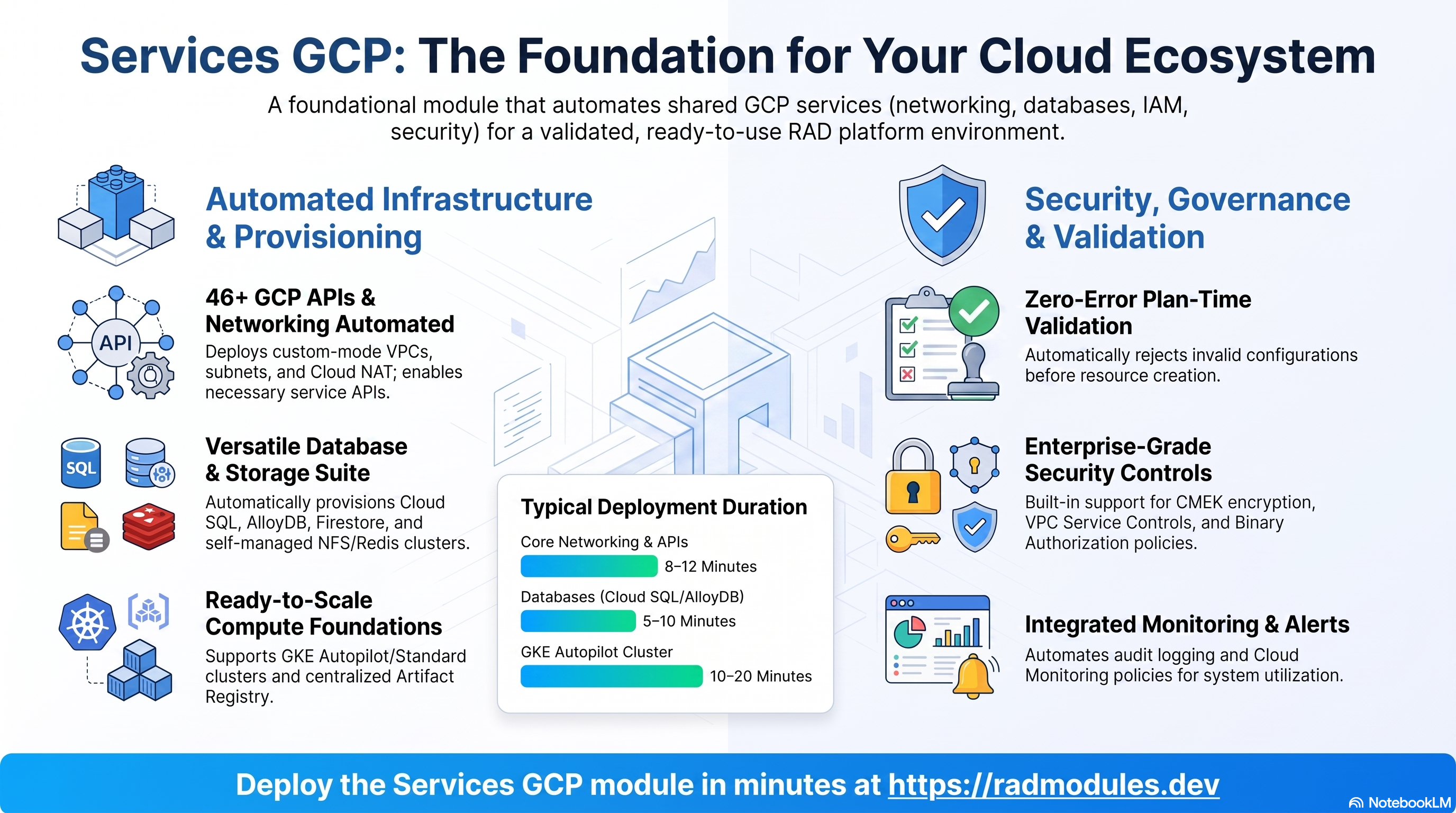
Services GCP is the platform foundation layer, provisioning the shared infrastructure that every application depends on: the VPC and networking, Cloud SQL and AlloyDB databases, Memorystore Redis, Cloud Filestore (or a self-managed NFS/Redis VM), the GKE Autopilot cluster, the shared Artifact Registry repository, the platform service accounts and IAM, and optional security controls (Binary Authorization, CMEK, VPC Service Controls, and Security Command Center).
Because everything else depends on its outputs, Services GCP must be provisioned and healthy before App CloudRun, App GKE, or any application module is deployed — but you do not need to arrange this yourself. When you deploy an application module into a project that doesn't have Services GCP yet, the platform detects that, auto-provisions it first (with the specific resources the application's own requires_services declares — e.g. Postgres vs. MySQL, GKE or not), waits for it to succeed, and then deploys your application on top of it. Deploying Services GCP directly, as documented below, remains supported for pre-configuring it before any app depends on it or deliberately sharing one deployment across several applications.
Deployment order:
Services GCP → App CloudRun / App GKE → Application Modules
Deployed GCP Services
A fully configured Services GCP deployment provisions and integrates the following GCP services:
| Capability | Google Cloud Service |
|---|---|
| Private networking | Compute Engine VPC, Subnets, Cloud Router, Cloud NAT, Private Service Connect, Firewall Rules |
| Relational databases | Cloud SQL (PostgreSQL / MySQL), AlloyDB for PostgreSQL |
| Document database (optional) | Firestore (Native, Enterprise edition) |
| Managed cache (optional) | Memorystore for Redis |
| Managed file storage (optional) | Cloud Filestore (NFS) |
| Self-managed file/cache (optional) | Compute Engine VM (NFS + Redis) in a Managed Instance Group |
| Container orchestration (optional) | GKE Autopilot / Standard clusters, GKE Fleet, Backup for GKE |
| Container registry | Artifact Registry (Docker) |
| Identity & access | Cloud IAM, platform Service Accounts, Workload Identity Federation (optional) |
| Secrets | Secret Manager (root database password) |
| Supply-chain security (optional) | Binary Authorization, Cloud KMS attestation key, Container Analysis |
| Encryption (optional) | Cloud KMS (CMEK) |
| Data-exfiltration controls (optional) | VPC Service Controls, Access Context Manager |
| Security posture (optional) | Security Command Center, Container Analysis vulnerability scanning |
| Observability | Cloud Monitoring (alert policies, notification channels), Cloud Logging |
| Cost management (optional) | Cloud Billing Budgets |
Prerequisites
Before deploying Services GCP:
- A GCP project with billing enabled.
- Deployment identity: the service account used by the platform to apply the module needs permission to create the shared infrastructure it manages. Prefer the least-privilege bundle that
Project GCPgrants its deploying identity (see that module's guide) over a broad primitive role; grant it in the target project, ideally time-limited and conditional.roles/ownerwill work but is far wider than required — if you grant it when onboarding an external project, scope it to the onboarding window rather than leaving it in place. - Required APIs: the module enables the APIs its default feature set needs automatically, with a propagation delay before resources are provisioned. Two deliberate exceptions: the GKE Enterprise / Anthos fleet APIs (
gkehub,gkeconnect,anthosconfigmanagement,anthospolicycontroller,mesh) are enabled byProject_GCPat Tier-0, not here — on a project not provisioned byProject_GCP,configure_config_management/configure_policy_controller/configure_cloud_service_meshfail at apply withError 403: GKE Hub API has not been used in project ...and must be supplied throughadditional_apis; andalloydb.googleapis.comwas removed outright, soenable_alloydbfails at apply. - Billing account access (only for the optional billing budget): the deployment identity needs billing account viewer access.
- Organization-level roles (only for VPC Service Controls and SCC notifications): perimeter and notification creation are silently skipped when the calling identity lacks the required org-level roles.
Networking (VPC)
Provisions a custom-mode VPC network with one regional subnet per configured availability region. All resources — Cloud SQL, Redis, Filestore, GKE, and the self-managed NFS VM — communicate exclusively over private IP within this network. A Cloud Router and Cloud NAT gateway are provisioned per region for outbound internet access from private instances, and a range is reserved for Private Service Connect so Google-managed services are reachable privately. Firewall rules are created for load-balancer health checks, IAP SSH, intra-VPC TCP/UDP/ICMP, NFS, and HTTP/HTTPS traffic. When more than one GKE cluster is provisioned, additional Istio east-west firewall rules are created for cross-cluster mesh traffic.
Console: VPC network → VPC networks → select the network → Subnets tab (per-region CIDRs); Firewall tab (rules and target tags). Cloud NAT under Network services → Cloud NAT.
# List all VPC networks in the project
gcloud compute networks list --project=PROJECT_ID

# List subnets — verify CIDR ranges and regions
gcloud compute networks subnets list \
  --project=PROJECT_ID \
  --format="table(name,region,ipCidrRange,network)"

# Confirm Cloud NAT is configured
gcloud compute routers nats list \
  --router=ROUTER_NAME \
  --region=REGION \
  --project=PROJECT_ID

# List firewall rules
gcloud compute firewall-rules list --project=PROJECT_ID \
  --format="table(name,direction,sourceRanges,allowed)"
Cloud SQL
Provisions Cloud SQL PostgreSQL and/or MySQL instances in the primary region, with private IP only (no public endpoint), automated daily backups, and auto-resizing SSD storage. Both engines support ZONAL (single-zone) or REGIONAL (HA with automatic hot standby) availability, optional read replicas (cross-region when a second region is configured), a configurable maintenance window and update track, optional Query Insights, and optional Cloud SQL IAM database authentication. The root database password is generated and stored in Secret Manager.
In a RAD-managed project the instance is bounded three ways: size (at most 2 vCPU), read replicas (at most 1 in a sandbox or lab project, 2 in development or production), and how far the disk may auto-grow (100 GB in sandbox and lab, 500 GB in development, 1 TB in production — Cloud SQL otherwise grows a disk without limit). The disk ceiling is set when an instance is created; an instance that already exists keeps the limit it has. A bring-your-own project is not bounded by any of these.
Console: SQL → select the instance. Connections tab confirms Private IP enabled / Public IP disabled; Backups, Flags, and Maintenance tabs show the corresponding settings; read replicas appear under the primary on the SQL overview.
# List all Cloud SQL instances
gcloud sql instances list --project=PROJECT_ID \
  --format="table(name,databaseVersion,settings.tier,region,state)"

# Describe a specific instance — availability type, flags, maintenance window
gcloud sql instances describe INSTANCE_NAME \
  --project=PROJECT_ID \
  --format="yaml(settings.availabilityType,ipAddresses,settings.databaseFlags,settings.maintenanceWindow)"

# List read replicas for a primary instance
gcloud sql instances list --project=PROJECT_ID \
  --filter="masterInstanceName=INSTANCE_NAME" \
  --format="table(name,databaseVersion,region,state)"
AlloyDB for PostgreSQL
AlloyDB is no longer usable in this module.
alloydb.googleapis.comwas removed from the enabled-API set on an explicit cost decision (PR #2673), soenable_alloydb = truefails at apply instead of creating a cluster. Thealloydb.tfresources, theenable_alloydb/alloydb_cpu_count/alloydb_database_flags/enable_alloydb_read_pool/alloydb_read_pool_node_countvariables and thealloydb_*outputs remain declared but are unreachable unless the API is supplied viaadditional_apis(denied on RAD-managed folders). Use Cloud SQL PostgreSQL (create_postgres) instead.
Console: AlloyDB for PostgreSQL → Clusters to view cluster and instance details, including columnar engine status.
# List AlloyDB clusters
gcloud alloydb clusters list \
  --region=REGION \
  --project=PROJECT_ID

# List AlloyDB instances in a cluster (primary and read pool)
gcloud alloydb instances list \
  --cluster=CLUSTER_NAME \
  --region=REGION \
  --project=PROJECT_ID
Firestore
Optionally creates a Firestore Native database in Enterprise edition — a serverless document database suited to flexible schemas, real-time sync, and offline client support. The database ID and location are configurable; the ID defaults to firestore-db-<random_id> and the location defaults to the primary region when left empty.
Console: Firestore to browse the database, collections, and documents.
# List Firestore databases
gcloud firestore databases list --project=PROJECT_ID
Memorystore (Redis)
Optionally provisions a Cloud Memorystore for Redis instance in the primary region as the managed alternative to the self-managed NFS/Redis VM. Supports BASIC (single-node) or STANDARD_HA (cross-zone failover) tier, configurable memory size and engine version, DIRECT_PEERING or PRIVATE_SERVICE_ACCESS connectivity, and optional persistence (RDB snapshots or AOF, on STANDARD_HA only). The AUTH string is stored in Secret Manager.
Console: Memorystore → Redis → select the instance to view tier, memory size, version, connectivity mode, private IP, and maintenance window.
# List all Memorystore Redis instances
gcloud redis instances list \
  --region=REGION \
  --project=PROJECT_ID \
  --format="table(name,tier,memorySizeGb,redisVersion,state)"

# Describe a specific instance — IP, connect mode, persistence config
gcloud redis instances describe INSTANCE_NAME \
  --region=REGION \
  --project=PROJECT_ID \
  --format="yaml(host,port,tier,connectMode,redisVersion,memorySizeGb,persistenceConfig)"
Filestore
Optionally provisions a Cloud Filestore instance in the primary region as managed, SLA-backed shared NFS storage — the alternative to the self-managed NFS VM. Supports BASIC_HDD, BASIC_SSD, and ENTERPRISE (regional, multi-zone) tiers, each with enforced minimum capacities. The instance exports a single NFS share mountable by multiple clients simultaneously.
Console: Filestore → Instances → select the instance to view tier, capacity, private IP, and the exported file share name and mount path.
# List all Filestore instances — tier, capacity, IP, state
gcloud filestore instances list \
  --project=PROJECT_ID \
  --format="table(name,tier,fileShares[0].capacityGb,networks[0].ipAddresses[0],state)"

# Describe a specific instance — NFS mount point and share name
gcloud filestore instances describe INSTANCE_NAME \
  --zone=ZONE \
  --project=PROJECT_ID \
  --format="yaml(fileShares,networks,tier,state)"
Self-Managed NFS & Redis VM
The lower-cost alternative to managed Filestore and Memorystore. Provisions a single Compute Engine VM running both an NFS server (port 2049) and Redis (port 6379), deployed as a regional Managed Instance Group of size 1 with auto-healing on TCP health-check failure, an SSD persistent data disk (a per-instance stateful disk, preserved across recreation), and daily disk snapshots with 7-day retention. Recommended for development and cost-sensitive deployments.
The MIG is distributed across every zone in the region with distribution_policy_target_shape = "ANY", so GCE places the single instance wherever capacity exists. This replaced an earlier single-zone pin that got stuck indefinitely on ZONE_RESOURCE_POOL_EXHAUSTED — a capacity failure, not a quota one, which is why CPU/instance quota can look completely clear while the VM still never launches.
| Variable | Default | Description |
|---|---|---|
nfs_excluded_zones | [] | Zones to exclude from the MIG's distribution policy. Needed for the residual failure mode where even target_shape = "ANY" commits the instance to a stocked-out zone and retries there forever; excluding that zone rebuilds the MIG with a policy that cannot pick it. Changing this list force-replaces the MIG (distribution_policy_zones is immutable) — the data disk survives via the daily snapshot, and a fresh deployment has nothing to lose. Only worth setting when a subset of zones is stocked out; if every zone is exhausted, exclusions cannot help and the MIG will self-heal once capacity returns. |
The self-managed VM and the managed Filestore/Memorystore services are independent. Running both creates redundant infrastructure and risks split-brain file storage — use one or the other.
Console: Compute Engine → VM instances (VM Running); Instance groups (MIG 1/1 healthy); Disks (data disk capacity); Snapshots (daily snapshots).
# List Compute Engine instances — confirm the NFS/Redis VM is running
gcloud compute instances list --project=PROJECT_ID \
  --format="table(name,zone,machineType,status)"

# List Managed Instance Groups — confirm health
gcloud compute instance-groups managed list --project=PROJECT_ID \
  --format="table(name,zone,targetSize,status.isStable)"

# List recent disk snapshots
gcloud compute snapshots list --project=PROJECT_ID \
  --format="table(name,sourceDisk,status,creationTimestamp)"
GKE Autopilot Cluster
Optionally provisions one or more GKE clusters in the primary region, registered to a GKE Fleet. Autopilot mode (default) is fully managed by Google — node provisioning, scaling, and security hardening are automatic and billing is per pod. Standard mode gives full control over node pool machine type, disk, and count via the node-pool variables, for workloads with strict scheduling or hardware requirements. Node, pod, and service CIDRs are configurable and must not overlap. Three independent Fleet add-ons are available: Cloud Service Mesh (managed Istio, mTLS), Config Sync (GitOps reconciliation), and Policy Controller (OPA Gatekeeper). When more than one cluster is provisioned, Multi-Cluster Ingress is available via the config cluster.
Nodes are always private, and this is not configurable. Every cluster is created with private_cluster_config { enable_private_nodes = true }. RAD-managed projects enforce a constraints/compute.vmExternalIpAccess DENY organization policy; without private nodes GKE tries to assign external IPs to its nodes, node creation fails with Constraint constraints/compute.vmExternalIpAccess violated, and the cluster is left stuck in ERROR. Only the nodes are affected — enable_private_endpoint stays at its default (false), so the control plane keeps its public endpoint and CI/CD tooling outside the VPC can still reach it.
Each cluster's control plane also needs its own private /28, carved per-cluster from a dedicated base CIDR in a different RFC1918 block from the subnet, pod, and service ranges so it cannot collide with them. Like the other three ranges, it is fixed at cluster creation — changing it forces cluster replacement.
Console: Kubernetes Engine → Clusters (status, mode, version, CIDRs); Fleets (registration); Features → Service Mesh / Config Management / Policy Controller (add-on status).
# List all GKE clusters
gcloud container clusters list --project=PROJECT_ID \
  --format="table(name,location,status,autopilot.enabled,currentMasterVersion)"

# Describe a cluster — view CIDRs and configuration
gcloud container clusters describe CLUSTER_NAME \
  --region=REGION \
  --project=PROJECT_ID \
  --format="yaml(clusterIpv4Cidr,servicesIpv4Cidr,network,subnetwork,autopilot)"

# List fleet memberships — confirm cluster registration
gcloud container fleet memberships list --project=PROJECT_ID \
  --format="table(name,state.code,endpoint.gkeCluster.resourceLink)"

# Get credentials and inspect the cluster
gcloud container clusters get-credentials CLUSTER_NAME \
  --region=REGION --project=PROJECT_ID
kubectl get nodes -o wide
kubectl get pods --all-namespaces
Backup for GKE
Optionally enables Backup for GKE on the provisioned cluster(s), creating scheduled backups of both Kubernetes resource state (Deployments, ConfigMaps, Secrets, Services) and PersistentVolumeClaim data to Cloud Storage, with a configurable schedule and retention period. Backups can be restored to the same or a different cluster.
Console: Kubernetes Engine → Backup for GKE → Backup plans (schedule, retention); select a plan → Backups (completed backups, size, expiry); use Restore from a completed backup.
# List all GKE backup plans in the region
gcloud beta container backup-restore backup-plans list \
  --location=REGION \
  --project=PROJECT_ID \
  --format="table(name,cluster,retentionPolicy.backupDeleteLockDays,state)"

# List completed backups for a backup plan
gcloud beta container backup-restore backups list \
  --backup-plan=BACKUP_PLAN_NAME \
  --location=REGION \
  --project=PROJECT_ID \
  --format="table(name,state,createTime,deleteLockExpireTime)"
Artifact Registry
Provisions a shared Docker repository in the primary region for storing and distributing container images. All application modules push to and pull from this repository. Optional scan-on-push vulnerability scanning and optional CMEK encryption can be applied.
Console: Artifact Registry → Repositories → select the repository to browse images and tags.
# List Artifact Registry repositories
gcloud artifacts repositories list --project=PROJECT_ID

# List images in the shared repository
gcloud artifacts docker images list \
  REGION-docker.pkg.dev/PROJECT_ID/REPO_NAME \
  --include-tags
IAM & Service Accounts
Implements a least-privilege IAM strategy using dedicated platform service accounts, exposed as outputs for downstream application modules:
- Cloud Build service account — CI/CD pipeline execution; builds images and manages deployments.
- Cloud Deploy service account — progressive delivery; manages delivery pipelines and rollout jobs.
- Cloud Run service account — runtime identity for Cloud Run containers; accesses secrets, Cloud SQL, and storage.
- NFS/Redis VM service account — identity for the self-managed NFS/Redis VM.
These accounts are tenant-scoped and shared. A GKE-enabled deployment also manages gke-sa, which App GKE creates under the same name. Services GCP is not the only creator of four of them (cloudbuild-sa, cloudrun-sa, nfs-sa, gke-sa) — an application deployed before Services GCP provisions cloudbuild-sa and cloudrun-sa (App CloudRun), cloudbuild-sa (App GKE), and nfs-sa on the inline-NFS path, and never deletes them. clouddeploy-sa is created here alone. An account that already exists is imported into state and managed normally, so it is also removed when this module is destroyed. Each account is therefore probed before the apply; one that already exists is imported into state and managed like any other, so deploying Services GCP into a project an application module reached first does not fail with already exists. IAM bindings are applied either way.
support_users grants no IAM access. Its only effect is to add email recipients to the Cloud Billing budget notification channels, and only when create_billing_budget = true; Cloud Monitoring alert recipients come from notification_alert_emails with configure_email_notification.
Console: IAM & Admin → Service Accounts (confirm the platform service accounts exist); IAM (filter by service account email or support user to view bindings).
# Confirm the platform service accounts were created
gcloud iam service-accounts list --project=PROJECT_ID \
  --format="table(displayName,email)"

# View the project's IAM policy bindings
gcloud projects get-iam-policy PROJECT_ID \
  --format="table(bindings.role,bindings.members)"
Workload Identity Federation
Optionally creates a Workload Identity Federation pool and provider so external CI/CD identities — GitHub Actions, GitLab CI, or any OIDC-compliant provider — can authenticate to GCP APIs using short-lived tokens, without long-lived service account key files. Authenticated external identities can impersonate the platform CI/CD service accounts. The provider type cannot be changed after provisioning without recreating the provider.
Console: IAM & Admin → Workload Identity Federation → select the pool and provider to view the allowed issuer, audiences, and attribute conditions.
# List Workload Identity pools
gcloud iam workload-identity-pools list \
  --location=global --project=PROJECT_ID \
  --format="table(name,displayName,state)"

# Describe a provider — view issuer and attribute mappings
gcloud iam workload-identity-pools providers describe PROVIDER_NAME \
  --workload-identity-pool=POOL_NAME \
  --location=global --project=PROJECT_ID
Binary Authorization
Optionally enforces image provenance at deploy time so only container images carrying a valid cryptographic attestation from a trusted attestor can be deployed to Cloud Run or GKE in the project. The attestor and Cloud KMS signing key are provisioned by the module; CI/CD pipelines sign images at build time. The policy applies project-wide with no per-service opt-out. Evaluation modes: ALWAYS_ALLOW (permit all — for initial setup), REQUIRE_ATTESTATION (the intended production mode), and ALWAYS_DENY (emergency lockdown).
Console: Security → Binary Authorization → Policy (evaluation mode) and Attestors (trusted attestors and signing keys).
# View the current Binary Authorization policy
gcloud container binauthz policy export --project=PROJECT_ID

# List configured attestors
gcloud container binauthz attestors list \
  --project=PROJECT_ID \
  --format="table(name,userOwnedGrafeasNote.noteReference)"

# Check whether a specific image has a valid attestation
gcloud container binauthz attestations list \
  --attestor=ATTESTOR_NAME \
  --attestor-project=PROJECT_ID \
  --artifact-url=IMAGE_URI
CMEK Encryption
Optionally replaces Google-managed encryption with customer-managed keys via Cloud KMS. A key ring and symmetric encryption key are provisioned in the primary region, and supported resources (Cloud SQL, Cloud Storage, Artifact Registry, GKE) are configured to use them for at-rest encryption. The key rotates automatically on a configurable schedule, with older versions retained for decryption. Plan CMEK at initial deployment — enabling it after resources are provisioned with Google-managed keys requires data migration, and service accounts must hold the KMS encrypter/decrypter role or resource creation fails.
Console: Security → Key Management → confirm the key ring and key in the primary region; verify rotation period and primary key version state. On a Cloud SQL instance Overview, confirm encryption shows Customer-managed.
# List key rings in the primary region
gcloud kms keyrings list \
  --location=REGION --project=PROJECT_ID \
  --format="table(name,createTime)"

# List keys — view rotation period and primary key state
gcloud kms keys list \
  --keyring=KEYRING_NAME \
  --location=REGION --project=PROJECT_ID \
  --format="table(name,purpose,rotationPeriod,nextRotationTime,primary.state)"

# Confirm a Cloud SQL instance is encrypted with the CMEK key
gcloud sql instances describe INSTANCE_NAME \
  --project=PROJECT_ID \
  --format="yaml(diskEncryptionConfiguration,diskEncryptionStatus)"
VPC Service Controls
Optionally establishes a VPC Service Controls perimeter around the project to protect against data exfiltration. Once enforced, the perimeter restricts Google Cloud API access to requests originating from within the perimeter — valid IAM credentials alone are not sufficient from outside the allowlisted networks. The perimeter allows requests from VPC subnet ranges, admin/operator IP ranges, the IAP service agent, and CI/CD service accounts. Perimeter creation is skipped with a warning when the calling identity lacks the required org-level role. Always validate in dry-run mode (the default) for 24–72 hours before switching to enforcement.
Console: Security → VPC Service Controls (perimeter and mode). For dry-run violations, use Logging → Logs Explorer and filter on the VPC Service Control audit metadata type.
# List access policies in the organisation
gcloud access-context-manager policies list --organization=ORG_ID

# List perimeters within the access policy
gcloud access-context-manager perimeters list \
  --policy=POLICY_NAME \
  --format="table(name,status.resources,status.restrictedServices)"

# View dry-run violation logs
gcloud logging read \
  'protoPayload.metadata.@type="type.googleapis.com/google.cloud.audit.VpcServiceControlAuditMetadata"' \
  --project=PROJECT_ID \
  --limit=20 \
  --format="table(timestamp,protoPayload.serviceName,protoPayload.methodName)"
Security Command Center
Optionally enables Security Command Center to aggregate security findings, misconfigurations, and vulnerability reports from across GCP services into a single dashboard. Built-in detectors identify publicly accessible storage buckets, over-privileged service accounts, and unused firewall rules. SCC findings can optionally be routed to a Pub/Sub topic for real-time alerting or SIEM ingestion. Notification config creation is skipped with a warning when the calling identity lacks the required org-level role.
Scan-on-push vulnerability scanning (Container Analysis) can also be enabled for Artifact Registry images independently, and detailed Cloud Audit Logs (Data Read and Data Write) can be enabled for compliance — both significantly increase log volume and cost.
Console: Security → Security Command Center → Findings (active findings by severity and source). For vulnerability scans, Artifact Registry → select an image → Security tab. For SCC notifications, Pub/Sub → Topics.
# List active Security Command Center findings
gcloud scc findings list PROJECT_ID \
  --source=- \
  --filter="state=ACTIVE" \
  --format="table(name,category,severity,eventTime)"

# Check which audit log types are enabled for the project
gcloud projects get-iam-policy PROJECT_ID \
  --format="yaml(auditConfigs)"

# List Pub/Sub topics — confirm SCC notification topic
gcloud pubsub topics list --project=PROJECT_ID \
  --format="table(name)"
Monitoring & Budgets
Optionally creates Cloud Monitoring email notification channels and alert policies for infrastructure resource utilisation — CPU, memory, and disk — across the Compute Engine VMs provisioned by the module (primarily the self-managed NFS/Redis VM). Alert policies evaluate average utilisation over a rolling window and fire when the configured threshold is exceeded. A Cloud Billing budget with email threshold alerts can also be created to track and control GCP spend.
Console: Monitoring → Alerting → Notification channels and Policies; Monitoring → Metrics Explorer for live utilisation. Billing → Budgets & alerts for the budget; Billing → Reports for cost breakdown.
# List Cloud Monitoring notification channels
gcloud beta monitoring channels list --project=PROJECT_ID \
  --format="table(displayName,type,labels.email_address,enabled)"

# List all alert policies
gcloud alpha monitoring policies list --project=PROJECT_ID \
  --format="table(displayName,enabled,conditions[0].displayName)"

# List budgets for the billing account
gcloud billing budgets list \
  --billing-account=BILLING_ACCOUNT_ID \
  --format="table(name,displayName,amount.specifiedAmount.units,thresholdRules)"
Configuration Variables
Variables are organised into groups that correspond to the sections shown in the deployment UI. Configure one group at a time before deploying.
Inputs are validated at plan time. The module enforces value and combination rules before any resource is created (it requires OpenTofu ≥ 1.9). Invalid values — a malformed
tenant_id, an out-of-range threshold, a database version that does not exist — and invalid combinations — a read replica without its primary, an enforced VPC-SC perimeter with no allow-listed IPs, a GKE add-on with no cluster — fail the plan with a clear, named error rather than surfacing as a cryptic mid-apply failure or, worse, succeeding silently and doing nothing. Each group below notes the rules that apply. The intent is that a plan either deploys what you asked for or tells you exactly why it cannot.
Group 1 — Project & Core Services
Choosing your core services. This group is the single most consequential set of decisions — it selects which data and compute backends every downstream application module will bind to. The database flags are not mutually exclusive in code, but pick deliberately by workload:
create_postgresfor general-purpose relational apps (the safe default);create_mysqlspecifically for MySQL-native apps (WordPress, Moodle, OpenEMR);enable_alloydbinstead of Postgres when the workload is analytics-, vector-, or AI-heavy (columnar engine + pgvector/SCANN);create_firestoreas a complement, not a replacement, when an app needs a serverless document store with real-time sync. Enabling backends you will not use is the most common source of avoidable cost — each is billed whether or not an application connects to it. Setcreate_google_kubernetes_engine = trueonly if you intend to deploy GKE application modules; Cloud Run apps do not need it, and an idle Autopilot cluster still incurs a control-plane charge.
| Variable | Default | Description |
|---|---|---|
project_id | (required) | GCP project ID into which all module resources are deployed. Changing it after initial deployment recreates all resources in the new project. |
tenant_id | "demo" | Short identifier (lowercase letters and numbers only, no hyphens — enforced at plan time) used as the prefix of every resource name. Never change after initial deployment — it would rename, and therefore recreate, every resource. |
availability_regions | ["us-central1"] | Regions for regional resources (subnets, Cloud SQL, Redis). The first region is the primary; a second region enables cross-region read replicas. 1–2 regions are supported, and you must supply at least one subnet_cidr_range per region (enforced at plan time). |
create_postgres | false | Provision a Cloud SQL PostgreSQL instance in the primary region. The general-purpose choice for relational workloads — but off by default, so a deployment that needs Postgres must ask for it. Application modules that require it declare create_postgres = true in their own requires_services map, which the platform reads when auto-provisioning this module. |
create_mysql | false | Provision a Cloud SQL MySQL instance. Enable for MySQL-native applications (WordPress, Moodle, OpenEMR); leave off otherwise to avoid an unused instance. |
enable_alloydb | false | Not supported — leave off. alloydb.googleapis.com was dropped from the module's enabled-API set on an explicit cost decision (PR #2673), so enable_alloydb = true fails at apply with a service-not-enabled error unless an operator supplies the API through additional_apis (and RAD-managed folders deny it at the folder allowlist). Use create_postgres instead. |
create_firestore | false | Create a Firestore Native database in Enterprise edition. A serverless document store — pay-per-use, scales to zero, so low-risk to enable speculatively. |
create_google_kubernetes_engine | false | Provision GKE cluster(s). Must be true before deploying any GKE application module; unnecessary (and a needless control-plane cost) for Cloud Run-only deployments. |
Group 2 — Notifications & Labels
| Variable | Default | Description |
|---|---|---|
support_users | [] | Email addresses added as recipients for billing budget alerts only, and only when create_billing_budget = true (merged with budget_alert_emails). Grants no IAM access and does not feed Cloud Monitoring alerts — monitoring recipients come from notification_alert_emails with configure_email_notification. Inert while create_billing_budget = false. |
resource_labels | {} | Key-value labels applied to all resources created by the module (cost centre, environment, team). |
Group 3 — Networking & VPC
| Variable | Default | Description |
|---|---|---|
subnet_cidr_range | ["10.0.0.0/24"] | CIDR ranges for the VPC subnets, one per availability region. Must be valid RFC 1918 ranges and must not overlap with each other or with GKE pod/service CIDRs. Between 1 and 2 ranges supported. |
Group 4 — Database & Storage Services
Choosing database configuration. Three axes drive cost and resilience here. Availability type (
ZONALvsREGIONAL) is the most important:ZONALis cheaper but a single-zone outage takes the database — and every app on it — fully offline;REGIONALroughly doubles instance cost in exchange for an automatic hot standby and sub-minute failover, and is the right choice for anything production-facing. Tier (*_tier) sets vCPU/memory: under-provisioning shows up as query latency and connection-queue buildup, so size to sustained load and scale up when CPU holds above ~70%. Read replicas offload read-heavy traffic and provide a DR promotion target — worth it once a single primary is read-bound, and free of cross-region egress only when you keep them in the primary region (configure a secondavailability_regionsentry for cross-region locality/DR). A replica without its primary (create_*_read_replica = truewhilecreate_* = false) is rejected at plan time rather than silently doing nothing. Tune*_database_flags(notablymax_connections) up in step with replica/app count to avoidtoo many clientsexhaustion. For AlloyDB, sizealloydb_cpu_countto the analytic workload and add a read pool only when read throughput genuinely needs horizontal scale.
Cloud SQL — PostgreSQL
| Variable | Default | Description |
|---|---|---|
postgres_database_version | "POSTGRES_17" | PostgreSQL engine version (POSTGRES_17 / POSTGRES_16 / POSTGRES_15 / POSTGRES_14). Downgrading is not supported. |
postgres_database_availability_type | "ZONAL" | ZONAL (single-zone, dev/test) or REGIONAL (HA with automatic failover, recommended for production). |
postgres_tier | "db-custom-1-3840" | Machine type (vCPUs / memory) for the PostgreSQL instance. Capped at 2 vCPU in a RAD-managed project (gcp-rad-*): a lifecycle.precondition in pgsql.tf admits only db-f1-micro, db-g1-small, db-custom-1-* and db-custom-2-*, and fails the plan otherwise. A bring-your-own project is untouched — you pick the size and pay for it. |
postgres_database_flags | [{ name = "max_connections", value = "200" }] | PostgreSQL server parameters. Some flag changes require an instance restart. |
create_postgres_read_replica | false | Provision read replicas for the PostgreSQL instance. |
postgres_read_replica_count | 1 | Number of PostgreSQL read replicas (cross-region when a second region is configured). Whole number 0-10; in a RAD-managed project at most 1 (sandbox, lab) or 2 (development, production). |
enable_cloudsql_iam_auth | false | Enable Cloud SQL IAM database authentication on all instances, eliminating password rotation. |
Cloud SQL — MySQL
| Variable | Default | Description |
|---|---|---|
mysql_database_version | "MYSQL_8_4" | MySQL engine version (MYSQL_8_4 / MYSQL_8_0 / MYSQL_5_7). Downgrading is not supported. |
mysql_database_availability_type | "ZONAL" | ZONAL (single-zone) or REGIONAL (HA). Recommended REGIONAL for production. |
mysql_tier | "db-custom-1-3840" | Machine type for the MySQL instance. Capped at 2 vCPU in a RAD-managed project (gcp-rad-*) by the matching lifecycle.precondition in mysql.tf — same permitted set as postgres_tier. |
mysql_database_flags | [{ name = "max_connections", value = "200" }, { name = "local_infile", value = "off" }] | MySQL server variables. The defaults disable local_infile as a security best practice. |
create_mysql_read_replica | false | Provision read replicas for the MySQL instance. |
mysql_read_replica_count | 1 | Number of MySQL read replicas (cross-region when a second region is configured). Whole number 0-10; in a RAD-managed project at most 1 (sandbox, lab) or 2 (development, production). |
Cloud SQL — Shared Maintenance Settings
| Variable | Default | Description |
|---|---|---|
sql_maintenance_window_day | 7 | Day of week (1=Mon … 7=Sun) for the Cloud SQL maintenance window on primary instances. |
sql_maintenance_window_hour | 3 | Hour (0–23, UTC) for the Cloud SQL maintenance window. |
sql_maintenance_update_track | "stable" | Maintenance track: canary (early), stable, or week5. |
enable_query_insights | false | Enable Cloud SQL Query Insights on PostgreSQL and MySQL primaries (no additional cost). |
AlloyDB
| Variable | Default | Description |
|---|---|---|
alloydb_cpu_count | 2 | vCPUs per AlloyDB instance (2 / 4 / 8 / 16 / 32 / 64). Only used when enable_alloydb = true. |
alloydb_database_flags | [] | PostgreSQL flags applied to the AlloyDB primary instance. |
enable_alloydb_read_pool | false | Provision an AlloyDB read pool for analytics offload. |
alloydb_read_pool_node_count | 1 | Number of nodes in the AlloyDB read pool (1–20). Only used when enable_alloydb_read_pool = true. |
Firestore
| Variable | Default | Description |
|---|---|---|
firestore_database_id | "" | Firestore database ID (auto-generated as firestore-db-<random_id> when empty). Only used when create_firestore = true. |
firestore_location_id | "" | Firestore location (defaults to the primary region when empty). Only used when create_firestore = true. |
Storage & cache: one decision, three groups. Groups 5, 6, and 7 offer the same two capabilities — shared file storage (NFS) and a Redis cache — in two delivery models. Self-managed (Group 5) packs both onto a single small VM: cheapest by far, no SLA, a single point of failure, fine for development and cost-sensitive deployments. Managed (Groups 6 & 7) splits them into Memorystore Redis and Cloud Filestore: SLA-backed, HA-capable, patched by Google, and correspondingly more expensive. Choose one model — running the self-managed VM alongside managed Filestore creates two independent NFS shares (split-brain: a write to one is invisible to clients of the other). The defaults intentionally give you the low-cost VM (
create_network_filesystem = true) and leave the managed services off; if you switch to managed, setcreate_network_filesystem = falsefirst.
Group 5 — Self-Managed NFS & Redis
| Variable | Default | Description |
|---|---|---|
create_network_filesystem | true | Provision a Compute Engine VM as a combined NFS server and Redis cache. The lower-cost alternative to managed Filestore and Memorystore; no SLA and a single point of failure — suitable for dev/test, not production. |
network_filesystem_machine | "e2-small" | Compute Engine machine type for the NFS/Redis VM. Under-sized for high-throughput NFS or large Redis datasets — step up to e2-medium/n2-standard-2 for heavier use. |
network_filesystem_capacity | 10 | Size in GB of the persistent disk for NFS data. Can be increased but not decreased — provision generously, as a full disk causes application ENOSPC write failures. |
Group 6 — Managed Redis (Memorystore)
Choosing Redis configuration. The pivotal choice is tier:
BASICis a single node with no replication — a maintenance event or node failure flushes the entire dataset and (for session stores) logs every user out;STANDARD_HAadds a cross-zone replica with automatic failover for roughly double the cost, and is the only tier on which persistence (RDBsnapshots orAOF) takes effect. For anything holding state that matters across a failover — sessions, rate-limit counters, job queues — useSTANDARD_HAwith a non-DISABLEDpersistence mode (a productionSTANDARD_HAinstance left atDISABLEDis rejected at plan time). Setting persistence onBASICis also rejected, since it would be silently ignored.redis_connect_modecannot be changed after creation, so decide peering vs Private Service Access up front.
| Variable | Default | Description |
|---|---|---|
create_redis | false | Provision a Cloud Memorystore Redis instance. Enable only when create_network_filesystem = false to avoid redundant infrastructure. |
redis_tier | "BASIC" | BASIC (single-node, no replication — cache-only) or STANDARD_HA (cross-zone failover, ~2× cost — required for durable state). |
redis_memory_size_gb | 1 | Memory capacity in GB (1–300). Size to working-set + headroom; an undersized instance evicts hot keys. |
redis_version | "REDIS_7_2" | Redis engine version (REDIS_7_2 / REDIS_7_0 / REDIS_6_X). |
redis_connect_mode | "DIRECT_PEERING" | DIRECT_PEERING (simpler, suits most) or PRIVATE_SERVICE_ACCESS (stricter segmentation). Cannot be changed after creation. |
redis_persistence_mode | "DISABLED" | Persistence mode (effective on STANDARD_HA only — enforced): DISABLED, RDB (periodic snapshots), or AOF (minimal loss, higher write overhead). |
redis_rdb_snapshot_period | "ONE_HOUR" | RDB snapshot interval. Only used when redis_persistence_mode = "RDB". |
Group 7 — Managed Filestore NFS
Choosing Filestore configuration. Tier sets both performance and the minimum capacity you must pay for:
BASIC_HDD(≥ 1024 GB) for cost-sensitive standard throughput;BASIC_SSD(≥ 2560 GB) for higher IOPS;ENTERPRISE(≥ 1024 GB) for the highest performance with regional multi-zone availability. The tier↔capacity minimum is enforced at plan time, so an under-sizedBASIC_SSDfails fast rather than at the API. Tier cannot change post-provision, and capacity can only grow — so pick the tier deliberately and start with realistic headroom.
| Variable | Default | Description |
|---|---|---|
create_filestore_nfs | false | Provision a Cloud Filestore NFS instance. Enable only when create_network_filesystem = false. |
filestore_tier | "BASIC_HDD" | BASIC_HDD (min 1024 GB), BASIC_SSD (min 2560 GB), or ENTERPRISE (min 1024 GB, regional HA). Cannot be changed after provisioning. |
filestore_capacity_gb | 1024 | Capacity in GB. Per-tier minimum enforced at plan time. Can be increased but not decreased after provisioning. |
Group 8 — Google Kubernetes Engine
Choosing GKE configuration. Default to
AUTOPILOT— Google manages node provisioning, scaling, and hardening, you are billed per pod, and thegke_node_*variables are ignored entirely. Switch toSTANDARDonly when a workload needs control Autopilot does not give: specific machine types, local SSD, or latency-sensitive scheduling (e.g. Temporal's History service). In Standard mode the node-pool variables apply, andgke_node_min_count ≤ gke_node_initial_count ≤ gke_node_max_countis enforced at plan time. The CIDR variables are the highest-risk settings in this group: node, pod, and service ranges must not overlap each other orsubnet_cidr_range, and the pod range must be large enough for your peak pod count — overlaps fail cluster creation, and an undersized pod CIDR causesno available IP addressesscheduling failures later. The defaults are sized for typical use; change them only with a deliberate IP plan. The three Fleet add-ons each require a cluster (create_google_kubernetes_engine = true, enforced) and add ongoing reconciliation overhead — enable them when you actually use mTLS (Service Mesh), GitOps (Config Sync), or policy enforcement (Policy Controller), not by default.
Cluster Settings
| Variable | Default | Description |
|---|---|---|
gke_cluster_name_prefix | "gke-cluster" | Prefix for cluster names; a 1-based index is appended (e.g. gke-cluster-1). Do not change after provisioning. |
gke_cluster_count | 1 | Number of GKE clusters to provision (1–10). |
gke_cluster_mode | "AUTOPILOT" | AUTOPILOT (recommended, fully managed) or STANDARD (manual node pool control). |
gke_autoscaling_profile | "BALANCED" | BALANCED (availability-first) or OPTIMIZE_UTILIZATION (aggressive scale-down). |
Network CIDRs
| Variable | Default | Description |
|---|---|---|
gke_subnet_base_cidr | "10.128.0.0/12" | Base CIDR for GKE node subnets. Must not overlap with subnet, pod, or service CIDRs. |
gke_pod_base_cidr | "10.64.0.0/10" | Base CIDR for pod IP ranges. Must not overlap with other CIDRs. |
gke_service_base_cidr | "10.8.0.0/16" | Base CIDR for Kubernetes Service ClusterIP ranges. Must not overlap with other CIDRs. |
gke_master_base_cidr | "172.16.0.0/16" | Base CIDR the control-plane private range (a /28 per cluster) is carved from. Deliberately in a different RFC1918 block (172.16.0.0/12, not 10.x) from the three above, so it can never collide with them however they are resized. Required because clusters run with private nodes — a private cluster's control plane always needs its own dedicated /28, whether or not its API endpoint is private. |
Standard Mode Node Pool (ignored in Autopilot)
| Variable | Default | Description |
|---|---|---|
gke_node_machine_type | "e2-standard-4" | Node pool machine type for Standard mode. |
gke_node_initial_count | 1 | Initial node count per zone (1–10), adjusted by the autoscaler. |
gke_node_min_count | 1 | Minimum nodes per zone the autoscaler maintains (0–10). |
gke_node_max_count | 5 | Maximum nodes per zone the autoscaler may scale to (1–100). |
gke_node_disk_size_gb | 50 | Boot disk size per node in GB (10–65536). Defaults to 50 rather than 100 to keep headroom under the development tier's custom.devDiskSizeCeiling org policy, which caps an individual disk at 100GB — the old default sat exactly on that ceiling, so any increase at all was rejected. |
gke_node_disk_type | "pd-balanced" | Boot disk type: pd-balanced, pd-ssd, or pd-standard. |
Fleet Add-ons
| Variable | Default | Description |
|---|---|---|
configure_cloud_service_mesh | false | Enable Cloud Service Mesh (managed Istio) with mTLS and traffic management. Requires create_google_kubernetes_engine = true. |
configure_config_management | false | Enable Config Sync for GitOps reconciliation from a Git repository. Requires create_google_kubernetes_engine = true. |
configure_policy_controller | false | Enable Policy Controller (OPA Gatekeeper) for compliance enforcement. Requires create_google_kubernetes_engine = true. |
Group 9 — GKE Backup & Restore
| Variable | Default | Description |
|---|---|---|
enable_gke_backup | false | Enable Backup for GKE on the provisioned cluster(s). Requires create_google_kubernetes_engine = true. |
gke_backup_retention_days | 30 | Days to retain GKE backup snapshots (1–365). |
gke_backup_schedule | "0 3 * * *" | Cron schedule (UTC) for automatic GKE backup jobs. |
Group 11 — VPC Service Controls
Choosing VPC-SC configuration — handle with care. This is the highest-blast-radius feature in the module: an enforced perimeter restricts all Google API access to requests originating inside it, so valid IAM credentials alone stop working from outside the allow-list. The safe path is non-negotiable: enable with
vpc_sc_dry_run = true(the default), watch audit logs forPOLICY_VIOLATIONentries for 24–72 hours, add every legitimate IP/network toadmin_ip_ranges/vpc_cidr_ranges, then setvpc_sc_dry_run = false. Enforcing with an emptyadmin_ip_rangeswould lock you out of your own project — that specific combination is now rejected at plan time, but the broader risk of an incomplete allow-list is yours to manage via dry-run. Enable this only when data-exfiltration control is an actual requirement.
| Variable | Default | Description |
|---|---|---|
enable_vpc_sc | false | Create a VPC Service Controls perimeter around the project. Always enable with vpc_sc_dry_run = true first. |
vpc_cidr_ranges | [] | VPC subnet CIDR ranges permitted through the perimeter. Only used when enable_vpc_sc = true. |
admin_ip_ranges | [] | Administrator/operator IP CIDR ranges permitted through the perimeter (office, VPN, CI/CD runners). Required (non-empty) when enforcing — enable_vpc_sc = true with vpc_sc_dry_run = false and no ranges is rejected at plan time. |
vpc_sc_dry_run | true | true = audit-only (violations logged, not blocked). Set to false only after reviewing dry-run logs. |
Group 12 — Binary Authorization
Choosing Binary Authorization configuration. The intended end state is
REQUIRE_ATTESTATION— only images signed by your CI/CD attestor may deploy to Cloud Run or GKE project-wide. But the order of operations matters: switching toREQUIRE_ATTESTATIONbefore the signing pipeline is producing valid attestations blocks every deployment in the project — and it cannot be undone from this module. The policy update is additive and escalate-only (multiple tenants share one project policy), so settingbinauthz_evaluation_modeback toALWAYS_ALLOWis ignored: the apply succeeds, logs a WARNING, and the live policy still enforces. Recovery is out-of-band withgcloud container binauthz policy import <file>. Enable withALWAYS_ALLOWfirst, stand up the attestation pipeline, confirm images are being signed, then tighten toREQUIRE_ATTESTATION.ALWAYS_DENYis an emergency lockdown switch, not a normal setting.
| Variable | Default | Description |
|---|---|---|
enable_binary_authorization | false | Enable Binary Authorization deploy-time image verification for the project. Applies project-wide, no per-service opt-out. |
binauthz_evaluation_mode | "ALWAYS_ALLOW" | ALWAYS_ALLOW (initial setup — permit all), REQUIRE_ATTESTATION (production — enforce signatures), or ALWAYS_DENY (emergency lockdown — block all). |
Group 14 — Customer-Managed Encryption Keys (CMEK)
Choosing CMEK configuration — decide at day zero. CMEK gives you control over the at-rest encryption key lifecycle for Cloud SQL, Cloud Storage, Artifact Registry, and GKE. The critical point is timing: enabling it on a fresh deployment is seamless, but enabling it after resources already exist with Google-managed keys requires a data migration. It is a compliance/governance feature — enable it only if key custody is a genuine requirement, and if so, enable it from the first deployment.
cmek_key_rotation_periodtrades crypto-hygiene against operational churn; the 90-day default is a sensible balance.
| Variable | Default | Description |
|---|---|---|
enable_cmek | false | Provision Cloud KMS keys for customer-managed encryption of Cloud SQL, Cloud Storage, Artifact Registry, and GKE. Decide at initial deployment — retrofitting requires data migration. |
cmek_key_rotation_period | "7776000s" | KMS key auto-rotation period as a duration in seconds with an s suffix (default 90 days). |
Group 16 — Workload Identity Federation
Choosing WIF configuration — the restriction field is mandatory in practice. WIF lets external CI/CD (GitHub Actions, GitLab CI, any OIDC provider) impersonate the platform service accounts with short-lived tokens instead of long-lived key files — a strict security improvement if scoped correctly. The trap is the scope field: for
github, an emptywif_github_orgremoves therepository_ownerrestriction, so any GitHub repository on the internet could exchange a token and impersonate your SA; forgeneric, an empty/invalidwif_oidc_issuer_urisimply fails provider creation. Both are now caught at plan time —githubrequireswif_github_org, andgenericrequires anhttps://issuer — but the underlying point stands: always pin the federation to your org/issuer/audience.wif_provider_typecannot be changed after provisioning without recreating the provider.
| Variable | Default | Description |
|---|---|---|
enable_workload_identity_federation | false | Create a WIF pool and provider for keyless CI/CD authentication (no service account key files). |
wif_provider_type | "github" | Provider type: github, gitlab, or generic. Cannot be changed after provisioning. |
wif_github_org | "" | GitHub organisation to restrict token exchange. Required when wif_provider_type = "github" (enforced) — an empty value would let any repository impersonate the service account. |
wif_gitlab_hostname | "gitlab.com" | GitLab hostname for the OIDC issuer. Only used when wif_provider_type = "gitlab". |
wif_oidc_issuer_uri | "" | OIDC issuer URI for a generic provider. Must be an https:// URL — required and validated when wif_provider_type = "generic". |
wif_allowed_audiences | [] | Allowed OIDC token audiences. Only used when wif_provider_type = "generic". |
Group 17 — Security, Auditing & Compliance
Choosing security & audit configuration. These are largely independent, low-risk toggles whose main cost is observability spend rather than blast radius.
enable_vulnerability_scanningis cheap insurance — scan-on-push CVE detection that also feeds Binary Authorization attestation.enable_security_command_centercentralises findings;enable_scc_notificationsroutes them to Pub/Sub for alerting/SIEM and requires SCC to be enabled (the combination is checked at plan time). The one to enable deliberately isenable_audit_logging: Data Read/Write audit logs are invaluable for compliance but can multiply Cloud Logging ingestion cost — turn it on for regulated environments, not by reflex.
| Variable | Default | Description |
|---|---|---|
enable_vulnerability_scanning | false | Enable Container Analysis scan-on-push CVE scanning for Artifact Registry images. Low cost, high value. |
enable_audit_logging | false | Enable Data Read and Data Write Cloud Audit Logs for all supported services. Significantly increases log volume and cost — enable for compliance, not by default. |
enable_security_command_center | false | Enable Security Command Center for centralised security findings. |
enable_scc_notifications | false | Route SCC findings to a Pub/Sub topic. Requires enable_security_command_center = true (enforced at plan time). |
Group 18 — Cloud Monitoring & Alerting
Choosing alerting configuration. Low-stakes but easy to render inert. The thresholds (0–100, enforced) primarily watch the self-managed NFS/Redis VM, so they matter most when
create_network_filesystem = true. The common mistake is enablingconfigure_email_notificationwith an emptynotification_alert_emails— the channel is created with no recipients and every alert is silently dropped. If you turn alerting on, supply at least one address.
| Variable | Default | Description |
|---|---|---|
configure_email_notification | false | Create a Cloud Monitoring email notification channel for the CPU, memory, and disk threshold alert policies. Pair with a non-empty notification_alert_emails. |
notification_alert_emails | [] | Email addresses for infrastructure alert notifications. Only used when configure_email_notification = true. |
alert_cpu_threshold | 80 | CPU utilisation % above which an alert is triggered (0–100, enforced). |
alert_memory_threshold | 80 | Memory utilisation % above which an alert is triggered (0–100, enforced). |
alert_disk_threshold | 80 | Disk utilisation % above which an alert is triggered (0–100, enforced). |
Group 19 — Billing & Budget
Choosing budget configuration. A cheap guardrail against runaway spend. The one subtlety is
budget_alert_thresholds: these are fractions ofbudget_amount, not percentages —0.5means 50%. Entering50would only fire at 5000% of budget (i.e. never), so the module restricts each value to the(0, 1]range at plan time. As with monitoring, supplybudget_alert_emailsor the alerts have nowhere to go.
| Variable | Default | Description |
|---|---|---|
create_billing_budget | false | Create a Cloud Billing budget with spend threshold alerts. Requires billing account access. |
budget_alert_emails | [] | Email addresses for billing budget alert notifications. |
budget_amount | 100 | Monthly budget limit in USD. |
budget_alert_thresholds | [0.5, 0.9, 1.0] | Spend thresholds as fractions of budget_amount (each in (0, 1], enforced) at which alerts fire — 0.5 = 50%, not 50. |
Outputs
After a successful deployment, the following values are available in the platform UI and are consumed by downstream application modules.
| Output | Description |
|---|---|
deployment_id | Random hex ID used as a suffix in all resource names. |
primary_region | The primary GCP region where single-region resources are provisioned. |
host_project_id | The GCP project ID into which all resources were deployed. |
vpc_network_name | Name of the VPC network. |
vpc_network_id | Full resource ID of the VPC network. |
cloudrun_service_account | Email of the Cloud Run service account. |
cloudbuild_service_account | Email of the Cloud Build service account. |
nfs_server_ip | Static internal IP of the NFS server VM (when create_network_filesystem = true). |
redis_on_nfs_server_ip | Static internal IP of the combined NFS/Redis VM (when create_network_filesystem = true). |
redis_on_nfs_connection_string | Redis connection URI redis://{ip}:6379 (when create_network_filesystem = true). |
postgres_instance_ip | Private IP of the PostgreSQL Cloud SQL instance (when create_postgres = true). |
postgres_instance_connection_name | PostgreSQL connection name for Cloud SQL Auth Proxy (when create_postgres = true). |
mysql_instance_ip | Private IP of the MySQL Cloud SQL instance (when create_mysql = true). |
mysql_instance_connection_name | MySQL connection name for Cloud SQL Auth Proxy (when create_mysql = true). |
redis_host | Host IP of the Memorystore Redis instance (when create_redis = true). |
redis_port | Port of the Memorystore Redis instance (when create_redis = true). |
redis_connection_string | Memorystore Redis connection string {host}:{port} (when create_redis = true). |
filestore_ip | Private IP of the Filestore NFS server (when create_filestore_nfs = true). |
filestore_name | Name of the Filestore instance (when create_filestore_nfs = true). |
filestore_file_share_name | Name of the exported Filestore NFS file share (when create_filestore_nfs = true). |
alloydb_cluster_name | Name of the AlloyDB cluster (when enable_alloydb = true). |
alloydb_primary_ip | Private IP of the AlloyDB primary instance (when enable_alloydb = true). |
alloydb_read_pool_ip | Private IP of the AlloyDB read pool instance (when enable_alloydb + enable_alloydb_read_pool). |
gke_cluster_name | Name of the primary GKE cluster (when create_google_kubernetes_engine = true). |
gke_cluster_endpoint | Endpoint of the primary GKE cluster (sensitive; when create_google_kubernetes_engine = true). |
gke_cluster_ca_certificate | CA certificate of the primary GKE cluster (sensitive; when create_google_kubernetes_engine = true). |
gke_cluster_location | Region of the primary GKE cluster (when create_google_kubernetes_engine = true). |
gke_cluster_mode | "single" or "multi", determined from cluster count (when create_google_kubernetes_engine = true). |
gke_service_account_email | Email of the GKE node service account (when create_google_kubernetes_engine = true). |
gke_clusters | Map of all cluster details — name, endpoint, CA cert, location, and CIDRs (sensitive; when create_google_kubernetes_engine = true). |
gke_mci_config_cluster | Config cluster name for Multi-Cluster Ingress (multi-cluster GKE). |
gke_fleet_membership_ids | Fleet membership IDs for all clusters (GKE with Config Management, Policy Controller, or Service Mesh). |
artifact_registry_repository_name | Name of the shared Artifact Registry repository. |
artifact_registry_repository_location | Region of the Artifact Registry repository. |
artifact_registry_repository_project | Project ID of the Artifact Registry repository. |
storage_kms_key_name | Cloud KMS key resource name used for Cloud Storage encryption (when enable_cmek = true). |
binauthz_attestor_name | Name of the Binary Authorization attestor (when enable_binary_authorization = true). |
binauthz_kms_key_id | KMS key ID used for attestation signing (when enable_binary_authorization = true). |
binauthz_note_id | Container Analysis note ID for Binary Authorization (when enable_binary_authorization = true). |
Configuration Pitfalls & Sensible Defaults
Because Services GCP is the platform layer that every application module depends on, misconfiguration here can block all downstream deployments simultaneously.
Risk levels: Critical (data loss, full outage, security breach) — High (service unavailable or significant degradation) — Medium (degraded function or increased cost) — Low (minor impact).
Many of these are now caught at plan time. Rows marked 🛡 plan-time are validated before any resource is created — the plan fails with a clear, named error, so you never reach the consequence described. The remaining rows (CIDR overlap, tier sizing, ZONAL-in-production) are judgement calls the module cannot safely decide for you; they are listed so you make the call deliberately. A clean plan is your confirmation that the value/combination rules passed — but it does not validate sizing or topology choices.
Provisioning reliability. The slow-to-create resources carry explicit, generous
timeoutsso normal slow provisioning is never abandoned mid-apply: Cloud SQL and AlloyDB up to 60 minutes, GKE clusters 40–60 minutes, Memorystore/Filestore and the Private Service Access connection 30 minutes. You do not need to babysit a long apply. If a transient API error (or a credential that expires during a very long apply) still leaves a resource live in GCP but absent from Terraform state, re-run the deployment — a partial state simply completes; a resource that reports "already exists" can be imported into state rather than recreated. See the lab's Troubleshoot & Debug phase for the exact recovery commands.
| Variable | Sensible Default | Risk | Consequence of Incorrect Value |
|---|---|---|---|
tenant_id | lowercase alphanumeric, set once | High 🛡 plan-time | Uppercase, hyphens, or underscores are rejected at plan time — it prefixes every resource name and invalid characters would otherwise break GCP naming across dozens of resources. Changing it later renames (recreates) everything. |
wif_github_org (with wif_provider_type = "github") | your GitHub org | Critical 🛡 plan-time | Empty removes the repository_owner restriction, letting any GitHub repository impersonate the platform service accounts. Now rejected at plan time when WIF + github is enabled. |
wif_oidc_issuer_uri (with wif_provider_type = "generic") | your https:// issuer | High 🛡 plan-time | Empty/non-HTTPS issuer fails provider creation; now validated at plan time. |
create_*_read_replica without create_* | match to the primary | Medium 🛡 plan-time | Previously the replica was silently dropped (you believed you had replicas; you had none). Now rejected at plan time. |
enable_alloydb_read_pool without enable_alloydb | match to the cluster | Medium 🛡 plan-time | Read pool silently dropped without an AlloyDB cluster; now rejected at plan time. |
enable_scc_notifications without enable_security_command_center | enable SCC first | Low 🛡 plan-time | Notification config silently skipped without SCC; now rejected at plan time. |
gke_node_min_count / gke_node_max_count (Standard mode) | min ≤ initial ≤ max | Medium 🛡 plan-time | min > max is an invalid autoscaler config that fails node-pool creation; the ordering is now enforced at plan time. |
budget_alert_thresholds | [0.5, 0.9, 1.0] | Medium 🛡 plan-time | Values are fractions, not percentages — entering 50 for "50%" would fire only at 5000% of budget (never). Restricted to (0, 1] at plan time. |
enable_vpc_sc | false; always enable with vpc_sc_dry_run = true first | Critical | Enabling with vpc_sc_dry_run = false on first enable immediately blocks API access across Cloud Build, Cloud Run, GKE, and Secret Manager for any identity, IP, or network missing from the access level. Dry-run for 24–72 hours, then enforce. |
vpc_sc_dry_run | true — never skip dry-run on first enable | Critical | false without a prior dry-run audit causes immediate, wide-blast-radius API blocking with no automatic rollback — the access level must be corrected manually. |
admin_ip_ranges | Office/VPN CIDR + CI/CD runner IPs | Critical (partly 🛡 plan-time) | Empty while enforcing (enable_vpc_sc = true, vpc_sc_dry_run = false) is rejected at plan time. In dry-run it is allowed, but an incomplete allow-list still surfaces as POLICY_VIOLATION in audit logs — the reason dry-run exists. |
enable_binary_authorization | false; enable only after attestation pipeline is in place | Critical | REQUIRE_ATTESTATION without a functioning attestation pipeline blocks every image deployment across the project. Reverting binauthz_evaluation_mode does not undo it — the policy update is additive and escalate-only, so a downgrade is ignored (the apply still succeeds, logging a WARNING). Recovery is out-of-band: gcloud container binauthz policy import <file>. |
subnet_cidr_range | ["10.0.0.0/24"] — must not overlap GKE pod/service CIDRs | High | Overlap with gke_pod_base_cidr or gke_service_base_cidr fails GKE cluster creation with a CIDR conflict, blocking all GKE application modules. |
gke_pod_base_cidr | "10.64.0.0/10" — large enough for pod density | High | Too small for the expected pod count: GKE cannot schedule new pods once the pod CIDR is exhausted (no available IP addresses). |
postgres_database_availability_type | "ZONAL"; use "REGIONAL" for production | High | "ZONAL" in production has no hot standby — a zone outage causes complete database unavailability for all dependent application modules. |
postgres_tier / mysql_tier | "db-custom-1-3840" | High (partly 🛡 plan-time) | Under-provisioned: CPU throttling causes slow queries, connection queue buildup, and application timeouts. Upgrade when sustained CPU exceeds 70% — but in a RAD-managed project (gcp-rad-*) the upgrade is bounded at 2 vCPU by a plan-time precondition, so anything larger fails the plan with a named error rather than provisioning. This replaced the custom.radSqlTierCeiling org policy on 2026-08-19, which probing showed denied nothing. Sizing beyond that cap means deploying into your own project. |
postgres_database_flags | max_connections = "200" | High | Too low for the number of replicas: connection-pool exhaustion (FATAL: sorry, too many clients already) across all modules. |
mysql_database_availability_type | "ZONAL"; use "REGIONAL" for production | High | Same single-zone failure risk as PostgreSQL for MySQL-backed apps (WordPress, Moodle, OpenEMR). |
network_filesystem_capacity | 10 GB | High | Too small: the NFS disk fills and applications fail to write (ENOSPC). Capacity can only be increased — provision generously. |
filestore_capacity_gb | 1024 GB (BASIC_HDD minimum) | High 🛡 plan-time | Below the tier minimum, Filestore provisioning would fail at the API; the per-tier minimum (1024 GB BASIC_HDD/ENTERPRISE, 2560 GB BASIC_SSD) is now enforced at plan time. |
redis_tier | "BASIC" | High | "BASIC" for production session storage: a node failure or maintenance event loses all Redis data and logs out all users. Use "STANDARD_HA". |
redis_persistence_mode | "DISABLED"; use "RDB"/"AOF" for production STANDARD_HA | High (partly 🛡 plan-time) | "DISABLED" with STANDARD_HA in production flushes all Redis data on failover (enforced for environment = production). Setting RDB/AOF on BASIC is rejected at plan time, since the tier ignores persistence. |
enable_cmek | false | High | Enabling after resources are provisioned with Google-managed keys requires data migration; service accounts must hold the KMS encrypter/decrypter role or resource creation fails. |
create_google_kubernetes_engine | true before any GKE application module | High | false when a GKE application module is deployed: the cluster does not exist and all GKE deployments fail. |
create_network_filesystem + create_filestore_nfs | Use one or the other | Medium | Both true creates two independent NFS infrastructures, leading to split-brain file storage where writes to one share are invisible to clients of the other. |
network_filesystem_machine | "e2-small" | Medium | Under-provisioned for high-throughput NFS or large Redis datasets. Upgrade to e2-medium or n2-standard-2 for production. |
enable_gke_backup | false — requires create_google_kubernetes_engine = true | Medium 🛡 plan-time | Enabling without a GKE cluster (along with the other GKE add-ons: Service Mesh, Config Sync, Policy Controller) is now rejected at plan time. Enable GKE first. |
enable_audit_logging | false | Medium | true significantly increases Cloud Logging ingestion volume and cost. Enable deliberately for compliance environments. |
configure_email_notification | false | Low | true with an empty notification_alert_emails list creates a notification channel with no recipients — alerts are silently dropped. |
Related guides
- Hands-on lab: Services GCP — deploy it step by step, with the console screens and commands at each stage.
Need RAD to do something it does not do yet? Request it on the roadmap, or vote on what is already there.