ClickHouse on GKE Autopilot
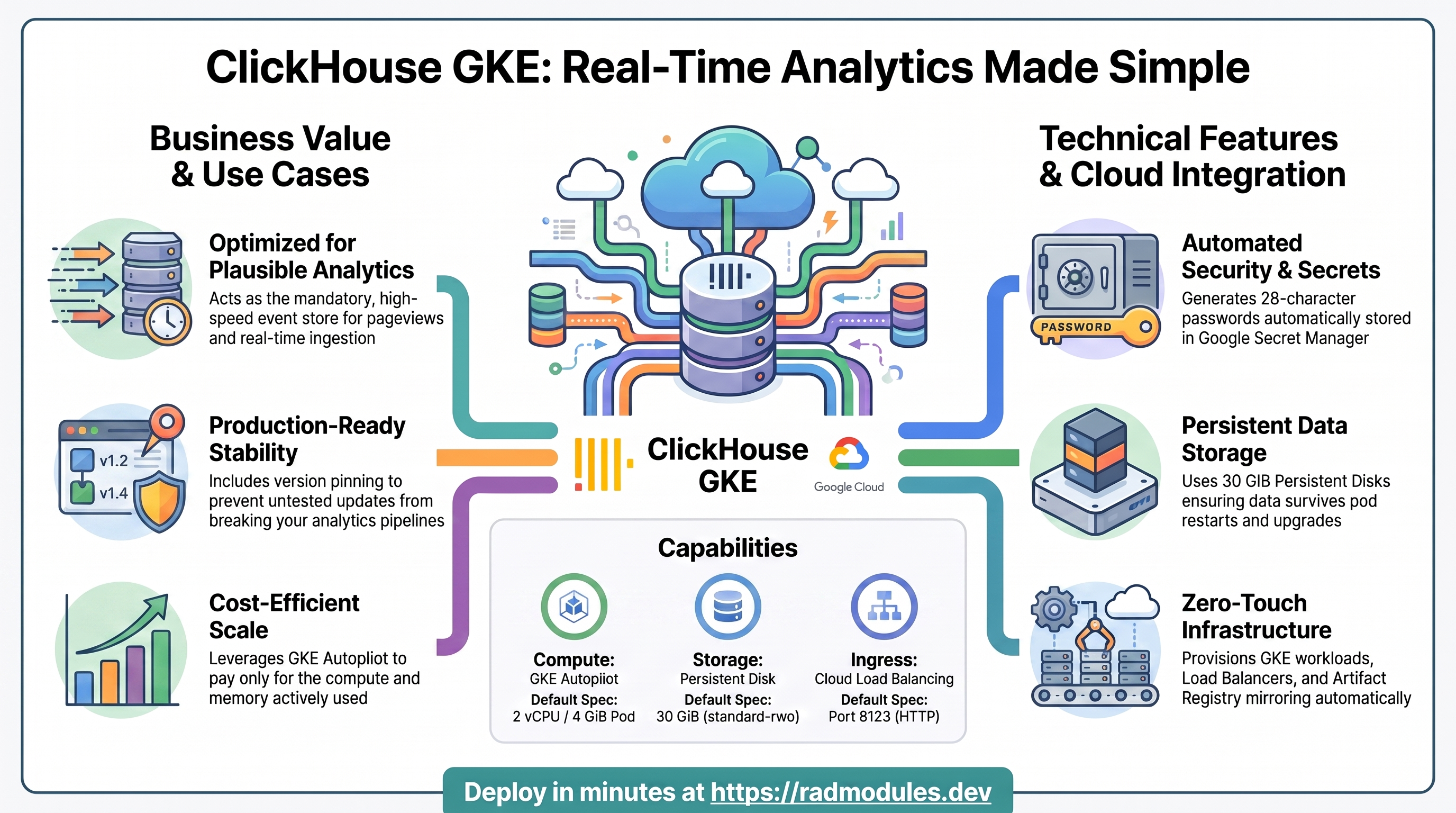
ClickHouse is an open-source (Apache-2.0) column-oriented OLAP database built for real-time analytics over large event streams. This module deploys a single-node ClickHouse server on GKE Autopilot on top of the App_GKE foundation, which provisions and manages the shared Google Cloud and Kubernetes infrastructure.
ClickHouse_GKE exists primarily as the mandatory event store for Plausible
Analytics (Plausible_GKE): Plausible's PostgreSQL database holds only accounts and
site configuration — every pageview/event is written to and queried from this
ClickHouse instance. The module also works as a general-purpose single-node OLAP
database.
This guide focuses on the cloud services ClickHouse uses and how to explore and operate them from the Google Cloud Console and the command line. For the mechanics common to every GKE application — Workload Identity, ingress, autoscaling, CI/CD, Cloud Armor, IAP, Binary Authorization, VPC Service Controls, backups, and the deployment lifecycle — refer to the App_GKE foundation guide rather than repeating them here.
What ClickHouse costs on RAD, and how that compares
ClickHouse on RAD's GKE Autopilot module costs about US$136.37 a month in a Google Cloud project you own, plus a one-time 110-credit module fee (US$11). ClickHouse is a column-oriented OLAP database for real-time analytics over large event streams.
If ClickHouse is only needed occasionally — a demo, a trial, a seasonal or study workload — a RAD-managed project can be deleted and restored within 30 days for a handful of credits, so that US$136.37 becomes a few dollars a month instead. See Pause it for free, below.
What you pay on RAD
| In a Google Cloud project you own | In a project RAD manages for you | |
|---|---|---|
| Module fee, once per deployment | 110 credits (US$11 at the top-up price) | 99 credits (10% lower) |
| Build time | A few credits per build (roughly 3–6) | The same |
| Google Cloud running cost | Billed by Google to your own billing account, about US$136.37 a month for the default configuration (table below) | Metered hourly in credits; RAD publishes 106 credits a day, about 3180 a month (about US$318 at the top-up price) |
| Who owns what | You own the project and its billing; RAD deploys and updates it | RAD owns the project, with guardrails, quotas and budget alerts; you get console access, and a minimum purchased balance is held in reserve |
10 credits cost US$1 on a one-off top-up, less on a plan. In a project RAD manages, the database, file server and network are shared by every application in the project, so a second application does not add a second database.
Default running cost in your own project (us-central1, Google list prices):
| Resource (module default) | Per month |
|---|---|
| GKE Autopilot pod, 2x vCPU / 4 GiB | US$79.35 |
| Cloud SQL for PostgreSQL, 1 vCPU / 3.75 GB, zonal, 10 GB SSD | US$51 |
| Cloud NAT and networking | US$5 |
| Cloud Storage (add-ons, backups) | US$1 |
| GKE cluster management fee | shared across every GKE app in the project; $0 if this is your only cluster, else ~73 |
| Total | about US$136.37 |
How it compares
- The project's own managed offering, ClickHouse Cloud, has no monthly minimum — a 30-day, $300-credit free trial, then usage-based compute (metered per minute, billed per compute-unit-hour, one unit = 2 vCPU/8 GiB) and storage (per TB-month); on the Enterprise tier those run $0.32–0.50 per compute-unit-hour and $22–27.50 per TB-month, with the Basic and Scale tiers priced lower but not separately published.
- Run it yourself and a VPS running a single-node ClickHouse server costs less in cash: sized to roughly 2 vCPU/4 GiB, a comparable VPS (Hetzner or DigitalOcean) runs about $24–48 a month, or a GCP
e2-standard-2-class VM about $49 — plus your own time for backups, security patches and upgrades, which RAD's managed Cloud SQL, Secret Manager and monitoring cover for you. - RAD never claims to be cheaper than bare infrastructure in cash terms — it usually is not. The difference is what RAD manages for you: patching, backups, secrets and monitoring, plus the ability to pause ClickHouse for free rather than paying for idle capacity (see below).
- Most of the running cost above is the managed PostgreSQL database (and, where used, the shared file server) — the part a bare VPS comparison has to run and back up by hand.
Pause it for free: delete a RAD-managed project, restore it when you need it
If ClickHouse runs in a project RAD manages for you, you have a second option that goes well beyond scaling to zero: delete the whole project, and restore it within 30 days for close to nothing. This suits ClickHouse that you only need occasionally far better than running it continuously.
- How it works. Deleting a RAD-managed project unlinks its billing first, then asks Google to delete the project. Google does not remove the project immediately: it keeps it, recoverable, for 30 days. Because billing is already unlinked, nothing is charged while it waits. Unlike deleting one module, this does not tear down Cloud SQL or GKE Autopilot resources one by one — the whole project, and everything in it, simply stops.
- Restoring costs a handful of credits, not a rebuild. Within 30 days, the project's owner can restore it. RAD asks Google to undelete the project and reattaches its billing account, then asks you to run Update on each deployment to confirm everything came back. Because nothing was individually destroyed, that Update finds the same resources already there — it is a check, not a rebuild, and an Update never charges the module fee again. That is a handful of credits (under US$1) in total for a typical ClickHouse chain, against the 115 credits a full redeploy costs.
- So a month of occasional use can cost a few dollars, not US$136.37. Deploy ClickHouse, use it, delete the project. Restore it next time you want it, confirm with Update, and delete it again when you're done. You pay only for the module fee once, the builds, and whatever hours it was actually live.
- What this needs. You must own the project (not a bring-your-own one RAD only manages billing for), and you restore it yourself within the 30 days — after that, Google deletes it for good. Restoring is admitted like creating a new project: your purchased credit balance must still clear the tier's floor (100 credits for the sandbox tier most study and demo use fits). Google says most services are fully working again within 36 hours of a restore.
- One real gap: the backup bucket does not survive. Nightly backups are written to a bucket inside the project, and that bucket is not protected by Cloud Storage's soft-delete, so it is very likely gone as soon as you delete the project — even though the project itself is recoverable for 30 days. If you have customised ClickHouse and want to keep that work, copy a backup out (to Google Drive, or a bucket outside the project) before you delete. For a default installation with nothing irreplaceable in it, this does not matter.
Pay only while you use it, the other way: delete and redeploy
GKE Autopilot keeps at least one pod running, so it never scales to zero on its own. The option above only applies to a RAD-managed project; in your own project, or once the 30-day window has passed, the way to stop paying is to delete the deployment and deploy it again when you need it.
- What a redeploy costs. The module fee again plus the builds: about 115 credits (US$11.50) in your own project. Deleting saves money only once ClickHouse would otherwise sit unused for about 3 days or more in your own project (US$4.55 a day), or about 1 days or more in a RAD-managed one (106 credits a day).
- Most of the running cost is usually the database. It stops only when nothing else in the project uses it, so deleting ClickHouse while something else shares the project saves only this app's own compute part.
- Keep your data first. Nightly backups are written to a bucket inside the deployment and are deleted with it, so copy the latest backup out before deleting if you want to keep it.
- Note your settings. RAD does not recreate a deleted deployment for you; you enter the settings again when you deploy.
Lab sessions and Managed Environments
- Lab sessions, for training. A trainer runs a session for a class. Each participant gets the app in their own Google Cloud project for 15 minutes to 24 hours, within an allowance the trainer sets. Either the trainer funds every place, or each participant pays for their own. Everything is deleted when the session ends and unused credits go back to the trainer.
- Managed Environments, for consultancies. A partner runs the app for a client from a ring-fenced wallet it funds, and settles with the client directly. If the wallet runs low, billing pauses and the data is kept, so nobody receives an unexpected charge. At the end the partner hands the project over and the deployments become the client's own.
Credits can be bought in more than 20 currencies, including XAF, XOF, NGN, GHS, KES and ZAR, by card, bank transfer or mobile money.
Sources (8 October 2026): Google Cloud list prices from the Cloud Billing Catalog API; RAD's own fees and daily-credit estimates from radmodules.dev/pricing; Delete and restore projects for the 30-day recovery window and what it says about Cloud Storage objects without soft delete; ClickHouse Cloud. Prices change; check each source before relying on a figure.
1. Overview
ClickHouse runs as a StatefulSet workload. The deployment wires together a focused set of Google Cloud services:
| Capability | Google Cloud service | Notes |
|---|---|---|
| Compute | GKE Autopilot | ClickHouse StatefulSet pod, 2 vCPU / 4 GiB by default |
| Persistent storage | Persistent Disk | 30 GiB PVC (standard-rwo) at /var/lib/clickhouse, survives pod restarts |
| Secrets | Secret Manager | Auto-generated ClickHouse user password, injected as CLICKHOUSE_PASSWORD |
| Ingress | Cloud Load Balancing | LoadBalancer Service on port 8123 (ClickHouse HTTP interface) for cross-namespace access |
| Image registry | Artifact Registry | clickhouse/clickhouse-server mirrored from Docker Hub |
No Cloud SQL, no Redis, no GCS buckets — the wrapper hard-forces
database_type = "NONE", enable_cloudsql_volume = false, and enable_redis = false
into the foundation call. All data lives in the PVC.
Sensible defaults worth knowing up front:
- The version is explicitly pinned —
latestis rejected.application_versiondefaults to the known-good tag24.12-alpineand a plan-time validation rejects"latest", because Plausible CE version-pins ClickHouse — untested versions have broken it upstream (plausible/analytics#3855). The Foundation resolves the deployed tag from this variable (a config-level remap is ignored), so an explicit pin is the only reliable control. - Bootstrap happens once. The official image creates
CLICKHOUSE_DB(plausible_events_db) andCLICKHOUSE_USER(plausible) only on the first start of an empty data dir, withCLICKHOUSE_DEFAULT_ACCESS_MANAGEMENT=1so that user can manage users/databases over SQL. Plausible's migrations create the events schema. - Password auth is always on. A 28-character password (no special characters — it
travels in URLs and basic-auth headers) is generated by Terraform, stored in Secret
Manager as
secret-<tenant_resource_prefix>-clickhouse-clickhouse-password, and injected asCLICKHOUSE_PASSWORD. Since the service is a LoadBalancer by default, an unauthenticated instance would be an open analytics store. - Single-node is enforced at plan time —
max_instance_countmust be1. Multi-node ClickHouse requires Keeper/replication configuration this module does not provide. - The Service listens on 8123, not App_GKE's default 80 — the wrapper forwards
service_port = container_portso consumers (Plausible'sCLICKHOUSE_DATABASE_URL) build their connection string against ClickHouse's standard HTTP-interface port. - Probes are TCP, hard-wired in the module config. Startup: 30 s initial delay, 10 s period, failure threshold 60 — up to ~10 minutes, because Autopilot must provision a node, attach the PVC, and pull the image before the container even starts. Liveness: 60 s / 30 s / 3. TCP is robust across image variants and cannot be wedged by auth changes.
- fsGroup 101. The
clickhouse/clickhouse-serverimage runs as UID/GID 101; the module sets the pod fsGroup to101so Kubernetes chowns the PVC on attach and the server can create/var/lib/clickhouse. - Termination grace period is 120 seconds so ClickHouse can flush in-memory data
parts (segments) to disk before the pod is forcibly removed;
deployment_timeoutis 1800 s.
2. Google Cloud Services & How to Explore Them
All commands assume you have run
gcloud container clusters get-credentials <cluster> --region <region> --project <project>
and that PROJECT, REGION, and NAMESPACE are set. The namespace and other
identifiers are reported in the deployment Outputs.
A. GKE Autopilot — the ClickHouse workload
ClickHouse runs as a Kubernetes StatefulSet on GKE Autopilot. Autopilot bills for the CPU and memory the pod actually requests. A PodDisruptionBudget keeps the pod available during node upgrades.
- Console: Kubernetes Engine → Workloads → select the ClickHouse StatefulSet to see pod status, events, and the PVC attachment. Kubernetes Engine → Services & Ingress shows the LoadBalancer external IP on port 8123.
- CLI:
gcloud container clusters list --project "$PROJECT"
kubectl get statefulset,pvc,svc -A | grep clickhouse     # name-agnostic discovery
kubectl get statefulsets,pods,svc,pvc -n "$NAMESPACE"
kubectl logs -n "$NAMESPACE" <pod-name> --tail=100
kubectl describe pvc -n "$NAMESPACE"          # confirm the PVC is Bound
See App_GKE for Autopilot scaling, PDB, and the StatefulSet lifecycle.
B. Persistent Disk — event storage
All ClickHouse data parts live on a Persistent Disk-backed PersistentVolumeClaim,
provisioned by the standard-rwo StorageClass and mounted at /var/lib/clickhouse
(the server's data directory).
- Console: Kubernetes Engine → Storage → PersistentVolumeClaims for size and binding state. Compute Engine → Disks shows the underlying disk.
- CLI:
kubectl get pvc -n "$NAMESPACE"
kubectl describe pvc -n "$NAMESPACE" <pvc-name>
# Check disk usage inside the pod:
kubectl exec -n "$NAMESPACE" <pod-name> -- df -h /var/lib/clickhouse
Size the PVC against event volume — Plausible workloads compress extremely well in ClickHouse, but leave headroom for merges (background part merges temporarily need extra space).
C. ClickHouse service endpoint & authentication
The ClickHouse HTTP interface is exposed on port 8123 through a Kubernetes
LoadBalancer Service. The external address is the clickhouse_endpoint output; the
in-cluster DNS address is clickhouse_internal_endpoint (preferred when Plausible
runs in the same cluster). The bootstrapped user's password lives in Secret Manager.
- Console: Kubernetes Engine → Services & Ingress for the external IP; Security → Secret Manager for the password secret.
- CLI:
CH_IP=$(kubectl get svc -n "$NAMESPACE" \
  -o jsonpath='{.items[?(@.spec.type=="LoadBalancer")].status.loadBalancer.ingress[0].ip}')
CH_SECRET=$(gcloud secrets list --project "$PROJECT" \
  --filter="name~clickhouse-password" --format="value(name)" --limit=1)
CH_PASS=$(gcloud secrets versions access latest --secret="$CH_SECRET" --project "$PROJECT")

# Unauthenticated health ping (expect "Ok."):
curl -s "http://$CH_IP:8123/ping"

# Authenticated query over HTTP:
echo "SELECT version()" | curl -s "http://$CH_IP:8123/" --user "plausible:$CH_PASS" --data-binary @-
echo "SHOW DATABASES" | curl -s "http://$CH_IP:8123/" --user "plausible:$CH_PASS" --data-binary @-

# Native client inside the pod:
kubectl exec -n "$NAMESPACE" -it <pod-name> -- \
  clickhouse-client --user plausible --password "$CH_PASS" --query "SELECT 1"
D. Secret Manager
The ClickHouse user password is generated by Terraform (random_password, 28
characters, no special characters) and stored as a service-scoped application secret —
secret-<tenant_resource_prefix>-clickhouse-clickhouse-password — then injected into
the container as the CLICKHOUSE_PASSWORD secret env var. Consuming modules
(Plausible) reference the same secret via the clickhouse_password_secret_id output
and have the foundation grant their workload SA secretAccessor.
- Console: Security → Secret Manager.
- CLI:
gcloud secrets list --project "$PROJECT" --filter="name~clickhouse-password"
gcloud secrets versions access latest --secret=<secret-name> --project "$PROJECT"
See App_GKE for the secret-injection mechanism and rotation.
E. Artifact Registry — container image
The official clickhouse/clickhouse-server:<version> image is mirrored into Artifact
Registry before deployment (when enable_image_mirroring = true), avoiding Docker Hub
rate limits and keeping images inside your VPC perimeter.
- Console: Artifact Registry → select the repository for tags and digests.
- CLI:
gcloud artifacts repositories list --project "$PROJECT" --location "$REGION"
gcloud artifacts docker images list "$REGION-docker.pkg.dev/$PROJECT/<repo>" --project "$PROJECT"
F. Networking & ingress
The LoadBalancer Service exposes ClickHouse on port 8123 so Plausible (and Cloud Run
services) can reach it across namespaces. Password auth protects the endpoint, but for
defence in depth prefer service_type = "ClusterIP" when everything shares the
cluster, or restrict reachability with enable_network_segmentation /
admin_ip_ranges / firewall rules.
- Console: Network services → Load balancing; VPC network → IP addresses.
- CLI:
kubectl get ingress,svc -n "$NAMESPACE"
gcloud compute addresses list --project "$PROJECT"
See App_GKE for custom domains, static IPs, and Cloud Armor details.
G. Cloud Logging & Monitoring
Pod stdout/stderr (the ClickHouse server log) flows to Cloud Logging; GKE metrics flow to Cloud Monitoring.
- Console: Logging → Logs Explorer; Monitoring → Dashboards / Alerting.
- CLI:
gcloud logging read 'resource.type="k8s_container" AND resource.labels.namespace_name="'"$NAMESPACE"'"' \
  --project "$PROJECT" --limit 50
3. ClickHouse Application Behaviour
- First-start-only bootstrap. The image reads
CLICKHOUSE_DB,CLICKHOUSE_USER, andCLICKHOUSE_PASSWORDonly when/var/lib/clickhouseis empty. Once data exists in the PVC, changing these variables has no effect on the running server — manage users and databases over SQL instead (CLICKHOUSE_DEFAULT_ACCESS_MANAGEMENT=1grants the bootstrapped user access management). Plan-time validation rejects emptyclickhouse_db/clickhouse_user. - Plausible creates the schema. No initialization jobs run; the module ships the
database empty and Plausible's migrations create the events tables on Plausible's
first boot. The
clickhouse_database/clickhouse_username/clickhouse_password_secret_idoutputs are exactly whatPlausible_GKEconsumes. - Version pinning is a correctness feature.
application_versiondefaults to24.12-alpineand"latest"is rejected at plan time — the Foundation resolves the deployed tag from this variable (a config-level remap is ignored), so the explicit pin is the only reliable control. Plausible CE only supports the ClickHouse versions it tests against; an arbitrary newer tag has broken Plausible upstream before (plausible/analytics#3855). Treat a version bump as a change to validate against your Plausible release, not a routine update. - Single-node only.
max_instance_count = 1is enforced by a plan-time precondition. Scaling a plain ClickHouse StatefulSet to 2+ replicas does not create a cluster — replicas would need ClickHouse Keeper andReplicated*table engines, which this module does not configure. - TCP probes by design.
/pinganswers HTTP 200 without auth, but TCP probes are robust across image variants and cannot be wedged by auth configuration changes. The trade-off: a probe pass proves only that the port is listening — verify auth and query behaviour explicitly after deploy (see the exploration commands above). Thestartup_probe_config/health_check_configvariables exist for convention mirroring; the container probes actually used are the TCP ones assembled inclickhouse.tf. - Slow cold start is normal. On a fresh Autopilot cluster the first rollout can
take up to ~10 minutes before Ready: node provisioning, PVC attach, image pull, then
ClickHouse initialisation. The startup probe (threshold 60 × 10 s) and
deployment_timeout = 1800are sized for this — do not shorten them because a warm redeploy was fast. - Graceful shutdown matters. ClickHouse buffers inserts into in-memory parts and
merges on disk in the background;
termination_grace_period_seconds = 120gives it time to flush cleanly. Force-killing risks slow recovery on the next start. - UID/GID 101. The server process runs as
clickhouse(101:101). The module'sstateful_fs_group = 101makes the PVC group-writable on attach; without it the server cannot create its data directory and crashes immediately.
4. Configuration Variables
Variables are grouped exactly as they appear on the deployment platform. Only settings specific to or notable for ClickHouse are listed; every other input is inherited from App_GKE with its standard behaviour and defaults.
Group 1 — Project & Identity
| Variable | Default | Description |
|---|---|---|
project_id | (required) | Target Google Cloud project. |
region | us-central1 | Region for the workload and regional resources. |
Group 2 — Deployment Environment
| Variable | Default | Description |
|---|---|---|
tenant_id | demo | Short suffix that makes resource names unique per environment. |
support_users | [] | Emails granted project access and monitoring alerts. |
resource_labels | {} | Labels applied to all resources for cost/ownership tracking. |
Group 3 — Application Identity
| Variable | Default | Description |
|---|---|---|
application_name | clickhouse | Base name for resources. Do not change after first deploy. |
application_display_name | ClickHouse | Friendly name shown in the Console. |
application_version | 24.12-alpine | Image tag. latest is rejected at plan time — the Foundation resolves the deployed tag from this variable (a config-level remap is ignored), so an explicit Plausible-tested pin is the only reliable control. |
clickhouse_db | plausible_events_db | Database bootstrapped on first start (CLICKHOUSE_DB). Non-empty enforced at plan time. |
clickhouse_user | plausible | User bootstrapped on first start (CLICKHOUSE_USER); password auto-generated into Secret Manager. Non-empty enforced at plan time. |
Group 4 — Runtime & Scaling
| Variable | Default | Description |
|---|---|---|
deploy_application | true | Set false to provision infrastructure only. |
container_image_source | prebuilt | Always prebuilt — official clickhouse/clickhouse-server image, no build. |
container_image | "" | Override image URI; leave empty for the official image. |
enable_image_mirroring | true | Mirror the image into Artifact Registry before deploy. |
min_instance_count | 1 | Keep at 1 for single-node mode. |
max_instance_count | 1 | Must be 1 — enforced at plan time; multi-node needs Keeper/replication this module does not provide. |
container_port | 8123 | ClickHouse HTTP interface port — also forwarded as the Service port (not App_GKE's default 80). |
cpu_limit | 2000m | CPU per pod. |
memory_limit | 4Gi | Memory per pod. ClickHouse recommends 4Gi as a practical floor; low-traffic Plausible runs acceptably at 2Gi. |
timeout_seconds | 300 | Load balancer backend timeout. |
Group 5 — Environment Variables & Secrets
| Variable | Default | Description |
|---|---|---|
environment_variables | {} | Extra env vars merged into the container; user values override the module's built-ins (CLICKHOUSE_DB, CLICKHOUSE_USER, CLICKHOUSE_DEFAULT_ACCESS_MANAGEMENT). |
secret_environment_variables | {} | Map of env var → Secret Manager secret name (the module already injects CLICKHOUSE_PASSWORD). |
secret_rotation_period | 2592000s | Secret Manager rotation notification cadence. |
secret_propagation_delay | 30 | Seconds to wait after secret creation before proceeding. |
Group 6 — GKE Backend & Cluster
| Variable | Default | Description |
|---|---|---|
gke_cluster_name | "" | GKE cluster name; leave empty for auto-discovery. |
namespace_name | "" | Kubernetes namespace; auto-generated when empty. |
workload_type | null | Leave unset — null auto-resolves to StatefulSet when stateful_pvc_enabled = true (the default); a Deployment is rejected with a PVC. |
service_type | LoadBalancer | Required for cross-namespace/cross-platform access from Plausible. Use ClusterIP when all consumers share the cluster. |
termination_grace_period_seconds | 120 | SIGTERM grace for segment flush. |
deployment_timeout | 1800 | Seconds Terraform waits for the StatefulSet rollout. |
Group 7 — StatefulSet & Persistence
Data persistence is critical — all ClickHouse event data lives in the PVC.
| Variable | Default | Description |
|---|---|---|
stateful_pvc_enabled | true | Defaults true — without a PVC ClickHouse deploys as a Deployment on ephemeral disk and the entire event store is wiped on every pod reschedule. Auto-resolves workload_type to StatefulSet. |
stateful_pvc_size | 30Gi | PVC size. Leave headroom for background merges. |
stateful_pvc_mount_path | /var/lib/clickhouse | Do not change — the server's data directory. |
stateful_pvc_storage_class | standard-rwo | GKE Autopilot default; premium-rwo for heavier query loads. Cannot change after PVC creation. |
stateful_fs_group | 101 | The clickhouse/clickhouse-server image's UID/GID. main.tf forwards this variable, and the module's assembled config in clickhouse.tf also hard-sets 101, so the two agree. |
Group 8 — Resource Quota
| Variable | Default | Description |
|---|---|---|
enable_resource_quota | false | Cap namespace CPU/memory. |
quota_memory_requests / quota_memory_limits | "" | Must use binary units (4Gi, 8192Mi) — bare integers are read as bytes and block all pod scheduling. |
Group 9 — Reliability Policies
| Variable | Default | Description |
|---|---|---|
enable_pod_disruption_budget | true | Protect availability during node upgrades. |
pdb_min_available | 1 | For single-node ClickHouse, "1" prevents any voluntary disruption. |
Group 10 — Observability & Health
| Variable | Default | Description |
|---|---|---|
startup_probe_config / health_check_config | (declared) | Convention mirrors — the container uses the module's hard-wired TCP probes (startup 30 s/10 s/60; liveness 60 s/30 s/3). |
uptime_check_config | disabled, path /_cluster/health | Optional Cloud Monitoring uptime check; the configured path is not a real ClickHouse endpoint (use /ping if you enable this). |
alert_policies | [] | Optional metric alert policies. |
Group 11 — Jobs & Scheduled Tasks
| Variable | Default | Description |
|---|---|---|
initialization_jobs | [] | Not required — ClickHouse bootstraps itself; Plausible creates the schema. |
cron_jobs / additional_services | [] | Optional CronJobs / sidecar services. |
Group 12 — CI/CD & GitHub Integration
Standard App_GKE Cloud Build / Cloud Deploy integration — see App_GKE.
Key inputs: enable_cicd_trigger, github_repository_url, github_token,
enable_cloud_deploy, enable_binary_authorization.
Groups 13-16 — NFS, Cloud Storage, Redis, Database
Not used by ClickHouse. enable_nfs = false and create_cloud_storage = false by
default; main.tf hard-forces enable_redis = false, database_type = "NONE",
and enable_cloudsql_volume = false regardless of the declared variables (which exist
for foundation-interface parity). Artifact Registry retention knobs
(max_images_to_retain = 7, delete_untagged_images = true,
image_retention_days = 30) apply to the mirrored image.
Group 17 — Backup & Maintenance
| Variable | Default | Description |
|---|---|---|
backup_schedule | 0 2 * * * | Cron (UTC). For ClickHouse, prefer native BACKUP ... TO S3/GCS statements over OS-level backups. |
backup_retention_days | 7 | Retention in days. |
enable_backup_import | false | Not applicable for ClickHouse. |
Group 19 — Custom Domain, Static IP & Networking
| Variable | Default | Description |
|---|---|---|
enable_custom_domain | true | Provision Ingress for custom hostname routing. |
application_domains | [] | Hostnames to serve. |
reserve_static_ip | true | Stable external IP across redeploys. |
network_tags | ["nfsserver"] | GKE node/pod network tags for firewall rules. |
Static IP quota: on projects capped on external global static IP quota, when the
only consumer is in-cluster (Plausible in the same GKE cluster), set
service_type = "ClusterIP", reserve_static_ip = false, and
enable_custom_domain = false — this avoids consuming a global static external IP for
a database that nothing outside the cluster calls.
Group 20 — Identity-Aware Proxy (IAP)
IAP is not recommended for ClickHouse — consumers are services, not browsers. Use
network-level controls instead. When enable_iap = true, both iap_oauth_client_id
and iap_oauth_client_secret are required (plan-time check).
Group 21 — Cloud Armor
enable_cloud_armor = false, admin_ip_ranges = [],
cloud_armor_policy_name = "default-waf-policy", enable_cdn = false (not applicable).
Group 22 — VPC Service Controls & Audit Logging
enable_vpc_sc = false, vpc_cidr_ranges = [], vpc_sc_dry_run = true,
organization_id = "", enable_audit_logging = false.
5. Outputs
These values are returned on a successful deployment and are the quickest way to locate and explore the running resources.
| Output | Description |
|---|---|
clickhouse_endpoint | External HTTP endpoint: http://<external-ip>:8123. Pass to Plausible as clickhouse_url. Returns null until the external IP is assigned. |
clickhouse_internal_endpoint | In-cluster endpoint: http://<svc>.<ns>.svc.cluster.local:8123 — preferred when Plausible_GKE runs in the same cluster. |
clickhouse_database | Database bootstrapped by the image on first start. |
clickhouse_username | ClickHouse username bootstrapped on first start. |
clickhouse_password_secret_id | Secret Manager secret ID holding the user password. Consuming modules pass this as Plausible_GKE's clickhouse_password_secret. |
service_name / namespace | Kubernetes Service name / namespace. |
service_cluster_ip / service_external_ip / api_url | In-cluster IP, LoadBalancer IP, and URL. |
stage_service_cluster_ips | Map of ClusterIPs for stage-specific services (Cloud Deploy). |
statefulset_name | Name of the StatefulSet resource. |
storage_buckets | Created Cloud Storage buckets (empty — none are provisioned). |
network_name / network_exists / regions | VPC network, presence, available regions. |
container_image / container_registry | Deployed image and Artifact Registry repo. |
monitoring_enabled / monitoring_notification_channels | Monitoring status and channels. |
initialization_jobs | Names of any setup jobs (none by default). |
deployment_id / tenant_id / resource_prefix | Naming identifiers. |
project_id / project_number | Project identifiers. |
cicd_enabled / cicd_configuration | CI/CD status and details. |
github_repository_url / github_repository_owner / github_repository_name | Connected GitHub repository details. |
artifact_registry_repository / cloudbuild_trigger_name / cloudbuild_trigger_id | Registry and build trigger. |
kubernetes_ready | true when the cluster endpoint is available and all workload resources are deployed; false on the first apply of a new inline cluster — re-run apply to complete. |
vpc_sc_enabled / vpc_sc_perimeter_name / vpc_sc_dry_run_mode | VPC-SC status. |
audit_logging_enabled / artifact_registry_cmek_enabled | Audit logging and CMEK status. |
6. Configuration Pitfalls & Sensible Defaults
Risk: Critical (data loss / outage / security) — High (service degraded) — Medium (cost or partial degradation) — Low (minor).
| Risk | Pitfall | Consequence | Avoidance |
|---|---|---|---|
| Critical | Setting application_version to an untested ClickHouse version | Plausible CE version-pins ClickHouse; an arbitrary newer tag has broken it upstream (plausible/analytics#3855) — migrations or queries fail and analytics ingestion stops. "latest" is now rejected at plan time. | Keep the default 24.12-alpine pin. Only set an explicit version validated against your Plausible release; treat a bump as a tested change. |
| Critical | Deleting the PVC, or setting stateful_pvc_enabled = false | Every analytics event ever recorded is destroyed (or, without a PVC, silently lost on each pod restart/node eviction). Plausible's PostgreSQL keeps accounts, but the event history is unrecoverable. | Keep the default stateful_pvc_enabled = true (StatefulSet) — the ephemeral-disk trap is closed by default. Never delete the PVC outside an intentional teardown; back up with native ClickHouse BACKUP first. |
| Critical | Setting max_instance_count > 1 | Plain replicas are NOT a cluster — each pod would have an isolated data dir; writes and reads diverge. Blocked at plan time: multi-node needs Keeper/replication this module does not provide. | Leave min = max = 1. For real HA, use a Keeper-configured ClickHouse deployment outside this module. |
| High | Exposing 8123 on a public LoadBalancer without network controls | Password auth is always on, but the HTTP interface is still internet-reachable — brute force, /ping reconnaissance, and any future auth misconfig become externally exploitable. | Prefer service_type = "ClusterIP" (use clickhouse_internal_endpoint) when consumers share the cluster; otherwise restrict with enable_network_segmentation, firewall rules, and admin_ip_ranges. |
| High | Trusting the TCP probe as proof of health | The TCP probe passes as soon as the port listens — an auth misconfiguration or an empty/foreign data dir still shows a "healthy" pod while every Plausible query fails. | After deploy, verify explicitly: curl http://$CH_IP:8123/ping, then an authenticated SELECT version() with the Secret Manager password. |
| High | Changing clickhouse_db/clickhouse_user (or expecting a new password to apply) after first start | The image bootstraps credentials only on the first start of an empty data dir — post-bootstrap changes silently do nothing; consumers then authenticate with values the server never learned. | Set them once before first deploy (plan-time check rejects empties). Post-bootstrap, manage users/databases over SQL (CLICKHOUSE_DEFAULT_ACCESS_MANAGEMENT=1). |
| Medium | Declaring the first rollout failed before Autopilot finishes | A fresh Autopilot cluster needs node provisioning + PVC attach + image pull — up to ~10 minutes before Ready. Manual intervention mid-rollout (deleting pods, re-applying) wedges the StatefulSet. | Wait out the startup probe window (60 × 10 s + 30 s delay; deployment_timeout = 1800). Watch kubectl get pods -w and events instead of restarting. |
| Medium | Undersizing memory_limit below ~2Gi | ClickHouse's merges and query memory push past small limits; the pod OOM-kills under ingestion or dashboard queries. | Keep the 4Gi default (ClickHouse's practical floor); 2Gi only for genuinely low-traffic Plausible sites. |
| Medium | quota_memory_requests / quota_memory_limits without binary suffixes | Bare integers are treated as bytes by Kubernetes and block ALL pod scheduling in the namespace. | Always use "4Gi" / "8192Mi"-style values (plan-time validation in App_GKE). |
| Low | Disabling enable_image_mirroring | Pulls come straight from Docker Hub; rate limits can intermittently fail deployments and imagePullPolicy re-pulls. | Keep mirroring on; retention knobs (max_images_to_retain, image_retention_days) manage repo growth. |
For the foundation behaviour referenced throughout — IAM and Workload Identity, autoscaling, ingress and certificates, CI/CD, Cloud Armor, IAP, Binary Authorization, VPC-SC, backups, and image mirroring — see App_GKE.
Related guides
- Hands-on lab: ClickHouse on GKE Autopilot — deploy it step by step, with the console screens and commands at each stage.
- Deployed alongside Kestra on GKE Autopilot, Apache Superset on GKE Autopilot, Metabase on GKE Autopilot in the Analytics Warehouse solution.
Need RAD to do something it does not do yet? Request it on the roadmap, or vote on what is already there.