UrBackup on GKE Autopilot
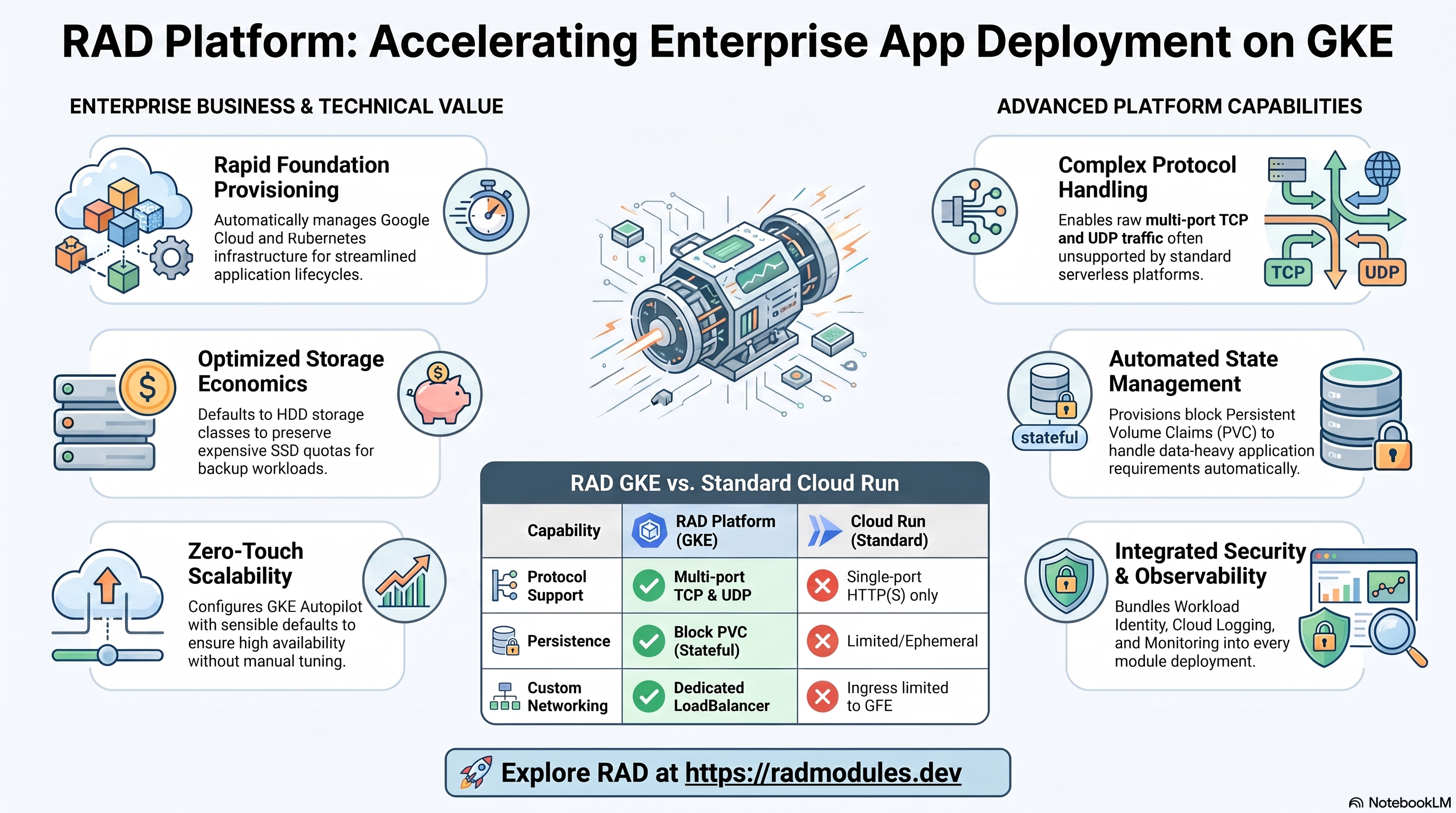
UrBackup is an open-source client/server network backup system for Windows, Linux, and macOS, supporting both file-level and full disk-image backups with client-side deduplication (via hardlinks) and a web management UI. This module deploys the UrBackup server on GKE Autopilot on top of the App_GKE foundation, which provisions and manages the shared Google Cloud and Kubernetes infrastructure. Real UrBackup client agents run on users' own PCs — entirely outside this GCP project — and dial in to this server on their own backup schedule.
There is no UrBackup_CloudRun, and there will not be one. UrBackup's
client protocol needs three raw TCP ports (55413 FastCGI backend, 55414
direct web UI, 55415 internet-mode client transfer) plus UDP LAN-discovery
broadcast (35622-35623) simultaneously reachable. Cloud Run's ingress (the
GFE) is single-port HTTP(S)-only and cannot expose raw multi-port TCP or any
UDP at all — see UrBackup_Common for the full writeup;
this is the same architectural class of gap as this catalogue's other
Common + GKE only modules (Kopia, RocketChat, Immich, Temporal, Prowlarr,
VictoriaMetrics, Plausible, LobeChat, Supabase, Woodpecker).
This guide focuses on the cloud services UrBackup uses and how to explore and operate them from the Google Cloud Console and the command line. For the mechanics common to every GKE application — Workload Identity, ingress, autoscaling, CI/CD, Cloud Armor, IAP, Binary Authorization, VPC Service Controls, and the deployment lifecycle — refer to the App_GKE foundation guide rather than repeating them here.
This module was not deployed to a live GCP project during development (no GKE cluster apply), but its custom container image WAS built and run locally with
docker build+docker run(an explicit bind mount at/var/urbackup, simulating a Kubernetes volumeMount) — confirmed the server genuinely boots, initializes its database, and serves a real web UI (HTTP 200, titled "UrBackup - Keeps your data safe"). Validate the health probe path and PUID/PGID permission handling against a real GKE cluster before relying on this in production.
What UrBackup costs on RAD, and how that compares
Running UrBackup on GKE Autopilot in your own Google Cloud project costs about US$42.08/month in Google Cloud charges (about US$115.08 if this isn't your only Autopilot cluster), on top of a one-off 75-credit RAD module fee (US$7.50) charged once at deploy time. There is no Cloud Run variant of UrBackup — its client protocol needs raw multi-port TCP and UDP LAN-discovery that Cloud Run's single-port HTTP(S) ingress cannot expose, so GKE is the only option. In a RAD-managed project the module fee drops to 67.5 credits (10% lower) and the running cost is metered hourly in credits — see Pause it for free below.
What you pay on RAD
| Own project | RAD-managed project | |
|---|---|---|
| Module fee (one-off) | 75 credits | 67.5 credits (10% lower) |
| Build time | ~3-6 credits per build, either way | ~3-6 credits per build, either way |
| Google Cloud running cost | US$42.08/month, billed by Google at list price | ~60 credits/day (about 1800/month, US$180 at the top-up price), metered at list price plus RAD's margin |
10 credits cost US$1 on a one-off top-up, and less on a monthly plan.
Default running cost in your own project
| Resource (module default) | Per month |
|---|---|
| GKE Autopilot pod, 1x vCPU / 1 GiB | US$36.08 |
| Cloud NAT and networking | US$5 |
| Cloud Storage (add-ons, backups) | US$1 |
| Total | US$42.08 |
The GKE cluster management fee is excluded from the total above because it is shared across every GKE app in the project — $0 if this is the only one, otherwise roughly $73/month split across however many you run.
How it compares
- UrBackup has no official hosted cloud version of its own server — it is network backup software you point your own client machines at, so there is no vendor SaaS plan for this exact project to compare against.
- A self-managed VPS comparison, sized to UrBackup's 1 vCPU / 1 GiB default: a Hetzner CPX11 or DigitalOcean 1 vCPU/2GB Droplet runs about $6-12/month, cheaper in cash terms — plus your own time for backups-of-the-backup-server, OS patching and keeping the raw TCP ports it needs actually reachable, which a bare VPS makes your own networking problem.
- Commercial cloud-backup services (Backblaze, cloud provider snapshot tools) are a different product, not a hosted version of UrBackup itself, so they aren't named here as a competitor — the honest comparison is self-hosting UrBackup yourself versus RAD managing the same software for you.
Pause it for free: delete a RAD-managed project, restore it when you need it
This is the headline advantage of a RAD-managed project, and it costs nothing while paused. Deleting a RAD-managed project unlinks its billing first, then asks Google to delete the project outright — Google's own 30-day recoverable soft delete. Unlike deleting one module, this does not tear down Cloud SQL, any VM, or the compute resource one by one: the whole project simply stops, and nothing is charged while it waits, because billing is already unlinked.
Restoring, within 30 days and only by the project's owner, asks Google to undelete the project and reattaches its billing account, then asks you to run Update on each deployment to confirm everything came back. Because nothing was individually destroyed, that Update finds the same resources already there — it is a check, not a rebuild, and an Update never charges the module fee again. This costs only a handful of credits (under US$1) in total for a typical 2-3-deployment chain.
What this needs: you must own the project (not one RAD only manages billing for), you must restore it yourself within 30 days — after that Google deletes it for good — and restoring is admitted like creating a new project, so your purchased credit balance must still clear the tier's floor (100 credits for the sandbox tier most study/demo use fits). Google says most services are fully working again within 36 hours of a restore.
One real gap: nightly backups are written to a bucket inside the project, and that bucket has Cloud Storage's soft-delete explicitly turned off, so it is very likely gone as soon as you delete the project — even though the project itself is recoverable for 30 days. If you've customised UrBackup and want to keep that work, copy a backup out (to Google Drive, or a bucket outside the project) before deleting. For a default install with nothing irreplaceable in it, this does not matter.
Pay only while you use it, the other way: delete and redeploy
In your own project, or once 30 days have passed on a RAD-managed one, there is no free pause — deleting removes the resources for good, and bringing UrBackup back means redeploying from scratch. That costs about 78-81 credits in your own project, or about 70.5-73.5 credits in a RAD-managed one.
Deleting only saves money once UrBackup would otherwise sit unused long enough to clear that redeploy cost against its own running cost — about 6 days or more in your own project (about US$1.40 a day), or about 1 days or more in a RAD-managed one (60 credits a day).
Keep data first: nightly backups go to a bucket inside the deployment and are deleted with it, so copy the latest backup out before deleting if you want to keep it.
Lab sessions and Managed Environments
Lab sessions, for training: a trainer runs a session for a class. Each participant gets the app in their own Google Cloud project for 15 minutes to 24 hours, within an allowance the trainer sets. Either the trainer funds every place, or each participant pays for their own. Everything is deleted when the session ends and unused credits go back to the trainer.
Managed Environments, for consultancies: a partner runs the app for a client from a ring-fenced wallet it funds, and settles with the client directly. If the wallet runs low, billing pauses and the data is kept, so nobody receives an unexpected charge. At the end the partner hands the project over and the deployments become the client's own.
Credits can be bought in more than 20 currencies, including XAF, XOF, NGN, GHS, KES and ZAR, by card, bank transfer or mobile money.
Sources (8 October 2026): Google Cloud Billing Catalog API list prices; radmodules.dev/pricing for RAD's own fees and daily-credit estimates; Google's project delete/restore documentation for the pause/restore claims.
1. Overview
UrBackup runs as a single pod, backed by a GKE block Persistent Volume Claim (not Cloud SQL — UrBackup has no external database):
| Capability | Google Cloud service | Notes |
|---|---|---|
| Compute | GKE Autopilot | One pod runs the UrBackup server, 1 vCPU / 1Gi by default |
| Database | None (embedded SQLite) | The server bootstraps its own database on first boot |
| Persistent storage | GKE Persistent Volume (block, HDD standard StorageClass) | Holds BOTH the server database and all client backup data — see §3 |
| Client access | A dedicated multi-port LoadBalancer Service, provisioned directly by this module | Covers 55413/55414/55415 tcp + 35622-35623 udp — beyond what App_GKE's own Service resource can express |
| Secrets | None | The admin account is created via UrBackup's own first-run web UI setup wizard |
| Ingress (web UI only) | Cloud Load Balancing (optional, via Gateway) | The Foundation-managed Service defaults to ClusterIP — see §6 |
Sensible defaults worth knowing up front:
- Persistent data lives on a single block PVC, mounted at
/var/urbackup, not GCS. The upstream image expects two separate volumes (/var/urbackupdatabase,/backupsclient data); this module's custom image patches the base image's own entrypoint (at build time) to redirect client backup data into abackups/subdirectory of/var/urbackupinstead, so both persist on the ONE PVC this module's StatefulSet supports — verified locally: the patched entrypoint boots to a working server.stateful_pvc_enabled = trueby default. - Storage class is HDD (
standard), not SSD. Backup data is written sequentially and read rarely; HDD draws from the much largerDISKS_TOTAL_GBquota instead of the tightSSD_TOTAL_GBquota. stateful_pvc_sizeneeds real capacity planning. The 200Gi default is a small-pilot starting point — size it for your actual client fleet and retention policy.min_instance_countdefaults to 1, not scale-to-zero. Real clients dial in on their own unattended schedule at arbitrary times; a scaled-to-zero server would silently miss check-ins.max_instance_countis hard-capped at 1 — embedded SQLite + hardlink dedup do not support concurrent instances.- No admin bootstrap secret. The first browser visit to the web UI presents UrBackup's own setup wizard to create the admin account.
- A dedicated multi-port Service is the real external entry point, not the
Foundation's own Service (which defaults to
ClusterIP) — see §6.
2. Google Cloud Services & How to Explore Them
All commands assume you have run
gcloud container clusters get-credentials <cluster> --region <region> --project <project>
and that PROJECT, REGION, and NAMESPACE are set. The namespace and other
identifiers are reported in the deployment Outputs.
A. GKE Autopilot — the UrBackup workload
A single pod runs the UrBackup server (StatefulSet by default, since
stateful_pvc_enabled = true auto-selects that workload type).
- Console: Kubernetes Engine → Workloads → select the UrBackup workload to see the pod and events.
- CLI:
kubectl get statefulset,pods,svc -n "$NAMESPACE"
kubectl logs -n "$NAMESPACE" statefulset/<service-name> --tail=100
See App_GKE for how Autopilot scheduling and Workload Identity work.
B. Persistent storage — the block PVC
kubectl get pvc -n "$NAMESPACE"
kubectl describe pvc -n "$NAMESPACE" <pvc-name>
Confirm the PVC's StorageClass is HDD (standard) and its capacity matches
what you configured in stateful_pvc_size. It is mounted at /var/urbackup
and holds BOTH the server database (directly) and all client backup data
(redirected into a backups/ subdirectory by a build-time patch to the base
image's entrypoint — see UrBackup_Common).
C. The dedicated multi-port client-access Service
kubectl get svc -n "$NAMESPACE" -o wide
kubectl describe svc -n "$NAMESPACE" <service-name>-client-ports
This LoadBalancer Service (provisioned in urbackup.tf, not by App_GKE's own
Service resource) exposes all five ports real UrBackup clients need: 55413
(FastCGI backend), 55414 (web UI), 55415 (internet-mode client transfer,
TCP), and 35622-35623 (LAN discovery, UDP). Configure client agents to dial
its external IP (urbackup_client_external_ip output).
D. Networking & ingress (web UI only)
kubectl get svc -n "$NAMESPACE"
gcloud compute addresses list --project "$PROJECT"
service_type on the Foundation-managed Service defaults to ClusterIP — the
dedicated multi-port Service above is the sole external entry point real
clients need (it covers the web UI port too), so this stays internal-only
rather than consuming a second external IP. It still works as a Gateway API
backend if enable_custom_domain is set for a friendly hostname on the web UI.
E. Cloud Logging & Monitoring
Pod stdout/stderr flows to Cloud Logging; GKE metrics flow to Cloud Monitoring.
gcloud logging read 'resource.type="k8s_container" AND resource.labels.namespace_name="'"$NAMESPACE"'"' \
  --project "$PROJECT" --limit 50
3. UrBackup Application Behaviour
- A build-time patch redirects backup data onto the one mounted PVC. The
upstream image expects
/var/urbackup(server SQLite database) and/backups(client backup data, hardlinked for deduplication across incremental backups) as separate volumes. Since only one PVC mount path is available, this module's Dockerfilesed-patches the base image's own entrypoint so it writes its backup-data destination (/var/urbackup/backupfolder) as a subdirectory of/var/urbackupinstead of the separate/backupspath — verified locally (see the note at the top of this guide): the patched entrypoint boots to a working server. - No database migration or init job. UrBackup bootstraps its own SQLite database on first boot; there is no Terraform-managed schema step.
- No env-injected admin credential. The web UI (port 55414) presents UrBackup's own setup wizard on first visit to create the admin account (confirmed live in local testing).
- Health probes are TCP, not HTTP. Local testing confirmed the web UI's
/path DOES return a genuine, unauthenticatedHTTP 200— but since that confirmation came from a local Docker test rather than a live GKE deployment, bothstartup_probeandliveness_probedefault to TCP against the listening port as the platform-agnostic choice. - PUID/PGID/TZ control file ownership. The base image's own entrypoint
chowns
/var/urbackup(the mounted PVC) to the configured uid/gid before startingurbackupsrv. - Single-writer, single-instance.
max_instance_countis hard-capped at1— the embedded SQLite database and hardlink-based deduplication do not support concurrent server instances against the same data. - The custom multi-port Service depends on the Foundation module. It uses
its own
provider "kubernetes" {}block (provider-auth.tf) since a parent module cannot reach intoApp_GKE's own internal provider configuration — the same pattern already established forWoodpecker_GKE's RBAC resources. Its pod selector is computed from this module's ownmodule.deployment_idcall (deterministic, guaranteed to match what App_GKE's StatefulSet applies to its pods), not guessed or hardcoded.
4. Configuration Variables
Variables are grouped exactly as they appear on the deployment platform. Only
settings specific to or notable for UrBackup are listed; every other input is
inherited from App_GKE with its standard behaviour and
defaults. See modules/UrBackup_GKE/README.md for the exhaustive,
group-by-group input reference.
Group 1–2 — Project & Identity
| Variable | Default | Description |
|---|---|---|
project_id | (required) | Target Google Cloud project. |
region | us-central1 | Region for the workload and regional resources. |
tenant_id | demo | Short suffix that makes resource names unique per environment. |
Group 3 — Application Identity
| Variable | Default | Description |
|---|---|---|
application_name | urbackup | Base name for resources. Do not change after first deploy. |
application_version | latest | Resolves internally to a pinned 2.5.x. |
deploy_application | true | Set false to provision infrastructure only. |
Group 4 — Runtime & Scaling
| Variable | Default | Description |
|---|---|---|
cpu_limit | 1000m | CPU limit for the UrBackup container. |
memory_limit | 1Gi | Memory limit for the UrBackup container. |
min_instance_count | 1 | NOT scale-to-zero — see §1. |
max_instance_count | 1 | Hard-capped in practice. |
enable_image_mirroring | true | Mirror the built image into Artifact Registry. |
Group 6 — GKE Backend & Cluster
| Variable | Default | Description |
|---|---|---|
service_type | ClusterIP | For the Foundation-managed Service ONLY (single port 55414) — see §2D. |
workload_type | null | Auto-resolves to StatefulSet since stateful_pvc_enabled = true. |
namespace_name | "" (auto) | Auto-generated from application_name + tenant_id. |
Group 7 — StatefulSet / Persistent Storage
| Variable | Default | Description |
|---|---|---|
stateful_pvc_enabled | true | Required in practice — see §1/§3. |
stateful_pvc_size | 200Gi | Capacity-plan for your real client fleet + retention. |
stateful_pvc_mount_path | /var/urbackup | Must stay /var/urbackup — the server's own database directory; the custom image's build-time patch depends on this exact path to redirect backup data too. |
stateful_pvc_storage_class | standard (HDD) | Backup data doesn't need SSD IOPS. |
stateful_fs_group | 0 (unset) | The container's own root-run entrypoint already handles ownership. |
Group 10 — Observability & Health
| Variable | Default | Description |
|---|---|---|
startup_probe / liveness_probe | TCP, port 55414 | See §3 — not confirmed as an HTTP-safe endpoint. |
uptime_check_config | disabled | If enabled, would need a reachable path on the Foundation Service. |
Group 11 — Jobs & Scheduled Tasks
| Variable | Default | Description |
|---|---|---|
initialization_jobs | [] | UrBackup needs none — no schema to create. |
cron_jobs | [] | Kubernetes CronJobs. |
Group 14 — Cloud Storage
| Variable | Default | Description |
|---|---|---|
enable_gcs_storage_volume | false | Optional escape-hatch bucket, NOT UrBackup's primary store (that's the block PVC). |
Group 16-17 — Database, Backup & Maintenance
Not applicable — UrBackup has no SQL database. All database-related variables are inert mirrors kept for Foundation-variable-mirroring convention.
Group 19 — Custom Domain, Static IP & Networking
| Variable | Default | Description |
|---|---|---|
enable_custom_domain | true | Provisions a Gateway for the web UI over a friendly hostname (optional). |
reserve_static_ip | true | For the OPTIONAL Gateway/custom-domain path only — not the client-facing multi-port Service. |
Group 23 — Backup Client Network Access
| Variable | Default | Description |
|---|---|---|
urbackup_puid / urbackup_pgid | 1000 / 1000 | Forwarded to the base image's PUID/PGID chown behaviour. |
urbackup_timezone | Etc/UTC | Affects backup scheduling/timestamps. |
urbackup_static_ip_address | "" (ephemeral) | Bring-your-own pre-reserved static IP for the dedicated multi-port Service — this module does not auto-reserve one. |
Groups 8, 9, 12, 18, 20, 21, 22
Standard App_GKE behaviour — Resource Quota, Reliability Policies, CI/CD &
Binary Authorization, Custom SQL (not applicable), IAP, Redis (not
applicable — UrBackup uses no cache) & Cloud Armor, VPC Service Controls. See
App_GKE.
5. Outputs
| Output | Description |
|---|---|
service_name / namespace / service_cluster_ip / service_external_ip / service_url | Foundation-managed Service details (internal — ClusterIP by default). |
urbackup_client_service_name | Name of the dedicated multi-port Service real clients connect to. |
urbackup_client_external_ip | External IP of the dedicated multi-port Service — configure clients to dial this. |
urbackup_client_ports | The fixed port map (55413/55414/55415 tcp, 35622-35623 udp). |
storage_buckets | The optional escape-hatch GCS bucket (unmounted by default). |
network_name / network_exists / regions | VPC network, presence, available regions. |
container_image / container_registry | Deployed image and Artifact Registry repo. |
deployment_id / tenant_id / resource_prefix | Naming identifiers. |
project_id / project_number | Project identifiers. |
kubernetes_ready | Whether the cluster/workload is ready. |
6. Configuration Pitfalls & Sensible Defaults
Risk: Critical (data loss / outage / security) — High (service degraded) — Medium (cost or partial degradation) — Low (minor).
Inherited plan-time validation. This module passes its configuration through the App_GKE foundation engine, which validates values and combinations at plan time.
UrBackup_GKE's ownvalidation.tfadditionally rejectsmin_instance_count > max_instance_countandenable_iap = truewithout both OAuth credentials.
| Setting | Sensible value | Risk | Consequence if wrong |
|---|---|---|---|
stateful_pvc_size | Capacity-plan for your real client fleet + retention policy | Critical | Undersizing means client backups start failing with "disk full" once the PVC fills — this is a large-data application, not a small-config one; the 200Gi default is a small-pilot starting point only. |
stateful_pvc_mount_path | Leave at /var/urbackup | Critical | The custom image's build-time entrypoint patch redirects backup data to a subdirectory of this exact path; changing it without also changing the Dockerfile breaks the database/backup-data layout entirely. |
stateful_pvc_storage_class | Leave at standard (HDD) unless you have a specific high-IOPS need | Medium | SSD (standard-rwo/premium-rwo) draws from the tight SSD_TOTAL_GB quota (as little as 500GB on some constrained projects) — a large backup-capacity PVC on SSD can exhaust that quota fast for no real performance benefit (backup writes are sequential, not IOPS-bound). |
| Client connectivity | Point client agents at urbackup_client_external_ip, never service_url/service_external_ip | High | Those latter outputs track the internal-only Foundation Service (web UI port only); clients pointed there cannot complete the actual backup-data-transfer protocol. |
min_instance_count | Leave at 1 | High | Scaling to zero means the server may not be running when a client's unattended, arbitrarily-scheduled backup attempt arrives — silently missed backups, not a visible error. |
max_instance_count | Leave at 1 | Critical | The embedded SQLite database and hardlink-based deduplication have no multi-instance coordination; concurrent servers would corrupt or race each other's state. |
| Health probes | Leave as TCP (module default) | Medium | Not confirmed whether an HTTP path on the web UI is safely unauthenticated for this image — an incorrect HTTP probe could wedge the rollout if the assumption is wrong. |
urbackup_static_ip_address | Leave empty unless you've pre-reserved an address | Low | This module does not auto-provision a reservation (to avoid silently exhausting a scarce project-wide static-IP quota) — setting this to an address you haven't actually reserved fails the apply. |
For the foundation behaviour referenced throughout — IAM and Workload Identity, autoscaling, ingress and certificates, CI/CD, Cloud Armor, IAP, Binary Authorization, VPC-SC, and image mirroring — see App_GKE. UrBackup-specific application configuration is described in UrBackup_Common.
Related guides
- Hands-on lab: UrBackup on GKE Autopilot — deploy it step by step, with the console screens and commands at each stage.
- UrBackup Common — Shared Application Configuration — the configuration shared by both deployment targets.
- Deployed alongside Kopia on GKE Autopilot, Filebrowser on GKE Autopilot in the Backup & Disaster Recovery solution.
Need RAD to do something it does not do yet? Request it on the roadmap, or vote on what is already there.