Unleash on GKE Autopilot
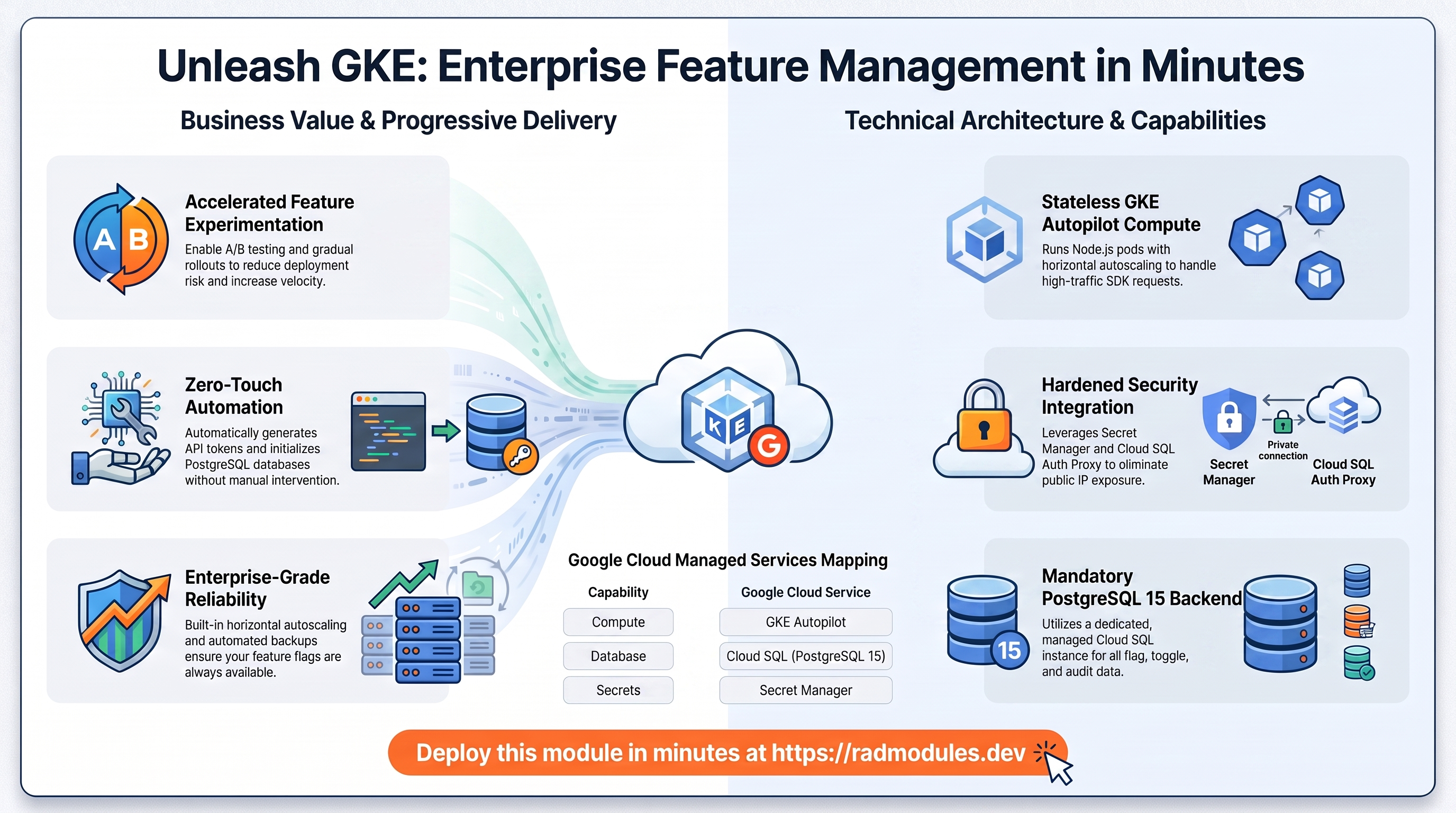
Unleash is an open-source, Apache-2.0-licensed feature-flag and toggle-management platform for progressive delivery, A/B testing, and gradual rollouts. This module deploys Unleash on GKE Autopilot on top of the App_GKE foundation, which provisions and manages the shared Google Cloud and Kubernetes infrastructure.
This guide focuses on the cloud services Unleash uses and how to explore and operate them from the Google Cloud Console and the command line. For the mechanics that are common to every GKE application — Workload Identity, ingress, autoscaling, CI/CD, Cloud Armor, IAP, Binary Authorization, VPC Service Controls, backups, and the deployment lifecycle — refer to the App_GKE foundation guide rather than repeating them here.
What Unleash costs on RAD, and how that compares
Running Unleash on GKE Autopilot in your own Google Cloud project costs about US$104.74/month in Google Cloud charges (about US$177.74 if this isn't your only Autopilot cluster), on top of a one-off 110-credit RAD module fee (US$11) — higher than the Cloud Run module's fee because this variant also runs a shared NFS volume on GKE. GKE Autopilot suits Unleash that must stay up or scale across pods; for the lowest cost, see the Cloud Run guide instead. In a RAD-managed project the module fee drops to 99 credits (10% lower) — see Pause it for free below.
What you pay on RAD
| Own project | RAD-managed project | |
|---|---|---|
| Module fee (one-off) | 110 credits | 99 credits (10% lower) |
| Build time | ~3-6 credits per build, either way | ~3-6 credits per build, either way |
| Google Cloud running cost | US$104.74/month, billed by Google at list price | ~92 credits/day (about 2760/month, US$276 at the top-up price), metered at list price plus RAD's margin |
10 credits cost US$1 on a one-off top-up, and less on a monthly plan.
Default running cost in your own project
| Resource (module default) | Per month |
|---|---|
| GKE Autopilot pod, 1x vCPU / 0.5 GiB | US$34.29 |
| Cloud SQL for PostgreSQL, 1 vCPU / 3.75 GB, zonal, 10 GB SSD | US$51.02 |
| NFS/cache file server (small VM) | US$13.43 |
| Cloud NAT and networking | US$5 |
| Cloud Storage (add-ons, backups) | US$1 |
| Total | US$104.74 |
The GKE cluster management fee is excluded from the total above because it is shared across every GKE app in the project — $0 if this is the only one, otherwise roughly $73/month split across however many you run.
How it compares
- Unleash's own hosted cloud is priced per seat: Pay-As-You-Go is $75/seat/month with a 5-seat minimum ($375/month floor) — verified on Unleash's pricing page, 8 October 2026. RAD's own-project cost here (~US$105/month, flat) still undercuts that floor.
- A self-managed VPS comparison, sized to Unleash's 1 vCPU / 0.5 GiB default: a Hetzner CPX11 or DigitalOcean 1 vCPU/2GB Droplet runs about $6-12/month — plus your own time for backups and patching, and no Kubernetes control plane to run.
- Most of this module's cost above the Cloud Run variant is the GKE pod and the NFS volume; the Cloud Run module needs neither and is the cheaper default for Unleash.
Pause it for free: delete a RAD-managed project, restore it when you need it
This is the headline advantage of a RAD-managed project, and it costs nothing while paused. Deleting a RAD-managed project unlinks its billing first, then asks Google to delete the project outright — Google's own 30-day recoverable soft delete. Unlike deleting one module, this does not tear down Cloud SQL, any VM, or the compute resource one by one: the whole project simply stops, and nothing is charged while it waits, because billing is already unlinked.
Restoring, within 30 days and only by the project's owner, asks Google to undelete the project and reattaches its billing account, then asks you to run Update on each deployment to confirm everything came back. Because nothing was individually destroyed, that Update finds the same resources already there — it is a check, not a rebuild, and an Update never charges the module fee again. This costs only a handful of credits (under US$1) in total for a typical 2-3-deployment chain.
What this needs: you must own the project (not one RAD only manages billing for), you must restore it yourself within 30 days — after that Google deletes it for good — and restoring is admitted like creating a new project, so your purchased credit balance must still clear the tier's floor (100 credits for the sandbox tier most study/demo use fits). Google says most services are fully working again within 36 hours of a restore.
One real gap: nightly backups are written to a bucket inside the project, and that bucket has Cloud Storage's soft-delete explicitly turned off, so it is very likely gone as soon as you delete the project — even though the project itself is recoverable for 30 days. If you've customised Unleash and want to keep that work, copy a backup out (to Google Drive, or a bucket outside the project) before deleting. For a default install with nothing irreplaceable in it, this does not matter.
Pay only while you use it, the other way: delete and redeploy
In your own project, or once 30 days have passed on a RAD-managed one, there is no free pause — deleting removes the resources for good, and bringing Unleash back means redeploying from scratch. That costs about 113-116 credits in your own project, or about 102-105 credits in a RAD-managed one.
Deleting only saves money once Unleash would otherwise sit unused long enough to clear that redeploy cost against its own running cost — about 3 days or more in your own project (about US$3.49 a day), or about 1 days or more in a RAD-managed one (92 credits a day).
Keep data first: nightly backups go to a bucket inside the deployment and are deleted with it, so copy the latest backup out before deleting if you want to keep it.
Lab sessions and Managed Environments
Lab sessions, for training: a trainer runs a session for a class. Each participant gets the app in their own Google Cloud project for 15 minutes to 24 hours, within an allowance the trainer sets. Either the trainer funds every place, or each participant pays for their own. Everything is deleted when the session ends and unused credits go back to the trainer.
Managed Environments, for consultancies: a partner runs the app for a client from a ring-fenced wallet it funds, and settles with the client directly. If the wallet runs low, billing pauses and the data is kept, so nobody receives an unexpected charge. At the end the partner hands the project over and the deployments become the client's own.
Credits can be bought in more than 20 currencies, including XAF, XOF, NGN, GHS, KES and ZAR, by card, bank transfer or mobile money.
Sources (8 October 2026): Google Cloud Billing Catalog API list prices; radmodules.dev/pricing for RAD's own fees and daily-credit estimates; Google's project delete/restore documentation for the pause/restore claims; Unleash pricing.
1. Overview
Unleash runs as a Node.js web workload. The deployment wires together a focused set of Google Cloud services:
| Capability | Google Cloud service | Notes |
|---|---|---|
| Compute | GKE Autopilot | Node.js pods, 1 vCPU / 512 MiB by default, horizontally autoscaled |
| Database | Cloud SQL for PostgreSQL 15 | Required — Unleash does not support MySQL or other engines |
| Secrets | Secret Manager | Auto-generated bootstrap admin API token (INIT_ADMIN_API_TOKENS); database password |
| Ingress | Cloud Load Balancing | External LoadBalancer, optional custom domain + managed certificate |
Sensible defaults worth knowing up front:
- PostgreSQL 15 is mandatory. The database engine is fixed by the shared application layer; selecting any other engine breaks startup.
- Unleash is stateless. All flag, toggle, strategy, segment, and audit data lives
in PostgreSQL, so
workload_type = Deployment,session_affinity = None, and any pod can serve any request. NFS and object storage are disabled. - No Redis or queue backend. Unleash needs no cache or queue; it scales horizontally by pointing more pods at the same database.
INIT_ADMIN_API_TOKENSis generated automatically and stored in Secret Manager, materialised into the namespace via the Secret Store CSI driver. Unleash seeds this all-access (*:*) admin API token into its database at first boot.- Minimum 1 replica is maintained (
min_instance_count = 1; GKE does not support scale-to-zero) so the Unleash API stays reachable for SDK clients. DATABASE_URLis assembled at pod start from the platform-injectedDB_*variables. On GKE the cloud-sql-proxy sidecar listens on127.0.0.1with TLS already terminated, so the entrypoint uses the loopback path (SSL off toward loopback).- The health endpoint is
/health— a public, unauthenticated 200 endpoint. The Admin API under/api/admin/*requires a token.
2. Google Cloud Services & How to Explore Them
All commands assume you have run
gcloud container clusters get-credentials <cluster> --region <region> --project <project>
and that PROJECT, REGION, and NAMESPACE are set. The namespace and other
identifiers are reported in the deployment Outputs.
A. GKE Autopilot — the Unleash workload
Unleash pods are scheduled on Autopilot, which bills for the CPU/memory the pods actually request. Horizontal Pod Autoscaling sizes the deployment between the minimum and maximum replica counts.
- Console: Kubernetes Engine → Workloads → select the Unleash workload to see pods, revisions, and events. Kubernetes Engine → Services & Ingress shows the external IP.
- CLI:
kubectl get pods,svc,hpa -n "$NAMESPACE"
kubectl logs -n "$NAMESPACE" deploy/<service-name> --tail=100
kubectl describe hpa -n "$NAMESPACE"          # current vs target utilisation
See App_GKE for how Autopilot, scaling, and the workload type are managed.
B. Cloud SQL for PostgreSQL 15
Unleash stores all application data (projects, feature flags, strategies, segments, API tokens, users, and the change/audit log) in a managed Cloud SQL for PostgreSQL 15 instance. Pods reach it privately through the Cloud SQL Auth Proxy sidecar; no public IP is exposed. On first deploy an initialization Job creates the application database and user, and Unleash applies its own schema migrations on startup.
- Console: SQL → select the instance for connections, backups, flags, and metrics.
- CLI:
gcloud sql instances list --project "$PROJECT"
gcloud sql instances describe <instance-name> --project "$PROJECT"
gcloud sql connect <instance-name> --user=<db-user> --database=<db-name> --project "$PROJECT"
The instance name, database name, user, and the Secret Manager secret holding the password are all surfaced in the Outputs. For the connection model, automated backups, and password rotation, see App_GKE.
C. Secret Manager
A bootstrap admin API token is generated automatically and stored in Secret Manager,
materialised into the namespace as INIT_ADMIN_API_TOKENS via the Secret Store CSI
driver. The database password is managed separately by the foundation.
- Console: Security → Secret Manager.
- CLI:
gcloud secrets list --project "$PROJECT" --filter="name~admin-token"
gcloud secrets versions access latest --secret=<secret-name> --project "$PROJECT"
See App_GKE for the Secret Store CSI integration and rotation.
D. Networking & ingress
By default the workload is exposed through an external Cloud Load Balancing IP. A custom domain with a Google-managed certificate can be enabled, and a static IP can be reserved so the address survives redeploys.
- Console: Network services → Load balancing; VPC network → IP addresses.
- CLI:
kubectl get ingress,svc -n "$NAMESPACE"
gcloud compute addresses list --project "$PROJECT"
See App_GKE for custom domains, Cloud CDN, and static IP details.
E. Cloud Logging & Monitoring
Pod stdout/stderr flow to Cloud Logging; GKE and Cloud SQL metrics flow to Cloud Monitoring. Optional uptime checks and alert policies are available.
- Console: Logging → Logs Explorer; Monitoring → Dashboards / Alerting.
- CLI:
gcloud logging read 'resource.type="k8s_container" AND resource.labels.namespace_name="'"$NAMESPACE"'"' \
  --project "$PROJECT" --limit 50
3. Unleash Application Behaviour
- First-deploy database setup. An initialization Job runs
create-db-and-user.shusingpostgres:15-alpine. It connects through the Cloud SQL Auth Proxy and idempotently creates the application database and user and grants privileges. The job is safe to re-run; it does not create tables. - Schema migrations on start. Unleash applies its own schema migrations automatically on every startup, so upgrading the application version applies schema changes without a separate migration step.
DATABASE_URLis composed at runtime. The custom image entrypoint assembles the connection string from the injectedDB_*variables and uses the cloud-sql-proxy loopback path on GKE. Inspect the injected variables when debugging:POD=$(kubectl get pods -n "$NAMESPACE" -o jsonpath='{.items[0].metadata.name}')
kubectl get pod "$POD" -n "$NAMESPACE" -o jsonpath='{.spec.containers[0].env[*].name}' | tr ' ' '\n' | grep -iE 'DB_|DATABASE'- Bootstrap admin API token.
INIT_ADMIN_API_TOKENSseeds an all-access (*:*) admin API token at first boot so CI, the Unleash CLI, and SDK back ends can call the Admin API without a UI login. - Default UI credentials. The admin UI ships a well-known first-run account —
admin/unleash4all. Change the password immediately after the first login. - Webhook / SDK reachability. The default
service_type = LoadBalancerexposes an external IP for SDK clients and CI. Set a custom domain viaapplication_domainsand reserve a static IP so the address survives redeploys. - Health path. Startup and liveness probes target
/health— a public, unauthenticated endpoint that responds 200 only when the server is initialised and connected to PostgreSQL.
4. Configuration Variables
Variables are grouped exactly as they appear on the deployment platform. Only settings specific to or notable for Unleash are listed; every other input is inherited from App_GKE with its standard behaviour and defaults.
Group 1 — Project & Identity
| Variable | Default | Description |
|---|---|---|
project_id | (required) | Target Google Cloud project. |
region | us-central1 | Region for the workload and regional resources. |
Group 2 — Deployment Environment
| Variable | Default | Description |
|---|---|---|
tenant_id | demo | Short suffix that makes resource names unique per environment. |
support_users | [] | Emails granted project access and monitoring alerts. |
resource_labels | {} | Labels applied to all resources. |
Group 3 — Application Identity
| Variable | Default | Description |
|---|---|---|
application_name | unleash | Base name for resources. Do not change after first deploy. |
application_display_name | Unleash | Human-readable name shown in the Console. |
application_version | 5.7.0 | unleashorg/unleash-server image tag; latest is remapped to a pinned tag at build time. |
deploy_application | true | Set false to provision infrastructure only. |
Group 4 — Runtime & Scaling
| Variable | Default | Description |
|---|---|---|
container_image_source | custom | Cloud Build wraps unleashorg/unleash-server with the DATABASE_URL entrypoint. |
container_resources | { cpu_limit="1000m", memory_limit="512Mi" } | Per-pod CPU/memory; Unleash's lightweight footprint. |
container_port | 4242 | Unleash listens on port 4242. |
min_instance_count | 1 | HPA minReplicas; keep ≥ 1 (GKE has no scale-to-zero). |
max_instance_count | 10 | HPA maxReplicas. |
workload_type | Deployment | Stateless — no StatefulSet needed. |
enable_cloudsql_volume | true | Cloud SQL Auth Proxy sidecar for connectivity. |
enable_image_mirroring | true | Mirror the built image into Artifact Registry. |
Group 5 — Environment Variables & Secrets
| Variable | Default | Description |
|---|---|---|
environment_variables | {} | Extra non-secret settings. DATABASE_URL is assembled at runtime — do not set it here. |
secret_environment_variables | {} | Map of env var → Secret Manager secret name. |
secret_propagation_delay | 30 | Seconds to wait after secret creation before proceeding. |
secret_rotation_period | 2592000s | Secret Manager rotation notification frequency. |
Group 6 — GKE Backend & Cluster
| Variable | Default | Description |
|---|---|---|
service_type | LoadBalancer | How the Kubernetes Service is exposed. |
session_affinity | None | Stateless — any pod serves any request; no stickiness needed. |
namespace_name | "" | Leave empty to auto-generate. |
network_tags | [] | Node/pod network tags for firewall rules. |
termination_grace_period_seconds | 30 | Seconds to wait after SIGTERM before SIGKILL. |
enable_network_segmentation | false | Create Kubernetes NetworkPolicy resources. |
Group 7 — StatefulSet
Not used for Unleash (stateless). stateful_pvc_enabled defaults null; leave the
StatefulSet inputs at their defaults.
Group 8 — Resource Quota
| Variable | Default | Description |
|---|---|---|
enable_resource_quota | false | Create a namespace ResourceQuota. |
quota_memory_requests / quota_memory_limits | "" | Must use binary suffixes (4Gi, 8192Mi) — bare integers are bytes and block scheduling. |
Group 9 — Reliability Policies
| Variable | Default | Description |
|---|---|---|
enable_pod_disruption_budget | true | Protect availability during node upgrades. |
pdb_min_available | 1 | Minimum pods available during voluntary disruptions. |
Group 10 — Observability & Health
| Variable | Default | Description |
|---|---|---|
startup_probe_config | HTTP /health, 30s delay, 30 retries | Startup probe. Headroom for first-boot migrations. |
health_check_config | HTTP /health, 30s delay | Liveness probe. |
uptime_check_config | { enabled=false, path="/health" } | Cloud Monitoring uptime check; disabled by default. |
alert_policies | [] | Metric alert policies. |
Group 11 — Jobs & Scheduled Tasks
| Variable | Default | Description |
|---|---|---|
initialization_jobs | [] | Leave empty to use the built-in db-init job. |
cron_jobs | [] | Scheduled Kubernetes CronJobs. |
additional_services | [] | Sidecar or helper services deployed alongside Unleash. |
Group 12 — CI/CD & GitHub Integration
Standard App_GKE Cloud Build / Cloud Deploy integration — see App_GKE.
Key inputs: enable_cicd_trigger, github_repository_url, github_token,
enable_cloud_deploy, enable_binary_authorization.
Group 13 — Filesystem (NFS)
| Variable | Default | Description |
|---|---|---|
enable_nfs | false | NFS is off — Unleash is stateless. |
nfs_mount_path | /mnt/nfs | Mount path inside the container (unused by default). |
Group 14 — Cloud Storage & Artifact Registry
| Variable | Default | Description |
|---|---|---|
create_cloud_storage | true | Create additional GCS buckets. |
storage_buckets | [] | Empty — Unleash is stateless. |
gcs_volumes | [] | GCS Fuse volume mounts via the CSI driver. |
manage_storage_kms_iam / enable_artifact_registry_cmek | false | CMEK options. |
max_images_to_retain / delete_untagged_images / image_retention_days | (set) | Artifact Registry cleanup policy. |
Group 16 — Database Backend
| Variable | Default | Description |
|---|---|---|
database_type | POSTGRES | Unleash requires PostgreSQL; Unleash_Common provisions PostgreSQL 15. |
application_database_name | unleash | PostgreSQL database name. Immutable after first deploy. |
application_database_user | unleash | Application database user. Immutable after first deploy. |
database_password_length | 32 | Generated password length (16–64). |
enable_auto_password_rotation | false | Zero-downtime DB password rotation. |
rotation_propagation_delay_sec | 90 | Seconds to wait after rotation before rolling-restarting pods. |
Group 18 — Custom SQL Scripts
enable_custom_sql_scripts, custom_sql_scripts_bucket, custom_sql_scripts_path,
custom_sql_scripts_use_root — run SQL from a GCS bucket after provisioning. See
App_GKE.
Group 19 — Custom Domain, Static IP & Networking
| Variable | Default | Description |
|---|---|---|
enable_custom_domain | true | Provision Ingress for custom hostnames + managed certificate. |
application_domains | [] | Hostnames to serve. |
reserve_static_ip | true | Stable external IP across redeploys. |
Group 20 — Identity-Aware Proxy (IAP)
Warning: Enabling IAP requires Google identity authentication for all inbound requests, including token-authenticated SDK and CI calls to the Unleash API. Only enable IAP when the API does not need to be reached directly by SDK clients.
| Variable | Default | Description |
|---|---|---|
enable_iap | false | Require Google sign-in in front of Unleash. |
iap_authorized_users / iap_authorized_groups | [] | Who may access. |
iap_oauth_client_id / iap_oauth_client_secret | "" | Required when IAP is enabled (sensitive). |
Group 21 — Cloud Armor
| Variable | Default | Description |
|---|---|---|
enable_cloud_armor | false | Attach a Cloud Armor (WAF) policy to the Ingress backend. |
admin_ip_ranges | [] | CIDRs allowed privileged access. |
cloud_armor_policy_name | default-waf-policy | Policy name. |
enable_cdn | false | Enable Cloud CDN on the GKE Ingress backend. |
Group 22 — VPC Service Controls & Audit Logging
| Variable | Default | Description |
|---|---|---|
enable_vpc_sc | false | Enforce a VPC-SC perimeter (auto-discovers organization_id). |
vpc_cidr_ranges / vpc_sc_dry_run | (set) | Access level CIDRs / dry-run mode. |
enable_audit_logging | false | Detailed Cloud Audit Logs. |
5. Outputs
These values are returned on a successful deployment and are the quickest way to locate and explore the running resources.
| Output | Description |
|---|---|
service_name | Kubernetes Service name. |
namespace | Namespace the workload runs in. |
service_external_ip | External LoadBalancer IP (when a static IP is reserved). |
service_url | URL to reach Unleash. |
database_instance_name | Cloud SQL instance name. |
database_name / database_user | Application database name / user. |
database_password_secret | Secret Manager secret holding the DB password. |
storage_buckets | Created Cloud Storage buckets (empty for Unleash). |
container_image | Deployed image. |
cicd_enabled / github_repository_url | CI/CD status and connected repo. |
kubernetes_ready | Whether the cluster/workload is ready. |
deployment_id / project_id | Naming and project identifiers. |
6. Configuration Pitfalls & Sensible Defaults
Risk: Critical (data loss / outage / security) — High (service degraded) — Medium (cost or partial degradation) — Low (minor).
Inherited plan-time validation. This module passes its configuration through the App_GKE foundation engine, which validates values and combinations at plan time — a read replica without its primary, IAP with no authorized identities, a
gen1runtime with NFS/GCS mounts, adatabase_typethat does not match an enabled extension, an out-of-rangebackup_retention_days. Invalid configuration fails the plan with a clear, named error before any resource is created, so most mistakes below are caught up front rather than at apply or runtime.
| Setting | Sensible value | Risk | Consequence if wrong |
|---|---|---|---|
database_type | POSTGRES (→ PostgreSQL 15) | Critical | Any other engine breaks Unleash startup — it only supports PostgreSQL. |
application_database_name / application_database_user | Set once | Critical | Immutable after first deploy; renaming recreates the DB/user and destroys all flag data. |
enable_backup_import | false unless restoring | Critical | Enabling without a valid backup_file fails the import job. |
startup_probe_config / health_check_config path | /health | High | Pointing a probe at /api/admin/* returns 401/403 and the pod never becomes Ready. |
min_instance_count | 1 | High | GKE requires min ≥ 1; the validation guard rejects invalid values. Keeping 1 keeps the API reachable. |
enable_cloudsql_volume | true | High | The Auth Proxy sidecar is required for PostgreSQL connectivity; disabling it is blocked by a plan-time validation guard. |
session_affinity | None | Low | Unleash is stateless; stickiness is unnecessary and adds no value. |
enable_iap | only when no SDK traffic | High | IAP blocks all unauthenticated requests, including token-authenticated SDK/CI calls to the Unleash API. |
quota_memory_requests / _limits | binary units (4Gi, 8192Mi) | Critical | Bare integers are bytes and block all pod scheduling in the namespace. |
Default UI login admin / unleash4all | Change on first login | High | Leaving the default password exposes full admin control of every flag. |
enable_pod_disruption_budget | true | Medium | Disabling allows GKE to evict all pods simultaneously during maintenance. |
backup_retention_days | 7 (raise for prod) | Medium | Too short for compliance retention. |
For the foundation behaviour referenced throughout — IAM and Workload Identity, autoscaling, ingress and certificates, CI/CD, Cloud Armor, IAP, Binary Authorization, VPC-SC, backups, and image mirroring — see App_GKE. Unleash-specific application configuration shared with the Cloud Run variant is described in Unleash_Common.
Related guides
- Hands-on lab: Unleash on GKE Autopilot — deploy it step by step, with the console screens and commands at each stage.
- Unleash on Google Cloud Run — the same application on Cloud Run, for when you need the other deployment target.
- Unleash Common — Shared Application Configuration — the configuration shared by both deployment targets.
Need RAD to do something it does not do yet? Request it on the roadmap, or vote on what is already there.