Homepage on Google Cloud Run
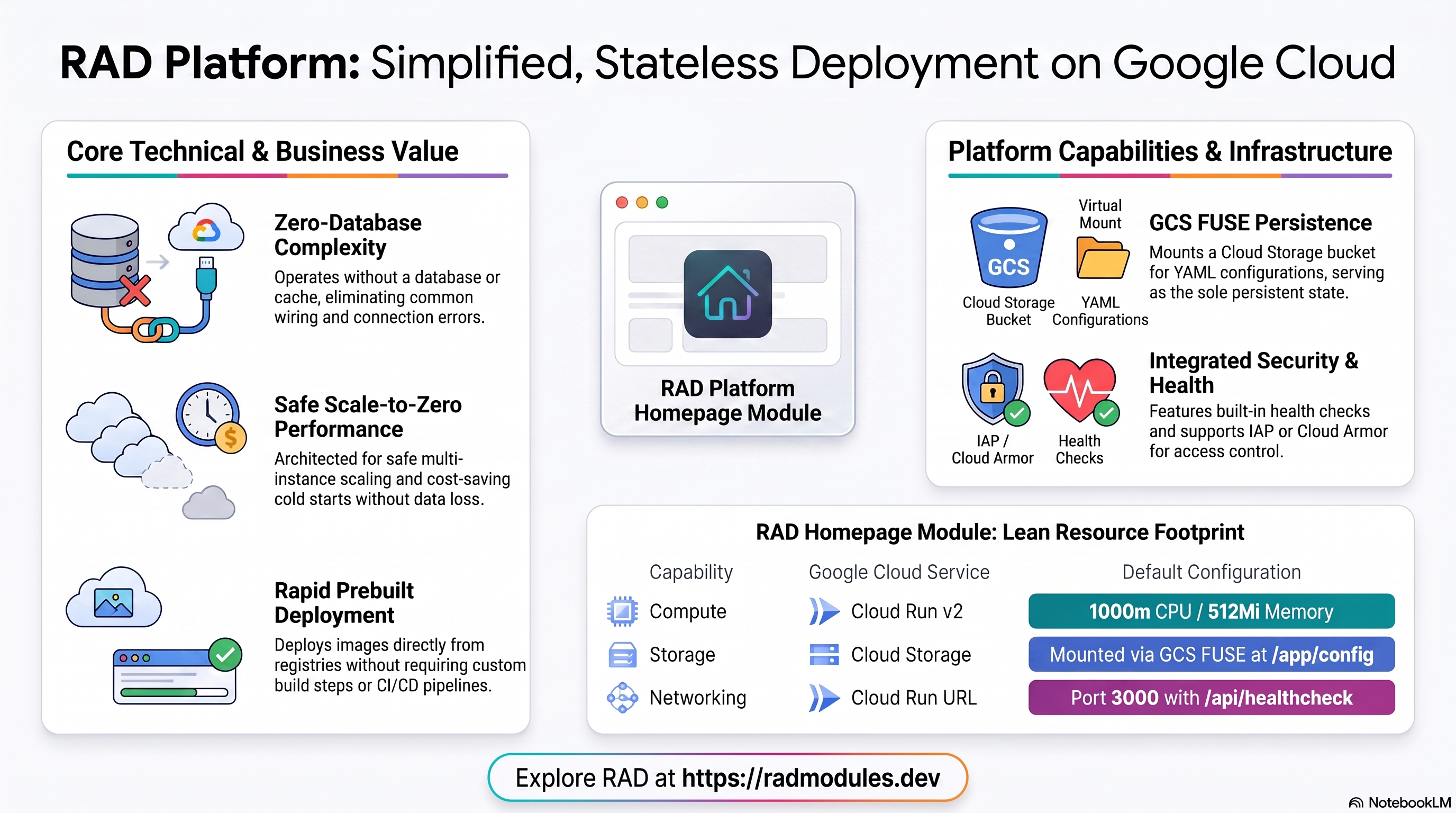
Homepage (gethomepage/homepage) is a self-hosted, highly customizable application dashboard/service-launcher — a Next.js 16 / Node 22 application whose entire configuration (services, bookmarks, widgets, layout) lives in a handful of YAML files, with optional live status/stats widgets for other self-hosted apps you run. This module deploys Homepage on Cloud Run v2 on top of the App_CloudRun foundation, which provisions and manages the shared Google Cloud infrastructure.
This guide focuses on the cloud services Homepage uses and how to explore and operate them from the Google Cloud Console and the command line. For the mechanics common to every Cloud Run application — service identity, ingress and load balancing, scaling and concurrency, CI/CD, Cloud Armor, IAP, Binary Authorization, VPC Service Controls, backups, and the deployment lifecycle — refer to the App_CloudRun foundation guide rather than repeating them here.
What Homepage costs on RAD, and how that compares
Running Homepage on Cloud Run in your own Google Cloud project costs about $16.78/month in Google Cloud charges, on top of a one-off 40-credit RAD module fee charged once at deploy time. Homepage is the lightest app in this batch by a wide margin — a static dashboard with no database of its own — so its own-project running cost is close to the floor of what any Cloud Run deployment costs. In a RAD-managed project the module fee drops to 36 credits (10% lower) and the running cost is metered hourly in credits instead of billed directly by Google — see Pause it for free below for the one RAD-managed advantage a self-hosted VPS cannot match — or see the GKE guide if you'd rather run it on Kubernetes.
What you pay on RAD
| Own project | RAD-managed project | |
|---|---|---|
| Module fee (one-off) | 40 credits | 36 credits (10% lower) |
| Build time | ~3-6 credits per build, either way | ~3-6 credits per build, either way |
| Google Cloud running cost | $16.78/month, billed by Google at list price | ~3 credits/day, metered at list price plus RAD's margin |
Default running cost in your own project
| Resource | US$/month (Google list price, us-central1) |
|---|---|
| Cloud Run, 1x vCPU / 0.5 GiB (scaleToZero) | $10.78 |
| Cloud NAT and networking | $5.00 |
| Cloud Storage (add-ons, backups) | $1.00 |
| Total | $16.78 |
How it compares
- A self-managed comparison: Hetzner CPX22 (2 vCPU/4GB) runs about $24/mo, a DigitalOcean 2 vCPU/4GB Droplet is the same $24/mo, and a GCP Compute Engine e2-standard-2 (2 vCPU/8GB) is about $49/mo — substantially more than a config-only dashboard with no database needs; a $5-6/month shared-vCPU micro instance from any of the same providers would run it comfortably.
- Homepage has no commercial hosted SaaS of its own — it is distributed only as self-hosted YAML-configured software.
- Because there's no database or file server here, the gap between RAD-managed and a bare VPS is smaller than for almost anything else in this batch — mostly just managed TLS, Secret Manager and monitoring versus doing it by hand.
Pause it for free: delete a RAD-managed project, restore it when you need it
This is the headline advantage of a RAD-managed project, and it costs nothing while paused. Deleting a RAD-managed project unlinks its billing first, then asks Google to delete the project outright — Google's own 30-day recoverable soft delete. Unlike deleting one module, this does not tear down Cloud SQL, any VM, or the compute resource one by one: the whole project simply stops, and nothing is charged while it waits, because billing is already unlinked.
Restoring, within 30 days and only by the project's owner, asks Google to undelete the project and reattaches its billing account, then asks you to run Update on each deployment to confirm everything came back. Because nothing was individually destroyed, that Update finds the same resources already there — it is a check, not a rebuild, and an Update never charges the module fee again. This costs only a handful of credits (under US$1) in total for a typical 2-3-deployment chain.
What this needs: you must own the project (not one RAD only manages billing for), you must restore it yourself within 30 days — after that Google deletes it for good — and restoring is admitted like creating a new project, so your purchased credit balance must still clear the tier's floor (100 credits for the sandbox tier most study/demo use fits). Google says most services are fully working again within 36 hours of a restore.
One real gap: nightly backups are written to a bucket inside the project, and that bucket has Cloud Storage's soft-delete explicitly turned off, so it is very likely gone as soon as you delete the project — even though the project itself is recoverable for 30 days. If you've customised Homepage and want to keep that work, copy a backup out (to Google Drive, or a bucket outside the project) before deleting. For a default install with nothing irreplaceable in it, this does not matter.
Pay only while you use it, the other way: delete and redeploy
In your own project, or once 30 days have passed on a RAD-managed one, there is no free pause — deleting removes the resources for good, and bringing Homepage back means redeploying from scratch. That costs about 43-46 credits (the 40-credit module fee plus a build).
Deleting only saves money once Homepage would otherwise sit unused long enough to clear that redeploy cost against its own running cost — for Homepage, that's about 8 days or more.
Keep data first: nightly backups go to a bucket inside the deployment and are deleted with it, so copy the latest backup out before deleting if you want to keep it.
Lab sessions and Managed Environments
Lab sessions, for training: a trainer runs a session for a class. Each participant gets the app in their own Google Cloud project for 15 minutes to 24 hours, within an allowance the trainer sets. Either the trainer funds every place, or each participant pays for their own. Everything is deleted when the session ends and unused credits go back to the trainer.
Managed Environments, for consultancies: a partner runs the app for a client from a ring-fenced wallet it funds, and settles with the client directly. If the wallet runs low, billing pauses and the data is kept, so nobody receives an unexpected charge. At the end the partner hands the project over and the deployments become the client's own.
Credits can be bought in more than 20 currencies, including XAF, XOF, NGN, GHS, KES and ZAR, by card, bank transfer or mobile money.
Sources (8 October 2026): Google Cloud Billing Catalog API list prices; radmodules.dev/pricing for RAD's own fees and daily-credit estimates; Google's project delete/restore documentation for the pause/restore claims.
1. Overview
Homepage runs as a single Node.js/Next.js container on Cloud Run v2. Unlike almost every other module in this catalogue, it has no database and no cache — its entire state is a directory of YAML files:
| Capability | Google Cloud service | Notes |
|---|---|---|
| Compute | Cloud Run v2 | Single Node.js process, 1000m CPU / 512Mi memory by default |
| Database | none | Homepage has no database of any kind; database_type = "NONE" |
| Object storage | Cloud Storage | A storage bucket mounted at /app/config via GCS FUSE — holds every YAML config file (settings.yaml, services.yaml, bookmarks.yaml, widgets.yaml, docker.yaml) plus logs |
| Cache & queue | none | enable_redis = false is hardcoded in main.tf, overriding the foundation's own default of true |
| Secrets | none | No secret is generated — Homepage needs no credentials of its own |
| Ingress | Cloud Run URL | Default run.app URL; optional external HTTPS load balancer + custom domain |
Sensible defaults worth knowing up front:
- Genuinely prebuilt — no custom image, no Cloud Build for the app.
Homepage_Commonsetsimage_source = "prebuilt"andcontainer_build_config.enabled = false;ghcr.io/gethomepage/homepageis deployed directly.enable_image_mirroring = truestill copies it into Artifact Registry (avoids GHCR rate limits), but that is a mirror, not a build. - Port 3000, health path
/api/healthcheck. Confirmed via a live deployment:GET /api/healthcheckreturns an unauthenticated200 "up"once the app is ready (backed by the image's ownHEALTHCHECKdirective). - No database, no Redis — architecturally unusual for this catalogue. Almost every other application module wires a Cloud SQL instance and/or Redis through the foundation; Homepage needs neither. This also means it has none of the usual DSN-wiring, socket-vs-TCP, or password-URL-encoding classes of bugs documented elsewhere in this repository — there is simply no database connection to get wrong.
- Scale-to-zero and multi-instance are both genuinely safe. Homepage
reads its YAML config live from disk on every request (no in-process
cache), and its one-time first-boot config self-seed is idempotent. The
module defaults to
min_instance_count = 0/max_instance_count = 3— most stateful apps in this catalogue need the opposite (min = 1,max = 1) to avoid cold-start loss or a single-writer race; Homepage needs neither guard. - No authentication of its own.
HOMEPAGE_ALLOWED_HOSTSdefaults to"*"— this only gates theHostheader check on Homepage's/api/*widget-data calls, not real access control. Put it behind IAP, a VPN, or a reverse proxy if you need to restrict who can reach it. - A documented, verified GCS FUSE mount-option override on Cloud Run.
Homepage_Commonrequestsuid=1000,gid=1000in the volume'smount_options(matching the container'sPUID/PGID), but Cloud Run's own built-in gcsfuse integration silently substitutes its ownuid=2000,gid=2000— confirmed via the GCSFuse "CLI Flags" log line at deploy time. This had no functional impact (the mount stayed self-consistent and writable), but it is worth knowing so a future maintainer does not assume the configuredmount_optionsare literally honored on Cloud Run.
2. Google Cloud Services & How to Explore Them
All commands assume PROJECT and REGION are set. Service and resource
names are reported in the deployment Outputs.
A. Cloud Run — the Homepage service
- Console: Cloud Run → select the service for revisions, traffic, logs, and metrics.
- CLI:
gcloud run services list --project "$PROJECT" --region "$REGION"
gcloud run services describe <service-name> --project "$PROJECT" --region "$REGION"
See App_CloudRun for scaling, concurrency, and traffic splitting.
B. Cloud Storage — the configuration volume
The storage bucket is mounted at /app/config via GCS FUSE. It holds every
YAML config file Homepage reads (settings.yaml, services.yaml,
bookmarks.yaml, widgets.yaml, docker.yaml) plus Homepage's logs — this
bucket is Homepage's entire persistent state; there is nothing else to
back up.
- CLI:
gcloud storage buckets list --project "$PROJECT" --filter="name~homepage"
gcloud storage ls "gs://<bucket-name>/"
gcloud storage cat "gs://<bucket-name>/settings.yaml"
C. Secret Manager
Nothing to see here — Homepage generates no secrets. Confirming this is itself a useful sanity check on a fresh deployment:
gcloud secrets list --project "$PROJECT" --filter="name~homepage"
# expect: no results
D. Networking & ingress
- CLI:
gcloud run services describe <service-name> --region "$REGION" --format='value(status.url)'
E. Cloud Logging & Monitoring
- CLI:
Look for the GCSFuse "CLI Flags" log line near boot to confirm the actual mounted UID/GID (see §1 above — it will read
gcloud run services logs read <service-name> --project "$PROJECT" --region "$REGION" --limit 50uid=2000,gid=2000on Cloud Run regardless of the configuredmount_options).
3. Homepage Application Behaviour
- No first-deploy database-schema job. Homepage has no database, so
initialization_jobsis empty by default and no job is needed. - No first-run setup wizard. There is no admin account to create and no
onboarding flow — Homepage renders its dashboard from whatever config
exists in
/app/config(the upstream image's own bundled defaults on a fresh deployment, since the entrypoint self-seeds any missing file). Customize the dashboard by editing the YAML files directly (see §2B) or by configuringdocker.yaml/label-based discovery if you connect it to a Docker/Kubernetes API. - Health path. Startup and liveness probes both target
GET /api/healthcheck— an unauthenticated200 "up", confirmed live. - Inspect job execution (should show nothing, by design):
gcloud run jobs executions list --job <job-name> --project "$PROJECT" --region "$REGION"
The GCS FUSE mount-option override — worth knowing, not worth worrying about
Homepage_Common explicitly sets mount_options with uid=1000,gid=1000 on
the /app/config GCS volume, matching the container's PUID=1000/PGID=1000
environment variables. On a live deployment, Cloud Logging's GCSFuse "CLI
Flags" line at container start shows the actual mount using
uid=2000,gid=2000 — Cloud Run's own built-in gcsfuse integration overrides
the configured value unconditionally. In testing this had no functional
impact: the mount was self-consistent (Cloud Run's overridden UID/GID
matched what the mount itself used for all subsequent writes) and the app
booted and wrote its config cleanly. The lesson is narrower than a bug: don't
assume the mount_options UID/GID you configure are what Cloud Run
literally uses — verify via the log line if you are ever debugging a real
permissions issue here. (This is specific to Cloud Run's own gcsfuse
integration; GKE's separate GCS FUSE CSI driver has no such override and
genuinely requires the configured UID/GID to match the container's user — see
the GKE gcsfuse finding referenced in this repository's CLAUDE.md.)
gcloud run services logs read <service-name> --project "$PROJECT" --region "$REGION" --limit 100 \
  | grep -i "gcsfuse"
4. Configuration Variables
Variables are grouped exactly as they appear on the deployment platform. Only settings specific to or notable for Homepage are listed; every other input is inherited from App_CloudRun with its standard behaviour.
Group 3 — Application Identity
| Variable | Default | Description |
|---|---|---|
application_name | homepage | Base name for resources. |
application_display_name | Homepage | Human-readable name shown in the platform UI. |
application_version | latest | Passed straight through as the ghcr.io/gethomepage/homepage image tag — no build step. |
homepage_allowed_hosts | * | HOMEPAGE_ALLOWED_HOSTS — comma-separated Host header allowlist for Homepage's own /api/* calls. Not a real access-control boundary. |
Group 4 — Runtime & Scaling
| Variable | Default | Description |
|---|---|---|
container_port | 3000 | Homepage's Next.js standalone server port. |
cpu_limit / memory_limit | 1000m / 512Mi | Lightweight — the gen2 512Mi floor is plenty. |
min_instance_count / max_instance_count | 0 / 3 | Both directions are genuinely safe here — see §1; a rare case in this catalogue where the wide default is intentional, not a placeholder. |
enable_image_mirroring | true | Mirrors the prebuilt image into Artifact Registry (avoids GHCR rate limits) — not a build. |
container_protocol | http1 | Plain HTTP/1.1; no gRPC/h2c requirement. |
enable_cloudsql_volume | false | Homepage has no Cloud SQL — keep false. |
Group 11 — Cloud Storage & Filesystem
| Variable | Default | Description |
|---|---|---|
gcs_volumes | [] | The storage bucket mount at /app/config is added automatically; use this for additional volumes only. |
enable_nfs | false | Not needed — GCS FUSE at /app/config is sufficient for Homepage's config-file workload. |
Group 12 — Database Backend
| Variable | Default | Description |
|---|---|---|
database_type | NONE | Fixed by Homepage_Common — Homepage has no SQL database, full stop. |
Group 13 — Jobs & Scheduled Tasks
| Variable | Default | Description |
|---|---|---|
initialization_jobs | [] | Stays empty by default — nothing to bootstrap. |
Group 14 — Observability & Health
| Variable | Default | Description |
|---|---|---|
startup_probe / liveness_probe | HTTP /api/healthcheck | Unauthenticated 200 "up" — an accurate default matching the image's own HEALTHCHECK directive, forwarded unchanged from Homepage_Common. |
5. Outputs
| Output | Description |
|---|---|
service_name / homepage_url | Cloud Run service name and the dashboard URL (port 3000). |
storage_buckets | The storage bucket backing /app/config. |
container_image / container_registry | The deployed image reference and Artifact Registry repository. |
deployment_id / tenant_id / resource_prefix | Naming identifiers. |
project_id / project_number | Project identifiers. |
initialization_jobs | Created initialization job names (empty for Homepage). |
6. Configuration Pitfalls & Sensible Defaults
Risk: Critical (data loss / outage / security) — High (service degraded) — Medium (cost or partial degradation) — Low (minor).
| Setting | Sensible value | Risk | Consequence if wrong |
|---|---|---|---|
gcs_volumes / storage at /app/config | Leave the automatic storage mount in place | Critical | Removing or misconfiguring this volume loses every YAML config file on the next cold start — Homepage has no other source of truth. |
HOMEPAGE_ALLOWED_HOSTS | Leave * unless you know the final hostname, then tighten it | Medium | A too-narrow value 400s every API-backed widget (page shell still loads) if the actual request hostname doesn't match; treating it as a real auth boundary is a false sense of security either way. |
| Probe path | Leave at /api/healthcheck | High | An authenticated or nonexistent probe path would leave the revision permanently unhealthy even though the app booted fine. |
enable_redis | Leave the hardcoded false alone (do not attempt to force it via environment_variables) | Low | Homepage has nothing to cache; enabling Redis wastes a Memorystore/NFS-Redis dependency for no benefit. |
| Assumed GCS FUSE mount UID/GID | Don't rely on the configured uid=1000,gid=1000 being literal on Cloud Run | Low | Cloud Run's own gcsfuse integration silently uses uid=2000,gid=2000 instead — harmless in practice, but a red herring if you're debugging a permissions issue by reading the Terraform instead of the actual mount log line. |
For the foundation behaviour referenced throughout — service identity, scaling and concurrency, ingress and load balancing, CI/CD, Cloud Armor, IAP, Binary Authorization, VPC-SC, backups, and image mirroring — see App_CloudRun. Homepage-specific application configuration is described in Homepage_Common.
Related guides
- Hands-on lab: Homepage on Cloud Run — deploy it step by step, with the console screens and commands at each stage.
- Homepage on GKE Autopilot — the same application on Kubernetes, for when you need the other deployment target.
- Homepage Common — Shared Application Configuration — the configuration shared by both deployment targets.
- Deployed alongside Dolibarr on Google Cloud Run, Invoice Ninja on Google Cloud Run, Kimai on Google Cloud Run, Docuseal on Google Cloud Run in the Small Business Suite solution.
Need RAD to do something it does not do yet? Request it on the roadmap, or vote on what is already there.