Meilisearch on Google Cloud Run
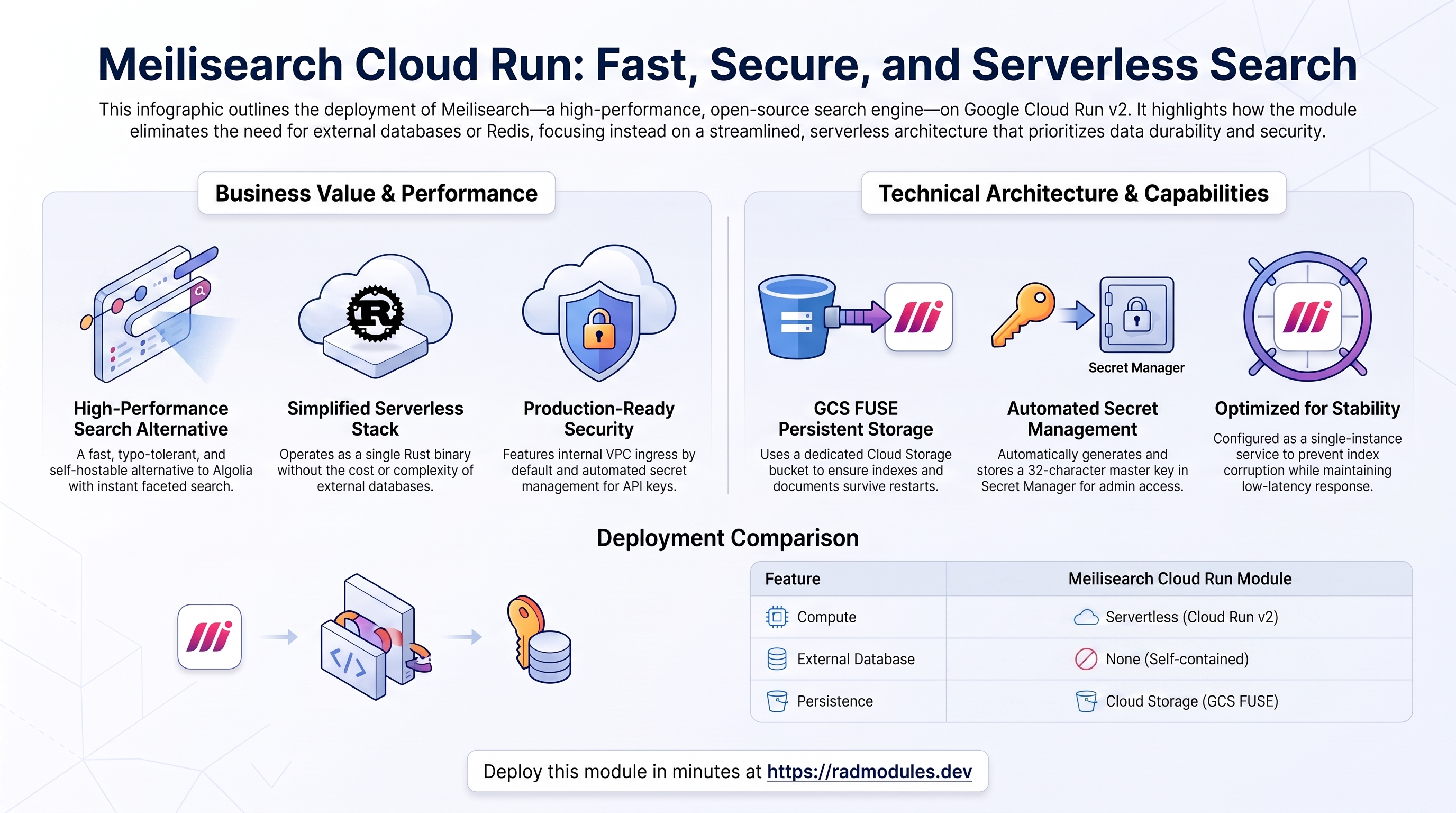
Meilisearch is a fast, open-source search engine — a single Rust binary that delivers instant, typo-tolerant, faceted search behind a simple REST API. It is widely used as a self-hostable alternative to Algolia. This module deploys Meilisearch on Cloud Run v2 on top of the App_CloudRun foundation, which provisions and manages the shared Google Cloud infrastructure.
This guide focuses on the cloud services Meilisearch uses and how to explore and operate them from the Google Cloud Console and the command line. For the mechanics common to every Cloud Run application — service identity, ingress and load balancing, scaling and concurrency, CI/CD, Cloud Armor, IAP, Binary Authorization, VPC Service Controls, backups, and the deployment lifecycle — refer to the App_CloudRun foundation guide rather than repeating them here.
1. Overview
Meilisearch runs as a single-binary Rust container on Cloud Run v2. The deployment wires together a focused set of Google Cloud services:
| Capability | Google Cloud service | Notes |
|---|---|---|
| Compute | Cloud Run v2 | Rust binary, 1 vCPU / 1 GiB by default, serverless; one warm instance by default |
| Persistent storage | Cloud Storage (GCS FUSE) | A dedicated bucket mounted at /meili_data holds all indexes and documents |
| Database | None | Meilisearch is self-contained — no Cloud SQL, no external database |
| Cache & queue | None | Meilisearch has no Redis or queue dependency |
| Secrets | Secret Manager | Auto-generated MEILI_MASTER_KEY (the search admin credential) |
| Ingress | Cloud Run URL / Cloud Load Balancing | Public Cloud Run URL by default (ingress_settings = "all"); optional external HTTPS load balancer + custom domain, or restrict to "internal" for VPC-only access |
Sensible defaults worth knowing up front:
- No database, no Redis. Meilisearch persists everything — indexes, documents,
settings, tasks — to the
/meili_datadirectory on the mounted GCS bucket. There is no Cloud SQL instance and no Redis to operate. - The master key is mandatory. Meilisearch runs in production mode
(
MEILI_ENV = production), which refuses to start without a ≥16-byteMEILI_MASTER_KEY. The module generates a 32-character key and stores it in Secret Manager (enable_api_key = true). - Public ingress by default.
ingress_settings = "all"exposes the search API on the public Cloud Run URL. This is only permitted becauseenable_api_key = trueis also the default (plan time blocksingress_settings = "all"without it), so an unauthenticated Meilisearch can never be published by accident. Setingress_settings = "internal"to restrict access to the VPC instead. - Single instance.
min_instance_count = 1andmax_instance_count = 1. Meilisearch is a single-writer store backed by one storage path; multiple instances writing the same path corrupt the index. Keep one instance warm to avoid cold-start index loading, and scale vertically (CPU/memory), not horizontally. - Gen2 execution environment is required for the GCS FUSE mount.
- Image is pinned to
v1.11. Theapplication_version = "latest"default maps to thegetmeili/meilisearch:v1.11build; pin a specific release in production. - Health at
/health. Startup and liveness probes both target/health, which returns{"status":"available"}once the engine is ready.
2. Google Cloud Services & How to Explore Them
All commands assume PROJECT and REGION are set. Service and resource names are
reported in the deployment Outputs.
A. Cloud Run — the Meilisearch service
Meilisearch runs as a Cloud Run v2 service. Each deployment creates an immutable revision; traffic can be split across revisions for safe rollouts. Because Meilisearch is single-writer, the service is pinned to exactly one instance.
- Console: Cloud Run → select the service for revisions, traffic, logs, and metrics.
- CLI:
gcloud run services list --project "$PROJECT" --region "$REGION"
gcloud run services describe <service-name> --project "$PROJECT" --region "$REGION"
gcloud run revisions list --service <service-name> --project "$PROJECT" --region "$REGION"
See App_CloudRun for scaling, concurrency, execution environment, and traffic splitting.
B. Cloud Storage — persistent index storage
All Meilisearch data lives in a dedicated Cloud Storage bucket mounted at
/meili_data via GCS FUSE (MEILI_DB_PATH = /meili_data). This is what makes the
indexes survive restarts and redeploys — there is no separate database.
- Console: Cloud Storage → Buckets.
- CLI:
gcloud storage buckets list --project "$PROJECT"
gcloud storage ls gs://<storage-bucket>/        # bucket name is in the Outputs
See App_CloudRun for GCS FUSE and CMEK options.
C. Secret Manager — the master key
A single cryptographic secret is generated automatically and stored in Secret
Manager: MEILI_MASTER_KEY, the search admin credential. It is injected into the
service as an environment variable; it is never written to disk or baked into the
image. The master key can create/delete indexes and mint scoped API keys, so treat
it as a root credential and issue scoped keys (POST /keys) to applications.
- Console: Security → Secret Manager.
- CLI:
gcloud secrets list --project "$PROJECT" --filter="name~api-key"
gcloud secrets versions access latest --secret=<secret-name> --project "$PROJECT"
See App_CloudRun for injection and rotation details.
D. Networking & ingress
The service is reachable on its public Cloud Run URL by default (ingress_settings = "all"), guarded by the master key (enable_api_key = true) that ships enabled
by default. An external HTTPS load balancer with a custom domain, Cloud CDN, and
Cloud Armor can be layered on; set ingress_settings = "internal" to keep the
search API off the public internet and VPC-only instead.
- Console: Cloud Run (service URL); Network services → Load balancing.
- CLI:
gcloud run services describe <service-name> --region "$REGION" --format='value(status.url)'
gcloud compute addresses list --project "$PROJECT"
See App_CloudRun.
E. Cloud Logging & Monitoring
Container logs flow to Cloud Logging; Cloud Run metrics flow to Cloud Monitoring,
with optional uptime checks and alert policies against /health.
- Console: Logging → Logs Explorer; Monitoring → Dashboards / Alerting.
- CLI:
gcloud run services logs read <service-name> --project "$PROJECT" --region "$REGION" --limit 50
3. Meilisearch Application Behaviour
- No initialization job. Meilisearch manages its own storage and needs no
database bootstrap, so no
db-initjob runs. The first request that creates an index lazily initialises the/meili_datadirectory. - Production mode requires the master key. With
MEILI_ENV = production, Meilisearch will not start unlessMEILI_MASTER_KEYis at least 16 bytes. Production mode also disables the built-in web mini-dashboard — interact via the REST API. - Everything is an API call. Create an index, add documents, and search with the
master key (or a scoped key) as a Bearer token:
URL=$(gcloud run services describe <service-name> --region "$REGION" --format='value(status.url)')
KEY=$(gcloud secrets versions access latest --secret=<secret-name> --project "$PROJECT")

# Add documents (creates the index on first write):
curl -X POST "$URL/indexes/movies/documents" \
  -H "Authorization: Bearer $KEY" -H 'Content-Type: application/json' \
  --data '[{"id":1,"title":"Interstellar"},{"id":2,"title":"Inception"}]'

# Search (note the deliberate typo — Meilisearch is typo-tolerant):
curl "$URL/indexes/movies/search" \
  -H "Authorization: Bearer $KEY" -H 'Content-Type: application/json' \
--data '{"q":"interstellr"}' - Scoped API keys. Do not ship the master key to browsers or apps. Mint scoped,
expiring keys with
POST /keys(using the master key) that are limited to specific indexes and actions (e.g. search-only), and distribute those. - Data durability = the bucket. Because state lives entirely in
/meili_data, the GCS bucket is the source of truth. Snapshots/dumps (POST /dumps) written to that path are captured by the module's scheduled backups. - Health path. Startup and liveness probes target
/health, which returns{"status":"available"}when the engine is ready. Confirm the running revision:gcloud run services describe <service-name> \
--region "$REGION" --project "$PROJECT" --format='value(status.url)'
4. Configuration Variables
Variables are grouped exactly as they appear on the deployment platform. Only settings specific to or notable for Meilisearch are listed; every other input is inherited from App_CloudRun with its standard behaviour.
Group 1 — Project & Identity
| Variable | Default | Description |
|---|---|---|
project_id | (required) | Target Google Cloud project. |
region | us-central1 | Region for the service and regional resources. |
Group 2 — Deployment Environment
| Variable | Default | Description |
|---|---|---|
tenant_id | demo | Short suffix that makes resource names unique per environment. |
support_users | [] | Emails granted project access and monitoring alerts. |
resource_labels | {} | Labels applied to all resources. |
Group 3 — Application Identity
| Variable | Default | Description |
|---|---|---|
application_name | meilisearch | Base name for resources. Do not change after first deploy. |
application_display_name | Meilisearch Vector Database | Human-readable name shown in the Console. |
description | Meilisearch Vector Database — high-performance similarity search for AI applications | Service description. |
application_version | latest | Meilisearch image tag; latest maps to the pinned v1.11 build. Pin a release in production. |
enable_api_key | true | Generate the MEILI_MASTER_KEY in Secret Manager. Required before ingress_settings = "all". |
Group 4 — Runtime & Scaling
| Variable | Default | Description |
|---|---|---|
deploy_application | true | Set false to provision infrastructure only. |
cpu_limit | 1000m | CPU per instance. |
memory_limit | 1Gi | Memory per instance; Meilisearch holds hot index structures in memory — raise for large indexes. |
min_instance_count | 1 | Keep ≥ 1 to avoid cold-start index loading. |
max_instance_count | 1 | Keep at 1. Meilisearch is single-writer; multiple instances corrupt the index. |
container_port | 7700 | Meilisearch listens on 0.0.0.0:7700. |
execution_environment | gen2 | Gen2 required for the GCS FUSE mount. |
timeout_seconds | 300 | Maximum request duration (0–3600 seconds); raise for large batch imports. |
enable_image_mirroring | true | Mirror the Meilisearch image into Artifact Registry. |
container_protocol | http1 | HTTP/1.1 by default. |
traffic_split | [] | Split traffic across revisions for staged rollouts. |
Group 5 — Access & Networking
| Variable | Default | Description |
|---|---|---|
ingress_settings | all | all (public, default; requires enable_api_key = true). internal restricts to VPC-only access. |
vpc_egress_setting | PRIVATE_RANGES_ONLY | Route only RFC 1918 traffic via VPC. |
enable_iap | false | Require Google sign-in in front of the service. |
iap_authorized_users / iap_authorized_groups | [] | Who may access through IAP. |
Group 6 — Environment Variables & Secrets
| Variable | Default | Description |
|---|---|---|
environment_variables | {} | Extra MEILI_* settings. Core values (MEILI_DB_PATH, MEILI_HTTP_ADDR, MEILI_ENV, MEILI_NO_ANALYTICS) are set automatically. |
secret_environment_variables | {} | Map of env var → Secret Manager secret name. |
secret_propagation_delay | 30 | Seconds to wait after secret creation before proceeding. |
secret_rotation_period | 2592000s | Secret Manager rotation notification frequency. |
Group 7 — Backup & Restore
| Variable | Default | Description |
|---|---|---|
backup_schedule | 0 2 * * * | Automated backup cron (UTC). |
backup_retention_days | 7 | Retention; raise for production. |
enable_backup_import / backup_source / backup_uri / backup_format | restore options | Restore from a backup/dump on deploy (backup_format defaults to tar). |
Group 8 — CI/CD & Binary Authorization
Standard App_CloudRun Cloud Build / Cloud Deploy integration — see
App_CloudRun. Key inputs: enable_cicd_trigger,
github_repository_url, github_token, enable_cloud_deploy,
enable_binary_authorization.
Group 9 — Custom SQL / NFS
enable_custom_sql_scripts is not applicable — Meilisearch has no SQL database.
nfs_instance_name / nfs_instance_base_name control NFS discovery only if NFS is
enabled for a custom job.
Group 10 — Load Balancer, CDN & Image Retention
| Variable | Default | Description |
|---|---|---|
enable_cloud_armor | false | Provision Global HTTPS LB + Cloud Armor WAF. |
admin_ip_ranges | [] | CIDR ranges exempted from WAF rules. |
application_domains | [] | Custom domain names for the HTTPS LB. |
enable_cdn | false | Enable Cloud CDN on the HTTPS LB backend (requires Cloud Armor). |
max_images_to_retain / delete_untagged_images / image_retention_days | (set) | Artifact Registry cleanup policy. |
Group 11 — Storage & Filesystem
| Variable | Default | Description |
|---|---|---|
create_cloud_storage | true | The <prefix>-storage bucket (mounted at /meili_data) is always created. |
storage_buckets | [] | Additional GCS buckets beyond the auto-provisioned storage bucket. |
enable_nfs | false | Meilisearch uses GCS for storage; enable NFS only for custom init jobs (requires gen2). |
nfs_mount_path | /mnt/nfs | Mount path inside the container. |
gcs_volumes | [] | Additional GCS FUSE mounts (the storage bucket is added automatically). |
manage_storage_kms_iam / enable_artifact_registry_cmek | false | CMEK options. |
Group 13 — Jobs & Scheduled Tasks
| Variable | Default | Description |
|---|---|---|
initialization_jobs | [] | Meilisearch requires no default init job; provide jobs only for custom data loading. |
cron_jobs | [] | Recurring Cloud Run Jobs (e.g., dump snapshots or maintenance). |
Group 14 — Observability & Health
| Variable | Default | Description |
|---|---|---|
startup_probe | HTTP /health 15s delay | Startup probe; returns {"status":"available"} when ready. |
liveness_probe | HTTP /health 30s delay | Liveness probe (same endpoint). |
startup_probe_config | HTTP /health | Alternative structured startup probe (foundation interface). |
health_check_config | HTTP /health | Alternative structured liveness probe. |
uptime_check_config | { enabled=false, path="/health" } | Cloud Monitoring uptime check. |
alert_policies | [] | Metric alert policies. |
Group 23 — VPC Service Controls & Audit Logging
| Variable | Default | Description |
|---|---|---|
enable_vpc_sc | false | Enforce a VPC-SC perimeter (requires organization_id). |
vpc_cidr_ranges / vpc_sc_dry_run | (set) | Access level CIDRs / dry-run mode. |
enable_audit_logging | false | Detailed Cloud Audit Logs. |
5. Outputs
Returned on a successful deployment — the quickest way to locate and explore the running resources.
| Output | Description |
|---|---|
service_name | Cloud Run service name. |
service_url | URL of the Cloud Run service. |
meilisearch_url | URL for the Meilisearch REST API (port 7700). Only reachable by services within the same VPC when ingress_settings is internal. |
service_location | Region the service runs in. |
stage_services | Stage-specific service URLs (Cloud Deploy). |
load_balancer_ip / load_balancer_url | External HTTPS load balancer IP / URL (when enabled). |
storage_buckets | Created Cloud Storage buckets (including the /meili_data storage bucket). |
network_name / network_exists / regions | VPC network, presence, regions. |
container_image / container_registry | Deployed image and Artifact Registry repo. |
monitoring_enabled / monitoring_notification_channels / uptime_check_names | Monitoring status, channels, uptime checks. |
initialization_jobs | Names of any custom setup jobs. |
deployment_id / tenant_id / resource_prefix | Naming identifiers. |
project_id / project_number | Project identifiers. |
cicd_enabled / github_repository_url / github_repository_owner / github_repository_name / cicd_configuration | CI/CD status and details. |
artifact_registry_repository / cloudbuild_trigger_name / cloudbuild_trigger_id | Registry and build trigger. |
vpc_sc_enabled / vpc_sc_perimeter_name / vpc_sc_dry_run_mode | VPC-SC status. |
audit_logging_enabled / artifact_registry_cmek_enabled | Audit logging and CMEK status. |
6. Configuration Pitfalls & Sensible Defaults
Risk: Critical (data loss / outage / security) — High (service degraded) — Medium (cost or partial degradation) — Low (minor).
Inherited plan-time validation. This module passes its configuration through the App_CloudRun foundation engine, which validates values and combinations at plan time — a
gen1runtime with GCS FUSE mounts, IAP with no authorized identities, an out-of-rangetimeout_seconds/backup_retention_days, or public ingress without the master key. Invalid configuration fails the plan with a clear, named error before any resource is created, so most mistakes below are caught up front rather than at apply or runtime.
| Setting | Sensible value | Risk | Consequence if wrong |
|---|---|---|---|
enable_api_key | true | Critical | Disabling it removes the master key; in production mode Meilisearch refuses to start, and if it did run, anyone on the network could read or delete every index. |
ingress_settings = "all" | only with enable_api_key = true | Critical | Publishing an unauthenticated Meilisearch exposes all indexes to the internet — blocked at plan time as a guard. |
max_instance_count | 1 | Critical | More than one instance writing the same /meili_data GCS path corrupts the index. |
MEILI_MASTER_KEY (auto-generated) | Rotate only with client updates | High | Rotating the key without updating every client breaks all authenticated search and admin calls. |
execution_environment | gen2 | High | GCS FUSE requires gen2; gen1 fails the plan and, without the mount, indexes would not persist. |
min_instance_count | 1 | Medium | Scale-to-zero (0) adds cold-start index-load latency to the first query after idle. |
memory_limit | 1Gi+ | High | Too little memory for a large index causes OOM kills under query load; size to your dataset. |
enable_iap | for a private, human-facing endpoint | Medium | IAP requires Google identity for every request — good for a locked-down dashboard, but it also blocks unauthenticated app/service calls. |
backup_retention_days | 7 (raise for prod) | Medium | Too short to recover from an accidental index deletion discovered late. |
application_version | pin a release | Low | latest maps to v1.11 today, but pinning avoids surprise upgrades on rebuild. |
For the foundation behaviour referenced throughout — service identity, scaling and concurrency, ingress and load balancing, CI/CD, Cloud Armor, IAP, Binary Authorization, VPC-SC, backups, and image mirroring — see App_CloudRun. Meilisearch-specific application configuration shared with the GKE variant is described in Meilisearch_Common.
Related guides
- Hands-on lab: Meilisearch on Cloud Run — deploy it step by step, with the console screens and commands at each stage.
- Meilisearch on GKE Autopilot — the same application on Kubernetes, for when you need the other deployment target.
- Meilisearch Common — Shared Application Configuration — the configuration shared by both deployment targets.
- Deployed alongside Directus on Cloud Run, Umami on Google Cloud Run in the Headless Content Platform solution.