PostHog on GKE Autopilot
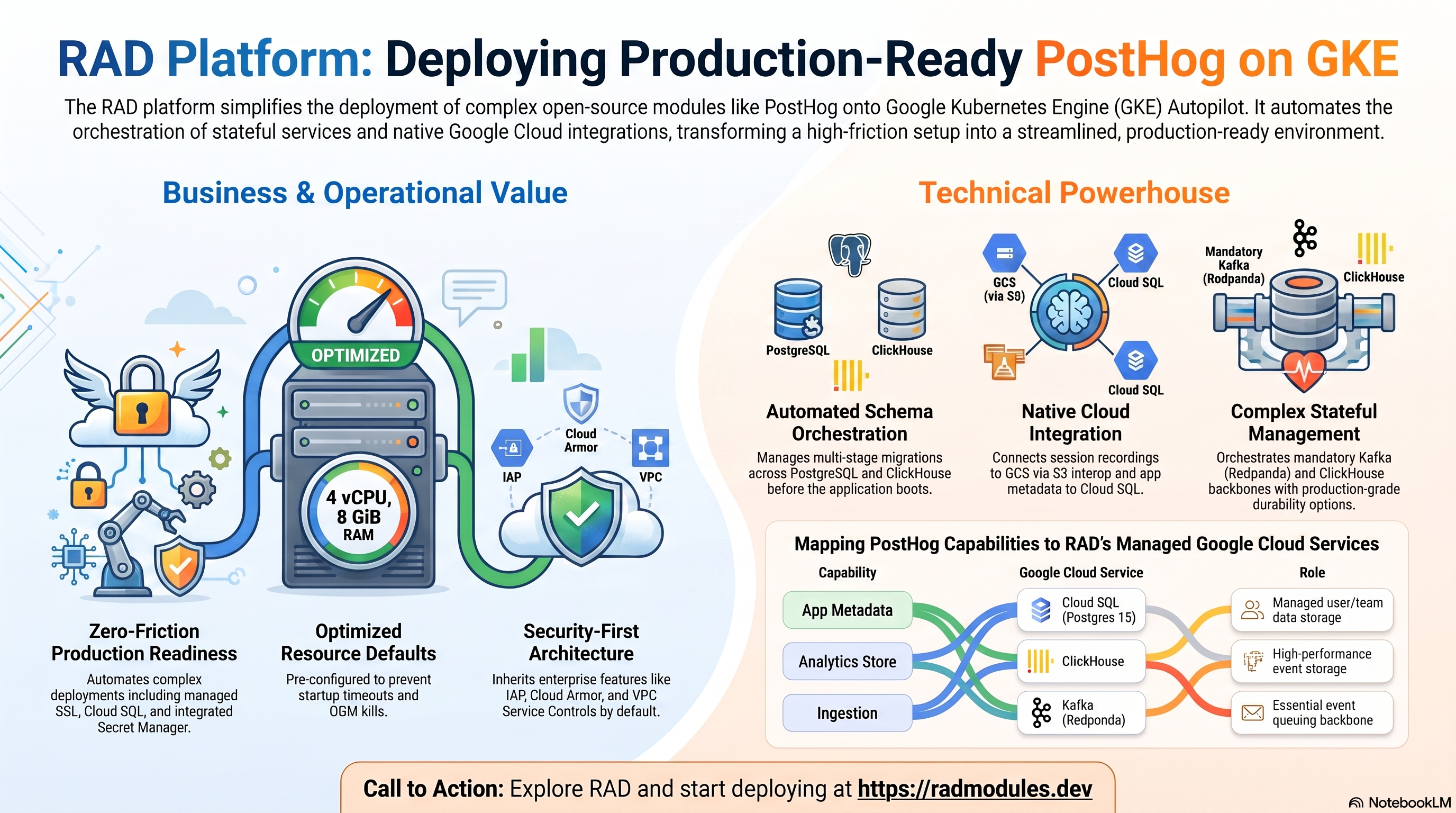
PostHog is an open-source product-analytics platform — event analytics, session replay, feature flags, A/B testing, and funnels — released under a hybrid MIT/PostHog-commercial license. It runs as a Python/Django web application with a co-located Celery worker+beat scheduler, and its event pipeline is built around two additional stateful services: Kafka as the ingestion backbone and ClickHouse as the actual analytics event store. This module deploys PostHog on GKE Autopilot on top of the App_GKE foundation, which provisions and manages the shared Google Cloud and Kubernetes infrastructure.
This guide focuses on the cloud services PostHog uses and how to explore and operate them from the Google Cloud Console and the command line. For the mechanics that are common to every GKE application — Workload Identity, ingress, autoscaling, CI/CD, Cloud Armor, IAP, Binary Authorization, VPC Service Controls, backups, and the deployment lifecycle — refer to the App_GKE foundation guide rather than repeating them here.
No Cloud Run variant, by design. PostHog's event pipeline mandates Kafka and ClickHouse — both stateful, long-lived services incompatible with Cloud Run's serverless, scale-to-zero model. Only
PostHog_GKEandPostHog_Commonexist.
Deployment prerequisite (recommended, not enforced): Deploying
ClickHouse_GKEfirst and pointingclickhouse_hostat it is the recommended production path — matching this catalogue'sRAGFlow_GKE→Elasticsearch_GKEcross-module-dependency precedent. Unlike RAGFlow's mandatoryelasticsearch_hosts, PostHog also offers an in-module single-node ClickHouse fallback (enable_inline_clickhouse = true) for dev/test use, so the plan is not rejected outright without an external instance — but the plan-time validation guard does still require ONE of the two paths to resolve.
What PostHog costs on RAD, and how that compares
Running PostHog in your own Google Cloud project costs about US$257.89/month in infrastructure, plus a one-time module fee of 300 RAD credits (sized at 4 vCPU / 16 GiB on GKE Autopilot pods). RAD charges the module fee once, at deploy time — never again on Update — plus build time metered in credits; Google Cloud usage itself is billed to your own billing account at Google's list price. On a RAD-managed project the same resources are metered hourly in credits at list price plus RAD's margin — about 160 credits/day — and the module fee is 10% lower, at 270 credits. See "Pause it for free" below for how a RAD-managed PostHog deployment can be stopped, at no running cost, until you need it again.
What you pay on RAD
| Item | Own project | RAD-managed project |
|---|---|---|
| Module fee | 300 credits (once) | 270 credits (once) |
| Build time | ~3-6 credits, metered per build minute | same, metered in credits at list price + RAD's margin |
| Google Cloud running cost | ~$257.89/month, billed to your own billing account at Google's list price | ~160 credits/day, metered hourly at list price + RAD's margin |
Default running cost in your own project
| Resource | US$/month (Google list price, us-central1) |
|---|---|
| GKE Autopilot pod, 4x vCPU / 16 GiB | 187.44 |
| Cloud SQL for PostgreSQL, 1 vCPU / 3.75 GB, zonal, 10 GB SSD | 51.02 |
| NFS/cache file server (small VM) | 13.43 |
| Cloud NAT and networking | 5 |
| Cloud Storage (add-ons, backups) | 1 |
| GKE cluster management fee* | shared across every GKE app in the project; $0 if this is your only cluster, else ~73 |
| Total | $257.89 |
* Not included in the total above — it is shared across every GKE app running in the same project, so it is $0 if this is your only GKE cluster.
How it compares
- We could not verify a current, directly-comparable commercial SaaS price for this exact open-source project, so the honest comparison is a bare self-managed server: Hetzner CPX22 (2 vCPU/4GB,
$24/mo), a DigitalOcean 2 vCPU/4GB Droplet ($24/mo), or a GCP Compute Engine e2-standard-2 (2 vCPU/8GB, ~$49/mo). This app's own footprint (4+ vCPU, double-digit GiB of memory) is larger than any of those classes — a self-managed box sized to match would cost well above the figures below, before counting the separate effort of running its own database/cache tier by hand. - RAD is not claiming to beat a bare VPS on sticker price — it usually does not. What RAD adds for the same or a similar dollar figure is a managed database, Secret Manager-held credentials, monitoring, and one-click Update, none of which a bare VPS gives you for free.
- On a bare VPS you are the one applying OS/database security patches, taking and testing backups, and renewing certificates; RAD's managed Cloud SQL, Secret Manager and monitoring handle all three for you.
Pause it for free: delete a RAD-managed project, restore it when you need it
This is the headline option on a RAD-managed project, and it is free while paused. Deleting a RAD-managed project first unlinks its billing, then asks Google to delete the project itself — Google's own 30-day recoverable soft delete. Unlike deleting a single module, this does not tear down the database, any VM, or the compute resource one at a time: the whole project simply stops, and because billing is already unlinked, nothing is charged while it waits.
Restoring — within 30 days, and only by the project's owner — asks Google to undelete the project and reattaches its billing account, then asks you to run Update on each deployment to confirm everything came back. Because nothing was individually destroyed, that Update finds the same resources already there: it is a check, not a rebuild, and an Update never charges the module fee again. The whole restore costs only a handful of credits (under US$1) in build time for a typical chain of deployments. What this needs: you must own the project (not merely have RAD manage its billing), you must restore it yourself within the 30 days — after that Google deletes it for good — and restoring is admitted like creating a new project, so your purchased credit balance must still clear the tier's floor (100 credits for the sandbox tier most study and demo use fits). Google says most services are fully working again within 36 hours of a restore.
One real gap: nightly backups are written to a bucket inside the project, and that bucket has Cloud Storage's soft-delete explicitly turned off, so the backup bucket is very likely gone as soon as you delete the project — even though the project itself is recoverable for 30 days. If you have customised this deployment and want to keep that work, copy a backup out (to Google Drive, or a bucket outside the project) before deleting. For a default install with nothing irreplaceable in it, this does not matter.
Pay only while you use it, the other way: delete and redeploy
The other lever, for an own project (or a RAD-managed one past its 30-day restore window), is to delete PostHog outright and redeploy it later. A redeploy costs the module fee again plus the builds — roughly 303-306 credits in total for this module.
Deleting only saves money once PostHog would otherwise sit unused long enough to clear that redeploy cost against its own running cost — for this module, that is about 4 days or more of being idle, based on its own US$257.89/month running cost above. Most of that running cost is usually the database and any shared file/cache VM, and they stop only once nothing else in the project uses them, so deleting this app alone saves only its own compute share if something else shares the project.
Keep data first: nightly backups go to a bucket inside the deployment and are deleted with it, so copy the latest backup out before deleting if you want to keep it.
Lab sessions and Managed Environments
- Lab sessions, for training: a trainer runs a session for a class. Each participant gets the app in their own Google Cloud project for 15 minutes to 24 hours, within an allowance the trainer sets. Either the trainer funds every place, or each participant pays for their own. Everything is deleted when the session ends and unused credits go back to the trainer.
- Managed Environments, for consultancies: a partner runs the app for a client from a ring-fenced wallet it funds, and settles with the client directly. If the wallet runs low, billing pauses and the data is kept, so nobody receives an unexpected charge. At the end the partner hands the project over and the deployments become the client's own.
- Credits can be bought in more than 20 currencies, including XAF, XOF, NGN, GHS, KES and ZAR, by card, bank transfer or mobile money.
Sources (8 October 2026): Google Cloud Billing Catalog API list prices; radmodules.dev/pricing for RAD's own fees and daily-credit estimates; Resource Manager: delete and restore projects for the pause/restore mechanics.
1. Overview
PostHog runs as a single containerised Python/Django workload with a co-located Celery worker+beat scheduler (matching the upstream image's own default all-in-one entrypoint — the same shape as this catalogue's Saleor/Woodpecker co-located-worker pattern). The deployment wires together four independent data stores, each with a distinct job, and none of them optional:
| Capability | Google Cloud service | Notes |
|---|---|---|
| Compute | GKE Autopilot | Custom-built PostHog pod, 4 vCPU / 8 GiB by default |
| App metadata | Cloud SQL for PostgreSQL 15 | Django's own app tables only — users, teams, feature flags, dashboards. No analytics data. |
| Analytics event store | ClickHouse | Mandatory. External ClickHouse_GKE recommended (production); in-module single-node fallback for dev/test |
| Ingestion backbone | Kafka | Mandatory. Bundled single-node Redpanda broker by default (no standalone Kafka module in this catalogue yet) |
| Cache / broker | Redis | Mandatory. Celery broker, plugin-server pub/sub, Django cache — the platform injects the NFS-server co-hosted Redis IP by default |
| Object storage | Cloud Storage (S3-interop) | Session-replay recordings and data exports, via PostHog's native S3-compatible client — not a GCS FUSE mount |
| Secrets | Secret Manager | Django SECRET_KEY, S3-interop HMAC key pair, DB password, CLICKHOUSE_PASSWORD (external, or generated for the inline fallback) |
| Ingress | Cloud Load Balancing | External LoadBalancer service; optional custom domain + managed certificate |
Sensible defaults worth knowing up front:
- PostgreSQL 15 is fixed, and it is NOT where your analytics data lives. Postgres holds only Django's application metadata. Every event, person, session recording index, and insight query runs against ClickHouse instead — a structurally different shape from most database-backed apps in this catalogue.
- Redis is mandatory, and cannot be disabled. A plan-time validation guard rejects
enable_redis = falseoutright. With noredis_host, the platform injects the NFS-server co-hosted Redis IP — which is whyenable_nfsdefaults totrueeven though PostHog itself has no filesystem media dependency. - ClickHouse is mandatory, external by default.
clickhouse_hostis empty andenable_inline_clickhouse = falseout of the box — setclickhouse_hostto a separately deployedClickHouse_GKEinstance for production, or flipenable_inline_clickhouse = truefor a single-node, no-persistence dev/test fallback. - Kafka is mandatory, bundled by default.
enable_inline_kafka = truedeploys a single-node Redpanda broker (Kafka-API-compatible, Zookeeper-free) as anadditional_servicesentry — no persistent volume, acceptable for an ingestion pipeline since events are re-sent/re-captured on loss. - Scale-out is disabled.
max_instance_countis hard-capped at1— validated at plan time. The main container co-locates the Celery worker with its beat scheduler (--with-scheduler); N replicas would run N duplicate beat schedulers, firing every periodic task N times. - A custom image is always built. Cloud Build extends
posthog/posthogwith a cloud entrypoint and adocker-boot.shoverride (see §3) — unlike mostlatest-tag apps in this catalogue,posthog/posthogpublishes a genuinely freshlatesttag tracking master, so no rolling-tag substitution is needed, only the standard build-ARG naming workaround. - Object storage is S3-interop, not GCS FUSE. Session-replay/export storage goes through PostHog's native S3-compatible client against GCS's S3-interop API via a dedicated service account + HMAC key pair.
enable_custom_domaindefaults totrue. Combined with the defaultreserve_static_ip = true, this provisions a managed certificate and HTTPS out of the box via a<ip>.nip.iohostname even whenapplication_domainsis left empty.- CPU/memory are pre-sized above generic defaults.
cpu_limit = "4000m"/memory_limit = "8Gi"— both bumped after live verification of PostHog's genuinely heavy first boot (Django registers ~80productssub-apps, plus the co-located Celery worker+beat).
2. Google Cloud Services & How to Explore Them
All commands assume you have run
gcloud container clusters get-credentials <cluster> --region <region> --project <project>
and that PROJECT, REGION, and NAMESPACE are set. The namespace and other
identifiers are reported in the deployment Outputs.
A. GKE Autopilot — the PostHog workload
The PostHog pod runs the Django/gunicorn web server and the co-located Celery
worker+beat scheduler in one container, matching PostHog's own default bin/docker
boot sequence.
- Console: Kubernetes Engine → Workloads → select the PostHog workload to see pods, revisions, and events.
- CLI:
kubectl get pods,svc -n "$NAMESPACE"
kubectl logs -n "$NAMESPACE" deploy/<service-name> --tail=100
# First lines of a healthy boot show the resolved config the cloud entrypoint composed:
kubectl logs -n "$NAMESPACE" deploy/<service-name> | grep -A6 'cloud-entrypoint'
See App_GKE for how Autopilot, scaling, and the workload
type (Deployment vs StatefulSet) are managed. Note that max_instance_count is
hard-capped at 1 for this module — see §4.
B. Cloud SQL for PostgreSQL 15 — Django app metadata only
PostHog stores its own Django application metadata (user accounts, teams/projects,
feature-flag definitions, dashboards) in a managed Cloud SQL for PostgreSQL 15 instance,
reached privately via the Cloud SQL Auth Proxy sidecar over 127.0.0.1. This is
NOT where analytics data lives — see §C. On first deploy an initialization Job
(db-init) creates the application database and user; PostHog's own Django migrations
run automatically on every container start.
- Console: SQL → select the instance for connections, backups, flags, and metrics.
- CLI:
gcloud sql instances list --project "$PROJECT"
gcloud sql instances describe <instance-name> --project "$PROJECT"
gcloud sql connect <instance-name> --user=<db-user> --project "$PROJECT"
The instance name, database name, user, and the Secret Manager secret holding the password are all surfaced in the Outputs. For the connection model, automated backups, and password rotation, see App_GKE.
C. ClickHouse — the actual analytics event store
Every event, person record, session-replay index, and insight/funnel query runs against ClickHouse, not Postgres — this is PostHog's foundational design, not an implementation detail. This module does not manage a durable ClickHouse instance directly:
- Recommended (production): deploy
ClickHouse_GKEseparately and setclickhouse_hostto its internal Service DNS/IP.clickhouse_password_secretaccepts a Secret Manager secret ID (e.g. the output of that deployment) and is injected asCLICKHOUSE_PASSWORD. - Dev/test fallback:
enable_inline_clickhouse = truedeploys a single-node ClickHouse instance as a GKEadditional_servicealongside PostHog — a single node, with its data directory on a persistent volume (clickhouse_disk_size, default20Gi). Itsdefaultuser's password is generated per deployment and delivered from Secret Manager.
# Confirm PostHog can reach ClickHouse (native protocol, port 9000):
kubectl exec -n "$NAMESPACE" deploy/<service-name> -- \
  sh -c 'echo "SELECT 1" | curl -s "http://$CLICKHOUSE_HOST:8123/" --data-binary @-'

# If using the in-module fallback, inspect it directly:
kubectl get pods -n "$NAMESPACE" -l app=<service-name>-clickhouse
kubectl logs -n "$NAMESPACE" deploy/<service-name>-clickhouse
The in-module fallback required a genuinely extensive bootstrap to make PostHog's schema
migrations succeed against a single node — an embedded ClickHouse Keeper (PostHog's
migration tracking tables use ReplicatedMergeTree, which needs a ZooKeeper-compatible
coordinator even for one node), cluster/shard/replica macros, ten named clusters (all
pointed at the same node), named collections for Kafka Engine tables, and a password —
generated per deployment and read by the app, the migrate job and the ClickHouse pod
alike (a blank password disables network access for the default user entirely —
it does not mean "open, unauthenticated," confirmed against the official
clickhouse/clickhouse-server entrypoint). PostHog's own ClickHouse migration also needs
the HTTP interface (port 8123) in addition to the native protocol (port 9000) — this
module's use of a second port on one additional_services entry is what motivated a new
extra_ports field added to App_GKE itself (see §3). Because PostHog's dictionaries
store the ClickHouse password in their DDL on the persistent volume, the pod's start
script rewrites those stored passwords to the current one before the server starts, so a
password change does not break dictGet.
D. Kafka — the ingestion backbone
Kafka sits between event capture and ClickHouse. Without it, PostHog's ingestion
pipeline (confirmed against the current docker-compose.hobby.yml: web/worker/plugin-server
all depend on it) has nowhere to queue incoming events.
- Default:
enable_inline_kafka = truedeploys a single-node Redpanda broker (Kafka-API-compatible, Zookeeper-free — officially supports a single-process "dev-container" mode) as a GKEadditional_service. No persistent volume — a pod reschedule loses unconsumed events, acceptable for an ingestion pipeline where events are re-sent/re-captured. - Production alternative: set
kafka_hoststo point at an externally operated broker.
kubectl get pods -n "$NAMESPACE" -l app=<service-name>-kafka
kubectl logs -n "$NAMESPACE" deploy/<service-name>-kafka --tail=50
E. Redis — Celery broker, plugin-server pub/sub, Django cache
Redis is mandatory and cannot be disabled — enable_redis = false is rejected at plan
time. With no redis_host set, the platform injects the NFS-server co-hosted Redis IP
(which is why enable_nfs defaults to true, even though PostHog has no filesystem
media dependency of its own).
- CLI:
redis-cli -h <redis-host> ping
redis-cli -h <redis-host> info clients
F. Cloud Storage — S3-interop object storage
PostHog has no filesystem media library. Session-replay recordings and data exports go through PostHog's native S3-compatible client, pointed at GCS's S3-interop XML API via a dedicated service account and HMAC key pair — not a GCS FUSE mount.
- Console: Cloud Storage → Buckets.
- CLI:
gcloud storage buckets list --project "$PROJECT"
gcloud storage ls gs://<storage-bucket>/     # bucket name is in the Outputs
G. Secret Manager
Django's SECRET_KEY (session signing — generated once, never regenerated on redeploy;
rotating it invalidates every active session), the S3-interop HMAC access/secret key
pair, and the database password are all stored as Secret Manager secrets and injected
into pods at runtime.
- Console: Security → Secret Manager.
- CLI:
gcloud secrets list --project "$PROJECT" --filter="name~posthog"
gcloud secrets versions access latest --secret=<secret-name> --project "$PROJECT"
H. Networking & ingress
enable_custom_domain defaults to true, which routes the workload through the
Gateway API load balancer with a Google-managed certificate — automatically serving
HTTPS on a <ip>.nip.io hostname when application_domains is empty. site_url
(injected as SITE_URL, used by PostHog to build absolute links — dashboards, shared
insights, webhook payloads) should be set once a real hostname or static IP is
configured; it defaults to the predicted in-cluster URL otherwise.
kubectl get ingress,svc -n "$NAMESPACE"
gcloud compute addresses list --project "$PROJECT"
See App_GKE for custom domains, Cloud CDN, and static IP details.
I. Cloud Logging & Monitoring
Pod stdout/stderr flow to Cloud Logging; GKE and Cloud SQL metrics flow to Cloud Monitoring. Optional uptime checks and alert policies are available.
gcloud logging read 'resource.type="k8s_container" AND resource.labels.namespace_name="'"$NAMESPACE"'"' \
  --project "$PROJECT" --limit 50
3. PostHog Application Behaviour
- First-deploy database setup. An initialization Job (
db-init,postgres:15-alpine) creates the PostgreSQL database and user before the application starts. No extensions are installed — unlike many apps in this catalogue, PostHog needs none; all analytics-specific storage is in ClickHouse. - A second, dedicated
clickhouse-migrateinit job runs to completion before the app boots. PostHog's ownbin/migrate(run on every container start) launches ClickHouse schema migration in a backgrounded subshell that runs concurrently with the foreground Postgres migration — and reaches its async-migration check (run_async_migrations, which queries ClickHouse for tables the backgrounded job may still be creating) before ever waiting on that background job. On a fresh database this crashes withIndexError: list index out of rangeon every single boot, forever — restarting does not let ClickHouse "catch up" becausebin/migratealways re-races the same way from a cold start. This module'sclickhouse-migratejob pre-runsbin/migrate --scope=clickhouseto completion with nothing else competing for the same timing budget, sidestepping the race entirely. - Django migrations run automatically on every container start, via
./bin/migrate(part of the default boot sequence baked into the custom image). - The Node.js plugin-server component is missing from the current upstream image.
Live-verified:
/code/nodejsis absent fromposthog/posthog(both:latestand a 6-day-old build), but the upstream boot script still retries connecting to it every 2 seconds forever, pinning CPU at 100% and starving the process that must answer the startup probe. This module'sdocker-boot.shskips that component — core event ingestion and analytics work fine; plugin-dependent features may not until upstream restores it. See PostHog_Common for the full diagnosis. - Immutable secrets generated on first boot.
SECRET_KEYand the S3-interop HMAC key pair are generated once and never regenerated on redeploy — rotatingSECRET_KEYafter first boot invalidates every active session. - Health endpoints.
GET /_readyz(startup) performs deep dependency checks (Postgres migration status, ClickHouse, Kafka, Celery broker, cache — source-verified againstposthog/health.py) with a deliberately largefailure_threshold = 145(~25 minutes) to accommodate first-boot Django migrations.GET /_livez(liveness) is the lightweight check that does not verify downstream dependencies. - First run is interactive. Visit the web UI after deploy and create the administrator account on the sign-up screen — no pre-seeded admin credential exists in Secret Manager.
- Single-replica by design.
max_instance_countis capped at1— the main container co-locates the Celery worker with its beat scheduler; running N replicas would fire every periodic task N times.
4. Configuration Variables
Variables are grouped exactly as they appear on the deployment platform. Only settings specific to or notable for PostHog are listed; every other input is inherited from App_GKE with its standard behaviour and defaults.
Group 1 — Project & Identity
| Variable | Default | Description |
|---|---|---|
project_id | (required) | Target Google Cloud project. |
region | us-central1 | Region for the workload and regional resources. |
clickhouse_host | "" | ClickHouse endpoint (bare hostname/IP, no scheme). Recommended: the internal Service DNS/IP of a separately deployed ClickHouse_GKE. |
clickhouse_port | 9000 | ClickHouse native-protocol TCP port (used only when clickhouse_host is set). |
kafka_hosts | "" | Kafka broker address(es), host:port. Leave empty for the bundled Redpanda broker. |
Group 2 — Deployment Environment
| Variable | Default | Description |
|---|---|---|
tenant_id | demo | Short suffix that makes resource names unique per environment. |
support_users | [] | Emails granted project access and monitoring alerts. |
resource_labels | {} | Labels applied to all resources for cost/ownership tracking. |
Group 3 — Application Identity
| Variable | Default | Description |
|---|---|---|
application_name | posthog | Base name for resources. Do not change after first deploy. |
display_name | PostHog Product Analytics | Friendly name shown in the Console. |
application_version | latest | posthog/posthog image tag. PostHog publishes a genuinely fresh latest tag tracking master — used as-is, no rolling-tag substitution. |
Group 4 — Runtime & Scaling
| Variable | Default | Description |
|---|---|---|
deploy_application | true | Set false to provision infrastructure only. |
cpu_limit | 4000m | Bumped from a generic 2000m default after live-verified startup-probe timeouts (~95% CPU saturation during first boot). |
memory_limit | "16Gi" | Bumped after live-verified OOM kills at 4Gi, 6Gi and 8Gi during first boot — the image registers 90+ Django sub-apps at startup. |
container_port | 8000 | The Django/gunicorn server's native port. |
min_instance_count | 1 | Minimum replicas. |
max_instance_count | 1 | Hard-capped at 1, validated at plan time — co-located Celery beat scheduler. |
enable_cloudsql_volume | true | Cloud SQL Auth Proxy sidecar for socket connections. |
Group 5 — Environment Variables & Secrets
| Variable | Default | Description |
|---|---|---|
environment_variables | {} | Extra non-secret settings. Do not override CLICKHOUSE_*, KAFKA_HOSTS, OBJECT_STORAGE_* — these are injected automatically. |
secret_environment_variables | {} | Map of env var → Secret Manager secret name. |
Group 6 — GKE Backend & Cluster
| Variable | Default | Description |
|---|---|---|
service_type | LoadBalancer | How the Service is exposed. |
session_affinity | ClientIP | Sticky routing. |
network_tags | ["nfsserver"] | Node/pod tags; nfsserver is required for NFS connectivity (see the enable_nfs note in Group 13). |
Group 7 — StatefulSet Configuration
Applies only when workload_type = "StatefulSet" or stateful_pvc_enabled = true;
PostHog itself has no per-pod persistent storage requirement (analytics data is
ClickHouse-resident, not local).
Group 10 — Observability & Health
| Variable | Default | Description |
|---|---|---|
startup_probe_config / startup_probe | HTTP /_readyz, deep dependency checks | failure_threshold deliberately large (~25 min) to cover first-boot Django migrations. |
health_check_config / liveness_probe | HTTP /_livez | Lightweight liveness check — does not verify downstream dependencies. |
uptime_check_config | { enabled=false, path="/_livez" } | Optional Cloud Monitoring uptime check; disabled by default. |
Group 11 — Jobs & Scheduled Tasks
| Variable | Default | Description |
|---|---|---|
initialization_jobs | [] | Leave empty to use the built-in db-init + clickhouse-migrate jobs. |
additional_services | [] | Operator-supplied extra services only — the bundled Redpanda broker and optional in-module ClickHouse fallback are injected automatically and are NOT part of this list. |
Group 13 — Filesystem (NFS)
| Variable | Default | Description |
|---|---|---|
enable_nfs | true | Kept true solely because it is the mechanism that makes the co-hosted Redis IP available — PostHog has no filesystem media dependency of its own. |
nfs_mount_path | /mnt/nfs | Inert for PostHog. |
Group 14 — Cloud Storage
| Variable | Default | Description |
|---|---|---|
create_cloud_storage | true | Provision the GCS bucket used by PostHog's native S3-compatible client (session replay, exports). |
storage_buckets | [{ name_suffix="storage" }] | The single bucket PostHog's S3-interop client writes to. |
gcs_volumes | [] | Not used — PostHog has no filesystem media library. |
Group 15 — ClickHouse & Kafka
| Variable | Default | Description |
|---|---|---|
clickhouse_database | posthog | ClickHouse database name events are read/written to. |
clickhouse_user | default | ClickHouse username. |
clickhouse_password_secret | "" | Secret Manager secret ID holding the ClickHouse password (e.g. from a separately deployed ClickHouse_GKE). Leave empty for the in-module fallback, which gets a generated per-deployment password in Secret Manager. |
enable_inline_clickhouse | false | Single-node ClickHouse as a GKE additional_service. Dev/test only — one node, data on a persistent volume (clickhouse_disk_size). |
clickhouse_image_tag | 26.6.1.1193 | Pinned to the exact version PostHog's own docker-compose.base.yml uses — a generic recent tag (e.g. 24.12-alpine) fails a TTL-expression check in one of PostHog's own migrations. |
enable_inline_kafka | true | Single-node Redpanda broker as a GKE additional_service — the default. |
kafka_image_tag | v25.1.9 | Redpanda image tag. |
Group 16 — Database Backend
| Variable | Default | Description |
|---|---|---|
database_type | POSTGRES (fixed to POSTGRES_15 by PostHog_Common) | App metadata only — analytics data lives in ClickHouse. |
db_name | posthog_db | Database name. Immutable after first deploy. |
db_user | posthog_user | Application user. Immutable after first deploy. |
database_password_length | 32 | Generated password length (16–64). |
Group 19 — Custom Domain, Static IP & Networking
| Variable | Default | Description |
|---|---|---|
enable_custom_domain | true | Provision Ingress for custom hostnames + managed certificate. |
application_domains | [] | Hostnames to serve. |
reserve_static_ip | true | Stable external IP across redeploys. |
site_url | "" | Injected as SITE_URL — used to build absolute links (dashboards, shared insights, webhook payloads). Defaults to the predicted in-cluster URL; set once a custom domain or static IP is configured. |
Group 21 — Redis
| Variable | Default | Description |
|---|---|---|
enable_redis | true | Mandatory, validated — cannot be disabled. Celery broker, plugin-server pub/sub, Django cache. |
redis_host | "" | Redis host. When empty and NFS is enabled, the NFS server IP is used. |
redis_port | 6379 | Redis port. |
For every other group (CI/CD, Backup & Maintenance, Custom SQL, IAP, Cloud Armor, VPC Service Controls) PostHog inherits the standard App_GKE behaviour with no application-specific overrides.
5. Outputs
These values are returned on a successful deployment and are the quickest way to locate and explore the running resources.
| Output | Description |
|---|---|
service_name | Kubernetes Service name. |
namespace | Namespace the workload runs in. |
service_cluster_ip | In-cluster ClusterIP. |
service_external_ip | External LoadBalancer IP (when a static IP is reserved). |
web_url | URL for the PostHog web UI — served by the primary service itself (the co-located Django/gunicorn container), not a separate frontend. |
database_instance_name | Cloud SQL instance name. |
database_name | Application database name (app metadata only). |
database_user | Application database user. |
database_password_secret | Secret Manager secret holding the DB password. |
database_host / database_port | DB endpoint (127.0.0.1 via the Auth Proxy) / port. |
storage_buckets | Created Cloud Storage buckets (S3-interop object storage). |
container_image / container_registry | Deployed image and Artifact Registry repo. |
initialization_jobs | Names of the db-init and clickhouse-migrate jobs. |
deployment_id / tenant_id / resource_prefix | Naming identifiers. |
project_id / project_number | Project identifiers. |
kubernetes_ready | Whether the cluster/workload is ready. false on first apply of a new inline cluster — re-run apply to complete deployment. |
6. Configuration Pitfalls & Sensible Defaults
Risk: Critical (data loss / outage / security) — High (service degraded) — Medium (cost or partial degradation) — Low (minor).
| Setting | Sensible value | Risk | Consequence if wrong |
|---|---|---|---|
enable_redis | true (cannot be disabled) | Critical | PostHog's Celery broker, plugin-server pub/sub, and Django cache all require Redis; the server refuses to start without it. |
clickhouse_host / enable_inline_clickhouse | one must resolve | Critical | Without a reachable ClickHouse endpoint, PostHog's entire analytics event pipeline cannot function — no events, no insights, no session replay. |
kafka_hosts / enable_inline_kafka | one must resolve (default: inline) | Critical | Without Kafka, ingested events have nowhere to queue — the pipeline stalls. |
max_instance_count | 1 (validated, cannot exceed) | Critical | The co-located Celery beat scheduler fires every periodic task once per replica; N replicas means N-fold duplicate execution of scheduled jobs. |
enable_inline_clickhouse | false for production | Critical | The in-module fallback is a single node with no replication — its persistent volume survives a pod restart, but there is no redundancy or managed backup for analytics data (events, session replays, insights). |
enable_inline_kafka | true acceptable for most, false + external broker for durable queueing | High | The bundled Redpanda has no persistent volume — a pod reschedule loses unconsumed events (acceptable for re-sent ingestion, not for a durable queue). |
redis_host | explicit host, or leave "" with enable_nfs=true | Critical | With neither set, REDIS_HOST is empty and PostHog fails fast at boot with a clear error. |
db_name / db_user | set once | Critical | Immutable after first deploy; renaming recreates the database/user. Note this only affects app metadata, not analytics data (ClickHouse-resident). |
cpu_limit / memory_limit | 4000m / 8Gi minimum | High | Below these, PostHog's genuinely heavy first boot (Django registering ~80 sub-apps, plus the co-located Celery worker+beat) live-verified to trigger startup-probe timeouts (CPU) or OOM kills (memory, confirmed at both 4Gi and 6Gi). |
clickhouse_image_tag (inline fallback) | 26.6.1.1193 — do not use a generic recent tag | High | A generic recent version (e.g. 24.12-alpine) fails a TTL-expression validation check used by one of PostHog's own ClickHouse migrations, with no config workaround. |
SECRET_KEY rotation | never rotate after first boot | Critical | Rotating Django's signing key invalidates every active session. |
enable_iap / enable_cloud_armor | enable for production | Medium | PostHog's web UI (and the initial admin sign-up screen) is otherwise publicly reachable. |
site_url | set once a custom domain/static IP exists | Medium | Left at the predicted in-cluster default, dashboard links / shared insights / webhook payloads point at an unreachable internal URL once external access is configured. |
application_version | latest (genuinely fresh, unlike several apps in this catalogue) | Medium | Incrementing triggers an image rebuild and rolling restart; verify Postgres + ClickHouse schema compatibility for major version jumps. |
For the foundation behaviour referenced throughout — IAM and Workload Identity, autoscaling, ingress and certificates, CI/CD, Cloud Armor, IAP, Binary Authorization, VPC-SC, backups, and image mirroring — see App_GKE. PostHog-specific application configuration is described in PostHog_Common.
Related guides
- Hands-on lab: PostHog on GKE Autopilot — deploy it step by step, with the console screens and commands at each stage.
- PostHog Common — Shared Application Configuration — the configuration shared by both deployment targets.
- Deployed alongside ClickHouse on GKE Autopilot, Plausible Analytics on GKE Autopilot, Metabase on GKE Autopilot in the Product Analytics solution.
Need RAD to do something it does not do yet? Request it on the roadmap, or vote on what is already there.