Certification track: Associate Cloud Engineer (ACE)
Invoice Ninja GKE Module — Configuration Guide
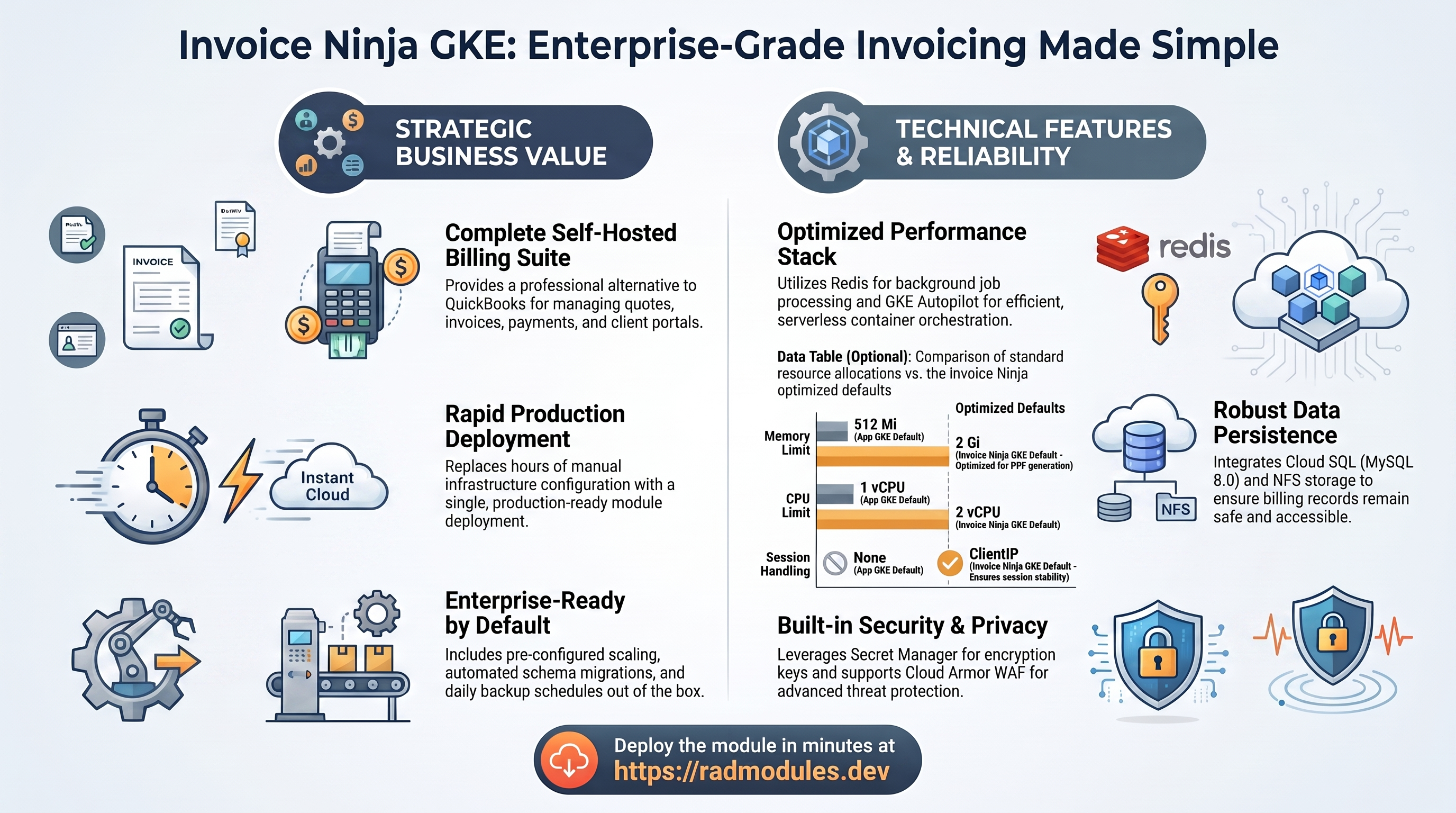
This guide describes every configuration variable available in the InvoiceNinja_GKE module. InvoiceNinja_GKE is a wrapper module that combines the generic App_GKE infrastructure module with the InvoiceNinja_Common shared application configuration to deploy Invoice Ninja — the open-source invoicing and billing platform — on Google Kubernetes Engine (GKE) Autopilot.
Invoice Ninja provides a complete self-hosted invoicing suite: quotes, invoices, receipts, client payments, recurring billing, expense tracking, time tracking, project management, and a self-service client portal. It is a self-hosted alternative to FreshBooks or QuickBooks.
Most configuration options in InvoiceNinja GKE map directly to the same options in App GKE. Where a variable is identical in behaviour, this guide references the App GKE guide rather than repeating the same documentation. Only the variables and defaults that are specific to Invoice Ninja are described in full here.
Note: Variables marked as platform-managed are set and maintained by the platform. You do not normally need to change them.
What Invoice Ninja costs on RAD, and how that compares
Invoice Ninja on RAD's GKE module costs about US$143 a month in your own project, plus a 175-credit (US$18) module fee once per deployment. If you only need it seasonally, see "Pause it for free" below to stop paying without losing your invoices. Invoice Ninja also ships as a Cloud Run module, which is the lower-cost option here (about US$99/month) — see the Cloud Run guide unless you already run GKE Autopilot for other apps.
What you pay on RAD
| In a Google Cloud project you own | In a project RAD manages for you | |
|---|---|---|
| Module fee, once per deployment | 175 credits (US$17.50) | 157.5 credits (10% lower) |
| Build time | A few credits per build | The same |
| Google Cloud running cost | Billed by Google to your own billing account, about US$142.62 a month for the default configuration (table below) | Metered hourly in credits; RAD publishes 112 credits a day |
| Who owns what | You own the project and its billing; RAD deploys and updates it | RAD owns the project, with guardrails, quotas and budget alerts; you get console access, and a minimum purchased balance is held in reserve |
10 credits cost US$1 on a one-off top-up, less on a plan. In a project RAD manages, the database, file server and network are shared by every application in the project, so a second application does not add a second database.
Default running cost in your own project (us-central1, Google list prices):
| Resource (module default) | Per month |
|---|---|
| GKE Autopilot pod, 2x vCPU / 2 GiB | US$72.16 |
| Cloud SQL for MySQL, 1 vCPU / 3.75 GB, zonal, 10 GB SSD | US$51.02 |
| NFS/cache file server (small VM) | US$13.43 |
| Cloud NAT and networking | US$5.00 |
| Cloud Storage (add-ons, backups) | US$1.00 |
| GKE cluster management fee | shared across every GKE app in the project; $0 if this is your only cluster, else ~73 |
| Total | about US$142.62 |
How it compares
- Invoice Ninja's own hosted plans are Ninja Pro at $14/month and Enterprise from $18/month for 1–2 account users, rising with team size — $94/month at 11–20 users and up to $300/month at 51–100 users (invoiceninja.com/pricing-plans, 8 October 2026).
- RAD's own-project running cost here (about $99/month) is a flat infrastructure cost that does not move as you add client-facing staff, so it costs more than Ninja Pro for a single user but undercuts Enterprise as soon as a handful of people need accounts.
- A bare VPS (Hetzner CPX22 or DigitalOcean 2 vCPU/4 GB, about $24/month) is cheaper in cash, but then you run MySQL, backups, security patches and PDF-rendering dependencies yourself — on a system that holds client payment and billing records, where that trade-off is a real one.
Pause it for free: delete a RAD-managed project, restore it when you need it
If Invoice Ninja runs in a project RAD manages for you and you expect to come back to it — a break between courses, a seasonal lull, or simply not knowing yet whether you'll need it next month — this is the better option, and it costs almost nothing.
Deleting a RAD-managed project unlinks its billing first, then asks Google to delete the project outright: Google's own 30-day recoverable soft delete. Unlike deleting Invoice Ninja as a single module, this does not tear down the Cloud Run/GKE service, Cloud SQL database, NFS file server and networking one by one — the whole project simply stops, and nothing is charged while it waits, because billing is already unlinked.
Restoring, within 30 days and only by the project's owner, asks Google to undelete the project and reattaches its billing account, then asks you to run Update on each deployment to confirm everything came back. Because nothing was individually destroyed, that Update finds the same resources already there — it is a check, not a rebuild, and an Update never charges the module fee again. This costs only a handful of credits (under US$1) in build time for a typical chain of deployments.
What this needs: you must own the project (not one RAD only manages billing for), you must restore it yourself within 30 days — after that Google deletes it for good — and restoring is admitted like creating a new project, so your purchased credit balance must still clear the tier's floor (100 credits for the sandbox tier most use fits). Google says most services are fully working again within 36 hours of a restore.
One real gap: nightly backups are written to a bucket inside the project, and that bucket has Cloud Storage's soft-delete explicitly turned off, so it is very likely gone as soon as you delete the project, even though the project itself is recoverable for 30 days. Invoice Ninja's own nightly export of the database and uploaded documents is kept in that bucket; copy it out first if you want a restorable snapshot beyond the project's own 30 days.
Pay only while you use it, the other way: delete and redeploy
In your own project, or once the 30-day window above has passed, the fallback is to delete Invoice Ninja outright and redeploy it later.
- What a redeploy costs: the module fee again, plus the builds — roughly the module fee shown above plus 3–6 credits of build time.
- When it's worth it: deleting saves money only once Invoice Ninja would otherwise sit unused for about 4 days or more in your own project (about 2 days or more in a RAD-managed one). The database and NFS file server are most of the running cost here, so deleting Invoice Ninja alone saves the whole bill above unless something else in the project shares them.
- Keep data first. Nightly backups are written to a bucket inside the deployment, and that bucket is deleted with it — copy the latest backup out (to Google Drive, or a bucket you keep) before deleting if you want to keep it.
Lab sessions and Managed Environments
- Lab sessions, for training. A trainer runs a session for a class. Each participant gets the app in their own Google Cloud project for 15 minutes to 24 hours, within an allowance the trainer sets. Either the trainer funds every place, or each participant pays for their own. Everything is deleted when the session ends and unused credits go back to the trainer.
- Managed Environments, for consultancies. A partner runs the app for a client from a ring-fenced wallet it funds, and settles with the client directly. If the wallet runs low, billing pauses and the data is kept, so nobody receives an unexpected charge. At the end the partner hands the project over and the deployments become the client's own.
- Credits can be bought in more than 20 currencies, including XAF, XOF, NGN, GHS, KES and ZAR, by card, bank transfer or mobile money.
Sources (8 October 2026): Google Cloud list prices from the Cloud Billing Catalog API; RAD fees and the daily-credit estimate from radmodules.dev/pricing; Google Cloud: delete and restore projects for the pause/restore mechanism; Invoice Ninja pricing for the hosted Ninja Pro/Enterprise comparison. Prices change; check each source before relying on a figure.
Standard Configuration Reference
The following configuration areas are provided by the underlying App_GKE module.
| Configuration Area | Ghost-Specific Notes |
|---|---|
| Project & Identity | Identical to App_GKE. |
| Application Identity | Invoice Ninja-specific defaults for application_name, application_display_name, and application_version; see Group 3: Application Identity. |
| Runtime & Scaling | Invoice Ninja-specific defaults for container_port, cpu_limit, memory_limit, and container_resources; see Group 4: Runtime & Scaling. |
| Environment Variables & Secrets | DB_CONNECTION=mysql, TRUSTED_PROXIES=*, and snappdf variables injected automatically; see Group 5: Environment Variables & Secrets. |
| Networking & Network Policies | Identical to App_GKE. |
| Initialization Jobs & CronJobs | db-init MySQL job and artisan-migrate supplied automatically by InvoiceNinja Common; see Group 11: Jobs & Scheduled Tasks. |
| Storage — NFS | enable_nfs defaults to true; see Group 16: Storage — NFS. |
| Storage — GCS | data GCS bucket provisioned automatically; see Group 17: Storage — GCS. |
| Database Configuration | MySQL 8.0 required; see Group 18: Database Configuration. |
| Backup Schedule & Retention | Identical to App_GKE. |
| Custom SQL Scripts | Identical to App_GKE. |
| Observability & Health | Invoice Ninja probe tuning; see Group 13: Observability & Health. |
| Cloud Armor WAF | Identical to App_GKE. |
| Identity-Aware Proxy | Identical to App_GKE. |
| Binary Authorization | Identical to App_GKE. |
| VPC Service Controls | Identical to App_GKE. |
| Redis Cache | Invoice Ninja requires Redis; enable_redis = true by default; see Group: Redis Cache. |
How InvoiceNinja GKE Relates to App GKE
InvoiceNinja GKE passes all variables through to App GKE and adds an InvoiceNinja Common sub-module that supplies Invoice Ninja-specific defaults and application configuration. The main effects are:
- MySQL 8.0 is required. Invoice Ninja's Laravel application only supports MySQL. The
database_typedefault is"MYSQL_8_0". DB_CONNECTION=mysqlis injected automatically. Laravel requires this environment variable to select the MySQL PDO driver.TRUSTED_PROXIES=*is injected automatically. Without this, Laravel generateshttp://links behind the GKE load balancer even when clients access via HTTPS, breaking invoice links.- snappdf PDF generation variables are injected.
PDF_GENERATOR=snappdfandSNAPPDF_EXECUTABLE_PATH=/usr/local/bin/chromeare set automatically. Theinvoiceninja/invoiceninja:5container ships Chromium at this path. APP_KEYis auto-generated and stored in Secret Manager.InvoiceNinja Commoncreates the Laravel encryption key on first apply and injects it at runtime. It is never written to state in plaintext.- A
dataGCS bucket is provisioned automatically.InvoiceNinja Commonprovides adatabucket definition for document storage. - Two initialisation jobs run on first deployment.
db-initcreates the MySQL schema and user;artisan-migrateruns Laravel migrations including initial seed data. Both run on every apply (execute_on_apply = true) so version upgrades automatically apply schema changes. - Resource defaults are sized for Invoice Ninja. The default
cpu_limit(2 vCPU) andmemory_limit(2 Gi) account for Chromium PDF generation. 4 Gi is recommended for high-volume deployments. - Redis is required and enabled by default. Invoice Ninja uses Redis for
QUEUE_CONNECTION,CACHE_DRIVER, andSESSION_DRIVER. Without Redis, background PDF generation and email delivery block the HTTP request cycle and fail under concurrent load. - Session affinity defaults to
"ClientIP". Invoice Ninja uses server-side PHP sessions. Without sticky routing, admin users are logged out on requests that route to a different pod.
Group 1: Project & Identity
Identical to App_GKE.
| Variable | Default | Description |
|---|---|---|
project_id | — | GCP project ID. Required. |
region | "us-central1" | GCP region. Used as fallback when network discovery cannot determine the region from existing VPC subnets. |
Group 2: Deployment Identity
| Variable | Default | Description |
|---|---|---|
tenant_id | "demo" | Short suffix appended to all resource names. |
support_users | [] | Email addresses for monitoring alerts and IAM access. |
resource_labels | {} | Labels applied to all provisioned resources. |
Group 3: Application Identity
Invoice Ninja-specific defaults:
| Variable | InvoiceNinja GKE Default | App GKE Default | Notes |
|---|---|---|---|
application_name | "invoiceninja" | "gkeapp" | Base name for GCP and Kubernetes resources. Do not change after deployment. |
application_display_name | "Invoice Ninja" | "App GKE Application" | Shown in the platform UI and dashboards. |
application_description | "Invoice Ninja Invoicing on GKE Autopilot" | "App GKE Custom Application…" | Descriptive label. |
application_version | "5" | "1.0.0" | The Invoice Ninja release version to deploy. |
display_name | "Invoice Ninja" | (not in App GKE) | Human-readable alias. |
description | "Invoice Ninja - Open-source invoicing platform on GKE Autopilot" | (not in App GKE) | Description passed to InvoiceNinja Common for init job metadata. |
Group 4: Runtime & Scaling
Invoice Ninja-specific defaults and behaviour:
| Variable | InvoiceNinja GKE Default | App GKE Default | Notes |
|---|---|---|---|
container_port | 80 | 8080 | Invoice Ninja uses nginx on port 80. Do not change unless your custom Dockerfile binds nginx to a different port. |
container_resources | { cpu_limit = "2000m", memory_limit = "2Gi" } | { cpu_limit = "1000m", memory_limit = "512Mi" } | Invoice Ninja requires 2 vCPU / 2 Gi minimum for Chromium PDF generation. |
cpu_limit | "2000m" | — | Shorthand alias for container_resources.cpu_limit. Passed to InvoiceNinja Common. |
memory_limit | "2Gi" | — | Shorthand alias for container_resources.memory_limit. Minimum 2 Gi for Chromium. |
min_instance_count | 1 | 1 | Same as App_GKE's own default — Invoice Ninja is kept warm. Cold starts involve PHP-FPM + Laravel bootstrap + optional migration. |
max_instance_count | 5 | 3 | Higher ceiling for invoice processing bursts. |
container_image_source | "prebuilt" | "custom" | The official invoiceninja/invoiceninja:5 image is production-ready without customisation. |
enable_cloudsql_volume | true | true | Cloud SQL Auth Proxy sidecar required for MySQL Unix socket connection. |
session_affinity | "ClientIP" | "None" | Important for Invoice Ninja. Without "ClientIP", admin users are logged out on requests routed to a different pod because PHP sessions are not shared across replicas. |
timeout_seconds | 300 | 300 | Increase to 600 for high-volume deployments where PDF generation or batch report exports may take longer. |
The deploy_application, container_image, container_build_config, enable_image_mirroring, enable_vertical_pod_autoscaling, container_protocol, cloudsql_volume_mount_path, service_annotations, service_labels, and enable_cloudsql_volume variables behave as described in the App_GKE documentation.
Group 5: Environment Variables & Secrets
Invoice Ninja-specific auto-injected environment variables:
The following variables are injected automatically by InvoiceNinja Common and do not need to be set manually in environment_variables:
| Variable | Auto-Injected Value | Purpose |
|---|---|---|
APP_ENV | "production" | Laravel environment mode. |
APP_DEBUG | "false" | Disables Laravel debug output. |
DB_CONNECTION | "mysql" | Laravel database driver. |
TRUSTED_PROXIES | "*" | Correct X-Forwarded-For and X-Forwarded-Proto handling behind the GKE load balancer. |
PDF_GENERATOR | "snappdf" | Invoice Ninja PDF renderer selection. |
SNAPPDF_EXECUTABLE_PATH | "/usr/local/bin/chrome" | Path to bundled Chromium in the container. |
MAIL_FROM_NAME | var.mail_from_name | Email sender display name. |
MAIL_FROM_ADDRESS | var.mail_from_address | Email sender address. |
The APP_KEY is injected as a Secret Manager reference via secret_environment_variables, not as a plaintext environment variable. It is resolved at pod start and never written to Terraform state.
User-configurable variables:
| Variable | Default | Description |
|---|---|---|
environment_variables | {} | Additional plain-text env vars injected into the pod. Use for SMTP configuration: MAIL_MAILER, MAIL_HOST, MAIL_PORT, MAIL_USERNAME. Core variables are set automatically. |
secret_environment_variables | {} | Secret Manager references. Use for MAIL_PASSWORD and other sensitive values. |
secret_rotation_period | "2592000s" | Secret rotation notification frequency. Default: 30 days. |
secret_propagation_delay | 30 | Seconds to wait after secret creation before pod start. Increase if deployments fail with secret not found errors. |
SMTP configuration example:
environment_variables = {
  MAIL_MAILER   = "smtp"
  MAIL_HOST     = "smtp.mailgun.org"
  MAIL_PORT     = "587"
  MAIL_USERNAME = "postmaster@mg.example.com"
}

secret_environment_variables = {
  MAIL_PASSWORD = "invoiceninja-smtp-password-secret"
}
Group 6: Backup & Maintenance
Invoice Ninja-specific defaults:
| Variable | Default | Notes |
|---|---|---|
backup_schedule | "0 2 * * *" | Daily at 02:00 UTC. Adjust to match your Recovery Point Objective. |
backup_retention_days | 7 | 7-day retention. Increase significantly for billing data — many jurisdictions require 5–7 year retention of invoice records. Recommended minimum: 90 days. |
Backup Import:
| Variable | Default | Description |
|---|---|---|
enable_backup_import | false | When true, runs a one-time import Kubernetes Job during deployment to restore the specified backup. |
backup_source | "gcs" | "gcs" imports from a Cloud Storage URI; "gdrive" imports from a Google Drive file ID. |
backup_uri | "" | Full GCS URI (e.g., "gs://my-bucket/invoiceninja.sql") or Google Drive file ID. |
backup_file | "backup.sql" | Filename of a backup in the module-managed GCS backups bucket. Alternative to backup_uri. |
backup_format | "sql" | Format of the backup file: sql, tar, gz, tgz, tar.gz, zip, auto. |
Group 7: CI/CD & GitHub Integration
Identical to App_GKE. Available variables: enable_cicd_trigger, github_repository_url, github_token, github_app_installation_id, cicd_trigger_config, enable_cloud_deploy, cloud_deploy_stages.
Typical use case: container_image_source = "prebuilt" is the default, so CI/CD triggers are most useful when switching to "custom" to build an Invoice Ninja image with company-specific configuration, branding assets, or extended plugins embedded in the image.
Group 9: Reliability Policies
Identical to App_GKE.
Available variables: enable_pod_disruption_budget (default true), pdb_min_available (default "1"), enable_topology_spread (default false), topology_spread_strict (default false).
Note: With
pdb_min_available = "1"and a single replica, the PDB prevents voluntary disruptions indefinitely. Use at least 2 replicas in production to allow rolling maintenance.
Group 10: GKE Backend Configuration
Invoice Ninja-specific defaults and behaviour:
| Variable | Default | Notes |
|---|---|---|
service_type | "LoadBalancer" | Exposes Invoice Ninja via a GKE external load balancer. |
workload_type | null | Defaults to Deployment. Setting stateful_pvc_enabled = true automatically resolves to StatefulSet. |
session_affinity | "ClientIP" | Required for Invoice Ninja. PHP sessions are stored per-pod. Without "ClientIP", admin users are logged out on requests that route to a different replica. |
namespace_name | "" | Auto-generated from application_name and tenant_id when empty. |
gke_cluster_name | "" | Leave empty to auto-discover a Services_GCP-managed cluster. |
deployment_timeout | 1800 | 30-minute rollout timeout. Invoice Ninja may need extended time on large-database initial migrations. |
enable_network_segmentation | false | Set true to create Kubernetes NetworkPolicy resources limiting inter-pod traffic. |
termination_grace_period_seconds | 30 | Kubernetes waits 30 seconds after SIGTERM before forcing SIGKILL. Increase to 60 if Invoice Ninja needs time to drain in-flight PDF generation requests. |
Group 11: Jobs & Scheduled Tasks
Invoice Ninja default initialisation jobs:
When initialization_jobs is left as the default (empty list []), InvoiceNinja Common supplies two jobs automatically:
| Job | Image | Purpose | Runs on Every Apply |
|---|---|---|---|
db-init | mysql:8.0-debian | Creates MySQL database and user with correct charset and privileges | Yes |
artisan-migrate | invoiceninja/invoiceninja:5 | Runs php artisan migrate --seed --force to apply schema and seed data | Yes |
artisan-migrate depends on db-init and runs after it completes. Running on every apply is intentional — Invoice Ninja version upgrades include database migrations that must be applied when application_version is incremented.
Override initialization_jobs with a non-empty list to replace both default jobs with custom jobs.
CronJobs are available and behave as described in the App_GKE documentation. CronJob fields use Kubernetes CronJob semantics (restart_policy, concurrency_policy, failed_jobs_history_limit, successful_jobs_history_limit, starting_deadline_seconds, suspend) rather than Cloud Run-style fields.
Additional Services (sidecar containers) are also available via additional_services.
Group 13: Observability & Health
Invoice Ninja-specific probe defaults:
Invoice Ninja's PHP-FPM initialisation, Laravel bootstrap, and first-boot database migration make it a slow-starting application. The health probe defaults are tuned to accommodate this.
InvoiceNinja_GKE declares two sets of probe variables, but only one actually reaches the Kubernetes pod spec:
-
startup_probe/liveness_probe— these ARE what controls the real K8s probe.main.tfunconditionally merges a hardcoded object intoapplication_config, overriding whateverInvoice Ninja Commonsupplies:Variable Value startup_probe{ enabled=true, type="HTTP", path="/", initial_delay_seconds=90, timeout_seconds=10, period_seconds=15, failure_threshold=20 }liveness_probe{ enabled=true, type="HTTP", path="/", initial_delay_seconds=120, timeout_seconds=10, period_seconds=30, failure_threshold=3 }Invoice Ninja has no dedicated health endpoint; the root path
/returning HTTP 200 (once PHP-FPM/nginx are serving) is the readiness signal. 20 × 15s = 300s of additional tolerance after the 90s initial delay accommodates first-boot migrations. -
startup_probe_config/health_check_config— declared with TCP defaults (their own description explains why: Invoice Ninja's/sometimes 302-redirects tohttps://<app_url>/, and an HTTP kubelet probe that follows the redirect hitshttps://<pod-ip>:443with nothing listening, causing a false failure). However, tracing the wiring shows these two variables are never read byApp_GKE's actual K8s-probe path for this module — the hardcodedstartup_probe/liveness_probeoverride above always wins. Treat them as currently inert for GKE; do not rely on changing them to alter the deployed probe type.
| Variable | Default |
|---|---|
startup_probe_config | { enabled=true, type="TCP", path="/", initial_delay_seconds=90, timeout_seconds=10, period_seconds=15, failure_threshold=20 } |
health_check_config | { enabled=true, type="TCP", path="/", initial_delay_seconds=120, timeout_seconds=10, period_seconds=30, failure_threshold=3 } |
uptime_check_config: Defaults to { enabled = false, path = "/" } — uptime checks are disabled by default in the GKE variant. Enable explicitly for production monitoring.
| Variable | Default | Description |
|---|---|---|
uptime_check_config | { enabled=false, path="/" } | Cloud Monitoring uptime check from global probe locations. Enable for production. |
alert_policies | [] | Custom Cloud Monitoring metric alert policies. |
Group 14: Resource Quota
Identical to App_GKE.
Available variables: enable_resource_quota, quota_cpu_requests, quota_cpu_limits, quota_memory_requests, quota_memory_limits, quota_max_pods, quota_max_services, quota_max_pvcs.
Critical:
quota_memory_requestsandquota_memory_limitsmust use binary unit suffixes (Gi,Mi) when set. Bare integers are treated as bytes by Kubernetes and prevent all pods from being scheduled.
Group 16: Storage — NFS
Invoice Ninja-specific defaults:
| Variable | Default | Notes |
|---|---|---|
enable_nfs | true | NFS is enabled by default. Invoice Ninja writes uploaded documents, client logos, and generated PDFs to the container filesystem. Without NFS, files are isolated per pod and lost on pod restart or re-schedule. |
nfs_mount_path | "/var/www/app/public/storage" | Container path where the NFS volume is mounted. |
nfs_volume_name | "nfs-data-volume" | Kubernetes volume name for the NFS mount. |
nfs_instance_name | "" | Name of an existing NFS GCE VM. Leave empty to auto-discover. |
nfs_instance_base_name | "app-nfs" | Base name for inline NFS VM. Deployment ID is appended. |
Group 17: Storage — GCS
InvoiceNinja Common automatically provisions a data GCS bucket in addition to any buckets defined in storage_buckets. You do not need to define it manually.
| Bucket | name_suffix | Purpose |
|---|---|---|
| Auto-provisioned | data | Invoice Ninja document storage (uploaded files, logos, generated PDFs) |
| Variable | Default | Description |
|---|---|---|
create_cloud_storage | true | Set false to skip GCS bucket creation. |
storage_buckets | [{ name_suffix = "data" }] | Additional GCS buckets to provision. |
gcs_volumes | [] | GCS buckets to mount via the GCS Fuse CSI Driver. |
manage_storage_kms_iam | false | Creates CMEK KMS key and enables CMEK on all storage buckets. |
enable_artifact_registry_cmek | false | Creates Artifact Registry KMS key for at-rest image encryption. |
Group 18: Database Configuration
Invoice Ninja-specific defaults and restrictions:
| Variable | InvoiceNinja GKE Default | App GKE Default | Notes |
|---|---|---|---|
database_type | "MYSQL_8_0" | "POSTGRES" | Invoice Ninja requires MySQL 8.0. Do not change — Invoice Ninja's PDO driver is MySQL-only. |
application_database_name | "invoiceninja" | "gkeappdb" | MySQL database name. Immutable after first deployment — changing recreates the database and destroys all invoice and billing data. |
application_database_user | "invoiceninja" | "gkeappuser" | MySQL application user. Immutable after first deployment. |
db_name | "invoiceninja" | (not in App GKE) | Shorthand passed to InvoiceNinja Common for the db-init and artisan-migrate jobs. Should match application_database_name. |
db_user | "invoiceninja" | (not in App GKE) | Shorthand passed to InvoiceNinja Common. Should match application_database_user. |
database_password_length | 32 | 32 | Range: 16–64 characters. |
Cloud SQL instance discovery:
| Variable | Default | Description |
|---|---|---|
sql_instance_name | "" | Name of an existing Cloud SQL instance. Leave empty to auto-discover. |
sql_instance_base_name | "app-sql" | Base name for inline Cloud SQL instance. Deployment ID is appended. |
Automatic password rotation:
| Variable | Default | Description |
|---|---|---|
enable_auto_password_rotation | false | Deploys a CronJob and Eventarc trigger for automated password rotation. |
rotation_propagation_delay_sec | 90 | Seconds to wait after rotation before restarting pods. |
Group 19: Custom Domain & Static IP
Identical to App_GKE.
Invoice Ninja URL configuration note: Invoice Ninja stores its application URL in the database during initial setup. When using a custom domain, the
APP_URLenvironment variable should be set to the domain URL before first boot. Set it viaenvironment_variables:environment_variables = {
APP_URL = "https://invoices.example.com"
}Invoice Ninja uses
APP_URLto generate links in sent invoices and client portal emails. Incorrect URL configuration causes broken links in client-facing documents.
| Variable | Default | Description |
|---|---|---|
enable_custom_domain | true | Provisions a Kubernetes Ingress resource for the hostnames in application_domains. Enabled by default. |
application_domains | [] | Custom domain names. DNS must point to the load balancer IP after deployment. |
reserve_static_ip | true | Provisions a global static external IP for stable DNS mapping. |
static_ip_name | "" | Name for the reserved IP. Auto-generated when empty. |
network_tags | ["nfsserver"] | Network tags applied to GKE nodes. The nfsserver tag is required for NFS firewall rules when enable_nfs = true. |
Group 20: Identity-Aware Proxy (IAP)
When enable_iap = true, IAP requires Google identity authentication before users can access Invoice Ninja. Useful for restricting the billing system to authenticated employees.
| Variable | Default | Description |
|---|---|---|
enable_iap | false | Enables IAP on the load balancer. |
iap_authorized_users | [] | Individual users or service accounts. Format: 'user:email@example.com'. |
iap_authorized_groups | [] | Google Groups. Format: 'group:name@example.com'. |
iap_oauth_client_id | "" | OAuth 2.0 Client ID. Required when enable_iap = true. |
iap_oauth_client_secret | "" | OAuth 2.0 Client Secret. Sensitive. |
iap_support_email | "" | Support email shown on the OAuth consent screen. |
Group 21: Cloud Armor WAF & CDN
| Variable | Default | Notes |
|---|---|---|
enable_cloud_armor | false | Attaches a Cloud Armor WAF policy to the GKE Ingress backend. |
admin_ip_ranges | [] | CIDR ranges permitted through Cloud Armor WAF rules. |
cloud_armor_policy_name | "default-waf-policy" | Name of the Cloud Armor security policy to attach. |
enable_cdn | false | Routes traffic through the Gateway API for Cloud CDN preparation. Note: after deployment, CDN must be enabled on the backend service out-of-band via gcloud compute backend-services update --enable-cdn. Cloud CDN and IAP are mutually exclusive on the same Gateway. Requires enable_custom_domain = true. |
Redis Cache
Redis is required for production Invoice Ninja deployments and is enabled by default. Invoice Ninja uses Redis for three critical roles:
QUEUE_CONNECTION=redis— Background PDF generation, email delivery, and webhook processing. Without Redis, these block the HTTP request cycle and cause timeouts under concurrent load.CACHE_DRIVER=redis— Application-level caching for company settings, client data, and tax calculations.SESSION_DRIVER=redis— Session storage. Combined withsession_affinity = "ClientIP", this allows admin sessions to survive pod restarts (since the session data lives in Redis, not on the pod).
Note: In
InvoiceNinja GKE, the Redis variables are in group 15.
| Variable | Default | Description |
|---|---|---|
enable_redis | true | Enables Redis for queue, cache, and session. Required for production. Disable only in development environments where background job processing is not needed. |
redis_host | "" (defaults to NFS server IP) | Redis server hostname or IP. Leave blank to use the automatically discovered NFS server IP. Override with a Memorystore for Redis instance for production reliability. Example: "10.128.0.10". |
redis_port | "6379" | Redis TCP port string. |
redis_auth | "" | Redis AUTH password. Sensitive — never stored in state in plaintext. Set for Memorystore instances with AUTH enabled. |
Validating Redis connectivity:
# List Memorystore Redis instances (if using dedicated Memorystore)
gcloud redis instances list \
  --region=REGION \
  --project=PROJECT_ID \
  --format="table(name,host,port,state,memorySizeGb,authEnabled)"

# Confirm Redis environment variables are set in the Invoice Ninja pod
kubectl exec -n NAMESPACE POD_NAME -- env | grep -iE "redis|queue|cache|session"

# Test Redis TCP connectivity from inside the pod
kubectl exec -n NAMESPACE POD_NAME -- \
  nc -zv REDIS_HOST 6379

# Check that Invoice Ninja queues are processing (look for queue worker logs)
kubectl logs -n NAMESPACE -l app=invoiceninja --tail=50 | grep -i queue
Group 22: VPC Service Controls
Identical to App_GKE.
| Variable | Default | Description |
|---|---|---|
enable_vpc_sc | false | Enforces VPC-SC perimeter around GCP API calls. Requires an existing perimeter. |
vpc_cidr_ranges | [] | VPC subnet CIDR ranges for VPC-SC access level. Auto-discovered when empty. |
vpc_sc_dry_run | true | Logs violations without blocking. Set false to enforce. |
organization_id | "" | GCP Organization ID. Auto-discovered from project. Required for folder-nested projects. |
enable_audit_logging | false | Enables detailed DATA_READ, DATA_WRITE, and ADMIN_READ Cloud Audit Logs. |
Group 23: Invoice Ninja Application Settings
These variables are specific to Invoice Ninja and are not present in App_GKE.
| Variable | Default | Description |
|---|---|---|
invoiceninja_admin_email | "admin@example.com" | Administrator email address. Used for login and system notifications. Change to a real address before going live. |
mail_from_name | "Invoice Ninja" | Display name shown as the sender on outgoing Invoice Ninja emails (invoice delivery, payment confirmations, quotes). |
mail_from_address | "ninja@example.com" | Email address used as the sender. Must match a verified sending domain for deliverability. |
Stateful Workloads
For deployments where persistent per-pod storage is required alongside NFS (e.g., each pod caches generated PDFs locally before uploading), Invoice Ninja GKE supports StatefulSet mode.
Setting stateful_pvc_enabled = true automatically resolves workload_type to "StatefulSet". Do not set workload_type = "Deployment" alongside stateful_pvc_enabled = true — this fails at plan time.
| Variable | Default | Description |
|---|---|---|
stateful_pvc_enabled | null | Enables PVC templates in the StatefulSet. Auto-selects StatefulSet when true. |
stateful_pvc_size | "10Gi" | Storage per pod replica. Invoice Ninja temporary PDF storage can grow quickly — provision 20–50 Gi for active deployments. PVC size can be expanded but not reduced. |
stateful_pvc_mount_path | "/data" | Container path for the per-pod PVC. |
stateful_pvc_storage_class | "standard-rwo" | Kubernetes StorageClass. "standard-rwo" (Balanced PD, ReadWriteOnce) is the GKE Autopilot default. |
stateful_headless_service | null | Creates a headless Service for stable pod DNS. Set when Invoice Ninja pods require peer discovery. |
stateful_pod_management_policy | null | "OrderedReady" or "Parallel". Defaults to "OrderedReady". |
stateful_update_strategy | null | "RollingUpdate" or "OnDelete". Defaults to "RollingUpdate". |
Module Outputs
InvoiceNinja GKE exposes the following outputs:
| Output | Description |
|---|---|
service_name | Name of the Kubernetes service. |
service_url | Service URL. |
service_external_ip | External IP address of the load balancer. |
project_id | GCP project ID. |
deployment_id | Deployment ID suffix. |
namespace | Kubernetes namespace. |
database_instance_name | Name of the Cloud SQL MySQL instance. |
database_name | Name of the application database. |
database_user | Name of the application database user. |
database_password_secret | Secret Manager secret name for the database password. |
storage_buckets | Created GCS storage buckets. |
container_image | Container image used for the deployment. |
cicd_enabled | Whether the CI/CD pipeline is enabled. |
github_repository_url | GitHub repository URL connected for CI/CD. |
kubernetes_ready | true when the GKE cluster endpoint is reachable and all Kubernetes resources are deployed. false on first apply of a new inline cluster — re-run apply to complete the deployment. |
Exploring with the GCP Console
GKE Workloads
- Navigate to Kubernetes Engine → Workloads.
- Filter by the Invoice Ninja namespace (auto-generated as
invoiceninja-<deployment-id>whennamespace_nameis empty). - The Deployment or StatefulSet for
invoiceninjashows the current number of running pods, rollout status, and container image. - Click the workload name to see pod conditions, events, and resource usage. Watch for
OOMKilledevents under 2 Gi memory — they indicate Chromium PDF generation hitting memory limits.
GKE Services & Ingress
- Navigate to Kubernetes Engine → Services & Ingress.
- Find the
invoiceninjaService (typeLoadBalancerby default). Note the external IP address — this is Invoice Ninja's public endpoint. - If
enable_custom_domain = true, find the Ingress resource and verify the SSL certificate status showsACTIVE.
GKE Workload Pods
- Navigate to Kubernetes Engine → Workloads → select the
invoiceninjaworkload → Managed pods. - Click any pod to view its logs, environment variables (non-secret), volume mounts, and resource limits.
- The Logs tab streams PHP-FPM access logs, Laravel application logs, and nginx access logs. Look for PHP fatal errors, queue connection failures, and Chromium crash reports.
Kubernetes Jobs (Initialisation)
- Navigate to Kubernetes Engine → Jobs (or Workloads filtered to Jobs).
- Filter by the Invoice Ninja namespace.
- Find the
db-initandartisan-migratejobs. Their status showsCompleteafter a successful deployment orFailedif the initialisation encountered an error. - Click a Job to see its execution history, pod logs, and exit codes. Artisan migration output is the most useful for debugging schema-related issues after version upgrades.
Cloud SQL
- Navigate to SQL → select the MySQL 8.0 instance.
- Overview: monitor CPU, memory, and storage utilisation. Invoice Ninja's reporting features are read-heavy — monitor read IOPS under batch export load.
- Connections tab: view active connections. Each GKE pod with
enable_cloudsql_volume = truemaintains connections via the Auth Proxy sidecar. - Databases: verify
invoiceninjadatabase exists. - Operations: view recent CREATE, ALTER, and DROP operations from the
artisan-migratejob.
Secret Manager
- Navigate to Security → Secret Manager.
- Find the Invoice Ninja secrets (prefixed with the deployment resource prefix):
- Database password secret
- Database root password secret
APP_KEYsecret (Laravel encryption key)
- Verify all secrets have an
ENABLEDlatest version. ADISABLEDorDESTROYEDversion causes Invoice Ninja pods to fail to start with a KubernetesCreateContainerConfigError.
Monitoring
- Navigate to Monitoring → Metrics Explorer.
- Select metric
kubernetes.io/container/memory/used_bytesfiltered to the Invoice Ninja namespace. Watch for memory pressure during PDF generation. - Navigate to Monitoring → Uptime checks to see uptime status (if
uptime_check_config.enabled = true). - Navigate to Monitoring → Alerting for configured alert policies.
Exploring with gcloud
Use these commands to inspect and troubleshoot the Invoice Ninja GKE deployment. Replace PROJECT_ID, CLUSTER_NAME, REGION, NAMESPACE, and DEPLOYMENT_ID with your actual values.
Inspect the GKE cluster and workloads
# List GKE clusters in the project
gcloud container clusters list \
  --project=PROJECT_ID \
  --format="table(name,location,status,currentMasterVersion,currentNodeVersion)"

# Get credentials for the cluster
gcloud container clusters get-credentials CLUSTER_NAME \
  --region=REGION \
  --project=PROJECT_ID

# List all pods in the Invoice Ninja namespace
kubectl get pods -n NAMESPACE \
  -o wide \
  --sort-by='.status.startTime'

# Describe the Invoice Ninja deployment
kubectl describe deployment invoiceninja -n NAMESPACE

# View resource usage per pod
kubectl top pods -n NAMESPACE
Stream and filter pod logs
# Stream Invoice Ninja application logs
kubectl logs -n NAMESPACE \
  -l app=invoiceninja \
  --tail=100 \
  --follow

# Filter for PHP errors
kubectl logs -n NAMESPACE \
  -l app=invoiceninja \
  --tail=200 | grep -iE "error|exception|fatal|warning"

# Filter for PDF generation events
kubectl logs -n NAMESPACE \
  -l app=invoiceninja \
  --tail=200 | grep -iE "pdf|snappdf|chromium|chrome"

# Filter for queue processing events
kubectl logs -n NAMESPACE \
  -l app=invoiceninja \
  --tail=200 | grep -iE "queue|job|dispatch"
Inspect initialisation jobs
# List all jobs in the namespace
kubectl get jobs -n NAMESPACE \
  -o wide \
  --sort-by='.metadata.creationTimestamp'

# Describe the artisan-migrate job
kubectl describe job artisan-migrate -n NAMESPACE

# Get logs from the artisan-migrate pod (useful for debugging migration errors)
MIGRATE_POD=$(kubectl get pods -n NAMESPACE \
  -l job-name=artisan-migrate \
  -o jsonpath='{.items[-1].metadata.name}')
kubectl logs -n NAMESPACE $MIGRATE_POD

# Get logs from db-init
DBINIT_POD=$(kubectl get pods -n NAMESPACE \
  -l job-name=db-init \
  -o jsonpath='{.items[-1].metadata.name}')
kubectl logs -n NAMESPACE $DBINIT_POD
Inspect Kubernetes Services and Ingress
# Get the external IP of the Invoice Ninja LoadBalancer service
kubectl get service -n NAMESPACE invoiceninja \
  -o jsonpath='{.status.loadBalancer.ingress[0].ip}'

# List all services in the namespace
kubectl get services -n NAMESPACE \
  -o wide

# Describe the Ingress (if custom domain is enabled)
kubectl describe ingress -n NAMESPACE

# Check TLS certificate status on the Ingress
kubectl get managedcertificate -n NAMESPACE
Inspect the Horizontal Pod Autoscaler
# Get HPA status for Invoice Ninja
kubectl get hpa -n NAMESPACE

# Describe HPA with current metrics and scaling targets
kubectl describe hpa invoiceninja -n NAMESPACE
Inspect Cloud SQL
# List Cloud SQL instances
gcloud sql instances list \
  --project=PROJECT_ID \
  --format="table(name,databaseVersion,state,ipAddresses[0].ipAddress)"

# Check active connections
gcloud sql instances describe INSTANCE_NAME \
  --project=PROJECT_ID \
  --format="json(name,state,settings.ipConfiguration,serverCaCert)"

# List databases
gcloud sql databases list \
  --instance=INSTANCE_NAME \
  --project=PROJECT_ID

# List users
gcloud sql users list \
  --instance=INSTANCE_NAME \
  --project=PROJECT_ID \
  --format="table(name,host,passwordPolicy.status)"
Inspect Secret Manager
# List Invoice Ninja secrets
gcloud secrets list \
  --project=PROJECT_ID \
  --filter="name~invoiceninja" \
  --format="table(name,replication.automatic,createTime)"

# Check APP_KEY secret versions
gcloud secrets versions list APP_KEY_SECRET_NAME \
  --project=PROJECT_ID \
  --format="table(name,state,createTime)"

# Verify the secret is accessible (tests IAM permissions)
gcloud secrets versions access latest \
  --secret=APP_KEY_SECRET_NAME \
  --project=PROJECT_ID \
  --format=json | head -c 20
Inspect Memorystore Redis (if using dedicated instance)
# List Redis instances
gcloud redis instances list \
  --region=REGION \
  --project=PROJECT_ID \
  --format="table(name,host,port,state,memorySizeGb,authEnabled)"

# Describe the Redis instance
gcloud redis instances describe REDIS_INSTANCE_NAME \
  --region=REGION \
  --project=PROJECT_ID

# Test Redis connectivity from inside a running pod
kubectl exec -n NAMESPACE \
  $(kubectl get pods -n NAMESPACE -l app=invoiceninja -o jsonpath='{.items[0].metadata.name}') \
  -- nc -zv REDIS_HOST 6379
Inspect GCS storage
# List storage buckets for this deployment
gcloud storage ls --project=PROJECT_ID | grep invoiceninja

# List objects in the data bucket
gcloud storage ls gs://BUCKET_NAME/

# Check bucket IAM
gcloud storage buckets get-iam-policy gs://BUCKET_NAME

# View lifecycle rules
gcloud storage buckets describe gs://BUCKET_NAME \
  --format="json(lifecycle)"
Check monitoring and alerts
# List uptime checks
gcloud monitoring uptime list-configs \
  --project=PROJECT_ID \
  --format="table(displayName,monitoredResource.labels.host,period,timeout)"

# List alert policies
gcloud alpha monitoring policies list \
  --project=PROJECT_ID \
  --format="table(displayName,enabled,conditions[0].conditionThreshold.filter)"
Configuration Pitfalls & Sensible Defaults
Risk levels: Critical (data loss, full outage, security breach) — High (service unavailable or significant degradation) — Medium (degraded function or increased cost) — Low (minor impact).
| Variable | Sensible Default | Risk | Consequence of Incorrect Value |
|---|---|---|---|
project_id | (required) | Critical | No default — deployment fails immediately. |
database_type | "MYSQL_8_0" | Critical | Invoice Ninja requires MySQL exclusively. Setting to POSTGRES causes the application to fail at startup with a PDO driver error. The GKE module wires MySQL credentials automatically — mismatched database type breaks all credential injection. |
application_database_name | "invoiceninja" | Critical | Immutable after first deployment. Changing this causes Terraform to recreate the database, destroying all invoice, client, and payment data. |
application_database_user | "invoiceninja" | Critical | Immutable after first deployment. Changing this recreates the MySQL user, invalidates credentials, and breaks the application connection. |
enable_redis | true | Critical | Invoice Ninja REQUIRES Redis for background queue processing. Without Redis, PDF generation and email delivery are synchronous — they block HTTP requests, cause client-facing timeouts, and fail under concurrent load. Invoice delivery becomes unreliable. |
redis_host | "" | High | Auto-resolves to NFS server IP. If NFS is disabled and no explicit redis_host is set, Invoice Ninja cannot connect to its queue backend at startup. Pods start but queue jobs fail silently. |
enable_nfs | true | High | Invoice Ninja writes uploaded documents, client logos, and cached data to the container filesystem. Without NFS, the /var/www/app/public/storage directory is isolated per pod — content uploaded to one pod is invisible to others and lost on pod restart. |
session_affinity | "ClientIP" | High | Invoice Ninja uses server-side PHP sessions stored in Redis. Without "ClientIP", admin requests may route to a pod without the active session context, logging users out mid-session. Always keep "ClientIP" for any multi-replica deployment. |
container_resources.memory_limit | "2Gi" | High | Below 1 Gi, Chromium OOM-kills during PDF generation, returning blank or corrupt PDFs to clients. Active invoice environments with concurrent PDF renders require 4 Gi. |
invoiceninja_admin_email | "admin@example.com" | Medium | The default placeholder must be changed to a real address. The administrator cannot receive system notifications or complete password reset flows with a placeholder email. |
mail_from_address | "ninja@example.com" | High | Invoice delivery emails from an unverified domain are rejected by client mail servers or marked as spam. Configure a verified sender domain before sending invoices to clients. |
backup_retention_days | 7 | Medium | Severely insufficient for billing data. Many jurisdictions require 5–7 year retention of invoice records. Increase to a minimum of 90 days; consider 365 days or more for compliance. |
pdb_min_available | "1" | Medium | With a single replica, PDB prevents voluntary disruptions indefinitely — node upgrades and cluster maintenance stall. Use at least 2 replicas in production to allow rolling maintenance. |
startup_probe initial_delay_seconds | 90 | High | Invoice Ninja runs PHP bootstrap + optional migrations on first boot. Reducing below 60 causes Kubernetes to restart the pod before Invoice Ninja is ready, creating a restart loop with escalating backoff. |
enable_cloud_armor | false | Medium | Without Cloud Armor, the Invoice Ninja admin panel (/) is protected only by application-level authentication. Bot traffic and credential stuffing attacks against the login form are common. Enable for any publicly accessible deployment. |
quota_memory_requests / quota_memory_limits | "" | Critical (GKE-specific) | Must use binary suffixes (Gi, Mi) when set. Bare integers are treated as bytes, preventing all pods from being scheduled and causing a complete deployment outage. |
enable_topology_spread | false | Medium | Without topology spread, all replicas may land in the same GKE zone. A zone failure takes down the entire Invoice Ninja deployment. Enable for production deployments with min_instance_count > 1. |
APP_URL env var | (not set by default) | Medium | If Invoice Ninja initialises without a correct APP_URL, all links in sent invoices and client portal emails reference localhost or an incorrect URL. Set APP_URL in environment_variables before first boot. |
Related guides
- Hands-on lab: InvoiceNinja on GKE Autopilot — deploy it step by step, with the console screens and commands at each stage.
- Invoice Ninja on Google Cloud Run — the same application on Cloud Run, for when you need the other deployment target.
- InvoiceNinja Common Shared Configuration Module — the configuration shared by both deployment targets.
Need RAD to do something it does not do yet? Request it on the roadmap, or vote on what is already there.