Snipe-IT on Google Cloud Run
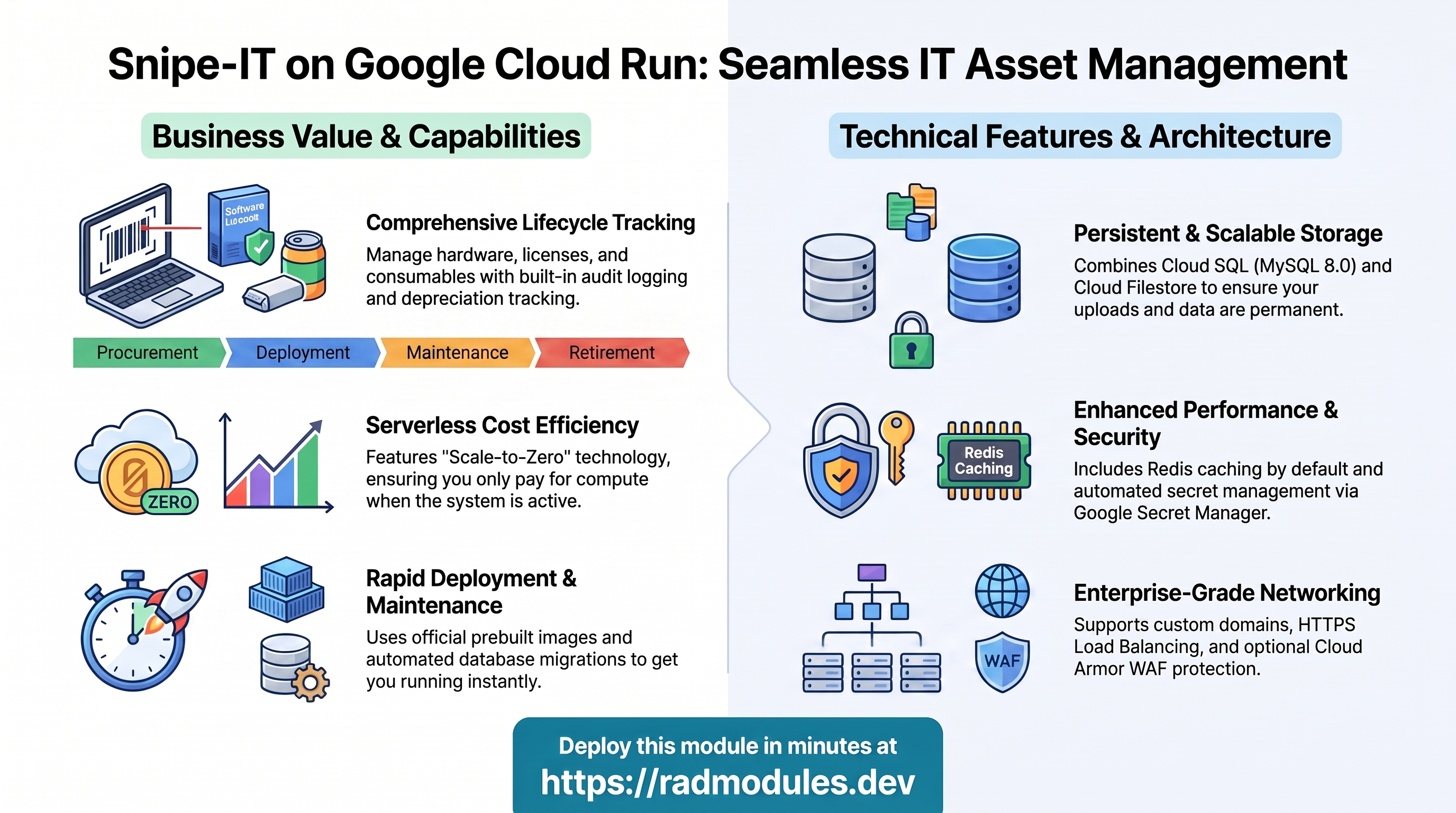
Snipe-IT is a free, open-source IT asset and inventory management system used to track hardware, software licences, accessories, and consumables, with asset check-in/out, audit logging, depreciation, and a full REST API. It is built on Laravel/PHP and runs behind Apache. This module deploys Snipe-IT on Cloud Run v2 on top of the App_CloudRun foundation, which provisions and manages the shared Google Cloud infrastructure.
This guide focuses on the cloud services Snipe-IT uses and how to explore and operate them from the Google Cloud Console and the command line. For the mechanics common to every Cloud Run application — service identity, ingress and load balancing, scaling and concurrency, CI/CD, Cloud Armor, IAP, Binary Authorization, VPC Service Controls, backups, and the deployment lifecycle — refer to the App_CloudRun foundation guide rather than repeating them here.
What Snipe-IT costs on RAD, and how that compares
Running Snipe-IT in your own GCP project costs about $83.61/month in Google Cloud charges; RAD's module fee is a one-time 110 credits (or 99 credits in a RAD-managed project), covering setup and support -- not the ongoing cloud bill, which Google bills you directly in your own project or RAD meters hourly in credits in a RAD-managed one. Or see the GKE guide for the alternative deployment target; either way, if you deploy into a RAD-managed project you can pause the whole thing for free when you are not using it -- see Pause it for free below.
What you pay on RAD
| Your own project | RAD-managed project | |
|---|---|---|
| Module fee | 110 credits, once | 99 credits, once (10% lower) |
| Build time | metered in credits as the build runs (a few credits, typically) | same |
| Google Cloud running cost | ~$83.61/month, billed to your own billing account at Google's list price | ~32 credits/day, metered hourly by RAD at list price plus margin |
Default running cost in your own project
| Resource | US$/month (Google list price, us-central1) |
|---|---|
| Cloud Run, 1x vCPU / 2 GiB (scaleToZero) | $13.16 |
| Cloud SQL for MySQL, 1 vCPU / 3.75 GB, zonal, 10 GB SSD | $51.02 |
| NFS/cache file server (small VM) | $13.43 |
| Cloud NAT and networking | $5.00 |
| Cloud Storage (add-ons, backups) | $1.00 |
| Total | $83.61 |
How it compares
- Snipe-IT's own official hosted plans start at $39.99/month (Basic Hosting, unlimited users and assets; source: https://snipeitapp.com/pricing) -- a close, directly comparable alternative to running it yourself.
- Running it yourself on a bare VPS is still the cheapest cash option -- Hetzner CPX22 (2 vCPU/4GB) runs about $24/month, a DigitalOcean 2 vCPU/4GB Droplet is also $24/month, and a GCP Compute Engine e2-standard-2 (2 vCPU/8GB) is about $49/month -- plus the admin's own time for backups, security patches and upgrades, which RAD's managed Cloud SQL, Secret Manager and monitoring cover for you -- but RAD's price is never meant to beat a VPS, only to replace the admin time a VPS still needs.
- An asset register is checked in and out of occasionally through the working day, not continuously polled, so the running cost below is driven by the database and the shared file server, not by request volume.
Pause it for free: delete a RAD-managed project, restore it when you need it
This is the headline for a RAD-managed project. Deleting a RAD-managed project first unlinks its billing, then asks Google to delete the project outright -- Google's own 30-day recoverable soft delete. Unlike deleting one module, this does not tear down Cloud SQL, any VM or the compute resource one by one: the whole project simply stops, and nothing is charged while it waits, because billing is already unlinked.
Restoring, within 30 days and only by the project's owner, asks Google to undelete the project and reattaches its billing account, then asks you to run Update on each deployment to confirm everything came back. Because nothing was individually destroyed, that Update finds the same resources already there -- it is a check, not a rebuild, and an Update never charges the module fee again. This costs only a handful of credits (under US$1) in total for a typical 2-3-deployment chain.
What this needs: you must own the project (not one RAD only manages billing for), you must restore it yourself within 30 days -- after that Google deletes it for good -- and restoring is admitted like creating a new project, so your purchased credit balance must still clear the tier's floor (100 credits for the sandbox tier most study/demo use fits). Google says most services are fully working again within 36 hours of a restore.
One real gap: nightly backups are written to a bucket inside the project, and that bucket has Cloud Storage's soft-delete explicitly turned off, so it is very likely gone as soon as you delete the project -- even though the project itself is recoverable for 30 days. If you have customised the app and want to keep that work, copy a backup out (to Google Drive, or a bucket outside the project) before deleting. For a default install with nothing irreplaceable in it, this does not matter.
Pay only while you use it, the other way: delete and redeploy
In your own project (or once you are past the 30-day restore window above), the alternative is to delete Snipe-IT outright and redeploy it later. A redeploy costs the module fee again, plus the builds -- roughly 110 + 3-6 credits of build time.
Deleting saves money only once Snipe-IT would otherwise sit unused long enough to clear that redeploy cost against its own daily running cost -- against the own-project total above, that works out to about 4 days or more. Most of the running cost here is usually the database and the NFS/cache VM; they stop only when nothing else in the project uses them, so deleting this app while something else shares the project saves only this app's own compute part.
Keep data first: nightly backups go to a bucket inside the deployment and are deleted with it, so copy the latest backup out before deleting if you want to keep it.
Lab sessions and Managed Environments
- Lab sessions, for training: a trainer runs a session for a class. Each participant gets the app in their own Google Cloud project for 15 minutes to 24 hours, within an allowance the trainer sets. Either the trainer funds every place, or each participant pays for their own. Everything is deleted when the session ends and unused credits go back to the trainer.
- Managed Environments, for consultancies: a partner runs the app for a client from a ring-fenced wallet it funds, and settles with the client directly. If the wallet runs low, billing pauses and the data is kept, so nobody receives an unexpected charge. At the end the partner hands the project over and the deployments become the client's own.
- Credits can be bought in more than 20 currencies, including XAF, XOF, NGN, GHS, KES and ZAR, by card, bank transfer or mobile money.
Sources (8 October 2026): Google Cloud Billing Catalog API list prices; radmodules.dev/pricing for RAD's own fees and daily-credit estimates; https://cloud.google.com/resource-manager/docs/delete-restore-projects for the pause/restore mechanics; https://snipeitapp.com/pricing for the named competitor's price.
1. Overview
Snipe-IT runs as the official snipe/snipe-it PHP/Apache container pulled
directly from Docker Hub — there is no custom build step. The deployment wires
together a focused set of Google Cloud services:
| Capability | Google Cloud service | Notes |
|---|---|---|
| Compute | Cloud Run v2 | Prebuilt snipe/snipe-it PHP/Apache image, port 80, 1 vCPU / 2 GiB by default; serverless autoscaling with scale-to-zero |
| Database | Cloud SQL for MySQL 8.0 | Required — fixed by SnipeIT_Common; other engines are not supported |
| File persistence | Cloud Filestore (NFS) | Enabled by default; uploaded asset images, signatures, and barcodes persist under /var/lib/snipeit |
| Object storage | Cloud Storage | A snipeit-uploads bucket provisioned automatically |
| Cache | Redis (optional) | Enabled by default for Laravel cache/session backing |
| Secrets | Secret Manager | Auto-generated Laravel APP_KEY; database password managed by the foundation |
| Ingress | Cloud Run URL / Cloud Load Balancing | Default run.app URL; optional external HTTPS load balancer + custom domain |
Sensible defaults worth knowing up front:
- Prebuilt official image only.
container_image_source = "prebuilt"is the default — the module deployssnipe/snipe-it:<application_version>(default tagv8-latest) directly, mirrored into Artifact Registry whenenable_image_mirroring = true. There is no Cloud Build/Dockerfile step. - MySQL 8.0 is mandatory.
SnipeIT_Commonfixesdatabase_typetoMYSQL_8_0regardless of the variable's value; other engines are not supported. - Cloud SQL is reached over TCP by default, not a Unix socket.
enable_cloudsql_volumedefaults tofalsehere — unlike most App_CloudRun modules. This is deliberate: Snipe-IT is a Laravel/MySQL client, and per this repository's convention, Laravel-mysql apps (Snipe-IT, Matomo) connect over the Cloud SQL private IP rather than the Auth Proxy socket.db-init.shstill supports the socket path if you flipenable_cloudsql_volume = true, but the proven, tested default is TCP. - DB env vars are hard-mapped to Laravel's native names.
main.tfhardcodesdb_user_env_var_name = "DB_USERNAME",db_name_env_var_name = "DB_DATABASE", anddb_password_env_var_name = "DB_PASSWORD"— the exact names Laravel'senv()config reads — plusDB_CONNECTION = "mysql"andDB_PORT = "3306"set bySnipeIT_Common. This is an already-fixed, proven convention (mirrored from the same fix applied to BookStack/Matomo), not something you need to configure. - NFS is enabled by default (
enable_nfs = true, mounted at/var/lib/snipeit) so uploaded asset images, signatures, and barcodes persist and survive scale-to-zero/cold starts — unlike apps such as Activepieces where NFS defaults off. - A Laravel
APP_KEYis generated automatically and stored in Secret Manager (secret-<prefix>-snipeit-app-key), injected as theAPP_KEYsecret env var. Regenerating it after first boot invalidates all active sessions and any application data encrypted with the old key. - Single instance ceiling by default.
max_instance_count = 1— multi-instance behaviour with shared NFS storage and Laravel's database-backed session driver has not been verified for Snipe-IT. - Scale-to-zero is enabled by default (
min_instance_count = 0). Cold starts add latency to the first request after idle. - Redis is on by default (
enable_redis = true) for Laravel cache/session offload; leavingredis_hostblank falls back to the platform's standard Redis endpoint resolution. - Two ordered init jobs run on every apply.
db-init(creates the database/user viamysql:8.0-debian) runs first, thenmigrate(php artisan migrate --forceagainst thesnipe/snipe-itimage) — both areexecute_on_apply = trueand safe to re-run.
2. Google Cloud Services & How to Explore Them
All commands assume PROJECT and REGION are set. Service and resource names
are reported in the deployment Outputs.
A. Cloud Run — the Snipe-IT service
Snipe-IT runs as a Cloud Run v2 service that autoscales by request load between the minimum and maximum instance counts. Each deployment creates an immutable revision; traffic can be split across revisions for safe rollouts.
- Console: Cloud Run → select the service for revisions, traffic, logs, and metrics.
- CLI:
gcloud run services list --project "$PROJECT" --region "$REGION"
gcloud run services describe <service-name> --project "$PROJECT" --region "$REGION"
gcloud run revisions list --service <service-name> --project "$PROJECT" --region "$REGION"
See App_CloudRun for scaling, concurrency, execution environment, and traffic splitting.
B. Cloud SQL for MySQL 8.0
Snipe-IT stores all application data (assets, licences, accessories,
consumables, users, audit trail) in a managed Cloud SQL for MySQL 8.0
instance. By default the service reaches it over the private IP via TCP
(enable_cloudsql_volume = false), not the Cloud SQL Auth Proxy Unix socket
used by most other App_CloudRun modules. On first deploy, the db-init
initialization Job creates the application database and user (retrying the
socket path first, then falling back to TCP against DB_IP), followed by the
migrate job which runs Laravel's artisan migrate --force.
- Console: SQL → select the instance for connections, backups, flags, metrics.
- CLI:
gcloud sql instances list --project "$PROJECT"
gcloud sql instances describe <instance-name> --project "$PROJECT"
gcloud sql connect <instance-name> --user=<db-user> --database=<db-name> --project "$PROJECT"
The instance name, database, user, and password secret are in the Outputs. See App_CloudRun for the connection model, backups, and password rotation.
C. Cloud Storage & NFS file persistence
A dedicated Cloud Storage bucket (suffix snipeit-uploads) is provisioned
automatically. Separately, Snipe-IT's runtime upload tree (asset images,
signatures, barcodes) lives on NFS (Cloud Filestore) at
/var/lib/snipeit, shared across instances and surviving container
restarts/cold starts — required because Cloud Run's local container
filesystem is ephemeral.
- Console: Cloud Storage → Buckets; Filestore → Instances.
- CLI:
gcloud storage buckets list --project "$PROJECT" --filter="name~snipeit-uploads"
gcloud filestore instances list --project "$PROJECT"
See App_CloudRun for GCS Fuse volumes and CMEK options.
D. Redis (cache backend)
Redis is enabled by default (enable_redis = true) for Laravel's cache
layer. When redis_host is left empty, the standard platform Redis
resolution applies (the NFS server's co-located Redis, when NFS is enabled).
- Console: Memorystore → Redis (if using a managed instance).
- CLI:
redis-cli -h <redis-host> ping
# Confirm the injected value in the running revision:
gcloud run services describe <service-name> --region "$REGION" \
  --format='value(spec.template.spec.containers[0].env)'
E. Secret Manager
One Snipe-IT secret is generated automatically and stored in Secret Manager:
the Laravel APP_KEY (base64:<...>, 32 random bytes base64-encoded). The
database password is managed separately by the foundation.
- Console: Security → Secret Manager.
- CLI:
gcloud secrets list --project "$PROJECT" --filter="name~snipeit"
gcloud secrets versions access latest --secret=<app-key-secret-name> --project "$PROJECT"
See App_CloudRun for injection and rotation details.
F. Networking & ingress
The service is reachable at its run.app URL by default (ingress_settings = "all"). An external HTTPS load balancer with a custom domain, Cloud CDN, and
Cloud Armor can be layered on; ingress settings and VPC egress control
connectivity.
- Console: Cloud Run (service URL); Network services → Load balancing.
- CLI:
gcloud run services describe <service-name> --region "$REGION" --format='value(status.url)'
gcloud compute addresses list --project "$PROJECT"
See App_CloudRun.
G. Cloud Logging & Monitoring
Container logs flow to Cloud Logging; Cloud Run and Cloud SQL metrics flow to Cloud Monitoring, with optional uptime checks and alert policies (disabled by default).
- Console: Logging → Logs Explorer; Monitoring → Dashboards / Alerting.
- CLI:
gcloud run services logs read <service-name> --project "$PROJECT" --region "$REGION" --limit 50
3. Snipe-IT Application Behaviour
- First-deploy database setup. The
db-initinitialization Job runs onmysql:8.0-debian. It first checks for a mounted Cloud SQL Unix socket (only present ifenable_cloudsql_volume = true) and, when absent, falls back to TCP againstDB_IP(the instance private IP) — the module's default path. It idempotently creates the application database and user, grants privileges, and verifies the app user can actually connect (which also warms MySQL 8'scaching_sha2_passwordserver-side auth cache). Safe to re-run. - Explicit migration job, not boot-time-only auto-migration. A separate
migratejob runsphp /var/www/html/artisan migrate --force(depends_on_jobs = ["db-init"],max_retries = 2) so the schema exists before the first revision serves traffic. The official image's own boot-time auto-migration, if any, is a secondary safety net. - DB env-var mapping to Laravel names (already fixed, not a gotcha).
main.tfhardcodesdb_user_env_var_name = "DB_USERNAME",db_name_env_var_name = "DB_DATABASE", anddb_password_env_var_name = "DB_PASSWORD", andSnipeIT_CommonsetsDB_CONNECTION = "mysql"andDB_PORT = "3306". The Foundation injects the tenant-scoped DB credentials directly under these Laravel-native names — no entrypoint aliasing needed. The variablesdb_user_env_var_name/db_name_env_var_name/db_password_env_var_namedeclared invariables.tfare inert for this module (their values are silently ignored; the literals above always win). APP_KEYis immutable after first boot. Generated once (random_password+ base64 encoding with thebase64:prefix Laravel expects) and written to Secret Manager. Regenerating it invalidates all active sessions and any data Snipe-IT encrypted with the old key.- Session/cache/queue persistence.
SnipeIT_CommonsetsSESSION_DRIVER = "database",CACHE_DRIVER = "file", andQUEUE_DRIVER = "database"so sessions and queued jobs survive instance restarts even withmax_instance_count = 1. APP_URLis derived automatically. The predicted Cloud Run service URL (built frommodule.deployment_id.service_name— the app-scoped name, not the tenant-onlyresource_prefix, per an explicit comment inmain.tfguarding against a wrong-host 404 loop) is passed asservice_urland injected asAPP_URLwhen non-empty.- No open self-serve sign-up. Unlike apps with a public registration
flow, a fresh Snipe-IT install redirects
/to the/setupinstallation wizard, where the first administrator account is created interactively. GettingAPP_URL/the service host wrong breaks this redirect. - Health path. The default startup probe is TCP on the container port
(30 s initial delay, 15 s period, 20 failure threshold — generous to allow
first-boot DB setup). The default liveness probe is HTTP
GET /(300 s initial delay, 60 s period, failure threshold 3) — Snipe-IT serves its login/setup page at/unauthenticated, confirming the PHP app and DB connection are healthy. php_memory_limit,upload_max_filesize,post_max_sizeare accepted but not applied. These variables are declared for UI convention parity but are never referenced bySnipeIT_Common's configuration — the prebuilt image keeps its own baked-in PHP settings regardless of these values.- Inspect job execution and running config:
gcloud run jobs list --project "$PROJECT" --region "$REGION"
gcloud run jobs executions list --job <job-name> --project "$PROJECT" --region "$REGION"
gcloud run services describe <service-name> --region "$REGION" \
  --format='value(spec.template.spec.containers[0].env)'
4. Configuration Variables
Variables are grouped exactly as they appear on the deployment platform. Only settings specific to or notable for Snipe-IT are listed; every other input is inherited from App_CloudRun with its standard behaviour.
Group 1 — Project & Identity
| Variable | Default | Description |
|---|---|---|
project_id | (required) | Target Google Cloud project. |
region | us-central1 | Region for the service and regional resources. |
Group 2 — Deployment Environment
| Variable | Default | Description |
|---|---|---|
tenant_id | demo | Short suffix that makes resource names unique per environment. |
support_users | [] | Emails granted project access and monitoring alerts. |
resource_labels | {} | Labels applied to all resources. |
Group 3 — Application Identity
| Variable | Default | Description |
|---|---|---|
application_name | snipeit | Base name for resources. Do not change after first deploy. |
display_name | Snipe-IT | Human-readable name shown in the Console. |
description | Snipe-IT IT asset management on Cloud Run | Service description. |
application_version | v8-latest | Tag of the official snipe/snipe-it image; pin to a specific release in production. |
php_memory_limit | 512M | Accepted but not applied — the prebuilt image keeps its own PHP config. |
upload_max_filesize / post_max_size | 64M / 64M | Accepted but not applied to the prebuilt image. |
Group 4 — Runtime & Scaling
| Variable | Default | Description |
|---|---|---|
deploy_application | true | Set false to provision infrastructure only. |
container_image_source | prebuilt | Deploys the official image directly; "custom" is not the supported path for Snipe-IT. |
cpu_limit | 1000m | 1 vCPU minimum recommended with MySQL. |
memory_limit | 2Gi | Minimum 512Mi; 2Gi recommended for production. |
min_instance_count | 0 | 0 enables scale-to-zero; set 1 to avoid cold starts. |
max_instance_count | 1 | Keep at 1 unless multi-instance session/NFS behaviour is verified. |
container_port | 80 | Snipe-IT (Apache) listens on port 80, not the common Cloud Run 8080 default. |
execution_environment | gen2 | Required for NFS and GCS Fuse mounts. |
timeout_seconds | 300 | Maximum request duration (0–3600 seconds). |
enable_cloudsql_volume | false | TCP by default — deliberate for this Laravel-mysql app; true mounts the Auth Proxy socket instead. |
enable_image_mirroring | true | Mirror the Docker Hub image into Artifact Registry. |
traffic_split | [] | Split traffic across revisions for staged rollouts. |
max_revisions_to_retain | 7 | Declared for convention parity; not referenced by this module's deployment. |
Group 5 — Access & Ingress Control
| Variable | Default | Description |
|---|---|---|
ingress_settings | all | all is required to reach the public setup wizard and UI. |
vpc_egress_setting | PRIVATE_RANGES_ONLY | Route only RFC 1918 traffic via VPC. |
enable_iap | false | Require Google sign-in before reaching the app. |
iap_authorized_users / iap_authorized_groups | [] | Who may access through IAP. |
Group 6 — Environment Variables & Secrets
| Variable | Default | Description |
|---|---|---|
environment_variables | {} | Extra non-secret settings. Core APP_*/DB_* values are set automatically. |
secret_environment_variables | {} | Map of env var → Secret Manager secret name. |
secret_propagation_delay | 30 | Seconds to wait after secret creation before proceeding. |
secret_rotation_period | 2592000s | Secret Manager rotation notification frequency. |
Group 7 — Backup & Restore
| Variable | Default | Description |
|---|---|---|
backup_schedule | 0 2 * * * | Automated backup cron (UTC). |
backup_retention_days | 7 | Retention; raise for production/compliance. |
enable_backup_import / backup_source / backup_uri / backup_format | restore options | Restore from a backup on deploy. |
Group 8 — CI/CD & Binary Authorization
Standard App_CloudRun Cloud Build / Cloud Deploy integration — see
App_CloudRun. Key inputs: enable_cicd_trigger,
github_repository_url, github_token, enable_cloud_deploy,
enable_binary_authorization. Not typically used since Snipe-IT deploys the
prebuilt official image rather than a custom build.
Group 9 — Custom Initialization & SQL Scripts
enable_custom_sql_scripts, custom_sql_scripts_bucket,
custom_sql_scripts_path, custom_sql_scripts_use_root — run SQL from a GCS
bucket against the database after provisioning. See
App_CloudRun.
Group 10 — Load Balancer, CDN & Image Retention
| Variable | Default | Description |
|---|---|---|
enable_cloud_armor | false | Provision Global HTTPS LB + Cloud Armor WAF. |
admin_ip_ranges | [] | CIDR ranges exempted from WAF rules. |
application_domains | [] | Custom domain names for the HTTPS LB. |
enable_cdn | false | Enable Cloud CDN on the HTTPS LB backend. |
max_images_to_retain / delete_untagged_images / image_retention_days | 7 / true / 30 | Artifact Registry mirror cleanup policy. |
Group 11 — Storage & Filesystem
| Variable | Default | Description |
|---|---|---|
create_cloud_storage | true | Create GCS buckets defined in storage_buckets. |
storage_buckets | [{name_suffix="data"}] | Additional GCS buckets beyond the auto-provisioned snipeit-uploads bucket. |
enable_nfs | true | On by default so uploaded asset images/signatures/barcodes persist and are shared across instances. Keep enabled. |
nfs_mount_path | /var/lib/snipeit | Where Snipe-IT stores uploads and runtime data. |
gcs_volumes | [] | GCS Fuse volume mounts (requires gen2). |
manage_storage_kms_iam / enable_artifact_registry_cmek | false | CMEK options. |
Group 12 — Database Backend
| Variable | Default | Description |
|---|---|---|
database_type | MYSQL_8_0 | Fixed by SnipeIT_Common regardless of value — Snipe-IT requires MySQL. |
db_name | snipeit | Database name. Immutable after first deploy. |
db_user | snipeit | Application database user. Password auto-generated in Secret Manager. |
database_password_length | 32 | Generated password length (16–64). |
enable_auto_password_rotation / rotation_propagation_delay_sec | off / 90 | DB password rotation. |
db_host_env_var_name / db_user_env_var_name / db_name_env_var_name / db_port_env_var_name / service_url_env_var_name | "" | Declared for convention parity; inert for this module — main.tf hardcodes the Laravel-native DB_USERNAME/DB_DATABASE/DB_PASSWORD mapping directly and does not forward these variables. |
Group 13 — Jobs & Scheduled Tasks
| Variable | Default | Description |
|---|---|---|
initialization_jobs | [] | Leave empty to use the built-in db-init → migrate job chain. |
cron_jobs | [] | Forwarded to the foundation; empty by default since Snipe-IT has no built-in scheduled maintenance task. |
Group 14 — Observability & Health
| Variable | Default | Description |
|---|---|---|
startup_probe | TCP, 30s delay, 20 failure threshold | Generous to allow first-boot DB setup. |
liveness_probe | HTTP /, 300s delay, 3 failure threshold | Confirms the PHP app and DB connection are healthy. |
uptime_check_config | { enabled=false, path="/" } | Cloud Monitoring uptime check; disabled by default. |
alert_policies | [] | Metric alert policies. |
Group 21 — Redis Cache
| Variable | Default | Description |
|---|---|---|
enable_redis | true | Enabled by default for Laravel's cache backend. |
redis_host | "" | Leave empty to use the platform's standard Redis endpoint resolution. |
redis_port | 6379 | Redis port. |
redis_auth | "" | Optional Redis auth password (sensitive). |
Group 22 — VPC Service Controls & Audit Logging
| Variable | Default | Description |
|---|---|---|
enable_vpc_sc | false | Enforce a VPC-SC perimeter (requires organization_id). |
vpc_cidr_ranges / vpc_sc_dry_run | [] / true | Access level CIDRs / dry-run mode. |
enable_audit_logging | false | Detailed Cloud Audit Logs. |
All other inputs follow standard App_CloudRun behaviour.
5. Outputs
Returned on a successful deployment — the quickest way to locate and explore the running resources.
| Output | Description |
|---|---|
service_name | Cloud Run service name. |
service_url | Default run.app URL of the service. |
service_location | Region the service runs in. |
stage_services | Stage-specific service URLs (Cloud Deploy). |
load_balancer_ip / load_balancer_url | External HTTPS load balancer IP / URL (when enabled). |
database_instance_name | Cloud SQL instance name. |
database_name / database_user | Application database name / user. |
database_password_secret | Secret Manager secret holding the DB password. |
database_host / database_port | DB endpoint / port. |
storage_buckets | Created Cloud Storage buckets. |
network_name / network_exists / regions | VPC network, presence, regions. |
container_image / container_registry | Deployed image and Artifact Registry repo. |
monitoring_enabled / monitoring_notification_channels / uptime_check_names | Monitoring status, channels, uptime checks. |
initialization_jobs | Names of the setup jobs (db-init, migrate). |
deployment_id / tenant_id / resource_prefix | Naming identifiers. |
project_id / project_number | Project identifiers. |
cicd_enabled / github_repository_url / github_repository_owner / github_repository_name / cicd_configuration | CI/CD status and details. |
artifact_registry_repository / cloudbuild_trigger_name / cloudbuild_trigger_id | Registry and build trigger. |
vpc_sc_enabled / vpc_sc_perimeter_name / vpc_sc_dry_run_mode | VPC-SC status. |
audit_logging_enabled / artifact_registry_cmek_enabled | Audit logging and CMEK status. |
6. Configuration Pitfalls & Sensible Defaults
Risk: Critical (data loss / outage / security) — High (service degraded) — Medium (cost or partial degradation) — Low (minor).
Inherited plan-time validation. This module passes its configuration through the App_CloudRun foundation engine, which validates values and combinations at plan time — a read replica without its primary, IAP with no authorized identities, a
gen1runtime with NFS/GCS mounts, an out-of-rangeredis_port/backup_retention_days. Invalid configuration fails the plan with a clear, named error before any resource is created, so most mistakes below are caught up front rather than at apply or runtime.
| Setting | Sensible value | Risk | Consequence if wrong |
|---|---|---|---|
database_type | MYSQL_8_0 (fixed) | Critical | Snipe-IT requires MySQL; SnipeIT_Common ignores other values. |
db_name / db_user | Set once | Critical | Immutable after first deploy; renaming recreates the DB/user and orphans all data. |
APP_KEY (auto-generated) | Never change after first boot | Critical | Regenerating it invalidates all active sessions and any data encrypted with the old key. |
enable_backup_import | false unless restoring | Critical | Enabling without a valid backup_uri fails the import job. |
enable_cloudsql_volume | false (TCP) | High | This is the tested default for Snipe-IT's Laravel/MySQL client; flipping to true mounts the socket path instead but has not been verified against Snipe-IT's Laravel DB config for this module. |
enable_nfs | true | High | Disabling it makes uploaded asset images/signatures/barcodes ephemeral — isolated per instance and lost on cold start. |
max_instance_count | 1 | High | Scaling beyond 1 without verified shared-NFS/session-driver behaviour risks inconsistent uploads and session handling. |
ingress_settings | all | High | Restricting to internal blocks the public /setup wizard needed to create the first administrator account. |
container_port | 80 | High | Snipe-IT's Apache listens on 80; changing this without a matching custom image breaks routing. |
db_user_env_var_name / db_name_env_var_name / db_password_env_var_name | Leave as-is | Low | These variables are inert for this module — main.tf hardcodes the correct Laravel-native names regardless of their value. |
php_memory_limit / upload_max_filesize / post_max_size | Any value | Low | Accepted but not applied to the prebuilt image — do not rely on these to change PHP behaviour. |
min_instance_count | 1 for production | Medium | Scale-to-zero (0) adds cold-start delay on the first request after idle. |
memory_limit | 2Gi | Medium | Values near the 512Mi floor risk OOM kills under concurrent asset imports/uploads. |
backup_retention_days | 7 (raise for prod) | Medium | Too short for compliance retention. |
enable_cloud_armor | enable for production | Medium | The setup wizard and admin UI are publicly reachable without WAF protection. |
For the foundation behaviour referenced throughout — service identity,
scaling and concurrency, ingress and load balancing, CI/CD, Cloud Armor, IAP,
Binary Authorization, VPC-SC, backups, and image mirroring — see
App_CloudRun. Snipe-IT-specific application
configuration shared with the GKE variant (image, APP_KEY secret, init
jobs) is described in modules/SnipeIT_Common/README.md — no standalone
docs/modules/SnipeIT_Common.md guide exists yet.
Related guides
- Hands-on lab: SnipeIT on Cloud Run — deploy it step by step, with the console screens and commands at each stage.
- Snipe-IT on GKE Autopilot — the same application on Kubernetes, for when you need the other deployment target.
- Snipe-IT Common — Shared Application Configuration — the configuration shared by both deployment targets.
- Deployed alongside NetBox on Google Cloud Run, BookStack on Google Cloud Run, Homepage on Google Cloud Run in the IT Asset & Infrastructure Records solution.
Need RAD to do something it does not do yet? Request it on the roadmap, or vote on what is already there.