Certification track: Professional Cloud Architect (PCA)
Google Cloud VMware Engine
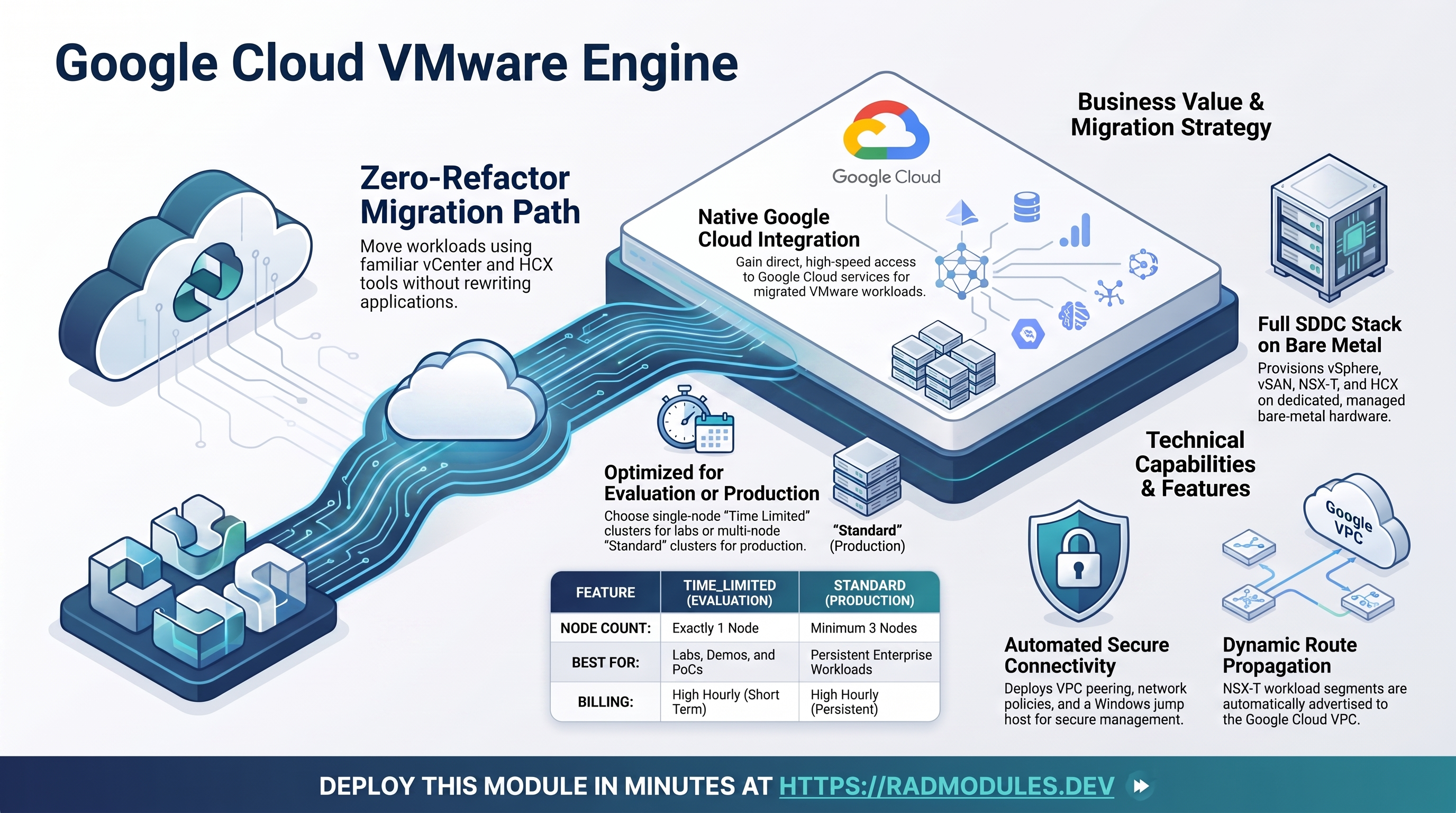
Google Cloud VMware Engine (GCVE) runs the complete VMware Software-Defined Data Center stack — vSphere, vSAN, NSX-T, and HCX — on dedicated, Google-managed bare-metal hardware. It is the enterprise-proven path for lifting and shifting existing VMware workloads to Google Cloud without refactoring: the same vCenter, NSX-T, and HCX tooling you use on-premises works unchanged, while the environment gains native access to Google Cloud services.
This is a standalone module — it does not build on a shared foundation. It provisions an end-to-end GCVE environment in a single deployment: a VMware Engine network, a private cloud (the SDDC itself), VMware Engine VPC peering into a Google Cloud VPC, a network policy for internet and external-IP access, default firewall rules, and a Windows Server 2022 jump host for reaching the vCenter, NSX-T, and HCX consoles. It also resets and surfaces the vCenter solution-user credentials so you can immediately register migration tooling or sign in.
This guide focuses on the cloud services the module uses and how to explore and operate them from the Google Cloud Console and the command line.
1. Overview
The module wires together VMware Engine and a handful of supporting Compute and IAM resources:
| Capability | Google Cloud service | Notes |
|---|---|---|
| VMware SDDC | VMware Engine private cloud | vCenter, vSAN, NSX-T, and HCX on bare-metal nodes; TIME_LIMITED (1-node eval) or STANDARD (3+ node production) |
| Managed network fabric | VMware Engine network | Global, STANDARD type; backs the private cloud and carries peering routes |
| VPC connectivity | VMware Engine VPC peering | Bridges the VMware Engine network to a Google Cloud VPC, with custom-route import/export |
| Internet & external IP | VMware Engine network policy | Controls outbound internet and public-IP allocation for workload VMs via the edge-services CIDR |
| Access workstation | Compute Engine (Windows Server 2022) | Jump host on the peer VPC for browser/RDP access to the management consoles |
| Peer network & firewall | Compute Engine VPC + firewall rules | Auto-mode VPC plus allow-internal/ssh/rdp/icmp/http rules |
| vCenter access | VMware Engine vCenter credentials | Solution-user password reset and retrieval after provisioning |
Things to know up front:
- Provisioning is slow by design. Google must allocate and configure bare-metal servers before the SDDC software is installed. A single-node
TIME_LIMITEDprivate cloud typically reachesACTIVEin 30–90 minutes;STANDARDprivate clouds (3+ nodes) take longer, up to roughly 2 hours. The private-cloud resource carries 180-minute create/update/delete timeouts, so provisioning that runs past three hours fails the apply on timeout rather than continuing to wait. The deployment appears to "hang" during this window — that is expected; do not interrupt it. - A VMware Engine node is expensive. GCVE bills per bare-metal node and a single node is a substantial hourly cost. Use
TIME_LIMITED(one node) for labs and demos, and tear the environment down promptly when you are done. - The management consoles are private. vCenter, NSX-T, and HCX are only reachable from inside the VMware Engine network or a peered VPC — never directly from the public internet. The jump host exists precisely to bridge that gap.
- vCenter credentials are reset, not stored. After the private cloud is
ACTIVE, the module resets the vCenter solution-user password and prints the new credentials to the deployment logs. They are not exposed as a Terraform output — capture them from the logs or re-run the describe command (see §2.E). - The management CIDR is immutable.
management_cidrcannot be changed after the private cloud is created. Choose it carefully so it does not overlap the peer VPC or the edge-services CIDR.
2. Google Cloud Services & How to Explore Them
All commands assume PROJECT, REGION, and ZONE are set, and that you are authenticated with an identity holding roles/owner (or the VMware Engine + Compute admin roles). Resource names follow the pattern altostrat-<deployment-id>-*; the exact IDs are surfaced in the Outputs.
A. VMware Engine private cloud
The private cloud is the SDDC itself — vCenter, vSAN, NSX-T, and HCX running on the management cluster's bare-metal nodes. It is created in a zone (ZONE), uses the immutable management_cidr for the management appliances, and runs the node type and count you select.
- Console: VMware Engine → Resources → Private clouds → select the cloud for state, vCenter/NSX-T/HCX summary, clusters, and subnets.
- CLI:
gcloud vmware private-clouds list --location "$ZONE" --project "$PROJECT"
gcloud vmware private-clouds describe <private-cloud-name> \
  --location "$ZONE" --project "$PROJECT" \
  --format="yaml(state, vcenter, nsx, hcx, managementCluster)"
# Wait for ACTIVE — provisioning can take 30 min to several hours:
gcloud vmware private-clouds describe <private-cloud-name> \
  --location "$ZONE" --project "$PROJECT" --format="value(state)"
B. VMware Engine network & VPC peering
The VMware Engine network is a global, Google-managed fabric (distinct from a normal VPC — it does not appear in the VPC console) that underpins the private cloud. The module peers it to a Google Cloud peer VPC so the jump host can reach the management appliances and so NSX-T workload segments are advertised back to Google Cloud. Custom-route import and export are enabled, so segments created in NSX-T propagate automatically.
- Console: VMware Engine → Network → VMware Engine networks; VMware Engine → Network → Peering. The peer VPC and its routes appear under VPC network.
- CLI:
gcloud vmware networks list --location global --project "$PROJECT"
gcloud vmware network-peerings list --location global --project "$PROJECT" \
  --format="table(name, state)"
# Routes exported from GCVE into the peer VPC:
gcloud compute routes list --project "$PROJECT" \
  --format="table(name, network, destRange, priority)"
Peering only reaches ACTIVE once the private cloud is fully provisioned — CREATING/INACTIVE during the provisioning window is normal.
C. VMware Engine network policy
The network policy governs, at the network level, whether workload VMs in the private cloud may reach the internet and whether NSX-T may allocate external (public) IPs for NAT. Both are controlled through the edge-services CIDR and are enabled by default. The policy is scoped to the region (REGION).
GCVE allows only one network policy per VMware Engine network. A leftover policy from a failed run blocks re-creation with
Resource for the given network already exists— list and delete the orphan, then redeploy.
- Console: VMware Engine → Network → Network policies.
- CLI:
gcloud vmware network-policies list --location "$REGION" --project "$PROJECT" \
  --format="table(name, internetAccess.enabled, externalIp.enabled, edgeServicesCidr)"
# Remove an orphaned policy from a prior failed deploy:
gcloud vmware network-policies delete <policy-name> \
  --location "$REGION" --project "$PROJECT" --quiet
D. Jump host (Compute Engine)
A Windows Server 2022 instance on the peer VPC is the workstation for all console access. It is tagged jump-host, gets an ephemeral external IP for RDP, and is granted the cloud-platform scope so gcloud works from within the session. RDP (3389), SSH (22), HTTP/HTTPS (80/443 to jump-host-tagged instances), ICMP, and internal traffic are opened by the default firewall rules.
- Console: Compute Engine → VM instances → select the jump host. Use Set Windows password to generate Windows credentials (the module does not set them).
- CLI:
gcloud compute instances list --filter="name~jump-host" --project "$PROJECT" \
  --format="table(name, zone, status, networkInterfaces[0].accessConfigs[0].natIP)"
# Generate a Windows password for RDP:
gcloud compute reset-windows-password <jump-host-name> \
  --zone "$ZONE" --project "$PROJECT"
Then RDP to <external-ip>:3389 with the generated username/password. On macOS use Windows App (brew install --cask windows-app); on Linux use xfreerdp /u:<user> /p:<pass> /v:<ip>:3389 /dynamic-resolution.
E. vCenter access
vCenter, NSX-T, and HCX each expose an internal FQDN (surfaced in the Outputs) reachable only from the jump host or another host on the peer VPC. To sign in you need the solution-user credentials, which the module resets and prints to the deployment logs once the private cloud is ACTIVE.
- Console: VMware Engine → Private clouds → select the cloud → the vSphere / NSX-T / HCX management links and credential views.
- CLI:
# Retrieve current vCenter solution-user credentials:
gcloud vmware private-clouds vcenter credentials describe \
  --private-cloud=<private-cloud-name> --username=<solution-user> \
  --location "$ZONE" --project "$PROJECT"
# Reset them (re-run if they have expired):
gcloud vmware private-clouds vcenter credentials reset \
  --private-cloud=<private-cloud-name> --username=<solution-user> \
  --location "$ZONE" --project "$PROJECT" --no-async
# NSX-T credentials:
gcloud vmware private-clouds nsx credentials describe \
  --private-cloud=<private-cloud-name> \
  --location "$ZONE" --project "$PROJECT"
From the jump host browser, open https://<vcenter-fqdn> (or the NSX-T / HCX FQDN), accept the self-signed certificate, and sign in.
3. Behaviour
What gets provisioned on apply. In dependency order: the required APIs are enabled (vmwareengine, vmmigration, compute, cloudresourcemanager, iam, iamcredentials); the VM Migration service agent is granted roles/iam.serviceAccountUser (so Migrate to Virtual Machines can act as project service accounts); the global VMware Engine network is created; the private cloud is provisioned (the long step); the peer VPC and its firewall rules are created; VPC peering is established between the VMware Engine network and the peer VPC; the network policy is applied; the Windows jump host is deployed; and finally the vCenter credentials are reset and retrieved.
Reaching vCenter. Generate a Windows password for the jump host, RDP in, then browse to the vCenter/NSX-T/HCX FQDNs from the Outputs. Use the solution-user credentials from the deployment logs (or re-run the describe command in §2.E). The consoles are not reachable from outside the peer VPC.
Peering setup. Peering is created with custom-route import and export enabled, so NSX-T segments defined inside the private cloud are automatically advertised to the peer VPC and vice versa. The peering depends on the private cloud and only becomes fully ACTIVE after the cloud is live.
Credential reset is conditional and idempotent. The reset runs only after the private cloud reports ACTIVE; if it is still provisioning, the step is skipped with instructions to run the reset manually later. The reset re-runs only when the private cloud is recreated. The credentials are printed to the deployment logs, not stored as an output.
Cleanup behaviour. Teardown deletes the managed resources in the correct order — the network policy and peering are removed before the VMware Engine network, and the private cloud is deleted with its 180-minute timeout. Private-cloud deletion is irreversible and destroys every VM and all data inside it; migrate or back up workloads first. Teardown is also slow (deprovisioning bare metal takes time). API enablement is left in place on destroy (disable_on_destroy = false), so the project's VMware Engine and Compute APIs are not turned off.
Runtime notes. TIME_LIMITED private clouds are single-node evaluation environments — Google reclaims them after the evaluation window, taking all VMs with them; use STANDARD for anything that must persist. Node-type availability is zone-dependent. The management_cidr is fixed at creation; changing it requires destroying and recreating the cloud.
4. Configuration Variables
Variables are grouped exactly as they appear on the deployment platform.
Group 1 — Project & Location
| Variable | Default | Description |
|---|---|---|
project_id | (required) | Target Google Cloud project; must already exist and the deploying identity must hold roles/owner. |
tenant_id | demo | Tenant identifier (1–20 lowercase letters, digits, hyphens). Declared for platform consistency only — this module does not reference it in any resource name. |
region | us-west2 | Region for the private cloud and the network policy. |
zone | us-west2-a | Zone for the private cloud and jump host. Must lie within region. |
Group 4 — Private Cloud
| Variable | Default | Description |
|---|---|---|
management_cidr | 172.20.1.0/24 | CIDR for the management cluster (vCenter, NSX-T, HCX, ESXi). Immutable after creation. Must not overlap the peer VPC or edge_services_cidr. |
private_cloud_type | TIME_LIMITED | TIME_LIMITED (single-node evaluation, for labs/demos) or STANDARD (production, minimum 3 nodes). |
node_type_id | standard-72 | VMware Engine node type. Use the API short form (standard-72), not the UI label (ve1-standard-72). Availability is zone-dependent. |
node_count | 1 | Nodes in the management cluster. Use 1 for TIME_LIMITED; STANDARD requires at least 3. |
Group 5 — Network Peering
| Variable | Default | Description |
|---|---|---|
create_vpc | true | Create the peer VPC. Set false to reuse an existing VPC of the expected name. |
Group 6 — Network Policy
| Variable | Default | Description |
|---|---|---|
edge_services_cidr | 10.11.3.0/26 | /26 CIDR for VMware Engine edge services (internet ingress/egress). Must not overlap management_cidr or the peer VPC subnets. |
enable_internet_access | true | Allow outbound internet from workload VMs via the edge-services CIDR. |
enable_external_ip | true | Allow external (public) IP allocation for workload VMs. |
Group 7 — Firewall Rules
| Variable | Default | Description |
|---|---|---|
create_default_firewall_rules | true | Create the four default rules (allow-internal, allow-ssh, allow-rdp, allow-icmp) on the peer VPC. Set false if they already exist. |
internal_traffic_cidr | 10.128.0.0/9 | Source range for the allow-internal rule. Matches the default auto-mode subnet range; override for custom-mode VPCs. |
Group 8 — Jump Host
| Variable | Default | Description |
|---|---|---|
create_jump_host | true | Deploy the Windows Server 2022 jump host for RDP access to vCenter/NSX-T/HCX. |
jump_host_machine_type | e2-medium | Machine type for the jump host. |
jump_host_boot_disk_size_gb | 50 | Boot disk size in GB (50 GB minimum recommended for Windows Server 2022). |
jump_host_subnetwork | "" | Subnetwork self-link or name for the jump host NIC. Required for custom-mode VPCs; leave blank to auto-select per region. |
Group 9 — vCenter Credentials
| Variable | Default | Description |
|---|---|---|
reset_vcenter_credentials | true | Reset and retrieve the vCenter solution-user credentials after provisioning. Requires gcloud in the deployment runner. |
vcenter_solution_user | solution-user-01@gve.local | Solution-user account whose password is reset. Used to access vCenter and register migration tooling. |
5. Outputs
| Output | Description |
|---|---|
deployment_id | Deployment suffix used in all altostrat-<id>-* resource names. |
project_id | GCP project the resources live in. |
vmware_engine_network_id | Full resource ID of the VMware Engine network. |
private_cloud_id | Full resource ID of the private cloud. |
vcenter_fqdn | vCenter Server FQDN — open from the jump host browser to reach the vSphere Client. |
nsx_fqdn | NSX-T Manager FQDN — open from the jump host browser to reach the NSX-T console. |
hcx_fqdn | HCX Manager FQDN. |
network_peering_state | Current VPC peering state (ACTIVE once the private cloud is fully provisioned). |
network_policy_id | Full resource ID of the VMware Engine network policy. |
The vCenter solution-user credentials are not an output. Retrieve them from the deployment logs or with
gcloud vmware private-clouds vcenter credentials describe(see §2.E).
6. Configuration Pitfalls & Sensible Defaults
Risk: Critical (data loss / outage / security) — High (service degraded) — Medium (cost or partial degradation) — Low (minor).
| Setting | Sensible value | Risk | Consequence if wrong |
|---|---|---|---|
private_cloud_type + node_count | TIME_LIMITED+1 or STANDARD+3 | Critical | Mismatched pairs are rejected by the API: TIME_LIMITED requires exactly 1 node, STANDARD at least 3. The apply fails after the long provisioning attempt. |
private_cloud_type | TIME_LIMITED for labs | High (cost) | Each bare-metal node bills at a high hourly rate. STANDARD with 3 nodes multiplies that cost; only use it for workloads that must persist. |
management_cidr | set once, non-overlapping | Critical | Immutable after creation. A wrong or overlapping CIDR forces a full destroy/recreate (hours) and loses all VMs. |
edge_services_cidr | non-overlapping /26 | High | Overlap with management_cidr or the peer VPC subnets is rejected at creation; the network policy fails to apply. |
node_type_id | standard-72 (API form) | High | Using the UI label ve1-standard-72, or a node type unavailable in the target zone, causes a hard API error during private-cloud creation. |
region / zone | zone within region | High | The private cloud is created in zone and the network policy in region; an inconsistent pair fails policy creation. |
deployment_id | set once | Critical | Changing it after deploy renames every resource — forcing recreation of the private cloud (hours) and destroying all VMs. |
reset_vcenter_credentials | true (with gcloud available) | Medium | Without gcloud in the runner the reset is skipped; you must reset credentials manually before signing in to vCenter. |
| vCenter credentials | capture from logs promptly | Medium | They are printed to logs, not stored as an output, and the solution-user password expires; re-run the reset to refresh. |
| Console access | only via the jump host | Medium | vCenter/NSX-T/HCX FQDNs resolve to private IPs reachable only from the peer VPC. Direct access from a workstation times out. |
create_vpc = false | only with a matching existing VPC | High | Firewall rules and peering reference the computed VPC name altostrat-<id>-vpc; if no such VPC exists, those resources fail. |
enable_internet_access / enable_external_ip | false for isolated clouds | Medium | Both default to true, so workload VMs can reach the internet and receive public IPs out of the box; disable for a fully isolated environment. |
| Teardown timing | allow time, back up first | Critical | Private-cloud deletion is irreversible and destroys all VMs/data, and deprovisioning bare metal is slow — do not interrupt it. |
For service concepts and deeper operations, see the GCVE documentation, and the hands-on VMware Engine Lab Guide.
Need RAD to do something it does not do yet? Request it on the roadmap, or vote on what is already there.