Certification track: Professional Cloud Architect (PCA)
Migrate to Containers on GKE
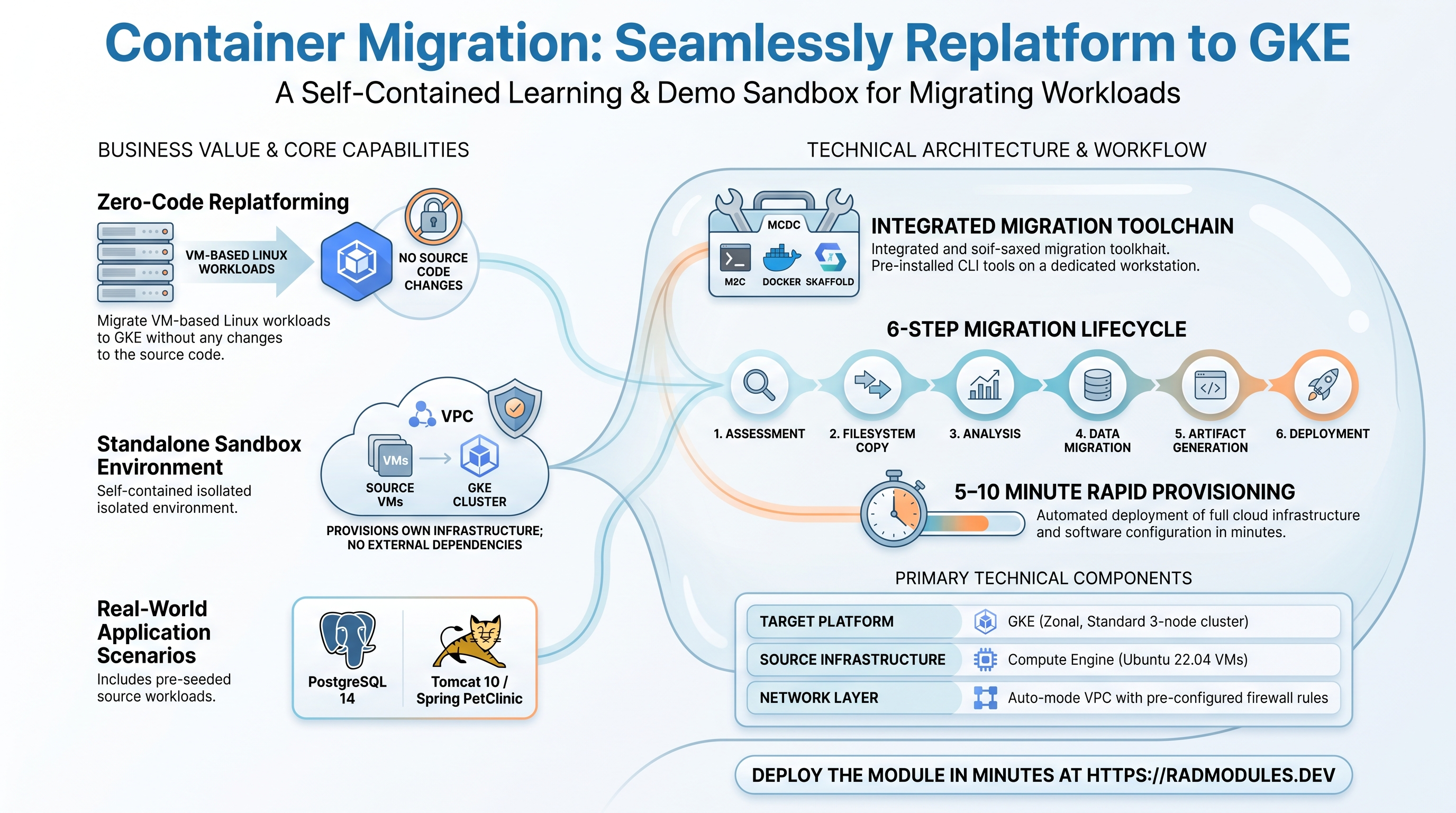
This module provisions a complete, hands-on environment for practising Google Cloud Migrate to Containers (M2C) — the automated path for replatforming VM-based Linux workloads to containers on Google Kubernetes Engine (GKE) without modifying application source code. It is a standalone module: it builds its own VPC, source VMs, a migration workstation, and a target GKE cluster, and does not depend on any shared foundation infrastructure.
On apply the module deploys two Ubuntu source VMs running real applications (PostgreSQL 14 and Apache Tomcat 10 serving the Spring PetClinic app), a Migrate to Containers CLI workstation pre-loaded with the migration toolchain, and a multi-node GKE cluster ready to receive migrated workloads. From there an operator works through the M2C lifecycle by hand: assess each VM with the mcdc CLI, copy and analyse filesystems with the m2c CLI, generate Dockerfiles and Kubernetes manifests, migrate persistent data to GKE PersistentVolumes, and deploy the resulting containers with Skaffold.
This guide focuses on the cloud services the module provisions and how to explore and operate them from the Google Cloud Console and the command line. The full operator walkthrough is in the Lab Guide.
All resources share the prefix mig-<id>-, where <id> is the deployment suffix (e.g. mig-8b56-postgres, mig-8b56-tomcat, mig-8b56-m2c, mig-8b56-gke-cluster, mig-8b56-vpc).
1. Overview
The module wires together a focused set of Google Cloud services to create a self-contained migration sandbox:
| Capability | Google Cloud service | Notes |
|---|---|---|
| Migration tooling | Migrate to Containers (mcdc + m2c CLIs) | Pre-installed on a dedicated workstation VM; operator-driven, not provisioned as a managed service |
| Source workloads | Compute Engine VMs | One PostgreSQL 14 VM and one Tomcat 10 / Spring PetClinic VM, both Ubuntu 22.04 |
| Migration workstation | Compute Engine VM | Large-disk VM with m2c, Docker, kubectl, Skaffold, and the GKE auth plugin |
| Target platform | GKE (zonal, standard) | Multi-node cluster (3 nodes by default) that receives the migrated containers |
| Networking | VPC + firewall rules | Auto-mode VPC with internal/SSH/ICMP rules plus a Tomcat (port 8080) rule |
Things to know up front:
- This is a learning/demo environment, not a production migration pipeline. The migration itself is performed manually by the operator on the workstation VM after the infrastructure is provisioned — the module does not run the migration for you.
- The source VMs run real, working applications. The PostgreSQL VM hosts a
petclinicdatabase; the Tomcat VM builds and serves the Spring PetClinic WAR against it. You can browse PetClinic on the Tomcat VM before migrating anything (petclinic_urloutput). - VM startup scripts take several minutes. Each VM installs and configures its software at first boot (PostgreSQL setup, a Maven build of PetClinic, downloading the migration toolchain). Allow roughly 5–10 minutes after deploy before the tools are ready; check
/var/log/startup-script.logon each VM. - The migration toolchain is downloaded at boot.
mcdc,m2c,kubectl, and Skaffold are fetched from public release endpoints during VM startup. Convenience scripts (/assess_mcdc.sh,/install_container_tools.sh, and others) are written to each VM to drive the lab steps. - The GKE cluster is zonal. It is created in the configured
zone, with one control plane and a single node pool. There is no regional-cluster option in this module. - Container images you build during the lab are not managed by the module. Images pushed to Artifact Registry / Container Registry and any PersistentVolumeClaims you create survive until you delete them manually (PVCs are removed when the cluster is destroyed).
2. Google Cloud Services & How to Explore Them
All commands assume PROJECT, REGION, and ZONE are set to match your deployment. Resource names are reported in the deployment Outputs.
A. Migrate to Containers (the migration tooling)
Migrate to Containers is delivered as two command-line tools rather than a managed cloud service. The mcdc CLI runs on each source VM to collect system data and produce a containerisation suitability report (scoring the workload across GKE, GKE Autopilot, Cloud Run, and Compute Engine journeys). The m2c CLI runs on the workstation VM to copy a source VM's filesystem, analyse it into a migration plan, migrate persistent data to GKE, and generate Dockerfiles and Kubernetes manifests. Both are pre-installed by the module's startup scripts.
- Console: there is no dedicated Console surface for the CLI-based workflow. Track progress through the source VMs (Compute Engine) and the resulting workloads (Kubernetes Engine → Workloads).
- CLI (run on the workstation VM over SSH):
# Connect to the workstation, then verify the toolchain:
gcloud compute ssh <m2c-cli-vm> --project "$PROJECT" --zone "$ZONE"
sudo /install_container_tools.sh        # checks m2c, kubectl, skaffold, docker, auth plugin
m2c version
# Core migration commands (see the Lab Guide for the full sequence):
m2c copy gcloud -p "$PROJECT" -z "$ZONE" -n <source-vm> -o <out-dir> --filters /root/filters.txt
m2c analyze -s <copied-fs> -p linux-vm-container -o ./migration
m2c migrate-data -i migration -n default
m2c generate -i ./migration -o ./artifacts
B. Compute Engine — source VMs and workstation
Three Compute Engine VMs are provisioned, all Ubuntu 22.04 with public IPs for SSH access:
-
the PostgreSQL source VM (tagged
postgres) running PostgreSQL 14 with a pre-seededpetclinicdatabase, -
the Tomcat source VM (tagged
tomcat) running Apache Tomcat 10 with the Spring PetClinic application, reachable on port 8080, and -
the migration workstation VM with a large boot disk to hold copies of the source filesystems.
-
Console: Compute Engine → VM instances. Use the SSH button, or open the serial console to watch the startup script.
-
CLI:
gcloud compute instances list --project "$PROJECT"
gcloud compute ssh <vm-name> --project "$PROJECT" --zone "$ZONE"
# Confirm a VM's startup script finished:
gcloud compute ssh <vm-name> --project "$PROJECT" --zone "$ZONE" \
  --command 'tail -5 /var/log/startup-script.log'
C. GKE — the migration target
A zonal, standard GKE cluster receives the migrated containers. Its default node pool is replaced by a module-managed pool sized by gke_node_count (default 3) and gke_node_machine_type (default e2-medium), with nodes granted the cloud-platform scope so they can pull images and talk to other Google Cloud APIs. The cluster uses VPC-native networking with auto-assigned pod and service ranges.
- Console: Kubernetes Engine → Clusters for the cluster and node pool; Workloads and Services & Ingress for the migrated apps once deployed.
- CLI:
gcloud container clusters list --project "$PROJECT"
gcloud container clusters get-credentials <cluster-name> --zone "$ZONE" --project "$PROJECT"
kubectl get nodes
kubectl get pods,svc,pvc -n default     # migrated workloads land in the default namespace
D. VPC network & firewall
The module creates an auto-mode VPC and the firewall rules the lab needs: internal traffic between instances, SSH (22) and ICMP from anywhere, and HTTP on port 8080 to tomcat-tagged instances so the PetClinic app is browsable. The migration workstation reaches the source VMs over this internal network to copy their filesystems.
- Console: VPC network → VPC networks for the network; VPC network → Firewall for the rules.
- CLI:
gcloud compute networks list --project "$PROJECT"
gcloud compute firewall-rules list --project "$PROJECT" --filter="network~mig-"
3. Behaviour
What gets provisioned on apply. A single apply builds the full environment: the VPC and firewall rules, the three Compute Engine VMs (each with a startup script that installs and configures its software), and the GKE cluster with its node pool. The required project APIs (Compute, GKE, Artifact Registry, Container Registry, IAM, Resource Manager, Storage, Logging, Monitoring) are enabled automatically when enable_services is left on.
First-boot configuration. The VM startup scripts do real work and take time:
- The PostgreSQL VM installs PostgreSQL 14, creates the
petclinicdatabase, sets thepostgresuser password, opens the server to remote connections, and installs themcdcassessment CLI plus an/assess_mcdc.shhelper. - The Tomcat VM installs Java 17, Maven, and Tomcat 10, clones and builds the Spring PetClinic WAR, deploys it, and installs
mcdcand/assess_mcdc.sh. It points the app at the PostgreSQL VM by adding its internal IP to/etc/hostsaspetclinic-postgres. - The workstation VM installs Docker, the
m2cCLI,kubectl, Skaffold, and the GKE auth plugin, and writes helper scripts (/install_container_tools.sh, a copy-exclusionfilters.txt, and a working directory).
The migration workflow (operator-driven). Once the infrastructure is up, the operator performs the migration manually from the workstation VM. The end-to-end flow is:
- Assess each source VM with
mcdc(run/assess_mcdc.sh) to confirm containerisation readiness and identify the ports each workload uses. - Copy a source VM's filesystem to the workstation with
m2c copy(uses rsync over SSH — the source VM keeps running and is never modified). - Analyse the copy with
m2c analyzeto produce a migration plan, then customise it (image name, exposed endpoints, persistent-volume paths). - Migrate data for stateful workloads with
m2c migrate-data, which creates and populates a GKE PersistentVolumeClaim. - Generate Dockerfiles, Kubernetes manifests, and a Skaffold config with
m2c generate. - Deploy to GKE with
skaffold run, then operate the workloads with native Kubernetes (scaling, Horizontal Pod Autoscaling, rolling updates).
Manual follow-up the operator performs. All of the M2C steps above are manual and are documented in detail in the Lab Guide. The module only supplies the environment and the convenience scripts; it does not orchestrate the migration.
Cleanup behaviour. Destroying the module removes everything it created — the VMs, the GKE cluster and node pool, the firewall rules, and the VPC. Two things are not cleaned up automatically: container images you pushed to Artifact Registry / Container Registry during the lab (delete them manually), and any PersistentVolumeClaims you created (these are removed when the cluster is destroyed, but must be deleted by hand if you keep the cluster).
Runtime notes. The migration toolchain versions are fetched from public endpoints at boot; if an endpoint is briefly unavailable an install step may be skipped silently, so verify with /install_container_tools.sh before starting. The Tomcat app self-heals its database connection once PostgreSQL finishes initialising, so a transient connection error immediately after deploy is expected.
4. Configuration Variables
Variables are grouped exactly as they appear on the deployment platform.
Group 1 — Project & Location
| Variable | Default | Description |
|---|---|---|
project_id | (required) | Target Google Cloud project. Must already exist. |
tenant_id | demo | Metadata only — accepted and validated (1-20 lowercase letters, numbers, hyphens) but not referenced by any resource in this module. Resource names use deployment_id, not tenant_id. |
region | us-central1 | Metadata only — no resource in this module references region. Every resource is placed by zone. |
zone | us-central1-a | Zone for the VMs and the GKE cluster. This is the only location input that has any effect. |
Group 3 — Network
| Variable | Default | Description |
|---|---|---|
create_vpc | true | Create a new auto-mode VPC for the lab. Set false only if a VPC named mig-<id>-vpc already exists. |
create_default_firewall_rules | true | Create the allow-internal, allow-SSH, and allow-ICMP rules. Disable if equivalent rules already exist. |
internal_traffic_cidr | 10.128.0.0/9 | Source range for the allow-internal rule. Matches the auto-mode subnet range; override for a custom-mode VPC. |
Group 4 — Source VMs
| Variable | Default | Description |
|---|---|---|
postgres_machine_type | e2-medium | Machine type for the PostgreSQL 14 source VM. |
postgres_disk_size_gb | 20 | Boot disk size (GB) for the PostgreSQL VM; 20 GB minimum recommended. |
tomcat_machine_type | e2-medium | Machine type for the Tomcat 10 / PetClinic source VM. |
tomcat_disk_size_gb | 20 | Boot disk size (GB) for the Tomcat VM; 20 GB minimum recommended. |
Group 5 — Migrate to Containers CLI VM
| Variable | Default | Description |
|---|---|---|
m2c_machine_type | e2-standard-4 | Machine type for the workstation VM. Needs enough CPU/memory to copy and analyse source filesystems. |
m2c_disk_size_gb | 200 | Boot disk size (GB). Must hold copies of the source VM filesystems plus working space; the generous default is intentional. |
Group 6 — GKE Cluster
| Variable | Default | Description |
|---|---|---|
gke_node_machine_type | e2-medium | Machine type for the GKE node pool that runs migrated workloads. |
gke_node_count | 3 | Number of nodes; 3 supports running both a StatefulSet and a Deployment during the lab. |
5. Outputs
These values are returned on a successful deployment and are the quickest way to locate and explore the environment.
| Output | Description |
|---|---|
deployment_id | The deployment suffix used in all resource names. |
project_id | GCP project ID. |
gke_cluster_name | Name of the GKE cluster that receives migrated workloads. |
gke_cluster_location | Zone where the GKE cluster is deployed. |
postgres_vm_name | Instance name of the PostgreSQL source VM. |
postgres_vm_internal_ip | Internal IP of the PostgreSQL source VM. |
tomcat_vm_name | Instance name of the Tomcat source VM. |
tomcat_vm_external_ip | External IP of the Tomcat VM (browse PetClinic on port 8080). |
m2c_cli_vm_name | Instance name of the migration workstation VM. |
petclinic_url | Full browser URL for the PetClinic app on the Tomcat VM. |
vpc_name | Name of the VPC network created for the lab. |
6. Configuration Pitfalls & Sensible Defaults
Risk: Critical (data loss / outage / security) — High (service degraded) — Medium (cost or partial degradation) — Low (minor).
| Setting | Sensible value | Risk | Consequence if wrong |
|---|---|---|---|
deployment_id | set once | Critical | Embedded in every resource name. Changing it after deploy forces recreation of the VPC, VMs, and GKE cluster. |
create_vpc | true | High | Setting false requires a pre-existing VPC named exactly mig-<id>-vpc — there is no variable to point at a differently named network, so the apply fails if it is absent. |
zone | valid, available zone | High | Every VM and the GKE cluster deploy to zone; an invalid or capacity-constrained zone fails the apply. region is inert, so a zone outside region is harmless. |
m2c_disk_size_gb | 200 | High | Too small a workstation disk cannot hold the copied source filesystems, and m2c copy fails partway through. |
enable_services | true | High | If the required APIs are not already enabled and this is false, resource creation fails immediately. Only disable when all required APIs are confirmed enabled. |
gke_node_count | 3 | Medium | Fewer than 3 nodes can leave a migrated StatefulSet and Deployment unable to schedule together during the lab. |
create_default_firewall_rules | true | Medium | Without the allow-internal rule the workstation cannot reach the source VMs to copy their filesystems; without allow-SSH you cannot connect to drive the lab. |
postgres_disk_size_gb / tomcat_disk_size_gb | 20+ | Medium | Undersized boot disks can run out of space during the PostgreSQL setup or the Maven build of PetClinic. |
| SSH / Tomcat firewall scope | restrict for shared projects | Medium | SSH (22) and Tomcat (8080) are open to 0.0.0.0/0 by default — acceptable for a short-lived lab, but tighten the source ranges in long-lived or shared projects. |
| Lab-built images & PVCs | clean up manually | Low | Images pushed during the lab and retained PVCs are not removed by destroy and continue to incur storage cost until deleted. |
For the full operator walkthrough — assessment, copy/analyse, data migration, manifest generation, GKE deployment, and Day-2 operations — see the Lab Guide.
Need RAD to do something it does not do yet? Request it on the roadmap, or vote on what is already there.