PCNE Certification Preparation Guide: Section 6 — Configuring, implementing and managing a cloud network security solution (~13% of the exam)
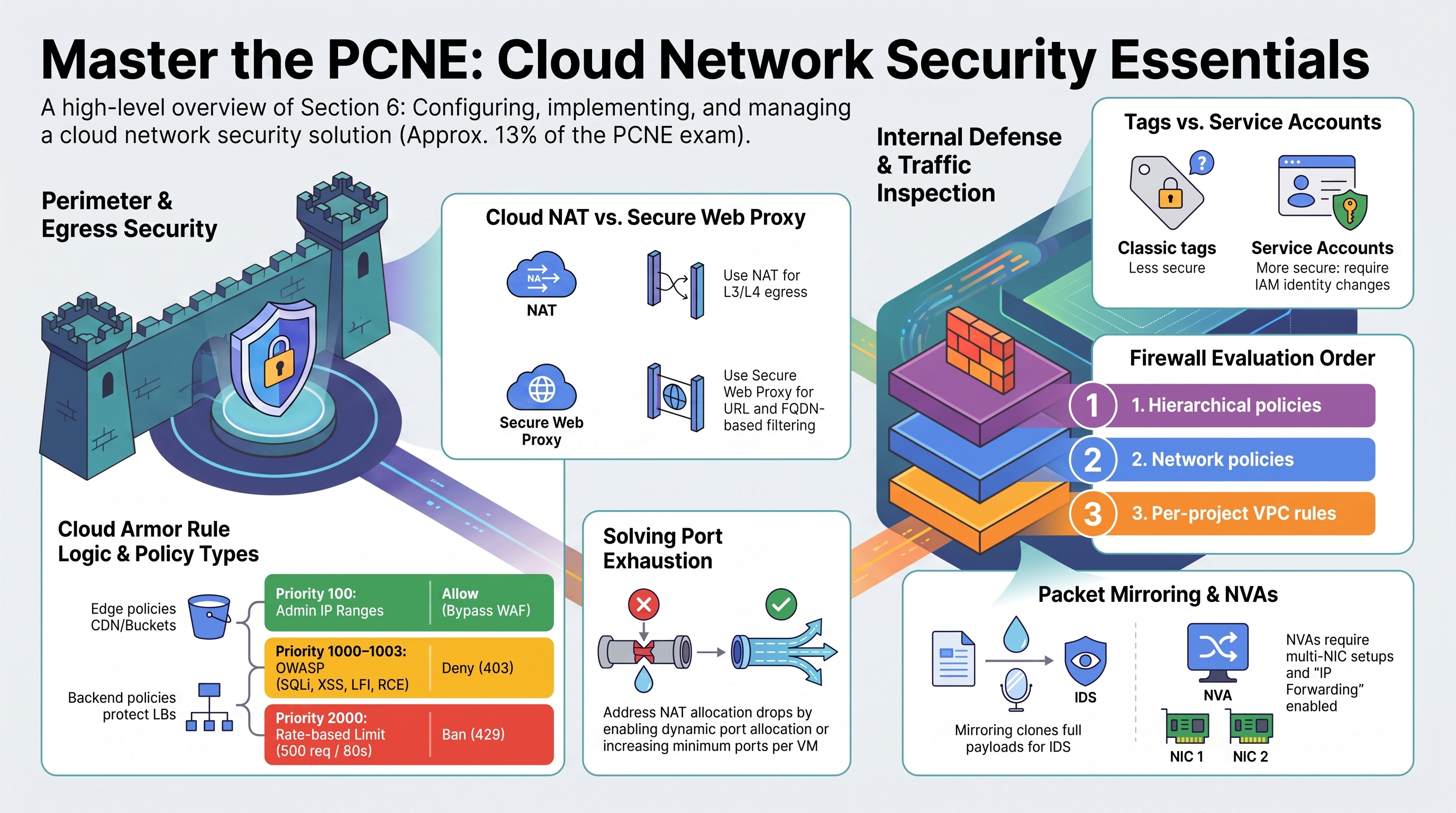
Network security is RAD's strongest suit in this exam after GKE networking. Both deployment engines build a production-shaped Cloud Armor policy (preconfigured OWASP rules, Adaptive Protection, rate-based banning), the platform VPC implements tag-based firewall micro-segmentation, and Cloud NAT handles all internet egress for private workloads. NGFW policies, Secure Web Proxy, NVAs, and Packet Mirroring are study-only. Deploy the Global Edge profile for 6.1 and the VPC Foundation profile for 6.2–6.4. Modules exercised: App_CloudRun, App_GKE, Services_GCP.
6.1 Implementing and managing Google Cloud Armor
⏱ ~60 min · 💰 Cloud Armor policy + per-request charges · ⚙️ Requires: Global Edge profile (
enable_cloud_armor = true)
Why the exam cares — Cloud Armor questions test rule mechanics (priority, preconfigured WAF expressions, custom CEL), the edge-policy vs backend-policy split, rate limiting (throttle vs rate_based_ban), Adaptive Protection for L7 DDoS, and bot management.
How RAD implements it — Both engines create the same verified Cloud Armor policy shape:
| Priority | Rule | Action |
|---|---|---|
| 100 | admin_ip_ranges allowlist | allow (bypasses WAF rules) |
| 1000–1003 | evaluatePreconfiguredExpr('sqli-v33-stable'), xss-v33-stable, lfi-v33-stable, rce-v33-stable | deny(403) |
| 2000 | rate-based ban: 500 requests/60 s per IP, exceed → deny(429), 300 s ban | rate-based ban |
| 2147483647 | default * | allow |
Plus Adaptive Protection with Layer 7 DDoS defense enabled. Attachment differs by engine: App_CloudRun sets the security policy on the backend service and forces ingress to internal-and-cloud-load-balancing so direct *.run.app access can't bypass the WAF; App_GKE attaches via the GCPBackendPolicy's default security policy and alternatively accepts an externally managed policy through cloud_armor_policy_name (default default-waf-policy) when enable_cloud_armor = false. The priority-100 admin_ip_ranges allow rule now exists in both policies; on Cloud Run the same variable additionally feeds the VPC-SC access levels. Both engines now behave the same way here: neither requires a domain for Cloud Armor — App_CloudRun derives an <ip-dashed>.nip.io certificate and App_GKE's Gateway derives an <ip>.nip.io one.
Try it
-
Read the deployed policy and match it to the table:
gcloud compute security-policies describe <service>-waf-policy \
--format="yaml(rules[].priority,rules[].action,rules[].match,adaptiveProtectionConfig)" -
Trigger the WAF and the rate limiter:
# SQLi probe → expect 403
curl -s -o /dev/null -w "%{http_code}\n" "https://<domain>/?q=1%27%20OR%20%271%27=%271"
# Burst past 500 req/min → expect 429s, then a 300 s ban
for i in $(seq 1 600); do curl -s -o /dev/null -w "%{http_code} " "https://<domain>/"; done | tr ' ' '\n' | sort | uniq -c -
Inspect enforcement in Console > Network Security > Cloud Armor policies > (policy) > Logs, or:
gcloud logging read 'resource.type="http_load_balancer" AND jsonPayload.enforcedSecurityPolicy.name!=""' \
--limit=5 --format="table(httpRequest.status,jsonPayload.enforcedSecurityPolicy.outcome,jsonPayload.enforcedSecurityPolicy.priority)" -
You know it worked when the SQLi probe logs
outcome: DENY, priority: 1000and the burst shows 200s flipping to 429s.
Check yourself
Q1: Legitimate admin traffic from the office keeps tripping the XSS rule on the GKE app. Fix without weakening protection for everyone?
A: Populate admin_ip_ranges — the module inserts an allow rule at priority 100, which evaluates before the WAF rules (lower number = earlier). That is the generic Cloud Armor answer too: scoped allow rule above the blocking rule. Both engines now insert this rule; on Cloud Run the same variable also feeds the VPC-SC access levels. The manual equivalent is gcloud compute security-policies rules create 100 --security-policy=<service>-waf-policy --src-ip-ranges=<office-cidr> --action=allow.
Q2: When do you need an edge security policy instead of the backend policy RAD uses?
A: Edge policies evaluate at Google's edge before the cache, so they can filter requests served from Cloud CDN cache hits and protect backend buckets (GCS). Backend policies (RAD's type) evaluate only on cache misses / non-CDN traffic. "Block country X from cached content" → edge policy.
Q3: Why does enabling Cloud Armor on App_CloudRun change the service's ingress setting?
A: Cloud Armor enforces only on traffic that traverses the load balancer. The default Cloud Run URL (*.run.app) would bypass it, so the module overrides ingress to internal-and-cloud-load-balancing — the standard exam-grade companion control. The same logic appears as "use internal-and-cloud-load-balancing + LB" whenever WAF/CDN/IAP-on-LB must not be bypassable.
Beyond the modules — Study: rate limiting variants (throttle vs RAD's rate-based ban; enforce-on-key options beyond IP — HTTP header, cookie, XFF-IP), preconfigured rule sensitivity levels and opt-out fields (evaluatePreconfiguredWaf('sqli-v33-stable', {'sensitivity': 1})), bot management with reCAPTCHA action-tokens and redirect actions, Google Threat Intelligence expressions (evaluateThreatIntelligence('iplist-known-malicious-ips')), and Adaptive Protection's granular models + automatic rule deployment (RAD enables detection; triage of its suggested rules is manual).
⚠️ Exam trap — Rule priority 0 is the highest; the default rule lives at 2147483647. A "deny all then allow" design that puts the deny at a low number blocks everything — order your allows above (numerically below) the deny.
6.2 Configuring NGFW policies and VPC firewall rules
⏱ ~45 min · 💰 no additional cost (NGFW Enterprise endpoints would cost; not created) · ⚙️ Requires: VPC Foundation profile; GKE Network Lab for the NetworkPolicy layer
Why the exam cares — The exam now distinguishes classic VPC firewall rules from NGFW (Cloud Firewall) policies — hierarchical, global, and regional — plus tags vs service accounts as targets, L7 inspection in NGFW Enterprise, rule logging, and micro-segmentation strategy.
How RAD implements it — Classic per-network VPC firewall rules only, but with a textbook micro-segmentation pattern in the Services_GCP network:
- Tag-scoped service access: rules target the
nfsservertag (tcp 111/2049/6379, udp 2049), theredisservertag (tcp 6379), and thehttpserver/webservertags (tcp 80/443/8080/8443). The NFS VM template carries thenfsserverandredisservertags. - Source-range strategy: intra-VPC allows are scoped to the computed internal CIDR set (subnets + GKE base ranges when GKE is on), not 0.0.0.0/0; the standalone NFS rules use the three RFC 1918 super-ranges.
- Source-tag refinement: the inline path goes further — NFS/Redis ingress allows are scoped to the source tag
app-nfs-client-<suffix>, the tag carried by Cloud Run's Direct VPC egress interfaces, so only that workload reaches the file server. - Special-range allows:
35.235.240.0/20(IAP TCP forwarding) for SSH,130.211.0.0/22+35.191.0.0/16for health checks. - Layer above: Kubernetes NetworkPolicy micro-segmentation via
enable_network_segmentation(Section 2.4) and the multi-cluster Istio east-west rules (tcp 15012/15017/15443) whengke_cluster_count > 1.
App_GKE intentionally creates no firewall rules — Gateway/LoadBalancer controllers auto-provision their LB firewall rules, and Autopilot nodes cannot carry custom tags (so a tag-scoped HTTP rule would be useless there). No hierarchical policies, no network firewall policies, no rule logging.
Try it
-
Map every rule to its segmentation role:
gcloud compute firewall-rules list --filter="network~vpc-network" \
--format="table(name,sourceRanges.list(),sourceTags.list(),targetTags.list(),allowed[].map().firewall_rule().list())" -
Prove tag-based enforcement: remove the
nfsservertag from the NFS instance and watch NFS mounts fail; re-add it.gcloud compute instances remove-tags <nfs-instance> --zone=us-central1-a --tags=nfsserver
gcloud compute instances add-tags <nfs-instance> --zone=us-central1-a --tags=nfsserver -
Recreate one rule as a network firewall policy rule in a scratch VPC to feel the difference (policies attach to networks; rules use secure tags or service accounts):
gcloud compute network-firewall-policies create pcne-policy --global
gcloud compute network-firewall-policies rules create 1000 \
  --firewall-policy=pcne-policy --global-firewall-policy \
  --direction=INGRESS --action=allow --layer4-configs=tcp:2049 \
  --src-ip-ranges=10.0.0.0/24 --enable-logging
gcloud compute network-firewall-policies associations create \
--firewall-policy=pcne-policy --network=<scratch-vpc> --global-firewall-policy -
You know it worked when the de-tagged instance stops accepting port-2049 connections within seconds — tag changes apply live, no restart.
Check yourself
Q1: Tags or service accounts as firewall targets for a high-security workload?
A: Service accounts (or IAM-governed secure tags in NGFW policies). Classic network tags are mutable by anyone with instanceAdmin on the VM — an attacker who can edit tags can re-scope firewall rules, exactly the manipulation you performed in the Try it. Service-account targets change only with a VM identity change, and secure tags require tagUser IAM. RAD uses classic tags for operational simplicity; know the harder answer.
Q2: An org must guarantee "deny tcp/22 from internet" across 200 projects, with project teams unable to override. Mechanism?
A: A hierarchical firewall policy at the org/folder node with a deny rule — hierarchical rules evaluate before network policies and VPC rules, and goto_next vs allow/deny controls delegation. Per-project VPC rules (RAD's mechanism) cannot enforce this centrally.
Beyond the modules — Study: evaluation order (hierarchical → global network policy → regional network policy → VPC rules, modulated by the network's firewall_policy_enforcement_order), migration tooling from VPC rules to network policies, NGFW tiers (Essentials = policies/secure tags; Standard adds FQDN/geo/Threat Intelligence objects; Enterprise adds TLS-inspecting L7 IPS via firewall endpoints), and NGFW with GKE/Cloud LB traffic. Docs: "Cloud NGFW overview", "Hierarchical firewall policies", "Migrate VPC firewall rules".
⚠️ Exam trap — The implied rules: every VPC has implied egress-allow and ingress-deny at priority 65535. "We never wrote an egress rule, so egress is blocked" is backwards — and RAD's NetworkPolicy layer exists partly because VPC firewalls alone leave egress wide open.
6.3 Controlling internet egress traffic with Cloud NAT and Secure Web Proxy
⏱ ~30 min · 💰 NAT gateway hourly + per-GB · ⚙️ Requires: VPC Foundation profile
Why the exam cares — Cloud NAT IP addressing (auto vs manual, and why allowlisting requires manual static IPs), static vs dynamic port allocation and port-exhaustion math, and when Secure Web Proxy (URL/FQDN-aware egress policy) replaces or complements NAT.
How RAD implements it — Two NAT deployments, both real: the platform creates {net}-nat-gw-{region} applied to all subnetworks and all IP ranges; the inline path creates a Cloud NAT with automatic IP allocation and the same all-subnets scope. This is what lets the private-IP-only NFS VM, GKE nodes/pods, and ALL_TRAFFIC-egress Cloud Run reach the internet with no public IPs anywhere. Port allocation settings are left at defaults (dynamic allocation per current GCP defaults; no per-VM minimum-port pinning). Secure Web Proxy is not implemented.
Try it
-
Verify the gateway and watch the NFS VM's egress identity:
gcloud compute routers nats list --router=vpc-network-<prefix>-nat-gw-us-central1 \
  --region=us-central1
gcloud compute routers nats describe vpc-network-<prefix>-nat-gw-us-central1 \
  --router=vpc-network-<prefix>-nat-gw-us-central1 --region=us-central1 \
  --format="yaml(natIpAllocateOption,sourceSubnetworkIpRangesToNat,minPortsPerVm,enableDynamicPortAllocation)"
gcloud compute ssh <nfs-instance> --zone=us-central1-a --tunnel-through-iap \
--command="curl -s ifconfig.me" -
Convert to manual static NAT IPs — the allowlisting pattern:
gcloud compute addresses create nat-egress-ip --region=us-central1
gcloud compute routers nats update vpc-network-<prefix>-nat-gw-us-central1 \
  --router=vpc-network-<prefix>-nat-gw-us-central1 --region=us-central1 \
--nat-external-ip-pool=nat-egress-ip -
Re-run the
curl ifconfig.me— it now returns your reserved address. -
You know it worked when the reported egress IP equals
nat-egress-ipand stays stable across VM recreation. (Revert afterward; the Terraform module will otherwise show drift.)
Check yourself
Q1: A partner allowlists your egress IP, but after traffic growth some connections fail with timeouts and NAT logs show allocation drops. Diagnosis and fixes?
A: Port exhaustion: each NAT IP provides ~64k ports shared across VMs; with static allocation each VM holds a fixed block (min_ports_per_vm). Fixes: enable dynamic port allocation (per-VM ports grow on demand between min and max), raise min_ports_per_vm, or add NAT IPs. The metric/log signals are dropped_sent_packets_count with reason OUT_OF_RESOURCES and ERRORS_ONLY NAT logs.
Q2: Compliance requires that workloads may reach only *.github.com and pypi.org. NAT or Secure Web Proxy?
A: Secure Web Proxy — NAT is L3/L4 and cannot filter by hostname/URL. SWP is an explicit (or policy-routed) proxy with rules on FQDN/URL/path and SA/secure-tag source identity, deployed per region with its own certificate and Gateway resource. NAT and SWP commonly coexist: SWP for HTTP(S) policy, NAT for everything else.
Beyond the modules — Study "Cloud NAT port reservation" (the math), NAT rules (different IPs per destination), Private NAT (NCC/inter-VPC overlap cases), and "Secure Web Proxy overview" (gcloud network-services gateways create --type=SECURE_WEB_GATEWAY, SecurityPolicy/UrlList objects, TLS inspection option).
⚠️ Exam trap — Cloud NAT never handles inbound connections — it is egress-only (responses to established flows excepted). "Use Cloud NAT to expose the private VM" is always wrong; inbound is load balancers, IAP TCP forwarding (35.235.240.0/20, which RAD allowlists for SSH), or protocol forwarding.
6.4 Implementing a self-managed network virtual appliance and Packet Mirroring
⏱ ~30 min study · 💰 none unless you build the scratch lab · ⚙️ Requires: VPC Foundation profile for the analogue only
Why the exam cares — Inserting third-party firewalls/IDS into a VPC path: multi-NIC NVAs spanning VPCs, internal passthrough LB as next hop for HA, policy-based routes steering selected traffic through the appliance, and Packet Mirroring for out-of-band inspection (the only way to capture full payloads agentlessly).
How RAD implements it — Not implemented. The honest nearest analogue is the self-managed NFS/Redis VM: a single-NIC appliance VM run in a MIG with TCP health checks, auto-healing, a static internal IP, and tag-scoped firewall rules — the operational half of an NVA pattern (health-checked appliance behind a stable address) without the routing half (no second NIC, no ILB-as-next-hop, no custom routes pointing at it). No Packet Mirroring resources exist.
Try it
-
Study the analogue's moving parts, then build the missing routing half in a scratch project:
gcloud compute instance-templates describe <nfs-template> \
  --format="yaml(properties.networkInterfaces,properties.tags)"
# Scratch lab: route selected traffic through an appliance via ILB next hop
gcloud compute forwarding-rules create nva-ilb --load-balancing-scheme=INTERNAL \
  --backend-service=<nva-backend-service> --ip-protocol=TCP --ports=ALL \
  --network=<scratch-vpc> --subnet=<scratch-subnet> --region=us-central1
gcloud compute routes create via-nva --network=<scratch-vpc> \
  --destination-range=0.0.0.0/0 --priority=800 \
--next-hop-ilb=nva-ilb -
For out-of-band inspection, mirror the RAD subnet to a collector ILB in a scratch setup:
gcloud compute packet-mirrorings create rad-mirror --region=us-central1 \
  --network=vpc-network-<prefix> \
  --collector-ilb=<collector-forwarding-rule> \
--mirrored-subnets=vpc-network-<prefix>-subnet-us-central1 -
You know it worked when tcpdump on the collector VM shows cloned packets (both directions) from the mirrored subnet.
Check yourself
Q1: An NVA must inspect traffic between a "trusted" and "untrusted" VPC. Why multi-NIC, and what's the routing rule?
A: Each NIC attaches to a different VPC (NICs are fixed at VM creation), making the appliance the only L3 path between them; each VPC gets a custom route with next hop the appliance's NIC IP — or, for HA, an internal passthrough LB per VPC fronting an NVA MIG with --next-hop-ilb. Symmetric routing matters: replies must traverse the same appliance, which is where policy-based routes (which can also steer by source) come in for multi-NIC HA designs.
Q2: Security wants full packet capture of east-west traffic for IDS without touching workloads. Flow logs, firewall logs, or Packet Mirroring?
A: Packet Mirroring — it clones entire packets (headers + payload) to a collector ILB backed by IDS instances. Flow logs are sampled 5-tuple metadata; firewall logs record rule decisions. Mirroring filters (CIDR/protocol/direction) keep collector volume manageable; mirrored traffic is charged egress.
Beyond the modules — Study "Packet Mirroring overview" (policy scoping by subnet/tag/instance, collector must be an internal passthrough LB with --is-mirroring-collector on the forwarding rule, same region), "Internal TCP/UDP load balancer as next hop" (symmetric hashing, no health-check-based failover to a different region), policy-based routes for NVA insertion with --next-hop-ilb and skip-rules for the appliance's own subnet, and the managed alternative positioning: Cloud IDS / NGFW Enterprise vs self-managed NVAs.
⚠️ Exam trap — A custom static route's next-hop instance must have IP forwarding enabled (--can-ip-forward, set at creation) or packets are dropped silently. It's the most common "NVA routing doesn't work" cause — before blaming routes or firewalls, check canIpForward on the appliance.
Need RAD to do something it does not do yet? Request it on the roadmap, or vote on what is already there.