PCNE Certification Preparation Guide: Section 1 — Designing and planning a Google Cloud VPC network (~21% of the exam)
📚 Official exam guide: Professional Cloud Network Engineer certification — always confirm section weightings against the current Google Cloud exam guide.
This section tests network design decisions: how to size and segment IP space, when to choose Shared VPC vs peering vs Private Service Connect, and how to plan GKE networking before the first cluster exists. Deploy the VPC Foundation profile first; add the GKE Network Lab profile before working through 1.4. The modules exercised are Services_GCP (the network itself) and App_Common (how downstream modules discover it).
1.1 Designing an overall network architecture
⏱ ~45 min · 💰 no additional cost beyond the VPC Foundation profile · ⚙️ Requires: default deployment
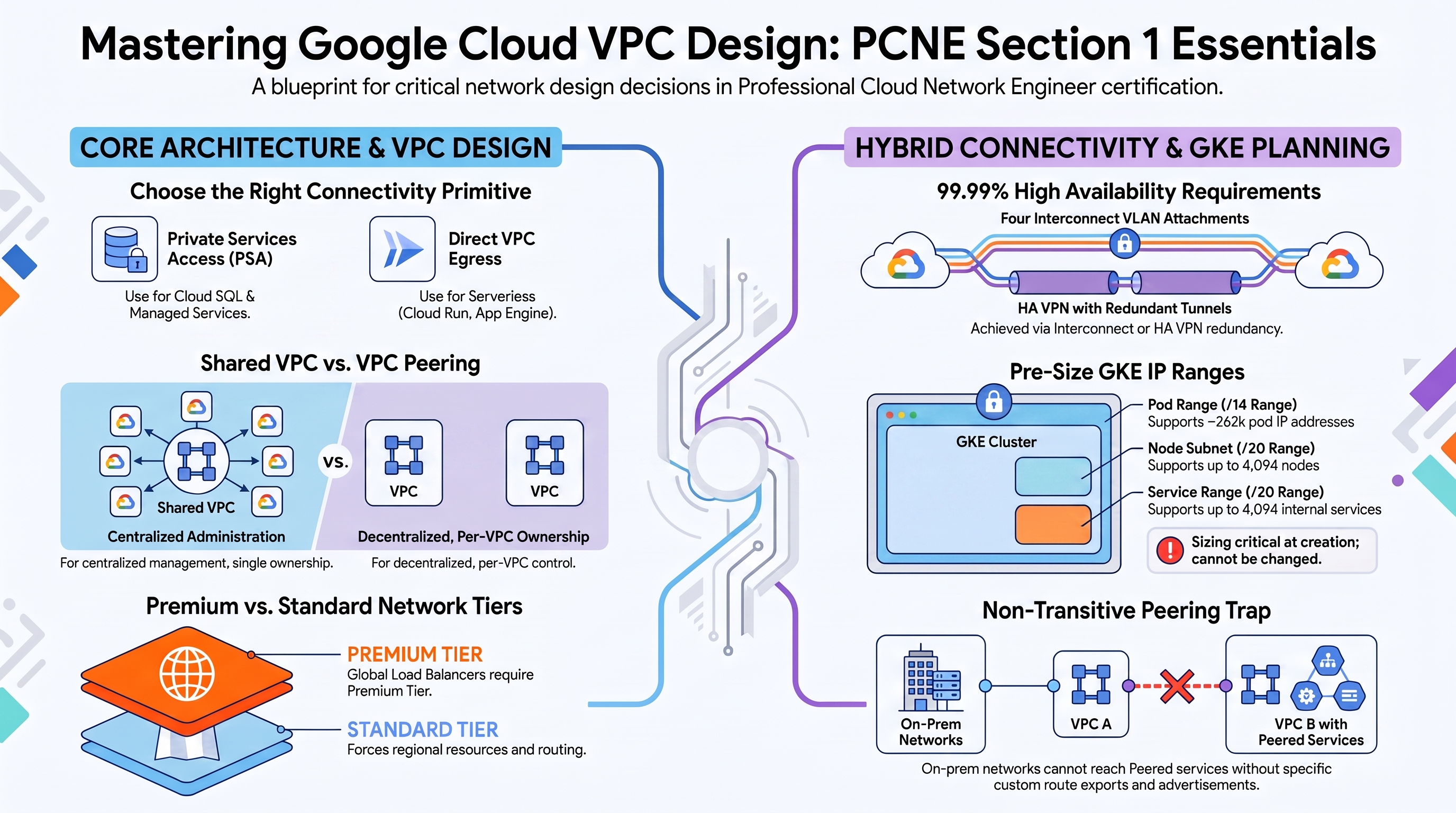
Why the exam cares — Architecture questions test whether you can pick the right connectivity primitive for a managed service: private services access (PSA) for Cloud SQL/Memorystore, Private Service Connect (PSC) for producer endpoints, Direct VPC egress or a Serverless VPC Access connector for Cloud Run. They also test load balancer selection (global external Application LB vs regional vs passthrough) and whether your design respects quotas (subnet ranges per VPC, peering route limits).
How RAD implements it — The platform makes three deliberate architecture choices you can interrogate:
| Decision | RAD's choice |
|---|---|
| Managed-service connectivity | PSA: a /16 internal range reserved for VPC peering plus a Service Networking connection |
| Serverless-to-VPC connectivity | Cloud Run Direct VPC egress (a network interface on a subnet) — no Serverless VPC Access connector anywhere |
| Internet-facing entry point | An external Application Load Balancer with a serverless NEG, created when enable_cloud_armor (default false) or enable_cdn (default false) is on |
Memorystore Redis additionally exposes the choice directly: redis_connect_mode (default DIRECT_PEERING, option PRIVATE_SERVICE_ACCESS). Filestore uses DIRECT_PEERING.
Try it
-
Deploy the VPC Foundation profile. In Console > VPC network > VPC network peering, find the
servicenetworking-googleapis-compeering created by the PSA connection. -
Inspect the reserved range and the peering from the CLI:
gcloud compute addresses list --global \
  --filter="purpose=VPC_PEERING" \
  --format="table(name,address,prefixLength,network)"
gcloud services vpc-peerings list \
--network=$(gcloud compute networks list --filter="name~vpc-network" --format="value(name)" | head -1) -
In Console > Cloud Run, open your service > Networking tab. Confirm "VPC" shows a network interface on the Services_GCP subnet (Direct VPC egress) rather than a connector.
-
You know it worked when the PSA address shows
prefixLength: 16and the Cloud SQL instance's private IP (visible in SQL > instance > Connections) falls inside that range.
Check yourself
Q1: A Cloud Run service must reach a Cloud SQL private IP and an on-prem CIDR via VPN. Direct VPC egress or Serverless VPC Access connector — and what egress setting?
A: Either works for routing into the VPC, but Direct VPC egress (what RAD uses) avoids connector instance cost and gives higher throughput. To reach on-prem, vpc_egress_setting = "ALL_TRAFFIC" is not strictly required — PRIVATE_RANGES_ONLY (RAD's default) routes RFC 1918 destinations through the VPC, which covers a private on-prem CIDR. ALL_TRAFFIC is needed when public destinations must also traverse the VPC (e.g., for NAT-based egress IP allowlisting).
Q2: Why does the platform reserve a /16 for private services access instead of a /24?
A: Each service producer (Cloud SQL, Memorystore, Filestore) carves per-region subnets out of the allocated range inside Google's producer VPC. A small allocation can be exhausted as instances, replicas, and regions are added, and growing it later requires updating the reservation. A /16 leaves headroom for every producer the platform might enable.
Q3: Which network tier do the module-created load balancers use?
A: Global external Application Load Balancers with EXTERNAL_MANAGED scheme require Premium Tier, which is the project default. The modules never set a network_tier, so everything runs Premium. Standard Tier would force regional load balancing and regional forwarding rules — one reason a "global static IP + Standard Tier" design is an exam trap.
Beyond the modules — The exam also tests: Premium vs Standard network tiers (study "Network Service Tiers overview"; try gcloud compute project-info describe --format="value(defaultNetworkTier)"); DNS resolution topology (Cloud DNS private zones, split horizon — nothing in RAD); IAM roles for network design (roles/compute.networkAdmin vs networkUser vs securityAdmin — only roles/compute.networkUser appears, granted to the GKE service account); and quotas/limits (study "VPC resource quotas": subnet ranges per network, secondary ranges per subnet, peering limits). For PSC study "Private Service Connect types" — RAD uses only PSA peering, never PSC endpoints, despite the resource name psconnect_private_ip_alloc.
⚠️ Exam trap — Private services access is implemented with VPC peering, so it is non-transitive: an on-prem network connected by VPN cannot reach a Cloud SQL private IP through the consumer VPC unless you export custom routes on the peering and advertise the PSA range from Cloud Router. RAD already enables custom-route export on the PSA peering — know why.
1.2 Designing VPC networks
⏱ ~45 min · 💰 no additional cost · ⚙️ Requires: VPC Foundation profile
Why the exam cares — You must choose between standalone VPCs, Shared VPC, and multi-VPC designs joined by peering, NCC, or PSC, then defend an IPAM plan: which CIDRs, how many subnets, global vs regional resources, MTU, and what happens when address space collides.
How RAD implements it — One standalone custom-mode VPC per project:
| Variable / behavior | Default |
|---|---|
VPC vpc-network-{resource_prefix} — custom-mode (subnets are not auto-created) | always |
availability_regions — one subnet per listed region | ["us-central1"] |
subnet_cidr_range — one CIDR per region, validated 1–2 entries | ["10.0.0.0/24"] |
Subnet description managed-by=services-gcp — the discovery contract used by app modules | always |
The deterministic IPAM pattern is worth studying closely. When no Services_GCP VPC exists, App_CloudRun and App_GKE provision inline VPCs whose subnet CIDR is a deterministic /24 carved out of 192.168.0.0/16 — derived from a SHA-256 of the deployment suffix — so multiple standalone deployments never advertise the same CIDR into the shared PSA peering. The inline GKE path goes further: pod ranges from 10.0.0.0/8 and service ranges from 100.64.0.0/10 — RFC 6598 shared address space, a live example of non-RFC 1918 IP planning.
The discovery layer runs gcloud compute networks subnets list --filter="description~managed-by=services-gcp" and also harvests network tags from existing ingress firewall rules so Cloud Run's VPC interface carries the right tags.
Try it
-
In your deployment portal, redeploy Services_GCP with
availability_regions = ["us-central1", "us-west1"]andsubnet_cidr_range = ["10.0.0.0/24", "10.0.1.0/24"]. -
Verify the subnet layout and that the VPC is custom mode:
gcloud compute networks describe vpc-network-<prefix> \
  --format="value(x_gcloud_subnet_mode,routingConfig.routingMode)"
gcloud compute networks subnets list \
  --network=vpc-network-<prefix> \
--format="table(name,region,ipCidrRange,description)" -
Console > VPC network > VPC networks — open the network and note the MTU column (the modules never set it, so it is the default 1460).
-
You know it worked when two subnets appear, one per region, each carrying the
managed-by=services-gcpdescription.
Check yourself
Q1: Two App_GKE deployments in one project, no Services_GCP. Why is the hashed-CIDR scheme necessary rather than a fixed 192.168.0.0/24 for both?
A: Both inline VPCs peer with the same Service Networking producer via PSA. If two consumer VPCs advertise identical subnet CIDRs, the producer installs a return route for only one of them, silently black-holing reply traffic for the other deployment. Deterministic, hash-distinct /24s guarantee non-overlapping advertisements — the same reason on-prem/cloud IP plans must never overlap.
Q2: A customer needs 40 service projects to share one network with centralized firewall administration. Standalone VPCs with peering, or Shared VPC?
A: Shared VPC. Peering does not scale administratively (full mesh, non-transitive, per-VPC firewall ownership) and has peering-group route limits. Shared VPC keeps subnets, routes, and firewall rules in one host project while service projects attach workloads via roles/compute.networkUser on specific subnets. RAD's "one VPC per project" model deliberately avoids this — know both.
Beyond the modules — Not implemented and heavily tested: Shared VPC (host/service projects, subnet-level IAM — try gcloud compute shared-vpc enable HOST_PROJECT in a scratch org), VPC Network Peering between your own VPCs (gcloud compute networks peerings create, remember non-transitivity and no overlapping CIDRs), NCC star/mesh topologies for many-VPC designs, IPv6 (dual-stack subnets, --stack-type=IPV4_IPV6), BYOIP/PUPI, Private NAT for overlapping ranges, MTU decisions (1460 default, 8896 jumbo for intra-VPC and supported Interconnect), and NVA insertion with custom/policy-based routes plus internal LB. Study pages: "Shared VPC overview", "VPC Network Peering", "Create and use IPv6", "MTU of a VPC network".
⚠️ Exam trap — Subnets are regional; VPCs and their routing tables are global. "Create one subnet per zone" is wrong, and a VM in us-west1 reaches a us-central1 subnet with no extra routing. Don't confuse the dynamic routing mode (regional vs global, affects only Cloud Router-learned routes) with subnet reach.
1.3 Designing a resilient and performant hybrid and multi-cloud network
⏱ ~60 min study · 💰 no platform cost · ⚙️ Requires: nothing deployed — concept-only
Why the exam cares — Choosing between Dedicated Interconnect (10/100 Gbps, your own colo presence), Partner Interconnect (50 Mbps–50 Gbps via a provider), Cross-Cloud Interconnect (to AWS/Azure), and HA VPN (encrypted, internet-transported, 99.99% with two tunnels per interface) is the single most repeated decision pattern on this exam, along with the 99.9% vs 99.99% Interconnect SLA topologies and hybrid DNS forwarding design.
How RAD implements it — Not implemented by the foundation modules. The only adjacent artifacts: the Cloud Router (ASN 64514, no BGP peers — it exists to anchor Cloud NAT), and the PSA peering's custom-route export, which is exactly the knob you would flip so an on-prem network could reach Cloud SQL private IPs over a future VPN/Interconnect.
Try it
-
Even without hybrid links, you can inspect the building blocks the modules leave behind:
gcloud compute routers list --format="table(name,region,network,bgp.asn)"
gcloud compute routers describe vpc-network-<prefix>-nat-gw-us-central1 \
--region=us-central1 --format="yaml(bgp,nats[].name)" -
Note
bgp.asn: 64514(a private ASN) and that there are nobgpPeersand nointerfaces— contrast with what an HA VPN attachment would add. -
You know you understand it when you can explain why this router could later host both NAT and VPN BGP sessions on the same network.
Check yourself
Q1: An enterprise needs 99.99% SLA connectivity to on-prem with encryption in transit. Which design?
A: HA VPN over Cloud Interconnect (or plain HA VPN if Interconnect isn't justified). The 99.99% Interconnect SLA requires four VLAN attachments across two metros (two edge availability domains each) with global dynamic routing; Interconnect alone is not encrypted, so the exam answer for "encrypted + 99.99%" is HA VPN over Interconnect, or MACsec on supported Interconnect connections.
Q2: On-prem hosts must call Google APIs privately through the Interconnect. What do you configure?
A: Advertise 199.36.153.4/30 (restricted.googleapis.com) or 199.36.153.8/30 (private.googleapis.com) from Cloud Router as a custom route advertisement, create a Cloud DNS private zone for googleapis.com mapping *.googleapis.com to those VIPs, and make it resolvable on-prem via DNS forwarding/inbound server policy. Note RAD's GKE NetworkPolicy already allowlists exactly those two /30s for pod egress — same VIPs, different enforcement point.
Beyond the modules — Study the full 1.3 list deliberately: Dedicated vs Partner vs Cross-Cloud Interconnect ("Cloud Interconnect overview"); HA VPN topologies incl. VPN between two VPCs; regional vs global dynamic routing mode and its effect on which subnets Cloud Router advertises; accessing multiple VPCs from on-prem (per-VPC attachments vs NCC hub); hybrid DNS (forwarding zones, inbound DNS policies, DNS peering, cross-project binding); IP planning across on-prem and cloud (internal ranges, Private NAT for overlap); MTU over hybrid links (1440 typical for VPN, up to 8896 on Interconnect); MACsec. Scratch-project commands worth memorizing: gcloud compute vpn-gateways create (HA VPN gives two interfaces automatically), gcloud compute interconnects attachments partner create, gcloud compute routers add-bgp-peer.
⚠️ Exam trap — "Global dynamic routing makes my VPN highly available" — no. Routing mode controls which subnets are advertised/learned across regions; HA comes from redundant tunnels/attachments and BGP failover (optionally accelerated with BFD).
1.4 Designing for Google Kubernetes Engine
⏱ ~60 min · 💰 Autopilot cluster cost while deployed · ⚙️ Requires: GKE Network Lab profile
Why the exam cares — GKE IP exhaustion is a classic incident: the exam tests sizing the node subnet, pod secondary range, and service secondary range before cluster creation, choosing public vs private nodes and control-plane endpoints, and matching node pools to workload needs.
How RAD implements it — The platform is a worked example of deterministic multi-cluster IP planning. For cluster i, each range is sliced out of a base CIDR using the cluster index:
| Range | Derivation | Cluster 1 result (defaults) |
|---|---|---|
| Node subnet | a /20 spaced 16 apart inside gke_subnet_base_cidr (10.128.0.0/12) | 10.128.0.0/20 (4,094 nodes) |
| Pod range | a /14 slice of gke_pod_base_cidr (10.64.0.0/10) | 10.64.0.0/14 (~262k pod IPs) |
| Service range | a /20 slice of gke_service_base_cidr (10.8.0.0/16) | 10.8.0.0/20 (4,094 services) |
Each subnet carries two named secondary ranges (gke-{prefix}-pods-{i}, gke-{prefix}-services-{i}) — i.e., VPC-native/alias-IP clusters. Other verified design choices: gke_cluster_mode default AUTOPILOT (or STANDARD with an explicit node pool: gke_node_machine_type default e2-standard-4, autoscaling gke_node_min_count 1 to gke_node_max_count 5, pd-balanced disks, Shielded nodes);release channel REGULAR; private nodes — private_cluster_config { enable_private_nodes = true } plus a control-plane-only /28 from gke_master_base_cidr, required because RAD-managed projects deny compute.vmExternalIpAccess; enable_private_endpoint is left false, so the control-plane endpoint stays public for CI/CD. The inline cluster additionally configures master authorized networks with Google public CIDR access enabled plus a 0.0.0.0/0 block so Cloud Build workers can reach the API server.
Try it
-
Deploy the GKE Network Lab profile, then map the IP plan end to end:
gcloud container clusters describe gke-cluster-1-<prefix> \
  --location=us-central1 \
  --format="yaml(clusterIpv4Cidr,servicesIpv4Cidr,ipAllocationPolicy,datapathProvider,privateClusterConfig)"
gcloud compute networks subnets describe vpc-network-<prefix>-gke-subnet-1-us-central1 \
  --region=us-central1 \
--format="yaml(ipCidrRange,secondaryIpRanges)" -
Confirm
privateClusterConfig.enablePrivateNodes: true(nodes have no external IPs) anddatapathProvider: ADVANCED_DATAPATH. -
In your portal, set
gke_cluster_count = 2and redeploy: observe cluster 2 receive10.68.0.0/14pods and10.8.16.0/20services — non-overlapping by construction. -
You know it worked when
kubectl get pods -o wideshows pod IPs inside the cluster's pod CIDR rather than the node CIDR (alias IPs in action):gcloud container clusters get-credentials gke-cluster-1-<prefix> --location=us-central1
kubectl get pods -A -o wide | head
Check yourself
Q1: With defaults, why can the platform support 10 clusters (gke_cluster_count max) without IP collisions?
A: Each base CIDR is sliced using the cluster index: 16 possible /14 pod slices in 10.64.0.0/10, 16 /20 service slices in 10.8.0.0/16, and node /20s spaced 16 apart inside 10.128.0.0/12. The arithmetic guarantees disjoint ranges for indexes 1–10 — the same precomputation discipline the exam expects for "plan IP space for N clusters".
Q2: A regulated customer demands nodes with no public IPs and a control plane reachable only from a bastion subnet. What changes relative to the RAD design?
A: Private nodes are already configured (enable_private_nodes = true on both the Services_GCP cluster and App_GKE's inline fallback; Cloud NAT handles their egress). Only the control plane changes: set enable_private_endpoint = true, or keep the public endpoint but restrict master authorized networks to the bastion CIDR (today the inline cluster opens them to 0.0.0.0/0). RAD's clusters are public-endpoint by design because the CI/CD path (Cloud Build) needs API-server access; the inline cluster even opens authorized networks to 0.0.0.0/0 (auth still required) — recognize that as a convenience trade-off, not a security best practice.
Q3: Pods schedule but new Services fail with "range exhausted". Which range is the problem and can you fix it in place?
A: The services secondary range. It is fixed at cluster creation and cannot be replaced; pods get relief via additional pod ranges (--additional-pod-ipv4-ranges / per-node-pool pod ranges), but service-range exhaustion requires recreating the cluster with a larger range — why the exam (and RAD's /20 default) push you to size it up front.
Beyond the modules — Study: private clusters and the three control-plane access patterns (public endpoint, public + authorized networks, private endpoint) plus the newer DNS-based control plane endpoint; non-RFC 1918 and PUPI pod ranges (RAD's inline path already uses 100.64.0.0/10 for services); IPv6/dual-stack GKE; GKE load balancing options (container-native LB with NEGs — covered in Section 3); node-pool design (taints, local SSD, spot). Docs: "Alias IP ranges", "GKE address management", "About private clusters".
⚠️ Exam trap — The pod range must be sized as nodes × max-pods-per-node × 2 (GKE reserves a /24 per node by default on Standard; Autopilot manages it but still consumes the range). A "/24 pod range for a 100-node cluster" answer is always wrong — the node subnet and pod range are sized with different math.
Need RAD to do something it does not do yet? Request it on the roadmap, or vote on what is already there.