PCNE Certification Preparation Guide: Section 3 — Configuring managed network services (~16% of the exam)
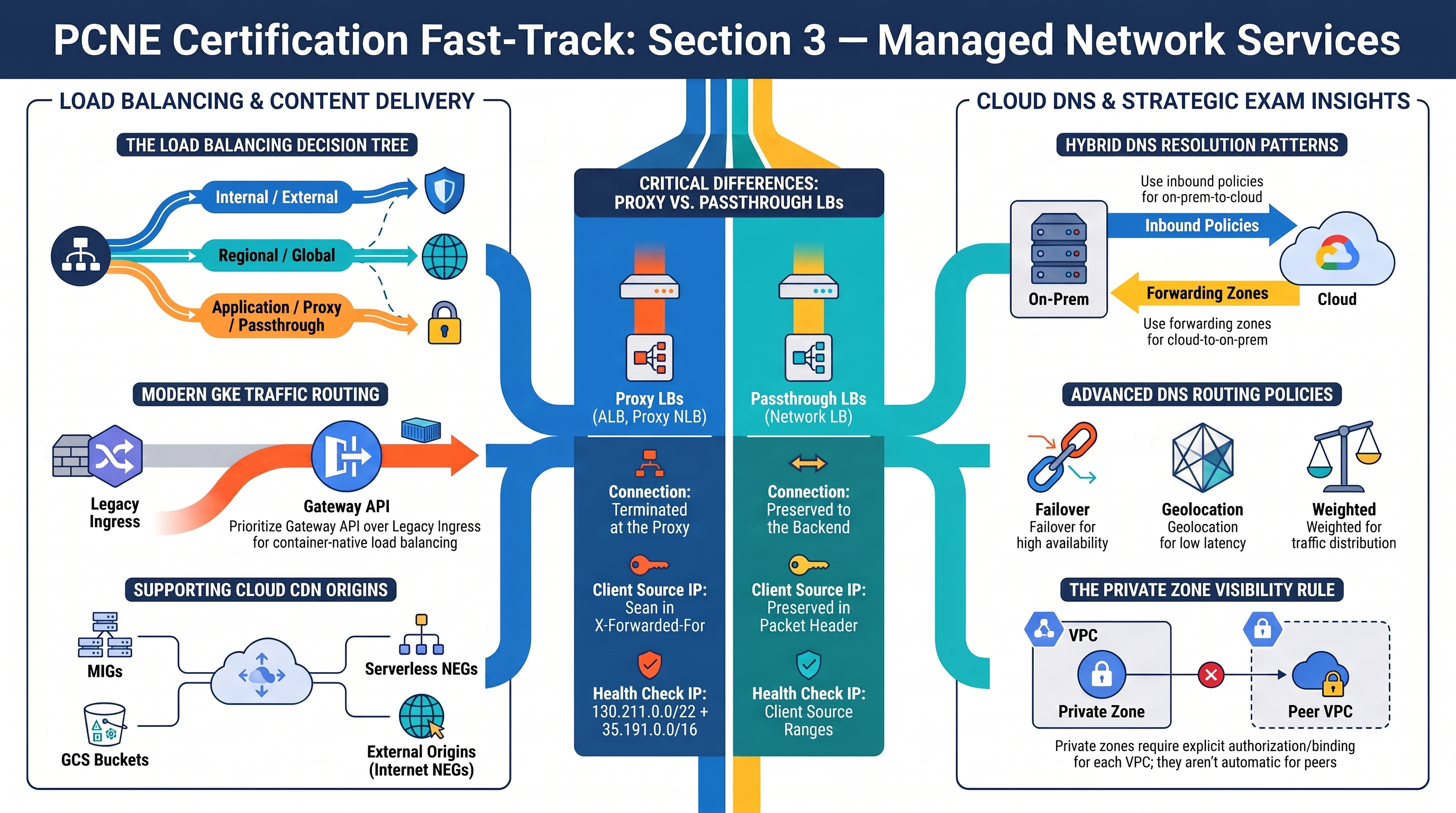
This section covers load balancing, Cloud CDN, and Cloud DNS. RAD gives you two complete global external Application Load Balancer builds to compare: the Cloud Run engine assembles one explicitly from load-balancing primitives (NEG → backend service → URL map → proxies → forwarding rules), while the GKE engine lets the Gateway controller assemble the same chain from Kubernetes manifests. Deploy the Global Edge profile before starting. Cloud DNS is not implemented — budget real study time for 3.3.
3.1 Configuring load balancing
⏱ ~90 min · 💰 forwarding-rule + LB request charges while deployed · ⚙️ Requires: Global Edge profile (
enable_cloud_armor = trueon App_CloudRun (application_domainsoptional);enable_custom_domain = trueon App_GKE)
Why the exam cares — The LB decision tree (internal/external × regional/global × application/proxy/passthrough) plus backend mechanics — NEG types, balancing modes, session affinity, health checks, URL maps — is the highest-yield topic in Section 3. GKE adds the Gateway vs Ingress controller choice and container-native load balancing with NEGs.
How RAD implements it —
Cloud Run path: when enable_cloud_armor (default false) or enable_cdn (default false) is true, the module sets the service ingress to internal-and-cloud-load-balancing and builds: a regional serverless NEG pointing at the Cloud Run service → a backend service (HTTPS protocol, 30s timeout, external managed scheme, request logging at full sample rate) → URL map → HTTPS target proxy with a Certificate Manager certificate map (per-domain Google-managed certs) → global forwarding rules on a reserved global static IP ({service}-lb-ip), plus an HTTP→HTTPS redirect (permanent). With no custom domain (CDN-only path), a Google-managed SSL cert is issued for a <ip-dashed>.nip.io hostname instead.
GKE path: when enable_custom_domain = true, a Gateway with gatewayClassName: gke-l7-global-external-managed (global external ALB), listeners HTTP/80 (+HTTPS/443 when application_domains is set), a NamedAddress pointing at a reserved global address, certificate map via the networking.gke.io/cert-map annotation, an HTTPRoute to the Service, and a GCPBackendPolicy carrying the backend timeout, optional IAP, and the Cloud Armor security policy. Without the Gateway, the default exposure is a LoadBalancer Service (regional external passthrough Network LB) with session_affinity default ClientIP and an optional regional static IP (reserve_static_ip, default true). Health checking: Cloud Run relies on the platform plus container startup_probe_config/health_check_config; GKE backends get probes from the same variables, and the shared VPC firewall (fw-allow-lb-hc) admits Google's prober ranges.
Try it
-
Deploy the Global Edge profile, then walk the Cloud Run LB chain in Console > Network services > Load balancing:
gcloud compute network-endpoint-groups list --format="table(name,networkEndpointType,region)"
gcloud compute backend-services describe <service>-backend --global \
  --format="yaml(loadBalancingScheme,protocol,backends,securityPolicy,enableCDN,logConfig)"
gcloud compute url-maps list
gcloud compute forwarding-rules list --global \
--format="table(name,IPAddress,portRange,target)" -
On the GKE side, compare what the Gateway controller generated:
kubectl get gateway,httproute,gcpbackendpolicy -n <app-namespace>
kubectl describe gateway <prefix>-gateway -n <app-namespace>   # note the programmed IP
gcloud compute backend-services list --format="table(name,loadBalancingScheme)" # gkegw1-* entries -
Curl the static IP with a Host header before DNS exists:
curl -sk -H "Host: app.example.com" https://<global-ip>/ -o /dev/null -w "%{http_code}\n" -
You know it worked when the Gateway resource shows a
Programmed: Truecondition and both LBs appear in the console's load balancing list with global scope.
Check yourself
Q1: Why is the serverless NEG regional while the load balancer is global?
A: Serverless NEGs are always regional objects (they wrap a regional Cloud Run/Functions service), but a global external ALB can attach regional NEGs from multiple regions to one backend service and route clients to the nearest healthy region via anycast. That's RAD's pattern with a single region; multi-region would add one NEG per region to the same backend service.
Q2: Traffic must split 90/10 between two app versions. Where does RAD do this, and where would the exam do it on an ALB?
A: RAD splits at the Cloud Run revision level via traffic_split (LATEST/REVISION percentages) — the LB is unaware. The ALB-native answer is URL-map routeRules with weightedBackendServices (plus requestMirrorPolicy for mirroring and urlRewrite for rewrites), or, on GKE Gateway, multiple backendRefs with weight in the HTTPRoute. Know both layers and that they compose.
Q3: A client's requests keep landing on different pods despite sessionAffinity: ClientIP on the GKE Service. The app is reached through the Gateway. Why?
A: Gateway/ALB traffic reaches pods via NEGs, bypassing kube-proxy Service semantics — the Service's ClientIP affinity applies to passthrough/cluster traffic, not to the ALB's backend selection. For the Gateway path, configure affinity on the backend via GCPBackendPolicy (sessionAffinity), which RAD leaves unset.
Beyond the modules — Not implemented: internal ALB/NLB (no INTERNAL_MANAGED/INTERNAL schemes anywhere, no proxy-only subnets), MIG backends with balancing modes (UTILIZATION/RATE/CONNECTION — the modules' only backend is a serverless NEG, which takes no balancing mode), global access on internal LBs, the legacy GKE Ingress controller with BackendConfig (RAD chose Gateway API), and ALB traffic management (weighted splits, mirroring, URL rewrites). Study "Choose a load balancer" (memorize the decision tree) and "Traffic management overview for global external Application Load Balancers"; in a scratch project create an internal ALB to see the required proxy-only subnet (gcloud compute networks subnets create ... --purpose=REGIONAL_MANAGED_PROXY).
⚠️ Exam trap — Passthrough LBs (internal/external Network LB) preserve client source IPs and require backend firewall rules for client ranges; proxy LBs (ALB, proxy NLB) terminate connections, so backends see proxy ranges and you must allow 130.211.0.0/22 + 35.191.0.0/16 for health checks and read client IPs from X-Forwarded-For. Mixing these up breaks both firewalling and logging answers.
3.2 Configuring Cloud CDN
⏱ ~30 min · 💰 cache-egress charges while testing · ⚙️ Requires: Global Edge profile with
enable_cdn = true(App_CloudRun)
Why the exam cares — Knowing which origins Cloud CDN supports (backend services with MIGs, backend buckets for GCS, serverless NEGs for Cloud Run, internet NEGs for external origins), how cache modes and invalidation work, and that CDN hangs off the backend service/bucket of a global external ALB.
How RAD implements it — On the Cloud Run engine this is real and verifiable: enable_cdn (default false) turns on Cloud CDN directly on the Cloud Run backend service and forces creation of the global external ALB, demonstrating "Cloud CDN for Cloud Run via serverless NEG". Note it is not usable on its own: validation.tf precondition 26 requires enable_cloud_armor = true alongside it, because the CDN attaches to the load balancer Cloud Armor provisions. On the GKE engine, be careful: enable_cdn (default false; a custom domain is not required — that validation was relaxed) switches the module onto the Gateway path, but no resource actually enables CDN — the GCPBackendPolicy CRD does not support a CDN field, so CDN for the GKE Gateway must be enabled out-of-band on the controller-generated backend service.
Try it
-
With the Global Edge profile deployed, confirm CDN on the Cloud Run backend and exercise the cache:
gcloud compute backend-services describe <service>-backend --global \
  --format="yaml(enableCDN,cdnPolicy)"
curl -s -D- -o /dev/null https://<your-domain>/ | grep -iE "age|cache|via"
Repeat the curl — a growing
Age:header indicates a cache hit. -
Invalidate the cache the way the exam expects:
gcloud compute url-maps invalidate-cdn-cache <service>-lb --path "/*" --async -
On GKE, prove the gap, then close it manually (out-of-band exercise):
BS=$(gcloud compute backend-services list --format="value(name)" --filter="name~gkegw1")
gcloud compute backend-services describe $BS --global --format="value(enableCDN)"   # False/empty
gcloud compute backend-services update $BS --global --enable-cdn --cache-mode=CACHE_ALL_STATIC -
You know it worked when Console > Network services > Cloud CDN lists the origin(s) and the second curl returns an
Ageheader.
Check yourself
Q1: Content must be served from an origin running in AWS behind the Google ALB with CDN. How?
A: Create an internet NEG (gcloud compute network-endpoint-groups create --network-endpoint-type=INTERNET_FQDN_PORT) referencing the external origin, attach it to a backend service on the global external ALB, and enable CDN on that backend service. Cloud CDN supports external backends via internet NEGs — no VPN/Interconnect required for this pattern.
Q2: After deploying a fix, users still see the old asset for hours. Cache invalidation or shorter TTL?
A: Immediate remediation is gcloud compute url-maps invalidate-cdn-cache --path (path-pattern based, takes effect in minutes but is rate-limited and not for routine use). The durable fix is versioned URLs or correct Cache-Control headers / cache-mode TTLs. Exam answers that "invalidate on every deploy" are wrong.
Beyond the modules — Study backend buckets (gcloud compute backend-buckets create --gcs-bucket-name --enable-cdn — RAD's GCS buckets are never CDN origins), cache modes (USE_ORIGIN_HEADERS, CACHE_ALL_STATIC, FORCE_CACHE_ALL), signed URLs/cookies, and negative caching. For the GKE gap above, the supported long-term pattern for Gateway is configuring CDN via GCPBackendPolicy's sibling mechanisms or managing the backend service setting out-of-band; for the legacy Ingress controller it's BackendConfig.spec.cdn.
⚠️ Exam trap — FORCE_CACHE_ALL caches everything, including responses with Set-Cookie or private data, and breaks dynamic content. Choose it only for pure-static backends; the safe default with well-behaved origins is USE_ORIGIN_HEADERS.
3.3 Configuring Cloud DNS
⏱ ~45 min study · 💰 pennies for a test zone · ⚙️ Requires: nothing — concept-only
Why the exam cares — Zone types (public/private), split-horizon, routing policies (weighted, geolocation, failover), DNSSEC, hybrid DNS (forwarding zones, server policies, DNS peering, cross-project binding), and the GKE external-DNS pattern are all enumerated exam topics.
How RAD implements it — Not implemented: no Cloud DNS resources exist anywhere in the four foundation modules. The modules sidestep DNS in two verifiable ways: the Cloud Run engine derives a zero-configuration hostname from the LB's static IP via the public nip.io wildcard DNS service (IP 34.56.78.90 → 34-56-78-90.nip.io) and issues a Google-managed certificate for it, and Certificate Manager domain certs for application_domains stay PROVISIONING until you create the DNS records pointing at the LB IP — an external dependency the deployment portal expects you to satisfy.
Try it
-
Create a public zone in a scratch project and point it at your deployed LB:
gcloud dns managed-zones create pcne-lab --dns-name="lab.example.com." \
  --description="PCNE practice"
gcloud dns record-sets create app.lab.example.com. --zone=pcne-lab \
--type=A --ttl=300 --rrdatas=<rad-lb-static-ip> -
Build the hybrid-relevant private-zone pattern against the RAD VPC:
gcloud dns managed-zones create internal-zone --dns-name="internal.lab." \
--visibility=private --networks=vpc-network-<prefix> --description="split horizon demo" -
Try a failover routing policy (exam favorite):
gcloud dns record-sets create svc.lab.example.com. --zone=pcne-lab --type=A --ttl=60 \
  --routing-policy-type=FAILOVER \
  --routing-policy-primary-data=<primary-ip> \
  --routing-policy-backup-data-type=GEO \
--routing-policy-backup-data="us-central1=<backup-ip>" -
You know it worked when
dig app.lab.example.com @8.8.8.8resolves once registrar NS delegation is in place, and the private record resolves only from a VM inside the RAD VPC.
Check yourself
Q1: On-prem resolvers must resolve records in a Cloud DNS private zone. What do you configure?
A: An inbound DNS server policy on the VPC (gcloud dns policies create --enable-inbound-forwarding --networks=...), which allocates inbound forwarder IPs in each subnet region; point on-prem conditional forwarders at those IPs over VPN/Interconnect. The reverse direction (cloud → on-prem names) uses a forwarding zone targeting on-prem DNS servers.
Q2: Two VPCs that are NOT peered must both resolve a private zone owned by a hub project. Options?
A: Either bind the private zone to additional networks (cross-project binding — the zone lives in one project but lists VPCs from others), or create DNS peering zones in the consumer VPCs targeting the producer VPC. DNS peering works without VPC peering — DNS and data-plane connectivity are independent, a recurring exam distinction.
Beyond the modules — Work through "Cloud DNS overview", "DNS server policies", "DNS routing policies and health checks" (geolocation + failover with health-checked internal LB targets), DNSSEC enablement (gcloud dns managed-zones update --dnssec-state=on plus DS record at the registrar), and the external-DNS operator for GKE (annotated Services/Ingresses auto-create Cloud DNS records — the natural automation for RAD's manually-pointed application_domains).
⚠️ Exam trap — A private zone is visible only to the VPC networks it is authorized for — not to peered VPCs, not on-prem, not other projects — unless you add bindings, DNS peering, or forwarding. "It's private, so the peer can see it" is always wrong.
Need RAD to do something it does not do yet? Request it on the roadmap, or vote on what is already there.