PCNE Certification Preparation Guide: Section 5 — Managing, monitoring, and troubleshooting network operations (~14% of the exam)
📚 Official exam guide: Professional Cloud Network Engineer certification — always confirm section weightings against the current Google Cloud exam guide.
This section tests operating a network: which logs exist and where to enable them, which metrics matter for VPN/Interconnect/LB/NAT, and how to use Network Intelligence Center to diagnose reachability and performance. RAD gives you a live network to instrument — a global external ALB with request logging already on, health-checked managed instance groups, and alerting plumbing — but deliberately ships with VPC Flow Logs, NAT logging, and firewall logging disabled, which makes enabling them your lab exercise. Deploy the VPC Foundation and Global Edge profiles. Modules exercised: Services_GCP and App_CloudRun.
5.1 Logging and monitoring with Google Cloud Observability
⏱ ~60 min · 💰 log-volume charges if you enable flow logs at high sampling · ⚙️ Requires: VPC Foundation + Global Edge profiles
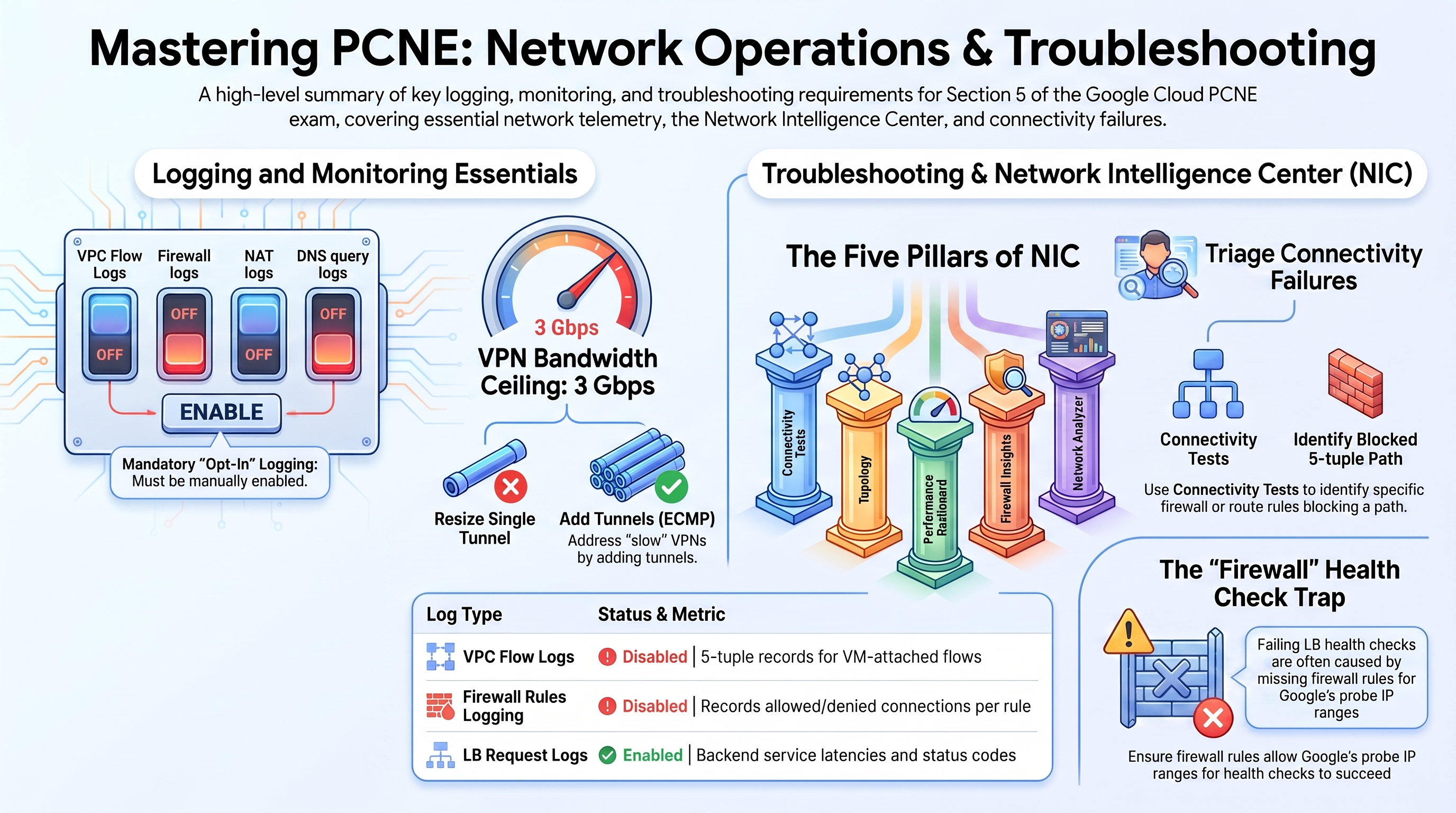
Why the exam cares — You must know which network logs are opt-in (VPC Flow Logs per subnet, firewall rules logging per rule, Cloud NAT logging per NAT, DNS logging per policy/zone) versus on by default, where each lands in Logs Explorer, and the headline metrics for VPN tunnels, Interconnect attachments, Cloud Routers, load balancers, and NAT gateways.
How RAD implements it — Verified state of the deployed estate:
| Telemetry | RAD state |
|---|---|
| LB request logs | Enabled — backend service request logging at full sample rate |
| VPC Flow Logs | Not enabled (no flow logging on any subnet) |
| Firewall rules logging | Not enabled (no logging on any firewall rule) |
| Cloud NAT logging | Not enabled |
| Cloud Audit Logs | enable_audit_logging (default false) → allServices ADMIN_READ/DATA_READ/DATA_WRITE |
| GKE logging/monitoring | SYSTEM_COMPONENTS + WORKLOADS logging, managed Prometheus |
| Alerting | support_users → email channels; alert_policies list (metric, comparison, threshold). uptime_check_config (default { enabled = false, path = "/" }) creates a <service>-uptime-check + alert policy, once enabled, when the endpoint is publicly reachable; internal-only deployments get none |
Try it
-
Read the ALB request logs that are already flowing (generate traffic first):
gcloud logging read 'resource.type="http_load_balancer"' --limit=5 \
--format="table(timestamp,httpRequest.status,httpRequest.requestUrl)" -
Enable VPC Flow Logs on the main subnet — the exam's canonical opt-in:
gcloud compute networks subnets update vpc-network-<prefix>-subnet-us-central1 \
  --region=us-central1 --enable-flow-logs \
  --logging-aggregation-interval=interval-5-sec --logging-flow-sampling=0.5
gcloud logging read 'logName:"compute.googleapis.com%2Fvpc_flows"' --limit=3 -
Enable NAT logging on the platform NAT (errors-only is the cheap, high-signal choice):
gcloud compute routers nats update vpc-network-<prefix>-nat-gw-us-central1 \
  --router=vpc-network-<prefix>-nat-gw-us-central1 --region=us-central1 \
--enable-logging --log-filter=ERRORS_ONLY -
In Console > Monitoring > Metrics explorer, chart
loadbalancing.googleapis.com/https/backend_latenciesfor your LB androuter.googleapis.com/nat/dropped_sent_packets_countfor the NAT. -
You know it worked when flow-log entries show 5-tuple records with
src_instance/dest_instanceannotations and the NAT log stream stays empty until you exhaust ports (see 6.3).
Check yourself
Q1: Security asks for a record of every allowed and denied connection to the NFS VM. What do you enable, and what's the catch?
A: Firewall rules logging on the relevant rules (gcloud compute firewall-rules update vpc-network-<prefix>-fw-allow-nfs-tcp --enable-logging). Catches: logging is per-rule, only TCP/UDP rules can log, and there is no log for traffic dropped by the implied deny — you must create an explicit low-priority deny rule with logging to capture denials. VPC Flow Logs complement this but sample flows and don't record the rule decision.
Q2: Which metric tells you an Interconnect VLAN attachment is approaching capacity, and which tells you a VPN tunnel's bandwidth ceiling?
A: Attachment: interconnect.googleapis.com/network/attachment/sent_bytes_count (vs configured capacity). VPN: vpn.googleapis.com/network/sent_bytes_count per tunnel against the ~3 Gbps-per-tunnel ceiling — the standard answer for "VPN slow under load" is adding tunnels (ECMP), not resizing a tunnel.
Beyond the modules — Study the per-product logging pages: "VPC Flow Logs" (sampling, aggregation, metadata annotations, cost levers), "Firewall Rules Logging", "Cloud NAT logging" (TRANSLATIONS_ONLY vs ERRORS_ONLY), "Cloud DNS logging" (query logs via server policies for private zones; public-zone query logging on the zone), VPC-SC audit logs (denials appear in the org-level policy audit log), and NCC/Cloud Router logs (bgp_routes status via get-status, router task logs). Also Firewall Insights and Flow Analyzer (5.3).
⚠️ Exam trap — VPC Flow Logs capture only VM-attached flows in the subnet (including GKE nodes); they do not capture traffic to global LB frontends (use LB logs) or PSA producer-side flows. Picking "enable flow logs" to debug an LB 502 is wrong — backend service logs and health checks are the tools.
5.2 Maintaining and troubleshooting connectivity issues
⏱ ~45 min · 💰 no additional cost · ⚙️ Requires: VPC Foundation profile (NFS VM enabled, default)
Why the exam cares — Scenario triage: LB drains and traffic redirection during maintenance, VPN tunnels that won't establish (IKE mismatch, overlapping selectors), Interconnect/BGP sessions down, and using flow logs, firewall logs, and Packet Mirroring to localize a fault.
How RAD implements it — The platform's self-healing data path is the best live material: the NFS/Redis VM runs in a managed instance group with TCP health checks on 2049 and 6379 and auto-healing — kill the process and watch detection, recreation, and recovery, the same observe-diagnose-recover loop the exam tests. The connection-draining concept appears on the Cloud Run side as traffic_split revision shifting and old-revision pruning, and the Cloud Run backend service (30s timeout) is the object you would drain in a classic ALB maintenance scenario. There is no VPN/Interconnect to troubleshoot — build the Section 4.2 scratch lab to practice those.
Try it
-
Watch auto-healing catch a failure on the NFS VM:
gcloud compute health-checks list --format="table(name,type,tcpHealthCheck.port)"
# SSH via IAP (allowed by the fw-allow-iap-ssh rule) and stop the NFS service
gcloud compute ssh <nfs-instance-name> --zone=us-central1-a --tunnel-through-iap \
  --command="sudo systemctl stop nfs-kernel-server"
watch -n 10 "gcloud compute instance-groups managed list-instances <nfs-mig-name> \
--zone=us-central1-a --format='table(name,instanceStatus,currentAction)'" -
Observe
currentAction: RECREATING(or VERIFYING) as the health check fails, then service restoration. -
Diagnose a deliberate firewall break: temporarily delete the health-check allow rule and watch the MIG flap, then restore it:
gcloud compute firewall-rules describe vpc-network-<prefix>-fw-allow-lb-hc -
You know it worked when you can correlate the MIG recreation event in Console > Compute Engine > Instance groups with the health-check state change.
Check yourself
Q1: You must take an ALB backend MIG out of service for maintenance with zero dropped requests. Steps?
A: Set connection draining on the backend service (--connection-draining-timeout), then remove/abandon the backend (or set its capacity-scaler to 0): in-flight requests complete during the drain window while new requests route to remaining backends. For RAD's serverless NEG the analogue is shifting traffic_split to another revision before deleting the old one.
Q2: HA VPN tunnel shows ESTABLISHED but BGP session stays down. Top causes?
A: Link-local interface/peer IPs mismatched between the Cloud Router interface and the peer config; wrong peer ASN; on-prem firewall blocking TCP/179 over the tunnel; or MD5 auth mismatch. gcloud compute routers get-status <router> --region=... shows the BGP session state and is the first diagnostic the exam expects. (Tunnel not ESTABLISHED at all → IKE version/shared-secret/peer-IP issues instead.)
Beyond the modules — Practice the canonical triage flows: "Troubleshoot Cloud VPN" (IKE phase failures, rekey drops, MTU/MSS clamping — VPN MTU ~1460 minus ESP overhead, clamp MSS to ~1360), "Troubleshoot Cloud Interconnect" (LACP, light levels, attachment state), BGP flap diagnosis with BFD counters, and Packet Mirroring as the deep-inspection tool when logs aren't enough (see 6.4).
⚠️ Exam trap — A failing LB health check is a firewall question more often than an application question: backends must allow 35.191.0.0/16 and 130.211.0.0/22 (or 35.235.240.0/20 for some regional paths). RAD encodes this twice — VPC rule fw-allow-lb-hc and the GKE NetworkPolicy ingress blocks — because both layers can independently break health checking.
5.3 Monitoring, maintaining, and troubleshooting latency and traffic flow
⏱ ~40 min · 💰 Connectivity Tests are free in moderate use · ⚙️ Requires: VPC Foundation profile (any deployment gives you test targets)
Why the exam cares — Network Intelligence Center's five tools each answer a specific question: Network Topology (what talks to what, with throughput), Connectivity Tests (would/does a 5-tuple reach its destination, and which rule/route decides), Performance Dashboard (zone-to-zone latency/loss baselines), Firewall Insights (shadowed/overly-permissive/unused rules), Network Analyzer (continuous config checks — IP exhaustion, route conflicts, misconfigured PSA), plus Flow Analyzer over VPC Flow Logs.
How RAD implements it — Not implemented as resources (nothing to configure), but every tool can be pointed at the deployed estate, which is the realistic exam skill. The RAD VPC offers ready-made test cases: VM→Cloud SQL private IP through PSA, VM→VM under the intra-VPC rules, internet→LB frontend, and pod-range→NFS paths.
Try it
-
Run a Connectivity Test from the NFS VM to the Cloud SQL private IP — it traverses the PSA peering and shows the full forwarding trace:
gcloud network-management connectivity-tests create nfs-to-sql \
  --source-instance=projects/<project>/zones/us-central1-a/instances/<nfs-instance> \
  --destination-ip-address=<cloudsql-private-ip> \
  --destination-port=5432 --protocol=TCP
gcloud network-management connectivity-tests describe nfs-to-sql \
--format="yaml(reachabilityDetails.result,reachabilityDetails.traces[0].steps[].description)" -
Create a deliberately blocked test (e.g., destination port 25 to an external IP) and read which step denies it.
-
Open Console > Network Intelligence > Network Topology and find the LB → Cloud Run edge generated by your test traffic; then Network Analyzer and look for insights against the GKE secondary ranges (IP-utilization warnings appear as ranges fill).
-
You know it worked when the first test returns
result: REACHABLEwith a trace step showing the peering hop, and the blocked test names the specific deny.
Check yourself
Q1: Users in Frankfurt report slow access to us-central1 backends, but app metrics look healthy. Which NIC tool first?
A: Performance Dashboard — it shows Google-measured inter-region latency and packet loss for your project's traffic versus the global baseline, separating "the network is slow" from "the app is slow". If the network is clean, move to LB backend_latencies vs total_latencies to split origin time from edge time.
Q2: A new deny rule was added and an app broke, but there are dozens of candidate rules. Fastest path to the culprit?
A: A Connectivity Test for the exact 5-tuple — its trace names the matched rule (allow or deny) at each step, including implied rules. Firewall Insights complements it for hygiene (shadowed-rule detection: a rule never hit because a higher-priority rule masks it).
Beyond the modules — Study "Network Analyzer insights reference" (it flags exactly the things RAD's design prevents: overlapping PSA allocations, GKE pod-range exhaustion, invalid next hops), "Flow Analyzer" (BigQuery-backed analysis of VPC Flow Logs — requires you to have enabled flow logs, as in 5.1), and Connectivity Tests' live data plane analysis (sends real probe packets for supported paths, vs the always-available config analysis).
⚠️ Exam trap — Connectivity Tests' configuration analysis can return REACHABLE while the workload still fails: it models VPC config (routes/firewalls/peering), not on-VM firewalls (iptables), application listeners, or Kubernetes NetworkPolicy. RAD's enable_network_segmentation policies are invisible to it — a denied pod connection with a green Connectivity Test is expected, not contradictory.
Need RAD to do something it does not do yet? Request it on the roadmap, or vote on what is already there.