PCNE Certification Preparation Guide: Section 4 — Configuring and implementing hybrid and multicloud network interconnectivity (~16% of the exam)
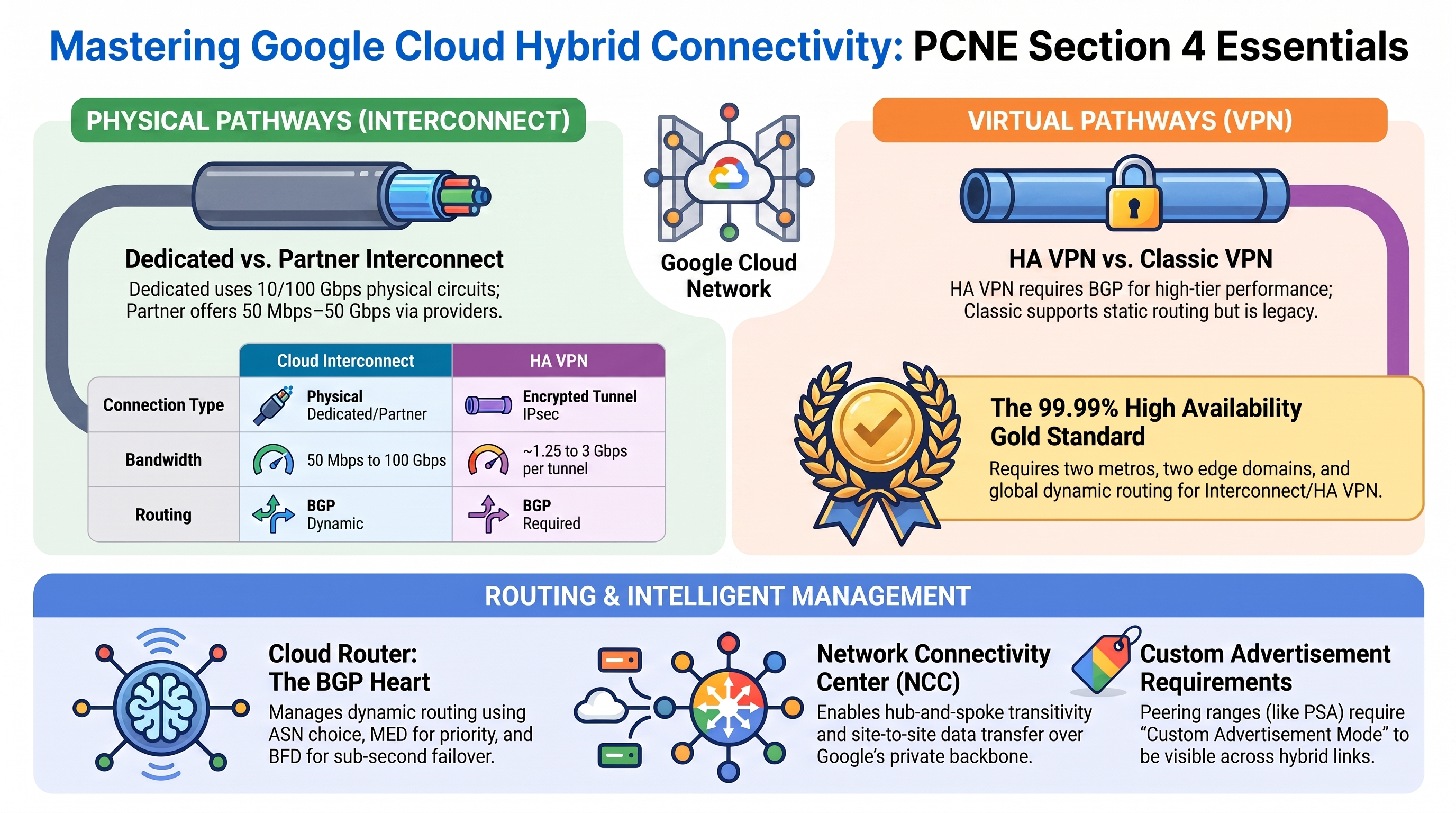
📚 Official exam guide: Professional Cloud Network Engineer certification — always confirm section weightings against the current Google Cloud exam guide.
Honest framing up front: the RAD foundation modules implement none of this section. There is no Interconnect, no VPN, no BGP session, and no NCC hub anywhere in Services_GCP, App_CloudRun, App_GKE, or App_Common. What the platform does give you is a realistic cloud-side anchor — a custom VPC (vpc-network-{prefix}), a Cloud Router (ASN 64514), and a PSA peering with custom-route export — against which every hybrid pattern in this section can be practiced in a scratch project. Deploy the VPC Foundation profile so those anchors exist, then treat this guide as a structured study program. Expect ~16% of the exam from material you will not see running in RAD.
4.1 Configuring Cloud Interconnect
⏱ ~60 min study · 💰 none (Interconnect cannot be meaningfully lab'd without a circuit) · ⚙️ Requires: VPC Foundation profile for the target VPC only
Why the exam cares — Dedicated vs Partner Interconnect selection (capacity, colocation presence, L2 vs L3 Partner models), VLAN attachment configuration, the 99.9% vs 99.99% SLA topologies, Cross-Cloud Interconnect to other clouds, and encrypting Interconnect with HA VPN over Interconnect or MACsec.
How RAD implements it — Not implemented by the foundation modules.
Try it
-
You can rehearse the cloud-side objects without a physical circuit (attachments in a scratch project remain unprovisioned but show the workflow):
gcloud compute interconnects locations list --format="table(name,city,availabilityZone)"
gcloud compute interconnects attachments partner create my-attachment \
  --region=us-central1 \
  --router=vpc-network-<prefix>-nat-gw-us-central1 \
  --edge-availability-domain=availability-domain-1
gcloud compute interconnects attachments describe my-attachment \
--region=us-central1 --format="yaml(pairingKey,state)" -
Note the
pairingKey— the token you hand to a Partner Interconnect provider — and thePENDING_PARTNERstate. -
You know you understand it when you can say why the attachment references the Cloud Router (BGP termination) and what changes for a Dedicated attachment (you specify the
--interconnectinstead of getting a pairing key). Delete the attachment afterward to avoid charges.
Check yourself
Q1: 5 Gbps needed, no presence in a colocation facility, and traffic must be encrypted. Design?
A: Partner Interconnect (no colo presence rules out Dedicated, which starts at 10 Gbps physical circuits) with HA VPN over Interconnect for encryption — Interconnect itself is unencrypted, and MACsec availability depends on the connection type/location. For an L3 partner, the partner's router peers with Cloud Router on your behalf; for L2, you run BGP to Cloud Router yourself.
Q2: What exactly earns the 99.99% Interconnect SLA?
A: Four VLAN attachments on at least two Dedicated/Partner connections in two metros, attachments spread across both edge availability domains in each metro, Cloud Routers in at least two regions, and global dynamic routing mode — plus on-prem redundancy. Two attachments in one metro across both availability domains gets only 99.9%.
Beyond the modules — Study "Cloud Interconnect overview", "Partner Interconnect provisioning", "Cross-Cloud Interconnect" (Google-managed dedicated links to AWS/Azure, same VLAN-attachment + Cloud Router model), "HA VPN over Cloud Interconnect" (VPN gateways on the attachments, doubles as the encryption answer), and MACsec for Cloud Interconnect. Memorize: Dedicated = 10/100 Gbps physical, your colo; Partner = 50 Mbps–50 Gbps via provider; attachments are regional and bind to a Cloud Router.
⚠️ Exam trap — Dataplane: an Interconnect connection is physical and metro-scoped; the VLAN attachment is the regional, routed object. A connection in Chicago can serve attachments to routers in any region (egress costs differ), but SLA math counts metros and availability domains, not regions alone.
4.2 Configuring a site-to-site IPSec VPN
⏱ ~60 min hands-on possible in a scratch project · 💰 ~$0.05/h per tunnel + egress · ⚙️ Requires: VPC Foundation profile as one side
Why the exam cares — HA VPN (two interfaces, 99.99% with correct tunnel topology, BGP-only) vs Classic VPN (single interface, 99.9%, supports static policy/route-based tunnels), VPN between two VPCs, and interaction with dynamic routing mode.
How RAD implements it — Not implemented by the foundation modules. The deployed Cloud Router ({net}-nat-gw-{region}, ASN 64514) is technically capable of hosting VPN BGP sessions, and the VPC's subnets plus the PSA range (custom-route export already enabled on the peering) are exactly what you would advertise to a remote site.
Try it
-
This one you can fully lab: create a second VPC in a scratch project and build HA VPN between it and the RAD VPC:
# One HA VPN gateway per side (note: two interfaces each, automatically)
gcloud compute vpn-gateways create rad-side-gw --network=vpc-network-<prefix> --region=us-central1
gcloud compute vpn-gateways create remote-side-gw --network=scratch-vpc --region=us-central1

gcloud compute routers create remote-router --network=scratch-vpc --region=us-central1 --asn=65010

# Tunnels (repeat with interface 1 / peer counterpart for full HA)
gcloud compute vpn-tunnels create rad-to-remote-0 \
  --region=us-central1 --vpn-gateway=rad-side-gw --interface=0 \
  --peer-gcp-gateway=remote-side-gw --shared-secret=SECRET \
  --router=vpc-network-<prefix>-nat-gw-us-central1 --ike-version=2

gcloud compute routers add-interface vpc-network-<prefix>-nat-gw-us-central1 \
  --interface-name=if-tun0 --vpn-tunnel=rad-to-remote-0 \
  --ip-address=169.254.0.1 --mask-length=30 --region=us-central1
gcloud compute routers add-bgp-peer vpc-network-<prefix>-nat-gw-us-central1 \
  --peer-name=remote-peer-0 --interface=if-tun0 \
--peer-ip-address=169.254.0.2 --peer-asn=65010 --region=us-central1 -
Verify:
gcloud compute vpn-tunnels describe rad-to-remote-0 --region=us-central1 --format="value(status)"→ESTABLISHED, then check learned routes withgcloud compute routers get-status. -
You know it worked when a VM (or the NFS server VM, tag
nfsserver) in the RAD VPC can ping a scratch-VPC VM through the tunnel — remember the intra-VPC firewall rules only allow internal CIDRs, so add an ingress allow for the remote CIDR first.
Check yourself
Q1: An on-prem device supports only policy-based VPN with static routing. HA VPN or Classic?
A: Classic VPN — HA VPN requires BGP. Policy-based/route-based static tunnels exist only on Classic VPN (99.9% SLA, deprecated for new dynamic deployments). The better exam answer when the device can do BGP is always HA VPN with two tunnels for 99.99%.
Q2: HA VPN is up but on-prem can't reach Cloud SQL's private IP, while VMs can. Why?
A: The Cloud SQL instance lives in the producer VPC behind PSA peering. Peering routes aren't advertised over BGP unless the consumer exports them: enable custom-route export on the PSA peering (RAD already does) and add the PSA /16 to Cloud Router's custom advertised routes — the PSA range is not a subnet of the consumer VPC, so default advertisement misses it.
Beyond the modules — Study "HA VPN topologies" (GCP↔GCP, GCP↔on-prem with 2 or 4 tunnels, active/active vs active/passive and the bandwidth-halving caveat), IKE ciphers, and tunnel troubleshooting (Section 5.2). Know link-local BGP addressing (169.254.x.x/30 per tunnel interface, as in the commands above).
⚠️ Exam trap — Creating two tunnels from one HA VPN gateway interface to the peer doesn't earn 99.99% — the SLA requires tunnels from both interfaces of the HA VPN gateway, matched to redundant peer endpoints.
4.3 Configuring Cloud Router
⏱ ~30 min · 💰 none · ⚙️ Requires: VPC Foundation profile
Why the exam cares — Cloud Router is the BGP speaker behind every dynamic hybrid topology: ASN choice, MED (advertised route priority), custom advertised routes, learned-route priority (--advertised-route-priority, base-priority adjustment), BFD for fast failover, MD5 auth, and best-path selection mode.
How RAD implements it — Partially. The platform creates a real Cloud Router named {net}-nat-gw-{region} with ASN 64514 and no advertised groups, whose only consumer is the Cloud NAT gateway (NAT applied to all subnetworks and all IP ranges). The inline path creates a plain Cloud Router with no BGP configuration at all. No BGP peers, no custom advertisements, no BFD exist anywhere.
Try it
-
Inspect the live router and add a custom advertisement (harmless with no peers — it changes what would be advertised):
gcloud compute routers describe vpc-network-<prefix>-nat-gw-us-central1 \
  --region=us-central1 --format="yaml(bgp,nats[].name)"
gcloud compute routers update vpc-network-<prefix>-nat-gw-us-central1 \
  --region=us-central1 \
  --advertisement-mode=CUSTOM \
  --set-advertisement-groups=ALL_SUBNETS \
  --set-advertisement-ranges=<psa-range-cidr>=PSA-range
gcloud compute routers get-status vpc-network-<prefix>-nat-gw-us-central1 \
--region=us-central1 -
You know it worked when
describeshowsadvertiseMode: CUSTOMwith your range. Revert to--advertisement-mode=DEFAULTafterward to avoid Terraform drift on the next platform apply.
Check yourself
Q1: Two Interconnect attachments; you want one preferred for traffic to on-prem and on-prem to prefer one path back. Which knobs?
A: Inbound to Google: on-prem influences Google's choice via MED it sends; Google-side preference for learned identical prefixes follows the route's priority (derived from MED + inter-regional cost). Outbound from Google: set --advertised-route-priority (MED Google sends) per BGP peer — lower MED = more preferred by on-prem. Asymmetry questions almost always resolve to "MED in each direction".
Q2: Failover between two VPN tunnels takes ~60s. How do you make it sub-second?
A: Enable BFD on both BGP peers (gcloud compute routers update-bgp-peer --bfd-session-initialization-mode=ACTIVE --bfd-min-transmit-interval=...). BGP hold timers alone are tens of seconds; BFD detects dataplane failure in hundreds of milliseconds and tears the route down immediately.
Beyond the modules — Study "Cloud Router overview": ASN rules (private 64512–65534/4200000000+ ranges; Google's side of PSA-style peering vs your --asn), regional vs global dynamic routing and how it changes which subnets the router advertises, MD5 authentication on BGP sessions, and legacy vs standard best-path selection modes. Also note each NAT-only router (RAD's case) still counts against router quotas.
⚠️ Exam trap — Cloud Router advertises subnet routes (per routing mode) by default; custom routes, peering ranges (like RAD's PSA /16), and secondary ranges outside the mode's scope require CUSTOM advertisement mode. "It's in the VPC so it's advertised" fails for PSA ranges.
4.4 Configuring Network Connectivity Center
⏱ ~30 min study · 💰 none · ⚙️ Requires: nothing — concept-only
Why the exam cares — Section 4's NCC angle is the hybrid one (vs Section 2.3's VPC-spoke angle): VPN/Interconnect attachments as hybrid spokes, site-to-site data transfer through Google's backbone, router appliances (SD-WAN integration) as spokes peering BGP with Cloud Router, and the transitivity rules.
How RAD implements it — Not implemented by the foundation modules.
Try it
-
If you built the 4.2 HA VPN lab, promote it into an NCC topology in the scratch project:
gcloud network-connectivity hubs create hybrid-hub
gcloud network-connectivity spokes linked-vpn-tunnels create vpn-spoke \
  --hub=hybrid-hub --region=us-central1 \
  --vpn-tunnels=rad-to-remote-0,rad-to-remote-1 \
  --site-to-site-data-transfer
gcloud network-connectivity spokes list --hub=hybrid-hub -
You know it worked when the spoke shows
ACTIVEand the hub's route table includes prefixes learned from the tunnels.
Check yourself
Q1: Two branch offices, each VPN'd to GCP, need branch-to-branch traffic without new circuits. Solution?
A: NCC hub with both VPN tunnel sets as hybrid spokes and site-to-site data transfer enabled — branch traffic transits Google's backbone between the spokes. Without NCC, two VPN tunnels into one VPC do not forward traffic between each other (a VPC is not a transit router for external-to-external flows).
Q2: Where do router appliances fit?
A: A router appliance spoke is a VM (typically a vendor SD-WAN appliance) in the VPC that BGP-peers with Cloud Router; NCC then treats its learned prefixes like any hybrid spoke. It's the answer pattern for "integrate our SD-WAN fabric with Google Cloud".
Beyond the modules — Study "NCC site-to-site data transfer" (supported regions, billing), router-appliance BGP setup, mixing VPC spokes with hybrid spokes (hub provides the transitivity that peering lacks — but VPC spokes and hybrid spokes interoperate per documented rules, not unconditionally), and Private NAT at the hub for overlapping site ranges.
⚠️ Exam trap — "VPC peering + VPN = on-prem reaches the peered VPC" is false (non-transitive). The two supported fixes are: export/import custom routes across the peering with Cloud Router advertising them, or restructure with NCC spokes. Recognize which the scenario allows.
Need RAD to do something it does not do yet? Request it on the roadmap, or vote on what is already there.