PCNE Certification Preparation Guide: Section 2 — Implementing a VPC network (~20% of the exam)
📚 Official exam guide: Professional Cloud Network Engineer certification — always confirm section weightings against the current Google Cloud exam guide.
Section 2 moves from design to gcloud compute networks ... muscle memory: creating VPCs, subnets, firewall rules, routes, and VPC-native GKE clusters. Deploy the VPC Foundation profile (Services_GCP + App_CloudRun) for 2.1–2.2 and add the GKE Network Lab profile for 2.4. Add the Locked-Down Perimeter profile if you want live VPC-SC resources. Modules exercised: Services_GCP, App_GKE, App_Common.
2.1 Configuring VPCs
⏱ ~60 min · 💰 no additional cost · ⚙️ Requires: VPC Foundation profile (add Locked-Down Perimeter for VPC-SC)
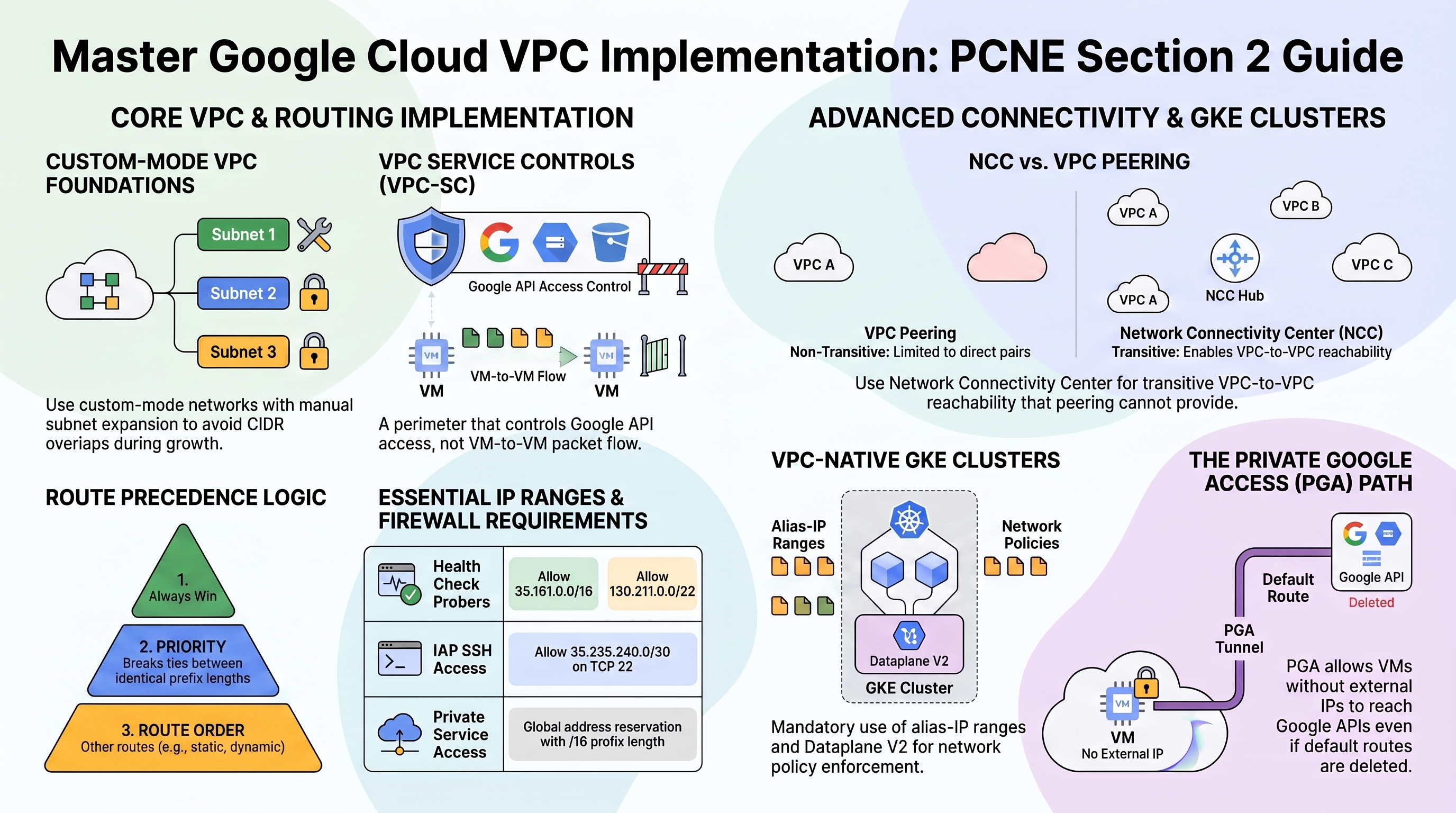
Why the exam cares — This is the bread-and-butter implementation domain: custom-mode networks, subnet creation and expansion, firewall rules vs policies, the private-services-access allocation, Private Google Access, Shared VPC attachment, and VPC-SC perimeters.
How RAD implements it — Here is how the platform builds the network:
| Resource | Key facts |
|---|---|
| VPC network | vpc-network-{prefix}, custom-mode (subnets are not auto-created) |
| GCE subnetwork | one per availability_regions entry, CIDR from subnet_cidr_range (default ["10.0.0.0/24"]), description managed-by=services-gcp |
| Firewall rules | {net}-fw-allow-lb-hc (sources 35.191.0.0/16, 130.211.0.0/22, tcp 80/2049/6379); {net}-fw-allow-iap-ssh (source 35.235.240.0/20, tcp 22); intra-VPC allow tcp/udp/icmp from all internal CIDRs; tag-scoped rules (nfsserver, redisserver, httpserver, webserver) |
| PSA | global address {net}-psconnect-ip-range reserved for VPC peering with prefix length 16, plus a Service Networking connection (peering abandoned, not deleted, on teardown) |
Private Google Access is enabled everywhere: the Services_GCP GCE and GKE subnets have it on, as do the inline subnets created when no Services_GCP VPC exists — so instances without external IPs (e.g. the NFS VM) reach Google APIs over the private path. For VPC-SC: enable_vpc_sc (default false) builds perimeter vpcsc_{prefix}_perimeter with 15 restricted services, four access levels (VPC CIDRs, admin_ip_ranges, the IAP service agent, CI/CD SAs), and vpc_sc_dry_run (default true). It is skipped with a console warning unless an organization ID is discoverable from the project, admin_ip_ranges is non-empty, and the caller passes an org-level Access Context Manager permission probe.
Try it
-
List the rules and compare against the table above:
gcloud compute firewall-rules list \
  --filter="network~vpc-network" \
--format="table(name,direction,sourceRanges.list(),allowed[].map().firewall_rule().list(),targetTags.list())" -
Check Private Google Access per subnet — every module-managed subnet should show it enabled:
gcloud compute networks subnets list --network=vpc-network-<prefix> \
--format="table(name,region,ipCidrRange,privateIpGoogleAccess)" -
Know the manual equivalent for subnets you create yourself (the module subnets already have PGA on):
gcloud compute networks subnets update <your-subnet> \
--region=us-central1 --enable-private-ip-google-access -
If you deployed the Locked-Down Perimeter profile in an org-attached project, view the perimeter: Console > Security > VPC Service Controls — it appears under the org's access policy in dry-run mode.
-
You know it worked when
privateIpGoogleAccess: Trueshows on every module subnet and (for VPC-SC)gcloud access-context-manager perimeters list --policy=<policy-id>showsvpcsc_<prefix>_perimeter.
Check yourself
Q1: The 10.0.0.0/24 subnet is nearly full. Can you grow it without downtime, and what's the constraint?
A: Yes — gcloud compute networks subnets expand-ip-range vpc-network-<prefix>-subnet-us-central1 --region=us-central1 --prefix-length=23. Expansion can only make the prefix shorter (larger range), must not overlap any other subnet or the PSA allocation, and cannot be reversed. RAD's Terraform would show drift afterward — in IaC environments, change subnet_cidr_range instead and let the plan handle it.
Q2: Why do the health-check firewall rules allow exactly 35.191.0.0/16 and 130.211.0.0/22?
A: Those are Google's central health-check prober ranges for most load balancer types. Without an ingress allow from them, backends are marked unhealthy and the LB serves 502s even though the application is fine — one of the most common LB troubleshooting answers on the exam. RAD bakes them into both the VPC rules (fw-allow-lb-hc) and the GKE NetworkPolicy.
Q3: enable_vpc_sc = true but no perimeter appears and the apply succeeded. Why?
A: By design the module degrades gracefully: VPC-SC is skipped (with a warning) if the project has no discoverable organization, if admin_ip_ranges is empty (lockout prevention), or if the caller fails the gcloud access-context-manager policies list permission probe. Check the apply log for the WARNING lines from the VPC-SC validators.
Beyond the modules — Not implemented: Shared VPC (gcloud compute shared-vpc enable, associated-projects add, subnet-level roles/compute.networkUser grants), VPC Peering between consumer VPCs (only the PSA producer peering exists), private pools for Cloud Build inside the perimeter, and global network firewall policies (the modules use classic per-network VPC firewall rules — see Section 6.2). Study "Provision Shared VPC" and "Migrate firewall rules to network firewall policies".
⚠️ Exam trap — A VPC-SC perimeter is not a firewall: it controls access to Google APIs (who can call storage.googleapis.com for project data), not packet flow between VMs. Conversely, firewall rules can't stop an exfiltration via gsutil cp to an attacker-owned bucket — that's exactly what VPC-SC is for.
2.2 Configuring VPC routing
⏱ ~40 min · 💰 no additional cost · ⚙️ Requires: VPC Foundation profile
Why the exam cares — Route precedence (subnet routes beat everything; then custom static/dynamic by priority), global vs regional dynamic routing, policy-based routes, internal LB as next hop for NVAs, and custom-route exchange over peering are all fair game.
How RAD implements it — Three verified routing artifacts:
- Cloud Router — a Cloud Router named
{net}-nat-gw-{region}with ASN 64514 and no advertised groups. It exists solely to host Cloud NAT; no BGP peers are configured. - Peering route exchange — the PSA peering imports and exports custom routes so GKE pod ranges reach the Cloud SQL producer network and back.
- Subnet-route export over PSA — the inline GKE path goes one step deeper: because a GKE secondary range is a subnet route (not a custom route), the platform runs
gcloud compute networks peerings update servicenetworking-googleapis-com --export-subnet-routes-with-public-ip --import-subnet-routes-with-public-ip. Without it, pod traffic reaches Cloud SQL on 3307 but replies have no return route.
Try it
-
Dump the effective routing table and identify each route's origin:
gcloud compute routes list \
  --filter="network~vpc-network" \
  --format="table(name,destRange,nextHopGateway.basename(),nextHopPeering,priority)"
Expect: one subnet route per subnet/secondary range, a
default-route-*todefault-internet-gateway, and peering routes for the PSA range. -
Inspect the peering's route exchange flags:
gcloud compute networks peerings list --network=vpc-network-<prefix> \
--format="table(name,exportCustomRoutes,importCustomRoutes,exchangeSubnetRoutes)" -
Confirm the network's dynamic routing mode (the modules leave the default):
gcloud compute networks describe vpc-network-<prefix> --format="value(routingConfig.routingMode)" -
You know it worked when you can explain every row of the routes list — especially which routes came from the
servicenetworkingpeering.
Check yourself
Q1: Two custom static routes match a destination: 0.0.0.0/0 priority 1000 via internet gateway, and 10.50.0.0/16 priority 900 via an NVA. A packet to 10.50.1.5 — where does it go?
A: Via the NVA. Longest-prefix match wins before priority is even considered (/16 beats /0); priority only breaks ties between routes of identical prefix length (lower number wins).
Q2: Why did App_GKE need --export-subnet-routes-with-public-ip on the PSA peering when custom-route export was already on?
A: GKE secondary (alias-IP) ranges propagate as subnet routes, and custom-route export covers only custom static/dynamic routes. The misleadingly named subnet-routes-with-public-IP flags control export/import of subnet routes across the peering; without exporting them, the producer VPC has no return path to pod IPs. This distinction — custom vs subnet route exchange over peering — is precisely sub-topic 2.2's "configuring custom route import/export".
Beyond the modules — Study: network tags on routes (gcloud compute routes create --tags restricts a route to tagged instances — RAD uses tags only on firewall rules), policy-based routes (gcloud network-connectivity policy-based-routes create, match on protocol/src/dst, steer to an internal LB), internal passthrough LB as next hop for HA NVAs, and regional vs global dynamic routing effects on Cloud Router advertisements. None exist in the modules.
⚠️ Exam trap — Deleting the default route (0.0.0.0/0 → default-internet-gateway) does not block access to Google APIs if Private Google Access is on — the PGA path still works. But it does break Cloud NAT egress, which depends on that default route.
2.3 Configuring Network Connectivity Center
⏱ ~30 min study · 💰 none · ⚙️ Requires: nothing — concept-only
Why the exam cares — NCC is Google's hub-and-spoke answer to "many VPCs + many sites": VPC spokes give transitive VPC-to-VPC reachability that plain peering cannot, hybrid spokes (VPN/Interconnect/router appliance) enable site-to-site data transfer through Google's backbone, and producer-VPC spokes propagate PSA networks.
How RAD implements it — Not implemented by the foundation modules. The closest live artifact is the problem NCC solves: RAD's PSA peering is non-transitive, and its multi-deployment inline-VPC scheme (hash-distinct CIDRs, Section 1.2) exists precisely because there is no hub joining those VPCs.
Try it
-
In a scratch project, create a hub and attach the RAD VPC as a spoke (read-only impact on the VPC itself):
gcloud network-connectivity hubs create rad-lab-hub --description="PCNE practice"
gcloud network-connectivity spokes linked-vpc-network create rad-vpc-spoke \
  --hub=rad-lab-hub --global \
  --vpc-network=projects/<project>/global/networks/vpc-network-<prefix>
gcloud network-connectivity hubs route-tables list --hub=rad-lab-hub -
You know it worked when the hub route table lists the RAD subnets as dynamic entries — that's NCC learning VPC-spoke routes.
Check yourself
Q1: VPC-A peers with VPC-B, VPC-B peers with VPC-C. A needs to reach C. NCC or more peering?
A: NCC with all three as VPC spokes on one hub (mesh topology) — peering is non-transitive, and adding A↔C peering scales O(n²). With NCC, spoke subnets are exchanged through the hub and reachability is transitive; use IP/CIDR export filters on spokes to exclude ranges (e.g., overlapping ones).
Q2: When do you choose star topology over mesh for VPC spokes?
A: Star when branch VPCs should reach only the center (shared services) and not each other — e.g., per-customer VPCs that must stay mutually isolated while consuming central services. Mesh gives any-to-any.
Beyond the modules — Study "Network Connectivity Center overview": spoke types (VPC, hybrid VPN/Interconnect, router appliance, producer VPC), star vs mesh, Private NAT at the hub for overlapping spokes, PSC propagation through NCC, and the monitoring story (hub route tables, spoke status). Know that hybrid spokes enable site-to-site data transfer only in supported regions.
2.4 Configuring and maintaining Google Kubernetes Engine clusters
⏱ ~75 min · 💰 Autopilot cluster cost · ⚙️ Requires: GKE Network Lab profile (
enable_network_segmentation = trueon App_GKE)
Why the exam cares — The implementation flip side of 1.4: VPC-native clusters with alias IPs, Dataplane V2 vs Calico network policies, private endpoints/authorized networks, SNAT/IP masquerade, and cluster DNS choices.
How RAD implements it — Verified cluster wiring:
| Concern | RAD implementation |
|---|---|
| VPC-native | alias-IP clusters with named secondary ranges per cluster |
| Dataplane V2 | enabled on all Services_GCP clusters; the inline cluster enables it only when enable_network_segmentation = true |
| Control-plane access | Public endpoint; inline cluster adds master authorized networks with Google public CIDR access enabled and an explicit 0.0.0.0/0 block (auth still enforced by credentials) |
| NetworkPolicy | enable_network_segmentation (default false) creates a namespace-wide policy: ingress from same namespace + LB health-check ranges + 35.235.240.0/20, plus 0.0.0.0/0 on the container port whenever service_type is LoadBalancer or NodePort (an L4 NLB preserves the client IP, so real traffic matches no Google range); egress limited to DNS (53), HTTPS incl. 199.36.153.4/30 and 199.36.153.8/30, Cloud SQL proxy loopback and 3307 → 10.0.0.0/8, metadata 169.254.169.254:80, NFS 2049 |
| Service exposure | service_type default LoadBalancer with annotation networking.gke.io/load-balancer-type: External, session_affinity default ClientIP |
| DNS | Cluster default kube-dns/Cloud DNS per GKE defaults — the modules configure nothing DNS-specific |
Try it
-
Deploy, then verify Dataplane V2 and the secondary ranges in one pass:
gcloud container clusters describe gke-cluster-1-<prefix> --location=us-central1 \
--format="yaml(datapathProvider,ipAllocationPolicy.clusterSecondaryRangeName,ipAllocationPolicy.servicesSecondaryRangeName,masterAuthorizedNetworksConfig)" -
Inspect the NetworkPolicy the module created and test enforcement:
gcloud container clusters get-credentials gke-cluster-1-<prefix> --location=us-central1
kubectl get networkpolicy -A
kubectl describe networkpolicy -n <app-namespace> <prefix>-namespace-isolation
# Negative test: a pod in a *different* namespace cannot reach the app
kubectl run probe --rm -it --image=busybox --restart=Never -n default \
-- wget -qO- --timeout=5 http://<service-name>.<app-namespace>.svc.cluster.local || echo "BLOCKED (expected)" -
Toggle
enable_network_segmentation = falsein your portal, redeploy, and rerun the probe — it now succeeds. -
You know it worked when the cross-namespace probe times out with the policy on and succeeds with it off.
Check yourself
Q1: Why does the egress policy allow 443 to 199.36.153.4/30 and also an unrestricted 443 rule?
A: 199.36.153.4/30 is restricted.googleapis.com — it only serves traffic when a Cloud DNS zone maps *.googleapis.com to those VIPs. RAD does not create that DNS zone, so kube-dns returns public Google IPs (e.g., for sqladmin.googleapis.com), and the cloud-sql-proxy sidecar would deadlock without a general HTTPS egress allowance. The module documents this dual-path reasoning in the NetworkPolicy — and the exam loves the "restricted VIP requires the DNS zone" dependency.
Q2: A Standard cluster's pods must reach an on-prem 172.16.0.0/12 range, but traffic arrives on-prem with node IPs, breaking source-based ACLs. What's happening?
A: The IP masquerade agent SNATs pod IPs to node IPs for destinations outside its nonMasqueradeCIDRs (default covers RFC 1918, but custom configs often shrink it). Fix by adding 172.16.0.0/12 to nonMasqueradeCIDRs (or configuring Dataplane V2's equivalent) so pod IPs are preserved — then ensure on-prem routes back to the pod CIDR. RAD doesn't configure masquerade; know the default behavior.
Q3: Why is 0.0.0.0/0 in the inline cluster's authorized networks not equivalent to "no authentication"?
A: Authorized networks is a network-layer filter on who may open a TCP session to the control plane; every request still requires valid IAM/OIDC credentials. The module opens it because Cloud Build's worker IPs are unpredictable. The hardening alternatives are private endpoints with private pools, or the DNS-based control-plane endpoint, which authorizes via IAM instead of CIDR.
Beyond the modules — Study: Shared VPC clusters (secondary ranges live in the host project; GKE service agents need roles/compute.networkUser + Host Service Agent User); private clusters and control-plane private endpoints; the DNS-based endpoint (gcloud container clusters update --enable-dns-access); additional pod ranges for IP relief; NodeLocal DNSCache and Cloud DNS for GKE (--cluster-dns=clouddns); SNAT/ip-masq-agent details. Docs: "About cluster networking", "Use Cloud DNS for GKE".
⚠️ Exam trap — Kubernetes NetworkPolicy on GKE requires an enforcement engine: Dataplane V2 (or legacy Calico on Standard). On a cluster created with no datapath provider specified and no Calico, policies are accepted by the API server but silently unenforced — exactly why RAD ties Dataplane V2 to enable_network_segmentation, and why flipping that flag later forces cluster recreation (the field is immutable).
Need RAD to do something it does not do yet? Request it on the roadmap, or vote on what is already there.