PSE Certification Preparation Guide: Section 4 — Managing operations (~19% of the exam)
📚 Official exam guide: Professional Cloud Security Engineer certification — always confirm section weightings against the current Google Cloud exam guide.
This guide covers Section 4 of the Professional Cloud Security Engineer exam. The relevant foundation modules: Services_GCP (Binary Authorization, Artifact Registry, audit logging, SCC, monitoring), App_CloudRun/App_GKE (CI/CD with attestation, audit logging, monitoring), and App_Common (image signing). Deploy the secure-platform profile with binauthz_evaluation_mode = "REQUIRE_ATTESTATION" plus one app module before starting.
4.1 Automating infrastructure and application security
⏱ ~2.5 h · 💰 low — Cloud Build minutes + Container Analysis scans · ⚙️ Requires: secure-platform (
enable_binary_authorization,enable_vulnerability_scanning); app module withenable_cicd_triggerfor the full pipeline
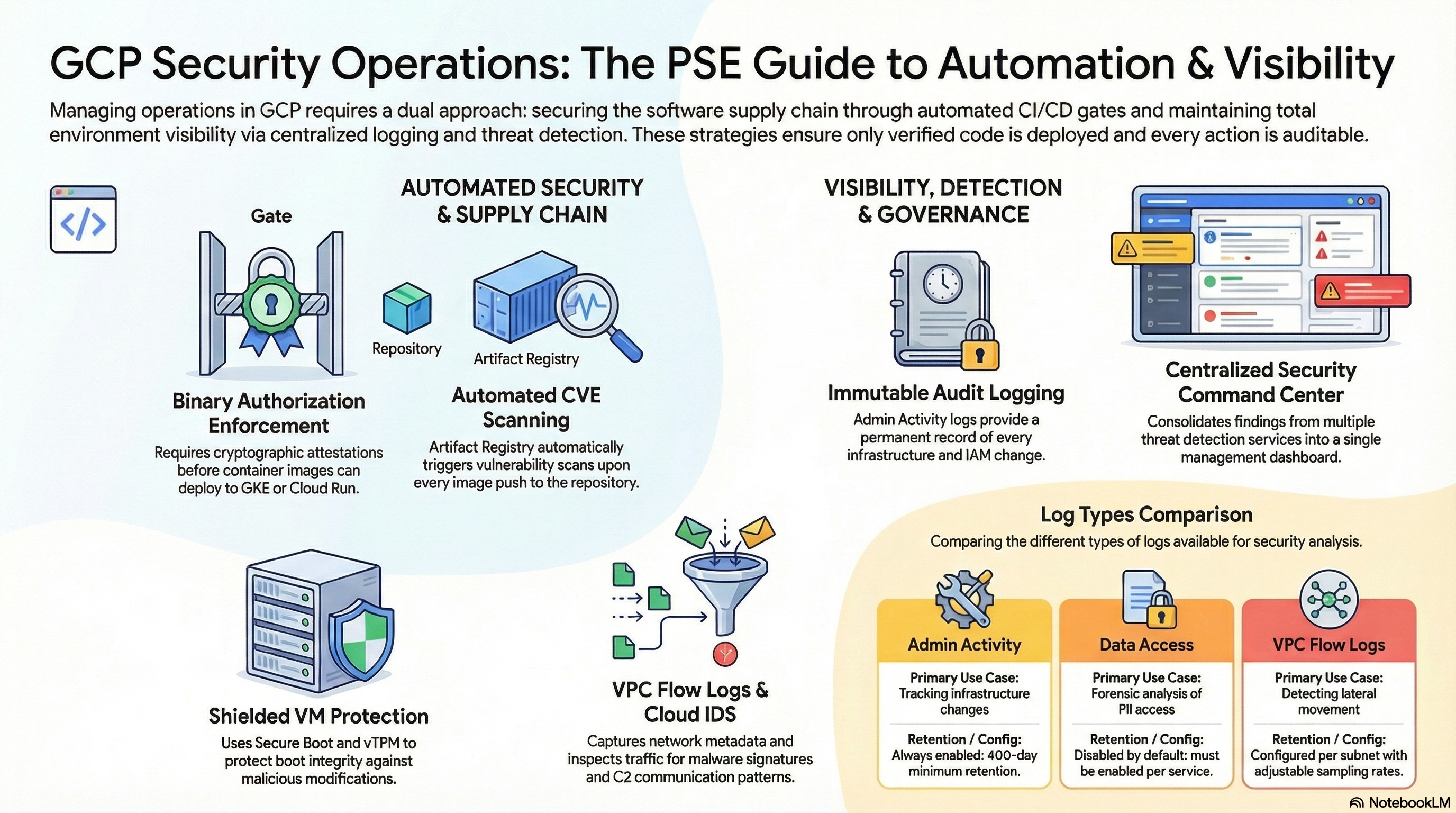
Why the exam cares — Software supply-chain security is heavily tested: scan-on-push vulnerability detection, gating deploys on scan results, cryptographic attestations (who signs, with what key, verified by whom), Binary Authorization evaluation/enforcement modes, and how IaC itself becomes a security automation layer.
How RAD implements it — The full chain when enable_binary_authorization = true (default false) with binauthz_evaluation_mode (default ALWAYS_ALLOW; also REQUIRE_ATTESTATION, ALWAYS_DENY):
- Signing key — a KMS asymmetric-signing key (RSA 2048, SHA-256).
Services_GCPcreatesbinauthz-{prefix}-signerin keyringbinauthz-{prefix}-keyring; the app layer uses keyring{project}-binauthz-keyringwith keybinauthz-signer. Both creation paths are idempotent and restore/enable version 1 if it was scheduled for destruction. - Attestor — a Container Analysis note (
binauthz-{prefix}-note) wrapped by attestorbinauthz-{prefix}-pipeline-attestorcarrying the KMS public key. - Policy — imported via
gcloud container binauthz policy importin an additive way: the current policy is exported, the attestor appended torequireAttestationsByonly if missing (so multiple tenants coexist), evaluation modeREQUIRE_ATTESTATION, enforcement mode block-and-audit-log, and allowlist patterns for Google system images (gke.gcr.io/*,gcr.io/cloudrun/*,gcr.io/cloud-sql-connectors/*, ...). The policy survives destroy by design. - Cluster/service enforcement — GKE clusters enforce the project singleton Binary Authorization policy when enabled; Cloud Run honors the project policy.
- Pipeline signing — the Cloud Build trigger (
enable_cicd_trigger+cicd_trigger_config, branch pattern default^main$) builds with Kaniko, then runsgcloud beta container binauthz attestations sign-and-createagainst the KMS key; first-deploy images are signed by the app layer so the initial apply doesn't deadlock. Cloud Build SA IAM is correspondingly narrow:roles/binaryauthorization.attestorsViewer,roles/cloudkms.signerVerifier,roles/containeranalysis.notes.attacher. - Vulnerability scanning —
enable_vulnerability_scanning(defaultfalse) enables the Container Analysis + On-Demand Scanning APIs and turns on scan-on-push for the Artifact Registry repo (inherited enablement, else disabled); the build SA gainsroles/containeranalysis.occurrences.viewerto read findings.
IaC-as-security-automation also shows up as drift correction: redeploying reverts out-of-band IAM changes, and plan-time probes (KMS key recovery, permission checks) self-heal the security baseline. GKE clusters additionally enable the security posture dashboard (basic posture + basic vulnerability scanning) and run on the REGULAR release channel with Shielded nodes (Secure Boot + integrity monitoring) on STANDARD node pools.
Try it
- In Console > Security > Binary Authorization, review the policy: default rule
REQUIRE_ATTESTATION, your attestor listed, enforcement "Block and audit log."
gcloud container binauthz policy export
gcloud container binauthz attestors list
gcloud artifacts docker images list \
  us-central1-docker.pkg.dev/$GOOGLE_PROJECT_ID/shared-repo-<prefix> \
  --show-occurrences --occurrence-filter='kind="VULNERABILITY"' --limit=5
- Negative test — deploy an unsigned public image and watch admission fail:
gcloud run deploy binauthz-test --image=docker.io/library/nginx:latest \
  --region=us-central1 --no-allow-unauthenticated
# Expect: "Container image ... must be attested by attestor projects/.../attestors/..."
- In Artifact Registry > repository > image > Vulnerabilities, review CVE findings per digest after a push.
- You know it worked when the unsigned deploy is rejected with a Binary Authorization violation while the pipeline-built, attested image deploys cleanly.
Check yourself
Q1: Scenario — a developer bypasses CI and runs gcloud run deploy with an image built on their laptop. With the secure-platform profile, what happens and why?
A: The deploy is rejected. The Binary Authorization policy requires an attestation from the pipeline attestor; only Cloud Build (holding roles/cloudkms.signerVerifier on the signing key) creates attestations, and only after building the image. A laptop image has no attestation, so ENFORCED_BLOCK_AND_AUDIT_LOG blocks it and writes an audit log entry.
Q2: What is the difference between ALWAYS_ALLOW, REQUIRE_ATTESTATION, and ALWAYS_DENY, and when would you use each?
A: ALWAYS_ALLOW admits everything (rollout/bootstrap phase — the module's default so first deploys succeed); REQUIRE_ATTESTATION admits only images with a valid signature from the required attestors (steady-state production); ALWAYS_DENY blocks all new deployments (emergency freeze during an incident). Enforcement vs dry-run is a separate axis: dry-run logs would-be violations without blocking.
Q3: Why does the module import the Binary Authorization policy additively instead of declaring it as a plain Terraform resource?
A: The policy is a project singleton. A plain resource owned by one tenant's state would overwrite every other tenant's attestor requirements on each apply. Export-merge-import appends this deployment's attestor only if absent, making multiple independent deployments safe — and the policy intentionally survives destroy so other tenants keep their protection.
Beyond the modules — Not implemented: failing the build on CVE severity (the scan results exist; a gate step querying Container Analysis and aborting on CRITICAL findings is left to you — try gcloud artifacts docker images scan IMAGE --format="value(response.scan)" then gcloud artifacts docker images list-vulnerabilities SCAN_ID), continuous validation (post-deploy revalidation of running pods), OS patch management for VM fleets (gcloud compute os-config patch-jobs execute), Shielded VM integrity-monitoring alerting, and policy-as-code with Policy Controller/OPA (the configure_policy_controller fleet feature exists in Services_GCP but constraint authoring is out of scope).
⚠️ Exam trap — Vulnerability scanning informs, Binary Authorization enforces — scanning alone never blocks a deployment. Conversely, Binary Authorization checks signatures, not CVEs: an attested-but-vulnerable image deploys unless your pipeline refuses to attest it. The exam expects you to wire scan → conditional attestation → enforcement.
4.2 Configuring logging, monitoring, and detection
⏱ ~2 h · 💰 moderate if DATA_READ logging is left on (log volume) · ⚙️ Requires: secure-platform (
enable_audit_logging,enable_security_command_center,enable_scc_notifications)
Why the exam cares — You must know the four Cloud Audit Logs types (Admin Activity always on and free; Data Access opt-in except BigQuery; System Event; Policy Denied), how to enable Data Access logs per service, how SCC findings are produced and routed, and how to design log access, retention, and export.
How RAD implements it —
- Audit log configuration —
enable_audit_logging(defaultfalse, available identically inServices_GCP,App_CloudRun, andApp_GKE): an IAM audit config for all services enablingADMIN_READ,DATA_READ, andDATA_WRITE(ADMIN_WRITE is always on), plus explicit per-service configs forsecretmanager.googleapis.comandcloudkms.googleapis.com(DATA_READ + DATA_WRITE) so secret reads and key usage are always evidenced. - SCC enrollment —
enable_security_command_center(defaultfalse) enables thesecuritycenter.googleapis.comAPI and creates Pub/Sub topicscc-{prefix}-findings.enable_scc_notifications(defaultfalse) provisions the SCC notification service identity, grants itroles/pubsub.publisheron the topic, then — only if an org-level permission probe (gcloud scc notifications list --organization=...) succeeds — creates an SCC notification config filtered tostate="ACTIVE"findings for this project. Lackingroles/securitycenter.notificationConfigEditorat org level, the config is skipped with a warning instead of failing the apply. - Monitoring & alerting —
Services_GCPcreates infrastructure alert policies driven byalert_cpu_threshold/alert_memory_threshold/alert_disk_threshold(all default80) with email channels fromconfigure_email_notification+notification_alert_emails; app modules create channels fromsupport_users, customalert_policies(metric type, comparison, threshold, duration) scoped to the service, a dashboard, and — for publicly reachable endpoints — a synthetic uptime check plus failure alert fromuptime_check_config. GKE clusters ship cluster logging for system components and workloads plus managed Prometheus. - Edge/request logging — the Cloud Armor-fronted backend service logs every request at full sample rate, giving you WAF verdict logs for detection work.
Try it
- Enable the audit/SCC flags and redeploy. In Console > IAM & Admin > Audit Logs, confirm "All services" shows Admin Read / Data Read / Data Write enabled, with Secret Manager and KMS individually configured.
- Generate and find a data-access event:
gcloud secrets versions access latest --secret=secret-<instance>-<service> >/dev/null
gcloud logging read \
  'logName:"cloudaudit.googleapis.com%2Fdata_access" AND protoPayload.serviceName="secretmanager.googleapis.com"' \
  --limit=5 --format="table(timestamp, protoPayload.authenticationInfo.principalEmail, protoPayload.methodName)"
- Wire findings to a consumer and watch them flow:
gcloud pubsub subscriptions create scc-tap --topic=scc-<prefix>-findings
gcloud pubsub subscriptions pull scc-tap --auto-ack --limit=5
In Security > Security Command Center > Findings, filter to your project and compare with what arrives on the subscription (only ACTIVE findings pass the filter).
4. You know it worked when your own AccessSecretVersion call appears in Data Access logs and an SCC finding (e.g., from Security Health Analytics) lands in the Pub/Sub pull.
Check yourself
Q1: Scenario — the SOC asks for evidence of every secret read in the last 30 days. Default project, nothing enabled. Can you produce it, and what does the platform change?
A: No — AccessSecretVersion is a DATA_READ event, and Data Access audit logs are off by default (except BigQuery). Evidence only exists from the moment they're enabled. The platform's enable_audit_logging turns them on project-wide plus explicit Secret Manager/KMS configs; the exam lesson is to enable Data Access logs for sensitive services before the incident.
Q2: Why does the module route SCC findings to Pub/Sub rather than relying on the SCC dashboard?
A: Pub/Sub makes findings machine-consumable in near-real-time — SIEM ingestion, ticket creation, automated remediation — and decouples producers from consumers. A dashboard requires a human to look. Note the org-level requirement: notification configs are organization resources, hence the permission probe and graceful skip.
Q3: An apply succeeds but no SCC notification config exists and the log shows a warning about org-level permission. Is this a bug?
A: No — it is the documented degraded mode. Creating an SCC notification config requires roles/securitycenter.notificationConfigEditor at the organization; the module probes first and skips with a warning so a project-scoped service account can still deploy everything else. Grant the org role and redeploy to get the config.
Beyond the modules — Not implemented: VPC Flow Logs (gcloud compute networks subnets update SUBNET --enable-flow-logs --logging-flow-sampling=1.0), firewall rule logging, log sinks/aggregated sinks to BigQuery/GCS/Pub-Sub (gcloud logging sinks create), Bucket Lock/locked retention for WORM compliance, Log Analytics, Cloud IDS, Packet Mirroring, Event Threat Detection / Container Threat Detection specifics (SCC Premium), and Google SecOps (Chronicle) SIEM integration. Design study: log views + roles/logging.viewAccessor for least-privilege analyst access; 400-day retention via sinks for Admin Activity logs.
⚠️ Exam trap — Admin Activity audit logs are always on, free, and cannot be disabled; Data Access logs are opt-in, billed as log volume, and can be expensive at scale (especially storage.googleapis.com DATA_READ). "Enable everything everywhere" is a cost trap; "rely on defaults for forensics" is an evidence trap. Scope Data Access logging deliberately — as the module's explicit Secret Manager/KMS overrides illustrate.
Need RAD to do something it does not do yet? Request it on the roadmap, or vote on what is already there.