PSE Certification Preparation Guide: Section 5 — Supporting compliance requirements (~11% of the exam)
📚 Official exam guide: Professional Cloud Security Engineer certification — always confirm section weightings against the current Google Cloud exam guide.
This guide covers Section 5 of the Professional Cloud Security Engineer exam. No single module owns compliance; instead, all four foundation modules contribute the technical controls auditors ask for — CMEK, immutable-by-default audit configuration, least-privilege IAM, perimeters, and managed-platform responsibility narrowing (GKE Autopilot, Cloud Run). Deploy the secure-platform profile (ideally with perimeter-lab) before starting, since most evidence-gathering exercises below depend on its flags.
5.1 Adhering to regulatory and industry standards requirements for the cloud
⏱ ~2 h · 💰 no additional cost beyond the underlying profiles · ⚙️ Requires: secure-platform; SCC enabled for posture findings
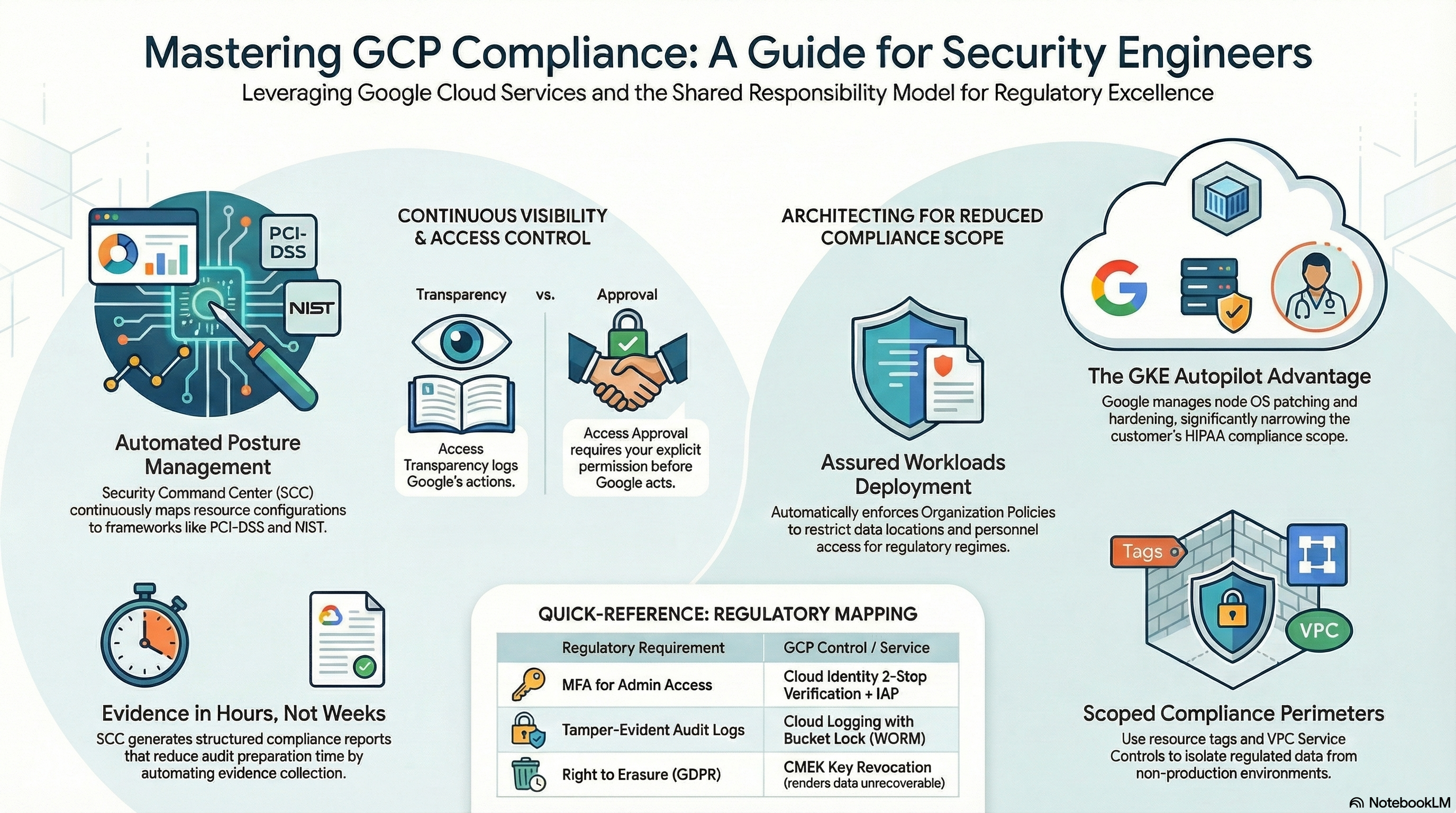
Why the exam cares — The exam tests three skills: (1) reasoning with the shared responsibility / shared fate model across service tiers (IaaS → GKE Standard → Autopilot → Cloud Run), (2) mapping a regulatory requirement (PCI-DSS, HIPAA, GDPR) to the specific Google Cloud control that satisfies it, and (3) scoping — knowing that compliance applies to the projects/services touching regulated data, not the whole organization.
How RAD implements it — The modules are a compliance control library you can point an auditor at:
| Compliance requirement (typical) | Deployed control | Where |
|---|---|---|
| Encryption at rest with customer-controlled keys | enable_cmek — per-service keys, 90-day rotation (cmek_key_rotation_period default 7776000s) | the CMEK keyring and per-service keys |
| Encryption in transit | TLS at the global LB (managed certs), HTTP→HTTPS redirect, Cloud SQL encrypted-only SSL mode | the load balancer edge and Cloud SQL instance |
| Access-evidence / audit trail | enable_audit_logging — ADMIN_READ/DATA_READ/DATA_WRITE for all services + Secret Manager/KMS overrides | the project IAM audit config |
| Least privilege | per-secret/per-bucket IAM, dedicated SAs, Workload Identity | the resource-level IAM layer and service accounts |
| Credential rotation | enable_auto_password_rotation + secret_rotation_period (default 2592000s) | the Secret Manager rotation pipeline |
| Data exfiltration prevention | enable_vpc_sc perimeter with access levels, dry-run rollout | the VPC Service Controls perimeter |
| Trusted software supply chain | enable_binary_authorization (REQUIRE_ATTESTATION) + enable_vulnerability_scanning | the Binary Authorization policy and Artifact Registry repo |
| Continuous misconfiguration detection | enable_security_command_center + findings to Pub/Sub | the SCC enrollment and findings topic |
| Public-exposure prevention | public access prevention enforced + uniform bucket-level access on the backup bucket | the backup bucket |
| Backup/retention | Cloud SQL PITR (7-day txn logs, 7 daily backups), backup_retention_days bucket lifecycle | the Cloud SQL instance and backup bucket |
| Data residency (regional pinning) | all resources placed in the selected availability_regions | the VPC and per-resource region settings |
Shared responsibility is observable, not just theoretical: GKE Autopilot clusters (gke_cluster_mode default AUTOPILOT) hand node OS hardening, patching (auto-repair/auto-upgrade on the REGULAR release channel), and node configuration to Google, while STANDARD mode shows the line moving back to you — the module must then manage the node pool itself, with Shielded-node settings (Secure Boot and integrity monitoring) made explicit on the nodes. Cloud Run narrows your scope further: no nodes at all, just code, IAM, and network posture.
Try it
- Generate an evidence pack for a mock audit — every command below produces an artifact you could hand to an assessor:
# Encryption: which CMEK key protects the database?
gcloud sql instances describe <instance> \
  --format="value(diskEncryptionConfiguration.kmsKeyName)"
# Audit posture: which log types are enabled project-wide?
gcloud projects get-iam-policy $GOOGLE_PROJECT_ID --format="yaml(auditConfigs)"
# Least privilege: who can read the DB password?
gcloud secrets get-iam-policy secret-<instance>-<service>
# Supply chain: what does the admission policy require?
gcloud container binauthz policy export
# Residency: where does everything actually live?
gcloud sql instances describe <instance> --format="value(region)"
gcloud storage buckets list --format="table(name, location)"
- In Console > Security > Security Command Center > Findings, filter by your project and treat each ACTIVE finding as an audit exception: identify the violated control and which portal variable remediates it.
- In Kubernetes Engine > Clusters, open an Autopilot cluster's Security posture panel and list which controls show as Google-managed — that list is your responsibility-narrowing evidence.
- You know it worked when you can present, for one framework requirement of your choice, the variable, the resource, and the CLI-verifiable evidence in one line each.
Check yourself
Q1: Scenario — a HIPAA assessor asks who is responsible for OS patching of the Kubernetes nodes running PHI workloads. Your answer differs by one portal variable — which, and how?
A: gke_cluster_mode. On AUTOPILOT (the default), Google manages node provisioning, OS hardening, and patching — it falls on Google's side of the shared responsibility line (covered by the BAA). On STANDARD, node management is configured by you (the module sets auto-upgrade/auto-repair and Shielded settings, but the responsibility — and the audit scope — is yours).
Q2: Map GDPR Article 17 (right to erasure) for backups to a deployed control.
A: CMEK crypto-shredding: Cloud SQL data and its backups are encrypted under cloudsql-{prefix}-key. Destroying that key's versions renders all of it — including backups you cannot individually edit — permanently unreadable. Pair with the backup bucket's backup_retention_days lifecycle deletion for data minimization.
Q3: Scenario — only the payment service handles cardholder data, but the CISO wants PCI controls (VPC-SC enforcement, CMEK, Data Access logging) applied to all 40 projects in the org. What do you advise?
A: Scope down. PCI-DSS applies to the cardholder data environment; applying maximum controls everywhere multiplies cost (Data Access log volume) and operational friction (VPC-SC breakage) without reducing CDE risk. Isolate in-scope workloads in dedicated projects/folders, apply the strict profile there (this platform's per-project perimeter model fits naturally), and document segmentation as the scope boundary.
Beyond the modules — Not implemented, study separately:
- Assured Workloads — compliance-regime folders (FedRAMP, EU Sovereign Controls) that pre-enforce location and personnel constraints:
gcloud assured workloads list --organization=ORG_ID --location=us-central1(Console > Compliance > Assured Workloads). - Access Transparency & Access Approval — logs of Google staff actions on your content, and an approval gate before such access; filter Logs Explorer on
cloudaudit.googleapis.com%2Faccess_transparency. Transparency = passive record, Approval = active control; both require Premium/Enterprise support tiers. - SCC compliance posture reporting — mapping findings to CIS GCP Foundations, PCI-DSS, NIST 800-53, ISO 27001 in SCC Premium (SCC > Compliance).
- Compliance documentation — Google's compliance reports portal (SOC 2, ISO certificates), the HIPAA BAA process and the eligible-services list, and data residency / data processing terms. The exam expects you to know that you inherit Google's certifications for infrastructure but must still certify your own configuration and processes.
⚠️ Exam trap — "Google Cloud is PCI-DSS / HIPAA compliant, therefore my application is" is always wrong. Compliance is inherited only for the layers Google operates; your IAM, network, encryption, and logging configuration — exactly the variables this platform exposes — remain your responsibility, and a misconfigured bucket fails the audit no matter what certificates Google holds.
Need RAD to do something it does not do yet? Request it on the roadmap, or vote on what is already there.