PSE Certification Preparation Guide: Section 1 — Configuring access (~25% of the exam)
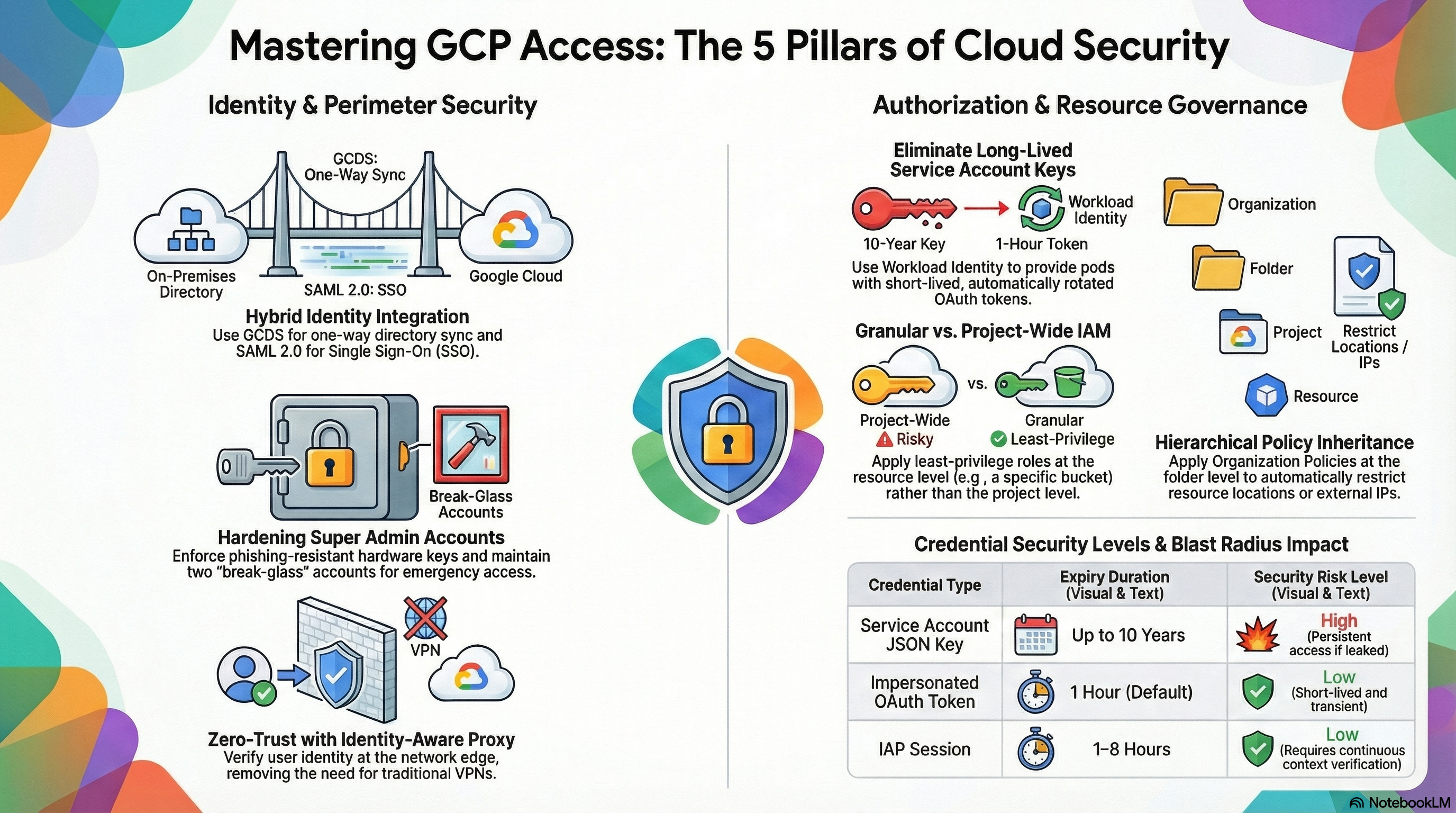
📚 Official exam guide: Professional Cloud Security Engineer certification — always confirm section weightings against the current Google Cloud exam guide.
This guide covers Section 1 of the Professional Cloud Security Engineer exam through the RAD platform's foundation modules. Services_GCP creates the purpose-built service accounts and their project-level role grants; App_CloudRun and App_GKE wire those identities into workloads (Workload Identity on GKE, dedicated runtime service accounts on Cloud Run, IAP for end-user authentication); App_Common applies resource-level least-privilege bindings. Deploy the secure-platform profile plus either guarded-edge (Cloud Run) or zero-trust-gke from the Lab Map before starting.
1.1 Managing Cloud Identity
⏱ ~45 min (mostly reading) · 💰 no additional cost · ⚙️ Requires: default deployment
Why the exam cares — The exam tests whether you can choose the right identity architecture: Google Cloud Directory Sync (GCDS) versus Workforce Identity Federation versus plain Cloud Identity, when SAML SSO makes Google the service provider versus the identity provider, and how to protect super-admin accounts. These are design decisions about human identity lifecycle, which sit above any single project.
How RAD implements it — Not implemented by the foundation modules. The modules consume existing identities rather than manage them: iap_authorized_users and iap_authorized_groups (both default []) accept user:, group:, serviceAccount:, and domain: principals (the platform normalizes the principal format), and support_users (default []) feeds monitoring notification channels. This mirrors real life: the security engineer receives groups from the identity team and binds them to resources.
Try it
- In your deployment portal, add a Google Group to
iap_authorized_groups(formatgroup:team@example.com) on a deployment withenable_iap = true, and redeploy. - In Console > IAM & Admin > IAM, filter for the group and confirm it now holds
roles/iap.httpsResourceAccessorat the project level. - CLI check:
gcloud projects get-iam-policy $GOOGLE_PROJECT_ID \
  --flatten="bindings[].members" \
  --filter="bindings.role:roles/iap.httpsResourceAccessor" \
  --format="table(bindings.members)"
- You know it worked when the group appears in the binding list — and removing it from the portal variable and redeploying removes the binding again.
Check yourself
Q1: Your company has 5,000 users in on-premises Active Directory and wants them to access GCP with their existing corporate credentials, without creating passwords at Google. What do you configure?
A: GCDS to synchronize users/groups one-way from AD into Cloud Identity, plus SAML SSO with the corporate IdP so Google acts as the service provider and never stores or verifies passwords. Alternatively, Workforce Identity Federation avoids synchronization entirely by issuing short-lived federated credentials — choose it when you don't want user objects in Cloud Identity at all.
Q2: What is the difference between Workforce Identity Federation and Workload Identity Federation?
A: Workforce Identity Federation federates human users from an external IdP (OIDC/SAML) into Google Cloud without provisioning Cloud Identity accounts. Workload Identity Federation federates non-human workloads (GitHub Actions, AWS, etc.) so they can impersonate service accounts without exported JSON keys. The exam frequently swaps these terms in distractors.
Beyond the modules — Study: GCDS one-way sync architecture; SAML 2.0 SSO configuration in the Admin Console (Security > Authentication > SSO with third-party IdP); super-admin best practices (≥2 break-glass accounts, hardware security keys, no day-to-day use); the Admin SDK Directory API for lifecycle automation; and Workforce Identity Federation pools/providers (IAM & Admin > Workforce Identity Federation). Try in a scratch org: gcloud iam workforce-pools list --location=global --organization=ORG_ID.
⚠️ Exam trap — GCDS synchronizes from on-premises to Cloud Identity, never the reverse, and it does not synchronize passwords by default — authentication still happens via SSO or Google passwords.
1.2 Managing service accounts
⏱ ~1.5 h · 💰 no additional cost · ⚙️ Requires: secure-platform; zero-trust-gke for Workload Identity
Why the exam cares — The exam tests the credential-risk hierarchy: exported service-account keys (worst) → key rotation → impersonation/short-lived tokens → Workload Identity / federation (best, keyless). You must know when to create dedicated service accounts instead of using defaults, and how GKE Workload Identity binds a Kubernetes ServiceAccount (KSA) to a Google service account (GSA).
How RAD implements it — Services_GCP never relies on the default Compute Engine service account for workloads. It creates purpose-scoped accounts:
| Service account | Purpose | Example roles |
|---|---|---|
cloudrun-sa-{prefix} | Cloud Run runtime | roles/run.admin, roles/secretmanager.secretAccessor, roles/cloudsql.client, roles/storage.objectAdmin, roles/compute.networkUser |
cloudbuild-sa-{prefix} | CI/CD builds | 17 roles incl. roles/cloudkms.signerVerifier, roles/binaryauthorization.attestorsViewer, roles/containeranalysis.admin |
clouddeploy-sa-{prefix} | Progressive delivery | roles/clouddeploy.jobRunner, roles/run.admin, roles/container.admin |
gke-sa-{prefix} | GKE nodes + workloads | node roles (roles/logging.logWriter, roles/monitoring.metricWriter, roles/artifactregistry.reader) plus workload roles (roles/cloudsql.client, roles/secretmanager.secretAccessor) |
nfs-sa-{prefix} | NFS server VM | minimal compute/monitoring roles |
On GKE, App_GKE annotates the namespace KSA with iam.gke.io/gcp-service-account and binds roles/iam.workloadIdentityUser to the member serviceAccount:{project}.svc.id.goog[namespace/ksa]. The cluster's workload pool is {project}.svc.id.goog (explicit for STANDARD mode, automatic on Autopilot). No JSON keys are created anywhere in the modules. Impersonation is also demonstrated: cloudbuild-sa is granted roles/iam.serviceAccountUser on clouddeploy-sa, and roles/iam.serviceAccountTokenCreator at project level.
Workload Identity Federation is live in Services_GCP: enable_workload_identity_federation (default false) creates pool wif-pool with one OIDC provider chosen by wif_provider_type — "github" (default) → provider github-actions with issuer https://token.actions.githubusercontent.com and an optional attribute condition pinning the repository owner to wif_github_org; "gitlab" → provider gitlab-ci against wif_gitlab_hostname; "generic" → provider oidc-provider with wif_oidc_issuer_uri and wif_allowed_audiences. The pool's identities (principalSet://.../*) get roles/iam.workloadIdentityUser on the Cloud Build, Cloud Deploy, and Cloud Run service accounts, so external CI exchanges its OIDC token for short-lived GCP credentials — no exported keys. Note the wildcard principal set is deliberately broad; production setups scope to a specific repository attribute.
Try it
- Deploy zero-trust-gke. In Console > IAM & Admin > Service Accounts, locate
gke-sa-{prefix}and open its Permissions tab — you'll see theroles/iam.workloadIdentityUsergrant to the KSA principal. - Inspect the KSA annotation and prove keyless token exchange:
gcloud container clusters get-credentials <cluster> --region us-central1
kubectl get serviceaccount -n <namespace> <prefix> \
  -o jsonpath='{.metadata.annotations.iam\.gke\.io/gcp-service-account}'
# From inside an application pod — token comes from the GKE metadata server:
kubectl exec -n <namespace> deploy/<prefix> -- \
  curl -s -H "Metadata-Flavor: Google" \
  "http://metadata.google.internal/computeMetadata/v1/instance/service-accounts/default/email"
- Confirm zero user-managed keys exist:
for SA in $(gcloud iam service-accounts list --format="value(email)"); do
  gcloud iam service-accounts keys list --iam-account=$SA \
    --managed-by=user --format="value(name)"
done
- You know it worked when the pod reports the GSA email (not a node default account) and the key listing returns nothing.
Check yourself
Q1: A pod in namespace app1 must read a Secret Manager secret without any mounted key file. What three pieces make this work?
A: (1) the cluster's Workload Identity pool {project}.svc.id.goog; (2) the KSA annotated with iam.gke.io/gcp-service-account: gsa@project.iam.gserviceaccount.com; (3) an IAM binding granting roles/iam.workloadIdentityUser on the GSA to serviceAccount:{project}.svc.id.goog[app1/ksa-name]. The pod then receives short-lived GSA tokens from the GKE metadata server.
Q2: Scenario — an auditor finds developers downloading JSON keys for a CI pipeline that runs on GitHub Actions. What do you recommend?
A: Workload Identity Federation: create a workload identity pool with a GitHub OIDC provider, restrict it with an attribute condition on the repository owner, and grant the federated principal roles/iam.workloadIdentityUser on the pipeline's service account. GitHub's own OIDC tokens are exchanged for short-lived Google credentials; no key is ever exported. Additionally enforce constraints/iam.disableServiceAccountKeyCreation.
Q3: Why does the platform create cloudbuild-sa-{prefix} instead of using the default Cloud Build service agent for everything?
A: A dedicated SA gets exactly the roles the pipeline needs (sign attestations, push to AR, deploy) and is auditable per deployment; the legacy default {project_number}@cloudbuild.gserviceaccount.com is shared by every build in the project, widening blast radius and muddying audit trails.
Beyond the modules — Inspect the deployed WIF setup with gcloud iam workload-identity-pools providers list --workload-identity-pool=wif-pool --location=global, and know the manual equivalents: gcloud iam workload-identity-pools create demo-pool --location=global then gcloud iam workload-identity-pools providers create-oidc github --workload-identity-pool=demo-pool --location=global --issuer-uri=https://token.actions.githubusercontent.com --attribute-mapping="google.subject=assertion.sub". Also study org policies constraints/iam.disableServiceAccountKeyCreation and constraints/iam.automaticIamGrantsForDefaultServiceAccounts, key-age auditing, and impersonation via gcloud auth print-access-token --impersonate-service-account=SA.
⚠️ Exam trap — roles/iam.serviceAccountUser lets a principal attach/run as a service account (deploy-time), while roles/iam.serviceAccountTokenCreator lets it mint tokens for the SA (impersonation). Granting either at the project level effectively hands over every SA in the project — grant on the individual SA resource instead.
1.3 Managing authentication
⏱ ~1 h · 💰 no additional cost (IAP itself is free) · ⚙️ Requires: guarded-edge or zero-trust-gke with
enable_iap = true
Why the exam cares — The exam tests context-aware, proxy-based authentication (IAP as a BeyondCorp building block) versus network-based access (VPN), the OAuth consent flow, session control, and 2-Step Verification enforcement levels. You should know what IAP authenticates (Google identity, via OAuth) and what it then authorizes (roles/iap.httpsResourceAccessor).
How RAD implements it — Two different IAP integration patterns, both behind enable_iap (default false):
| Aspect | App_CloudRun | App_GKE |
|---|---|---|
| Mechanism | Cloud Run v2 native IAP — the service is created with IAP enabled and runs in the BETA launch stage | GCPBackendPolicy on the Gateway backend referencing a Kubernetes Secret {service}-iap-oauth holding the OAuth client secret |
| Required inputs | ≥1 of iap_authorized_users / iap_authorized_groups (plan-time validation) | same, plus iap_oauth_client_id, iap_oauth_client_secret, and iap_support_email (plan-time validations) |
| Service agent | roles/run.invoker granted to service-{project_number}@gcp-sa-iap.iam.gserviceaccount.com | IAP configured on the LB backend service |
| User authorization | roles/iap.httpsResourceAccessor at project level + roles/run.invoker on the service | roles/iap.httpsResourceAccessor granted per backend |
| Lockout protection | the deploying identity is auto-appended to the authorized list (discovered from the caller's OpenID userinfo) | same auto-append logic |
Note that on Cloud Run, native IAP protects the direct *.run.app URL too, so no ingress restriction is needed for IAP alone.
Try it
- Enable
enable_iap = truewith your email iniap_authorized_usersand redeploy. - Open the service URL in an incognito window — you are redirected to Google sign-in; after authenticating with a non-authorized account you get the IAP "You don't have access" page.
- In Console > Security > Identity-Aware Proxy, find the resource and review the principals.
- CLI checks:
# Cloud Run: IAP-enabled services run in the BETA launch stage
gcloud run services describe <service> --region us-central1 \
  --format="value(launchStage)"
# Who can pass IAP?
gcloud projects get-iam-policy $GOOGLE_PROJECT_ID \
  --flatten="bindings[].members" \
  --filter="bindings.role:roles/iap.httpsResourceAccessor" \
  --format="table(bindings.members)"
- You know it worked when an unauthorized Google account is blocked by IAP before the request reaches your container (no application log entry is produced).
Check yourself
Q1: Scenario — a contractor's engagement ends. With IAP protecting the internal app, how is access revoked and how fast?
A: Remove the user (or their group membership) from iap_authorized_users/iap_authorized_groups and redeploy — the roles/iap.httpsResourceAccessor binding is removed and IAP denies them at the Google edge within minutes. No VPN certificate revocation, firewall change, or application logout is needed; this is the BeyondCorp advantage the exam looks for.
Q2: Why does App_GKE require an OAuth client ID/secret while App_CloudRun does not?
A: Cloud Run v2 exposes native IAP (iap_enabled), which uses a Google-managed OAuth configuration. The GKE Gateway path uses classic backend-service IAP, which still requires you to create an OAuth client in APIs & Services > Credentials and supply it via iap_oauth_client_id/iap_oauth_client_secret; the module stores the secret in a Kubernetes Secret referenced by the GCPBackendPolicy.
Beyond the modules — Not covered: 2SV enforcement (Admin Console > Security > 2-step verification; know that FIDO2 hardware keys are the only phishing-resistant method), IAP session length tuning, context-aware access (combining IAP with Access Context Manager access levels for device/IP conditions), SAML app integration, and IAP TCP forwarding for SSH/RDP — try gcloud compute ssh VM --tunnel-through-iap in a scratch project (the platform's fw-allow-iap-ssh firewall rule for 35.235.240.0/20 already permits this path).
⚠️ Exam trap — IAP authenticates the user, but a Cloud Run service must also authorize the forwarded request: without roles/run.invoker for the user (or the IAP service agent), requests still fail after successful sign-in. The module grants both — remember the pair on the exam.
1.4 Managing and implementing authorization controls
⏱ ~1 h · 💰 no additional cost · ⚙️ Requires: default deployment of any app module
Why the exam cares — Scenario questions hinge on where a role is granted: project-level roles/editor is almost always a wrong answer; resource-level grants of predefined roles are the expected pattern. You should also know uniform bucket-level access, IAM Conditions, deny policies, and Policy Intelligence tooling.
How RAD implements it — the platform's resource-level IAM layer is a working least-privilege catalog:
| Binding | Scope | Role |
|---|---|---|
| DB password secret read | the individual secret | roles/secretmanager.secretAccessor |
| Writable app secrets | the individual secret | roles/secretmanager.secretVersionManager |
| App bucket data access | the individual bucket | roles/storage.objectAdmin |
| App bucket metadata | the individual bucket | roles/storage.legacyBucketReader |
| GitHub token | the individual secret | roles/secretmanager.secretAccessor (build SAs only) |
| Cloud Build deploy | project | var.deployment_role + roles/iam.serviceAccountUser on the runtime SA |
Buckets created by the platform's object-storage layer set uniform bucket-level access per bucket, and the backup bucket has uniform bucket-level access enabled with public access prevention enforced. Secrets are injected into workloads by reference only — secret_environment_variables (default {}) maps env-var names to Secret Manager secret IDs, resolved at runtime.
Try it
- In Console > Security > Secret Manager, open the DB password secret (named
secret-{instance}-{service}) and check Permissions — only the workload and build SAs appear, not project-wide principals. - Compare resource-level vs project-level policy:
gcloud secrets get-iam-policy secret-<instance>-<service> \
  --format="table(bindings.role, bindings.members)"
gcloud storage buckets describe gs://<app-bucket> \
  --format="value(uniform_bucket_level_access)"
- Negative test: create a new secret manually (
gcloud secrets create scratch-secret --replication-policy=automatic), then exec into the workload and attempt to read it — access is denied because the SA'ssecretAccessorgrant is per-secret, not project-level. (On GKE,gke-saalso holds a project-levelsecretAccessorgrant from Services_GCP, so run this test against the Cloud Run deployment for a clean result.) - Add the secret to
secret_environment_variablesin the portal, redeploy, and re-test. You know it worked when the previously denied read now succeeds.
Check yourself
Q1: Scenario — an app needs to read one bucket and one secret. A teammate proposes granting roles/editor "to keep it simple." What do you do and why?
A: Grant roles/storage.objectViewer (or objectAdmin if it writes) on that bucket and roles/secretmanager.secretAccessor on that secret only. If the SA is compromised, the attacker reaches two resources instead of the whole project. The exam expects predefined roles at the narrowest resource scope; custom roles only when no predefined role fits.
Q2: A legacy object ACL grants allUsers read on one object in a bucket. How do you guarantee IAM is the single source of truth?
A: Enable uniform bucket-level access on the bucket — object ACLs stop being evaluated entirely and bucket/project IAM governs all access. Pair with public_access_prevention = enforced to block any future allUsers/allAuthenticatedUsers grant, as the module's backup bucket does.
Q3: How would you block everyone, including project owners, from deleting audit log sinks?
A: An IAM deny policy — deny rules are evaluated before allow bindings and override them. Attach a deny policy on the relevant permissions (e.g., logging.sinks.delete) with an exception principal set for the break-glass identity. This cannot be done with allow-policy hygiene alone.
Beyond the modules — Not implemented: IAM Conditions (time/resource-attribute-bound bindings — try gcloud projects add-iam-policy-binding $GOOGLE_PROJECT_ID --member=user:x@example.com --role=roles/viewer --condition='expression=request.time < timestamp("2026-12-31T00:00:00Z"),title=temp'), IAM deny policies (gcloud iam policies create ... --kind=denypolicies), Privileged Access Manager (JIT elevation), IAM Recommender, Policy Analyzer, and Policy Troubleshooter.
⚠️ Exam trap — roles/secretmanager.secretAccessor allows reading secret payloads; roles/secretmanager.viewer only reads metadata. Distractors swap them. The module grants secretAccessor for reads and secretVersionManager (manage versions) for the rotation path.
1.5 Defining the resource hierarchy
⏱ ~45 min · 💰 no additional cost · ⚙️ Requires: a project inside an organization to see hierarchy effects
Why the exam cares — Organization → folder → project inheritance determines effective policy: IAM allow bindings inherit downward, deny overrides allow, and organization policy constraints set guardrails that no project admin can bypass. The exam tests folder design, custom org policy constraints (CEL), and the effective-policy evaluation order.
How RAD implements it — The modules are project-scoped and do not manage folders or organization policies. The one place the hierarchy is visible is VPC Service Controls organization discovery: the platform reads the project's org ID and distinguishes three cases — project directly under the organization (org ID auto-discovered, VPC-SC proceeds), project nested under a folder (folder ID set but org ID empty → a warning instructs you to set organization_id explicitly), and standalone project (no org at all → VPC-SC permanently unavailable, skipped with a warning). This is a practical lesson in how project placement in the hierarchy changes which security features you can even use.
Try it
- Discover where your lab project sits:
gcloud projects describe $GOOGLE_PROJECT_ID --format="value(parent.type, parent.id)"
- In Console > IAM & Admin > Organization Policies, review effective constraints on the project (e.g.,
constraints/iam.disableServiceAccountKeyCreation,constraints/gcp.resourceLocations) and note at which level each is set:
gcloud org-policies list --project=$GOOGLE_PROJECT_ID
- If you hold org-policy admin in a sandbox, set a location constraint on a test folder and attempt to deploy a bucket outside the allowed region from the portal — the apply fails with a policy violation.
- You know it worked when you can explain, for one constraint, which ancestor set it and why the project cannot override it.
Check yourself
Q1: Scenario — enable_vpc_sc = true deploys cleanly but no perimeter appears, and the log says the organization ID could not be auto-discovered. The project lives under a folder. What is the fix?
A: Set organization_id explicitly in the App_CloudRun/App_GKE portal variables. data.google_project only exposes org_id for projects parented directly by the organization; folder-nested projects return folder_id instead, so auto-discovery fails by design and the module skips VPC-SC with a warning rather than guessing.
Q2: An IAM role granted at the organization level conflicts with a deny policy at a folder. Who wins?
A: The deny policy. Deny is evaluated before allow at every level; an inherited org-level allow cannot override a folder-level deny. Use Policy Troubleshooter to trace the effective decision.
Beyond the modules — Study: folder design patterns (by environment/business unit/compliance tier), org policy custom constraints in CEL (IAM & Admin > Organization Policies > Custom constraints), and project-factory automation. Useful scratch command: gcloud org-policies describe constraints/iam.disableServiceAccountKeyCreation --effective --project=$GOOGLE_PROJECT_ID.
⚠️ Exam trap — Organization policy constraints restrict resource configuration (what can be created and how); IAM controls who can act. "Use an org policy to remove a user's access" is a classic wrong answer — and vice versa.
Need RAD to do something it does not do yet? Request it on the roadmap, or vote on what is already there.