PSE Certification Preparation Guide: Section 2 — Securing communications and establishing boundary protection (~22% of the exam)
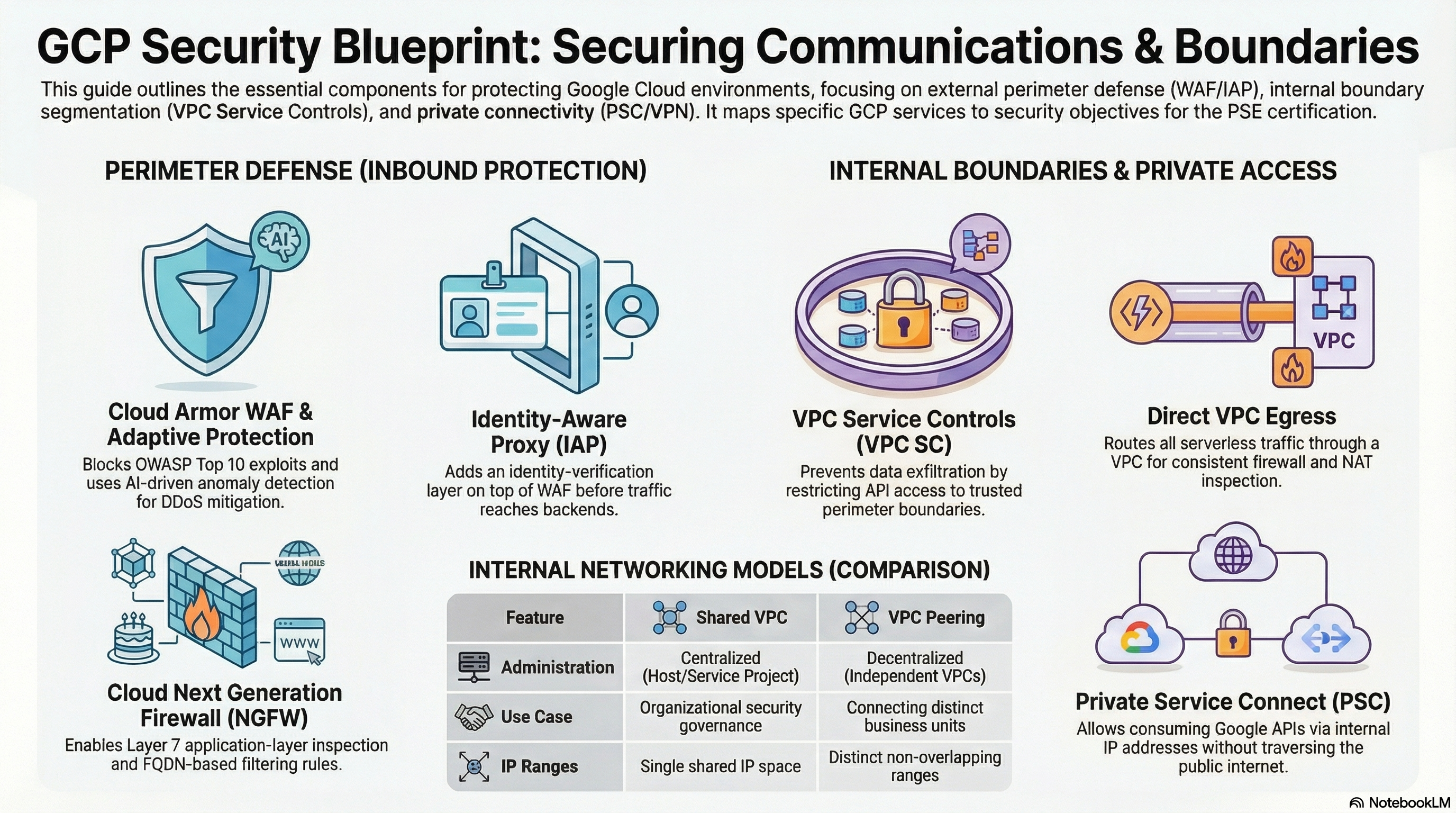
This guide covers Section 2 of the Professional Cloud Security Engineer exam. The relevant foundation modules: Services_GCP builds the VPC, firewall rules, Cloud NAT, and Private Services Access; App_CloudRun and App_GKE each implement a Cloud Armor WAF edge and a VPC Service Controls perimeter; App_GKE adds Kubernetes NetworkPolicy micro-segmentation on Dataplane V2. Deploy guarded-edge (or zero-trust-gke) and perimeter-lab from the Lab Map before starting.
2.1 Designing and configuring perimeter security
⏱ ~2 h · 💰 moderate — global LB + Cloud Armor policy charges · ⚙️ Requires:
enable_cloud_armor = true(application_domainsoptional on Cloud Run)
Why the exam cares — You must pick the right edge control per threat: Cloud Armor preconfigured WAF rules for OWASP attacks, rate-based bans for brute force/scraping, Adaptive Protection for L7 DDoS, and IAP for identity — and know that Cloud Armor only protects traffic that actually flows through the load balancer it is attached to.
How RAD implements it — enable_cloud_armor (default false) creates a Cloud Armor security policy with identical rule content in both modules:
| Priority | Rule | Action |
|---|---|---|
| 100 | admin_ip_ranges allowlist | allow (bypasses WAF rules) |
| 1000–1003 | evaluatePreconfiguredExpr('sqli-v33-stable'), xss-v33-stable, lfi-v33-stable, rce-v33-stable | deny(403) |
| 2000 | rate limit 500 requests/min per IP | rate_based_ban → deny(429), 300 s ban |
| 2147483647 | default | allow |
Adaptive Protection (Layer 7 DDoS defense) is on in both. The plumbing differs:
- App_CloudRun builds the entire edge: serverless NEG → backend service (an external Application Load Balancer, with request logging at full sample rate) → URL map → HTTPS proxy → global static IP, with Certificate Manager Google-managed certificates per
application_domainsand a permanent HTTP→HTTPS redirect. Cloud Run ingress is force-overridden to internal-and-cloud-load-balancing wheneverenable_cloud_armororenable_cdnis true, so the direct*.run.appURL cannot bypass the WAF. A plan-time validation requires at least one entry inapplication_domainswhenenable_cloud_armor = true; a nip.io-derived Google-managed certificate fallback exists only for the LB-without-Cloud-Armor path (e.g., CDN-only). - App_GKE creates the policy as
{service}-waf-policyand attaches it to the Gateway API backend via aGCPBackendPolicy; a plan-time validation requiresenable_custom_domain = trueorservice_type = "LoadBalancer". The priority-100admin_ip_rangesallow rule is present in both policies; on App_CloudRun the same variable also feeds the VPC-SC access level, so trusted networks bypass the WAF and pass the perimeter with one setting.
Try it
- Deploy guarded-edge. In Console > Network Security > Cloud Armor policies, open
{service}-waf-policyand review rule priorities and the Adaptive Protection tab. - Fire a simulated SQL injection at the LB and watch it bounce:
LB_IP=$(gcloud compute addresses list --global \
  --filter="name~lb-ip" --format="value(address)")
curl -sk "https://app.example.com/?q=1%27%20OR%20%271%27=%271" -o /dev/null -w "%{http_code}\n"
# Expect 403 from rule sqli-v33-stable
gcloud compute security-policies describe <service>-waf-policy \
  --format="yaml(rules[].priority, rules[].action, rules[].description)"
- Verify the bypass is closed:
curl -s -o /dev/null -w "%{http_code}\n" https://<service>-<hash>.run.app/returns 404/403 because ingress is restricted to the load balancer. - You know it worked when WAF denials appear in Logging > Logs Explorer under the backend service's
requestslog withjsonPayload.enforcedSecurityPolicy.outcome="DENY".
Check yourself
Q1: Scenario — after enabling Cloud Armor on Cloud Run, a pen tester still reaches the app through its run.app URL. What was missed?
A: Ingress was left at all. Cloud Armor only inspects traffic traversing the load balancer; the service must be restricted to internal-and-cloud-load-balancing so direct URLs are refused. The RAD module does this automatically — the exam expects you to know it must be done.
Q2: A credential-stuffing botnet sends 2,000 requests/min/IP. Which of the deployed rules responds, and how?
A: The priority-2000 rate_based_ban rule: each source IP exceeding 500 requests/60 s gets deny(429) and a 300-second ban. Adaptive Protection complements this by detecting distributed L7 anomalies that per-IP limits miss and suggesting targeted rules.
Q3: When is IAP the right edge control instead of (or in addition to) Cloud Armor?
A: Cloud Armor filters by request signature/source (no identity); IAP requires an authenticated, authorized Google identity. For an internal tool, IAP alone suffices. For a public app, Cloud Armor (WAF/DDoS/rate limiting). For a sensitive internal app exposed via LB, layer both: Armor scrubs attacks at the edge, IAP enforces identity.
Beyond the modules — Not implemented: Cloud NGFW network/hierarchical firewall policies (the platform uses classic VPC firewall rules with network tags), FQDN/geo/threat-intelligence rules, Cloud Armor bot management with reCAPTCHA, edge security policies, Certificate Authority Service for mTLS, and Secure Web Proxy for egress filtering. Scratch-project starter: gcloud compute network-firewall-policies create demo-policy --global and gcloud compute security-policies update <policy> --enable-layer7-ddos-defense.
⚠️ Exam trap — Preconfigured WAF rules come in sensitivity levels and can false-positive on legitimate payloads (e.g., a CMS saving HTML). The exam answer is to run new rules in preview mode and tune with evaluatePreconfiguredWaf(...,{'sensitivity': N}) or opt-out rule IDs — not to disable the WAF.
2.2 Configuring boundary segmentation
⏱ ~2.5 h · 💰 none for VPC-SC/NetworkPolicy · ⚙️ Requires: perimeter-lab (org + ACM permission); zero-trust-gke for NetworkPolicy
Why the exam cares — IAM answers who, network segmentation answers from where, and VPC Service Controls answers where data may flow at the API layer. Exam scenarios about stolen-but-valid credentials exfiltrating Cloud Storage or BigQuery data are VPC-SC questions; pod-lateral-movement scenarios are NetworkPolicy questions.
How RAD implements it —
VPC Service Controls (created in App_CloudRun/App_GKE when enable_vpc_sc = true, default false; Services_GCP has a standalone equivalent):
- Organization ID contract: the org ID is auto-discovered from the project. In App_CloudRun/App_GKE, an explicit
organization_id(default"") overrides discovery and is required only when the project is nested under a folder; standalone projects skip VPC-SC with a warning.Services_GCPrelies purely on auto-discovery (it has noorganization_idvariable). - Creation is further gated by: non-empty
admin_ip_ranges(lockout prevention) and a plan-time permission probe that runsgcloud access-context-manager policies list --organization=...and gracefully skips all VPC-SC resources with a warning if the caller lacks org-level ACM permission. - What gets built: an Access Context Manager policy (reused if the org already has one), four access levels — VPC subnet CIDRs (auto-discovered from the network when
vpc_cidr_rangesis empty, falling back to10.0.0.0/8),admin_ip_ranges, the IAP service agent, and CI/CD service accounts — and a regular service perimeter restricting 15 services (Cloud Run, GKE, Cloud SQL Admin, Secret Manager, Storage, Artifact Registry, Cloud Build, KMS, Pub/Sub, Redis, Filestore, Firestore, Compute, Certificate Manager, IAP) with VPC-accessible-services restriction, ingress policies sourced from the four access levels, and scoped egress policies. vpc_sc_dry_run(defaulttrue) writes the configuration to the perimeter's dry-run spec: violations are logged, not blocked.
Kubernetes NetworkPolicy (enable_network_segmentation default false, requires Dataplane V2 — which Services_GCP clusters always use via the advanced datapath): a default-deny-by-omission policy selecting all pods in the namespace for both ingress and egress. Allowed ingress: same-namespace pods, Google LB/health-check ranges 130.211.0.0/22 and 35.191.0.0/16, 35.235.240.0/20, and — whenever service_type is LoadBalancer (the module default) or NodePort — 0.0.0.0/0 on the container port only, because an L4 Network Load Balancer preserves the original client IP so real traffic matches none of the Google ranges. Restricting callers is then Cloud Armor's job (enable_cloud_armor + admin_ip_ranges) or an internal service_type, not the NetworkPolicy. Allowed egress: DNS (53 TCP/UDP), HTTPS 443 (including the restricted/private googleapis VIPs 199.36.153.4/30 and 199.36.153.8/30), same-namespace pods, Cloud SQL proxy loopback plus port 3307 to 10.0.0.0/8, the metadata server 169.254.169.254/32:80 (Workload Identity token endpoint), and NFS 2049 when enabled.
Network-level isolation: Cloud SQL is private-IP-only (no public IPv4, encrypted-only SSL mode), and firewall rules use network tags (httpserver, nfsserver, etc.) rather than broad CIDR allows.
Try it
- Deploy perimeter-lab. In Console > Security > VPC Service Controls, switch to the dry-run tab and open the perimeter; review restricted services and access levels.
POLICY=$(gcloud access-context-manager policies list \
  --organization=ORG_ID --format="value(name)")
gcloud access-context-manager perimeters dry-run list --policy=$POLICY
gcloud access-context-manager levels list --policy=$POLICY
- From a machine outside
admin_ip_ranges, rungcloud secrets versions access latest --secret=secret-<instance>-<service>and then search Logs Explorer forprotoPayload.metadata.dryRun="true"violations againstsecretmanager.googleapis.com. - For NetworkPolicy, deploy zero-trust-gke and probe segmentation:
kubectl get networkpolicy -n <namespace>
kubectl describe networkpolicy <prefix>-namespace-isolation -n <namespace>
# Negative test from a scratch namespace — should time out:
kubectl run probe --image=busybox -n default --rm -it --restart=Never \
  -- wget -T 5 -qO- http://<service>.<namespace>.svc.cluster.local
- You know it worked when cross-namespace pod traffic times out while the app still serves LB health checks and reaches Cloud SQL.
Check yourself
Q1: Scenario — an attacker steals a service account key with roles/storage.admin and runs gsutil cp from their home network. IAM allows it. What deployed control stops the copy, and why?
A: The VPC-SC perimeter (once vpc_sc_dry_run = false). storage.googleapis.com is a restricted service, and the request originates from outside every access level (not the VPC CIDRs, not admin_ip_ranges, not the IAP/CI-CD identities), so the API call itself is rejected regardless of valid credentials. VPC-SC controls where from, IAM controls who.
Q2: Why does the module refuse to create the perimeter when admin_ip_ranges is empty?
A: Lockout prevention. With enforcement on and no admin access level, operators and CI/CD outside the VPC would be unable to call any restricted API — including the calls needed to fix or remove the perimeter. The module emits a warning and skips creation instead.
Q3: Your GKE pods must reach Secret Manager under the NetworkPolicy. Which two egress rules make that possible?
A: Egress 443 (covering the googleapis endpoints, including the restricted-VIP ranges 199.36.153.4/30/199.36.153.8/30 when Cloud DNS maps *.googleapis.com there) and egress to the metadata server 169.254.169.254:80, which Workload Identity uses to exchange the KSA token for a GSA access token before the HTTPS call can authenticate.
Beyond the modules — Not implemented: Shared VPC host/service projects, VPC peering between customer VPCs, hierarchical firewall policies, Cloud NGFW L7 inspection, and per-pod (rather than per-namespace) policy granularity. Study the Shared VPC IAM model (roles/compute.networkUser on shared subnets) and try gcloud compute shared-vpc enable HOST_PROJECT in a scratch org. Also study VPC-SC ingress/egress rule semantics for cross-perimeter sharing and perimeter bridges.
⚠️ Exam trap — Dry-run mode is the right rollout default but enforces nothing. An audit finding of "VPC-SC configured" is not "VPC-SC enforced" — check vpc_sc_dry_run (the module defaults it to true) and the perimeter's enforced vs dry-run spec before claiming exfiltration protection.
2.3 Establishing private connectivity
⏱ ~1.5 h · 💰 low — Cloud NAT data processing; PSA/Direct VPC egress free · ⚙️ Requires: secure-platform + any app module (defaults suffice)
Why the exam cares — The exam tests choosing among Private Google Access, Private Services Access (PSA), Private Service Connect, Direct VPC egress / serverless VPC access, and hybrid options (HA VPN, Interconnect) — and knowing which gives private reachability to Google APIs versus managed services versus your own VPC.
How RAD implements it —
- Private Services Access: a reserved
/16internal range used for VPC peering plus a Service Networking connection with custom-route import/export — this is how Cloud SQL, AlloyDB, and Memorystore get private IPs inside the producer network peered to your VPC. - Direct VPC egress on Cloud Run: the service attaches a network interface in the subnet;
vpc_egress_setting(defaultPRIVATE_RANGES_ONLY, orALL_TRAFFIC) controls whether only RFC-1918-bound traffic or everything is routed through the VPC. No Serverless VPC Access connector is used. - Cloud NAT: one Cloud Router + NAT gateway per region (covering all subnetworks and IP ranges) gives instances and egressing workloads outbound internet without external IPs.
- Restricted/private Google API VIPs: the GKE NetworkPolicy explicitly allows
199.36.153.4/30(restricted.googleapis.com, the VPC-SC-compatible endpoint) and199.36.153.8/30(private.googleapis.com). - The Cloud SQL Auth Proxy sidecar on GKE dials the instance's private IP (
--private-ip, port 3307), keeping database traffic entirely on the VPC.
Try it
- In Console > VPC network > VPC network peering, observe the
servicenetworkingpeering created by PSA; in SQL > instance > Connections, confirm there is no public IP.
gcloud services vpc-peerings list --network=vpc-network-<prefix>
gcloud sql instances describe <instance> \
  --format="value(settings.ipConfiguration.ipv4Enabled, ipAddresses[].ipAddress)"
gcloud compute routers nats list --router=<router> --region=us-central1
- Flip
vpc_egress_settingtoALL_TRAFFICin the portal and redeploy; in Cloud Run > service > Networking, the egress setting changes — outbound calls to public APIs now exit via Cloud NAT with the NAT IP (verify withcurl https://ifconfig.mefrom the container). - You know it worked when the Cloud SQL instance shows only a 10.x address and the container's public egress IP equals the NAT address.
Check yourself
Q1: Scenario — a payment gateway allowlists a single static IP. Your Cloud Run service must call it. How do you guarantee a stable source IP with the deployed architecture?
A: Set vpc_egress_setting = "ALL_TRAFFIC" so all outbound traffic routes through the VPC, then ensure Cloud NAT uses a reserved static external address. The gateway then sees only the NAT IP. With PRIVATE_RANGES_ONLY, calls to public endpoints would leave directly from Google's serverless pool with unpredictable IPs.
Q2: What's the difference between Private Services Access (used here for Cloud SQL) and Private Service Connect?
A: PSA creates a VPC peering to a Google-managed producer network and allocates an IP range from your space — connectivity is network-to-network and non-transitive. PSC exposes a service (Google APIs or a producer service) as an endpoint IP inside your own subnet, with no peering and finer control. The exam favors PSC for new designs needing per-service endpoints or overlapping-IP tolerance; PSA remains the mechanism Cloud SQL/Memorystore private IP classically uses.
Beyond the modules — Not implemented: Cloud VPN / HA VPN, Cloud Interconnect (Dedicated/Partner, MACsec), BGP custom routing beyond NAT, Network Connectivity Center, Private Google Access subnet flag demonstrations, proxy-only subnets, internal load balancers, and Cloud DNS private zones for *.googleapis.com → restricted VIP mapping (the NetworkPolicy allows those CIDRs, but the DNS zone itself is not created). Scratch commands: gcloud compute networks subnets update SUBNET --region=R --enable-private-ip-google-access and gcloud compute vpn-gateways create ... to study HA VPN topology.
⚠️ Exam trap — restricted.googleapis.com only serves APIs that VPC-SC supports and is the endpoint to use inside a perimeter; private.googleapis.com serves nearly all APIs but provides no exfiltration protection. Pointing perimeter workloads at the private VIP instead of the restricted VIP is a classic mis-hardening the exam probes.
Need RAD to do something it does not do yet? Request it on the roadmap, or vote on what is already there.