PSE Certification Preparation Guide: Section 3 — Ensuring data protection (~23% of the exam)
📚 Official exam guide: Professional Cloud Security Engineer certification — always confirm section weightings against the current Google Cloud exam guide.
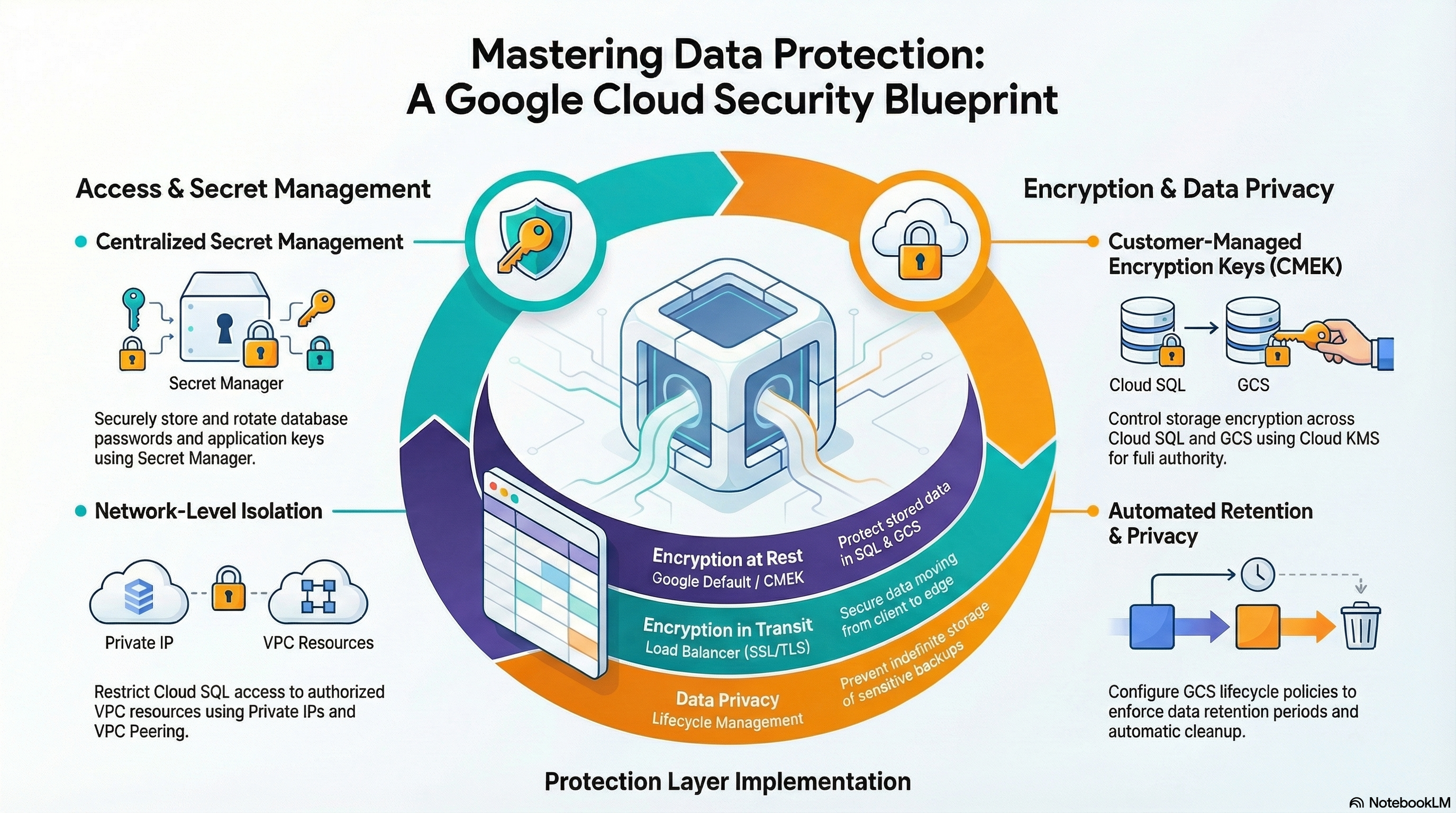
This guide covers Section 3 of the Professional Cloud Security Engineer exam. The relevant foundation modules: App_Common (Secret Manager lifecycle and the zero-downtime rotation pipeline), Services_GCP and App_Common (customer-managed encryption keys with plan-time key recovery), and the TLS/storage controls spread across App_CloudRun, App_GKE, and the platform's object-storage layer. Deploy the secure-platform profile with enable_cmek = true plus guarded-edge with enable_auto_password_rotation = true before starting.
3.1 Protecting sensitive data and preventing data loss
⏱ ~2 h · 💰 low — Secret Manager versions and one rotation job · ⚙️ Requires: guarded-edge (
enable_auto_password_rotation = true); any database-backed deployment
Why the exam cares — The exam tests secret hygiene end to end: never in code/env-var plaintext/Terraform state, least-privilege access per secret, automated rotation with zero downtime, and a defensible audit trail. It also tests Sensitive Data Protection (Cloud DLP) for PII discovery and de-identification — which the modules do not implement.
How RAD implements it — the platform's Secret Manager layer:
- The database password is generated randomly (
database_password_length, default32, range 16–64) and stored assecret-{instance}-{service}. Workload access is per-secretroles/secretmanager.secretAccessor. Apps consume secrets by reference:secret_environment_variableson Cloud Run resolves at runtime via a secret key reference; App_GKE uses the Secret Manager add-on — aSecretProviderClassplus aSecretSynccustom resource materializes Secret Manager values into the Kubernetes Secret the pods reference, withsecret_propagation_delay(default30s) absorbing replication lag. - The GitHub CI/CD token is written with
gcloud secrets versions addinside a provisioner specifically so the plaintext never enters Terraform state — a state-hygiene pattern worth quoting in exam answers about IaC secret handling. secret_rotation_period(default2592000s= 30 days) creates the Pub/Sub topicsecret-{service}-rotationand grants the Secret Manager service identityroles/pubsub.publisherso Secret Manager itself emits rotation notifications on schedule.enable_auto_password_rotation(defaultfalse; plan-time validation requires a database) deploys the full handler: Eventarc trigger →pw-rotator-dispatcherCloud Run service →{prefix}-pw-rotatorCloud Run job. The job's zero-downtime dual-version flow: record current ENABLED version → generate a new random password →ALTER USERon Cloud SQL (effective immediately) → add a new secret version (solatestserves the new value) → sleeprotation_propagation_delay_sec(default90) → disable (not destroy) the old version, keeping it for rollback and audit.
Datastore-side protection: Cloud SQL is private-IP-only with encrypted-only SSL mode; Redis has AUTH enabled with the AUTH string stored in Secret Manager.
Try it
- Deploy with rotation enabled. In Console > Security > Secret Manager, open
secret-{instance}-{service}→ Versions: note the version history and the rotation settings (next rotation time, topic). - Trigger and observe a rotation without waiting 30 days:
gcloud run jobs execute <prefix>-pw-rotator --region us-central1 --wait
gcloud secrets versions list secret-<instance>-<service> \
  --format="table(name, state, createTime)"
- You should see a new ENABLED version and the previous one DISABLED. Confirm the app still serves traffic during the swap (the dual-version window plus the propagation sleep covers in-flight connections).
- Audit who touched the secret (requires
enable_audit_logging = true):
gcloud logging read 'protoPayload.serviceName="secretmanager.googleapis.com" AND protoPayload.methodName:"AccessSecretVersion"' \
  --limit=10 --format="table(timestamp, protoPayload.authenticationInfo.principalEmail)"
- You know it worked when the version table shows the dual-version history and the data-access log names the workload SA as the only payload reader.
Check yourself
Q1: Scenario — during password rotation, users must see zero failed logins. Order the steps correctly and explain the critical ordering decision.
A: Generate new password → update the database user (ALTER USER) → add the new Secret Manager version → wait a propagation delay → disable the old version. The critical choice: the DB is updated before the secret version, and the old version is disabled only after propagation — during the window both old (cached) and new credentials authenticate, so no client fails. Disabling (not destroying) the old version preserves rollback.
Q2: Why does Secret Manager's rotation feature alone not rotate anything?
A: rotation on a secret only publishes a Pub/Sub notification on schedule. Something must consume it and perform the change — here, Eventarc fires the dispatcher, which executes the rotator job. The exam loves this distinction: rotation schedule = notification; rotation handler = your code.
Q3: A teammate proposes declaring Secret Manager secret versions directly in Terraform for API tokens. What is the risk and the deployed alternative?
A: That resource stores the plaintext payload in Terraform state — anyone with state access (or a committed state file) reads the secret. The module instead pushes the value with gcloud secrets versions add in a provisioner, so only a non-reversible hash is kept in state and workloads read the secret by ID at runtime.
Beyond the modules — Sensitive Data Protection (Cloud DLP) is not implemented: study infoType inspection of Cloud Storage/BigQuery, de-identification (redaction, CryptoDeterministicConfig tokenization, format-preserving encryption with CryptoReplaceFfxFpeConfig), and routing findings to SCC. Scratch command: gcloud dlp inspect-templates create or inspect a string via the API: gcloud alpha dlp text inspect --content="My SSN is 123-45-6789" --info-types=US_SOCIAL_SECURITY_NUMBER (or use the Security > Sensitive Data Protection console). Also study BigQuery column-level security and dynamic data masking — no BigQuery exists in the platform.
⚠️ Exam trap — DISABLED secret versions can be re-enabled; DESTROYED versions are gone forever. Rotation handlers should disable, not destroy, the previous version until the new one is proven — exactly what the rotator job does.
3.2 Managing encryption at rest, in transit, and in use
⏱ ~2 h · 💰 low — a few KMS key versions per month · ⚙️ Requires: secure-platform (
enable_cmek = true)
Why the exam cares — You must choose the right key-management tier (Google default → CMEK → Cloud HSM → Cloud EKM/Hold-Your-Own-Key) for a compliance requirement, understand rotation semantics (new versions encrypt; old versions still decrypt), key state transitions (ENABLED/DISABLED/DESTROY_SCHEDULED/DESTROYED), and crypto-shredding.
How RAD implements it —
- At rest, CMEK (
enable_cmekdefaultfalse): keyringcmek-{prefix}(created idempotently because keyrings are indestructible) with three symmetric-encryption keys —cloudsql-{prefix}-key,artifactregistry-{prefix}-key,storage-{prefix}-key— each rotating oncmek_key_rotation_period(default7776000s, 90 days). Each service identity (Cloud SQL, AlloyDB, Artifact Registry; the GCS service agent) is grantedroles/cloudkms.cryptoKeyEncrypterDecrypteron the individual key, not the project. - App-layer CMEK: discovers the Services_GCP keyring or creates
{project_id}-cmek-keyring, manages well-known keysstorage-keyandartifact-registry-key, and waits ~60 s for IAM propagation before encrypting buckets/repos. - Key recovery at plan time (a key-recovery script runs on every plan): if the named key version is scheduled for destruction it is restored, if disabled it is re-enabled, if missing it is created — returning a key status of
enabled|restored|created|skipped. A companion check re-asserts the GCS service agent's KMS grant. The Binary Authorization signing key gets the same restore-and-enable treatment. - In transit: Certificate Manager Google-managed certificates terminate TLS at the global HTTPS LB with permanent HTTP→HTTPS redirects; Cloud SQL enforces encrypted-only SSL mode (PostgreSQL); the Cloud SQL Auth Proxy sidecar gives mTLS-wrapped database connections on GKE.
- In use: not implemented (no Confidential VMs / Confidential GKE Nodes).
Try it
- In Console > Security > Key Management, open keyring
cmek-{prefix}; check each key's rotation period and next rotation date, and the per-key IAM grants on the Permissions pane.
gcloud kms keys list --keyring=cmek-<prefix> --location=us-central1 \
  --format="table(name, purpose, rotationPeriod, primary.state)"
gcloud kms keys get-iam-policy cloudsql-<prefix>-key \
  --keyring=cmek-<prefix> --location=us-central1
gcloud sql instances describe <instance> --format="value(diskEncryptionConfiguration.kmsKeyName)"
- Exercise the recovery path: disable the storage key version (
gcloud kms keys versions disable 1 --key=storage-key --keyring=<keyring> --location=us-central1), then run a plan/redeploy from the portal — the platform's plan-time key-recovery check re-enables it before any bucket operation; check the plan log for a key status ofrestored/enabled. - You know it worked when the Cloud SQL instance reports your CMEK key name and the disabled key version is ENABLED again after the next plan.
Check yourself
Q1: Scenario — a regulator requires that you can render all customer data unrecoverable on demand ("crypto-shredding"). How does the deployed CMEK design satisfy this, and what is the irreversible step?
A: All Cloud SQL/GCS/AR data is encrypted under customer-managed keys. Disabling the key versions makes data immediately inaccessible but reversible; scheduling destruction (gcloud kms keys versions destroy) and letting the 24-hour-plus pending window elapse destroys the key material, making every byte encrypted under it permanently unrecoverable — including backups. Destruction of the key version is the irreversible step.
Q2: After automatic rotation creates key version 5, can data encrypted under version 2 still be read?
A: Yes. Rotation changes the primary version used for new encryption; existing ciphertext stays decryptable by its original version as long as that version remains enabled. This is why disabling/destroying old versions, not rotation itself, is what cuts access to old data.
Q3: Cloud SQL instance creation fails with "Cloud KMS key is disabled, destroyed, or scheduled to be destroyed." What does the platform do about this class of failure, and what would you answer on the exam?
A: The platform's plan-time data "external" probe restores DESTROY_SCHEDULED versions and re-enables DISABLED ones before dependent resources are touched. The exam answer: restore the key version (possible only during the scheduled-destruction window) or re-enable it, and verify the service agent still holds roles/cloudkms.cryptoKeyEncrypterDecrypter on the key.
Beyond the modules — Not implemented: Cloud HSM protection level (FIPS 140-2 Level 3 — --protection-level=hsm at key creation), Cloud EKM (keys held outside Google entirely), customer-supplied encryption keys (CSEK), key import, Confidential Computing (AMD SEV Confidential VMs / Confidential GKE Nodes), and client-side/application-layer encryption (e.g., Tink). Scratch commands: gcloud kms keys create hsm-key --keyring=KR --location=L --purpose=encryption --protection-level=hsm and gcloud compute instances create cvm --confidential-compute --maintenance-policy=TERMINATE.
⚠️ Exam trap — CMEK does not mean Google "can't see" your data (the key still lives in Cloud KMS and Google infrastructure performs the cryptography); it means you control the key lifecycle and IAM. Only Cloud EKM (external key manager) keeps key material outside Google — pick EKM for "provider must never hold the key" scenarios.
3.3 Securing AI workloads
⏱ ~30 min (reading) · 💰 n/a · ⚙️ Requires: nothing deployable — concept-only
Why the exam cares — The current PSE exam includes securing AI/ML systems: threats unique to models (prompt injection, training-data poisoning, model inversion/extraction), guardrail services (Model Armor), de-identifying training data, and the IaaS-vs-PaaS responsibility split for training infrastructure.
How RAD implements it — Not implemented by the foundation modules. The nearest adjacency: every generic control here also protects an AI workload's serving path — Artifact Registry vulnerability scanning for model-server images, Binary Authorization for attested inference containers, VPC-SC around storage/APIs holding training data, CMEK on the buckets that would hold model artifacts, and IAP/Cloud Armor in front of inference endpoints.
Try it
- There is no AI surface in the modules; instead, rehearse the perimeter pattern you would reuse: confirm
storage.googleapis.com(training data) andartifactregistry.googleapis.com(model images) are in the deployed perimeter's restricted-services list.
POLICY=$(gcloud access-context-manager policies list --organization=ORG_ID --format="value(name)")
gcloud access-context-manager perimeters dry-run describe vpcsc_<prefix>_perimeter \
  --policy=$POLICY --format="yaml(spec.restrictedServices)"
- You know you've internalized the mapping when you can state which deployed control would cover
aiplatform.googleapis.comif it were added to a perimeter (the same access-level + restricted-service mechanism).
Check yourself
Q1: Scenario — a fine-tuned internal LLM occasionally outputs employee phone numbers from its training data. Which two Google Cloud controls address this, at which stage?
A: Sensitive Data Protection de-identification of the training corpus before fine-tuning (prevents memorization of PII), and Model Armor response filters on the serving path to detect and block PII leakage in outputs. IAM/VPC-SC don't help — the leak is via legitimate model responses.
Q2: What changes in your security responsibilities between training on Compute Engine GPUs (IaaS) versus Vertex AI Training (PaaS)?
A: IaaS: you own OS hardening (Shielded VM), patching, inter-node lateral-movement controls (no external IPs, firewall rules), plus data/IAM controls. PaaS: Google runs the nodes; your scope narrows to Vertex AI IAM roles, CMEK on artifacts, VPC-SC on the Vertex AI API, and private endpoints. Same shared-responsibility narrowing logic as GKE Standard vs Autopilot.
Beyond the modules — Study: Model Armor templates (prompt-injection/jailbreak/PII filters for Gemini and Vertex endpoints), Vertex AI security controls (CMEK, VPC-SC support, Private Service Connect endpoints, granular roles such as roles/aiplatform.user), and the OWASP Top 10 for LLM Applications. Scratch commands: gcloud ai models list --region=us-central1 and review Vertex AI > Model Armor in the console.
⚠️ Exam trap — Prompt injection is an input-validation problem at the model boundary; WAFs like Cloud Armor cannot parse prompts semantically. Answers that bolt a WAF onto an LLM endpoint to stop jailbreaks are distractors — Model Armor (or equivalent guardrails) is the control.
Need RAD to do something it does not do yet? Request it on the roadmap, or vote on what is already there.