PDE Certification Preparation Guide: Section 5 — Optimizing performance and cost (~12% of the exam)
📚 Official exam guide: Professional Cloud DevOps Engineer certification — always confirm section weightings against the current Google Cloud exam guide.
This guide covers exam Section 5 using the RAD foundation modules. Performance levers live in App_CloudRun (execution environment, CPU allocation, probes, resources) and App_GKE (resource requests, VPA, quotas); cost levers span both engines plus Artifact Registry cleanup and the GKE cluster's cost-allocation configuration. Deploy the Cost-lean serverless profile from the Lab Map; the GKE exercises reuse the GKE release engineer profile.
5.1 Collecting performance information in Google Cloud
⏱ ~60 min · 💰 low · ⚙️ Requires: Cost-lean serverless profile; GKE release engineer profile for Kubernetes metrics
Why the exam cares — Performance questions test cause isolation: is latency in cold starts, CPU throttling, the container's resource ceiling, or a downstream dependency? You need to know which platform setting produces which performance signature and which metric proves it.
How RAD implements it
| Lever | Module setting | Performance effect |
|---|---|---|
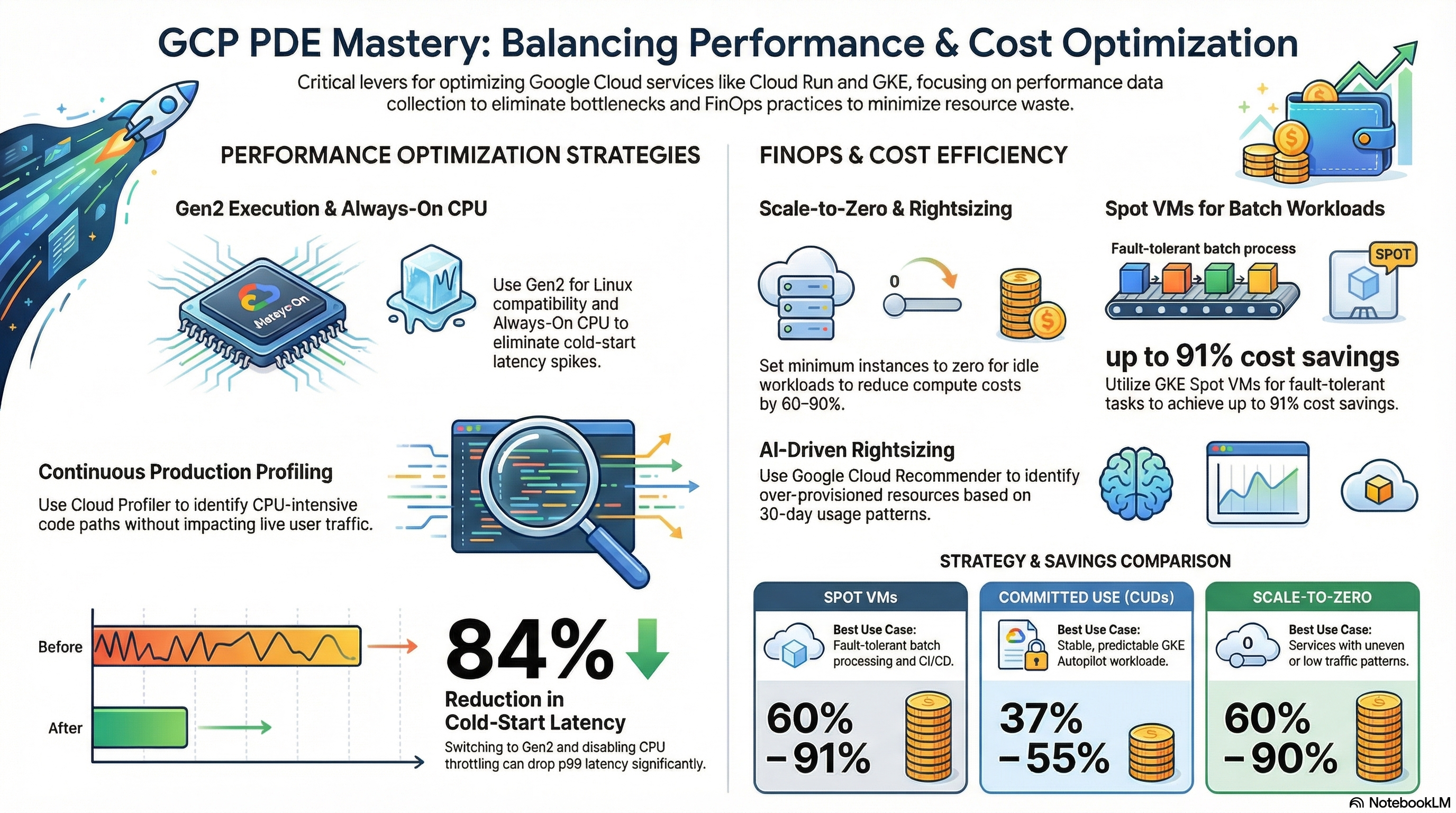
| Execution environment | execution_environment (default gen2) | gen2 gives full Linux compatibility (required by the module's NFS and GCS Fuse mounts — validated at plan time) and different startup/CPU characteristics vs. gen1 |
| Startup CPU boost | startup CPU boost is always on for the Cloud Run service | extra CPU during instance start shrinks cold-start latency |
| CPU allocation | cpu_always_allocated (default false) controls whether CPU stays allocated when idle | always-on CPU keeps background work running between requests; request-only CPU throttles to near-zero when idle |
| Warm floor | min_instance_count (default 0) | ≥1 eliminates cold starts at a constant cost |
| Resource ceiling | container_resources (cpu_limit 1000m, memory_limit 512Mi) | undersized limits show up as throttling/OOM kills |
| Probe tuning | startup_probe_config / health_check_config | a slow /healthz or tight failure_threshold masquerades as deploy flakiness |
| GKE metrics source | managed Prometheus + SYSTEM_COMPONENTS monitoring on every Services_GCP cluster | PromQL-queryable workload performance data |
The performance evidence lives in Metrics Explorer: run.googleapis.com/request_latencies, run.googleapis.com/container/startup_latencies, run.googleapis.com/container/cpu/utilizations, and kubernetes.io/container/cpu/limit_utilization — the same metrics the module's dashboards and alerts are built from (see the Section 4 guide).
Try it
- Measure cold starts: with
min_instance_count = 0, let the service idle ~15 minutes, then:
for i in 1 2 3; do curl -s -o /dev/null -w "request $i: %{time_total}s\n" <service-url>; done
The first request carries the cold start; compare with Metrics Explorer > run.googleapis.com/container/startup_latencies.
2. Set min_instance_count = 1 in the portal, apply, repeat the measurement after another idle period — the cold-start penalty disappears.
3. Flip cpu_always_allocated = false, apply, and check Console > Cloud Run > (service) > Revisions > (latest) shows "CPU is only allocated during request processing"; with background-thread workloads you'd now see idle-time throttling.
4. On GKE, compare requested vs. actual: kubectl top pods -n <namespace> against the container_resources values in the pod spec (kubectl get pod <pod> -n <ns> -o jsonpath='{.spec.containers[0].resources}').
5. You know it worked when you can attribute the first-request latency delta to startup (not request processing) using the startup-latency metric, and you can state each pod's utilization-to-request ratio.
Check yourself
Q1: A Cloud Run service shows fast p50 but terrible p99 latency, concentrated right after idle periods. Which two settings fix it and what do they cost?
A: min_instance_count = 1 (warm instance — eliminates cold starts, constant baseline cost) and startup CPU boost (already on for this service — faster starts when they do happen, billed only during startup). The p99-after-idle signature is the classic cold-start fingerprint.
Q2: After setting cpu_always_allocated = false, a service's response webhooks stop firing even though requests succeed. Why?
A: With CPU allocated only during requests, background threads (work continuing after the response is sent) are throttled to near-zero between requests. Anything asynchronous must either finish before the response, move to a Cloud Run job/queue, or the service needs always-allocated CPU.
Beyond the modules — Cloud Trace (where in the request path latency accrues), Cloud Profiler (which function burns CPU — add the language agent and read flame graphs), and load testing methodology are not provisioned. In a scratch project, instrument a Cloud Run service with OpenTelemetry and inspect a trace waterfall — exam questions name these tools explicitly.
⚠️ Exam trap — "CPU always allocated" and min_instance_count are independent axes: a min-instances=1 service with request-only CPU still throttles between requests, and a scale-to-zero service with always-allocated CPU still pays nothing when no instance exists. Don't conflate warm instances with active CPU.
5.2 Implementing FinOps practices for optimizing resource utilization and costs
⏱ ~60 min · 💰 reduces cost · ⚙️ Requires: Cost-lean serverless profile; GKE release engineer profile
Why the exam cares — FinOps questions test matching the saving mechanism to the waste pattern: idle capacity → scale-to-zero or rightsizing; over-requested resources → VPA/Recommender; stale artifacts → lifecycle/cleanup policies; predictable steady load → committed use discounts; attribution gaps → labels and billing export.
How RAD implements it
- Pay-for-nothing idle:
min_instance_count = 0(Cloud Run default) pluscpu_always_allocated = falsegives true scale-to-zero with request-granular billing. - Spend ceilings:
max_instance_count(Cloud Run default1, GKE default3) caps the worst-case bill. - Right-sizing: GKE Autopilot bills by pod requests, so
container_resourcesis directly a billing input;enable_vertical_pod_autoscaling(defaultfalse) lets VPA continuously fit requests to observed usage (updateMode: Auto, floor10mCPU /32Mi). - Consumption guardrails:
enable_resource_quota(defaultfalse) caps a namespace atquota_cpu_requests/quota_cpu_limits(default"4"),quota_memory_requests(default"4Gi") /quota_memory_limits(default"8Gi") — binary unit suffixes are mandatory and validated (a bare"4"would be read by Kubernetes as 4 bytes and block all scheduling) — plusquota_max_pods("20"),quota_max_services("10"),quota_max_pvcs("5"). - Artifact storage hygiene: the Artifact Registry cleanup trio —
max_images_to_retain(default7, KEEP),delete_untagged_images(defaulttrue),image_retention_days(default30) — and Cloud Run revision pruning viamax_revisions_to_retain(default7). - Cost visibility hooks: every resource carries cost-attribution labels (
tenant,application,deployment); the GKE cluster enables cost allocation, so namespace/workload costs surface in billing reports. Note that the old BigQuery resource-usage export is not supported on Autopilot and was removed — billing export plus cost allocation is the supported path.
Try it
- Quantify scale-to-zero: with the Cost-lean profile, watch the instance count fall to zero after traffic stops — Metrics Explorer >
run.googleapis.com/container/instance_count— then compare against a day withmin_instance_count = 1in Billing > Reports, filtering by SKU group Cloud Run and grouping by service label. - Right-size with evidence on GKE: run load, read
kubectl top pods -n <ns>, and if usage sits far below requests, either lowercontainer_resourcesor setenable_vertical_pod_autoscaling = trueand apply; verify the VPA's target with:
kubectl get vpa <service>-vpa -n <namespace> \
  -o jsonpath='{.status.recommendation.containerRecommendations[0].target}'
- Apply a namespace budget: set
enable_resource_quota = true(defaults above) and verify enforcement:
kubectl describe resourcequota -n <namespace>
Then try raising max_instance_count beyond what the quota allows and watch pods stay Pending with a quota event.
4. Audit artifact spend: gcloud artifacts repositories describe <repo> --location=us-central1 --format="yaml(cleanupPolicies)" and Artifact Registry > (repo) size over time.
5. You know it worked when instance count hits zero between bursts, the VPA target is below your original request, and the ResourceQuota shows used vs. hard limits.
Check yourself
Q1: A GKE Autopilot bill seems high although kubectl top shows pods using ~20% of their CPU requests. What's the cheapest structural fix?
A: Lower the requests — Autopilot bills requested resources, not used ones. Either set container_resources from observed usage or enable VPA to do it continuously. Adding CUDs before right-sizing would lock in the waste.
Q2: Why does the module validate that quota_memory_requests carries a binary suffix like "4Gi"?
A: Kubernetes parses a bare "4" as 4 bytes. A 4-byte namespace memory quota makes every pod's request exceed the quota, so nothing schedules — an outage caused by a unit typo. The plan-time validation turns a runtime mystery into an immediate, explainable failure.
Q3: Finance wants per-team cost reports for workloads sharing one GKE Autopilot cluster. Which two platform features make that possible here?
A: GKE cost allocation (enabled on Services_GCP clusters), which attributes cluster costs to namespaces/labels in billing data, combined with the modules' consistent resource labels (tenant, application). Export billing to BigQuery and group by those labels for the report.
Beyond the modules — Billing export to BigQuery (the foundation of any FinOps practice — configure under Billing > Billing export), budgets and programmatic budget alerts via Pub/Sub, Active Assist/Recommender rightsizing and idle-resource recommendations, committed use discounts (GKE Autopilot CUDs commit to vCPU/GB amounts, not machine types), and Spot provisioning for fault-tolerant batch work. None are provisioned by the modules; all are inexpensive console exercises against the lab project.
⚠️ Exam trap — Deleting old container images and old Cloud Run revisions are separate problems: a revision pins its image by digest, so an aggressive registry cleanup can break rollback to a retained revision whose image was deleted. The module's KEEP policy default (max_images_to_retain = 7) matches max_revisions_to_retain (7) — keep that coupling in mind when tuning either.
Need RAD to do something it does not do yet? Request it on the roadmap, or vote on what is already there.