PDE Certification Preparation Guide: Section 3 — Applying site reliability engineering practices (~18% of the exam)
📚 Official exam guide: Professional Cloud DevOps Engineer certification — always confirm section weightings against the current Google Cloud exam guide.
This guide covers exam Section 3 using the RAD foundation modules. SLO and error-budget theory is concept-only here (the modules emit the metrics SLIs are built from, but create no SLO objects), while service lifecycle management and incident mitigation are fully hands-on through App_CloudRun scaling controls, the App_GKE HPA/VPA/PDB stack, and instant traffic-based rollback. Deploy the GKE release engineer profile plus a Cloud Run service (any profile) from the Lab Map.
3.1 Balancing change, velocity, and reliability of the service
⏱ ~60 min (mostly study + one console exercise) · 💰 no additional cost · ⚙️ Requires: Observability baseline profile (for the metrics SLOs are built on)
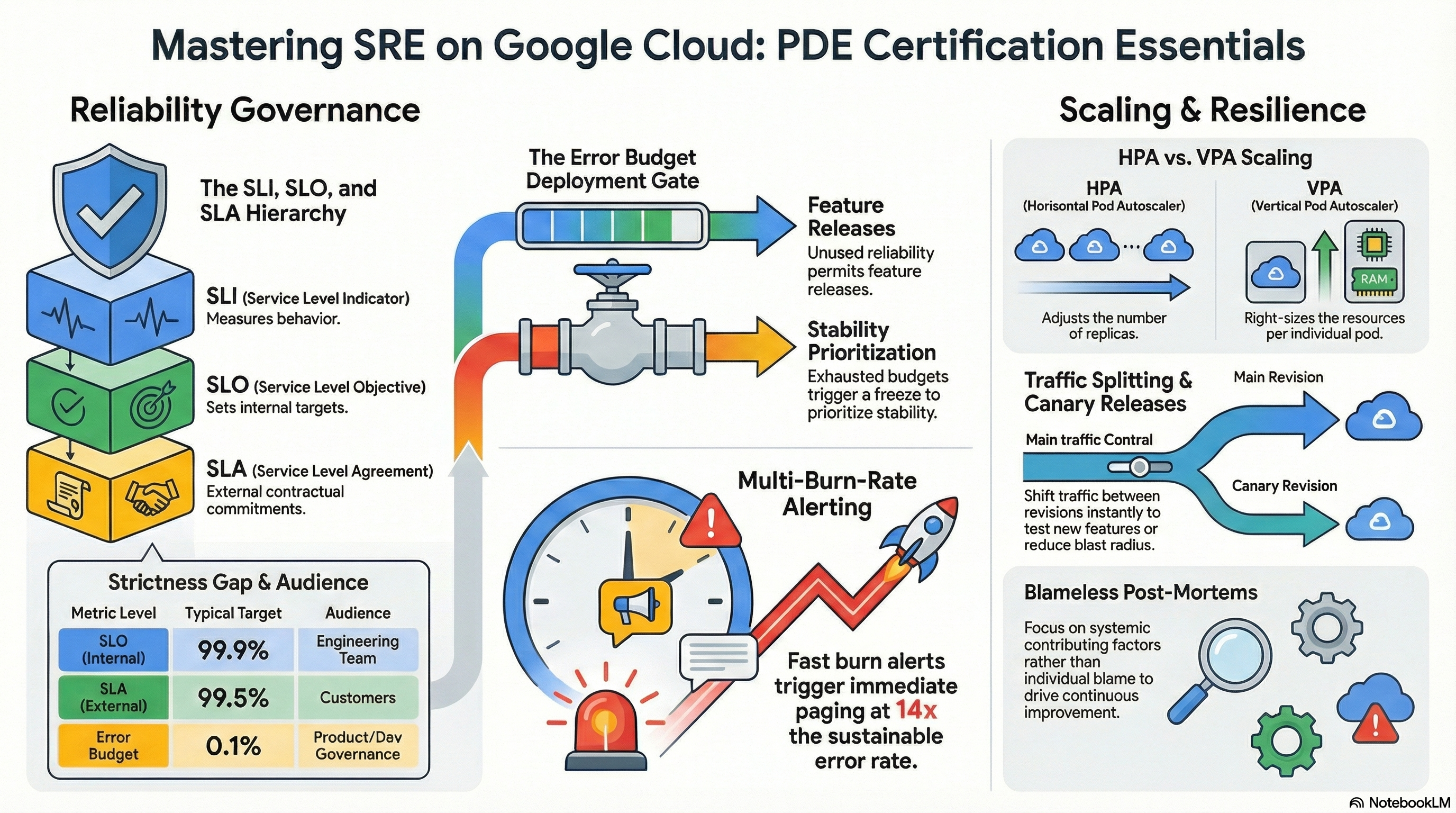
Why the exam cares — This is core SRE: SLIs measure behavior, SLOs set internal targets, SLAs are external contracts (always looser than the SLO), and the error budget (1 − SLO) is the objective currency that arbitrates between shipping features and hardening reliability. The exam tests the decision layer: what happens when the budget is exhausted, which burn rate should page, and who owns the error-budget policy.
How RAD implements it — Not implemented as SLOs: no Cloud Monitoring SLO or service objects exist in the modules. The nearest adjacent capability is the raw SLI material and threshold alerting: the monitoring layer creates fixed CPU and memory utilization alerts at 0.9 (90%) per platform, the alert_policies variable lets you alert on any metric (e.g., run.googleapis.com/request_count or request_latencies), and the auto-generated dashboards chart request count and p95 latency — the exact signals you'd select as availability and latency SLIs.
Try it
- With a Cloud Run service deployed and receiving some traffic, create a real SLO manually on top of the module's service: Console > Monitoring > Services > Define service, pick the Cloud Run service, then Create SLO → SLI type Availability (request-based) → goal 99.9% over a rolling 30 days.
- Add the two standard burn-rate alerts on that SLO (fast burn: 14.4× over 1h; slow burn: 6× over 6h) from the SLO's Alerts tab.
- Inspect what the console built, via the API:
gcloud monitoring services list --project=$GOOGLE_PROJECT_ID
gcloud alpha monitoring policies list \
  --filter="displayName~'burn rate'" --format="value(displayName)"
- Generate traffic (e.g.,
for i in $(seq 1 200); do curl -s -o /dev/null <service-url>; done) and watch the error-budget gauge move on the SLO page. - You know it worked when the SLO page shows compliance %, remaining error budget, and burn-rate charts for the module-deployed service.
Check yourself
Q1: Your SLO is 99.9% availability over 30 days and an incident just consumed 50% of the remaining error budget in 2 hours. Per standard SRE policy, what should the team do about tomorrow's planned feature release?
A: Pause it. A burn that fast means the sustainable rate is massively exceeded; the error-budget policy trades release velocity for reliability work until the budget recovers. This is the whole point of the budget — an objective, pre-agreed gate instead of a judgment call mid-incident.
Q2: Why is the SLA always set looser than the SLO (e.g., SLA 99.5% vs. SLO 99.9%)?
A: The SLO is the internal target with consequences you control (release freezes); the SLA carries external penalties (refunds, contracts). The gap is the operational buffer: you want to breach your internal target, react, and recover well before any contractual breach.
Q3: Why page on error-budget burn rate instead of on the raw error percentage?
A: Burn-rate alerting scales urgency to budget impact: a 14× burn over an hour threatens the monthly budget and deserves a page, while a slow 1.5× burn is a ticket. Raw-threshold alerts either page too often (noise) or too late (budget already gone) — the multiwindow, multi-burn-rate pattern from the SRE Workbook fixes both.
Beyond the modules — Study: Cloud Monitoring SLO monitoring (request-based vs. windows-based SLIs), the SRE Workbook chapters on alerting on SLOs and error-budget policy, and toil measurement. In a scratch project, try gcloud monitoring services create / the SLO REST API to script what you clicked in the console — the exam may reference SLO definitions in JSON form.
⚠️ Exam trap — 99.9% monthly ≈ 43 minutes of downtime, 99.99% ≈ 4.3 minutes. Exam answers often hinge on whether a proposed maintenance window or recovery time even fits in the stated SLO's budget.
3.2 Managing service lifecycle
⏱ ~75 min · 💰 moderate (GKE replicas) · ⚙️ Requires: GKE release engineer profile + any Cloud Run deployment
Why the exam cares — Capacity management questions test which knob solves which problem: horizontal scaling for load, vertical right-sizing for efficiency, minimum instances for latency, maximums for cost protection. On GKE you must know HPA vs. VPA semantics (and that they conflict on the same resource metric); on Cloud Run, scale-to-zero trade-offs.
How RAD implements it
| Control | Cloud Run (App_CloudRun) | GKE (App_GKE) |
|---|---|---|
| Floor | min_instance_count (default 0 — scale-to-zero) | min_instance_count (default 1) → HPA minReplicas |
| Ceiling | max_instance_count (default 1) | max_instance_count (default 3) → HPA maxReplicas |
| Horizontal trigger | request load (managed by Cloud Run) | a Horizontal Pod Autoscaler: CPU target 70%, memory target 80% utilization |
| Vertical | container_resources (cpu_limit default 1000m, memory_limit default 512Mi) | container_resources, or enable_vertical_pod_autoscaling (default false) → VPA with updateMode: Auto, floor 10m/32Mi |
| Readiness gating | startup_probe_config (HTTP /healthz, 10s period, 10 failures) | startup_probe_config (10s delay/10s period) |
| Liveness | health_check_config (30s period, 3 failures → restart) | health_check_config (15s delay/30s period) |
Two wiring details worth knowing: the GKE HPA is created only when max_instance_count > 1 and VPA is disabled — the module never runs HPA and VPA together on the same workload; and the HPA carries a plan-time precondition that min_instance_count <= max_instance_count.
Try it
- On GKE, inspect the module's autoscaling stack:
kubectl get hpa -n <namespace>
kubectl describe hpa <service-name> -n <namespace>   # see the 70%/80% targets
- Load the service and watch HPA react (Autopilot provisions node capacity automatically):
kubectl run loadgen --image=busybox -n <namespace> --restart=Never -- \
  /bin/sh -c "while true; do wget -q -O- http://<service-name>; done"
kubectl get hpa <service-name> -n <namespace> --watch
- Switch to vertical right-sizing: set
enable_vertical_pod_autoscaling = truein the portal and apply — note in the plan that the HPA is destroyed and aVerticalPodAutoscalerappears. Check its recommendations after some load:kubectl get vpa -n <namespace> -o yaml. - On Cloud Run, set
min_instance_count = 1and apply, then compare cold-start latency before/after withcurl -w "%{time_total}\n" -o /dev/null -s <url>after an idle period. - You know it worked when the HPA scales replicas toward
max_instance_countunder load, the VPA emits target requests after observation, and the warmed Cloud Run service answers without multi-second first-request latency.
Check yourself
Q1: A GKE service OOM-kills under steady (not spiky) traffic. Do you reach for HPA or VPA, and why?
A: VPA (or manually raising container_resources memory): the per-pod allocation is wrong, not the replica count. HPA on memory would add replicas, masking the problem expensively. VPA observes real usage and raises the request — the right vertical fix for a sizing error. Note the module enforces choosing one: enabling VPA removes the HPA.
Q2: Why does max_instance_count matter on a pay-per-use platform like Cloud Run where idle costs nothing?
A: It caps blast radius in both directions: runaway cost under a traffic spike or retry storm, and overload protection for downstream fixed-capacity dependencies (Cloud SQL max_connections is 200 by default in Services_GCP) that unlimited Cloud Run scaling would exhaust.
Beyond the modules — Cloud Run concurrency tuning (requests per instance) isn't exposed as a module variable; study how concurrency interacts with CPU allocation and instance count (gcloud run services update --concurrency=... in a scratch project). Also study GKE cluster-level autoscaling concepts (node auto-provisioning) even though Autopilot abstracts them away.
⚠️ Exam trap — HPA percentage targets are relative to the request, not the limit. A pod with a low CPU request hits "70% utilization" almost immediately; wrong requests make HPA behavior look broken.
3.3 Mitigating incident impact on users
⏱ ~60 min · 💰 low · ⚙️ Requires: Pipeline engineer + GKE release engineer profiles
Why the exam cares — During an incident, mitigation beats diagnosis: drain traffic away from the bad version, roll back, shed abusive load, keep capacity alive through infrastructure disruption. The exam also covers the human side — incident command roles, communication, and blameless postmortems — which no Terraform module can deploy.
How RAD implements it
- Instant revision rollback (Cloud Run): every retained revision (
max_revisions_to_retain, default7) is a rollback target; repointtraffic_split(or use the console traffic manager) — seconds, no build. - Pipeline rollback (Cloud Deploy): each target retains release history;
gcloud deploy targets rollbackredeploys the prior release's pinned digests. - Workload rollback (GKE):
kubectl rollout undoreverts to the previous ReplicaSet; the direct CI/CD path (kubectl set image) keeps rollout history intact. - Availability under disruption:
enable_pod_disruption_budget(defaulttrue) creates a PDB withpdb_min_available(default"1") — automatically skipped whenmax_instance_count = 1, where a PDB would block node drains forever; created per Cloud Deploy stage namespace too.enable_topology_spread(defaultfalse) spreads replicas across zones. - Failure containment at the edge:
enable_cloud_armor(defaultfalse) fronts Cloud Run with a global load balancer whose policy includes per-IP rate limiting — 500 requests/60s, exceed → deny with HTTP 429 and a 300s ban — plus OWASP preconfigured WAF rules and Adaptive Protection for L7 DDoS. When enabled,ingress_settingsis forced tointernal-and-cloud-load-balancingso the WAF can't be bypassed via the direct*.run.appURL. - Self-healing probes: liveness failures restart containers (3 consecutive failures on Cloud Run's
health_check_config); startup probes keep traffic off instances that aren't ready.
Try it
- Stage a "bad deploy" on Cloud Run: push a change that returns 500s (or just treat the latest revision as bad), then execute the mitigation:
gcloud run services update-traffic <service> --region=us-central1 \
  --to-revisions=<previous-revision>=100
Time yourself — this is the "under a minute" mitigation the exam expects. 2. On GKE, break and revert a deployment:
kubectl set image deployment/<name> <app>=badregistry.example/nope:1 -n <ns>
kubectl rollout status deployment/<name> -n <ns>   # watch it stall on ImagePullBackOff
kubectl rollout undo deployment/<name> -n <ns>
Note that the rolling update strategy kept the old pods serving the whole time.
3. Verify the PDB protects you during maintenance: kubectl get pdb -n <ns> and confirm MIN AVAILABLE matches pdb_min_available.
4. With Cloud Armor enabled, hammer the endpoint past 500 req/min from one IP and observe 429s plus a 5-minute ban; check Console > Network Security > Cloud Armor policies > (policy) > Logs.
5. You know it worked when traffic shifted away from the bad revision with zero downtime, the stalled GKE rollout never reduced ready replicas below the PDB floor, and rate limiting returned 429s.
Check yourself
Q1: A bad GKE rollout is at 50% when errors spike. Why is kubectl rollout undo safe to run immediately, mid-rollout?
A: A rolling update keeps the previous ReplicaSet until completion; undo simply reverses direction, scaling the old (known-good) ReplicaSet back up under the same maxSurge/maxUnavailable constraints. No rebuild, no data risk for stateless workloads — exactly why the exam favors it as first response.
Q2: Why does the module deliberately skip creating a PDB when max_instance_count = 1?
A: A PDB of min-available 1 over a single replica makes the pod un-evictable, blocking node drains and upgrades indefinitely — turning a reliability tool into an operational outage. With one replica, voluntary-disruption protection is meaningless anyway; the real fix is running more than one replica.
Q3: During a suspected DDoS, why is Cloud Armor's rate-based ban preferable to scaling max_instance_count up?
A: Rate limiting sheds abusive load at the edge before it consumes compute or reaches the database; scaling up absorbs the attack at your expense and pushes it onto downstream fixed-capacity systems. Mitigate at the outermost layer that can distinguish bad traffic.
Beyond the modules — Incident management process is pure study: the Incident Command System roles (incident commander, communications lead, operations lead), severity classification, status communication, and blameless postmortem structure (timeline, contributing factors, action items with owners). Read the Google SRE Book chapters "Managing Incidents" and "Postmortem Culture"; practice writing one postmortem for a lab incident you stage above.
⚠️ Exam trap — A PodDisruptionBudget protects only against voluntary disruptions (drains, upgrades, autoscaler consolidation). Node crashes, OOM kills, and pod evictions under node pressure ignore it — answers claiming a PDB prevents involuntary failures are wrong.
Need RAD to do something it does not do yet? Request it on the roadmap, or vote on what is already there.