PDE Certification Preparation Guide: Section 1 — Bootstrapping and maintaining a Google Cloud organization (~20% of the exam)
📚 Official exam guide: Professional Cloud DevOps Engineer certification — always confirm section weightings against the current Google Cloud exam guide.
This guide covers exam Section 1 using the RAD platform as a lab. The foundation modules exercised here are App_CloudRun and App_GKE (the deployment engines), Services_GCP (the once-per-project platform layer), and the App_Common building blocks they share. Deploy the Pipeline engineer profile from the Lab Map before starting.
1.1 Designing the overall resource hierarchy
⏱ ~30 min · 💰 no additional cost · ⚙️ Requires: default deployment
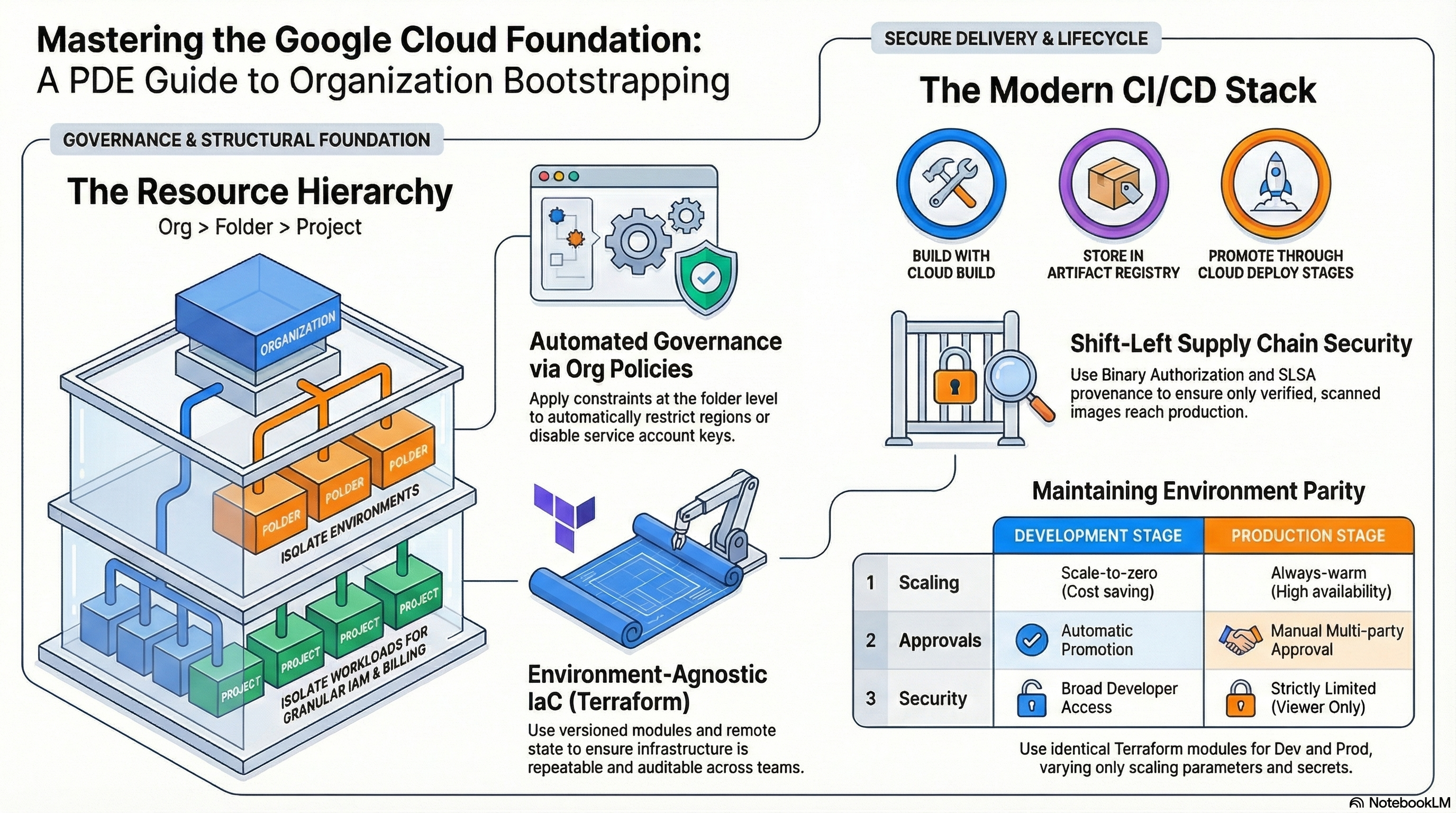
Why the exam cares — DevOps engineers inherit the org → folder → project → resource hierarchy and must know where to attach what: organization policies and IAM at folders for environment-wide guardrails, billing accounts outside the hierarchy, projects as the isolation and quota boundary. Exam scenarios test whether you put a constraint at the right level (e.g., a folder-level policy instead of repeating it per project) and whether you isolate environments by project rather than by naming convention.
How RAD implements it — Not meaningfully: all four foundation modules operate inside a single existing project; no folders, organization policies, or project-factory resources are created. The nearest adjacent capability is governance labeling — resource_labels (default {}) in both application engines is merged into a common label set (which always adds application, deployment, tenant, and managed-by keys) and stamped on every resource, which is the foundation for label-based cost attribution and log filtering.
Try it
- In the portal, set
resource_labels = { team = "payments", env = "lab" }on a deployed application module and apply. - In Console > Cloud Run > (service) > Details, confirm the labels; then in Billing > Reports, group by label key
teamto see cost attribution per label. - Confirm from the CLI:
gcloud run services describe <service-name> --region=us-central1 \
  --format="value(metadata.labels)"
gcloud projects get-ancestors $GOOGLE_PROJECT_ID
- You know it worked when the
teamandenvlabels appear alongside the module-injectedmanaged-byandtenantlabels, andget-ancestorsshows where your lab project sits in the hierarchy.
Check yourself
Q1: Your company wants every non-production project to be restricted to us-central1 while production projects stay multi-region. Where do you implement this with the least ongoing effort?
A: Attach a constraints/gcp.resourceLocations organization policy to a non-production folder and place all non-prod projects under it. Policies inherit down the hierarchy, so new projects get the restriction automatically — no per-project configuration or Terraform changes needed.
Q2: Why do the RAD modules stamp a tenant and deployment label on every resource instead of relying on resource names?
A: Labels are queryable in billing exports, log filters, and asset inventory, while names are free-form strings. Labels give you cost showback and operational grouping across heterogeneous resource types — the same mechanism the exam expects for chargeback in a multi-team organization.
Beyond the modules — Study the resource hierarchy and organization policy docs directly: practice gcloud resource-manager folders list --organization=<ORG_ID>, gcloud org-policies list --project=<PROJECT>, and review the Cloud Foundation Fabric/FAST landing-zone blueprints for how enterprises bootstrap folders, billing, and IAM with Terraform. Also know that a billing account is linked to projects but lives outside the hierarchy.
⚠️ Exam trap — Organization policies are not IAM: denying a permission in IAM and constraining a resource configuration (e.g., disableServiceAccountKeyCreation) are different control planes, and the exam likes answers that combine both.
1.2 Managing infrastructure
⏱ ~60 min · 💰 no additional cost · ⚙️ Requires: any deployed module
Why the exam cares — The exam tests IaC decision criteria: declarative state-based tooling (Terraform/OpenTofu, Infrastructure Manager) vs. imperative scripts, how remote state enables collaboration and locking, how drift is detected and reconciled, and when to deliberately let another system own part of a resource. Expect scenarios on what terraform plan shows after someone clicks around the console.
How RAD implements it — The deployment modules are the artifact:
| Practice | Where you see it |
|---|---|
| Declarative full-stack modules | App_CloudRun declares a Cloud Run v2 service; App_GKE declares a Kubernetes Deployment |
| Parameterization, no hardcoding | each engine exposes 130–160 variables with validations, e.g. traffic_split entries must sum to 100 |
| Plan-time guardrails | App_GKE carries dozens of precondition checks, e.g. min ≤ max instances, binary-suffix memory quotas |
| Deliberate shared ownership | the Cloud Run service that Cloud Deploy targets ignores changes to the container image, so Cloud Deploy owns image rollouts while Terraform owns everything else |
| CI for the IaC itself | a repo-level Cloud Build pipeline runs convention checks, tofu fmt -check + tofu validate on every module, tflint, and tofu test against the App_CloudRun validation tests |
| Discovery over duplication | the networking layer discovers Services_GCP-managed VPCs by label instead of re-declaring them |
The deployment-control variable is deploy_application (default true) — setting it false provisions supporting infrastructure without the workload, a staged-rollout pattern worth knowing.
Try it
- Understand the validation gate: before any deployment, the platform's CI runs a credential-free static-analysis loop on the IaC —
tofu init -backend=false, thentofu validate(type and reference checks) and a formatting check (tofu fmt -check) — so syntax, type, and precondition errors are caught without touching a live project. This is the code-review gate; you experience its result as a deployment that is rejected before it ever reachesplan/apply. - Simulate drift: in Console > Cloud Run > (service) > Edit & deploy new revision, change the memory limit to
1Gimanually. The next time the platform re-applies your deployment,terraform planproposes reverting memory to the declaredcontainer_resourcesmemory limit (default512Mi) — because the console change is drift against the declared state. - Contrast with sanctioned drift: deploy a new image through the Cloud Deploy pipeline (Pipeline engineer profile). On the next apply, the plan shows no diff for the image, because the container image is deliberately ignored by Terraform.
- You know it worked when step 2's plan proposes an in-place update reverting your manual change, while step 3 shows "No changes" for the image attribute.
Check yourself
Q1: After a hotfix was deployed with gcloud run services update --image=..., the next terraform apply reverted it and re-broke production. What design prevents this class of incident?
A: Either route all image changes through the pipeline that Terraform delegates to (Cloud Deploy) and have Terraform ignore the image attribute, as this platform does, or make the emergency path update the IaC source first. The root cause is two writers owning one attribute; the fix is explicitly assigning ownership.
Q2: Why does the repo run tofu validate and tofu test in CI rather than only tofu plan against live infrastructure?
A: Validation and unit tests run without credentials or a live project (-backend=false), so they catch syntax, type, and precondition violations cheaply on every commit. Plans against live state are slower, need secrets, and belong to the deployment pipeline, not the code-review gate.
⚠️ Exam trap — terraform plan detects drift only for attributes Terraform manages. Resources created entirely outside Terraform are invisible to it; finding those requires Cloud Asset Inventory or config scanning, not a plan.
1.3 Designing a CI/CD architecture stack
⏱ ~45 min · 💰 low (Cloud Build minutes) · ⚙️ Requires: Pipeline engineer profile
Why the exam cares — Architecture questions test tool selection: Cloud Build for CI, Artifact Registry for artifacts, Cloud Deploy for progressive delivery, Binary Authorization for deploy-time supply-chain enforcement — and where the trust boundaries sit (which service account does what, where attestations are created and verified).
How RAD implements it — The full stack is wired in App_CloudRun (the GKE engine mirrors it):
- CI:
enable_cicd_trigger(defaultfalse) creates a Cloud Build trigger with an inline build definition — no separate build-config file is needed in the application repo. Step 1 builds with Kaniko (gcr.io/kaniko-project/executor:v1.23.2, layer cache enabled with a 24h cache TTL). - Artifact management: images are pushed with three tags — the configured version,
latest, and$COMMIT_SHA— to the shared Artifact Registry repo (shared-repo-*), discovered or created as a fallback. - Supply-chain security: when
enable_binary_authorization = true, step 2 resolves the image digest and runsgcloud beta container binauthz attestations sign-and-createagainst thepipeline-attestorattestor, signing with the KMS keybinauthz-signerin the{project}-binauthz-keyringkeyring. The Cloud Run service uses the project's default Binary Authorization policy; the GKE cluster enforces the project singleton policy. Policy enforcement strength comes frombinauthz_evaluation_mode(defaultALWAYS_ALLOW; setREQUIRE_ATTESTATIONto enforce). - CD:
enable_cloud_deploy(defaultfalse) provisions a Cloud Deploy delivery pipeline plus one target per stage. Note that setting it withoutenable_cicd_trigger = trueis rejected by a plan-time precondition — a delivery pipeline without a CI trigger would never receive releases. Skaffold configs live in a GCS bucket named{project}-{8-char-hash}-cd-configs. - Builds run as a dedicated SA (
cloudbuild-sa-*), grantedroles/clouddeploy.releaserand read access to the Skaffold bucket — not as a broad default identity.
Try it
- Deploy the Pipeline engineer profile, then push a commit to the connected repo's
mainbranch (the trigger'scicd_trigger_config.branch_patterndefaults to^main$). - Watch the build: Console > Cloud Build > History — identify the Kaniko step, the attestation step, and the deploy step.
gcloud builds list --region=us-central1 --limit=3
gcloud artifacts docker images list \
  us-central1-docker.pkg.dev/$GOOGLE_PROJECT_ID/<repo-name>/<app-name> \
  --include-tags --limit=5
gcloud container binauthz attestations list \
  --attestor=pipeline-attestor --attestor-project=$GOOGLE_PROJECT_ID --limit=3
- In Console > Cloud Deploy > Delivery pipelines, open the pipeline and confirm a release named
release-<short-sha>landed in the first stage. - You know it worked when the image appears in Artifact Registry with the commit-SHA tag, an attestation exists for its digest, and the dev stage shows a successful rollout.
Check yourself
Q1: Why does the attestation step sign the image digest rather than the :latest or commit-SHA tag?
A: Tags are mutable pointers; a digest is the content-addressed identity of the image. Binary Authorization verifies attestations against the digest being deployed, so signing a tag would let a re-pushed image inherit a signature it never earned.
Q2: A teammate sets enable_cloud_deploy = true but leaves enable_cicd_trigger = false, and the plan fails with a precondition error. Bug or design?
A: Design — a plan-time precondition rejects enable_cloud_deploy = true without enable_cicd_trigger = true, because a delivery pipeline without a CI trigger to feed it releases would sit empty. The exam parallel: CD is downstream of CI; design the stack as one flow.
Q3: Why Kaniko instead of a Docker daemon build step?
A: Kaniko builds OCI images entirely in userspace inside the build container — no privileged Docker daemon socket — which shrinks the attack surface of the build environment and is the recommended pattern in Cloud Build.
⚠️ Exam trap — binauthz_evaluation_mode = "ALWAYS_ALLOW" (the default here) means Binary Authorization is configured but not enforcing. Attestations being created in the pipeline does nothing until the policy says REQUIRE_ATTESTATION.
1.4 Managing multiple environments
⏱ ~45 min · 💰 low–moderate (one Cloud Run service or GKE namespace per stage) · ⚙️ Requires: Pipeline engineer profile with
enable_cloud_deploy = true
Why the exam cares — You must keep dev/staging/prod structurally identical while varying parameters, decide where approval gates belong, and know what isolation boundary each environment needs (namespace vs. service vs. project). Exam scenarios probe promotion mechanics: what artifact moves between stages and what must not be rebuilt.
How RAD implements it — cloud_deploy_stages defines the promotion path. The default is:
[
  { name = "dev",     require_approval = false, auto_promote = false },
  { name = "staging", require_approval = false, auto_promote = false },
  { name = "prod",    require_approval = true,  auto_promote = false },
]
Each stage becomes a Cloud Deploy target (with require_approval mapped directly) and a stage-suffixed runtime: Cloud Run services named <service>-<stage>, or GKE namespaces per stage passed to Skaffold via the NAMESPACE deploy parameter. Stages with auto_promote = true get a Cloud Deploy automation with an advance-rollout rule, so a successful rollout advances automatically. Terraform provisions only the first stage's service/namespace; later stages materialize when Cloud Deploy promotes into them — the same rendered release, same image digest, no rebuild. Per-stage overrides (project_id, region, service_name) exist on each stage object, so cross-project promotion is expressible, though the lab runs all stages in one project.
Try it
- With the Pipeline engineer profile deployed, promote the current release out of dev:
gcloud deploy releases promote \
  --delivery-pipeline=<pipeline-name> \
  --region=us-central1 --project=$GOOGLE_PROJECT_ID
- Promote again toward prod, then open Console > Cloud Deploy > (pipeline) — the prod rollout stops in Pending approval. Approve it:
gcloud deploy rollouts list --delivery-pipeline=<pipeline-name> \
  --release=<release-name> --region=us-central1
gcloud deploy rollouts approve <rollout-name> \
  --delivery-pipeline=<pipeline-name> --release=<release-name> \
  --region=us-central1
- Compare environments:
gcloud run services listnow shows<service>-dev,<service>-staging,<service>-prodrunning the identical image digest. - You know it worked when the prod rollout required an explicit approval and all three services report the same image digest in
gcloud run services describe ... --format="value(spec.template.spec.containers[0].image)".
Check yourself
Q1: Staging validated image digest X, but prod is running digest Y after promotion. In a correctly designed pipeline, is this possible?
A: No — Cloud Deploy promotes the release, which pins image digests at release-creation time. If prod shows a different digest, something outside the pipeline deployed it (audit logs will show who), or the pipeline rebuilds per stage, which defeats the build-once/promote-many principle the exam expects.
Q2: Where would you add a fully automatic dev → staging hop while keeping the prod gate?
A: Set auto_promote = true on the dev stage — the module then creates a Cloud Deploy automation with an advance-rollout rule scoped to the dev target. Prod keeps require_approval = true, so automation never bypasses the human gate.
Beyond the modules — The lab keeps all stages in one project. For exam completeness, study per-environment project isolation (separate IAM, quotas, VPCs per environment), Cloud Deploy deploy parameters and custom targets, and post-deployment verification (verify in Skaffold profiles), none of which the modules configure.
⚠️ Exam trap — require_approval gates the rollout into the target, not release creation. A release can exist and sit unpromoted forever; approval is per-target, which is why only prod's target carries the flag.
Need RAD to do something it does not do yet? Request it on the roadmap, or vote on what is already there.