PDE Certification Preparation Guide: Section 2 — Building and implementing CI/CD pipelines (~25% of the exam)
📚 Official exam guide: Professional Cloud DevOps Engineer certification — always confirm section weightings against the current Google Cloud exam guide.
This is the heaviest exam section and the RAD platform's strongest lab. The pipeline is implemented in App_CloudRun and App_GKE (an inline Cloud Build definition: Kaniko build → optional Binary Authorization attestation → deploy), with the shared App_Common building blocks providing the Cloud Deploy pipeline and the GitHub connection. Deploy the Pipeline engineer profile from the Lab Map before starting; subsection 2.2 also uses the GKE release engineer profile for the Kubernetes path.
2.1 Designing pipelines
⏱ ~60 min · 💰 low (Cloud Build minutes, AR storage) · ⚙️ Requires: Pipeline engineer profile
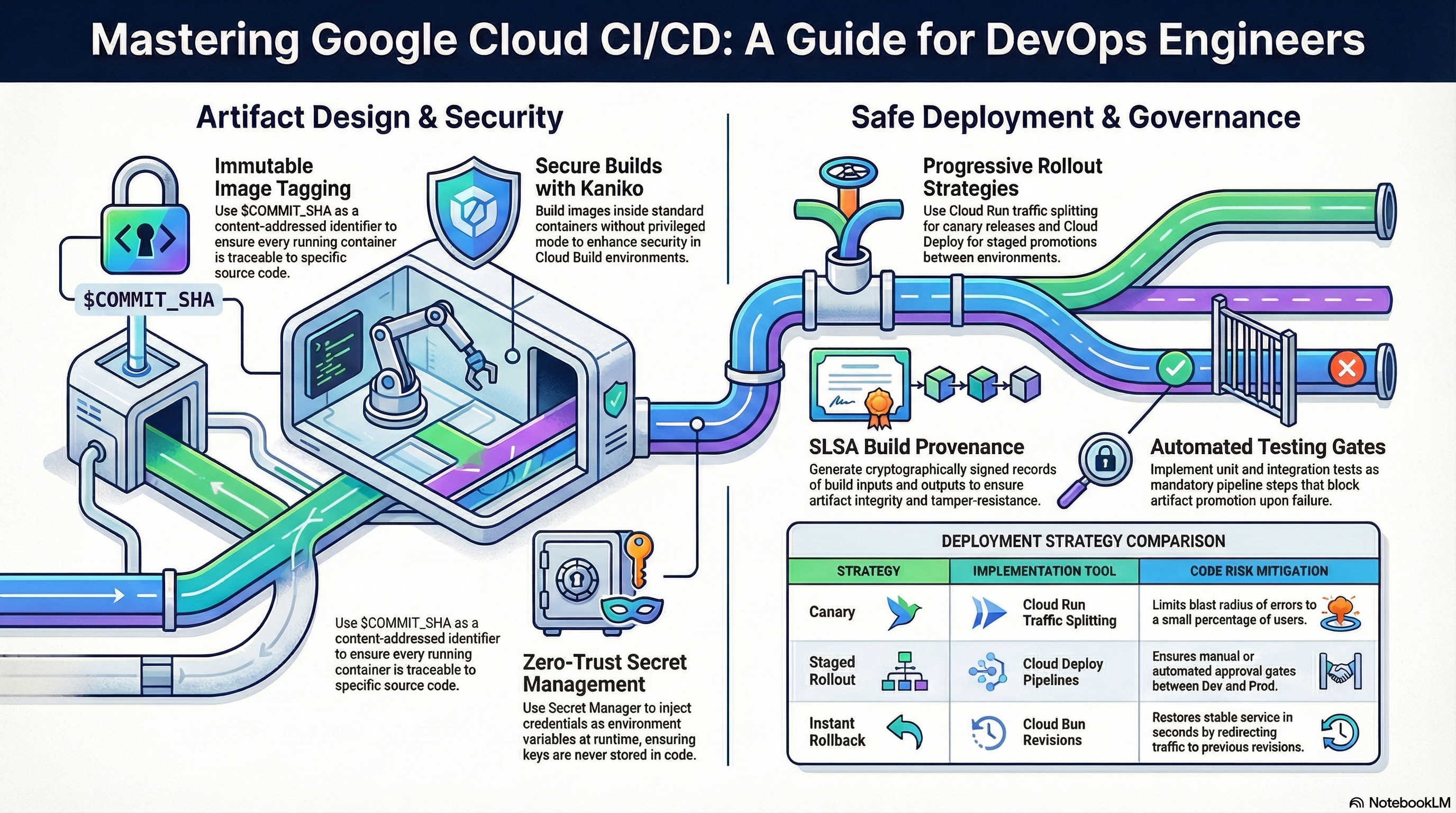
Why the exam cares — Pipeline design questions test artifact strategy: immutable, traceable image references (digest/commit-SHA over latest), build caching for speed, registry hygiene (cleanup policies so storage doesn't grow unbounded), and vulnerability scanning placement. You should be able to justify each step's order and the blast radius of getting it wrong.
How RAD implements it — One trigger, three build steps, defined inline in App_CloudRun:
| Design decision | Implementation |
|---|---|
| Trigger scope | cicd_trigger_config.branch_pattern (default ^main$), plus optional included_files/ignored_files path filters and custom substitutions |
| Build tool | Kaniko v1.23.2, daemonless, with a 24h layer cache for reuse |
| Tagging | every build pushes three tags: <application_version>, latest, and $COMMIT_SHA — the SHA tag is what the deploy step uses, preserving commit-to-runtime traceability |
| Registry | shared repo discovered automatically; if absent, the platform creates shared-repo-<prefix> (Docker format, mutable tags) |
| Cleanup | three policies scoped to this app's images: a KEEP policy retaining the max_images_to_retain (default 7) most recent versions, a DELETE policy for untagged images when delete_untagged_images (default true), and a DELETE policy for images older than image_retention_days (default 30) days |
| Build logging | build logs land in Cloud Logging, not a GCS log bucket |
| Build identity | a dedicated per-deployment Cloud Build SA, not the legacy project default |
Vulnerability scanning is a platform-layer toggle: enable_vulnerability_scanning (default false) in Services_GCP enables the Artifact Registry repo's inherited vulnerability scanning.
Try it
- Push a trivial commit to the connected repo and watch Console > Cloud Build > History; open the build and read each step's log (Kaniko cache hits are visible on the second build — compare durations).
- Inspect the artifact trail:
gcloud builds list --region=us-central1 --limit=2
gcloud artifacts docker images list \
  us-central1-docker.pkg.dev/$GOOGLE_PROJECT_ID/<repo>/<app> --include-tags
gcloud artifacts repositories describe <repo> --location=us-central1 \
  --format="yaml(cleanupPolicies)"
- In the portal, lower
image_retention_daysto7and re-apply; re-run thedescribecommand and confirm thedelete-old-imagespolicy'solderThanchanged to604800s. - You know it worked when each image version shows all three tags and the cleanup policies reflect your variable values.
Check yourself
Q1: Storage costs on your registry keep climbing even though a cleanup policy deletes images older than 30 days. Builds run 40×/day. What is the likely gap?
A: Untagged images (layers orphaned each time latest is re-pointed) aren't covered by an age-based tagged-image policy alone. The RAD platform pairs the age policy with an untagged-image DELETE policy (delete_untagged_images) precisely for this. Also check that the KEEP policy count isn't holding more than intended.
Q2: Why does the deploy step reference the $COMMIT_SHA tag rather than latest, given both point at the same image right after the build?
A: latest is a moving pointer — a concurrent or later build changes what it resolves to, breaking reproducibility and rollback reasoning. The commit SHA is stable and links the running revision to the exact source commit, which is also what audit and incident investigation need.
Q3: Where in this pipeline would you add a unit-test gate, and what makes the build fail?
A: As a step before the Kaniko step (or a test stage in the Dockerfile). Any step exiting non-zero fails the whole Cloud Build execution, so nothing is pushed or deployed — the standard fail-fast CI contract.
⚠️ Exam trap — Artifact Registry KEEP policies beat DELETE policies: an image matched by the most_recent_versions KEEP rule is never deleted even if older than the age threshold. Reason about cleanup as "DELETE rules minus KEEP rules".
2.2 Implementing and managing pipelines
⏱ ~90 min · 💰 low–moderate (per-stage services) · ⚙️ Requires: Pipeline engineer profile; GKE release engineer profile for the Kubernetes path
Why the exam cares — This is the deployment-strategies subsection: canary vs. blue/green vs. rolling, how Cloud Run traffic splitting implements canaries, how Cloud Deploy promotion/approval/rollback works mechanically, and what a Kubernetes rolling update actually does. Expect "errors spiked after deploy — what's the fastest safe action?" scenarios.
How RAD implements it
- Cloud Run canary:
traffic_split(default[]= 100% to latest) is a list of{ type, revision, percent, tag }objects rendered into the service's traffic configuration. Validations require percentages to sum to exactly 100 and arevisionon every revision-allocation entry. The optionaltaggives a revision a stable URL for testing before it gets real traffic. - Revision hygiene:
max_revisions_to_retain(default7) prunes old revisions after each apply — it lists revisions newest-first and deletes the surplus, skipping any revision currently serving traffic. - Cloud Deploy mechanics: targets carry
require_approval;auto_promote = trueon a stage creates a Cloud Deploy automation with an advance-rollout rule. The Cloud Deploy service agent getsroles/run.admin(Cloud Run) orroles/container.developer(GKE); the Cloud Build SA getsroles/clouddeploy.releaser. - Two deploy paths from CI (Cloud Run): with
cicd_enable_cloud_deploy = true(defaultfalse), the trigger's deploy step creates a release withgcloud deploy releases create release-<short-sha> --source=<skaffold-from-GCS>; otherwise it callsgcloud run services update --image=...:$COMMIT_SHAdirectly. - GKE rolling update: the GKE trigger's direct path runs
kubectl set image <workload-type>/<name> ... -n <namespace>. The Kubernetes Deployment sets no explicit strategy, so Kubernetes' default RollingUpdate (25% maxSurge / 25% maxUnavailable) applies; StatefulSets usestateful_update_strategy(defaultRollingUpdate, orOnDeletefor manual control). The PodDisruptionBudget (enable_pod_disruption_budget, defaulttrue) protects availability during the node-level disruptions that accompany updates.
Try it
- Cloud Run canary: deploy a config change to create a second revision, list revisions, then set in the portal:
traffic_split = [
  { type = "TRAFFIC_TARGET_ALLOCATION_TYPE_LATEST", percent = 10, tag = "canary" },
  { type = "TRAFFIC_TARGET_ALLOCATION_TYPE_REVISION", revision = "<service>-00001-xyz", percent = 90 }
]
Apply, then verify:
gcloud run services describe <service> --region=us-central1 \
  --format="yaml(status.traffic)"
- Roll back instantly by editing the split to send 100% to the old revision and re-applying — no build, no new revision.
- Cloud Deploy rollback: in Console > Cloud Deploy > (pipeline) > (target), click Rollback, or:
gcloud deploy targets rollback <target-name> \
  --delivery-pipeline=<pipeline> --region=us-central1
- GKE rolling update (GKE profile): trigger one manually and watch it:
kubectl set image deployment/<name> <app>=<image>:<new-tag> -n <namespace>
kubectl rollout status deployment/<name> -n <namespace>
kubectl rollout undo deployment/<name> -n <namespace>   # instant revert
kubectl get pdb -n <namespace>                          # the module-created PDB
- You know it worked when
status.trafficshows your 90/10 split with acanarytag URL, and the GKE rollout replaces pods incrementally while the PDB reportsALLOWED DISRUPTIONS≥ 0 throughout.
Check yourself
Q1: Five minutes after a Cloud Run deploy, 5xx rates triple. Fastest safe mitigation?
A: Shift 100% of traffic back to the previous healthy revision (console traffic manager, gcloud run services update-traffic, or traffic_split in IaC). Old revisions remain deployable instantly; this takes seconds and needs no build. Investigate the bad revision afterward via its logs — it still exists, just serves no traffic.
Q2: What's the difference between a canary on Cloud Run traffic splitting and a Cloud Deploy canary strategy?
A: Traffic splitting is a runtime control on one service between revisions — you move percentages yourself. Cloud Deploy canary is a pipeline strategy that automates phased percentage progression with verification between phases. The RAD modules implement the former and use plain stage promotion (not canary strategy) in Cloud Deploy.
Q3: Why does revision pruning skip revisions serving traffic, and what failure would deleting them cause?
A: A revision receiving any traffic percentage is live capacity; deleting it would break the traffic split (gcloud rejects the delete). Retention pruning must only ever remove fully drained revisions — the same reason you keep N known-good revisions as your rollback inventory.
⚠️ Exam trap — Blue/green ≠ canary: blue/green switches 100% of traffic between two complete environments at once (instant rollback, double capacity); canary shifts a small percentage first (gradual risk, no double capacity). Cloud Run's traffic splitting can express both, but the exam wants you to name the right strategy for the constraint given.
2.3 Managing pipeline configuration and secrets
⏱ ~45 min · 💰 no additional cost · ⚙️ Requires: Pipeline engineer profile
Why the exam cares — Secrets in pipelines are a classic failure mode: tokens in source, passwords in Terraform state, plaintext in build logs. The exam tests where secrets should live (Secret Manager), how they reach runtime (references, not values), and how rotation happens without downtime.
How RAD implements it
- The GitHub PAT never touches Terraform state:
github_token(sensitive) is required on first apply only; the platform writes it withgcloud secrets versions add(a provisioner, not a stored resource attribute) and the secret is abandoned rather than deleted on destroy. On later applies the stored token is reused — the trigger resolves the existing secret version rather than asking for the token again. - Runtime secrets are references:
secret_environment_variables(map of env var → secret name) renders as Cloud Run secret references; the GKE engine syncs secrets via the Secret Manager CSI add-on into Kubernetes Secrets. The container sees a value; state and manifests see a reference. - Generated, not chosen: the database password is a randomly generated value of
database_password_length(default32) chars stored straight into Secret Manager. - Rotation:
secret_rotation_period(default2592000s= 30 days) configures Secret Manager rotation notifications to a Pub/Sub topic;enable_auto_password_rotation(defaultfalse) closes the loop with an Eventarc-dispatched rotation job that performs a dual-version, zero-downtime rotation (add new version → update DB user → disable old version afterrotation_propagation_delay_sec, default90). - Pipeline parameters that aren't secret travel as Cloud Build substitutions (
cicd_trigger_config.substitutions), visible in the trigger definition — the exam distinction between configuration and secrets.
Try it
- List the module-created secrets and confirm no value is visible anywhere in IaC outputs:
gcloud secrets list --filter="name~<deployment-prefix>" \
  --format="table(name,createTime)"
gcloud secrets versions list <db-password-secret-name>
- In Console > Cloud Run > (service) > Revisions > (latest) > Variables & Secrets, confirm
DB_PASSWORDshows a secret reference (.../versions/latest), not a value. - Enable
enable_auto_password_rotation = truein the portal and apply; after the rotation flow runs,gcloud secrets versions listshows a new ENABLED version and the prior one DISABLED. - Reason about the negative case: the GitHub PAT and the database password never appear in Terraform state — they are written directly to Secret Manager and consumed by reference, so state holds only the secret's name. A state inspection would never reveal the token value, which is the whole point of the reference-not-value design.
- You know it worked when secrets have multiple versions with only the newest enabled and the runtime resolves secrets purely by reference.
Check yourself
Q1: Why is writing the GitHub token via a gcloud secrets versions add provisioner better than a managed Terraform secret-version resource?
A: A managed secret-version resource stores the secret payload in state; anyone with state-read access reads the token. The provisioner pushes the value directly to Secret Manager so state holds only the secret's name. The trade-off (Terraform can't detect value drift) is acceptable for write-once credentials.
Q2: During password rotation, why add the new secret version before disabling the old one instead of replacing in place?
A: Running instances may hold connections authenticated with the old password and may re-read the old version until propagation completes. The dual-version window lets old and new credentials coexist (the DB user is updated, the old version stays readable), achieving zero-downtime rotation; the old version is disabled only after the propagation delay.
⚠️ Exam trap — Setting secret_rotation_period alone rotates nothing: Secret Manager rotation is a Pub/Sub notification schedule. Something must consume the notification and write a new version — here, that's the enable_auto_password_rotation machinery.
2.4 Auditing and logging of code and configurations
⏱ ~45 min · 💰 low–moderate (audit log ingestion) · ⚙️ Requires: Pipeline engineer profile +
enable_audit_logging = true
Why the exam cares — After an unauthorized or broken deployment, you must reconstruct who deployed what, when, from which source. The exam tests knowledge of Admin Activity vs. Data Access audit logs (the former always on and free, the latter opt-in and billed), and how artifact provenance plus release history close the chain from commit to runtime.
How RAD implements it
- Data Access audit logs:
enable_audit_logging(defaultfalsein both engines andServices_GCP) turns on project IAM audit logging forallServiceswithADMIN_READ,DATA_READ, andDATA_WRITE, plus explicit per-service configs for Secret Manager and Cloud KMS — so every secret access and key use is logged. - Deployment provenance chain: commit SHA → image tag (build step) → attestation on the image digest (Binary Authorization step) → Cloud Deploy release pinning the digest → per-target rollout history with approver identity. Each hop is queryable.
- Build logs are forced to Cloud Logging (
CLOUD_LOGGING_ONLY), making build activity searchable alongside audit logs. - Config history: every infrastructure change flows through
tofu plan/apply, so the IaC repo's git history plus state snapshots are the configuration audit trail.
Try it
- Enable
enable_audit_logging = true, apply, then read your own trail. Find who deployed the last Cloud Run revision:
gcloud logging read \
  'protoPayload.serviceName="run.googleapis.com"
   AND protoPayload.methodName:"Services.ReplaceService"' \
  --limit=5 --format="table(timestamp, protoPayload.authenticationInfo.principalEmail)"
- Read a secret in the console, then prove Data Access logging caught it:
gcloud logging read \
  'protoPayload.serviceName="secretmanager.googleapis.com"
   AND protoPayload.methodName:"AccessSecretVersion"' --limit=5
- Walk the provenance chain for the running image: get its digest from
gcloud run services describe, thengcloud container binauthz attestations list --attestor=pipeline-attestorto find its signature, then Console > Cloud Deploy > (pipeline) > Release history to see when it was promoted and who approved prod. - You know it worked when you can name the principal, timestamp, image digest, and approving user for the most recent prod deployment without leaving the console/CLI.
Check yourself
Q1: Security asks for a record of every read of the production DB password over the last month, but Logs Explorer shows nothing. Most likely cause?
A: Data Access audit logs (DATA_READ) for Secret Manager were not enabled — only Admin Activity logs are on by default, and reading a secret version is a data access, not an admin action. That is exactly what enable_audit_logging turns on; it cannot be enabled retroactively.
Q2: An image is running in prod that no Cloud Build execution produced. Which two controls in this lab would have (a) detected and (b) prevented it?
A: (a) Admin Activity audit logs on run.googleapis.com show the out-of-band ReplaceService call and its principal. (b) Binary Authorization with binauthz_evaluation_mode = "REQUIRE_ATTESTATION" would have blocked the deploy, since only the pipeline holds the KMS signing key for pipeline-attestor.
Beyond the modules — The modules don't configure log sinks or retention: study aggregated sinks to BigQuery/GCS for long-term audit retention, log bucket retention settings (gcloud logging buckets update _Default --retention-days=...), and SLSA provenance generated natively by Cloud Build (gcloud artifacts docker images describe ... --show-provenance) — the RAD pipeline's KMS attestation is a related but distinct mechanism.
⚠️ Exam trap — Admin Activity audit logs are always on, unconfigurable, and free; Data Access logs are off by default (except BigQuery), must be enabled per service or via allServices, and can be expensive at volume. Questions that hinge on "why is there no log?" usually turn on this distinction.
Need RAD to do something it does not do yet? Request it on the roadmap, or vote on what is already there.