PCA Certification Preparation Guide: Section 6 — Ensuring solution and operations excellence (~12.5% of the exam)
📚 Official exam guide: Professional Cloud Architect certification — always confirm section weightings against the current Google Cloud exam guide.
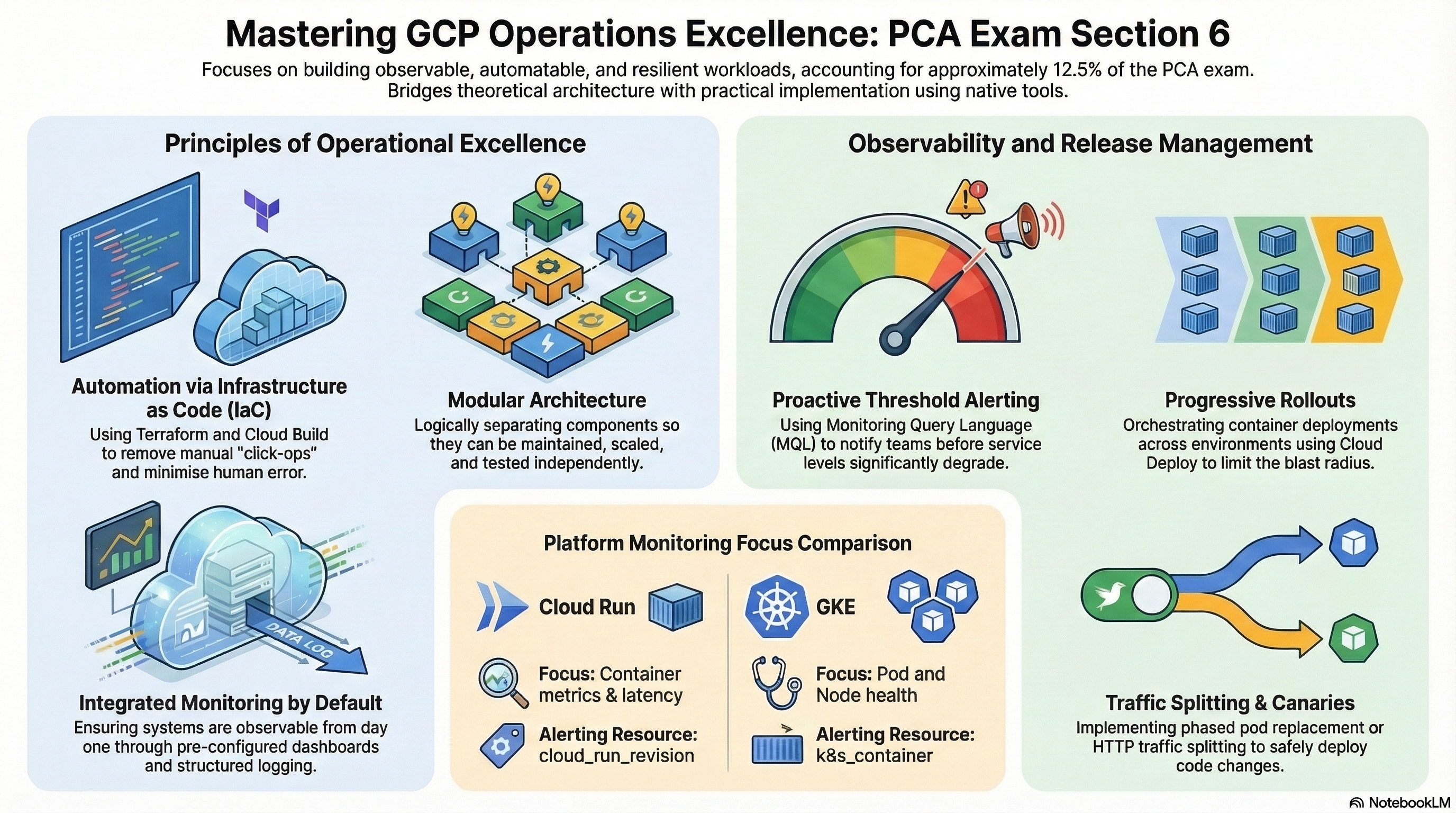
Day-2 operations: observing systems, releasing safely, controlling quality, and keeping production reliable. Every RAD deployment ships with a dashboard and alerting wired to your email, and publicly reachable deployments add a synthetic uptime check (see 6.2) — so most of this section is observable on the Lean baseline profile from the Lab Map; add the Security and delivery profile for release management (6.3) and the GKE architecture profile for the reliability mechanics in 6.6. Modules exercised: all four, with emphasis on the monitoring layers of Services_GCP and App_CloudRun, plus the platform's shared monitoring and dashboard layers.
6.1 Operational excellence pillar (Well-Architected Framework)
⏱ ~30 min reading + console review · 💰 no additional cost · ⚙️ Requires: default deployment
Why the exam cares — The Architecture Framework's operational excellence pillar — automate everything, make changes safely, prepare for failure, continuously improve — frames many scenario answers. The exam rewards recognizing operational toil and replacing it with automation.
How RAD implements it — The pillar is visible as a set of automations that remove human toil: the NFS VM is a managed instance group with TCP health checks and auto-healing plus daily disk snapshots (no pager for a hung file server); the platform restores disabled or destruction-scheduled CMEK key versions at plan time (self-healing before the failure manifests); orphaned Cloud Run jobs and old revisions are cleaned automatically; secret rotation is event-driven and zero-downtime; and the entire platform is declaratively reproducible, so environment rebuilds are an apply, not a runbook.
Try it
- Pick three automations above (the auto-healing NFS instance group, the plan-time CMEK key recovery, and Cloud Run revision/job pruning), and write down the manual runbook each replaces.
- Observe one in action — list the snapshot schedule protecting the NFS data disk:
gcloud compute resource-policies list --format="table(name,snapshotSchedulePolicy.schedule.dailySchedule)"
- You know it worked when you can name, for each automation, the incident class it prevents rather than reacts to.
Check yourself
Q1: A team's runbook says "if the file server stops responding, SSH in and restart nfsd; if the disk is corrupted, restore last night's copy." What does this platform replace that with?
A: A managed instance group with TCP health checks (ports 2049/6379) and auto-healing — an unresponsive instance is automatically recreated with its stateful data disk reattached — plus a daily snapshot schedule with 7-day retention for the corruption case. The runbook becomes infrastructure; the exam calls this eliminating toil through automation.
Beyond the modules — Read the official "Google Cloud Architecture Framework: Operational excellence" pillar end to end — its principles (automate deployments, manage incidents, plan for DR) are quoted nearly verbatim in exam options. The framework's sustainability and performance pillars are also fair game and have no module analogue.
6.2 Familiarity with Google Cloud Observability solutions
⏱ ~60 min · 💰 low — log/metric volume only · ⚙️ Requires: default deployment with
support_userspopulated
Why the exam cares — You must know the observability stack's division of labor — Monitoring (metrics, alerts, uptime checks, dashboards), Logging (Logs Explorer, log-based metrics, sinks), Trace/Profiler (latency and code-level analysis) — and design alerting that pages on symptoms with actionable thresholds.
How RAD implements it
| Capability | Implementation | Variables (defaults) |
|---|---|---|
| Notification channels | email channels per address | support_users (App modules), configure_email_notification + notification_alert_emails (Services_GCP) |
| Infrastructure alerts | Cloud SQL CPU/memory/disk and NFS-VM CPU/memory/instance-down policies provisioned by the platform | alert_cpu_threshold / alert_memory_threshold / alert_disk_threshold (all default 80) |
| Application alerts | per-service policies filtered to the Cloud Run service | alert_policies list — metric_type, comparison, threshold_value, duration_seconds, aggregation_period (default "60s") |
| Synthetic monitoring | <service>-uptime-check (HTTP GET from multiple global probe regions) plus a <service>-uptime-check-alert policy on monitoring.googleapis.com/uptime_check/check_passed, created by the platform's monitoring layer when the endpoint is publicly reachable; uptime_check_names outputs the real check name | uptime_check_config (default { enabled = false, path = "/" }; check_interval default "60s", timeout default "10s") |
| Dashboards | per-deployment dashboard provisioned by the platform | App_CloudRun / App_GKE |
| GKE telemetry | system + workload logging, managed Prometheus | fixed defaults in Services_GCP |
Try it
- In Console > Monitoring > Alerting, identify the platform policies (Cloud SQL CPU/memory/disk, NFS health) and your service's policies; open one and trace metric → threshold → channel.
- Add a custom policy via the portal, e.g.
{ name = "high-latency", metric_type = "run.googleapis.com/request_latencies", comparison = "COMPARISON_GT", threshold_value = 1000, duration_seconds = 300 }, and re-apply. - In Console > Monitoring > Uptime checks, open the module-created
<service>-uptime-checkand watch the probe results arriving from multiple regions, then query recent application errors:
gcloud logging read \
  'resource.type="cloud_run_revision" AND severity>=ERROR' \
  --limit=10 --format="table(timestamp,severity,textPayload)"
- You know it worked when your custom policy appears in Alerting wired to the
support_usersemail channel, and the module-created uptime check shows passing probes from multiple regions.
Check yourself
Q1: Users report the app is down, but no alert fired — CPU and memory were normal. What monitoring gap exists in the default deployment, and what is the right kind of alert to close it?
A: A synthetic uptime check probing the endpoint from outside (the modules create one via uptime_check_config for publicly reachable deployments — internal-only deployments get none, so this gap appears whenever ingress is locked down). Resource metrics are cause-based and can look healthy while the user experience is broken (bad deploy, LB misconfig, dead dependency); an external probe is symptom-based — it measures what users experience, which SRE practice (and the exam) says to page on.
Q2: The DB team wants warning before the database degrades. Which three platform thresholds apply, and what tuning trade-off should you explain?
A: alert_cpu_threshold, alert_memory_threshold, alert_disk_threshold (each default 80%) on the Cloud SQL instance. Lower thresholds buy lead time but raise false-positive load (alert fatigue); higher thresholds reduce noise but shrink reaction time. Durations (duration_seconds) suppress transient spikes — alert design is a precision/recall trade-off, not a single right number.
Beyond the modules — Not wired up: log sinks/exports to BigQuery, log-based metrics, SLO monitoring with burn-rate alerts, Cloud Trace, and Cloud Profiler. Practice creating a log-based metric and an SLO on a Cloud Run service in the Monitoring console — SLO/error-budget questions are frequent.
⚠️ Exam trap — Uptime checks need an externally reachable endpoint. If a scenario locks ingress down (e.g. internal-only), a public uptime check fails by design — the answer is private uptime checks or internal synthetic probes, not "the service is down." RAD encodes this: the foundation modules skip uptime check creation entirely when the deployment is not publicly reachable.
6.3 Deployment and release management
⏱ ~60 min · 💰 low · ⚙️ Requires: Security and delivery profile (Cloud Deploy + CI/CD)
Why the exam cares — Release management questions test rollout strategies (rolling, blue-green, canary), rollback speed, and environment promotion discipline — including keeping the data layer (schemas, secrets) compatible across a rollout.
How RAD implements it — Cloud Run retains prior revisions and prunes them to max_revisions_to_retain (default 7), so rollback is re-pointing traffic, with traffic_split providing canary and blue-green percentages (validated to sum to 100). Cloud Deploy (cloud_deploy_stages, default dev/staging/prod with approval on prod) promotes one artifact through environments. On GKE, Deployments use rolling updates, StatefulSets use stateful_update_strategy (default RollingUpdate), and Cloud Deploy stages map to per-stage services selected by gateway_backend_stage (default "dev") behind the Gateway. The data layer is covered too: secret rotation is dual-version (new version added, old disabled only after rotation_propagation_delay_sec, default 90) so a rollout never races its credentials.
Try it
- Deploy a new application version, then roll back without rebuilding:
gcloud run services update-traffic <service-name> \
  --region=us-central1 \
  --to-revisions=<previous-revision>=100
- Confirm in Console > Cloud Run > Revisions that traffic moved and the old revision still exists (pruning keeps 7).
- On GKE, watch a rolling update: change the image/version in the portal and run
kubectl rollout status deployment/<name> -n <namespace>. - You know it worked when rollback took seconds (traffic shift) rather than minutes (rebuild + redeploy).
Check yourself
Q1: Why does revision pruning matter to release management — isn't keeping every revision safer?
A: Unbounded revisions accumulate cost (container images, config clutter) and make the rollback target ambiguous. Retaining a bounded window (7 here) keeps fast rollback to any recent version while forcing older states to be reproduced from source control — the artifact of record — rather than from stale runtime objects.
Q2: During a credential rotation mid-rollout, old pods still hold the previous password. Why doesn't this platform's rotation break them?
A: Rotation is dual-version: the rotator adds the new secret version and changes the database password, but disables the old version only after a propagation delay, so both credentials briefly remain valid while revisions/pods converge. Single-version rotation (overwrite-then-pray) is the outage pattern the exam wants you to avoid.
⚠️ Exam trap — Blue-green and canary differ in cost and blast radius: blue-green doubles capacity for an instant full cutover; canary exposes a small percentage gradually. traffic_split implements both shapes on Cloud Run — pick per the scenario's tolerance for risk vs spend.
6.4 Assisting with the support of deployed solutions
⏱ ~20 min reading · 💰 no additional cost · ⚙️ Requires: default deployment
Why the exam cares — Architects design the support model: who is notified, with what evidence, and when to escalate to Google Cloud Customer Care (Standard/Enhanced/Premium plans, TAM engagement for P1s).
How RAD implements it — Largely not implemented; the nearest adjacent capability is the notification plumbing: support_users feeds Cloud Monitoring email channels (one per address, via the platform's monitoring layer), so the on-call audience is part of the deployment definition, and every alert in 6.2 carries the metric evidence a support case needs.
Try it
- Add a second address to
support_usersand re-apply; verify the new channel in Console > Monitoring > Alerting > Notification channels:
gcloud beta monitoring channels list --format="table(displayName,type,labels.email_address)"
- You know it worked when the channel list matches the variable.
Check yourself
Q1: A customer running mission-critical production workloads asks which Google Cloud support plan they need for a 15-minute P1 response and a named technical contact. What do you recommend?
A: Premium Support — it provides the fastest P1 response SLO and Technical Account Manager engagement. Enhanced suits production workloads with less aggressive response needs; Standard is for non-critical workloads. Plan selection is an architectural recommendation, not an afterthought, in exam scenarios.
Beyond the modules — Study the Cloud Customer Care tiers and case-priority definitions (P1–P4), escalation paths, and how to package diagnostic evidence (logs, traces, monitoring snapshots). Browse Console > Support in any project to see the case workflow.
6.5 Evaluating quality control measures
⏱ ~45 min · 💰 low · ⚙️ Requires:
enable_vulnerability_scanning = true(Services_GCP) and the Security and delivery profile
Why the exam cares — Quality control spans the delivery chain: static checks before apply, image scanning before deploy, admission enforcement at deploy, and posture monitoring after. The exam asks which control catches which defect class, and where in the pipeline it belongs.
How RAD implements it — The platform layers four quality gates. Plan time: tofu validate plus the modules' preconditions (32 in App_GKE alone) reject invalid configurations before any API call. Build time: enable_vulnerability_scanning enables Artifact Registry scanning (enablement_config = INHERITED), surfacing CVEs per image digest. Deploy time: Binary Authorization (REQUIRE_ATTESTATION) admits only pipeline-signed digests. Run time: GKE clusters enable security_posture_config (mode BASIC, VULNERABILITY_BASIC) for workload posture findings.
Try it
- Push an intentionally dated base image through the pipeline, then review findings in Console > Artifact Registry > (repo) > (image) under Vulnerabilities, or:
gcloud artifacts docker images list \
  <region>-docker.pkg.dev/<project>/<repo>/<image> \
  --show-occurrences --occurrence-filter='kind="VULNERABILITY"'
- Map each defect class to its gate: bad variable → plan precondition; CVE → AR scan; unsigned image → Binary Authorization; risky workload config → security posture.
- You know it worked when the scan lists CVEs with severities for your image, and you can state which gate would have caught each of the three other defect classes.
Check yourself
Q1: Scanning found a critical CVE, yet the image deployed anyway. Why, and what closes the gap?
A: Scanning is detective, not preventive — it reports findings but blocks nothing. Closing the gap requires an enforcement point: Binary Authorization with an attestation granted only after a passing scan (e.g. the CI step attests only when no critical CVEs are present). The exam regularly contrasts visibility controls with enforcement controls.
Q2: Which is cheaper to catch: a malformed memory quota at plan time or at pod-scheduling time — and how does this platform decide?
A: Plan time. App_GKE validates that quota memory values carry binary unit suffixes ("4Gi") precisely because a bare number is interpreted by Kubernetes as bytes and silently blocks all pod scheduling — a confusing runtime outage converted into an immediate, named plan error. Shifting defect detection left is the quality-control principle being tested.
Beyond the modules — Not present: automated test suites in CI (unit/integration), SAST/dependency scanning steps, Web Security Scanner, and policy-as-code on infrastructure plans (e.g. OPA/terraform-compliance). Study "Container scanning overview" and "Web Security Scanner" docs, and try adding a test step to a Cloud Build YAML in a scratch repo.
6.6 Ensuring the reliability of solutions in production
⏱ ~75 min · 💰 moderate — needs the GKE profile with ≥2 replicas · ⚙️ Requires: GKE architecture profile (
max_instance_count ≥ 2),enable_topology_spread = true
Why the exam cares — Reliability engineering is mechanism selection: protect capacity during voluntary disruptions (PDBs), spread replicas across failure domains, gate traffic on health (probes), auto-heal infrastructure, and enforce production-grade tiers. The exam gives a failure narrative and asks which mechanism was missing.
How RAD implements it
| Failure mode | Mechanism | Variables (defaults) |
|---|---|---|
| Upgrade/drain evicts too many pods | PodDisruptionBudget | enable_pod_disruption_budget (default true), pdb_min_available (default "1"), skipped when max_instance_count = 1 |
| All replicas land in one zone | topology spread across zone + hostname | enable_topology_spread (default false), topology_spread_strict |
| Traffic hits a booting container | startup probe (10 s delay/10 s period) and liveness probe (15 s delay/30 s period), HTTP or TCP | startup_probe_config, health_check_config (both engines) |
| NFS VM hangs | MIG auto-healing on TCP 2049/6379 health checks (300 s initial delay), PROACTIVE/REPLACE updates | create_network_filesystem (default true) |
| Production on a non-replicated cache | plan-time guardrail blocks redis_tier = "BASIC" when resource_labels.environment = "production" | Services_GCP |
| Demand exceeds capacity | HPA 70% CPU / 80% memory (GKE), instance scaling (Cloud Run) | min_instance_count / max_instance_count |
Try it
- With ≥2 replicas, verify the PDB and then simulate a voluntary disruption:
kubectl get pdb -n <namespace>
kubectl get pods -n <namespace> -o wide   # note the nodes
kubectl drain <node-name> --ignore-daemonsets --delete-emptydir-data --dry-run=server
- Enable
enable_topology_spread = true, re-apply, and confirm pods land in different zones (kubectl get pods -o wide— compare node zones). - Break the liveness path deliberately (point
health_check_config.pathat a non-existent route in a test deployment) and watch pods restart in Console > Kubernetes Engine > Workloads. - You know it worked when the drain respects
minAvailable, replicas span zones, and the bad health path produces restarts instead of silent traffic blackholing.
Check yourself
Q1: During a GKE node upgrade, a 3-replica service briefly dropped to zero healthy pods. Which two mechanisms from this platform were missing?
A: A PodDisruptionBudget (minAvailable: 1 would have forced the drain to keep one pod serving) and topology spread (replicas concentrated on one node/zone all evict together). Defaults here provide the PDB automatically once max_instance_count > 1; spread must be opted into via enable_topology_spread.
Q2: A slow-starting JVM app gets killed in a restart loop on GKE. Which probe setting is wrong, and why are there two probes at all?
A: The startup probe window is too short — it must cover worst-case boot time before the liveness probe takes over. Startup probes answer "has it finished booting?" (failure = keep waiting, within limits); liveness probes answer "is it still healthy?" (failure = restart). Tuning liveness to tolerate slow boots instead of using a startup probe weakens failure detection for the entire pod lifetime.
Q3: Leadership asks for "five nines" on the self-managed NFS option. What honest answer does this architecture support?
A: It cannot deliver that: the NFS server is a single zonal VM — auto-healing and daily snapshots reduce MTTR but recovery still takes minutes, and a zone outage takes the share down. For higher availability you change architecture, not tuning: managed Filestore (or, beyond this platform, a regional/Enterprise file tier). Recognizing when an SLO requires an architectural change is core PCA material.
Beyond the modules — Not demonstrated: chaos engineering (fault injection), load testing at scale, multi-region failover with global traffic management, and formal SLO/error-budget operations. Study the SRE workbook's "Implementing SLOs," and practice a load test (e.g. hey or the distributed load-testing reference architecture) against a scratch deployment while watching the HPA respond.
⚠️ Exam trap — A PDB protects only against voluntary disruptions (drains, upgrades, autoscaler consolidation). Node crashes and zone outages ignore it entirely — those require replica count, topology spread, and multi-zone/multi-region design. "We had a PDB, why did the zone outage hurt us?" is exactly the confusion the exam probes.
Need RAD to do something it does not do yet? Request it on the roadmap, or vote on what is already there.