PCA Certification Preparation Guide: Section 1 — Designing and planning a cloud solution architecture (~25% of the exam)
📚 Official exam guide: Professional Cloud Architect certification — always confirm section weightings against the current Google Cloud exam guide.
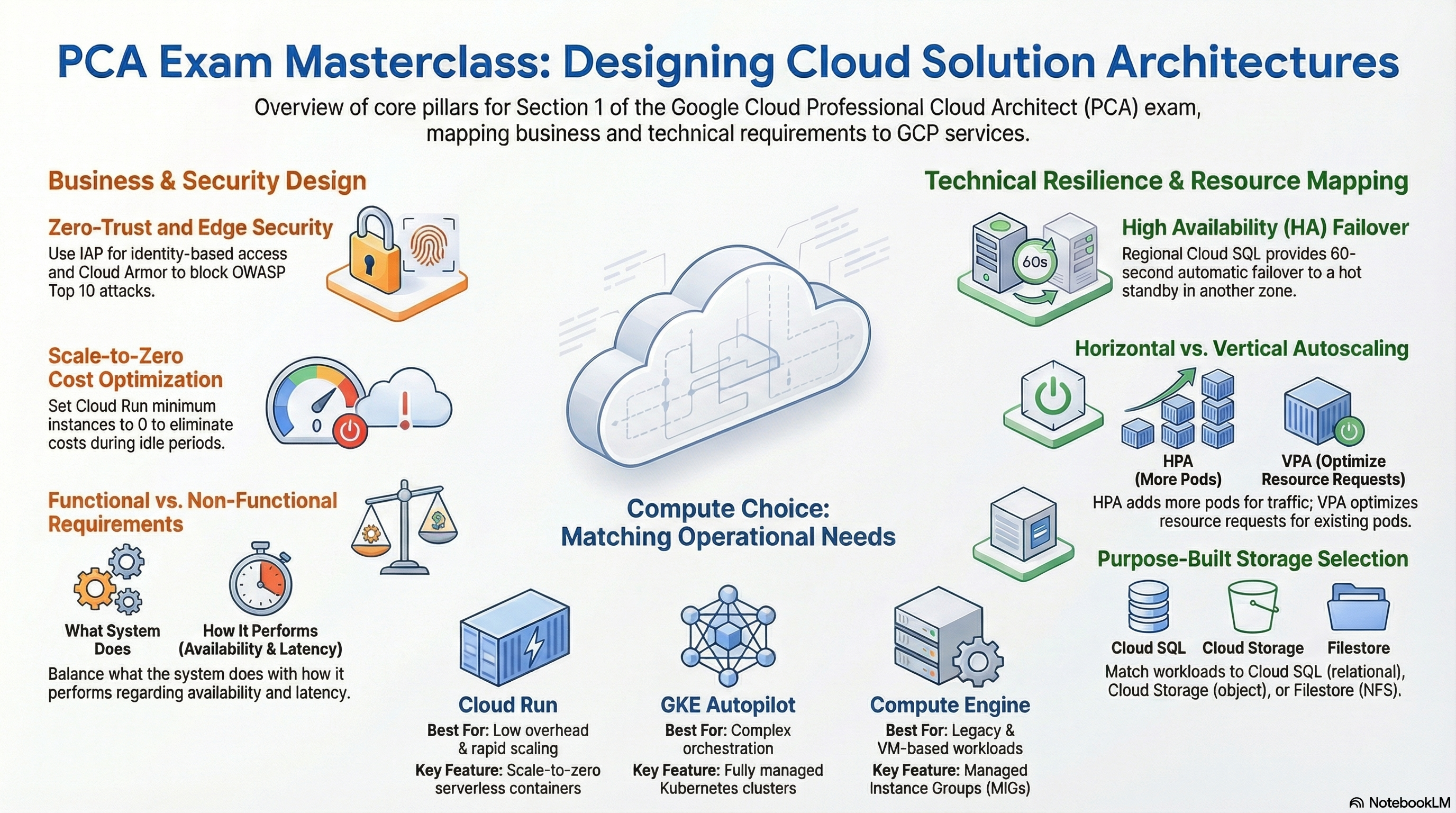
This is the heaviest-weighted PCA section, and it is about choices: which compute platform, which availability tier, which storage type — and why. All four foundation modules are exercised here. Deploy the Lean baseline profile from the Lab Map first, then apply the Resilient data tier and GKE architecture profiles as you reach 1.2 and 1.3, so you can compare the cheap architecture and the resilient one in the same project.
1.1 Designing a cloud solution infrastructure that meets business requirements
⏱ ~60 min · 💰 low — baseline profile only · ⚙️ Requires: Lean baseline profile
Why the exam cares — PCA scenarios open with business constraints, not technical ones: "minimize cost," "the security team requires zero-trust access," "leadership needs spend visibility." You are tested on translating those into platform decisions — scale-to-zero vs warm capacity, identity-based access vs network-based access, budgets and alerts as financial guardrails — and on recognizing which requirement drives which knob.
How RAD implements it
| Business requirement | Variable (default) | Module |
|---|---|---|
| Minimize idle cost | min_instance_count (default 0) — Cloud Run scales to zero | App_CloudRun |
| Cap maximum spend on compute | max_instance_count (default 1) | App_CloudRun |
| CPU billing trade-off | cpu_always_allocated (default false — request-based billing) — set true to keep CPU allocated between requests for in-process background work | App_CloudRun |
| Financial guardrails | create_billing_budget (default false), budget_amount (default 100), budget_alert_thresholds (default [0.5, 0.9, 1.0]) | Services_GCP |
| Zero-trust access for internal apps | enable_iap (default false) + iap_authorized_users / iap_authorized_groups | App_CloudRun |
| Stakeholder visibility | support_users — becomes Cloud Monitoring email notification channels | App_CloudRun / App_GKE |
Cost-relevant platform choices also live in Services_GCP: the default database is a single zonal db-custom-1-3840 PostgreSQL 17 instance (postgres_tier), and the default shared filesystem is a single e2-small VM (create_network_filesystem, default true) rather than managed Filestore — a deliberate cost-over-resilience default you will invert in 1.2.
Try it
- Deploy the Lean baseline profile. In Console > Cloud Run, open your service and confirm "Min instances: 0" on the service details.
- Watch the instance count fall to zero after an idle period on the service's Metrics tab, then send a request and observe the cold start.
- Verify the scaling bounds from the CLI:
gcloud run services describe <service-name> \
  --region=us-central1 \
  --format="yaml(spec.template.scaling)"
- Set
create_billing_budget = trueon the Services_GCP deployment and inspect Console > Billing > Budgets & alerts. - You know it worked when the Metrics tab shows the instance count touching zero and a budget with 50%/90%/100% thresholds exists.
Check yourself
Q1: A startup runs an internal admin tool used a few hours per day and wants the lowest possible bill without exposing it to the internet. Which two settings from this platform meet both requirements?
A: min_instance_count = 0 (scale-to-zero eliminates idle compute cost) and enable_iap = true with an authorized-users list (identity-based zero-trust access instead of a VPN or IP allowlist). IAP authenticates every request at Google's edge before it reaches the service, so no always-on network infrastructure is needed.
Q2: Finance wants to be warned before, not after, the monthly cloud budget is exhausted. What do you configure?
A: A billing budget with multiple alert thresholds — here budget_alert_thresholds = [0.5, 0.9, 1.0] notifies at 50% and 90% of budget_amount, before the 100% mark. Budgets alert but do not stop spending; pair them with max_instance_count caps if hard limits matter.
Beyond the modules — The exam also tests business analysis the modules cannot show: defining KPIs and success measures, CapEx-vs-OpEx framing, total cost of ownership, and build/buy/modify/deprecate workload disposition. Study the Google Cloud pricing calculator, "Cloud Billing reports" docs, and the Architecture Framework's cost optimization pillar. Try gcloud billing accounts list and explore Billing > Reports grouped by SKU in a scratch project.
⚠️ Exam trap — Budgets never stop spending; they only notify. If a scenario demands spend enforcement, the answer involves quotas, instance caps, or programmatic budget-response automation — not the budget alone.
1.2 Designing a cloud solution infrastructure that meets technical requirements
⏱ ~90 min · 💰 high — REGIONAL Cloud SQL roughly doubles instance cost; HA Redis and a read replica add more · ⚙️ Requires: Resilient data tier profile (+ GKE architecture profile for the HPA/PDB steps)
Why the exam cares — High availability, scalability, and reliability requirements ("99.95% uptime," "survive a zone failure," "handle 10× Black Friday traffic") each map to a specific mechanism with a specific cost. The exam expects you to know that zonal→regional Cloud SQL buys automatic zone failover, that read replicas buy read throughput but not HA, and that BASIC-tier Redis offers no replication at all.
How RAD implements it
| Requirement | Mechanism | Variable (default) |
|---|---|---|
| Database survives zone failure | Cloud SQL REGIONAL = synchronous standby in a second zone, automatic failover | postgres_database_availability_type (default ZONAL) |
| Read scale-out | Read replicas — always ZONAL in this module | create_postgres_read_replica (default false), postgres_read_replica_count (default 1) |
| Point-in-time recovery | PITR with 7-day transaction log retention, 7 retained daily backups starting 04:00 UTC | always on for PostgreSQL |
| Cache survives instance failure | Memorystore STANDARD_HA = replica + automatic failover | redis_tier (default BASIC) |
| Cache survives restart | RDB snapshots or AOF | redis_persistence_mode (default DISABLED) |
| App scales with traffic (GKE) | HPA targeting 70% CPU / 80% memory utilization — created only when max_instance_count > 1 and enable_vertical_pod_autoscaling = false | min_instance_count (default 1), max_instance_count (default 3) in App_GKE |
| Voluntary-disruption protection | PodDisruptionBudget, skipped when max_instance_count = 1 | enable_pod_disruption_budget (default true), pdb_min_available (default "1") |
A guardrail worth studying: the platform's Redis layer carries two plan-time preconditions — one blocks redis_tier = "BASIC" when resource_labels.environment = "production", and a second blocks redis_persistence_mode = "DISABLED" on a production STANDARD_HA instance, so production caches must enable RDB or AOF. That is the exam's "BASIC tier is not production-grade" lesson — and "cached state must survive failover" — encoded as validations.
Try it
- Apply the Resilient data tier profile. In Console > SQL, open the instance — the overview shows high availability (regional) and a failover option.
- Confirm from the CLI and find the standby zone:
gcloud sql instances describe <instance-name> \
  --format="value(settings.availabilityType, gceZone, secondaryGceZone)"
- In Console > Memorystore > Redis, verify the instance tier shows Standard.
- On the GKE profile, inspect the autoscaler:
kubectl get hpa -n <namespace> -o wide
- You know it worked when
availabilityTypereturnsREGIONALwith a populatedsecondaryGceZone, andkubectl get hpashows utilization targets of 70% (CPU) and 80% (memory).
Check yourself
Q1: An e-commerce database must survive a zone outage with no manual intervention, and the reporting team's heavy queries are slowing checkout. What two changes do you make?
A: Set the instance to REGIONAL availability (synchronous standby plus automatic failover handles the zone outage) and add a read replica, pointing the reporting workload at it (offloads reads). Neither substitutes for the other: replication to a read replica is asynchronous with no automatic failover, and a REGIONAL standby serves no read traffic.
Q2: A session cache on BASIC-tier Memorystore loses all data during maintenance, breaking user logins. Cheapest fix that survives both maintenance and instance failure?
A: Move to STANDARD_HA, which adds a replica and automatic failover — exactly what the module's production guardrail enforces. Persistence (RDB/AOF) additionally protects against full restarts. BASIC tier has no replica, so any failure event means a cold cache.
Q3: Why does the module skip creating a PodDisruptionBudget when max_instance_count = 1?
A: A PDB with minAvailable: 1 on a single-replica workload would make the one pod unevictable, blocking node drains and GKE upgrades indefinitely. PDBs only make sense when spare replicas can keep serving during voluntary disruption — a validation in App_GKE also requires pdb_min_available to be less than max_instance_count (percentages exempt).
⚠️ Exam trap — Backups ≠ PITR ≠ HA. Backups recover to a snapshot time, PITR replays transaction logs to any moment within retention, and REGIONAL HA prevents the outage in the first place. A scenario asking to "recover the database to 14:32 yesterday" needs PITR; "no downtime during zone failure" needs REGIONAL; neither solves the other.
1.3 Designing network, storage, and compute resources
⏱ ~90 min · 💰 moderate — Filestore's 1024 GB minimum and the GKE cluster are the drivers · ⚙️ Requires: GKE architecture profile, optionally
create_filestore_nfs = true
Why the exam cares — This is the product-selection subsection: VPC layout and private access patterns, file vs object vs block vs relational storage, and the serverless-vs-Kubernetes compute decision. The exam rewards knowing the decision criteria — POSIX semantics demand file storage, per-pod persistent state demands a StatefulSet, operational simplicity favors Cloud Run.
How RAD implements it
Network: a custom-mode VPC (subnets are not auto-created) with one subnet per entry in availability_regions (default ["us-central1"]) sized by subnet_cidr_range (default ["10.0.0.0/24"]); a Cloud Router and Cloud NAT per region (covering all subnets and IP ranges) so private workloads get outbound-only internet; and private services access (a global VPC-peering address range plus a service networking connection) carrying Cloud SQL and Memorystore traffic privately — the PostgreSQL instance has no public IP and uses encrypted-only SSL connections. GKE clusters are VPC-native (alias-IP), with pod/service secondary ranges derived per cluster from gke_pod_base_cidr (default 10.64.0.0/10) and gke_service_base_cidr (default 10.8.0.0/16).
Storage — the module set is a storage-selection matrix:
| Need | Service | Variable (default) |
|---|---|---|
| Relational, transactional | Cloud SQL PostgreSQL/MySQL, AlloyDB | create_postgres (default true), create_mysql (false), enable_alloydb (false) |
| Document / NoSQL | Firestore (Native mode, Enterprise edition) | create_firestore (default false) |
| Shared POSIX filesystem, managed | Filestore (BASIC_HDD/BASIC_SSD/ENTERPRISE) | create_filestore_nfs (default false), filestore_capacity_gb (default 1024) |
| Shared POSIX filesystem, cheap | Self-managed NFS on an e2-small MIG with a stateful pd-ssd data disk, auto-healing, daily snapshots | create_network_filesystem (default true), network_filesystem_capacity (default 10 GB) |
| Object storage | GCS buckets with versioning, lifecycle rules, CMEK | storage_buckets list in App_CloudRun / App_GKE |
| In-memory cache | Memorystore Redis | create_redis (default false) |
| Per-pod block storage | StatefulSet PVCs (GKE only) | stateful_pvc_enabled, stateful_pvc_size |
The Filestore-vs-NFS-VM pair is a textbook managed-vs-self-managed trade-off: Filestore costs more (1 TiB minimum on BASIC tiers) but removes patching, healing, and snapshot management; the VM is cheap but is a single zonal instance whose resilience is only MIG auto-healing and daily disk snapshots. The platform's NFS-discovery layer prefers Filestore when both exist.
Compute — the same App_Common wiring deploys to either engine. Cloud Run: request-driven, execution_environment default gen2 (required — and validated — for NFS and GCS Fuse mounts), timeout_seconds default 300, no per-instance persistent volumes. GKE: workload_type (default null) auto-resolves — stateful_pvc_enabled = true selects a StatefulSet, otherwise a Deployment; setting workload_type = "Deployment" alongside stateful_pvc_enabled = true fails at plan time because Deployments do not honor per-replica volume claim templates.
Try it
- In Console > VPC network > VPC networks, open the platform VPC; note custom subnet mode and the GKE subnet's two secondary ranges.
- List the private services access allocation:
gcloud compute addresses list --global --filter="purpose=VPC_PEERING"
gcloud services vpc-peerings list --network=<vpc-network-name>
- Deploy App_GKE with
stateful_pvc_enabled = true,stateful_pvc_size = "10Gi", and astateful_pvc_mount_path; leaveworkload_typeunset. Then:
kubectl get statefulset,pvc -n <namespace>
- Now set
workload_type = "Deployment"while keepingstateful_pvc_enabled = trueand run a plan — read the validation error, then revert. - You know it worked when a StatefulSet with a bound PVC exists, and the deliberate misconfiguration was rejected at plan time, not at runtime.
Check yourself
Q1: A legacy CMS needs a shared writable filesystem across six replicas, with a strict SLA and no ops staff to babysit a file server. Which option here, and why not the default?
A: Filestore (create_filestore_nfs = true) — a managed service with no VM to patch or heal. The default self-managed NFS VM is far cheaper but is a single zonal e2-small whose recovery depends on MIG auto-healing and daily snapshots; "no ops staff + strict SLA" rules it out.
Q2: Why does Cloud Run gen2 matter for this platform's NFS support?
A: NFS and GCS Fuse volume mounts require Cloud Run's gen2 execution environment (full Linux kernel compatibility); gen1 does not support them. The module encodes this as a plan-time validation: enable_nfs = true with execution_environment = "gen1" is rejected before anything deploys.
Q3: A team must run a container with one persistent volume per replica and stable network identities. Cloud Run or GKE, and which workload type?
A: GKE with a StatefulSet — per-replica PVCs (volumeClaimTemplates) and stable pod identities are StatefulSet features. Cloud Run instances are ephemeral and share-nothing; its volume options (Cloud SQL socket, NFS, GCS Fuse) are shared, not per-instance block storage.
Beyond the modules — Not implemented here: Shared VPC host/service projects, VPC Network Peering between VPCs, Cloud DNS, internal load balancers, Spanner, Bigtable, and BigQuery. For the exam, be able to place each: Spanner for globally consistent relational scale, Bigtable for high-throughput wide-column time series, BigQuery for analytics. Read "Choose a storage option" and "Compare Google Cloud database services" in the official docs.
⚠️ Exam trap — "NoSQL" is not one answer. Firestore (the only NoSQL engine deployable here) suits document data with mobile/web sync; Bigtable suits petabyte time series; Memorystore is a cache, not a system of record — especially with persistence DISABLED, the default.
1.4 Creating a migration plan
⏱ ~30 min reading + a short lab on the import jobs · 💰 no additional cost · ⚙️ Requires: default deployment
Why the exam cares — Migration scenarios test sequencing (assess → plan → migrate → optimize), choosing rehost/replatform/refactor per workload, and data-transfer mechanics: online vs offline, downtime windows, dependency order.
How RAD implements it — The foundation modules deploy greenfield infrastructure; there is no migration tooling. The nearest adjacent capability is the data-import path in App_CloudRun/App_GKE: enable_backup_import (default false) with backup_source (gcs or gdrive), backup_file, and backup_format runs a containerized job that restores an existing database dump into the new Cloud SQL instance — a miniature "migrate the data, then cut over" exercise. Notice the real plan-time constraint: backup_format = "auto" is rejected when backup_source = "gdrive".
Try it
- Export a small PostgreSQL dump from any existing system and upload it to a GCS bucket.
- Redeploy with
enable_backup_import = true,backup_source = "gcs", and thebackup_filepath; watch the import job in Console > Cloud Run > Jobs. - Verify activity on the target instance:
gcloud sql operations list --instance=<instance-name> --limit=5
- You know it worked when the import job execution succeeds and your tables exist in the application database.
Check yourself
Q1: A company must move a 400 TB on-premises archive to GCS over a 100 Mbps link within a month. Which transfer approach?
A: Transfer Appliance (offline hardware). At 100 Mbps, 400 TB takes roughly a year online — far beyond the window. Storage Transfer Service or gcloud storage suits online transfers only when bandwidth × time covers the volume.
Q2: In a phased migration, which workloads move first?
A: Rehost (lift-and-shift) stateless, low-dependency workloads first for quick wins; refactor strategically valuable apps where cloud-native gains justify the effort; defer tightly coupled legacy systems until dependencies are mapped. The exam rewards "assess and map dependencies before moving anything."
Beyond the modules — Study Migration Center (discovery and assessment), Migrate to Virtual Machines, Database Migration Service (continuous replication into Cloud SQL with minimal downtime), and Storage Transfer Service vs Transfer Appliance selection. Also review the network prerequisites for migration — HA VPN and Cloud Interconnect — none of which the modules provision. Walk the Migration Center console flow in a scratch project.
1.5 Envisioning future solution improvements
⏱ ~30 min reading · 💰 no additional cost · ⚙️ Requires: default deployment
Why the exam cares — Architects design for change: new regions, new compliance regimes, replacing components without rework. The exam probes whether your design has seams — abstraction layers, loose coupling, declarative definitions — that let it evolve.
How RAD implements it — Not a deployable feature, but the repository itself is the exhibit. Two patterns are worth internalizing as exam-ready talking points. First, the layered module architecture (Platform → Foundation → Application): swapping Cloud Run for GKE is a one-layer change because both foundation engines consume the same shared configuration. Second, the discovery-vs-inline pattern: App_CloudRun and App_GKE probe for Services_GCP-managed resources (subnets carrying the description managed-by=services-gcp, labeled Artifact Registry repos) and provision inline equivalents only when the platform layer is absent — with require_services_gcp_module (default true) able to enforce platform presence. That is "design for evolving deployment topologies" in working code.
Try it
- Note that the platform discovers shared subnets by the
managed-by=services-gcpdescription filter. - Reproduce the discovery query the module runs:
gcloud compute networks subnets list \
  --filter="description~managed-by=services-gcp" \
  --format="table(name,network,region,description)"
- You know it worked when the subnets your Services_GCP deployment created appear — the same signal a future App_GKE deployment would use to attach to them.
Check yourself
Q1: A platform team wants application teams to deploy onto shared infrastructure when it exists, but self-provision in isolated sandboxes when it does not. What architectural pattern supports this?
A: Discovery with inline fallback — probe for tagged/labeled shared resources at plan time and provision local equivalents only when absent, exactly as App_CloudRun does for VPC, SQL, NFS, and Artifact Registry. A policy flag (require_services_gcp_module) converts the fallback into a hard requirement for production.
Beyond the modules — Study the evolution mechanisms the modules do not show: event-driven decoupling with Pub/Sub and Eventarc, strangler-fig migration off monoliths, API versioning behind API Gateway/Apigee, and tracking Google Cloud release notes ("What's new") as ongoing architectural input.
Need RAD to do something it does not do yet? Request it on the roadmap, or vote on what is already there.