PCA Certification Preparation Guide: Section 2 — Managing and provisioning a cloud solution infrastructure (~17.5% of the exam)
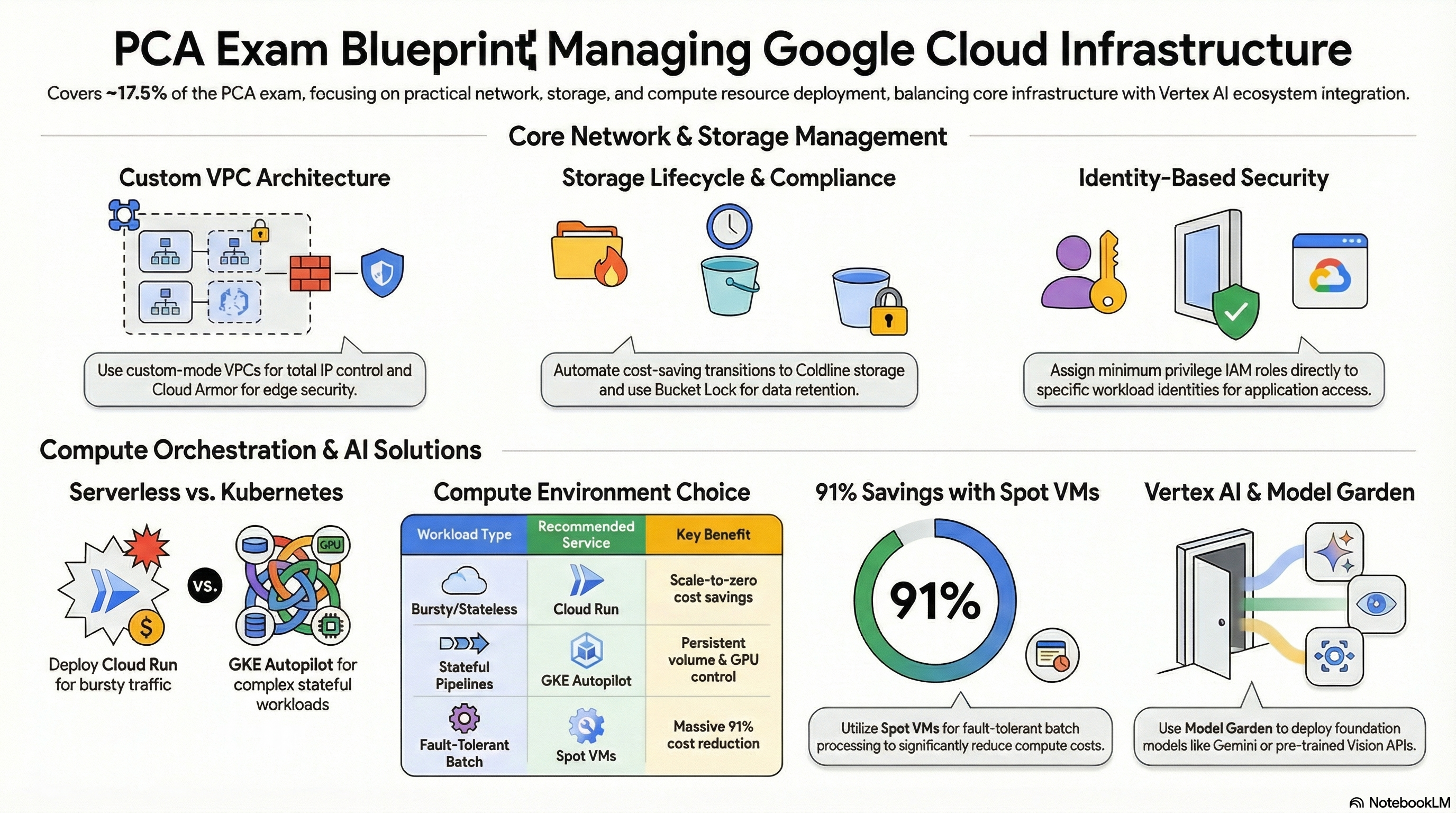
📚 Official exam guide: Professional Cloud Architect certification — always confirm section weightings against the current Google Cloud exam guide.
This section tests whether you can actually stand infrastructure up — network topology, storage configuration, compute provisioning — and the two Vertex AI subsections added to the current exam guide. The modules exercised are Services_GCP (network, databases, GKE) and the two deployment engines. Deploy the Lean baseline profile from the Lab Map, then enable GKE (GKE architecture profile) before 2.3. Subsections 2.4 and 2.5 are study-only.
2.1 Configuring network topologies
⏱ ~45 min · 💰 low — Cloud NAT and a static IP are minor costs · ⚙️ Requires: default Services_GCP deployment
Why the exam cares — Topology questions hinge on traffic direction and trust: how do private workloads reach the internet (NAT, egress-only), how do managed services get private connectivity (private services access), and how is east-west traffic constrained (firewall rules, tags). The exam then extends this to hybrid and multi-VPC designs, which you must study separately.
How RAD implements it — Here is how the platform implements it:
| Topology element | Implementation |
|---|---|
| Custom-mode VPC | one subnet per region in availability_regions (default ["us-central1"]), CIDRs from subnet_cidr_range (default ["10.0.0.0/24"]) |
| Outbound-only internet | a Cloud Router and Cloud NAT per region, covering all subnets and IP ranges |
| Private access to managed services | a global VPC-peering address plus a service networking connection (used by Cloud SQL and Memorystore private IP) |
| Health-check ingress | firewall fw-allow-lb-hc allowing 130.211.0.0/22 and 35.191.0.0/16 |
| Admin SSH without public IPs | firewall fw-allow-iap-ssh allowing 35.235.240.0/20 on tcp:22 (IAP TCP forwarding range) |
| Tag-based segmentation | tags nfsserver/redisserver open tcp 111/2049/6379 + udp 2049 only to tagged VMs; httpserver/webserver open 80/443/8080/8443 |
On the application side, App_CloudRun uses Direct VPC egress (a network interface on the subnet — no Serverless VPC Access connector), with vpc_egress_setting (default PRIVATE_RANGES_ONLY, or ALL_TRAFFIC to force everything through the VPC and NAT). App_GKE can add Kubernetes NetworkPolicies via enable_network_segmentation (default false) — covered in Section 3.
Try it
- In Console > VPC network > VPC networks, open the platform VPC and review subnets; then Console > Network services > Cloud NAT for the NAT gateway.
- List the firewall rules and map each to a trust decision:
gcloud compute firewall-rules list \
  --filter="network=<vpc-network-name>" \
  --format="table(name,direction,sourceRanges.list(),allowed[].map().firewall_rule().list(),targetTags.list())"
- In Console > Cloud Run, open your service's Networking tab and confirm the VPC egress setting.
- You know it worked when you can explain every rule's source range — Google LB health checks, the IAP range, or intra-VPC — and the Cloud SQL instance shows only a private IP.
Check yourself
Q1: VMs in a private subnet must download OS packages but must never accept inbound internet connections. Which component, and why not external IPs?
A: Cloud NAT — it provides source NAT for egress with no inbound path, and removes the per-VM external IP attack surface. External IPs would work for egress but expose every VM to inbound scanning and violate the requirement.
Q2: Why does Cloud SQL need a "private services access" peering range instead of just living in your subnet?
A: Cloud SQL instances run in a Google-managed producer VPC, not yours. Private services access allocates an IP range from your VPC and peers it to the producer network, so the instance gets an RFC-1918 address reachable from your subnets — which is why this module can disable the public IP entirely and keep the database off the public internet.
Q3: An auditor asks how admins SSH to the NFS VM with no public IP and no VPN. What is the answer in this topology?
A: IAP TCP forwarding — the fw-allow-iap-ssh rule admits tcp:22 only from Google's IAP range 35.235.240.0/20, and admins use gcloud compute ssh --tunnel-through-iap. Identity is verified by IAP before any packet reaches the VM.
Beyond the modules — Not implemented: Shared VPC, VPC peering between customer VPCs, Cloud VPN / Cloud Interconnect (hybrid), Network Connectivity Center, Cloud DNS, VPC flow logs, and hierarchical firewall policies. These are heavily examined — study "Choosing a Network Connectivity product" (Dedicated vs Partner Interconnect vs HA VPN decision tree, 99.99% SLA requires HA VPN or redundant Interconnect attachments), and Shared VPC host/service project IAM. In a scratch project, try gcloud compute networks subnets update <subnet> --enable-flow-logs.
⚠️ Exam trap — Private Google Access, private services access, and Private Service Connect are three different things. This module uses private services access (VPC peering to managed-service producers). Don't pick PSC endpoints when the scenario describes Cloud SQL private IP via an allocated peering range.
2.2 Configuring individual storage systems
⏱ ~60 min · 💰 low–moderate — bucket storage is cheap; Filestore adds ~1 TiB minimum if enabled · ⚙️ Requires: App_CloudRun with
create_cloud_storage = trueand astorage_bucketsentry
Why the exam cares — Storage configuration questions are about durability and cost mechanics: lifecycle transitions between storage classes, object versioning vs backups, retention for compliance, and database backup/PITR settings. You should be able to configure each and predict its cost behavior.
How RAD implements it
Object storage — the storage_buckets list (available on both App_CloudRun and App_GKE) provisions GCS buckets through the platform's object-storage layer. Each entry supports storage_class (default "STANDARD"), versioning_enabled (default false), lifecycle_rules (age, newer-version counts, storage-class transitions), CORS, public_access_prevention (default "enforced"), and uniform_bucket_level_access. The platform also sets a zero-retention soft-delete policy so destroys are not blocked, empties buckets at destroy time, and applies a lifecycle delete rule on the backup bucket driven by backup_retention_days (default 7).
Database protection — PostgreSQL gets 7 retained daily automated backups (04:00 UTC) plus PITR with 7-day log retention; disks are PD_SSD with autoresize. Application-level dumps are separate: a Cloud Scheduler job (backup_schedule, default "0 2 * * *") triggers a containerized export job that writes dumps to the backup bucket.
File storage — Filestore (create_filestore_nfs, filestore_tier default BASIC_HDD, share name share, no-root-squash) vs the self-managed NFS VM with daily pd-ssd snapshots and 7-day snapshot retention.
Try it
- Deploy with a bucket entry such as
{ name_suffix = "media", versioning_enabled = true, lifecycle_rules = [...] }including a transition toNEARLINEafter 30 days. - In Console > Cloud Storage > Buckets, open the bucket's Lifecycle tab and verify the rule; check Protection for versioning and public access prevention.
- Confirm from the CLI:
gcloud storage buckets describe gs://<bucket-name> \
  --format="yaml(lifecycle,versioning,publicAccessPrevention)"
- In Console > Cloud Scheduler, find the backup schedule; trigger it manually ("Force run") and watch the export job in Cloud Run > Jobs, then verify the dump file landed in the backup bucket.
- You know it worked when the lifecycle rule shows in the describe output and a fresh dump object exists after the forced run.
Check yourself
Q1: Compliance requires keeping uploaded documents for 90 days in fast storage, then cheap storage for 7 years, then deletion — with no application changes. How?
A: Object Lifecycle Management on the bucket: a SetStorageClass transition (e.g. to COLDLINE/ARCHIVE) at age 90 days and a Delete action at ~2,645 days. Lifecycle rules run server-side, so the application never changes. If regulators require immutability, add a retention policy with Bucket Lock — lifecycle alone does not prevent deletion.
Q2: The team enables object versioning "as a backup" but the bucket bill triples in a month. What happened and what fixes it?
A: Every overwrite/delete keeps a noncurrent version billed at full storage rates. Add lifecycle rules keyed on num_newer_versions (or noncurrent age) to prune old versions — exactly what lifecycle_rules in the storage_buckets entry expresses. Versioning protects against accidental deletion; it is not a managed backup with retention built in.
⚠️ Exam trap — The scheduled SQL-dump job and Cloud SQL automated backups are different layers: automated backups + PITR restore the instance; dumps in GCS are portable, survive instance deletion, and can seed migrations. A scenario about "restore after the instance was deleted" needs the export, not PITR.
2.3 Configuring compute systems
⏱ ~75 min · 💰 moderate — the GKE cluster fee and node/pod resources dominate · ⚙️ Requires: GKE architecture profile; try
gke_cluster_mode = "STANDARD"in a scratch project if budget allows
Why the exam cares — Provisioning questions test the configuration surface of each compute platform: Autopilot vs Standard GKE (who manages nodes, how billing works), machine/resource sizing, autoscaling profiles, and serverless runtime settings. The exam loves "which mode/setting reduces ops burden vs grants control."
How RAD implements it
GKE: create_google_kubernetes_engine (default false) provisions 1–10 clusters (gke_cluster_count, default 1). gke_cluster_mode (default "AUTOPILOT") is the headline trade-off: Autopilot is fully managed per-pod billing with node auto-provisioning; "STANDARD" removes the default pool and creates an explicit node pool with gke_node_machine_type (default e2-standard-4), autoscaling gke_node_min_count (default 1) to gke_node_max_count (default 5), gke_node_disk_type (default pd-balanced), and Shielded nodes (secure boot + integrity monitoring). Both modes share: Dataplane V2, VPC-native IP allocation, the standard Gateway API channel, vertical pod autoscaling, managed Prometheus, the REGULAR release channel (fixed), cost allocation, and gke_autoscaling_profile (default BALANCED, or OPTIMIZE_UTILIZATION for aggressive scale-down). Note these clusters DO use private_cluster_config { enable_private_nodes = true } (nodes get no external IPs — required because RAD-managed projects deny compute.vmExternalIpAccess) with a dedicated master_ipv4_cidr_block from gke_master_base_cidr; only enable_private_endpoint stays false, so the control plane is still reachable on its public endpoint for CI/CD.
Cloud Run: container_resources (defaults cpu_limit = "1000m", memory_limit = "512Mi"), startup CPU boost always on, execution_environment (default gen2), timeout_seconds (default 300), session affinity enabled, and startup/liveness probes via startup_probe_config / health_check_config.
Workload provisioning on GKE: the same container_resources shape, Cloud SQL Auth Proxy sidecar injected when enable_cloudsql_volume = true (default) and a database exists, and CronJobs via the cron_jobs list.
Try it
- In Console > Kubernetes Engine > Clusters, open the cluster — note "Mode: Autopilot", the release channel, and the enabled features list.
- Compare via CLI:
gcloud container clusters describe <cluster-name> \
  --location=us-central1 \
  --format="value(autopilot.enabled, releaseChannel.channel, autoscaling.autoscalingProfile)"
- Change
gke_autoscaling_profiletoOPTIMIZE_UTILIZATIONin the portal and re-apply; re-run the describe to see the profile change. - On Cloud Run, raise
container_resources.memory_limitto1Giand observe a new revision roll out in Console > Cloud Run > Revisions. - You know it worked when the describe output reflects each portal change without you touching a node, VM, or YAML file.
Check yourself
Q1: A team with no Kubernetes operations experience needs GKE for its API ecosystem but must not manage nodes, upgrades, or bin-packing. Which mode and why?
A: Autopilot (gke_cluster_mode = "AUTOPILOT", the default here). Google manages nodes, repairs, and upgrades; billing is per pod resource request, so right-sizing requests is the only capacity task left. Standard mode is for workloads needing specific machine types, GPUs/local SSDs, or scheduling control — the module's own variable description calls out latency-sensitive gRPC workloads as the Standard-mode use case.
Q2: On Autopilot, what is the cost lever equivalent to "choosing a smaller machine type" on Standard?
A: Pod resource requests (container_resources) — Autopilot bills what pods request, not nodes. Over-requested CPU/memory is pure waste; VPA (enabled at the cluster level, and exposed per-workload via enable_vertical_pod_autoscaling in App_GKE) right-sizes requests from observed usage. gke_autoscaling_profile = "OPTIMIZE_UTILIZATION" additionally tightens scale-down.
Q3: When would you accept Standard mode's extra operational burden in this platform?
A: When workloads need explicit node control: a specific machine series (gke_node_machine_type), disk types, or scheduling behavior Autopilot constrains. The module then provisions a single explicit node pool with autoscaling 1–5 nodes and Shielded VM protections — operational burden traded for hardware control.
⚠️ Exam trap — Autopilot ≠ "no capacity planning." You still set requests/limits, and HPA/quota math still applies — App_GKE's quota_memory_requests-style values must use binary suffixes ("4Gi"), because a bare "4" is parsed by Kubernetes as 4 bytes and blocks all scheduling.
2.4 Leveraging Vertex AI for end-to-end ML workflows
⏱ ~study only · 💰 no platform cost · ⚙️ Requires: nothing deployable
Why the exam cares — The current PCA guide tests Vertex AI workflow architecture: pipelines for orchestration, feature consistency between training and serving, and choosing infrastructure (GPUs/TPUs, on-demand vs reserved) for training and inference.
How RAD implements it — Not implemented by the foundation modules. The closest adjacency is architectural: a trained model served as a container would deploy on these modules like any other workload (Cloud Run for spiky low-ops inference, GKE for GPU-backed or high-throughput serving).
Beyond the modules — Study Vertex AI Pipelines (Kubeflow Pipelines / TFX as pipeline definitions), Vertex AI Feature Store (online vs batch serving, preventing training-serving skew), BigQuery as the training data source and BigQuery ML for in-warehouse models, and accelerator selection (GPU vs TPU, on-demand vs reservations). In a scratch project, run the Vertex AI "Hello custom training" quickstart and gcloud ai custom-jobs list to see the job lifecycle.
Check yourself
Q1: A model performs well offline but degrades in production; investigation shows features are computed differently at serving time. Which Vertex AI component addresses this?
A: Vertex AI Feature Store — it centralizes feature definitions and serves the same feature values for training (batch) and prediction (online), eliminating training-serving skew caused by duplicated feature logic.
2.5 Configuring prebuilt solutions or APIs with Vertex AI
⏱ ~study only + 20 min secret-handling lab · 💰 no platform cost · ⚙️ Requires: default App_CloudRun deployment
Why the exam cares — You must select the right pre-trained API per use case (Vision, Video Intelligence, Speech-to-Text/Text-to-Speech, Dialogflow, Vertex AI Search, Gemini models via Model Garden) versus training a custom model — and integrate them securely.
How RAD implements it — The AI APIs themselves are not provisioned, but the secure-integration pattern is fully demonstrated: secret_environment_variables injects credentials into Cloud Run via Secret Manager references (never plaintext env vars), and App_GKE materializes secrets through the GKE Secret Manager CSI add-on (SecretProviderClass + secret sync). An application calling Gemini or Vision would receive its API key exactly this way.
Try it
- Add a dummy secret to
secret_environment_variablesand redeploy. - In Console > Cloud Run > (service) > Revisions > Containers, confirm the variable shows as a secret reference, not a value; then:
gcloud run services describe <service-name> --region=us-central1 \
  --format="yaml(spec.template.containers[0].env)"
- You know it worked when the env entry shows
valueSource.secretKeyRefrather than a literal value.
Check yourself
Q1: A product needs OCR on scanned invoices and a conversational support agent. Which pre-trained APIs, and when would you switch to custom training?
A: Cloud Vision API (OCR/document text detection) and Dialogflow CX (conversational agents). Switch to custom training (Vertex AI) only when the pre-trained model's quality on your domain data is insufficient — e.g. specialized invoice layouts needing Document AI custom processors or fine-tuned models. Pre-trained first is the exam's default posture.
Beyond the modules — Study the official API categories (Vision, Imagen, Video Intelligence, Speech, Dialogflow, Vertex AI Search), Model Garden deployment options, and grounding/RAG patterns with Vertex AI Search. Try gcloud ml vision detect-text <image-path> in a scratch project for a two-minute taste of a pre-trained API.
Need RAD to do something it does not do yet? Request it on the roadmap, or vote on what is already there.