PCA Certification Preparation Guide: Section 5 — Managing implementation (~12.5% of the exam)
📚 Official exam guide: Professional Cloud Architect certification — always confirm section weightings against the current Google Cloud exam guide.
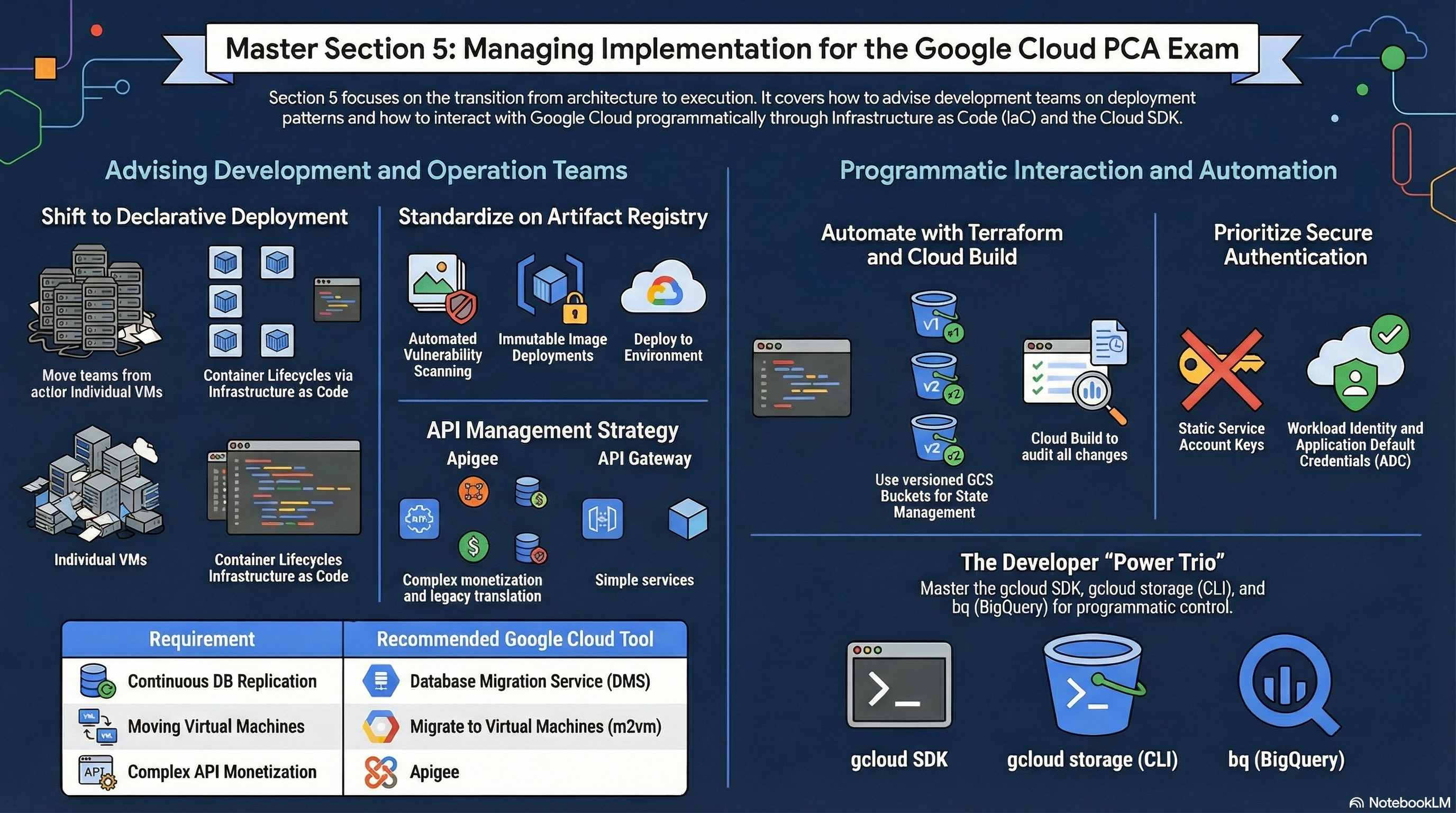
Managing implementation means making other teams successful: providing paved paths, guardrails, and programmatic access patterns. The RAD platform is itself the exhibit — a four-tier Terraform/OpenTofu architecture that development teams consume through a portal, with validations that fail bad configurations at plan time and registry hygiene baked in. Deploy any profile from the Lab Map; the Security and delivery profile makes the most artifacts visible. Modules exercised: all four, with emphasis on the platform's shared scripts and plan-time validations.
5.1 Advising development and operation teams
⏱ ~60 min · 💰 no additional cost · ⚙️ Requires: any deployed profile
Why the exam cares — Architects are advisors: they codify standards so teams cannot easily do the wrong thing, choose API-management and testing approaches, and set artifact and dependency policies. Exam scenarios ask what guidance or guardrail prevents a described failure.
How RAD implements it — Three advisory patterns are observable in the code:
Paved path with guardrails. The foundation modules expose a curated variable surface and reject misconfigurations at plan time — App_GKE carries 32 preconditions (min ≤ max instances, IAP completeness, PVC requirements, CDN/Armor prerequisites, name-length limits ≤ 55 chars, gateway_backend_stage must exist). Teams get expressive power; the platform team gets enforced invariants. This is "advising through tooling," and it is how the exam expects standards to scale beyond documentation.
Artifact policy. Artifact Registry is auto-discovered or created (shared-repo-{prefix}), with cleanup policies — max_images_to_retain (default 7), delete_untagged_images (default true), image_retention_days (default 30) — and optional CMEK (enable_artifact_registry_cmek) and vulnerability scanning. Third-party dependencies are not pulled from the internet at runtime: required images (e.g. the Cloud SQL Auth Proxy) are copied into AR using Crane with digest comparison — an existing tag is overwritten when its digest no longer matches the source, so a stale or tampered mirror is never silently used.
Operational defaults. Database client tooling ships as a purpose-built image, initialization jobs are first-class (initialization_jobs with depends_on_jobs ordering), and revision/image pruning keeps environments tidy without team effort.
Try it
- Review five of App_GKE's plan-time preconditions; for each, write the production incident it prevents.
- Deliberately violate one in the portal (e.g.
min_instance_count = 5,max_instance_count = 2) and observe the plan-time error — the message names the variables and the fix. - Inspect the artifact policy in effect:
gcloud artifacts repositories describe <repo-name> \
  --location=<region> \
  --format="yaml(cleanupPolicies,vulnerabilityScanningConfig)"
- You know it worked when the bad configuration never reached an apply, and the repository shows cleanup policies a developer never had to write.
Check yourself
Q1: Development teams keep deploying containers that pull a third-party sidecar from Docker Hub at runtime, causing outages during registry rate-limiting. What do you advise, and what subtlety makes a naive mirror dangerous?
A: Mirror required third-party images into your own Artifact Registry and deploy only from there — as this platform does for the Cloud SQL Auth Proxy. The subtlety: a tag can silently drift upstream, so the mirror must compare digests (as this platform does with Crane) rather than assume "tag exists = up to date"; otherwise you pin to a stale or wrong image forever.
Q2: A platform team's written standards are ignored. What does this repository demonstrate as the scalable alternative?
A: Encode standards as plan-time validations and curated module variables — the standard becomes impossible to violate rather than merely documented. Misconfigurations fail with actionable error messages before any resource is created, which is cheaper than failing in production and faster than review-based enforcement.
Beyond the modules — Study what advising covers beyond IaC guardrails: API management selection (Apigee for monetization/analytics/legacy mediation vs API Gateway for lightweight serverless fronting), testing frameworks (unit/integration/load and where each runs in CI), Database Migration Service for advising on data moves, and Service Catalog for curated solution distribution. Try creating an API Gateway in a scratch project to feel the difference from Apigee's scope.
⚠️ Exam trap — "Store images in Container Registry" is a stale answer: Container Registry is deprecated in favor of Artifact Registry, which adds per-repository IAM, cleanup policies, CMEK, and scanning — the features this platform depends on.
5.2 Interacting with Google Cloud programmatically
⏱ ~60 min · 💰 no additional cost · ⚙️ Requires: any deployed profile + Cloud Shell or a workstation with
gcloud
Why the exam cares — The exam tests fluency across the programmatic surface: declarative IaC vs imperative CLI, when each is appropriate, and how authentication works without key files. Expect "which command/approach" questions.
How RAD implements it — The portal compiles your variable choices and runs the OpenTofu lifecycle (tofu init → plan → apply) for you — every deployment you have done in these guides was a programmatic interaction. The modules also demonstrate the boundary of declarative IaC: where the provider has gaps, they shell out to gcloud deliberately — e.g. GKE add-ons are enabled via gcloud container clusters update --enable-secret-manager, Cloud Run jobs are executed with gcloud run jobs execute --wait, and discovery runs gcloud compute networks subnets list --filter=... inside external data scripts. Service-account impersonation (--impersonate-service-account, and the impersonation_service_account variable) is used throughout instead of key files.
Try it
- Trigger a deployment from the portal — behind the scenes it runs the read-only half of the lifecycle (init → validate → plan) before any apply, rejecting invalid configurations at plan time.
- Cross-check the declared state against live state imperatively:
gcloud run services list --region=us-central1
gcloud sql instances list
gcloud container clusters list
- Note where the platform deliberately steps outside declarative IaC: discovery is fed by
gcloud ... --format=jsoncalls (e.g. subnet discovery), and add-ons are toggled with imperativegcloudcommands where the provider has gaps. - You know it worked when the plan shows no unexpected diff (declarative truth) and the
gcloudlistings match it (imperative observation).
Check yourself
Q1: An operator "quickly fixed" a service's memory limit with gcloud run services update. What happens on the next platform deployment, and what does the exam call this?
A: Configuration drift — the next tofu apply reverts the manual change to the declared value (or surfaces it as a diff at plan time). The exam expects drift to be resolved by changing the declaration (the portal variable), never by repeated imperative patching; IaC is the source of truth.
Q2: A CI system needs to call GCP APIs as a privileged service account without storing a JSON key. Which patterns does this platform use?
A: Service-account impersonation — callers with roles/iam.serviceAccountUser/token-creator rights act as the target SA via --impersonate-service-account, receiving short-lived tokens (the modules pass impersonation_service_account into provider auth and gcloud calls). On GKE, Workload Identity binds Kubernetes service accounts to GCP SAs the same keyless way. Long-lived JSON keys are the anti-answer.
Beyond the modules — The exam's programmatic surface is wider: Cloud Shell and Cloud Code, gcloud storage (the modern gsutil replacement), bq for BigQuery, client libraries (Python/Java/Node) with Application Default Credentials resolution order, local emulators (Pub/Sub, Firestore, Spanner, Bigtable), and API quota/retry behavior (exponential backoff on 429/5xx). Practice in Cloud Shell: gcloud config list, gcloud auth application-default login, and one client-library quickstart end to end.
⚠️ Exam trap — gcloud auth login (your user) and Application Default Credentials (gcloud auth application-default login, what client libraries see) are separate credential stores. A script that works in your terminal but fails with "could not find default credentials" inside code is the classic symptom — and a recurring exam distractor.
Need RAD to do something it does not do yet? Request it on the roadmap, or vote on what is already there.