PCD Certification Preparation Guide: Section 4 — Integrating applications with Google Cloud services (~21% of the exam)
📚 Official exam guide: Professional Cloud Developer certification — always confirm section weightings against the current Google Cloud exam guide.
This section uses the integration surfaces the foundation modules wire up for you: database connectivity and runtime configuration (App_CloudRun's Cloud Run service and the GKE proxy sidecar), identity (the GKE service-account wiring, Workload Identity Federation in Services_GCP, and the platform's IAM layer), and monitoring (the platform's monitoring and dashboard layers). Deploy the Serverless baseline profile; add the Kubernetes lab profile for the Workload Identity exercises (see the Lab Map).
4.1 Integrating applications with data and storage services
⏱ ~60 min · 💰 no additional cost over the deployed profile · ⚙️ Requires: Serverless baseline (Postgres + Cloud SQL volume are on by default)
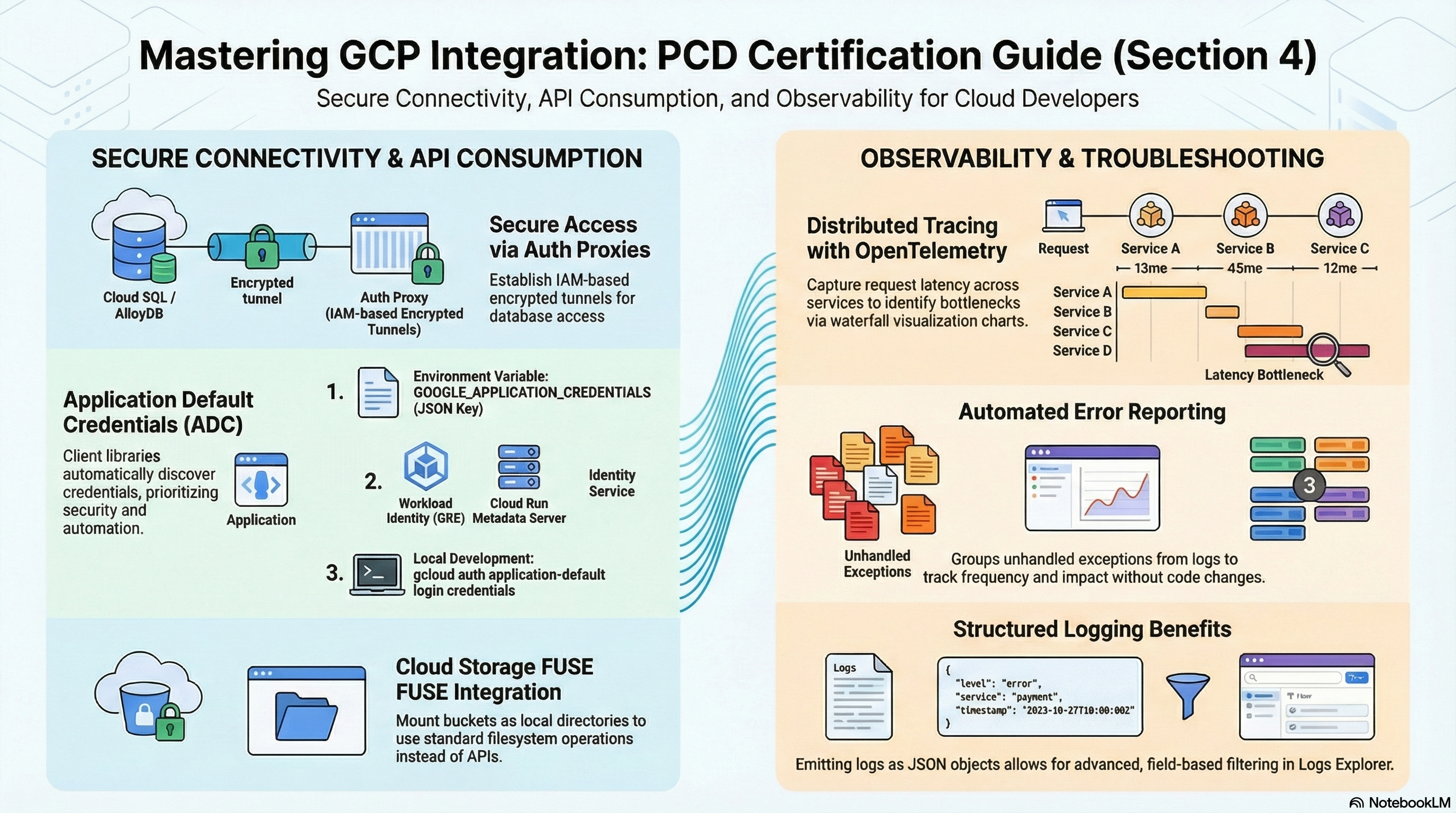
Why the exam cares — Integration questions are concrete: what connection string does the code use, where does the password come from, which IAM role does the service account need, and what happens at scale (connection limits, proxy behavior). The Cloud SQL Auth Proxy pattern — IAM-authenticated, TLS-encrypted, no IP allowlists — is the canonical answer, and you should know both its Cloud Run form (managed socket volume) and its GKE form (sidecar container).
How RAD implements it —
Database connectivity. On Cloud Run, enable_cloudsql_volume (default true) attaches the managed Cloud SQL volume mounted at cloudsql_volume_mount_path (default /cloudsql); the app connects via the Unix socket /cloudsql/<project>:<region>:<instance>. On GKE, the same flag injects a cloud-sql-proxy sidecar (image mirrored into Artifact Registry, started with --private-ip, graceful preStop via /quitquitquit) and the app connects to localhost. Disable the flag to connect over private IP directly — the module then sets DB_HOST to the instance's private address.
Runtime configuration injection. App_CloudRun assembles env vars the container sees without any code knowing about Terraform: APP_NAME, APP_VERSION, DB_NAME, DB_USER, DB_PORT, DB_HOST (socket path or private IP), CLOUDRUN_SERVICE_URL, plus NFS_SERVER_IP when NFS is enabled and REDIS_HOST/REDIS_PORT/REDIS_URL when enable_redis is on. The password never appears in plaintext: DB_PASSWORD arrives as a Secret Manager reference. All the env var names are overridable (db_password_env_var_name, db_host_env_var_name, etc.) so existing application images need no changes.
Schema and data lifecycle. initialization_jobs (default: a db-init job running a database-init script on postgres:15-alpine with execute_on_apply = true) handles migrations/seeding with depends_on_jobs ordering. enable_backup_import restores a dump from GCS or Google Drive (backup_source, backup_file, backup_format); enable_postgres_extensions/enable_mysql_plugins install database extensions; enable_custom_sql_scripts runs arbitrary SQL from a bucket. Services_GCP additionally offers enable_cloudsql_iam_auth (default false), which sets the IAM-auth database flag (cloudsql.iam_authentication on PostgreSQL, cloudsql_iam_authentication on MySQL) and grants roles/cloudsql.instanceUser — the passwordless IAM database authentication the exam mentions.
File and object integration. gcs_volumes mounts buckets via GCS Fuse (filesystem semantics; gen2 only), enable_nfs (default true) mounts the shared NFS export at /mnt/nfs for multi-instance shared writes, and storage_buckets provisions buckets with per-bucket roles/storage.objectAdmin for the app SA — the client-library path.
Try it
-
See exactly what your code sees:
gcloud run services describe <service-name> --region=us-central1 \
  --format="yaml(spec.template.spec.containers[0].env, spec.template.spec.containers[0].volumeMounts)"
Identify
DB_HOST(a/cloudsql/...path), theDB_PASSWORDsecret reference, and the volume mounts. -
Verify the IAM that makes the proxy work — the service account needs
roles/cloudsql.client:gcloud projects get-iam-policy <project-id> \
--flatten="bindings[].members" \
--filter="bindings.members~cloudrun-sa" \
--format="table(bindings.role)" -
Watch the default initialization job run and read its logs:
gcloud run jobs executions list --job=<db-init-job-name> --region=us-central1
gcloud logging read 'resource.type="cloud_run_job"' --limit=20 -
On the GKE profile, confirm the sidecar:
kubectl -n <namespace> get pod <pod> -o jsonpath='{.spec.containers[*].name}'should list your app andcloud-sql-proxy. -
You know it worked when the app container resolves
DB_HOSTto the socket path, the db-init execution showsSucceeded, and the GKE pod runs two containers.
Check yourself
Q1: Cloud Run scaled to 50 instances and Postgres started rejecting connections. The instance has the module default flags. What happened and what are the fixes?
A: Each instance holds its own pool; 50 instances × even a small pool exceeds the default max_connections=200 flag set on the RAD Postgres instance. Fixes in exam order: cap max_instance_count, shrink the per-instance pool, raise max_connections (costs memory), or introduce server-side pooling. The Auth Proxy authenticates and encrypts — it does not pool for you.
Q2: Why does the platform run schema migrations as a Cloud Run job instead of at service startup?
A: A service can scale to N concurrent instances — running migrations in the entrypoint races N copies against each other and slows cold starts. A job (initialization_jobs with execute_on_apply) runs exactly task_count tasks once, can be ordered with depends_on_jobs, retried independently (max_retries), and keeps the serving path fast. This separation of "run-once" from "serve" is a standard PCD design answer.
Q3: An app needs shared writable storage across all Cloud Run instances. Compare the two RAD options.
A: enable_nfs mounts a real POSIX filesystem (Filestore or the platform NFS VM) — correct for apps needing file locking/rename semantics, but it's a single capacity/throughput point. gcs_volumes (GCS Fuse) backs the mount with an object store — effectively unlimited and cheaper, but writes are object uploads (no partial writes/locking). Both require execution_environment = "gen2".
Beyond the modules — The modules create no application messaging or document-store code paths: practice the Pub/Sub client libraries (publish with attributes, pull vs push subscriptions, ack deadlines, dead-letter topics), Firestore SDK usage (documents, queries needing composite indexes, real-time listeners, transactions), and Cloud Storage client-library patterns including signed URLs for direct browser upload/download. The only Pub/Sub in the platform is internal (secret-rotation and SCC topics) — useful to inspect (gcloud pubsub topics list) but not an application pattern.
⚠️ Exam trap — The Cloud SQL Auth Proxy replaces network allowlisting and TLS cert management, not database authentication: code still presents a DB user and password (unless IAM database authentication is enabled). "We added the proxy, why do we still need the password?" distinguishes roles/cloudsql.client (connect) from roles/cloudsql.instanceUser + IAM auth (login).
4.2 Consuming Google Cloud APIs
⏱ ~60 min · 💰 no additional cost · ⚙️ Requires: Serverless baseline; Kubernetes lab profile for Workload Identity;
enable_workload_identity_federation = truein Services_GCP for the WIF steps
Why the exam cares — Every PCD scenario about calling Google APIs reduces to identity: code should use Application Default Credentials backed by the runtime's service account — never JSON key files. You must know how ADC resolves on Cloud Run (metadata server), on GKE (Workload Identity), on developer machines (gcloud auth application-default login), and outside Google Cloud entirely (Workload Identity Federation). The second axis is authorization: least-privilege roles on the resource (a specific secret, a specific bucket), not the project.
How RAD implements it —
Dedicated service accounts. Services_GCP creates cloudrun-sa-{prefix}, cloudbuild-sa-{prefix}, clouddeploy-sa-{prefix}, gke-sa-{prefix}, and nfs-sa-{prefix} — nothing runs as the default compute SA. The platform's IAM layer applies resource-level least privilege: roles/secretmanager.secretAccessor granted per secret, roles/storage.objectAdmin per bucket, and roles/iam.serviceAccountUser for the impersonation chains the deployer needs. When your app needs more (say Firestore), additional_cloudrun_sa_roles extends the Cloud Run SA's role list declaratively.
Workload Identity on GKE. App_GKE creates a Kubernetes ServiceAccount per namespace annotated iam.gke.io/gcp-service-account: <gsa-email> and binds roles/iam.workloadIdentityUser to serviceAccount:{project}.svc.id.goog[<namespace>/<ksa>]. Pods using that KSA get GSA-backed tokens from the metadata server — ADC works with zero key files, identical in code to Cloud Run.
Workload Identity Federation. Services_GCP (enable_workload_identity_federation, default false) creates pool wif-pool with a provider chosen by wif_provider_type (default "github" → provider github-actions; also gitlab → gitlab-ci, or generic for any OIDC issuer). All pool identities (principalSet://.../*) may impersonate the Cloud Build, Cloud Deploy, and Cloud Run service accounts via roles/iam.workloadIdentityUser — keyless CI from external systems, the exam's recommended replacement for exported keys.
Service-to-service authorization. Cloud Run access is IAM on roles/run.invoker: public services get an allUsers binding; IAP services instead grant the IAP service agent invoker rights and your principals roles/iap.httpsResourceAccessor. Calling a non-public service from another service means minting an ID token for the caller's SA — the modules establish the IAM shape; the token-fetching code is yours to learn.
Try it
-
Prove the runtime identity from inside the deployed service (no SDK required — this is what ADC does under the hood):
# from your workstation, against the metadata-backed identity:
gcloud run services describe <service-name> --region=us-central1 \
--format="value(spec.template.spec.serviceAccountName)" -
On GKE, inspect the Workload Identity wiring:
kubectl -n <namespace> get sa -o yaml | grep -B2 "iam.gke.io/gcp-service-account"
gcloud iam service-accounts get-iam-policy <gsa-email> \
  --format="table(bindings.role, bindings.members)"
You should see the
roles/iam.workloadIdentityUserbinding forserviceAccount:<project>.svc.id.goog[<ns>/<ksa>]. -
Inspect the WIF pool and provider, then test invoker enforcement:
gcloud iam workload-identity-pools providers list \
  --workload-identity-pool=wif-pool --location=global
gcloud run services get-iam-policy <service-name> --region=us-central1
curl -s -o /dev/null -w "%{http_code}\n" \
-H "Authorization: Bearer $(gcloud auth print-identity-token)" https://<service-url>/ -
You know it worked when the KSA annotation matches the GSA whose policy contains the workloadIdentityUser binding, and the authenticated curl returns 200 where an anonymous one is rejected (on a non-public service).
Check yourself
Q1: Service A on Cloud Run must call private Service B. Which role, on what, for whom — and which token type does A send?
A: Grant A's service account roles/run.invoker on Service B (resource-level, not project-level). A fetches an ID token with audience = B's URL (from the metadata server, e.g. via the client library or fetch_id_token) and sends it as a Bearer header. An OAuth access token is the wrong answer — Cloud Run's IAM check validates identity tokens.
Q2: GitHub Actions needs to push images and create Cloud Deploy releases without a downloaded key. Which RAD configuration is the textbook setup?
A: enable_workload_identity_federation = true with wif_provider_type = "github". The workflow exchanges its GitHub OIDC token through pool wif-pool / provider github-actions and impersonates cloudbuild-sa-*/clouddeploy-sa-* (the module binds roles/iam.workloadIdentityUser for the pool). No long-lived credential exists anywhere; note the module's wildcard principalSet is deliberately broad — production answers scope to attribute.repository.
Q3: A pod's Google API calls run as the node's identity instead of the app's GSA. What's missing?
A: One of the three Workload Identity legs: the cluster's workload pool, the KSA annotation iam.gke.io/gcp-service-account, or the roles/iam.workloadIdentityUser binding on the GSA for {project}.svc.id.goog[ns/ksa] — or the pod spec isn't using the annotated KSA (serviceAccountName). The RAD module wires all three; on the exam, the missing IAM binding is the most common culprit.
Beyond the modules — Practice the client-library mechanics the modules can't show: automatic retries with exponential backoff (built into the libraries for 429/503), pagination iterators, field masks, and choosing gRPC vs REST transports. Also study API enablement failures (SERVICE_DISABLED 403s — the platform pre-enables its APIs, a fresh project does not) and quota errors (RESOURCE_EXHAUSTED 429 → backoff or quota increase, not retry-storms).
⚠️ Exam trap — Access tokens vs ID tokens: gcloud auth print-access-token authorizes Google API calls; gcloud auth print-identity-token authenticates you to a service (Cloud Run invoker, IAP). Swapping them produces 401s that look like missing IAM but aren't.
4.3 Troubleshooting and observability
⏱ ~60 min · 💰 low — alerting/dashboards are free at this scale; log storage grows if you enable DATA_READ audit logs · ⚙️ Requires: any deployed profile; set
support_usersto receive notifications
Why the exam cares — PCD troubleshooting questions hand you a symptom (5xx spike, latency regression, crash loop) and expect you to pick the right tool in the right order: Logs Explorer with resource-type filters, metrics and alerting, dashboards, then code-level tools (Trace, Profiler, Error Reporting). Structured logging and instrumentation are developer responsibilities the exam tests directly.
How RAD implements it — Containers log to stdout/stderr and Cloud Run/GKE forward to Cloud Logging automatically — nothing to configure. The modules add the alerting layer via the platform's monitoring layer:
support_userscreates email notification channels; monitoring resources are only created whensupport_users,alert_policies, or an enabled uptime config exists.- Built-in alerts: CPU utilization > 0.9 and memory utilization > 0.9 (P99-aligned over 60s), filtered to your specific service (
resource.labels.service_nameon Cloud Run; the GKE module passes Kubernetes-scoped filters). alert_policiesadds custom policies declaratively: each entry is{ name, metric_type, comparison, threshold_value, duration_seconds, aggregation_period }and the module scopes the filter to the deployed service — e.g.run.googleapis.com/request_latencieswithCOMPARISON_GTandthreshold_value = 1000.- The platform provisions a per-deployment Cloud Monitoring dashboard (separate Cloud Run and GKE layouts).
uptime_check_config(default{ enabled = false, path = "/" }— setenabled = trueto provision one;check_intervaldefault"60s",timeoutdefault"10s") provisions a real Cloud Monitoring uptime check named<service>-uptime-check(HTTP GET from multiple global regions) plus a<service>-uptime-check-alertpolicy onmonitoring.googleapis.com/uptime_check/check_passed(fires after 300s of failure, notifies thesupport_userschannels). Creation is gated at plan time on public reachability — Cloud Run probes the firstapplication_domainsentry, else the nip.io LB host, else the run.app URL wheningress_settings = "all"; GKE probes the custom domain via the Gateway (HTTPS:443) or the LoadBalancer Service ingress IP over HTTP onservice_port. Internal-only deployments get no check, anduptime_check_namesoutputs the created check's name.
Try it
-
Generate some traffic and read the logs the developer way:
gcloud logging read \
  'resource.type="cloud_run_revision" AND resource.labels.service_name="<service-name>" AND severity>=WARNING' \
  --limit=20 --format="value(timestamp, severity, textPayload)"
In Console > Logging > Logs Explorer, repeat with the query builder and note that JSON log lines become filterable
jsonPayload.*fields — emit structured logs from your app to get this for free. -
Add a latency alert via the portal:
alert_policies = [{ name = "p-latency", metric_type = "run.googleapis.com/request_latencies", comparison = "COMPARISON_GT", threshold_value = 1000, duration_seconds = 300 }], apply, then verify:gcloud alpha monitoring policies list --format="table(displayName, enabled)"
gcloud monitoring dashboards list --format="value(displayName)" -
Inspect the module-created uptime check (publicly reachable deployments only) and confirm the probed host matches your domain or LB:
gcloud monitoring uptime list-configs --format="table(displayName, httpCheck.path, period)"
gcloud monitoring uptime describe <service-name>-uptime-check -
Force an error (e.g., temporarily point
health_check_config.pathat a nonexistent path) and watch the liveness restarts in Cloud Run > service > Logs and the CPU/memory charts on the module-created dashboard. -
You know it worked when the alert policy appears with your email channel attached, and the module-created uptime check shows green from multiple regions in Monitoring > Uptime checks.
Check yourself
Q1: Users report intermittent 503s but your application logs show nothing at those timestamps. Where do you look next on Cloud Run?
A: The request logs and platform metrics, not app logs: filter resource.type="cloud_run_revision" AND httpRequest.status=503 — 503s with no app log usually mean the request never reached your code (instance startup failures, exceeded max_instance_count under load, or request timeout/probe failures). Correlate with container/instance_count and startup-probe failures; raising max_instance_count or fixing the startup probe is the usual fix.
Q2: An alert should fire when error rate exceeds 5% for 5 minutes, notifying the on-call list. Map this to RAD variables.
A: Put the on-call addresses in support_users (creates the notification channels) and add an alert_policies entry on run.googleapis.com/request_count filtered to 5xx — though for a ratio, the honest answer is that the module's single-metric threshold policies can't express it; you'd build a ratio-based condition (MQL/PromQL) directly in Cloud Monitoring. Knowing when declarative simple thresholds stop being enough is itself exam-relevant.
Q3: Checkout takes 4s; the database team swears their queries are fast. Which tool proves where the time goes across your two Cloud Run services?
A: Cloud Trace with distributed trace context propagation — instrument both services with OpenTelemetry (Cloud Trace exporter), propagate the traceparent header on the service-to-service call, and read the waterfall to see which span (handler, downstream call, DB query) owns the latency. Logs and metrics aggregate; only tracing shows the per-request breakdown.
Beyond the modules — Nothing in the modules instruments application code: study OpenTelemetry setup and trace propagation (Cloud Trace), continuous profiling (google-cloud-profiler, flame graphs, <1% overhead — safe in prod), Error Reporting's automatic stack-trace grouping (works from stdout logs for major runtimes), and log-based metrics for alerting on log patterns. Also try Cloud Run's built-in SLO monitoring (Cloud Run > service > SLOs) — none of this is provisioned by the platform.
⚠️ Exam trap — Don't assume an input variable means a provisioned resource — always verify in the source (earlier platform releases accepted uptime_check_config without creating any check; today it provisions one, but only for publicly reachable endpoints). On the exam the analogous trap is assuming Cloud Run "has" tracing/profiling because the agent could run — Trace gets automatic spans for inbound requests, but cross-service propagation and custom spans require you to instrument the code.
Need RAD to do something it does not do yet? Request it on the roadmap, or vote on what is already there.