PCD Certification Preparation Guide: Section 3 — Deploying applications (~20% of the exam)
📚 Official exam guide: Professional Cloud Developer certification — always confirm section weightings against the current Google Cloud exam guide.
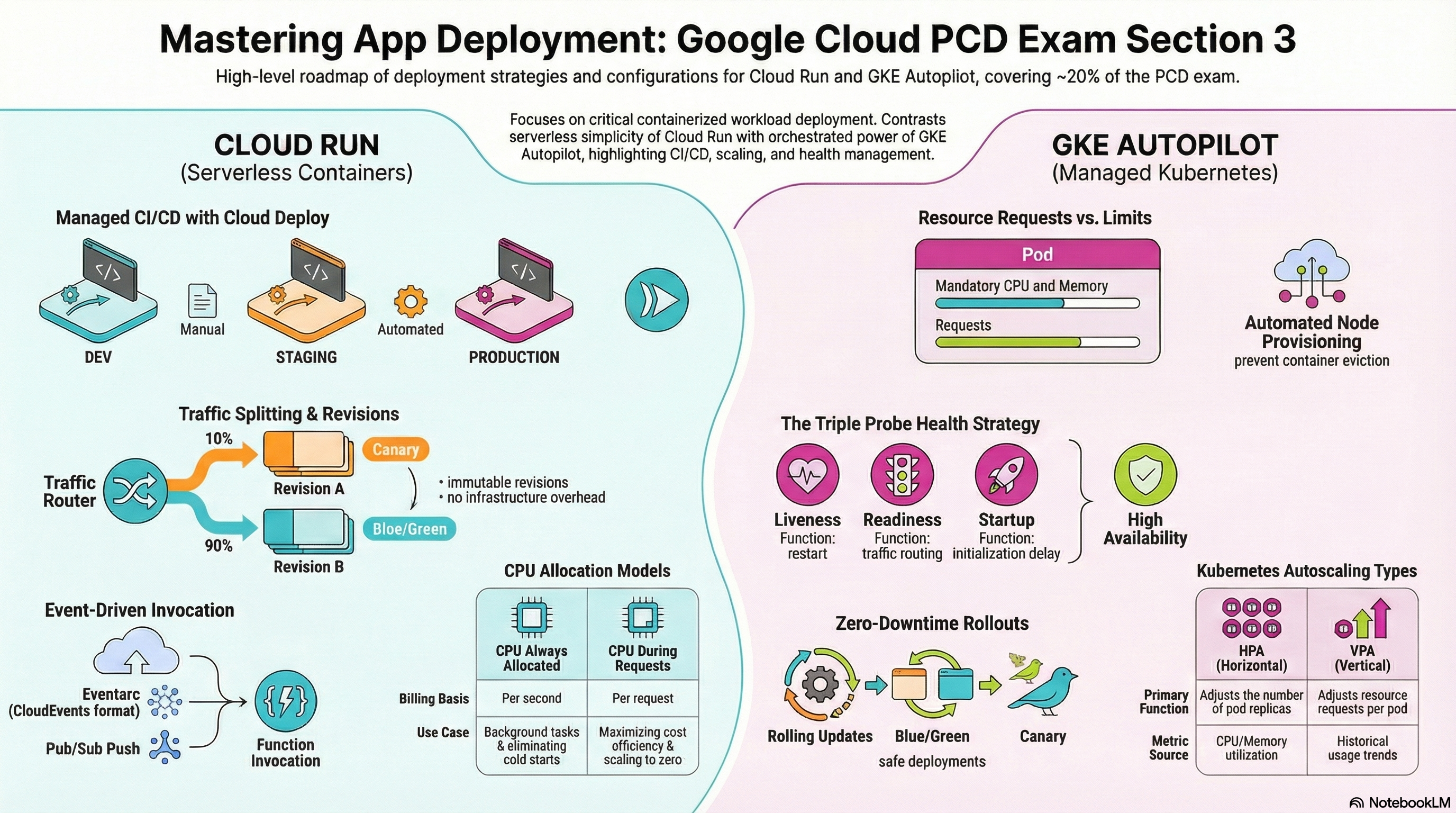
This section is where the RAD foundation modules shine: App_CloudRun deploys a fully configured Cloud Run v2 service (scaling, probes, volumes, traffic management, jobs, optional Cloud Deploy pipeline) and App_GKE deploys the equivalent Kubernetes workload on GKE Autopilot (Deployment/StatefulSet, HPA, probes, quotas, Gateway API). Deploy the Serverless baseline and Delivery pipeline profiles for 3.1, and the Kubernetes lab profile for 3.2 (see the Lab Map).
3.1 Deploying applications to Cloud Run
⏱ ~90 min · 💰 low — per-stage services scale to zero; Cloud Deploy itself is free (you pay for the Cloud Build it runs) · ⚙️ Requires: Serverless baseline; Delivery pipeline profile for the Cloud Deploy steps
Why the exam cares — Cloud Run questions probe the service resource model: every deploy creates an immutable revision; traffic is routed across revisions by percentage and tag; scaling, CPU allocation, execution environment, and probes are revision properties. Progressive delivery questions then layer Cloud Deploy on top: releases, targets, promotion, and approval gates. You should be able to predict what a given configuration does to cold starts, cost, and rollback time.
How RAD implements it — App_CloudRun builds the Cloud Run v2 service from portal variables:
| Concern | Variables (defaults) |
|---|---|
| Lifecycle | deploy_application (true) — false provisions infra only |
| Image | container_image_source ("custom" = Cloud Build; "prebuilt" = use container_image as-is), enable_image_mirroring (true) |
| Scaling | min_instance_count (0), max_instance_count (1); plan-time check min ≤ max |
| Runtime | container_port (8080), container_resources (1000m/512Mi), timeout_seconds (300), execution_environment ("gen2"), cpu_always_allocated (false), startup_cpu_boost hardcoded on |
| Probes | startup_probe_config (enabled, HTTP /healthz, delay 10s, period 10s, failure threshold 10) and health_check_config → liveness probe (enabled, HTTP /healthz, delay 15s, period 30s, failure threshold 3); both support TCP |
| Volumes | Cloud SQL socket (enable_cloudsql_volume true, mount cloudsql_volume_mount_path /cloudsql), NFS (enable_nfs true, nfs_mount_path /mnt/nfs), GCS Fuse (gcs_volumes) — NFS and Fuse require gen2 (validated) |
| Traffic | traffic_split (default all-to-latest), revision tag for preview URLs, max_revisions_to_retain (7) |
| Networking | ingress_settings ("all"), Direct VPC egress with vpc_egress_setting ("PRIVATE_RANGES_ONLY") — no Serverless VPC Access connector is used |
| Jobs | initialization_jobs (Cloud Run v2 Jobs with depends_on_jobs ordering, execute_on_apply, NFS/GCS mounts); cron_jobs |
Progressive delivery: enable_cloud_deploy (default false) creates a Cloud Deploy delivery pipeline — setting it without enable_cicd_trigger = true is rejected at plan time by a precondition in App_CloudRun (the pipeline would never receive a release without a CI trigger). cloud_deploy_stages defaults to dev → staging → prod with require_approval = true on prod and auto_promote = false everywhere (per-stage auto_promote creates a Cloud Deploy automation). Each stage gets its own Cloud Run service named <service>-<stage>; only the prod stage inherits your ingress_settings (non-prod stages stay "all" so their *.run.app URLs work). Skaffold configs live in a GCS bucket named {project}-{8-char-md5}-cd-configs; skaffold post-deploy hooks grant allUsers invoker on public stages and execute initialization jobs with gcloud run jobs execute --wait. With cicd_enable_cloud_deploy = true, the Cloud Build trigger ends with gcloud deploy releases create instead of gcloud run services update.
Try it
-
Deploy the baseline, then list revisions and confirm probe wiring:
gcloud run services describe <service-name> --region=us-central1 \
--format="yaml(spec.template.spec.containers[0].startupProbe, spec.template.spec.containers[0].livenessProbe)" -
With the Delivery pipeline profile, push a commit and follow the release:
gcloud deploy releases list --delivery-pipeline=<service-name> --region=us-central1
gcloud deploy rollouts list --delivery-pipeline=<service-name> \
--release=<release-name> --region=us-central1 -
Promote to staging, then approve prod (it is gated by default):
gcloud deploy releases promote --release=<release-name> \
  --delivery-pipeline=<service-name> --region=us-central1
gcloud deploy rollouts approve <rollout-name> --release=<release-name> \
  --delivery-pipeline=<service-name> --region=us-central1
Watch Console > Cloud Deploy > Delivery pipelines render the stage graph as each rollout completes.
-
Inspect the per-stage services:
gcloud run services list --region=us-central1shows<service>-dev,<service>-staging,<service>-prod. -
You know it worked when the prod rollout sits in "Pending approval" until you approve it, and the prod service serves the new image afterward.
Check yourself
Q1: A release passed dev and staging but the prod rollout is stuck. No errors anywhere. What's the most likely cause in the default RAD pipeline?
A: The prod stage has require_approval = true by default — the rollout is waiting in PENDING_APPROVAL for gcloud deploy rollouts approve (or a console approval). This is the intended manual gate, not a failure; the exam phrases this as "deployment requires manager sign-off before production".
Q2: You set enable_cloud_deploy = true without enable_cicd_trigger = true and the plan fails with a precondition error. Why does the module insist on the trigger?
A: Cloud Deploy releases are only created by the CI/CD pipeline; a delivery pipeline with nothing to create releases is meaningless, so the module rejects the combination at plan time instead of provisioning a dead pipeline. Generalized exam lesson: progressive delivery sits downstream of CI — Cloud Deploy consumes artifacts, it doesn't build them.
Q3: How do you give QA a URL for an unreleased revision without sending it any production traffic?
A: Add a traffic_split entry for the revision with percent = 0 and a tag (e.g., "qa"). Cloud Run exposes a stable tagged URL (https://qa---<service>-<hash>.run.app) that routes directly to that revision while the main URL keeps serving the stable split.
Beyond the modules — The exam also expects Cloud Run event-driven invocation (Eventarc triggers delivering CloudEvents, Pub/Sub push subscriptions authenticating with OIDC tokens and roles/run.invoker) — the modules only use Eventarc internally for secret rotation. Also study canary/automated rollback strategies in Cloud Deploy (canary deployment strategy with traffic percentages per phase) — the RAD pipeline uses the standard strategy with manual promotion. Try gcloud deploy rollouts retry and gcloud run services update-traffic --to-latest in a scratch project.
⚠️ Exam trap — The startup probe and the liveness probe fail differently: a failing startup probe means the instance never receives traffic and Cloud Run keeps retrying/replacing instances (deploys appear to hang); a failing liveness probe restarts a previously healthy container. "New revision stuck at 0% serving" is almost always the startup probe (wrong path or port), not liveness.
3.2 Deploying containers to GKE
⏱ ~90 min · 💰 moderate — Autopilot bills summed pod resource requests plus a cluster fee; the quota/PDB/probe exercises add nothing · ⚙️ Requires: Kubernetes lab profile (
create_google_kubernetes_engine = truein Services_GCP, then App_GKE)
Why the exam cares — GKE questions test the Kubernetes resource model through a Google lens: requests vs limits (and how Autopilot bills them), Deployment vs StatefulSet selection, HPA vs VPA, probe semantics, disruption budgets, and modern exposure via the Gateway API. Autopilot specifics matter: you size pods, not nodes.
How RAD implements it — Services_GCP provisions the cluster: gke_cluster_mode default "AUTOPILOT", Dataplane V2, VPC-native (alias-IP) pod/service secondary ranges, Workload Identity ({project}.svc.id.goog), the standard Gateway API channel, release channel REGULAR, and the Secret Manager add-on. App_GKE then deploys into it (discovering the cluster via gke_cluster_selection_mode, or provisioning an inline Autopilot cluster when the platform module is absent):
- Workload type.
workload_type(defaultnull) auto-resolves:stateful_pvc_enabled = true→ StatefulSet (with requiredstateful_pvc_sizeandstateful_pvc_mount_path,stateful_pod_management_policydefaultOrderedReady,stateful_update_strategydefaultRollingUpdate); otherwise Deployment. Explicitly settingworkload_type = "Deployment"together withstateful_pvc_enabled = truefails at plan time. - Autoscaling. The HPA is created only when
max_instance_count > 1(default3) andenable_vertical_pod_autoscaling = false(its default); it targets 70% CPU and 80% memory utilization. Turning VPA on therefore replaces horizontal scaling with request right-sizing — they are mutually exclusive here because both would act on the same CPU/memory signals. - Probes.
startup_probe_config(enabled, HTTP/healthz, delay 10s, period 10s, failure threshold 3) andhealth_check_config→ liveness probe (delay 15s, period 30s, failure threshold 3). No readiness probe is configured — the module relies on the startup probe to gate first traffic; be ready to explain on the exam why a dedicated readiness probe still matters for temporarily-overloaded pods. - Sidecar. When a database exists and
enable_cloudsql_volume = true, acloud-sql-proxysidecar (image mirrored into Artifact Registry) runs with--private-ipand a preStop hook calling/quitquitquitfor graceful shutdown. - Namespace governance.
enable_resource_quota(defaultfalse) creates a ResourceQuota —quota_cpu_requests/quota_cpu_limitsdefault"4",quota_memory_requestsdefault"4Gi",quota_memory_limitsdefault"8Gi"(binary unit suffix is validated: a bare"4"would be read as 4 bytes by Kubernetes and block all scheduling),quota_max_pods"20".enable_pod_disruption_budget(defaulttrue) creates a PDB withpdb_min_availabledefault"1", skipped whenmax_instance_count = 1and validated to be <max_instance_count.enable_network_segmentation(defaultfalse) adds NetworkPolicies (requires Dataplane V2).enable_topology_spreadspreads pods across zones/hosts. - Exposure. The Service is
service_typedefault"LoadBalancer",service_port80→container_port8080,session_affinitydefault"ClientIP".enable_custom_domain(defaultfalse) switches to the Gateway API: aGatewaywithgatewayClassName: gke-l7-global-external-managed, anHTTPRoute(plus aReferenceGrantfor cross-namespace backends), Certificate Manager Google-managed certs forapplication_domains, and a reserved global static IP (reserve_static_ipdefaulttrue). Cloud Armor and CDN attach viaGCPBackendPolicy.
Try it
-
Get credentials and inspect what the module deployed (the namespace is auto-generated from
application_name+tenant_idunlessnamespace_nameis set):gcloud container clusters get-credentials <cluster-name> --region=us-central1
kubectl get ns
kubectl -n <namespace> get deploy,hpa,pdb,resourcequota,svc -
Confirm probe and sidecar wiring, and watch a rolling update:
kubectl -n <namespace> get deploy <name> -o yaml | grep -A6 -E "startupProbe|livenessProbe|cloud-sql-proxy"
kubectl -n <namespace> rollout status deploy/<name>
kubectl -n <namespace> rollout history deploy/<name> -
Trigger the HPA: run a load generator against the Service IP and watch replicas climb toward
max_instance_count:kubectl -n <namespace> get hpa -w -
Set
enable_resource_quota = truewithquota_max_pods = "2"whilemax_instance_count = 3, generate load, and observe pods blocked by the quota inkubectl -n <namespace> get events --sort-by=.lastTimestamp. -
You know it worked when the HPA shows
cpu: <current>%/70%scaling events and the quota event readsexceeded quotawhen the cap is hit.
Check yourself
Q1: On Autopilot, a team sets limits of 4 CPU/8Gi "to be safe" while actual usage is 200m/300Mi. What is the cost effect and the fix?
A: Autopilot bills the pod's resource requests (and defaults requests from limits when unset), so over-declaring inflates cost ~20× regardless of usage. Fix: set realistic container_resources requests (cpu_request/mem_request) below the limits, or enable enable_vertical_pod_autoscaling = true and let VPA right-size requests — accepting that the module then drops the HPA.
Q2: A maintenance event evicts pods and the app briefly serves 0 replicas. Which RAD default should have prevented this, and when does it silently not apply?
A: The PodDisruptionBudget (enable_pod_disruption_budget = true, pdb_min_available = "1") makes voluntary evictions keep at least one pod running. It is intentionally skipped when max_instance_count = 1 — a PDB of minAvailable 1 on a single-replica workload would block node upgrades entirely. Single-replica workloads therefore have no disruption protection by design.
Q3: You need stable per-pod volumes and ordered startup for a clustered datastore. What do you set, and what happens if you also force workload_type = "Deployment"?
A: Set stateful_pvc_enabled = true with stateful_pvc_size and stateful_pvc_mount_path — the workload auto-resolves to a StatefulSet with OrderedReady pod management. Forcing workload_type = "Deployment" alongside it fails at plan time, because Deployments share volumes and have no stable identity — the validation encodes the exam's own decision rule.
Beyond the modules — Study maxSurge/maxUnavailable tuning on rolling updates and blue/green via label-switching Services (the module always uses default RollingUpdate parameters), GKE Standard node-pool management (gcloud container node-pools create), and fine-grained canary traffic on GKE (requires a mesh or Gateway API traffic splitting across two Services — the module's HTTPRoute targets a single backend, selectable per Cloud Deploy stage via gateway_backend_stage, default "dev"). Also know kubectl rollout undo for instant Deployment rollback.
⚠️ Exam trap — Requests vs limits on Autopilot: scheduling, quota accounting (quota_*_requests), and billing all key off requests, while OOM kills key off memory limits. "Reduce the limit" does not reduce Autopilot cost if the request stays high — and a memory limit below actual usage turns a working pod into a CrashLoopBackOff.
Need RAD to do something it does not do yet? Request it on the roadmap, or vote on what is already there.