PCD Certification Preparation Guide: Section 2 — Building and testing applications (~23% of the exam)
📚 Official exam guide: Professional Cloud Developer certification — always confirm section weightings against the current Google Cloud exam guide.
This section maps to the RAD platform's build machinery: the platform's Cloud Build container builds, the Cloud Build CI trigger (present in both App_CloudRun and App_GKE), Artifact Registry management, and image mirroring. Deploy the Delivery pipeline profile from the Lab Map. Local development tooling (2.1) and test authoring (2.3) are mostly study-only — honest pointers are given.
2.1 Setting up your development environment
⏱ ~45 min (mostly outside the platform) · 💰 no additional cost · ⚙️ Requires: any deployed profile + a workstation or Cloud Shell
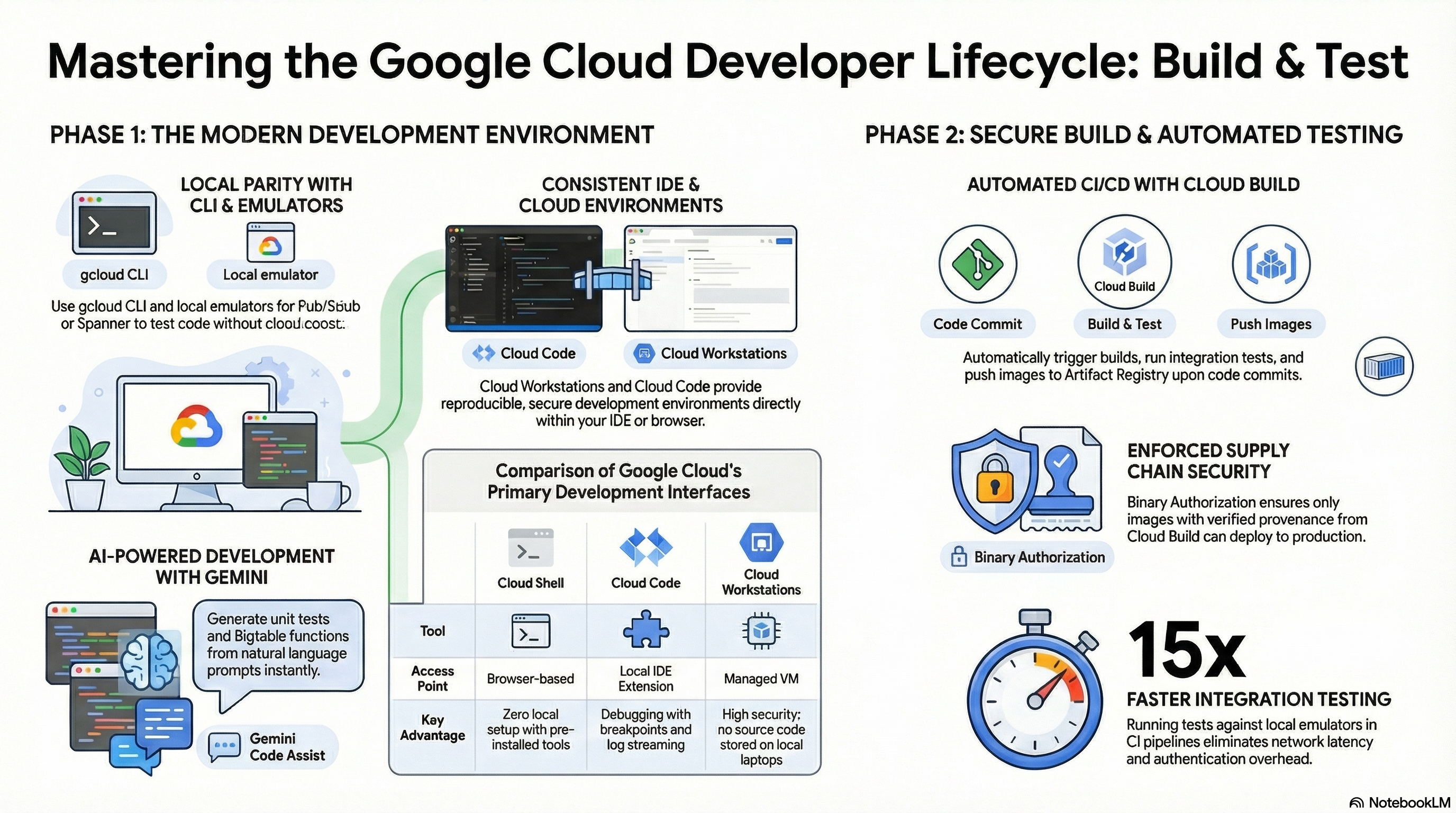
Why the exam cares — The exam tests whether you know the developer toolchain: gcloud auth flows (user credentials vs Application Default Credentials), local emulators for unit testing without cloud cost, Cloud Code/Cloud Shell/Cloud Workstations trade-offs, and how to reproduce a cloud environment locally (e.g., Cloud SQL Auth Proxy on your laptop).
How RAD implements it — Not directly: the foundation modules run server-side and assume the portal performs the deploy. The nearest adjacent capabilities are real and useful, though:
- Isolated per-developer environments.
tenant_idfeeds the deterministic naming scheme (app<name><tenant><8-hex-hash>), so each developer can deploy a complete, non-colliding copy of the same application into a shared project — the cloud-native answer to "works on my machine". - Database tooling image. The platform builds a psql/mysql client image into Artifact Registry, which the modules' jobs use; you can run the same image locally for parity.
- Local DB access pattern. Cloud SQL has private IP only, so the local equivalent of the deployed setup is running the Cloud SQL Auth Proxy yourself from a machine with VPC access (or via IAP tunneling) — the same binary the GKE module runs as a sidecar.
Try it
-
Deploy a second copy of
App_CloudRunwith a differenttenant_idand confirm both stacks coexist:gcloud run services list --region=us-central1
gcloud sql databases list --instance=<instance-name> -
Set up ADC locally the way the exam expects developer machines to authenticate:
gcloud auth application-default login
gcloud config set project <project-id> -
Start a Pub/Sub emulator and point a test at it (no RAD involvement — this is the exam skill):
gcloud beta emulators pubsub start --project=test-project &
export PUBSUB_EMULATOR_HOST=localhost:8085 -
You know it worked when
gcloud run services listshows two services with different tenant suffixes, and your local client library calls hit the emulator (no credentials needed).
Check yourself
Q1: A developer's laptop code calls storage.Client() and gets a 403 in the office but works on Cloud Run. Why, and what's the fix?
A: On Cloud Run the client library resolves Application Default Credentials from the metadata server (the service's service account). Locally there are no ambient credentials until the developer runs gcloud auth application-default login (or sets GOOGLE_APPLICATION_CREDENTIALS — discouraged because key files are long-lived). The fix is establishing local ADC; the code itself shouldn't change.
Q2: Your CI unit tests must exercise Pub/Sub and Firestore logic without network access or cost. What do you use?
A: The local emulators (gcloud beta emulators pubsub start, the Firestore emulator) with the PUBSUB_EMULATOR_HOST / FIRESTORE_EMULATOR_HOST environment variables set so client libraries transparently target them. Emulators need no credentials, which is exactly what hermetic CI wants.
Beyond the modules — Study Cloud Code (IDE deploy/debug for Cloud Run and GKE, including a local Cloud Run emulator), Cloud Shell (ephemeral, pre-authenticated, 5 GB persistent home), and Cloud Workstations (managed, persistent, IAP-fronted dev VMs for regulated teams) — know which to recommend for a given constraint. Also practice gcloud run deploy --source . (Buildpacks-based source deploy) since the RAD pipeline always builds an explicit container instead.
⚠️ Exam trap — gcloud auth login and gcloud auth application-default login are different credentials: the first authorizes the gcloud CLI, the second writes the ADC file client libraries read. Tests that pass for CLI commands but 401 in code usually mean the second was skipped.
2.2 Building
⏱ ~75 min · 💰 low — Cloud Build per-minute billing plus Artifact Registry storage · ⚙️ Requires: Delivery pipeline profile (
enable_cicd_trigger = true,github_repository_urlset)
Why the exam cares — PCD expects fluency in the container supply chain: building images in Cloud Build (and why a daemonless builder like Kaniko or Buildpacks beats docker build in CI), tagging strategy (mutable latest vs immutable commit-SHA tags), Artifact Registry storage and cleanup, and attaching provenance (attestations) so Binary Authorization can gate deploys.
How RAD implements it — Two distinct build paths, both real Cloud Build:
- Terraform-driven build (every deploy with
container_image_source = "custom", the default): the platform renders a build config and runsgcloud builds submit. Kaniko builds with layer caching (--cache=true,--cache-ttl=24h) and pushes three tags: the app version,latest, and the commit SHA. Rebuilds are hash-triggered: the platform hashes the build context files, the Dockerfile (or inlinedockerfile_content), andbuild_args, so an unchanged source tree never rebuilds. - Git-driven CI trigger (
enable_cicd_trigger, defaultfalse): the platform creates a Cloud Build trigger bound togithub_repository_url, filtered bycicd_trigger_config(branch_patterndefault"^main$", plusincluded_files/ignored_files/substitutions). The generated pipeline runs Kanikov1.23.2, optionally signs the image (gcloud beta container binauthz attestations sign-and-createagainst thepipeline-attestorusing thebinauthz-signerKMS key in{project}-binauthz-keyring), then either runsgcloud run services update --image=...:$COMMIT_SHAdirectly or creates a Cloud Deploy release (Section 3.1).
Registry management: the module discovers the Services_GCP shared repository or creates one, and applies cleanup policies — max_images_to_retain (default 7), delete_untagged_images (default true), image_retention_days (default 30), scoped to this deployment's package names. enable_image_mirroring (default true) copies external base images into Artifact Registry using Crane digest comparison, comparing source/target SHA256 digests and only copying (or overwriting a stale tag) when digests differ — protecting you from registry rate limits and tag drift. enable_vulnerability_scanning (Services_GCP) makes Artifact Analysis scan everything pushed.
Try it
-
Push a commit to the configured branch and watch the trigger fire: Console > Cloud Build > History, open the build, and identify the Kaniko step and (if Binary Authorization is on) the attestation step.
gcloud builds list --limit=5
gcloud builds log <build-id> -
Inspect the resulting tags and scan results:
gcloud artifacts docker images list \
  us-central1-docker.pkg.dev/<project>/<repo> --include-tags
gcloud artifacts docker images describe \
  us-central1-docker.pkg.dev/<project>/<repo>/<image>:latest \
--show-package-vulnerability -
Verify the attestation exists for the new digest:
gcloud container binauthz attestations list \
--attestor=pipeline-attestor --attestor-project=<project> -
Re-apply the deployment without changing source and confirm no new Cloud Build job runs (the build's content hash was unchanged).
-
You know it worked when the image shows three tags (version,
latest, commit SHA), vulnerabilities are listed, and an attestation references the new digest.
Check yourself
Q1: Why does the pipeline deploy by commit-SHA tag rather than latest, even though latest is also pushed?
A: latest is mutable — it points to whatever was pushed most recently, so a deployment referencing it is not reproducible and rollbacks are ambiguous. The commit SHA tag is effectively immutable and ties the running revision to exact source provenance, which is also what the Binary Authorization attestation signs (the digest). latest is kept only as a developer convenience.
Q2: A build fails with Docker daemon errors inside Cloud Build. The RAD pipeline never hits this — why?
A: It uses Kaniko, which builds OCI images entirely in userspace from the Dockerfile without a Docker daemon — the standard answer for daemonless, cacheable container builds in CI. (Buildpacks are the other daemonless exam answer, used by gcloud run deploy --source.)
Q3: Artifact Registry storage costs are growing without bound in a busy repo. Which three RAD controls address it?
A: delete_untagged_images = true removes dangling layers, image_retention_days = 30 ages out old images, and max_images_to_retain = 7 keeps the most recent N regardless of age (a keep-guard, not a deleter). Together they implement the recommended AR cleanup-policy pattern: delete-by-age plus keep-most-recent.
Beyond the modules — The exam also covers Buildpacks/source deploys, build provenance and SLSA levels (Cloud Build generates SLSA provenance viewable under a build's Security insights tab), private pools, and build substitutions/secrets in a Cloud Build config (try gcloud builds submit --substitutions=_FOO=bar in a scratch repo). The RAD trigger supports GitHub only (token or App installation) — know that Cloud Build also connects GitLab and Bitbucket repos.
⚠️ Exam trap — Pushing an image to Artifact Registry does not deploy it. The pipeline's explicit gcloud run services update (or Cloud Deploy release) step is what changes the running revision — a missing deploy step is a classic "build succeeded, app unchanged" troubleshooting scenario.
2.3 Testing
⏱ ~45 min · 💰 low (extra Cloud Build minutes) · ⚙️ Requires: Delivery pipeline profile + write access to the app repository
Why the exam cares — Tests must run inside the pipeline so a failure blocks promotion: unit tests early (cheap, hermetic, emulator-backed), integration tests against real or staged services after build, and smoke tests after deploy to a non-prod stage. The exam tests where each belongs and what a failing step does to the pipeline.
How RAD implements it — Honestly: the generated pipelines contain no test step by default — the CI flow is build → (optional attestation) → deploy/release. The hooks for adding tests are real, though:
- The Cloud Build trigger executes the generated build config; steps run sequentially and any non-zero exit fails the build, so a test step inserted between Kaniko and the deploy step gates deployment exactly as the exam describes.
cicd_trigger_config.branch_pattern(default"^main$") controls which pushes build at all;included_files/ignored_fileskeep doc-only commits from burning build minutes.- The foundation modules themselves ship native OpenTofu/Terraform tests exercising the plan-time validations — a useful example of testing infrastructure code, which occasionally appears on the exam as "shift-left for IaC".
- Cloud Deploy stages (Section 3.1) provide the post-deploy verification surface: promote to
dev, run smoke tests against the per-stage service URL, then promote.
Try it
-
In your application repo, add a test step to the build config between the build and deploy steps, e.g.:
- name: 'python:3.12-slim'
  entrypoint: 'bash'
args: ['-c', 'pip install -r requirements.txt && pytest -q'] -
Push a commit with a deliberately failing test and observe: Console > Cloud Build > History shows the red step, and the deploy step never runs.
gcloud builds list --filter="status=FAILURE" --limit=3 -
Confirm the Cloud Run service still runs the previous image:
gcloud run services describe <service-name> --region=us-central1 \
--format="value(spec.template.spec.containers[0].image)" -
You know it worked when the failed build leaves the deployed image untouched and the deploy step is skipped.
Check yourself
Q1: Integration tests need a real Postgres but must not touch production data. How would you structure this with the RAD stack?
A: Deploy a separate tenant (tenant_id = "ci") so the pipeline gets its own isolated Cloud SQL database and service, run integration tests against that stage from a Cloud Build step, and tear down or reuse it per run. Unit tests stay on emulators/mocks; only the integration layer touches the real (isolated) database.
Q2: Where do smoke tests belong in a Cloud Deploy pipeline, and what stops a bad release from reaching prod?
A: After the rollout to a non-prod target (dev/staging) — run them against that stage's URL, and gate prod with require_approval = true (the RAD default) so a human (or an automated verification you wire in) confirms before promotion. A failed rollout or withheld approval keeps the release from advancing.
Beyond the modules — Practice writing emulator-backed unit tests (Pub/Sub, Firestore, Spanner emulators), Cloud Build test reporting, and load testing against Cloud Run revisions (e.g., hey/k6 against a tagged canary URL). Cloud Deploy verify (post-deploy verification jobs declared in the Skaffold config) is the managed version of step 2's smoke-test idea and worth reading about — the RAD Cloud Deploy configs use hooks for IAM and jobs, not verification.
⚠️ Exam trap — Cloud Build steps share the /workspace volume but are otherwise isolated containers; a test step can't reach a server started in a previous step unless you background it within the same step or use the docker network. "Why can't step 4 see the service step 3 started?" is a recurring question shape.
Need RAD to do something it does not do yet? Request it on the roadmap, or vote on what is already there.