PCD Certification Preparation Guide: Section 1 — Designing highly scalable, available, and reliable cloud-native applications (~36% of the exam)
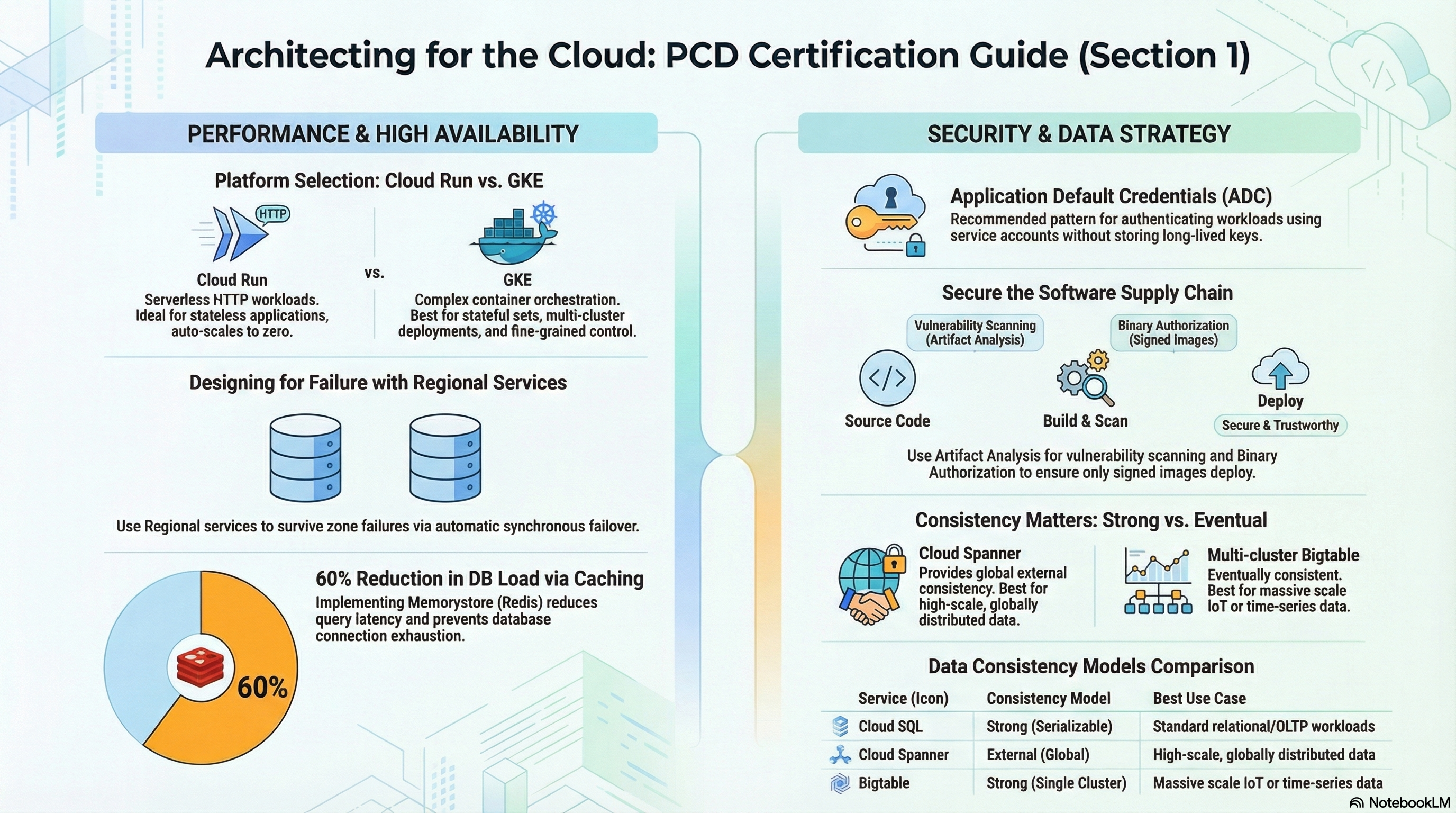
This guide covers the largest PCD exam section using the RAD platform foundation modules. You will exercise App_CloudRun (Cloud Run v2 service design), App_GKE (Kubernetes workload design), and Services_GCP (the shared database, cache, and security infrastructure). Deploy the Serverless baseline profile from the Lab Map before starting; add the Hardened edge profile for 1.1 (caching/CDN) and 1.2 (IAP, rotation).
1.1 Designing high-performing applications and APIs
⏱ ~90 min · 💰 low (scale-to-zero defaults); Memorystore and the global LB bill continuously if enabled · ⚙️ Requires: Serverless baseline; Hardened edge for CDN/Redis steps
Why the exam cares — PCD scenarios constantly ask you to pick between Cloud Run and GKE, and to tune the chosen platform: when does min_instances > 0 beat accepting cold starts, when is CPU throttling between requests acceptable, how do you canary a new revision without redeploying, and where does a cache or CDN belong in the request path. The decision criteria are cost vs latency vs operational control: Cloud Run for stateless request/response workloads with bursty traffic, GKE for workloads needing sidecars you control, StatefulSets, or fine-grained pod networking.
How RAD implements it — Both foundation modules expose the same scaling vocabulary with platform-appropriate defaults:
| Variable | App_CloudRun default | App_GKE default | What it controls |
|---|---|---|---|
min_instance_count | 0 (scale to zero) | 1 | scaling floor / HPA minReplicas |
max_instance_count | 1 | 3 | scaling ceiling / HPA maxReplicas |
container_resources | cpu_limit = "1000m", memory_limit = "512Mi" | same | per-instance/pod resources |
timeout_seconds | 300 (0–3600) | 300 | request / LB backend timeout |
Cloud Run-specific performance levers:
cpu_always_allocated(defaultfalse, i.e. request-based billing) — settrueto keep CPU allocated between requests (schedulers, queue workers, WebSocket servers). Startup CPU boost is always on, and session affinity is always on for the service. NOTE: line 59 of the same file ("keepcpu_always_allocated = true") is phrased as an override and stays correct only if reworded from "keep" to "set".execution_environment(default"gen2") — plan-time validations require gen2 for NFS (enable_nfs) and GCS Fuse (gcs_volumes) mounts.traffic_split(default[]= 100% to latest) takes a list of{ type, revision, percent, tag }entries wheretypeisTRAFFIC_TARGET_ALLOCATION_TYPE_LATESTorTRAFFIC_TARGET_ALLOCATION_TYPE_REVISION; validation enforces that percents sum to exactly 100. The optionaltaggives a revision a stable preview URL.max_revisions_to_retain(default7) prunes old revisions automatically; revisions serving traffic are never deleted.- Request concurrency per instance is not exposed — the service uses the Cloud Run default (80 concurrent requests per instance).
container_protocol(default"http1") sets the named port on the Cloud Run service:"h2c"switches Cloud Run to end-to-end HTTP/2 cleartext — required for gRPC services (gRPC is built on HTTP/2) and useful for streaming/large-payload workloads. The container must serve cleartext HTTP/2 on the container port. On GKE the same variable advertisesappProtocol kubernetes.io/h2con the Service port so Gateway/Ingress backends speak HTTP/2 to the pods.
On GKE, the platform creates a HorizontalPodAutoscaler only when max_instance_count > 1 and enable_vertical_pod_autoscaling = false, targeting 70% CPU and 80% memory utilization.
Caching: Services_GCP provisions Memorystore with create_redis (default false), redis_tier (default BASIC vs STANDARD_HA), redis_memory_size_gb (default 1), AUTH enabled. On the app side, enable_redis (App_CloudRun default true) injects REDIS_HOST/REDIS_PORT (and REDIS_URL when derivable) env vars — set redis_host to the Memorystore IP, otherwise the module falls back to the shared NFS VM's Redis. CDN: enable_cdn (default false) forces the service behind a global external Application Load Balancer (ingress is auto-overridden to internal-and-cloud-load-balancing).
Try it
-
In the portal, set
max_instance_count = 3and redeploy. In Console > Cloud Run > your service > Revisions, note a new revision was created — configuration changes always create revisions. -
Deploy a trivial change (e.g., a new
environment_variablesentry), then settraffic_splitto send 10% to the new revision:gcloud run revisions list --service=<service-name> --region=us-central1
gcloud run services update-traffic <service-name> --region=us-central1 \
--to-revisions=<old-revision>=90,<new-revision>=10
gcloud run services describe <service-name> --region=us-central1 \
--format="yaml(status.traffic)"(Doing it via the
traffic_splitvariable keeps Terraform state authoritative; the CLI is what the exam tests.) -
Flip
cpu_always_allocated = false, apply, and inspect the revision: Console > Cloud Run > service > Revisions > Containers tab shows "CPU is only allocated during request processing". -
Generate load (
heyor a loop ofcurl) and watch Cloud Run > service > Metrics > Container instance count climb toward 3 and fall back to 0. -
You know it worked when the traffic chart on the Revisions tab shows the 90/10 split and instance count returns to zero after load stops.
Check yourself
Q1: A latency-sensitive API on Cloud Run shows 4-second p99 spikes after idle periods. Which two settings fix this, and what is the cost trade-off?
A: Set min_instance_count >= 1 to keep a warm instance (eliminates cold starts, bills the idle instance continuously) and keep cpu_always_allocated = true so background initialization isn't throttled between requests. The trade-off is paying for instance time even with zero traffic — the opposite of the scale-to-zero default.
Q2: You must roll out a risky change to 5% of users with instant rollback. How do you do it on Cloud Run without a load balancer?
A: Deploy the change as a new revision and use revision-based traffic splitting (traffic_split / gcloud run services update-traffic) to send 5% to it, optionally with a tag for a direct test URL. Rollback is routing 100% back to the previous revision — no rebuild or redeploy, because revisions are immutable.
Q3: When would you choose App_GKE over App_CloudRun for the same container?
A: When the workload needs stable per-pod storage (StatefulSet via stateful_pvc_enabled), Kubernetes-native controls (NetworkPolicy, ResourceQuota, PDB, topology spread), long-lived non-HTTP protocols, or sidecars you define yourself. Cloud Run wins for bursty stateless HTTP because of scale-to-zero and per-request billing.
Beyond the modules — The exam also tests API design and async patterns the modules don't implement: REST versioning and OpenAPI specs behind API Gateway or Apigee (try gcloud api-gateway gateways list in a scratch project), gRPC application code (the platform side is covered — container_protocol = "h2c" is the module equivalent of gcloud run deploy --use-http2 — but writing the gRPC service/client is study-only), Pub/Sub publish/subscribe and push-vs-pull decisions, Cloud Tasks for rate-limited dispatch, Workflows for multi-step orchestration, and Eventarc triggers (the modules use Eventarc only internally for secret rotation). Also study Cloud Run concurrency tuning (--concurrency) since the modules pin the default of 80.
⚠️ Exam trap — "Min instances = 0" plus "CPU always allocated" is a contradiction candidates miss: with min_instance_count = 0 you still pay full instance time while instances exist if CPU is always allocated. Scale-to-zero only saves money between requests if instances actually terminate.
1.2 Designing secure applications
⏱ ~75 min · 💰 low (Secret Manager pennies; KMS keys ~$0.06/key/month; IAP free) · ⚙️ Requires: Hardened edge profile (
enable_iap,enable_auto_password_rotation); addenable_binary_authorizationon both modules
Why the exam cares — PCD security questions are about where credentials live and who can call what: secrets must reach code at runtime (never baked into images or state), end-user authentication should happen before traffic reaches the app (IAP), and only provably-built images should run (Binary Authorization). You're expected to know which mechanism solves which problem, not to administer the org.
How RAD implements it —
Secrets at runtime. secret_environment_variables (map of env var name → Secret Manager secret name) is rendered on the Cloud Run service as a secret reference pinned to the latest version — the plaintext never enters Terraform state or the image. The database password is auto-generated (database_password_length, default 32 in App_CloudRun) and stored in Secret Manager by the platform's secrets layer. On GKE, secrets arrive through the Secret Manager add-on: the platform creates a SecretProviderClass (provider gke) that syncs Secret Manager secrets into a Kubernetes Secret which pods consume via secretKeyRef — the add-on itself (secret-manager+secret-sync-v1) is enabled on the cluster via gcloud.
Rotation. secret_rotation_period (default "2592000s" = 30 days) configures the Secret Manager rotation notification. On its own it only publishes to Pub/Sub; enable_auto_password_rotation (default false) closes the loop: an Eventarc trigger fires a dispatcher Cloud Run service which runs a rotator Cloud Run job. The rotation logic is dual-version and zero-downtime: ALTER USER first, add the new secret version, wait rotation_propagation_delay_sec (default 90), then disable (not destroy) the old version so latest is unambiguous and rollback stays possible.
IAP. enable_iap (default false) turns on IAP for the Cloud Run v2 service (launch stage BETA). A plan-time validation requires at least one entry in iap_authorized_users or iap_authorized_groups; the platform grants roles/run.invoker to the IAP service agent and roles/iap.httpsResourceAccessor to your principals. Without IAP, public services get an allUsers → roles/run.invoker binding. On GKE, IAP additionally requires iap_oauth_client_id, iap_oauth_client_secret, and iap_support_email.
Supply chain. enable_binary_authorization with binauthz_evaluation_mode (default "ALWAYS_ALLOW", options include REQUIRE_ATTESTATION and ALWAYS_DENY) creates a KMS-backed attestor; the CI pipeline signs images (see Section 2). enable_vulnerability_scanning (Services_GCP, default false) turns on Artifact Analysis scanning for the shared repository.
Edge protection. enable_cloud_armor (default false) deploys a WAF policy ({service}-waf-policy) with preconfigured OWASP rules (SQLi/XSS/LFI/RCE), Adaptive Protection, and a 500 req/min/IP rate limit behind a global HTTPS LB. application_domains is optional — with none set, the module derives a zero-config <ip-dashed>.nip.io Google-managed certificate so the LB always has a hostname. The live constraint runs the other way: enable_cdn = true requires enable_cloud_armor = true, because the CDN attaches to the load balancer Cloud Armor provisions. Hardening extras: enable_cmek (Services_GCP, default false) for customer-managed keys with cmek_key_rotation_period default 7776000s (90 days), enable_audit_logging (default false) for DATA_READ/DATA_WRITE audit logs, and enable_network_segmentation (App_GKE, default false) for namespace-scoped NetworkPolicies.
Try it
-
Add a custom secret: create
MY_API_KEYin Console > Security > Secret Manager, then setsecret_environment_variables = { MY_API_KEY = "<secret-name>" }and redeploy. Verify in Cloud Run > service > Revisions > Variables & Secrets that it shows "Secret reference", not a value. -
Enable rotation (
enable_auto_password_rotation = true) and inspect the moving parts:gcloud secrets list --filter="name~rotation OR name~password"
gcloud secrets versions list <db-password-secret-name>
gcloud eventarc triggers list --location=us-central1
gcloud run jobs list --region=us-central1 # look for the rotator job -
Enable IAP with your user in
iap_authorized_users, then prove the boundary:curl -s -o /dev/null -w "%{http_code}\n" https://<service-url>/ # 302/403 anonymous
curl -s -o /dev/null -w "%{http_code}\n" \
-H "Authorization: Bearer $(gcloud auth print-identity-token)" https://<service-url>/ -
You know it worked when the secret version list shows a new ENABLED version and a DISABLED prior version after a rotation fires, and anonymous requests stop returning 200 once IAP is on.
Check yourself
Q1: Your app reads DB_PASSWORD from an env var sourced from Secret Manager with version "latest". A rotation writes a new version while 20 instances are running. What happens, and how does the RAD design avoid an outage?
A: Running instances keep the value they resolved at startup — env-var secret references resolve when the instance starts, not per request. The rotator avoids breakage by being dual-version: the database accepts the new password (ALTER USER) before the new secret version is published, the old secret version is only disabled after a propagation delay, and the workload is restarted so new instances pick up "latest". An exam answer should mention that env-var secrets require a new revision/restart to refresh.
Q2: A team must guarantee only images built by their CI pipeline run in production. Which two RAD variables implement this, and what happens to a hand-pushed image?
A: enable_binary_authorization = true plus binauthz_evaluation_mode = "REQUIRE_ATTESTATION". The CI pipeline signs each image with the KMS-backed attestor after building; a locally built image pushed straight to Artifact Registry has no attestation, so admission is denied at deploy time (enforcement is block-and-audit-log).
Q3: You enable enable_cloud_armor = true without setting application_domains. What happens?
A: It deploys successfully. The module auto-provisions a zero-config <ip-dashed>.nip.io Google-managed SSL certificate (security.tf, use_nip_io / nip_io_cert), so the Global HTTPS Load Balancer always has a hostname to bind to. A domain is optional, not required.
The validation that once required a domain here was removed — App_CloudRun/validation.tf keeps it only as comment 19, "(removed) Cloud Armor no longer requires a custom domain."
The constraint that does exist runs the other way: enable_cdn = true requires enable_cloud_armor = true (precondition 26). Cloud CDN attaches to the Global HTTPS Load Balancer that Cloud Armor provisions; without it there is no backend to attach the CDN to.
Beyond the modules — Study Identity Platform (end-user/CIAM auth — the modules only do IAP for Google identities), OAuth 2.0/OIDC token flows and the difference between access tokens and ID tokens, signed URLs vs IAM for object access, and Web Security Scanner. VPC Service Controls exist in the modules (enable_vpc_sc, dry-run by default, with graceful permission-probe skips) but perimeter design questions go deeper — read the VPC-SC ingress/egress rules documentation.
⚠️ Exam trap — secret_rotation_period alone rotates nothing. It only schedules a Pub/Sub notification. Something must consume that notification and write a new version — in RAD that's enable_auto_password_rotation; on the exam it's "a rotation function/job you implement".
1.3 Storing and accessing data
⏱ ~60 min · 💰 moderate — Cloud SQL
db-custom-1-3840is the dominant baseline cost; REGIONAL roughly doubles it; FilestoreBASIC_HDD1 TiB is significant · ⚙️ Requires: Serverless baseline (Postgres is on by default)
Why the exam cares — Storage-selection questions give you data shape, consistency, and scale requirements and expect the right product: relational OLTP → Cloud SQL/AlloyDB, documents with mobile sync → Firestore, petabyte wide-column/time-series → Bigtable, global relational → Spanner, blobs → Cloud Storage, hot ephemeral → Memorystore. PCD adds the developer angle: how does code connect to each (covered in 4.1), and what consistency does it observe.
How RAD implements it — Services_GCP provisions the menu; the app modules consume it:
| Variable (Services_GCP) | Default | What you get |
|---|---|---|
create_postgres | true | Cloud SQL Postgres (postgres_database_version default POSTGRES_17), private IP only, SSL ENCRYPTED_ONLY, PITR with 7-day log retention, 7 daily backups |
postgres_database_availability_type | ZONAL | set REGIONAL for an HA standby with automatic failover |
create_postgres_read_replica | false | read replica(s) (postgres_read_replica_count default 1) for read scaling |
create_mysql | false | MySQL (MYSQL_8_4), binlog-based recovery (no PITR config) |
enable_alloydb | false | AlloyDB cluster + primary; enable_alloydb_read_pool adds a read pool |
create_firestore | false | Firestore Native (Enterprise edition) database — provisioning only |
create_redis | false | Memorystore Redis; persistence redis_persistence_mode default DISABLED |
create_filestore_nfs | false | Filestore (filestore_tier default BASIC_HDD, filestore_capacity_gb default 1024) |
create_network_filesystem | true | self-managed e2-small NFS+Redis VM with stateful disk and daily snapshots |
Object storage lives in the app modules: storage_buckets (a list of bucket definitions handled by the platform's object-storage layer) creates GCS buckets with versioning, lifecycle rules (age, newer-version counts, storage-class transitions), CORS, per-bucket public_access_prevention, and least-privilege IAM (roles/storage.objectAdmin granted per bucket to the app SA). gcs_volumes mounts buckets into the container via GCS Fuse (gen2 required), so code can use plain filesystem calls.
Consistency facts to anchor: Cloud SQL is strongly consistent on the primary; read replicas lag asynchronously. The RAD Postgres instance enables PITR (restore to a timestamp) in addition to daily backups — these are different exam answers. Redis BASIC tier has no replication and loses data on restart unless RDB/AOF persistence is enabled; the module even enforces at plan time that a production STANDARD_HA instance must not have persistence DISABLED.
Try it
-
Inspect the database the baseline profile created:
gcloud sql instances describe <instance-name> \
  --format="yaml(settings.availabilityType, settings.backupConfiguration, ipAddresses)"
Confirm
availabilityType: ZONAL,pointInTimeRecoveryEnabled: true, and that there is no public IP. -
Set
postgres_database_availability_type = "REGIONAL"in the portal and re-apply; the describe output now shows a secondary zone. (This restarts the instance — do it in a lab window.) -
Add a bucket via
storage_bucketswith a lifecycle rule, then verify:gcloud storage buckets describe gs://<bucket-name> \
--format="yaml(lifecycle_config, versioning, public_access_prevention)" -
You know it worked when the bucket shows your lifecycle rule and
versioning: enabled, and the SQL instance reports REGIONAL with a failover replica zone.
Check yourself
Q1: An app needs to survive a zone outage with zero data loss on its relational store. Daily backups are already enabled. What change is required and why aren't backups enough?
A: Set postgres_database_availability_type = "REGIONAL" — synchronous replication to a standby in another zone gives automatic failover with no data loss. Backups (and even PITR) are recovery mechanisms with restore time and potential data loss back to the last transaction logs; they don't provide availability.
Q2: A product catalog is read 50:1 vs writes and the Cloud SQL primary is CPU-saturated. Rank the RAD options.
A: First add Memorystore caching (create_redis = true + app-side enable_redis) — it removes repeated reads entirely and is cheapest. Second, create_postgres_read_replica = true to offload remaining reads (code must route reads to the replica and tolerate replication lag). Vertical scaling (postgres_tier) is the fallback because it has a ceiling and scales cost linearly.
Q3: Why might a developer choose gcs_volumes (GCS Fuse) over the Cloud Storage client library?
A: Fuse lets unmodified code use filesystem semantics (good for legacy apps, ML model files, static assets at startup) at the cost of object-storage performance characteristics and POSIX edge cases. The client library is the right answer for high-throughput object I/O, signed URLs, and metadata operations. Fuse requires execution_environment = "gen2" on Cloud Run — validated at plan time.
Beyond the modules — Spanner (interleaved tables, avoiding hotspotting primary keys), Bigtable (row-key design, single-index model, eventual consistency across replicated clusters), BigQuery write paths (Storage Write API vs batch loads), and signed URL generation (blob.generate_signed_url, requires roles/iam.serviceAccountTokenCreator or a key) are all absent from the modules and all examined. The Firestore database can be created here (create_firestore = true) but SDK usage — documents, composite indexes, real-time listeners, transactions — must be practiced with the client libraries or the emulator.
⚠️ Exam trap — Backups ≠ PITR. Daily backups restore to a snapshot moment; PITR replays transaction logs to an arbitrary timestamp. The RAD Postgres instance has both; the RAD MySQL instance relies on binary logging and has no PITR configuration — a distinction the exam loves.
Need RAD to do something it does not do yet? Request it on the roadmap, or vote on what is already there.