ACE Certification Preparation Guide: Section 4 — Configuring access and security (~20% of the exam)
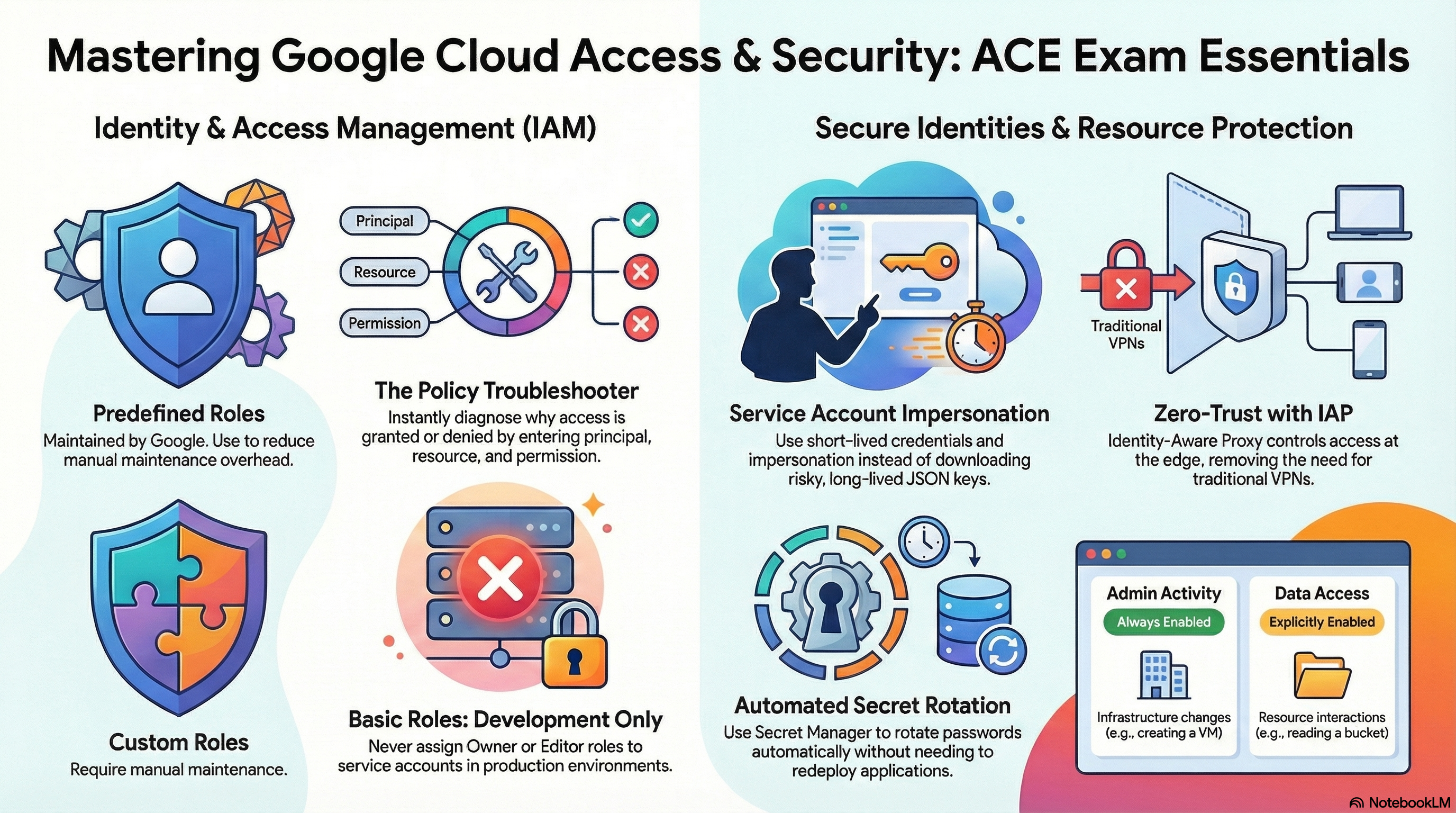
📚 Official exam guide: Associate Cloud Engineer certification — always confirm section weightings against the current Google Cloud exam guide.
This guide covers exam Section 4 using the RAD platform foundation modules. Security is where the modules shine as a lab: every deployment creates dedicated least-privilege service accounts (Services_GCP plus the platform's IAM layer), App_GKE uses Workload Identity, Services_GCP can stand up Workload Identity Federation, and secrets live exclusively in Secret Manager. Deploy the Serverless application profile plus the Operations & security add-ons profile (IAP, audit logging) from the Lab Map.
4.1 Managing Identity and Access Management (IAM)
⏱ ~60 min · 💰 no additional cost (audit logging adds log volume) · ⚙️ Requires: any deployed profile;
enable_audit_logging = truefor the audit-log lab
Why the exam cares — IAM questions test the policy model (principal + role + resource, inherited down the hierarchy), the three role types (basic, predefined, custom) and when each is appropriate, and reading/troubleshooting effective access. The recurring decision criterion: prefer predefined roles on groups; never hand out roles/owner/roles/editor in production; basic roles are pre-IAM legacy.
How RAD implements it — The modules are a worked example of least privilege:
Services_GCPcreatescloudbuild-sa-{prefix},clouddeploy-sa-{prefix},cloudrun-sa-{prefix},nfs-sa-{prefix}, andgke-sa-{prefix}, each granted only the predefined roles its job needs — no basic roles anywhere.- The platform's IAM layer narrows further: the runtime service account gets
roles/secretmanager.secretAccessorper secret androles/storage.objectAdminper bucket (resource-level bindings, not project-level), and Cloud Build getsroles/iam.serviceAccountUseronly on the identity it must deploy as. enable_audit_logging(defaultfalse, available onServices_GCPand both app modules) enables Data Access audit logs (ADMIN_READ/DATA_READ/DATA_WRITE) forallServicesplus explicit Secret Manager and KMS configs — the mechanism for answering "who did what".support_users(default[]) is the human-principal entry point: emails become monitoring notification targets; bind your operators as groups where possible.
Try it
- Dump and read the project IAM policy the way the exam expects:
Confirm the module SAs hold only narrow predefined roles.
gcloud projects get-iam-policy $GOOGLE_CLOUD_PROJECT \
  --flatten="bindings[].members" \
  --filter="bindings.members:serviceAccount" \
--format="table(bindings.members, bindings.role)" | sort - See a resource-level binding (a concept many candidates miss):
The runtime SA appears here, not in the project policy — least privilege in action.
gcloud secrets get-iam-policy <secret-name>
gcloud storage buckets get-iam-policy gs://<bucket-name> - Explore role definitions:
gcloud iam roles describe roles/secretmanager.secretAccessor— note it contains essentially one permission (secretmanager.versions.access). Compare withgcloud iam roles describe roles/editorto see why basic roles are discouraged. - With audit logging enabled, change any IAM binding in the console, then find it:
gcloud logging read 'protoPayload.methodName="SetIamPolicy"' --limit=5 \
--format="table(timestamp, protoPayload.authenticationInfo.principalEmail)" - You know it worked when steps 2–4 show per-resource bindings, single-permission predefined roles, and your own email on the
SetIamPolicyentry.
Check yourself
Q1: A developer needs to view Cloud Run services and read their logs — nothing else. Which roles, and why not roles/viewer?
A: roles/run.viewer plus roles/logging.viewer — predefined roles scoped to exactly the needed services. roles/viewer (a basic role) grants read access across nearly every service in the project, violating least privilege and exposing data (e.g. listing secrets, reading buckets' metadata) the developer has no business seeing.
Q2: A service account has roles/secretmanager.secretAccessor on secret app-db-password only, but the exam scenario says it "can't list secrets in the console". Is something wrong?
A: No — secretAccessor permits reading versions of that one secret, not listing secrets (that needs secretmanager.secrets.list, in roles like roles/secretmanager.viewer at project level). Resource-level grants don't confer project-level browse access; this asymmetry is intended and frequently tested.
Q3: Access granted at the folder level — can a project-level admin in a child project remove it?
A: No. IAM policies are inherited downward and the effective policy is the union of all levels; a child resource cannot revoke or restrict a grant made on its ancestor. You'd need to change the folder-level binding (or use IAM deny policies / conditions, managed above the project).
Beyond the modules — Not implemented: custom role creation, IAM Conditions, Policy Troubleshooter, and org-level policy administration. For the exam: create a throwaway custom role (gcloud iam roles create labRole --project=$GOOGLE_CLOUD_PROJECT --permissions=run.services.list), run IAM & Admin > Policy Troubleshooter against a principal/resource/permission triple, and review IAM role recommendations in IAM (Active Assist flags over-granted bindings based on 90-day usage).
⚠️ Exam trap — Removing a user from IAM does not invalidate already-issued access tokens (up to ~1 hour) and does not touch resource-level bindings you may have forgotten — checking both project and resource policies is the complete answer.
4.2 Managing service accounts
⏱ ~75 min · 💰 no additional cost · ⚙️ Requires: Serverless or Kubernetes application profile;
enable_iap = truewith authorized users for the IAP lab
Why the exam cares — Service accounts are the workload identity story: creating dedicated SAs instead of using defaults, attaching them to compute, avoiding exported JSON keys (Workload Identity / Workload Identity Federation / impersonation instead), and protecting application credentials. The exam's consistent theme: keys are a last resort.
How RAD implements it —
Dedicated runtime identities: the Cloud Run service runs as its tenant-scoped cloudrun-sa-*, never the default Compute Engine service account. On GKE, App_GKE implements Workload Identity end-to-end: a Kubernetes ServiceAccount annotated iam.gke.io/gcp-service-account, and a roles/iam.workloadIdentityUser binding to serviceAccount:{project}.svc.id.goog[namespace/ksa] — pods get short-lived Google credentials with no key file anywhere.
Keyless CI/CD: Services_GCP's enable_workload_identity_federation (default false) creates pool wif-pool with a provider per wif_provider_type (default "github"; also gitlab or generic OIDC) and binds the pool's principals (roles/iam.workloadIdentityUser) to the Cloud Build, Cloud Deploy, and Cloud Run SAs — external CI authenticates by exchanging its OIDC token, no exported keys.
Impersonation: the platform itself runs as resource_creator_identity, and impersonation_service_account (default "") makes the modules' shell scripts call GCP APIs as a target SA — the same --impersonate-service-account pattern the exam tests for humans.
Secrets: secret_environment_variables maps env var names to Secret Manager secrets resolved at runtime (a secret-reference env source on Cloud Run; the Secret Manager CSI driver on GKE). The DB password is generated randomly (database_password_length default 32), stored only in Secret Manager, and enable_auto_password_rotation (default false) deploys an Eventarc-triggered rotation job doing a dual-version, zero-downtime rotation (rotation_propagation_delay_sec default 90). The plain secret_rotation_period (default "2592000s") only publishes rotation notifications — it does not rotate anything by itself.
Identity-gated access: enable_iap (default false) turns on IAP. On Cloud Run, the v2 service enables IAP (BETA launch stage) and the module grants roles/run.invoker to the IAP service agent and roles/iap.httpsResourceAccessor to iap_authorized_users/iap_authorized_groups. On GKE, IAP additionally requires iap_oauth_client_id, iap_oauth_client_secret, iap_support_email, and at least one authorized principal — all enforced by plan-time validations.
Try it
- Confirm the workload runs as a dedicated SA, not the default:
gcloud run services describe <service-name> --region=us-central1 \
--format="value(spec.template.spec.serviceAccountName)" - On GKE, verify Workload Identity from inside a pod:
The active account is the Google SA — no key was mounted.
kubectl get serviceaccount -n <namespace> -o yaml | grep gcp-service-account
kubectl run wi-test -n <namespace> --rm -it --image=google/cloud-sdk:slim \
  --overrides='{"spec":{"serviceAccountName":"<ksa-name>"}}' \
-- gcloud auth list - Practice impersonation (grant yourself
roles/iam.serviceAccountTokenCreatoron the SA first):gcloud storage ls --impersonate-service-account=cloudrun-sa-<prefix>@$GOOGLE_CLOUD_PROJECT.iam.gserviceaccount.com - Inspect secret handling:
gcloud secrets versions list <secret-name>and, after enablingenable_auto_password_rotation, watch a new version appear while the previous is disabled (dual-version rotation). - Enable IAP with
iap_authorized_users = ["user:you@example.com"], redeploy, then open the service URL in an incognito window — you are pushed through Google sign-in, and a non-listed account gets a 403. You know it worked when your account passes and others don't.
Check yourself
Q1: A GKE pod must read a GCS bucket. A teammate suggests mounting a service account JSON key as a Kubernetes Secret. What is the exam-correct alternative and why?
A: Workload Identity — bind the pod's KSA to a Google SA with roles/storage.objectViewer (the roles/iam.workloadIdentityUser pattern used by App_GKE). JSON keys never expire, can be exfiltrated by anyone who can read the namespace's secrets, and require manual rotation; Workload Identity issues short-lived tokens automatically with full audit attribution.
Q2: GitHub Actions needs to deploy to Cloud Run. Options: download a key for the Cloud Build SA, or use Workload Identity Federation. Compare.
A: WIF (the module's wif-pool + GitHub OIDC provider) lets the workflow exchange its GitHub-issued OIDC token for short-lived GCP credentials — nothing stored in repo secrets, automatically scoped and auditable. A downloaded key is a long-lived bearer credential sitting in GitHub secrets; if leaked it works until manually destroyed. The exam answer is WIF (or impersonation) over keys, essentially always.
Q3: With IAP enabled on Cloud Run, a user authenticates successfully with their Google account but still gets a 403. What two grants must both exist?
A: The user needs roles/iap.httpsResourceAccessor (via iap_authorized_users/iap_authorized_groups), and the IAP service agent needs roles/run.invoker on the service so it can forward authenticated requests. Authentication (who you are) passing while authorization (what you may access) fails is exactly this split — the module creates both bindings for you.
Beyond the modules — Not implemented: service account key creation/rotation workflows (deliberately — the modules avoid keys entirely), short-lived token minting (gcloud auth print-access-token --impersonate-service-account=..., gcloud auth print-identity-token), disabling/undeleting service accounts, and cross-project SA usage. Practice in a scratch project: gcloud iam service-accounts create, gcloud iam service-accounts keys create (then delete it and explain why), and gcloud iam service-accounts add-iam-policy-binding <sa> --member=user:you@... --role=roles/iam.serviceAccountTokenCreator to wire impersonation. Also review the default Compute Engine SA (PROJECT_NUMBER-compute@developer.gserviceaccount.com) and why attaching it with Editor-scope access is the canonical anti-pattern.
⚠️ Exam trap — roles/iam.serviceAccountUser (attach/run as the SA) and roles/iam.serviceAccountTokenCreator (mint tokens to impersonate it) are different roles; questions often hinge on which one a deployer or impersonator actually needs. The modules grant serviceAccountUser to Cloud Build precisely so it can deploy services that run as the runtime SA.
Need RAD to do something it does not do yet? Request it on the roadmap, or vote on what is already there.