ACE Certification Preparation Guide: Section 2 — Planning and implementing a cloud solution (~30% of the exam)
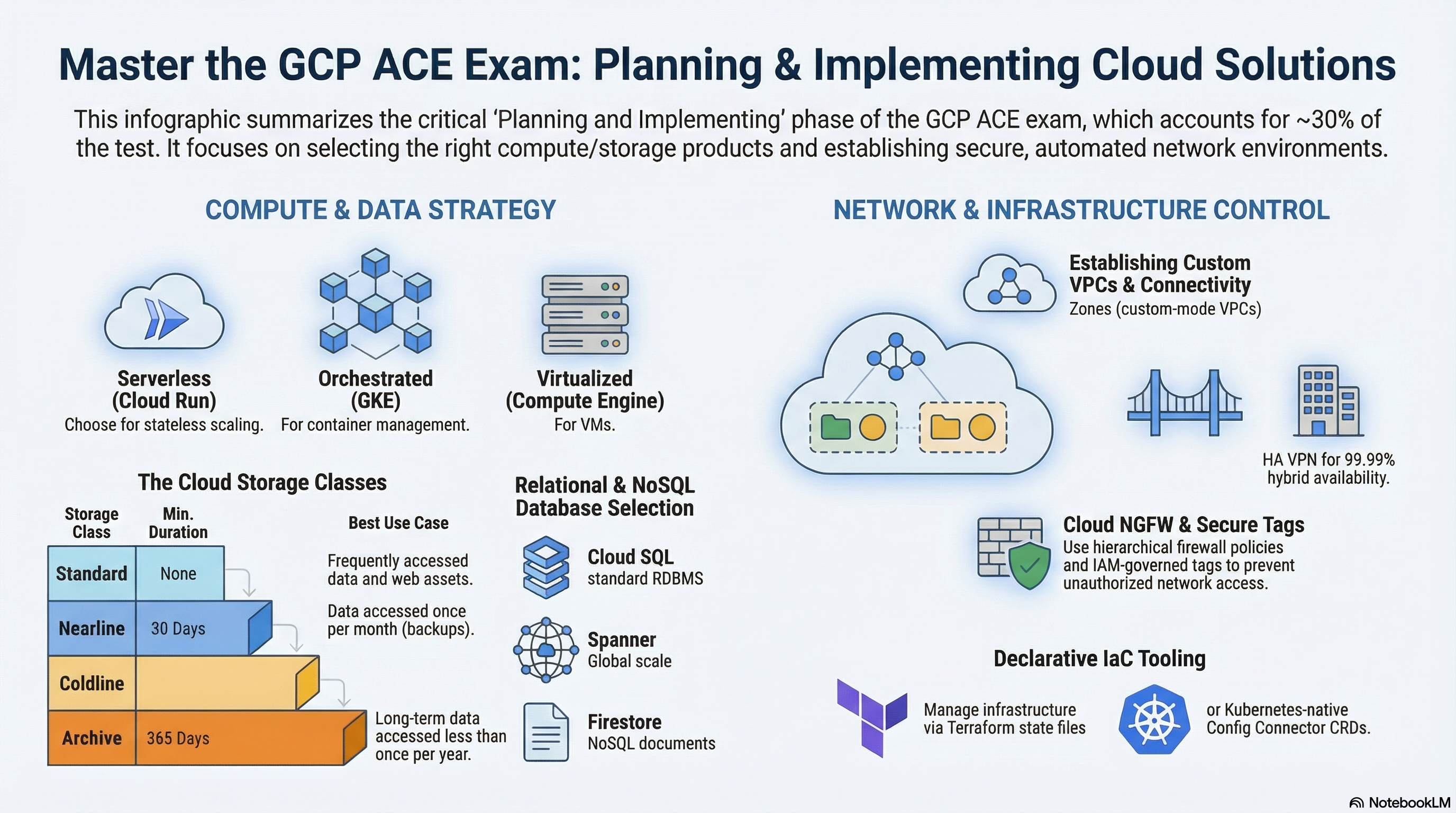
This guide covers exam Section 2 using the RAD platform foundation modules as a hands-on lab. All four foundation modules are exercised: Services_GCP provides the VPC, databases, and (optionally) the GKE Autopilot cluster; App_CloudRun and App_GKE are the two deployment engines; the App_Common shared library handles storage, secrets, and builds. Deploy the Serverless application profile first, then the Kubernetes application profile from the Lab Map.
2.1 Planning and implementing compute resources
⏱ ~90 min · 💰 low for Cloud Run (scale-to-zero); moderate for GKE Autopilot · ⚙️ Requires: Serverless application profile; Kubernetes application profile for the GKE half
Why the exam cares — The biggest single skill in Section 2 is choosing the right compute platform — Compute Engine for full OS control, GKE for container orchestration, Cloud Run for stateless request-driven containers — and then configuring scaling and resources correctly on each. Expect scenarios contrasting scale-to-zero economics, cold starts, machine-type selection, and preemptible/Spot pricing.
How RAD implements it — The same application can be deployed through App_CloudRun or App_GKE, making the comparison concrete:
Cloud Run (App_CloudRun):
| Variable | Default | Notes |
|---|---|---|
container_image_source | "custom" | prebuilt deploys container_image directly; custom builds with Cloud Build |
min_instance_count | 0 | 0 = scale to zero; ≥1 eliminates cold starts |
max_instance_count | 1 | Cost ceiling (1–1000) |
container_resources | cpu_limit = "1000m", memory_limit = "512Mi" | Per-instance capacity |
container_port | 8080 | Port Cloud Run routes requests to |
execution_environment | "gen2" | gen2 is required for NFS and GCS Fuse volumes |
timeout_seconds | 300 | Request timeout, 0–3600 |
cpu_always_allocated | false | Default is request-based billing (CPU only during request processing); set true to keep CPU allocated between requests |
enable_image_mirroring (default true) copies public images into Artifact Registry first (a digest-aware copy), so the service never pulls directly from Docker Hub.
GKE (App_GKE): min_instance_count (default 1) and max_instance_count (default 3) become an HPA's min/max replicas; container_resources becomes pod requests/limits (Autopilot bills by requests). workload_type (default null) resolves to a Deployment, but setting stateful_pvc_enabled = true auto-selects a StatefulSet with per-pod PVCs (stateful_pvc_size, stateful_pvc_mount_path required); explicitly combining workload_type = "Deployment" with stateful_pvc_enabled = true fails at plan time. enable_vertical_pod_autoscaling (default false) adds a VPA. The cluster itself comes from Services_GCP: gke_cluster_mode (default AUTOPILOT, or STANDARD with an explicit e2-standard-4 node pool autoscaling 1–5 nodes via gke_node_min_count/gke_node_max_count), regional location, REGULAR release channel, Workload Identity, and Managed Prometheus.
Compute Engine appears once: create_network_filesystem (default true) runs an e2-small Ubuntu VM in a managed instance group of size 1, with a stateful data disk, TCP health checks with auto-healing, and a daily snapshot schedule (7-day retention) — a small but real MIG to inspect.
Try it
- Deploy the Serverless application profile, then inspect the service and its revisions:
In Cloud Run > service > Revisions, confirm CPU/memory match
gcloud run services list --region=us-central1
gcloud run services describe <service-name> --region=us-central1 \
--format="yaml(spec.template.spec.containers[0].resources, spec.template.metadata.annotations)"container_resources. - Change
max_instance_countto5in the portal and redeploy; watch the new revision appear withgcloud run revisions list --service=<service-name> --region=us-central1. - Deploy the Kubernetes application profile, connect, and inspect the workload:
gcloud container clusters get-credentials gke-cluster-1 --region=us-central1
kubectl get deployments,hpa,pods -n <namespace>
kubectl describe hpa -n <namespace> - Inspect the one Compute Engine VM and its MIG:
gcloud compute instance-groups managed listandgcloud compute instances list --filter="name~nfs". - You know it worked when the HPA shows
MINPODS 1 / MAXPODS 3(or your overrides) and the Cloud Run revision shows your CPU/memory limits.
Check yourself
Q1: A stateless HTTP API has unpredictable, bursty traffic and the team wants to pay nothing during idle nights. Cloud Run or GKE — and which RAD variable expresses the decision?
A: Cloud Run with min_instance_count = 0 — Cloud Run scales to zero between requests and bills only while serving. GKE Autopilot pods (HPA minimum of 1 in this module) keep billing for their resource requests around the clock. The trade-off is cold-start latency on the first request after idle.
Q2: You set stateful_pvc_enabled = true in App_GKE without touching workload_type. What gets deployed and why?
A: A StatefulSet. The module auto-selects StatefulSet whenever per-pod PVCs are requested, because Deployments cannot give each replica its own stable volume and identity. Forcing workload_type = "Deployment" alongside it fails validation at plan time.
Q3: On GKE Autopilot, what happens if a container spec has no CPU/memory requests, and why does the module always set them?
A: Autopilot requires resource requests — it either rejects the pod or applies defaults, and it bills per requested resource. The module always renders container_resources into requests/limits so scheduling and billing are deterministic.
Beyond the modules — General-purpose Compute Engine, App Engine, and Cloud Functions are not implemented. For the exam:
- Create a VM yourself:
gcloud compute instances create test-vm --zone=us-central1-a --machine-type=e2-micro, then SSH withgcloud compute ssh test-vm --zone=us-central1-a. Study machine families (E2/N2/C3), Spot VMs, instance templates, and MIG autoscaling/rolling updates. - App Engine: deploy a hello-world with
gcloud app deployin a scratch project; know Standard vs Flexible and that the region is permanent per project. - Cloud Run functions (Cloud Functions):
gcloud functions deploywith an HTTP or Pub/Sub trigger; know that 2nd gen runs on Cloud Run. - GKE Standard node-pool operations (
gcloud container node-pools create/resize) — the RAD cluster defaults to Autopilot where node pools are invisible.
⚠️ Exam trap — Cloud Run max_instance_count defaults to 1 in this module: a load test will plateau quickly and is not a Cloud Run limitation, just a deliberate cost ceiling. On the exam, "service stops scaling" scenarios are usually a max-instances setting, not quota.
2.2 Planning and implementing storage and data solutions
⏱ ~75 min · 💰 Cloud SQL is the dominant baseline cost; Filestore (
BASIC_HDD1 TiB) and Redis add meaningful cost — destroy after the lab · ⚙️ Requires: Baseline platform; togglecreate_redis/create_filestore_nfsfor those labs
Why the exam cares — Section 2.2 tests product selection: object storage (GCS) vs file storage (Filestore) vs block storage, relational (Cloud SQL/AlloyDB/Spanner) vs NoSQL (Firestore/Bigtable), and caching (Memorystore). It also tests basic creation parameters: storage classes, regional vs zonal availability, and private connectivity to managed databases.
How RAD implements it — Services_GCP provisions the data layer; the app modules consume and mount it.
| Variable (Services_GCP) | Default | What it creates |
|---|---|---|
create_postgres | true | Cloud SQL PostgreSQL (postgres_database_version default POSTGRES_17, postgres_tier default db-custom-1-3840) |
postgres_database_availability_type | ZONAL | Set REGIONAL for HA with a synchronous standby |
create_postgres_read_replica | false | Zonal read replicas (postgres_read_replica_count default 1) |
create_mysql | false | Cloud SQL MySQL (mysql_database_version default MYSQL_8_4) |
enable_alloydb | false | AlloyDB cluster + primary (alloydb_cpu_count default 2) |
create_firestore | false | Firestore database (Native mode) |
create_redis | false | Memorystore Redis (redis_tier default BASIC, redis_memory_size_gb default 1, AUTH enabled) |
create_filestore_nfs | false | Filestore (filestore_tier default BASIC_HDD, filestore_capacity_gb default 1024) |
The Cloud SQL instance is private-IP only (no public IPv4, encrypted-only SSL mode), reachable through Private Services Access, with automated daily backups (7 retained, 04:00 UTC) and point-in-time recovery enabled. Redis persistence (redis_persistence_mode, default DISABLED) is only configurable on STANDARD_HA tier, and plan-time preconditions reject BASIC tier when resource_labels.environment = "production" — and also reject redis_persistence_mode = "DISABLED" on a production STANDARD_HA instance, so production caches must enable RDB or AOF persistence.
On the application side, storage_buckets (default [], with create_cloud_storage default true) provisions GCS buckets per entry — storage_class default STANDARD, versioning_enabled default false, public_access_prevention default "enforced", optional lifecycle_rules and CORS (the platform's object-storage layer). gcs_volumes mounts buckets into the container via GCS Fuse, enable_nfs (default true) mounts the NFS share at nfs_mount_path (default /mnt/nfs), and database_type (default POSTGRES; MYSQL/NONE) selects which Cloud SQL engine the app binds to, connected through the Cloud SQL Auth Proxy (a unix-socket volume on Cloud Run via enable_cloudsql_volume default true; a proxy sidecar on GKE).
Try it
- Inspect the database from the CLI and confirm it has no public IP:
Note
gcloud sql instances list
gcloud sql instances describe <instance-name> \
--format="yaml(settings.availabilityType, settings.ipConfiguration, settings.backupConfiguration)"pointInTimeRecoveryEnabled: trueand the absence of a public address. - In the portal, add a bucket:
storage_buckets = [{ name_suffix = "media", versioning_enabled = true, storage_class = "NEARLINE" }], redeploy, then verify:gcloud storage buckets list --format="table(name, storageClass, versioning_enabled)"
gcloud storage cp /etc/hostname gs://<bucket-name>/test.txt && gcloud storage ls -L gs://<bucket-name>/test.txt - Set
create_redis = trueandcreate_filestore_nfs = truein Services_GCP, redeploy, then:gcloud redis instances list --region=us-central1andgcloud filestore instances list. Check the Redis AUTH and private IP in the output. - You know it worked when the bucket shows
NEARLINEclass with versioning on, and the SQL instance showsavailabilityType: ZONALwith backups enabled.
Check yourself
Q1: The application needs a shared read-write filesystem mounted by 10 Cloud Run instances simultaneously. GCS, Filestore, or a persistent disk?
A: Filestore (or the module's NFS server) — it is a managed NFS file share supporting concurrent multi-writer POSIX access, which RAD mounts via enable_nfs/nfs_mount_path. Persistent disks are single-writer block devices for VMs; GCS is object storage (the GCS Fuse mount is eventually-consistent object semantics, not a POSIX filesystem).
Q2: Production launch review: the Cloud SQL instance must survive a zone outage. Which single variable changes, and what does it actually do?
A: postgres_database_availability_type = "REGIONAL". Cloud SQL then maintains a synchronous standby in a second zone of the same region with automatic failover. It roughly doubles instance cost and is not the same as a read replica (asynchronous, zonal in this module, no automatic failover).
Q3: Why does the module reject redis_tier = "BASIC" when resource_labels.environment = "production"?
A: BASIC tier is a single node with no replication and no SLA — a maintenance event or node failure flushes the cache and causes downtime. STANDARD_HA adds a replica with automatic failover, and only STANDARD_HA supports RDB/AOF persistence in this module.
Beyond the modules — Not implemented: BigQuery, Spanner, Bigtable, Datastore mode, Pub/Sub as an application messaging bus, Memcached, and Storage Transfer Service. For the exam: load a CSV into BigQuery (bq load + bq query --dry_run for cost estimation), create and delete a small Spanner instance, publish/pull a Pub/Sub message (gcloud pubsub topics create t && gcloud pubsub subscriptions create s --topic=t), and review GCS storage classes (Standard/Nearline/Coldline/Archive with 0/30/90/365-day minimums).
⚠️ Exam trap — "Backups enabled" ≠ unlimited recovery: PITR (enabled here with 7-day transaction log retention) lets you restore to a moment in time within the window; daily backups alone only restore to backup snapshots. MySQL in this module has binary logging but no PITR configuration block — don't assume parity between engines.
2.3 Planning and implementing networking resources
⏱ ~75 min · 💰 the Cloud Armor + global LB lab adds a forwarding-rule and policy cost · ⚙️ Requires: Baseline platform;
enable_cloud_armor = truewith a domain for the LB lab
Why the exam cares — You must be able to create a custom-mode VPC with subnets, write firewall rules with priorities and target tags, give private instances outbound internet via Cloud NAT, and choose the right load balancer (global external Application LB for HTTP(S), passthrough Network LB for TCP/UDP). Private access to managed services (Private Services Access vs Private Google Access vs Private Service Connect) is a recurring scenario.
How RAD implements it — Services_GCP builds a custom-mode VPC vpc-network-{prefix} (subnets are not auto-created) with one subnet per region in availability_regions (default ["us-central1"], CIDRs from subnet_cidr_range, default ["10.0.0.0/24"]), a Cloud Router + Cloud NAT per region ({network}-nat-gw-{region}), and a Private Services Access peering range (/16) used by Cloud SQL, Redis, and Filestore for private IPs. Firewall rules are tag- and range-based: {network}-fw-allow-lb-hc admits Google health-check ranges 130.211.0.0/22 and 35.191.0.0/16; {network}-fw-allow-iap-ssh admits IAP TCP forwarding range 35.235.240.0/20 on tcp:22; NFS/Redis rules target tags nfsserver/redisserver; HTTP rules target httpserver/webserver tags on 80/443/8080/8443. GKE secondary ranges (pods/services) are carved out of gke_pod_base_cidr (default 10.64.0.0/10) and gke_service_base_cidr (default 10.8.0.0/16) only when the cluster is enabled.
On the edge: in App_CloudRun, vpc_egress_setting (default PRIVATE_RANGES_ONLY, or ALL_TRAFFIC) controls Direct VPC egress (the service gets a network interface in the subnet — no Serverless VPC Access connector is used), and ingress_settings (default all) controls who can reach the service. enable_cloud_armor (default false) provisions a global external Application Load Balancer — serverless NEG → backend service with a Cloud Armor policy (preconfigured OWASP sqli/xss/lfi/rce rules, 500 req/min/IP rate limit, Adaptive Protection) → URL map → HTTPS proxy → global static IP — with application_domains optional (a zero-config <ip-dashed>.nip.io certificate is derived when it is empty); Google-managed certificates are issued per domain when you do supply one, and enable_cdn (default false) turns on Cloud CDN at the backend service. In App_GKE, enable_custom_domain uses the Gateway API (gke-l7-global-external-managed GatewayClass) with Certificate Manager, reserve_static_ip (default true) holds a global address, and enable_cloud_armor activates the same Gateway, falling back to a derived <ip>.nip.io HTTPS certificate when no custom domain is set.
Try it
- Walk the network from the CLI:
gcloud compute networks list --filter="name~vpc-network"
gcloud compute networks subnets list --network=<vpc-name>
gcloud compute routers list
gcloud compute routers nats list --router=<router-name> --region=us-central1
gcloud compute firewall-rules list --filter="network~<vpc-name>" \
--format="table(name, sourceRanges.list(), allowed[].map().firewall_rule().list(), targetTags.list())" - See Private Services Access: VPC network > VPC network peering shows
servicenetworking-googleapis-com;gcloud compute addresses list --global --filter="purpose=VPC_PEERING"shows the reserved /16. - Enable
enable_cloud_armor = truewithapplication_domains = ["app.example.com"](a domain you control), redeploy, then inspect the LB and the WAF policy:gcloud compute forwarding-rules list --global
gcloud compute security-policies list
gcloud compute security-policies describe <policy-name> --format="table(rules[].priority, rules[].action, rules[].description)" - Flip
vpc_egress_settingtoALL_TRAFFICand observe in Cloud Run > service > Networking that all egress now routes through the VPC (and therefore out via Cloud NAT). - You know it worked when the firewall list shows the health-check and IAP ranges above, and the security policy shows deny(403) WAF rules plus a rate-based ban rule.
Check yourself
Q1: The Cloud SQL instance has no public IP, yet Cloud Run connects to it. Name the two mechanisms involved.
A: Private Services Access gives the Cloud SQL instance a private IP in a peered Google-managed range, and Cloud Run reaches that RFC 1918 address through Direct VPC egress (vpc_egress_setting = "PRIVATE_RANGES_ONLY" routes private-range traffic into the VPC), with the Cloud SQL Auth Proxy handling authentication/encryption.
Q2: A VM in the subnet must download OS packages but must never be reachable from the internet. What provides this, and what would you check if downloads fail?
A: Cloud NAT — it gives instances without external IPs outbound internet access with no inbound exposure. If downloads fail, check that the NAT gateway covers the subnet/region (gcloud compute routers nats describe) and that no egress-deny firewall rule outranks the default allow.
Q3: Why does enabling Cloud Armor in App_CloudRun also flip ingress away from "all"?
A: Cloud Armor evaluates traffic at the load balancer. If the Cloud Run service still accepted direct run.app traffic (ingress = all), attackers could bypass the WAF entirely; restricting ingress to internal-and-cloud-load-balancing forces every request through the protected path.
Beyond the modules — Not implemented: Shared VPC (host/service projects), VPC peering between your own VPCs, Cloud DNS zones and records, Cloud VPN / Interconnect, custom static routes, VPC flow logs, and internal load balancers. For the exam: create a private Cloud DNS zone (gcloud dns managed-zones create), peer two scratch VPCs and verify non-transitivity, review HA VPN (99.99% SLA, requires Cloud Router/BGP), and practice gcloud compute networks subnets expand-ip-range (ranges can grow, never shrink).
⚠️ Exam trap — Firewall rule priority: lower number wins, default rules sit at 65534, and an "allow" does not override a higher-priority "deny". Also remember health-check ranges (130.211.0.0/22, 35.191.0.0/16) must be allowed or your load balancer marks all backends unhealthy — the module creates this rule for you, which is why it "just works".
2.4 Planning and implementing resources through infrastructure as code
⏱ ~45 min · 💰 no additional cost · ⚙️ Requires: any deployed profile
Why the exam cares — ACE expects you to understand what IaC buys you (declarative desired state, plan-before-apply diffs, repeatability, drift correction), the basic Terraform workflow (init → validate → plan → apply), remote state, and Google-native tooling (Cloud Foundation Toolkit, Config Connector). You don't need to write modules from scratch.
How RAD implements it — The entire RAD platform is IaC: your deployment portal collects variable values and runs OpenTofu inside Cloud Build (a create pipeline for the first deploy and an update pipeline for changes: tofu init → plan → apply). Every portal toggle in this guide is a Terraform variable; deploy_application (default true) is a good example of declarative control — set it to false and the next apply removes the workload while keeping the supporting infrastructure (VPC, database, buckets) intact. The modules also demonstrate plan-time policy: 23 preconditions in App_CloudRun and 32 in App_GKE reject invalid combinations (e.g. CDN without a custom domain) before any API call is made.
Try it
- See the IaC workflow run end-to-end: trigger any deploy from the portal, then
gcloud builds list --limit=5and open the latest build's log to watch theinit → plan → applysteps execute in order. - In that plan output, find where your portal field (e.g.
min_instance_count) lands on the Cloud Run service — connect a portal toggle to the concrete API attribute it sets. - Observe drift correction: in the console, manually change your Cloud Run service's memory limit (Edit & deploy new revision), then trigger an update from the portal with unchanged variables and watch the plan revert your manual edit.
- Re-read the build log's plan/apply steps to see exactly which create/update/no-op actions the apply performed.
- You know it worked when the plan output for step 3 shows your console edit being reverted (an in-place update back to
512Mior your configured value).
Check yourself
Q1: A teammate "fixed" production by editing a firewall rule in the console. The next scheduled IaC apply un-fixed it. What happened and what is the correct workflow?
A: Terraform reconciles real resources to the declared configuration, so out-of-band console edits are reverted as drift. The correct workflow is to change the variable/configuration in source (or the portal) and apply through the pipeline — console edits to IaC-managed resources should be reserved for break-glass emergencies and immediately backported.
Q2: Why does tofu plan matter on the exam (and in this platform) before apply?
A: plan computes the exact create/update/destroy diff against state without touching anything, letting you catch destructive changes (e.g. a database replacement) before they happen. The RAD pipeline always runs plan -out=plan.tfplan and applies that saved plan, guaranteeing what was reviewed is what executes.
Beyond the modules — The portal abstracts state management, so practice separately: configure a GCS backend with versioning for remote state (terraform { backend "gcs" { bucket = "..." } }), know why remote state + locking matters for teams, and skim Config Connector (GCP resources as Kubernetes CRDs) and the Cloud Foundation Toolkit/Terraform blueprints. Also drill the raw CLI equivalents the exam loves: gcloud compute instances create, gcloud container clusters create-auto, gcloud run deploy — IaC questions are often really "do you know what this automates".
⚠️ Exam trap — terraform destroy (and the portal's purge) deletes everything in state, not just "unused" resources. Conversely, resources created outside IaC are invisible to it — deleting the Terraform deployment won't clean up your console experiments.
Need RAD to do something it does not do yet? Request it on the roadmap, or vote on what is already there.